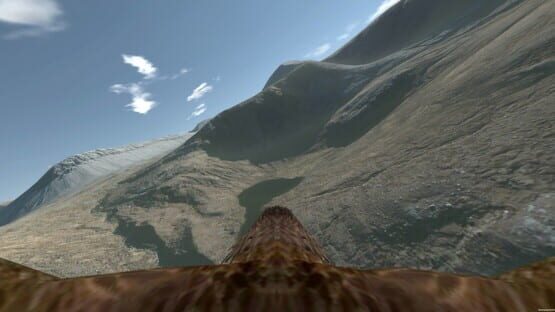

Aquila Bird Flight Simulator
HTC Vive Feedback
Initial impression on the Vive? A really good VR product, the controllers work well, the picture is clear in the headset, but the field of view doesn't match the Oculus.
Anyway... Vive and Aquila? Flying worked pretty much how I was expecting, but you need to do large circles for the flapping motion, much as you can do on Oculus. About 1 per second for it to register well. Your tracking setup needs to be accurate. It has triggered the need for me to add some kind of 'aid' to show you how you're doing.
I'll be adjusting the motion controller tutorial to be more accurate with its text when a Vive is detected. The D-Pad/Directional Pad is the Vive's Touchpad, and works very well. The tutorial refers to the D-Pad only.
When I first ran Aquila, I was facing West in the calibration screen that is shown at the start. When you run it, pick your spot and center the view so North is then ahead. This isn't a room-scale app and it needs you at your center point, preferably sat down or on a stool at least. Make sure your sensors have a good view of your hands for the flapping motion.
Whatever VR setup you have, you'll have more control if you fly faster... therefore I'll have to add a gauge to show your speed. Turn on the 'glide pitch' option in the in-game menu to show a good glide position.
Otherwise I was quite pleasently surprised, and the experience wasn't too different from the Oculus. Would I buy one? Maybe, if I didn't have Oculus. They're both good headsets.
I'll see what I can get done prior to releasing the early access version, but the patches will keep on coming for sure!
Thank you for your patience, and thank you for reading. :)
Graeme
Patch to version 0.941
- Finally... Finally... managed to fix Unity's quirk of printing text on top of everything else, so the title menu looks correct. It was some legacy Unity 'feature' that was as useful as a chocolate fire-guard...
- Changed the music around, so a different piece starts first.
If you're having fun with motion controllers and Aquila...
- Most control issues with your bird, and flying anything including gliders, rockets and commercial airliners, comes from a lack of speed. If you fly too slow, you may stall. In Aquila, one wing always begins to stall first with quite a pronounced turn towards the stalling wing. Pitch yourself forwards a little to fly faster and you will have more control.
... which prompts future issues to fix/add:
- I'll be working on something to help with speed awareness, maybe just a speed indication, and make it show in Easy mode only.
- I'm planning an 'easier' control method for motion controllers, so you can simply flap your arms up and down like we (probably) all did at school.
- I'll be trying a Vive first hand tomorrow, so I'll be able to bug fix and adjust as appropriate.
Thanks for looking. Patch is live now... small 2.2mb update.
Graeme
Aquila Demo soon Available
I will finally be able to try Aquila on a Vive setup myself on Tuesday, with a massive thank you to Virtually Mine in Essex. This will allow me to check that the experience is as it should be. As this simulator was originally made for the Oculus, owners of that VR setup should be fine.
At the moment this is a flight simulator that gives you a feeling of flying a soaring bird over the wilds of Scotland. There are tutorials for all three control methods, XBox controller, headset steering and motion controller. I recommend leaving the option to start in the air, as the satellite photography used is best tried away from the ground. There are no trees (yet) or prey to catch, so it's you, a good breeze, thermals, and a pretty corner of Scotland. That's it for now in the demo.
Over time there is plenty to add. I am working with World Creator to bring more detail to the world,and I am planning tree's and survival elements along with network play and Steam Achievements.
Give it a try, see how you get on, and drop us a line with your feedback. If you're using Motion Controllers (i.e. Oculus Touch, or HTV Vive) check out the Next Level Motion Platform v3 video in the Community Hub to see the correct flapping technique (soaring is easy, flapping is pretty hard, steering and flapping together will have you really thinking!). I am planning an 'easier' way so you can flap your arms like we (probably) all did at school, but it's not ready yet. The flying technique is not meant to be simple, so I might just forget... :o)
See if it works for you. I'd love to see any gameplay videos/screenshots, anyone embarrasing themselves flapping on camera, or just get in touch.
Thank you for looking!
Graeme
Patch to version 0.94
- Game starts with a calibration scene, giving you the chance to check your position in VR before starting.
- Wing flap sound has been changed to something a bit more realistic.
- New song added by Angelo Cicero. The tracks play randomly.
- Credits added to title screen.
So just a few things this time around. Still plenty to do!
Please note that, due to the SDK's involved, Next Level Motion platform support is not included in the Steam version. Contact me if you are interested in this feature.
Thanks for looking. :)
Graeme
Patch to version 0.935
Experimental autopilot available on the in-flight menu, with glide pitch hold, level wings, altitude hold and 'steer home' functions. Selecting some modes trips out others that don't mix, but give it a try!
If you have had control problems, try enabling the autopilot, turn off level wings, and enable Altitude Hold (optional). This combination lets you steer, without worrying about up and down.
Altitude Hold manages your pitch and wing flapping to fly you roughly level, and climb you if you're close to the ground. Without this mode, it'll hold you at a sensible gliding posture, but won't stop you hitting the ground.
The autopilot works with all control methods, but there may be bugs lurking. Altitude Hold looks down, not ahead, and it cannot out climb a steep slope... in that case turn away!
Also in this new version:
1) Recreated Scotland terrain with no gaps.
2) Multiple start points for each map.
3) Prevent leaving the map area (the autopilot will engage and turn you around)
4) Birds on the title menu move smoother.
5) ... and the in-flight menu is overhauled.
VIVE Owners: Until I have first-hand access to a Vive headset, I am uncertain what you may experience with Aquila. The tutorial uses Oculus Touch models, but the trigger and D-pad are on both handsets and the behavior is compatible. Please look at the Videos section for an example of how you need to move your arms to flap effectively. :)
If you have the Oculus Home version of Aquila...
Many thanks;
Graeme