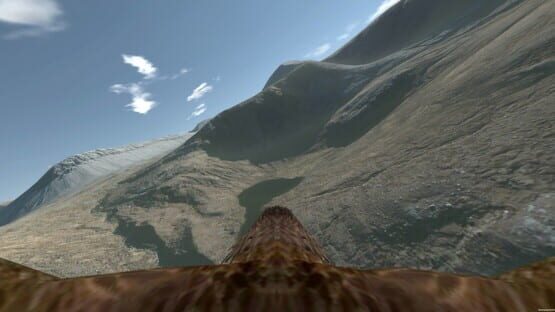

Aquila Bird Flight Simulator
Beta Version 0.954
Changes are only on the full version (not the demo for now), and are as follows:
- Fade transitions added between all scenes in your VR headset. They do not yet work on your pc screen as they are part of the OpenVR library, so with no vr headset they fail to function.
- Starting calibration screen wording refined. I cannot stress enough that this is designed as a seated experience that requires a center point to be set. Before clicking Start on the first screen, please ensure that the distance value is in green (this is the distance between your headset and the current center point of your play area), and sitting comfortably looking ahead you face towards the north billboard. If this is not the case, recenter the view or you will have a wrong perspective on the main menu and ingame. You can recenter at any time using the same buttons. All you need to do is sit comfortably, face forwards straight ahead, recenter, click start. :)
Many many other changes are on the way...
Graeme
Patch to 0.953
The changes for this version are:
- Methods for resetting the view made uniform. So on your motion controller you're pressing the touchpad on Vive or the left thumbstick on Oculus, whereas on your gamepad it's blue 'X' or backspace on the keyboard. This should work through the game, although once you've done it on the front screen it isn't necessary to repeat. The tutorial will direct you to recenter as part of its text, although an overhaul of the tutorial is on the cards...
- Text made bigger, and hopefully more in line with what can be read easily. I didn't realise a rogue line of code was moving the text down for non-vr, but it was moving it all the time.
Thank you for reading.
Graeme
Beta Version 0.953
- Methods for resetting the view made uniform. So on your motion controller you're pressing the touchpad on Vive or the left thumbstick on Oculus, whereas on your gamepad it's blue 'X' or backspace on the keyboard. This should work through the game, although once you've done it on the front screen it isn't necessary to repeat. The tutorial will direct you to recenter as part of its text, although an overhaul of the tutorial is on the cards...
- Text made bigger, and hopefully more in line with what can be read easily. I didn't realise a rogue line of code was moving the text down for non-vr, but it was moving it all the time.
You can opt-in to this beta by changing your game options for Aquila (right click on Aquila in your game library). Opting in should trigger a 16mb update from the normal version.
This version is in beta as, while tested on non-vr and on my DK2, it is not tested on motion controllers yet. Once it's tested I'll of course move it. :)
Thank you for reading.
Graeme
IndieGala Promotion!
Beta Version 0.952
If you're a non-vr player, opt in to the beta to get this version under test and give it a go. I'm currently uploading a video showing some demo gameplay in 4k 60fps, but it's taking a small age to process. Once it finishes, I'll put it here in the Steam page of course.
Very small update ... less than 1mb for either the demo or full version.
Thanks for your patience. :)
Graeme
Beta version 0.951
Using your Xbox gamepad, you can now look around by holding the top right shoulder button and moving the right-hand thumbstick. You can reset your view by pressing blue X. Pressing 'V' or the top-left shoulder button cycles through first person, back, and chase views. The cycling Observer mode is available through the in-game menu, and selecting this option will cycle through First Person, Back, Chase and Observer ... this button is mainly for VR use to select a view for your main pc screen while you play in VR, but it will work in non-VR also if you're playing without a headset.
Flying with WSAD, Right Shift, and the mouse to look around still works before, but there's a bug where Right Shift does add thrust, however the wings do not animate. It's a small fix that I should be able to make tomorrow. Control on a gamepad does not have this bug and the wings flap normally. Headset and Motion controller steering are untested in this version, so I'd stick with the non-beta 0.95 for now as these latest changes are for non-vr play.
I hope that explains things as clear as I can. I'll upload a video to run through some flying in non-vr, making use of the view options and autopilot. :)
Again... stick with the non-beta 0.95 version if you're playing in VR. Only use 0.951 (via the beta participation in Steam) if you're curious to try these new changes for non-vr play.
Thanks for reading. :)
Graeme
Patch to version 0.95
- Better support for playing without a VR headset. You can play with a keyboard or an Xbox style gamepad. The keys are your usual WSAD, right shift to flap/take off, space to show the in game menu, cursor keys and enter to select options, and V changes view modes. The gamepad controls are the same and described in the tutorial. Additionally, the mouse can be used to control where you look. Holding the right button lets you move the camera in all view modes, middle button resets the view, while the left button flaps.
- I had been restricting the range that the game had been assuming to be a valid zone for motion controllers, and this was restricting some controllability in some ranges, mainly when playing with comfort mode off. This restriction is now lifted, so see how it functions now a few pressing SteamVR bugs have been fixed.
Fixes:
- Bald and Harpy eagles fixed to show a more believable neck length when in a view other than first person. The bald eagle in particular had looked rather too long, but this is fixed.
- Start options adjusted and fixed to launch the normal VR app, provide override options for Vive and Oculus, and finally a non-vr option. If you have SteamVR installed, it will start even when beginning the game in non-vr mode, but won't actually be used. If you're running without VR or SteamVR installed, you won't see anything impacting here.
The patch is live now, with a download size of 3.6mb. :)
Thank you for reading. I hope these changes allow users without VR to experience Aquila now. Please contact me with any feedback you wish to share.
Graeme
Corrections for Patch 0.946
These changes are live now, with a small 1.3mb update.
Thank you for your patience. :)
Graeme
Patch to version 0.946
In due course I'll refine the code to detect the Vive, so these launch options become redundant. :)
Thanks for looking.
Graeme
Patch to version 0.945
I encourage you to check out the demo and see how it works on your VR setup. Headset and gamepad steering are straightforwards, but the motion controller steering will keep you on your toes to start! Check out the tutorials.
So the changes are :
- Vive VR headset detection has been added, but is untested. This makes a difference to the motion controller tutorial, which now has Vive handsets modelled, and some adjusted wording appropriate to how a Vive works. Oculus users should see the same tutorial as before, with the Touch handsets shown.
- On Easy mode, and in the tutorial, you have a basic airspeed and height over the ground indication. It also displays a caution message if your airspeed is low enough to make control difficult. This panel is displayed while flying in Easy mode only. It does not appear in Medium or Hard.
- Wording adjusted on the start calibration screen, to make it clearer what you need to do. Basically pick your spot, and center the camera as this is meant to be a seated experience. :)
The demo and full versions have been updated. Thank you for your patience while me, and my family, have been going through what has been a terrible year. Juggling the coding here and getting on with life has been a struggle. While not finished... the wishlist is still long ... I hope you can get some fun having a fly around, and support bird of prey conservation in the process.
Once again I welcome any feedback, and thank you for checking out Aquila.
Graeme