`^Qhhf` and `^Qhuf` terrain codes available to allow forest terrain on bluff/gulch hexes
Translations
Updated translations: British English, Czech, French, Polish, Portuguese (Brazil)
Units
Merkfolk units movement cost on forest and hills reduced from 5 to 4.
Orcish Slayer can advance to the Orcish Nightblade by default.
Orcish Slayer's xp required to level up reduced from 100 to 64.
Dunefolk Falconer portrait added.
Miscellaneous and Bug Fixes
Fixed not being able to undo moves (bug #6898)
Wesnoth 1.17.9
Terrain
Change codes "Irs, Ias, Icr, Ior, and Icn" to "Isr, Isa, Isc, Iwo, and Iwc", respectively
Translations
Updated translations: British English, Czech, French, Italian, Portuguese (Brazil)
User interface
Bot hosted games are now show on a separate tab from player hosted games.
Miscellaneous and Bug Fixes
Add disconnect check to alert users when they lose connection to the multiplayer server (issue #1336)
World Conquest: Wesnoth with friends
One of the joys of Wesnoth is amassing an army of high-level recruits over a long campaign. When playing with friends, though, most multiplayer games are short, one-off encounters. When the scenario ends, you can say goodbye to that Red Mage you painstakingly leveled up.
Wouldn't it be great if you could play a whole campaign with friends? Well you can with World Conquest, a randomly-generated Co-op campaign for 1-3 players. Since including it in our 1.16 release, it's become the second-most popular game on our multiplayer server.
What to expect
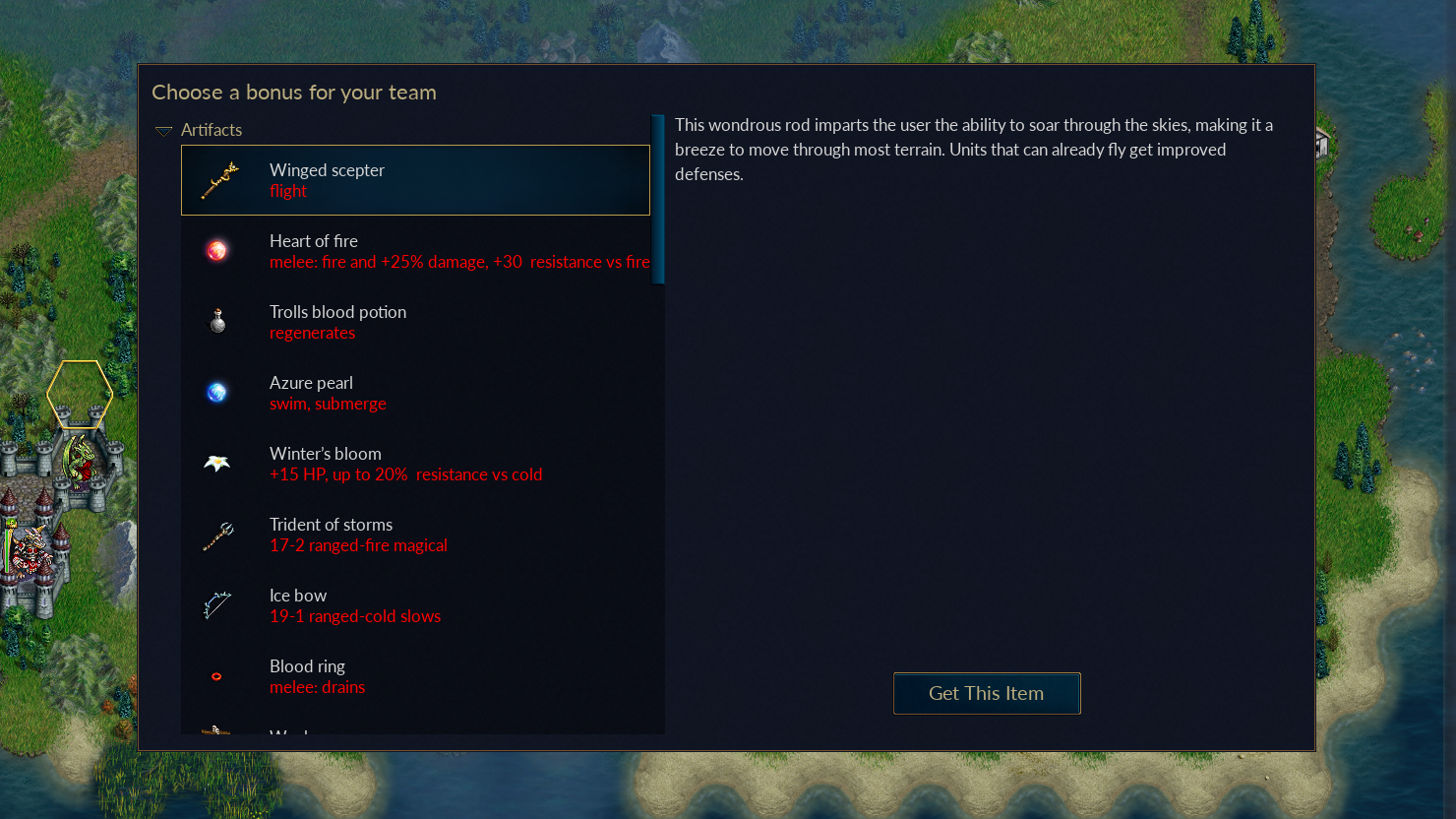
A game of World Conquest works like most other Wesnoth campaigns. You'll need to seize villages and kill enemy leaders to win. But there's a twist. When you recruit your first unit, you can choose bonuses for your side by giving them artifacts, training and heroes.
Every time you win and start a new scenario, you'll get to choose another set of bonuses. Choose carefully! The right bonus combos can really increase the power of your units.
A different campaign every time
Every scenario in World Conquest is randomly generated -- random maps, random enemies, random heroes, random bonuses. It's a great way to try out a new strategy or faction, like the Dunefolk we introduced in the last release.
How to play
To start a new Co-op game of World Conquest, follow these steps.
1. From the Main Menu click Multiplayer. 2. Select Join Official Server and click ok. 3. Once you're in the lobby, click Create Game. 4. Find the dropdown that says Scenarios and change it to Multiplayer Campaigns. 5. Select World Conquest 2p (two players) or World Conquest 3p (three players) and click Create Game. 6. Select your difficulty and click Play. (Start on Easy if you're not sure -- World Conquest is really hard.) 7. Tell your friend your game room's name so they can join you, or wait for another player. 8. Click I'm Ready to start the game.
Remember, this is a campaign and you'll need more than one sitting to finish it! When you're ready for a break, be sure to save the game before quitting. Go to Menu > Save Game and give it a name you can remember.
To resume a saved campaign, follow these steps.
1. From the Main Menu click Multiplayer. 2. Select Join Official Server and click ok. 3. Once you're in the lobby, click Create Game. 4. Click Load Game on the left. 5. Find your saved game and click Load. 6. Tell your friend your game room's name so they can join you, or wait for another player. 7. Click I'm Ready to start the game.
Want to play by yourself?
You can play World Conquest by yourself. Follow the steps above, but join the Local Game in step 2 and select World Conquest 1p in your game room.
Wesnoth 1.17.8
Editor
add "elevation" terrain group
Multiplayer
The /report command now opens a dialog rather than simply allowing free-form text after the command.
Terrain
Expansion of cosmetic "lower terrain" to "higher terrain" and more transition graphics.
Translations
Updated translations: British English, Chinese (Simplified), Czech, French, Italian, Portuguese (Brazil), Russian, Turkish
Miscellaneous and Bug Fixes
Fixed highlighted movement range when hovering over units after their owner ends turn. It now shows their max movement next turn, instead of the remaining moves from their previous turn. (issue #6716)
Stopped wmllint adding `wesnoth-icon.png` to `[message]`s that don’t already have an image. (PR #6991)
Wesnoth 1.16.6
Translations
Updated translations: Arabic, British English, Bulgarian, Chinese (Simplified), Chinese (Traditional), Czech, French, Italian, Japanese, Portuguese (Brazil), Russian, Swedish, Turkish
Miscellaneous and Bug Fixes
Fixed drake flare leadership animation over water (issue #3996)
Fixed animations not clearing properly when zoomed (issue #6589)
Fixed the `{IS_HERO}` macro to avoid losing the hero ellipse when a unit levels up
Fixed highlighted movement range when hovering over units after their owner ends turn. It now shows their max movement next turn, instead of the remaining moves from their previous turn. (issue #6716)
Fixed out of sync errors occurring when unused add-ons contain the [resistance_defaults] or [terrain_defaults] tags (issue #6650)
There are more than 450 add-ons available for 1.16 and this summer saw a lot of activity on the add-on server. Here are some of the highlights from what our user community has created.
Era of Magic
An update to one of the most popular unofficial eras was released in late May. Era of Magic 3.8.3 brought us five more units and some exciting new treats, like the Mirrorshield's deflect magic ability. Now's a good time to revisit the Al-Kamija, the Kharos, and all the factions from Era of Magic.
Ashen Hearts
This challenging campaign, which tells the history of the drakes and the secret to their inner fire, is now available for 1.16. Lead Herkarth and his people to the source of a mysterious power effecting the drakes deep in the ancient Heartfang mountains. With custom units, tricky puzzles, and easter eggs, this campaign brings much love to an under-played faction.
The Great Steppe Era
The team behind this growing era delivered a major update (1.4), with innovative new tactics like castle-breaking, unit-pulls and long-range attacks. They have also put together a short campaign, Ogre Crusaders, if you want to cut your teeth on something longer than a single scenario.
The Unstoppable Legion
A true classic, this add-on may be the most well-written horse-back campaign ever and it's now available for 1.16. Command a cavalry force and use your mobility to outflank and defeat an unstoppable legion of cultists, soldiers, and creatures of the night.
Eastern Europe at War
This unique era features more than 200 historical units in more than a dozen factions inspired by 18th century warfare in Europe. A new major version was just released and the maintainers are looking for more contributors.
Struggle for Freedom
Another classic, this elven campaign is back after several years being unmaintained. It has been rebuilt to use units from the War of Legends era, and features dungeon-crawling scenarios and small-squad gameplay.
How to play an add-on
Follow these steps to install an add-on and play it.
1. From the main menu, click Add-ons. 2. Click Connect to join addons.wesnoth.org, the official add-on server. 3. Browse or search the list of add-ons. 4. Click on the add-on to read more about it. 5. Click to install the add-on. 6. Click Exit to return to the main menu.
Once your add-on is installed, you can play it like any other game of Wesnoth. Campaign add-ons can be found in the campaigns menu. Multiplayer eras and scenarios are available when you start a multiplayer game.
Got a fun idea?
Every add-on starts with a good idea. Here's how to get started making your own maps, units, scenarios and campaigns.
Wesnoth 1.17.7
Terrain
Generalized "lower terrain" similar to the mid-level in lava/chasm. Cosmetic and unwalkable versions. (PR #6927)
Translations
Updated translations: Arabic, British English, Bulgarian, Chinese (Traditional), Czech, Finnish, French, Italian, Portuguese (Brazil)
WML Engine
Add the pre_attack event.
Miscellaneous and Bug Fixes
Implemented logging to file for Linux and macOS, and enabled it be default for Steam Linux.
Fixed drake flare leadership animation over water (issue #3996)
Fixed animations not clearing properly when zoomed (issues #6589, #6891, #6892)
Fixed inconsistent cropping of unusually-sized item images (issue #6118)
Fixed the `{IS_HERO}` macro to avoid losing the hero ellipse when a unit levels up
Stored credentials are now encrypted with AES rather than RC4. This will result in credentials needing to be re-entered the first time when logging in with this version.
1.17.6
Campaigns
The South Guard
S4: Fixed replay OOS on victory event (issue #6832)
Under the Burning Suns
S8: Fixed replay OOS on victory event (issue #6267)
World Conquest
Fixed Bezoar artifact being bugged and broken.
Lua API
New `wesnoth.interface.screen_fade` function applies an overlay colour to the game display, fading over the given duration (PR #6864).
New functions have been added to register game events from Lua: `wesnoth.game_events.add`, `wesnoth.game_events.add_menu`, `wesnoth.game_events.add_repeating`, `wesnoth.game_events.add_wml`.
Both the action and the filter can now be a native Lua function, if needed.
All features of the `[event]` tag are available.
The primary API is `wesnoth.game_event.add` - the others are shortcuts for common use-cases.
`wesnoth.game_events.fire` (renamed from `wesnoth.fire_event`) now supports passing unusual event-specific data such as damage in an attack event or previous owner in a village capture event.
`wesnoth.fire_event_by_id` is renamed to `wesnoth.game_events.fire_by_id`.
`wesnoth.current.event_context` now has an additional `data` attribute that contains the full event data, including the former owner in a village capture event (which was previously never exposed anywhere).
`wesnoth.remove_event_handler` renamed to `wesnoth.game_events.remove` for consistency with other event functions.
Packaging
Increased minimum required version of SDL to 2.0.10 for non-macOS platforms.
Increased minimum required version of SDL to 2.0.22 and the minimum required OS version to 10.12 for macOS due to needing the fix https://github.com/libsdl-org/SDL/commit/3bebdaccb7bff8c40438856081d404a7ce3def30.
Rendering Engine
Large changes have been made to Wesnoth's rendering engine, enabling hardware acceleration for the majority of components and resolving many long-standing issues. Performance should be greatly increased, and CPU and GPU usage greatly decreased in almost all situations. Issues confirmed resolved: #1291, #1350, #1605, #1755, #2059, #2458, #2618, #2865, #3238, #3255, #3421, #3592, #3798, #3937, #4210, #4460, #4877, #5115, #5420, #5494.
Translations
Updated translations: Arabic, British English, Czech, Finnish, French, Italian, Japanese, Swedish
Units
Fixed Warden’s and Arbiter’s animations popping on water tiles (issue #6508)
Updated some Loyalist sprites: Sergeant, Lieutenant, Swordsman, Pikeman, Royal Guard, Halberdier
Animations for Nightgaunt
WML Engine
A new interface action `[screen_fade]` provides a smooth screen fade effect which also covers units (issue #6745).
Events now support filter conditions using the Wesnoth Formula Language with a new `filter_formula` key.
It is now possible for variable interpolation in an event name to expand to multiple event names - the name is split on commas both before and after variable interpolation.
The `[fire_event]` tag now supports a `[data]` subtag that can be used to pass any arbitrary information to the event. In particular, it supports passing damage to an attack event and former owner to a village capture event.
Miscellaneous and Bug Fixes
Fixed being unable to interact with units when Scroll Lock is active (issue #6759)
Fixed the addon manager UI blanking incorrectly (issue #6787)
Implemented a workaround for bad SDL rectangle drawing in some versions (issue #6799)
Patch 1.16.5
Campaigns
Eastern Invasion
S07a:
Better handling for side 2 (issue #4145)
Fixed Grug upkeep, added dialogue about ogres joining (issue #4145)
Northern Rebirth
S1: Fixed Al'Tar confusing an orc for a slave (issue #6735)
Under the Burning Suns
S5: Enforce encounter with the Cloaked Figure (issue #6364)
Translations
Updated translations: Arabic, British English, Chinese (Traditional), Czech, Polish, Finnish, French
Units
Fixed Warden’s and Arbiter’s animations popping on water tiles (issue #6508)
User interface
Resolved broken layout in some low-resolution configurations (issue #5620, #6544)
Miscellaneous and Bug Fixes
Fixed frequent crashes occurring in multiplayer matches (issue #6863).
Fixed path finding visibility bug that sometimes caused OOS errors on maps with tunnels and at least three sides that do not share vision (PR #6744)
Fixed being unable to interact with units when Scroll Lock is active (issue #6759)
Removing the Protect Unit Micro AI no longer causes a Lua error
Fixed chance of being unscathed in damage calculation for some fights in which both units can die (issue #6590)
Fixed visibility bug in ai_helper.get_attackable_enemies() for some complex filters
Fixed bug in Bottleneck Micro AI involving units without moves on terrain with multiple open passages (issue #6599)
Fixed error in Castle Switch CA of the Experimental AI after a leader was killed (issue #6440)
Fixed error in retreat-injured CA when regenerate ability code does not include a value= key
Retreat-injured CA no longer takes villages from allies
Experimental AI no longer uses generic_recruit_engine: fixes a data leakage bug between Experimental AIs of different sides
Experimental AI recruit rushers: include unit types from extra_recruit (issue #4924)
Fix segfault when weapon is removed during attack (issues #4927 and #5914)
Add no-unit error message for unit debug command (issue #6116)
Significantly improve efficiency of move-to-any-enemy CA
Development Patch 1.17.5
Campaigns
Eastern Invasion
S1: Fixed campfire not having a sound (issue #5766)
S07a:
Better handling for side 2 (issue #4145)
Fixed Grug upkeep, added dialogue about ogres joining (issue #4145)
Northern Rebirth
S1: Fixed Al'Tar confusing an orc for a slave (issue #6735)
Translations
Updated translations: Arabic, Chinese (Traditional), Czech, Finnish, French, Japanese, Polish
User interface
High-DPI font and image rendering is now enabled across the entire UI.
Miscellaneous and Bug Fixes
wmllint automatically removes the obsolete lines `{SOUND:SLOW}` and `{SOUND:POISON}`
Fixed path finding visibility bug that sometimes caused OOS errors on maps with tunnels and at least three sides that do not share vision (PR #6744)
Fixed transparency of submerged units when zoomed (issue #3746)
Fixed mouse input mapping problems on MacOS (issue #6715)
Removing the Protect Unit Micro AI no longer causes a Lua error
Fixed chance of being unscathed in damage calculation for some fights in which both units can die (issue #6590)
Fixed visibility bug in ai_helper.get_attackable_enemies() for some complex filters
Fixed bug in Bottleneck Micro AI involving units without moves on terrain with multiple open passages (issue #6599)
Fixed error in Castle Switch CA of the Experimental AI after a leader was killed (issue #6440)



 to install the add-on.