
Play your cards right with Battlefield™ 2042 – Season 2: Master of Arms. Head to a drained Panamanian lake and the new map Stranded where you’ll fight around and inside a beached container ship housing an illicit arms trading hub. Deploy as charismatic Specialist Charlie Crawford and support your squad with his Mounted Vulcan stationary minigun and teamwork skills. The new tank-like vehicle EBLC-RAM lets you traverse the battlefield quickly and uniquely.

Battlefield 2042
Battlefield™ 2042 – Season 2: Master of Arms
Play your cards right with Battlefield™ 2042 – Season 2: Master of Arms. Head to a drained Panamanian lake and the new map Stranded where you’ll fight around and inside a beached container ship housing an illicit arms trading hub. Deploy as charismatic Specialist Charlie Crawford and support your squad with his Mounted Vulcan stationary minigun and teamwork skills. The new tank-like vehicle EBLC-RAM lets you traverse the battlefield quickly and uniquely.
Battlefield Briefing - Development Update, August 2022
Hoping that you all had a great summer. We’re back at it following our own summer break, and wanted to give you some insight on where our focus is as we close out Season 1: Zero Hour, and look ahead to the start of Season 2 and beyond. If you’re looking to get straight to it, have a watch of the video below to check in with Alexia Christofi and the Battlefield Development team, you can also check out our recap of the Development Update over on our official website here.
As discussed by Alexia within the Development Update video, today marks the point where we lift the lid on our designs and plans for improving the experience that you have with Specialists in Battlefield™ 2042.
To read the full details on the changes we're exploring bringing to Specialists, check out the full post over on the Battlefield website;
If you'd like to provide your own feedback to what we've shared with you today, you can do so on our dedicated thread on the Answers HQ forums.

In addition to everything we’ve shared today, we will continue our commitment to ongoing Quality of Life and Performance improvements in all our updates.
On behalf of all the teams continuing to work on Battlefield 2042, thank you for sticking with us.
See you on the Battlefield.
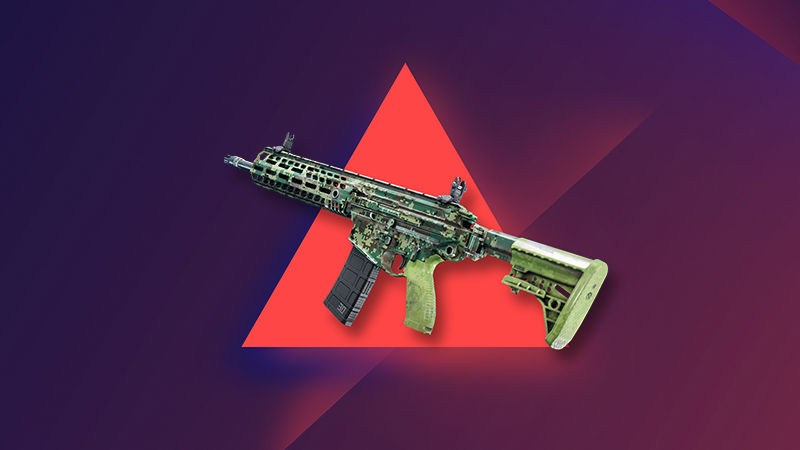
Battlefield™ 2042 EA Play* Woodland Digital Weapon Skin
follow us on Twitter @eaplay!
*CONDITIONS, LIMITATIONS AND EXCLUSIONS APPLY. SEE https://tos.ea.com/legalapp/eaplay/US/en/PC/ FOR DETAILS.
Battlefield Briefing - Update #1.2.0 Dev Corner
Update 1.2 for Battlefield 2042 is available to download and play right now.
In this months Battlefield Briefing, hear direct from Lead Game Designer Florian Le Bihan and Lead Level Designer Shashank Uchil on the changes in our Community Stream originally broadcast over on the Battlefield Twitch channel.
For more on Update 1.2, be sure to check out our Update Notes over on the Battlefield website or via Steam!
See you on the Battlefield
Battlefield Community Team
Battlefield 2042 - Update #1.2.0
Being just over halfway into Season 1, we hope you continue to enjoy the new content and are having a great summer. This week, Update 1.2 launches and we are excited about getting these new changes and improvements into your hands. It will be available to download and play on Tuesday, August 2.
What’s new?
This update includes not only new bug fixes, balance changes and Quality of Life improvements, but also the first of our planned launch map reworks, alongside the initial Style and Tone changes for some of our Specialists:
- Kaleidoscope has been reworked to offer an improved gameplay flow through new cover assets, flag positions, terrain elevations and visual updates to several locations on the map
- We are introducing the first Style and Tone change for our Specialists, which includes several updated character models
- The power of the RAH-68 Huron and YG-99 Hannibal 30mm Cannon has been reduced by making it overheat at a much faster rate. This will help to limit their impact on infantry and bring it more inline with our balance
- A Player Profile and Statistics page is now available in-game. It provides an overview of your performance and progression since launch
- Aim Assist on Controllers has been adjusted to ensure it feels smoother and more consistent while tracking moving targets
- The BSV-M Full Auto mode now receives an accuracy penalty, and High Power rounds now lose damage faster over distance
The full list of changes for Update 1.2 is available in the Changelog below.
When is the next update?
This is the last scheduled game update before we venture into Season 2. That means we’ll check in with you later in August on Update 2.0
Stay Updated
To stay informed on the roll out of Update 1.2, you can follow us on the @BattlefieldComm Twitter account. You can also follow along with our tracking of Known Issues and game changes that we’re able to make in real time on our Battlefield forums.
Content & Improvements
Kaleidoscope - Map Improvement
Earlier this year we had an open discussion with you on map design via our Core Feedback - Maps initiative. Through your feedback, we identified several focus areas for our launch maps where our quality standards could be improved through Cover, Intensity, Line of Sight, Pathing and Traversal changes. As a result, we have been reworking our launch maps to ensure their gameplay is updated to these revised standards of quality.
Reworking maps takes time, and Kaleidoscope is the first map for which we have completed this rework. You can play the improved version in this game update.
What’s changed?
We have revised the playspace to add more cover, creating new flag positions, and improved the flow across the whole map.
Cover has been added not only with the placement of new assets, but also in the raising of terrain to help break sightlines and let infantry move more purposefully around the map. Most importantly, these new assets bring more tactical destruction which help to ensure that the map evolves throughout the duration of each round, and provide both Attackers and Defenders with new options when playing in key areas.
We have also introduced new areas onto the map, by adding a Forward Operating Base into the park, with a second command post added close to the Tower. The Data Center has similarly received multiple passes from the teams to help ensure that there are more cover points, and new war torn looks to certain areas that help make the map more faithful to 2042’s setting.
We hope you will enjoy the new gameplay on this map, and we are looking forward to your feedback on how this updated version plays once you have tried it out.

As a reminder, Renewal is the next map we are reworking. That work is still ongoing, and the revised version will be available for play during Season 2.
Specialists - Style and Tone Updates
In this update, we are revising our art direction to ensure Specialists meet your Style and Tone expectations for our world of 2042. You will notice updated Specialist character models to better reflect the intense situations they have experienced.
Here are several examples of those updated models. We would love to hear your thoughts on the new Specialist looks once you have seen them in-game.


Player Profile
Another area of feedback we have heard from you is being able to view your in-game performance and stats. This feature will be in your hands in Update 1.2 through the introduction of the Player Profile.
Your Profile shows your current in-game progress and your performance stats since launch. View information such as your current Rank, XP required towards the next Rank and the associated unlocks, your top Masteries and the unlocks you are next closest to completing.

While on the Statistics screen, you can check out information such as your K/D Ratio, kills, deaths, assists, revives, accuracy, shots fired and much more.

We are excited for you to discover how you have been performing once the Player Profile is in your hands. And of course, we are looking forward to seeing those impressive K/D ratio screenshots coming our way.
Changelog
General
- Fixed an issue with Aim Assist that prevented Auto Tracking from working as intended for moving targets
- A scroll menu has been added while viewing weapon attachments
- Previewing skins while in a game will no longer show character feet clipping into the ground
- Text in the Collection screen identifying Ranger's category is now easier to read
- The Hide UI button in the Battle Pass screen no longer hides Player Card backgrounds or Tags
Battlefield Portal
- Rush - corresponding era-specific MCOM's have been added for all maps. The Bad Company 2 version also received visual improvements from its original look and feel
- Fixed an issue where AI Soldiers driving tanks wouldn't move in the El Alamein: Axis Airfield map layout
Modifiers
- Dozer will no longer regenerate explosive damage even when Soldier Health Regeneration is On
- The call-in Vehicle Cooldown modifier now affects the window of time when a vehicle is destroyed and when it's available for use again
- The call-in tablet now correctly displays when vehicles are unavailable due to limits being reached
- AI Soldiers are now able to fly planes
- Vehicle Superiority will now respect the ticket multiplier modifier
- Vehicle Superiority ticket progress bar will now update based on max tickets remaining
- A new separate Modifier has been added for enabling AI passenger seats
Rules Editor
- Quad Bike vehicles placed in the map now respond to ModBuilder Blocks
- Resolved a Rules Editor teleporting issue on Exposure
- The “Equals” Rules Editor block now supports Capture Point type
- Disabled Capture Points will no longer impact the game, such as still having ticket bleed
- Teleport now works in vehicle superiority game modes
- Several new Rules Editor blocks have been added
- ○ GetPreviousOwnerTeamId
- ○ GetOwnerProgressTeamId
- ○ GetCurrentOwnerTeamId
- ○ GetCaptureProgress
- ○ OnCaptured:CapturePoint
- ○ OnCapturing:CapturePoint
- ○ OnLost:CapturePoint
Gadgets
- Picking up Ammo Pouches should now always register when collecting them in quick succession
- An incorrect status is no longer displayed while using insta-lock projectiles such as Sundance's Anti-Armor grenade
- Fixed an issue where the player could use both IBA Armor Plates consecutively after placing Boris's SG-36 Sentry Gun or Irish's DCS Deployable Cover
Anti-Tank Mine
- The handle of the Anti-Tank Mine no longer floats while held when changing to it from the NTW-50
C5
- C5 no longer gets attached to the MV38-Condor when thrown from the passenger seat
Insertion Beacon
- The Insertion Beacon health bar and icon should now not be offset when it's placed on uneven terrain
Repair Tool
- The Repair Tool now starts cooling down immediately when stopping a repair
- There is no longer an incorrect delay before the overheat progress starts
Smoke Grenade Launcher
- The Smoke Grenade Launcher now shows the correct category tag in the Battle Pass
Hazard Zone
- There is now a chance for a powerful AI Tank to appear which guards a significant number of Data Drives. It's marked on the map, so it's up to you if you want to try and get the sweet loot...
- In-world icons have been adjusted to make it easier to read how many Data Drives are at each location
- You are now able to pick up Gadgets dropped by Players and AI Soldiers
- An issue has been resolved that prevented Ranger and vehicle call-in items from being used after picking up the required Uplink
Soldier
- Auto deploying a parachute should no longer deploy too late or cause fall damage
- The camera will no longer clip in transition from 1P to 3P view while performing a takedown
- Soldiers sometimes did not drop their weapons when dying in a vehicle. This has been resolved
- Made changes to areas where explosion damage would still reach out of range soldiers
- Fixed an issue where melee attacks could cause physical issues on transition areas such as slopes
- Fixed as bug where reviving and trying to melee didn't cancel the revive
- Soldiers no longer clip into each other during takedown animations
- Fixed an issue where downed animations were not played correctly if the player died before others players spawned in
- Fixed an issue reviving an ally inside the elevator on Renewal wasn't possible
- Added high quality animations for occluded soldier kill cams
- Spawning on a player that is prone will ensure you are now also in prone stance
- Prone behavior on steep slopes has been improved which should prevent instances of inaccurate dispersion while firing
- You are now able to go prone while walking backwards
- Player models would sometimes stick through walls while prone, which allowed them to be damaged. This should no longer happen
- Stairs or slopes should no longer sometimes show vaulting animations
- You should no longer sometimes see a stuttering animation when starting a slide
- Visuals for soldiers and vehicles popping into player view after being hidden has been made smoother
- Fixed an issue where the forward button had to be held for a short duration to enter ladders
- Jumping should no longer get interrupted directly after vaulting
- An issue has been resolved that prevented sliding immediately after climbing a ladder
- Jumping during a slide should now always trigger correctly
Specialists
Paik
- We felt that Paik’s EMG-X Scanner was not consistently worth using as an offensive tool as it caused her to become spotted, and thus vulnerable. We therefore removed this self-spotting effect, and slightly increased the spot duration of scanned enemies to make the Scanner more reliable for use.
- Increased the spot duration while using the EMG-X Scanner from 0.5 -> 0.85s
- Paik is no longer spotted when using the EMG-X Scanner
Rao
- Rao's Hack effect should no longer last when in the passenger seat of a vehicle
- Rao's hacking animation should no longer sometimes get stuck
- Rao's hacking now properly goes through some penetrable or see through objects, while before it didn't always do that
Sundance
- Resolved discrepancies with Sundance Grenade Icons
- Sundance's Wingsuit audio should no longer continue playing when entering a vehicle
- You should now be able to perform takedown while inside bushes
Angel
- Angel’s Loadout Crate should no longer block ladders
Casper
- The OV-P Recon Drone is now always destroyed when hit by air vehicles
Dozer
- Bashing with Dozer’s SOB-8 Ballistic Shield should now always follow the enemy soldier
- The camera should no longer clip through structures when attacking with Dozer's SOB-8 Ballistic Shield
Irish
- Ammo Crates and Medical Crates can no longer go through Irish's DCS Deployable Cover
Lis
- Fixed an issue where hitting the back of a T90 MBT with Lis' G-84 TGM would deal 1% damage
- Fixed issues with aircraft HUD disappearing when shooting and reloading the G-84 TGM from a passenger seat
- G-84 TGM camera missile visuals now properly interact with the sandstorm on Hourglass
- Lis's animations should no longer sometimes clip during End of Round
- Reduced the brightness for Lis's Armor Hunter trait
UI/HUD
- Added support for Aim Based Icons Opacity. This new feature allows the opacity of icons to be adjusted based on how close or how far they are from the center of the screen. Icons at the center of the screen will be more transparent, whereas icons at the edge of the screen will be more opaque.
This feature aims to prevent icons from blocking the visibility of enemy targets that you are aiming at. It is active at all times with greater effect when zoomed (very low opacity when the icon is in the center). Enemy player icons' opacity are not affected by this feature. - Added options to customize the area of the screen where the opacity is affected as well as the transparency in the periphery of the area or at the center of the screen when zoomed and not zoomed. The option can be found under DIsplay > HUD Icons."
- Added a new HUD option called "Horizontal HUD Padding" which allows adjusting how far off the left and right side the HUD is positioned. When set to 0, elements such as the minimap and the inventory will be positioned at the edges of the screen. When set to 100, those elements will be close to the center. This option can be found under Display > HUD General
- Improved readability of nearby grenade threats through an updated grenade warning indicator icon. Animation, size and opacity scaling over distances adjustments have been made to ensure it's easier to see the warning when the grenade isn't in the player's view
- In-world health bars, icons and names should now always be visible on unoccupied and friendly vehicles
- Fixed issues with distance not being visible on location, danger and objective pings when these icons are sticking to edge of screen
Vehicles
- Adjusted helicopter rotor transparency in 1P view to reduce potential photosensitivity risks.
- Ammo counters and the actual replenish time are now fully synced properly on vehicle weapon pods.
- Fixed an issue that was causing the MV38-Condor to not take off while in flight mode
- Fixed an issue where the reload timer on missiles would stay on screen after switching weapons.
- The spark element for miniguns has been adapted to light level so it doesn't block player view while in low-light environments
- A Minigun/20mm shell eject effect has been added for the MD540 Nightbird
- Added 25mm shell eject effects for aircraft Anti-Aircraft weapon
- Collision damage has been updated for light vs heavy air vehicles. This does not mean the vehicles are immediately destroyed while colliding, but they will take more damage than before
50mm Air Cannon Pod (Condor / Hind)
We felt the offensive capabilities from the MV-38 Condor and Mi-240 Super Hind against infantry were still too strong. We are adjusting their 50mm Cannon to help further limit their impact on infantry, and to put more focus on these helicopters being intended as a means of transport.
- Ammo count reduced from 12 to 8
- Blast radius reduced from 5 -> 3.5m
- Replenish time increased from 3.5 -> 6s
EBAA Wildcat
We are adjusting the EBAA WILDCAT’s anti-air capabilities to ensure these weapons are more effective in their intended use of dealing with air vehicles.
- Anti-Aircraft Missiles - Damage increased from 130 -> 210. This means it's now a 2-hit kill against the Nightbird and Jets, and will leave Attack Helicopters at critical HP.
- Anti-Aircraft Missiles lock on range increased from 400 -> 600m
- Dual 30mm AA Cannons minimum damage has been removed. It now always does the same damage at all ranges
- Dual 30mm AA Cannons now do slightly more damage against Jets and all Helicopters
RAH-68 Huron / YG-99 Hannibal
We felt the Stealth Helicopter 30mm Cannon Pods were too powerful against infantry because they could be fired for extended periods of time and leaving little opportunity for infantry to retaliate. We have therefore increased the overheat speed for these Cannons to limit their impact on infantry.
- Increased overheat of the 30mm Cannon Pods on the RAH-68 Huron and YG-99 Hannibal
- The wrong keybind is no longer being displayed for the Equipment Slot in the Gunner seat for RAH-68 Huron and YG-99 Hannibal
- Adjusted entry icon position on the YG-99 Hannibal/ RAH-68 Huron
Weapons
- Fixed an issue where Shotguns were dealing damage up to 300m. They no longer deal damage above 200m.
- For those fired upon from distances with a shotgun, it means less instances of falsely giving you feedback that you might be in danger. For shotgun wielders, it should no longer mistakenly give you the indication that you could effectively eliminate your target from such distances
- The Incendiary Grenade launcher no longer one shots enemies
- Reduced the peripheral blur around weapon scopes when zoomed in to aid with general visibility
- M5A3 barrel is no longer visible through some scopes
- BKS Scope no longer clips with camera in NTW-50
- Ghostmaker R10 barrel is no longer visible through certain scopes
- A number of scopes have been updated to ensure a larger playable area is visible when Aiming Down Sights
- Tweaked shell eject effects so that the shell casings aren't visible when ADSing with the PSO-1 scope
- Fixed an issue that was breaking scope visuals on the BKS 8X and SDB 10X when certain underbarrels were equipped
- The Target 8T 1.25-4.5X scope is no longer missing its "Toggle Optic" label
- Buckshot Shell's default magazine now has the correct magazine size icon
- The MP28 default red-dot sight is now using the correct icon
- Fixed an issue that was causing incorrect visuals to be displayed through scopes with some skins
BSV-M
- Full Auto mode on the BSV-M no longer provides Recoil Compensation and instead gives a 15% Dispersion Penalty
- Adjusted the BSV-M High Power Magazine damage dropoff to begin at 50m instead of 100m
- Fixed an issue where the BSV-M would not get reduced recoil while using the bipod
- Fixed an issue where the BSV-M magazine size in the HUD did not match the one equipped on the weapon
K30
- Reduced K30 ammo type damage for Subsonic, Standard Issue and High-Power rounds
- Subsonic, 0-10m - 22 dmg > 18 dmg
- Subsonic, 30-40m - 18 dmg > 15 dmg
- Standard Issue, 0-10m - 22 dmg > 18 dmg
- High-Power, 0-10m - 22 dmg > 18 dmg
M5A1
- Reduced the M5A3 Close Combat rounds damage
- 0-20m - 22 -> 18 damage
MP9
- Reduced the MP9 Close Combat rounds damage
- 0-5m - 28 -> 22 damage
- 30-40m - 22 -> 18 damage
Underbarrels
- Reduced the size of the Masterkey's attachment crosshairs
- Players would take damage from the initial impact of the 40mm Incendiary launcher, but not the fire itself. Players will now burn as expected
- Firing an underbarrel now also spots you on the minimap
- Fixed a broken animation that would sometimes play when triggering an underbarrel attachment while being in the Plus Menu
- An underbarrel icon will now be displayed while ADSing in Launcher/Masterkey mode
- Added missing Default underbarrel to the Hazard Zone M5A3
- Fire Mode UI icon is now present while using underbarrel attachments
- Fire Mode Key bind is no longer present while using underbarrel attachments
This announcement may change as we listen to community feedback and continue developing and evolving our Live Service & Content. We will always strive to keep our community as informed as possible.
Battlefield 2042 - Update #1.1.0
We hope you are enjoying exploring every nook and cranny of Exposure, and trying out Lis’s G-84 TGM to take out your opponents from every conceivable angle. Thank you for playing Season 1, and sharing your thoughts on gameplay with us. It means a lot to the team, and we had a ton of fun watching and playing alongside you.
That brings us to Update #1.1.0 which is the first Update for Season 1. It will become available for play on Wednesday, July 6.
What’s new?
In this Update you’ll find new fixes, Quality of Life improvements and balance changes. Here are some highlights of what to expect:
- New XP events for Pilot Kills, Disarming Mines and Repairs
- Multiple vehicle balance changes such as a reduction in power for the MV38-Condor’s and Mi-240 Super Hind's 50mm Cannon
- DMR rebalancing to increase their long-range combat value
- Battlefield Portal receives new playspaces, vehicles, and Modifier and Rules Editor options to further empower the creation of your own modes
You’ll find the full list of changes for #Update 1.1.0 in the Changelog below.
When is the next Update?
The next Update is currently scheduled for release in August, and brings further fixes and changes to the Battlefield. We’ll follow-up with full detail closer to its release.
Stay Updated
To stay informed on the roll out of Update 1.1.0, you can follow us on the @BattlefieldComm Twitter account. You can also follow along with our tracking of Known Issues and game changes that we’re able to make in real time on our Battlefield forums.
Changelog
General
- A new widget has been added to the Main Menu which shows how many friends are currently online. You'll now also see the number of online friends directly in the Social tab.
- Voice Chat options now show you which device is being used for voice input
- Resolved some instances where Controllers would not provide input when launching the game
- You will no longer get stuck at the "party leader selects game" screen in the lobby when the party leader has already entered the next game. Friends stick together!
- You'll no longer see Unassigned or Not Set text in menus when using an alternate controller scheme
- A Party Leader icon has been added to the Social menu
- Camera settings for Vehicle 3rd person Field of View now apply immediately without having to cycle through camera options again
- Changing Squads while in a party now automatically sets your VoIP setting to Party
- The Kill Log sometimes didn't show all kills made when the "Show Kills Made" setting was to ALL. It now properly shows all kills.
- Weapon Charms should now always be visible on weapons while scrolling through the menu
- Bonus Missions now show the correct expiration time
- End of Round visuals for Battle Pass rewards are no longer missing after playing a Portal match
- The Zoom button now functions correctly when previewing Charms in the catalog
- Zooming in/out has been made smoother while in preview menus
- Fixed overlapping icons in Tags for players you've taken down
- Completed Challenges that previously didn't give out their reward should now retroactively grant them
- Further new XP events have been added:
- New Pilot Kill Bonus Event - triggers alongside you snipe and kill the pilot of an air vehicle
- New Disarming Mine Event - triggers when you disarm an enemy AT Mine using Interact
- Repair Assist - triggers when someone in a vehicle you recently repaired kills an enemy with that vehicle
- Reduced XP reward of Spot Assists to 10 XP
- How Players of the Match are selected is now more consistent
- Player Icons and Healthbars now update faster when their state changes
- Made various changes to smooth out the overall camera experience
- The Kill Card has received several improvements:
- A list of nearby or incoming receivers is now visible on the Kill Card alongside information about the killer
- If there are no assists involved in a kill then assist will not show on the Killcard
- There is now an animation for when the Killcard is showing on screen or when hiding or skipping it
Battlefield Portal
- New game presets Air Superiority and Ground Superiority have been added to the Web Builder
- You are able to adjust vehicle count in Air Superiority and Ground Superiority game modes
- AI Soldiers are now better at climbing ladders across Classic era maps
- Underbarrel attachments can now be resupplied as expected by Ammo Crates
- Added Ranger to Restrictions tab
- Teleportation action block now works inside HQs
Audio
- New and unique character voices have been added for:
- Battlefield 1942 British Engineer
- Battlefield 1942 American Anti-Tank
- Battlefield 1942 German Engineer (aka Günter)
- Additional voice over lines have been added for Bad Company 2 and Battlefield 3 non-squad soldiers
Maps
- Added 4 extra-small layouts for existing maps (Battle of the Bulge, El Alamein, Kaleidoscope and Manifest). These are suitable for creating new Vehicle TDM experiences, but they'll also work with Team Deathmatch and Free-for-All modes
- Several fixes have been made across Classic era maps to resolve terrain, prop and collision issues
Modifiers
- Added Passenger Seat Modifier: disabling passenger seats allows for a higher maximum number of vehicles.
- Added the option to toggle passenger seats availability
- Added Set Max Health Multiplier modifier for vehicles
- Added InfiniteWeaponMagazines modifier
- Added Projectile speed multiplier modifier for throwable items
Rules Editor
- Added CompareVehicleName value block and VehicleName selection list block
- Added GetVehicleState GetPosition value block for vehicles
- Added GetVehicleState GetFacingDirection value block for vehicles
- Added AllPlayersInsideVehicle array value block
- Added GetVehicleState LinearVelocity value block
- Added the option to enable and disable capture points in Air Superiority and Ground Superiority experiences
- Added GetCapturePoint value block
- Allow error reports to send additional payloads in Error Logs
- Add new action block for sending custom error reports in Logic Editor
Vehicles
- Bad Company 2
- Replaced the UH-60 on the Russian team with the Mi-24 Hind
- Replaced the BMP-2 on the Russian team with the BMD-3
- Battlefield 3
- Added the A-10 Warthog and SU-25TM Frogfoot as new vehicles
Gadgets
- Resolved several clipping animations for melee weapons while vaulting over obstacles
- Resolved several gadgets clipping through hands while vaulting
- The EMP effect from thrown EMP Grenades will no longer affect players outside the visual radius
-
FXM-33 AA Missile
- FXM-33 AA Missile UI will no longer remain on screen while switching to another weapon
- Fixed an issue where no 'In Stealth' state is displayed while locking on to Helicopters with the FXM-33 AA
Repair Tool
- The "Repairing" voice over no longer plays when attempting to repair destroyed vehicles
- Using the Repair Tool no longer sometimes causes the camera to shake
Smoke Grenade Launcher
- The Smoke Grenade Launcher's name is now properly displayed in the Kill Log and Kill Card
SOFLAM
- The overlay on vehicles for the SOFLAM now has the accurate colors; grey when in progress and yellow when fully locked on
Spawn Beacon
- The Spawn Beacon now takes 1 to 2 bullets to destroy instead of 4 to 7
Hazard Zone
We’ve made several changes to reduce the reliance on the Data Drive Scanners within Hazard Zone. This should make it easier to understand the mode, and allows you more choice in which gadgets you want to deploy with.
- Increased cost of the Data Drive Scanner from 0 to 200
- Now only shows players carrying Data Drives when scanning
- Data Drives are now globally shown in the world
- IBA Armor Plates are now free and the default gadget
A new mechanic has been added to Hazard Zone, called Second Chance. This should make it more forgiving while you are first getting to know and start interacting with new squad mates.
- If your squad wipes before the first extraction, then the whole squad is redeployed one time after 15 seconds, at a different location from where you first inserted
- Redeploy and Second Chance now spawns players at 500m instead of 100m. Until the player is 100m above the ground, the parachute cannot be used
Several further changes have been added to faster to get into a Hazard Zone match
- Map Overview has been removed
- Reduced the amount of players needed to start the timer for starting the round, even if the server isn't full yet
- Reduced the start timer from 2 -> 1 minute
-
Tactical Items
- Quickdraw Holster has been removed
- Throwable Increase I - Increased to +2 extra throwable, up from +1
- Faster Healing I - Increased healing with 50%, up from 20%
- Insider Information - Increased location reveal from 30s -> 60s before impact
- Insider Information - Reduced rarity to Rare, down from Epic
- Insider Information - Reduced costs from 400 -> 200 Credits
- Biometric Scanning - Now spots enemies for 100% longer, up from 50%
- Biometric Scanning - Increased rarity to Rare, up from Common
- Biometric Scanning - Increased costs from 100 -> 200 Credits
- Table Deal - Increased cost from 400 -> 600 Credits
- Ammo Increase II - Increased to +3 additional magazines, up from +2
- Ammo Increase II - Increased rarity to Epic, up from Rare
- Ammo Increase II - Increased cost from 400 -> 600 Credits
- Faster Healing II - Increased healing with 100%, up from 50%
- Faster Healing II - Increased cost from 400 -> 600 Credits
Maps & Modes
- Fixed several visual, collision, lighting and interaction related bugs across Current era maps
- Resolved an issue on Discarded that could cause defending players to become stuck when spawning
- Resolved instances on Discarded where EMP Grenades exploded without delay after being thrown
- It no longer happens that the wrong voice overs would sometimes play when a match was in overtime
Breakthrough
- Distinctive icons have been added for both Attackers and Defenders
- Directional retreat indicators have been added for defenders. This helps you understand in which direction you need to retreat
- Objective icons now show a hold Hold, Defend, Attack or Retake description to make it easier to understand where you need to go
- Audio has been tweaked to increase the feeling of tension during a match
- The transition from the match into the End of Round screen has been smoothened
Soldier
- Soldiers will no longer sometimes clip through terrain when running up steep slopes
- Gadgets and weapons will no longer sometimes clip through walls while vaulting
- Ping locations are no longer inaccurate when in a vehicle seat as a passenger
- Jumping will no longer sometimes be interrupted after sliding
- Soldier hip rotation animations have been improved
- You are now able to vault over some angled walls that prevented this previously
- You are now able to move while Aiming Down Sights and being prone
- Strafing no longer causes the camera to slightly move
- Several improvements have been added to soldier movements animations:
- Separated aiming from turning so 3P animations can now look around slightly before triggering a turn animation
- Added leaning to 3P animations
- Added new and improved idle animations
- Fixed an issue where your 3P animation wouldn't always show that you were in traversal sprint
- The revive animation for enemy soldiers has been polished
- Animations for a soldier jumping and descending from an upside down plane have been improved
- Changing to your primary weapon in mid melee attack now shows the correct melee animation
- Fall damage should no longer be inconsistent
- Animations while looking down during traversal sprint have been improved
- Pinging an enemy Hovercraft no longer plays a voice over indicating it's empty and ready for use
- Players should no longer slide away after a takedown
- Resolved a broken animation while throwing an Ammo Crate or Medical Crate while vaulting
- The death animation when redeploying has been removed
- The Parachute / Wingsuit hint no longer remains on screen after either are deployed
- You will no longer automatically enter a vehicle if you revive a teammate who was under it
- You'll no longer get a takedown prompt when a takedown is currently being performed on you
- It's now possible to interrupt the Initial Deploy animation while ADS
- Moving sometimes caused specific weapons to have their animations broken, this has been fixed
- When reviving a player there was a chance that the weapon attachments would get all spooky and become misplaced. We've cured their fear of the dead
Specialists
Angel
- A blocked loadout message no longer appears in error when interacting with the Loadout Crate
- It's now possible to remain crouched while interacting with Angels' Supply Crate.
- Resolved a repeating animation when repeatedly selecting the Supply Bag
- The 3P flash effect is now visible while being revived by Angel
- Angel's Trait has been reworded to indicate he now only supplies ammo, instead of armor
Boris
- Resolved several inconsistent placement areas for the SG-36 Sentry Gun on Exposure
- The "Place Turret" hint no longer shows after the SG-36 Sentry Gun has already been deployed
- The SG-36 Sentry Gun can no longer fire downwards at extreme angles
- The SG-36 Sentry Gun can now fall through broken glass
Casper
- It's no longer possible to deploy the OV-P Recon Drone in elevators which allows players to see through walls. This will now instead destroy the drone.
Dozer
- The correct Kill Card is now displayed while Dozer dies from heavy fire while having the SOB-8 Ballistic Shield deployed
- The SOB-8 Ballistic Shield can now block missiles from the G-84 TGM
Falck
- Using ADS with the S21 Syrette Pistol now shows the correct visual instead of a red lined pattern
- Shooting allies with the S21 Syrette Pistol no longer sometimes triggers the friendly fire voice over
Lis
- Being hit by EMP Field Grenades now causes you to exit the G-84 TGM TV screen
- Fixed an issue that caused Lis' G-84 TGM missile to bounce off of certain bushes
- Fixed an issue that caused Sundance's Anti Armor grenade to lock onto and chase Lis' G-84 TGM missile
- Increased the delay for exiting the G-84 TGM’s screen to 1 second
- It's no longer possible to damage friendly air vehicles with the G-84 TGM’s missile
- The G-84 TGM missile will no longer bounce off vehicles
Rao
- The Hack indicator should no longer freeze in place after starting a hack
Sundance
- The Anti-Armor Smart Explosive UI no longer gets stuck in lock on when the grenade has already been deployed
- The Kill Feed now properly indicates players killed by the Scatter Grenade
Paik
- Scrolling through weapons with a mouse wheel will no longer activate Paik's EMG-X Scanner
UI/HUD
- The Commorose now shows shortened objective names so the text doesn't clip or overlap
- The Nearby Players list now accurately reflects nearby teammates
- Players dying due to friendly fire no longer show up as an enemy in the Kill Feed
- The Need Spotting Commorose command no longer displays empty text in the game feed
- Player name tags no longer change position while occluded by cover
- You'll no longer see a hit indicator when shooting a dead enemy
Vehicles
- Anti-Air and Anti-Tank lock on missiles will now acquire new targets without a delay. This should make switching targets significantly smoother
- Anti-Tank missiles now also lock on to empty vehicles to prevent you from losing your target if the target vehicle is abandoned
- Overall target acquisition for lock on missiles has been improved
- The YG-99 would sometimes look a little banged up in the collection screens. We've buffed it out
- Fixed Stealth bombing coordinates so they no longer show negative values
- We have taught our autocorrect how to spell Suppressed within the Stealth Helicopter weaponry descriptions
- While flying an aircraft, the yawing input now stops when the mouse is not moving.
- Fixed an issue where a second TOW missile could be fired from vehicles while still controlling the first one
- Fixed an issue where the minimap view cone would not follow the camera in driver/pilot freelook, gunner and passenger seats
- Damage markers distance to center updated in vehicles to solve overlapping HUD
- Driving over a street lamp no longer makes the camera go inside the vehicle. Vehicle love lamp
- You should no longer see the landing gear on the SU-57 while it’s in flight
- Dying while driving the Polaris Sportsman will no longer cause the camera to violently shake
- Fixed an issue where Stealth Helicopter bombs would sometimes jitter as they fell
- Bullet tracers would sometimes go in the wrong direction while firing from vehicle weapons. We've reset their internal compass and they now point in the right direction
- Vehicle grenade crosshairs no longer display the wrong ammo
- Fixed an issue where the critical health recovery audio cue triggers everytime you exit vehicle
- Crashing an air vehicle into a friendly vehicle will no longer mark them as an enemy in the kill cam
F-35E Panther / SU-57 FELON - 25mm Cannon (internal)
- Damage increased from 20 -> 30
- Damage Fall Off start increased from 100 -> 250
- Minimum dispersion has been removed
- Maximum dispersion decreased from 1 -> 0.7
- Dispersion increase per shot has been lowered
Airplane Air-to-Ground Missile
- Missile Rate of Fire increased from 30 -> 90
- Replenish delay increased from 8 -> 20s
- Lock time increased from 1 -> 1.5s
- Lock release time reduced from 1 -> 0.5s
Airplane Air-to-Air missile
- Increased lock from 1 -> 1.5s
MD540 Nightbird - 70mm Anti-Personnel Rocket Pack:
- Rate of Fire lowered to 250 -> 200
- Replenish time increased from 1.8 -> 2.5
T28 / M1A5 - Kinetic Grenade Weapon Pod
- Lower blast radius from 10 -> 7m
- Lowered inner blast radius from 4 -> 3m
MAV
- Autocannon has been adjusted to make it a close range anti-vehicle weapon with diminished power over longer distances:
- Speed decreased from 980 -> 300
- Rate of fire increased from 120 -> 140
- Damage increased from 40 -> 65
- Added damage fall off start distance at 25m
- Added damage fall off end distance 150m
- Added blast damage fall off curve
- Blast damage increased from 10 -> 25
- Blast radius from 1 ->3m
MV38-Condor and Mi-240 Super Hind - 50mm Cannon Pod
- Now fires single shots
- Rate of Fire reduced from 110 -> 40
- Longer replenish delay to fit the new slower rate of fire
Weapons
- AK24 no longer incorrectly shows it has a single rate of fire
- Fixed an issue where AK-24 attachments would not lower the recoil of the weapon as intended
- Fixed an issue where AC-42 magazines were displaying an incorrect rate of fire
- Fixed MCS-880 Flechettes doing unintended high damage at longer ranges
- Fixed an issue where some weapons wouldn't play reload sounds while using an underbarrel attachments
- Fixed an issue where the SWS-10 Extended mag has a negative rate of fire within the collection screen
- Updated DDM4 magazines so bullets are not shown through scopes
- Fixed an issue where the time to live on the Incendiary grenade underbarrel was too short
- Fixed an issue where attachments were not available when opening the Plus Menu
- Fixed an issue which would cause the bipod to deploy itself changing scopes
- Laser sights would stop working while in 1P when a player would switch equipment or enter in a vehicle. This no longer happens
- Exiting a vehicle with the DXR-1 triggers no longer triggers the bipod deploy animation
- M44 Revolver damage increased up to 75m
- Fixed an issue that caused aim assist to not work for vehicle passengers in open seats
- Fixed an issue where swapping attachments caused some underbarrel attachments to become activated incorrectly
- Fixed an issue that made it possible to fire faster than intended with some bolt action rifles by swapping attachments
We've updated DMR's to make them more valuable in long-range combat as we currently felt they were underperforming. The first improvement we made here is to increase Bullet Speed, which means less lead time when firing at your target.
- BSV-M: 700 -> 790
- SVK: 860 -> 960
- VCAR: 600 -> 700
- DM7: 740 -> 800
We also noticed that headshots weren’t rewarding enough for extended combat engagements. To address this we've tweaked their Headshot Damage Multiplier at long-range:
- BSV-M / DM7: 1.9x -> 2.2x
- SVK 1.5x -> 1.6 x
- VCAR: 1.8x -> 2x
No changes have been made to DMR performance in short to medium range combat, and they’ll feel as you are used to when fighting against Assault Rifles and SMG's. We're looking forward to your feedback on these changes once you've been able to test them.
This announcement may change as we listen to community feedback and continue developing and evolving our Live Service & Content. We will always strive to keep our community as informed as possible.
Battlefield Briefing - Welcome to Zero Hour
We streamed this live over on the Battlefield Twitch Channel, but in case you missed it, you can watch it back below:
What’s new in Season 1?
New Map: Exposure
Head to the Canadian Rockies and traverse the extreme vertical terrain. Ground-to-air combat as well as tight infantry fights await.
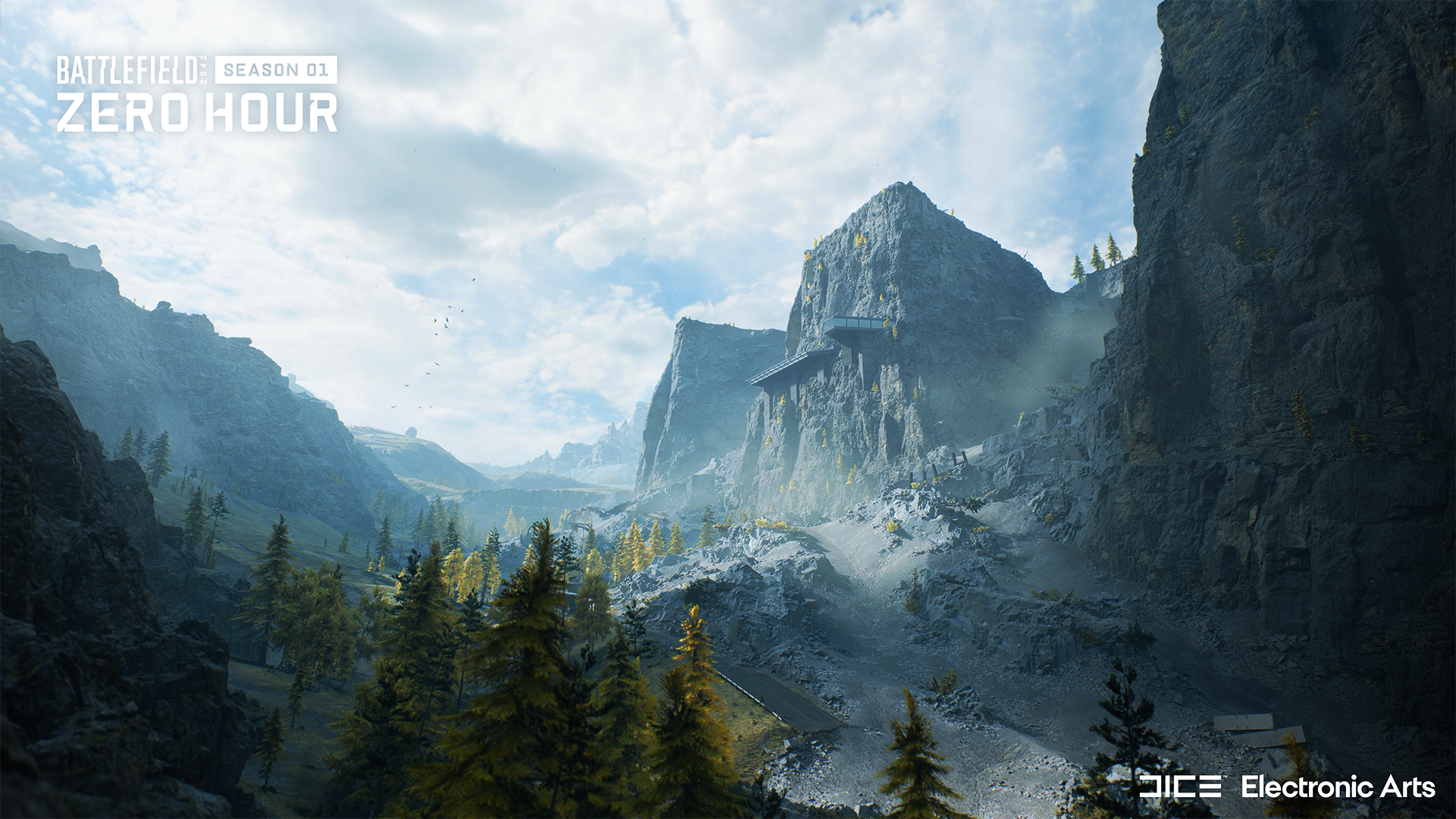
Black Ridge
On this part of the map, you and your squad need to seize control of a contested military base. Once you’ve secured the area, head to the elevators and move down to capture the interiors.
Mission Operations
This area consists of two sub-sections, the tunnel and the server room. The tunnel holds the vehicle elevator which players on wheels can utilize to get to the Black Ridge section. If you enter the server room, prepare for intense close-quarter combat gameplay. From here, you can also take a zipline to the Command Center.
Command Center
Located smack in the middle of Exposure, the Command Center is designed to be an intense, highly populated battleground. The area consists of three sub-sections: The Tunnels, The Office, and The Balcony. Tanks can roam the former while infantry troops will engage in the office section. If you’re fighting on The Balcony, expect enemy helis to pay a visit. This clash of armor, infantry, and aircraft will create a ton of memorable Battlefield moments.

Mountain Complex
This area consists of two sub-sections, a tunnel and office room. The tunnel holds the vehicle elevator, which the players can take to the monitoring section. The office room supports intense close-quarter combat gameplay and lets you take a zipline to the Command Center.
Landslide
Following a disastrous landslide, some of the interior of the research facility has been exposed and the surrounding area has been damaged. This is the lowest part of the valley in Exposure, and it’s vital to stay alert. Watch out for players jumping down from the cliffs. Use ziplines to get to higher points or stay down and hold the space for your team.
Monitoring Station
Capture the radar station in this section to get a good overview of the map's upper area. If you're approaching this control point in a vehicle, use the open spaces. Infantry should use the interior spaces to be safe. The flag at this control point sits dangerously close to the cliff edge, enabling infantry who have just captured the flag to make a dramatic exit. Jump off, deploy your parachute or wingsuit, and discover the rest of Exposure.

New Specialist: Lis
A true anti-vehicle expert, Ewelina Lis was born in Gdansk and got recruited into Poland's elite special force (GROM) at age 21. Committed and earnest, Lis is a defiant, honour-bound warrior who can overcome any obstacle (or blow it to pieces.)

Specialty: G-84 TGM
Launches a player TV Guided anti-vehicle missile.
Trait: Armor Hunter
Automatically reveal nearby enemy vehicles that are damaged or hacked (visible to Lis only).

Ewelina Lis, pictured above with her GROM anti-air unit dubbed the "Szakale Ogniste" (The Fire Jackals.) Lis is the sole survivor.
New Gadget: Smoke Grenade Launcher
The Smoke Grenade Launcher fires a canister that forms a large smoke wall on impact. Ideal for obscuring wounded team mates and denying enemy vision.

New Air Vehicles: RAH-68 Huron (US) and YG-99 Hannibal (RU)
RAH-68 Huron
Advanced reconnaissance attack helicopter. Designed for speed, maneuverability, and devastating low-level CAS. Move in low and fast - and leave before they know they’re dead.

YG-99 Hannibal
The top-secret YG-99 Hannibal is the most advanced attack helicopter in the world. If you set eyes on a Hannibal, it is already too late.

New Weapons: Ghostmaker R10 and BSV-M
Ghostmaker R10
An easy-to-handle crossbow that features an integral lever for fast and effective reloading. Deadly, precise and silent.

BSV-M
The last iteration of the classic Russian rifle features dual fire modes and a powerful integrated suppressor, making it the perfect weapon for clandestine operations.

Battle Pass
Season 1 introduces the Battle Pass to Battlefield 2042.

Gain XP & Complete Weekly Missions
Gain XP and complete Weekly Missions to earn the 10 Battle Pass points required to progress each tier. Every week a limited time Bonus Mission is available to unlock, and completion of this mission will provide additional points.

Unlock Rewards
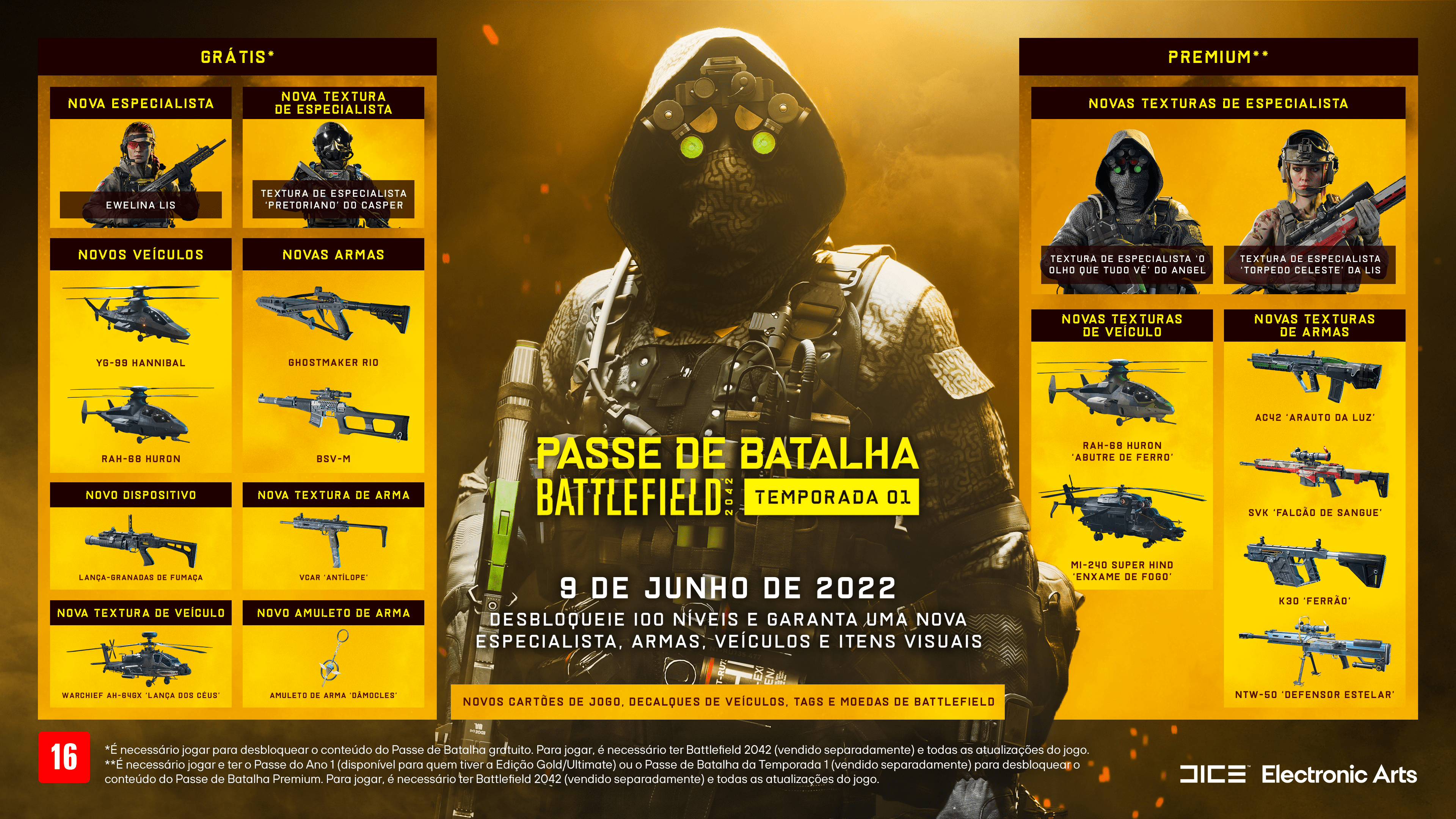
The Battle Pass tiers are filled with rewards. Free tiers offer additional Weapons, Vehicles, Gadget and an all-new Specialist. Premium tier rewards include Epic and Legendary seasonal cosmetics.

Upgrade to Premium at any time to get access to rewards on all 100 Battle Pass tiers, and instantly unlock Premium rewards like the Zero Hour bundle plus all Battle Pass Tiers you have already progressed.
Year 1 Pass owners who have purchased either the Battlefield 2042 Gold or Ultimate Editions will automatically get access to the new Specialist each season as well as the Premium Battle Pass, without needing to unlock them via gameplay.

Keep up to date!
Make sure that you’re following @Battlefield and @BattlefieldComm on Social Media to stay informed on Season 1, and to learn about further changes that we’ll go on to make this season.
See you on the Battlefield!
Freeman // @PartWelsh
Community Lead, Battlefield
This announcement may change as we listen to community feedback and continue developing and evolving our Live Service & Content. We will always strive to keep our community as informed as possible.
Unleash the Unexpected - Season 1: Zero Hour Available Now
Utilize hi-tech gear like the Ghostmaker R10 Crossbow and the BSV-M Marksman Rifle to lead your squad to victory. Pilot the RAH-68 Huron and YG-99 Hannibal stealth gunships or provide extra cover by laying down a wall of smoke using the Smoke Grenade Launcher.
-
ZERO HOUR BATTLE PASS
Play through 100 tiers in the Season 1 Battle Pass to unlock Free* and Premium** content. Free tiers give access to the new Specialist (Lis), Weapons, Vehicles, Cosmetics, and more. Completing Premium tiers unlocks Skins, BFC, Player Card Backgrounds, Weapon Charms, Takedowns, and more.
Battlefield 2042 | Season 1: Zero Hour Gameplay Trailer Premiere
Experience a new map, a new Specialist, stealth helis, and more in Battlefield™ 2042 Season 1: Zero Hour.
Reach greater heights with high-tech stealth helicopters on Exposure; a new mountainous map. Deploy as new Specialist Ewelina Lis and use her G-84 TGM Rocket Launcher to clear the skies as you lead your squad to victory with new hi-tech gear.
https://store.steampowered.com/app/1517290/Battlefield_2042/
Battlefield Briefing - Development Update, May 2022
Over the past few months, we've shared some of the key areas of focus for Battlefield™ 2042. Through our Core Feedback Loop, we've also shown off some of the work we've been doing on those areas. As we’ve been working to get Season 1 into your hands, it’s been a while since we provided you with a better overview of where we are with that work, and the changes and improvements that you can expect to see coming to the game throughout the year.
To bring you in on what we’ve been working on I recently sat down with Senior Producer Ryan McArthur, and Creative Director for Battlefield 2042, Lars Gustavsson to talk about the improvements we’re bringing to the game and maybe even give a hint about all the new content and improvements that’s coming down the pipe. Have a watch below, and see for yourself where we’re at as we approach the release of Season 1 next month.
What we are focusing on
Ahead of the start of our first Season, we have focused on addressing the core issues with our game. It's been essential for us to ensure that as much of the experience that we shipped with is in as best a shape as possible before we started to deliver all new content. We know that this has been a frustrating, and lengthy time getting from there to here, and while we have more to do, we're encouraged that many of you are having a better experience with the game.
Ahead of new content arriving in the game, we wanted to assure you that there are still four key focus areas for us right now:
- Maps
- Experiences & Modes
- Core Gameplay
- New Content
These encompass some pretty big areas of our game and have plenty of nuanced changes and additions built within them. In the video above, you get to hear directly from Ryan and Lars on where we are today with our work, but if you’re looking for a recap, here’s a breakdown of what you can expect to see updated and changed in the game over the next several months.
Maps
In this focus area, we’re not just looking at the new maps that we’re planning to bring throughout our upcoming Seasons, but also the improvements that we want to bring to our existing playspaces.
We know that our maps play best when the space is being well utilized, and when you feel that you have a good understanding of not only where to go next in our maps, but also the safest ways to traverse that distance. We’ve seen from your feedback that you are enjoying our maps in 128 players on Conquest, but that when it comes to other experiences, we shouldn’t stick so rigidly to those rules. When the first of our new maps arrives in Season 1, we hope you’ll feel that these changes help to create a more fun and tactical experience, and we’re looking forward to you experiencing these changes for yourself next month.
We’re also looking to ensure that where we need to, we’re able to bring some of our launch maps up to our revised standard of quality, focusing first on the reintroduction of Kaleidoscope. As shared in our Core Feedback loop last month, we’ve revised the playspace to add more cover, creating new flag positions, and improved the flow across the whole map.
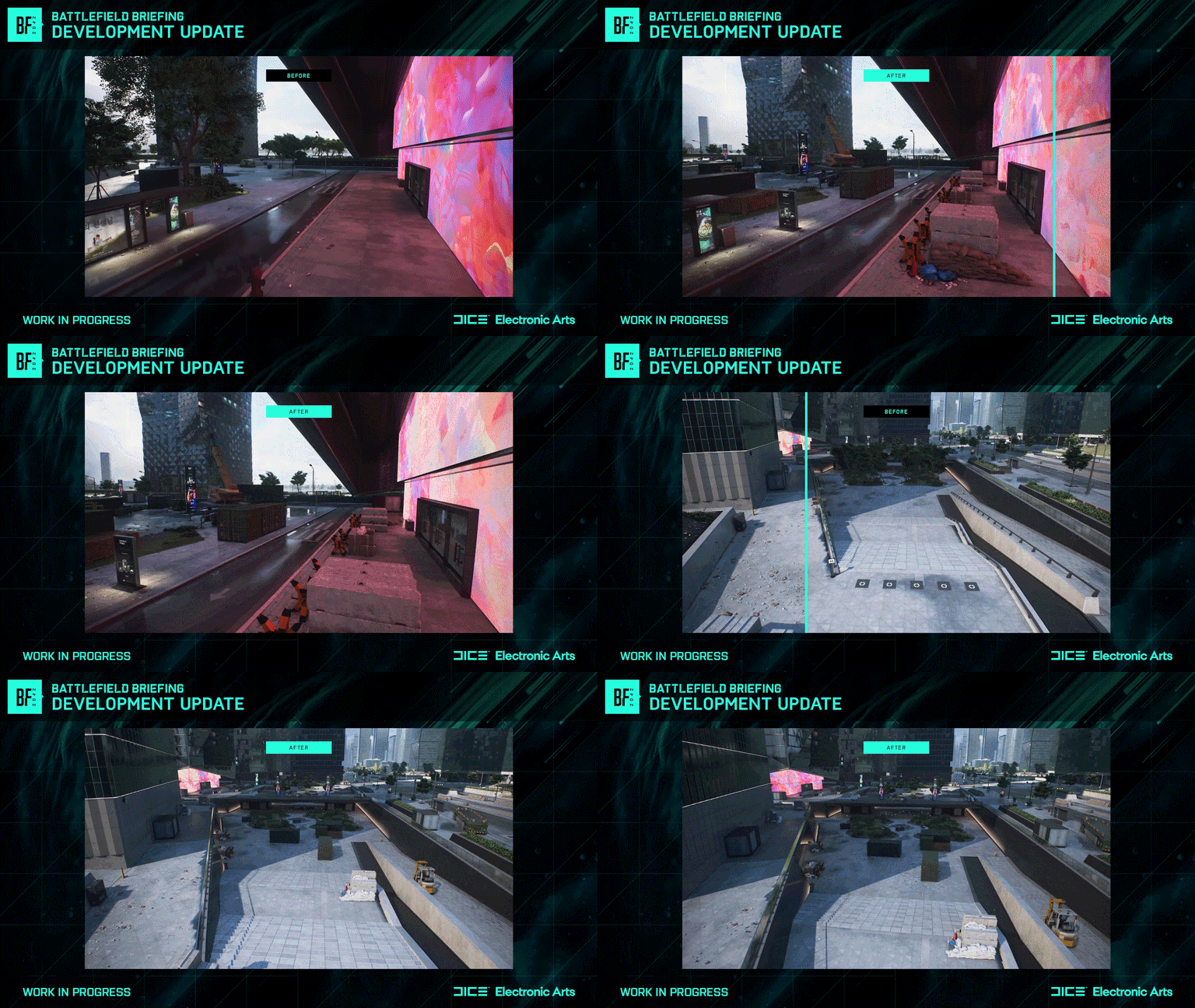
Cover has been added not only with the placement of new assets, but also in the raising of terrain to help break sightlines and let infantry move more purposefully around the map. Most importantly, these new assets bring more tactical destruction which help to ensure that the map evolves throughout the duration of each round, and provide both Attackers and Defenders with new options when playing in key areas.
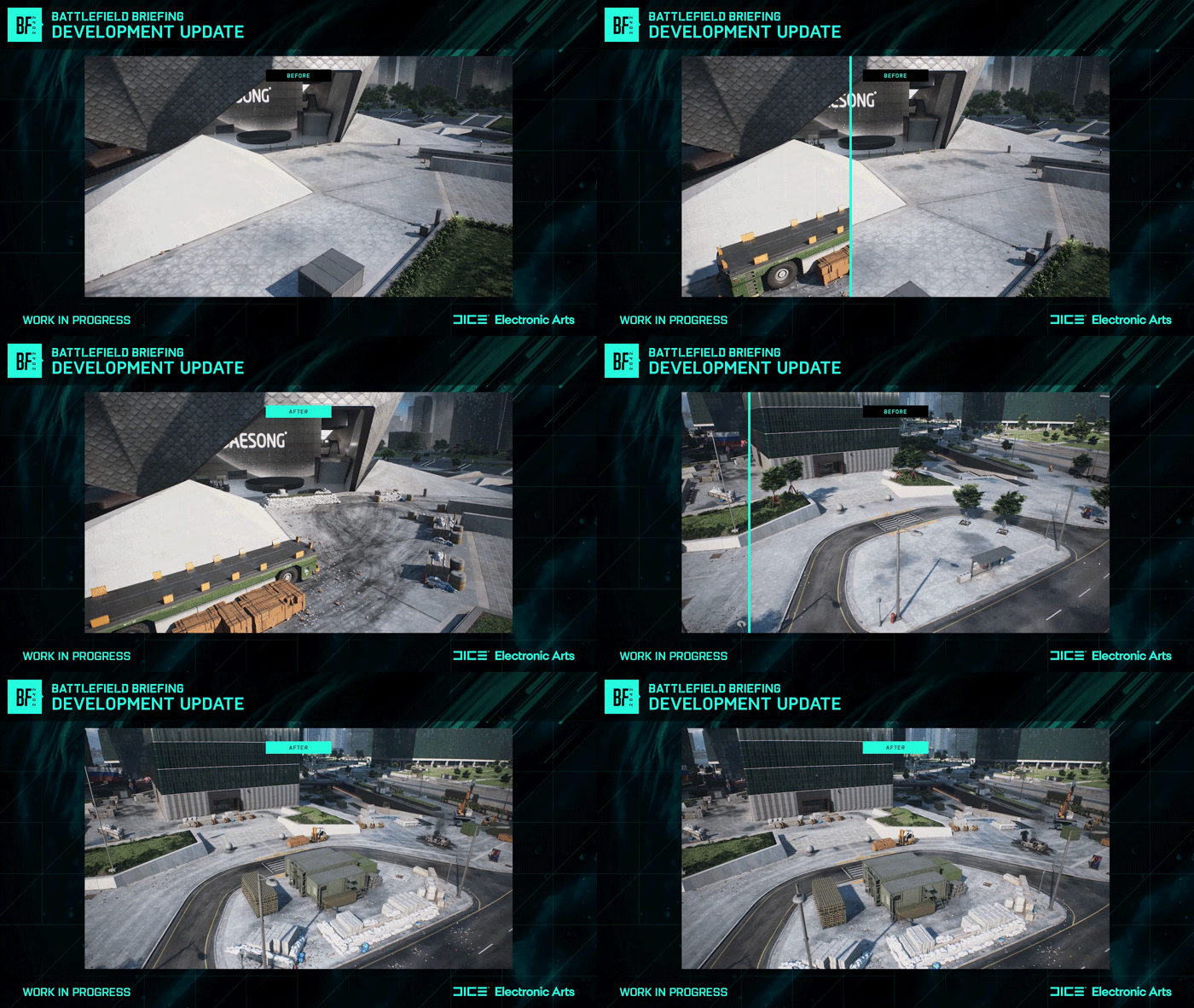
We’ve also introduced new areas onto the map, adding a Forward Operating Base into the park, with a second command post added close to the Tower. The Data Center has similarly received multiple passes from the teams to help ensure that there are more cover points, and new war torn looks to certain areas that help make the map more faithful to 2042’s setting.
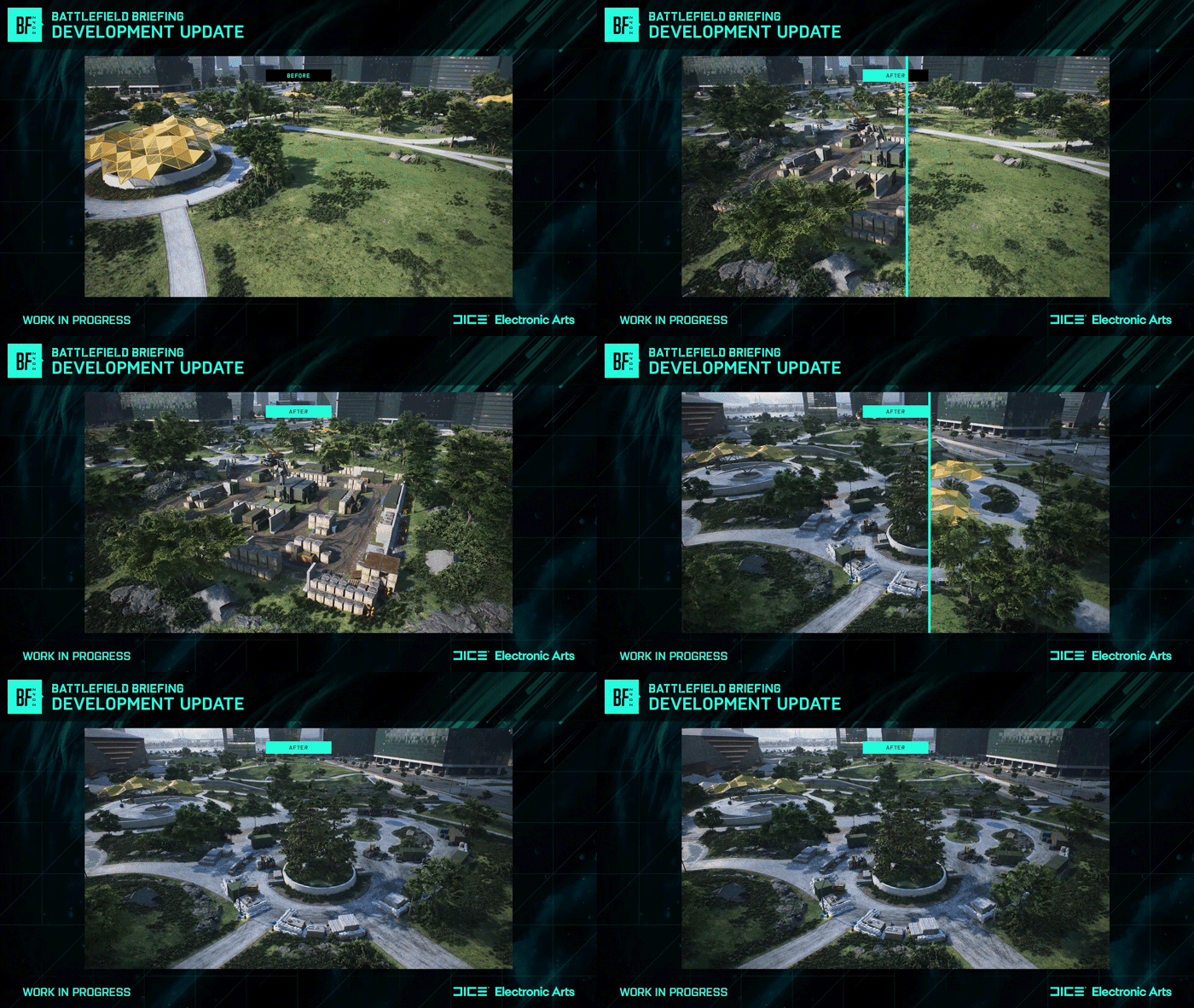
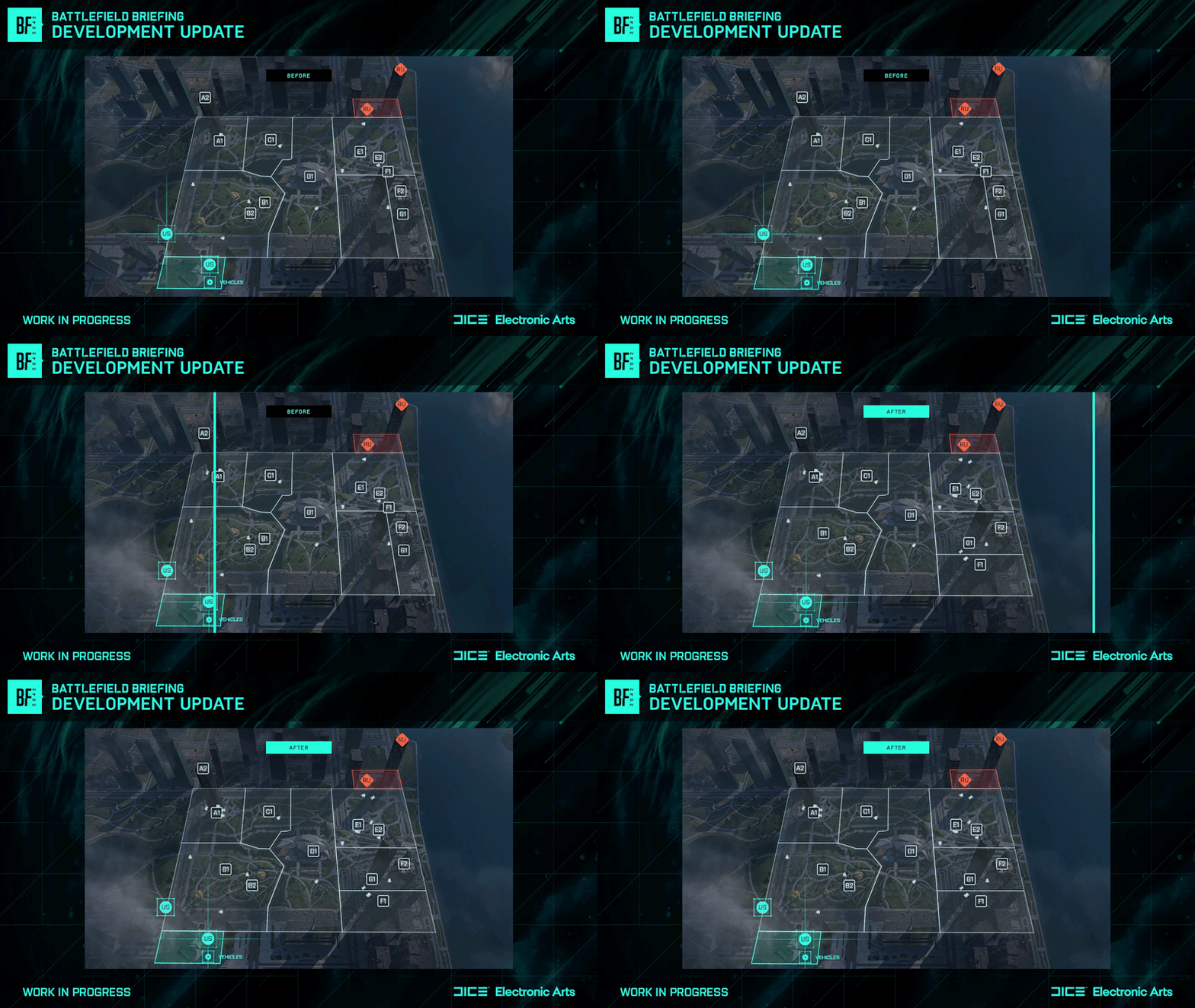
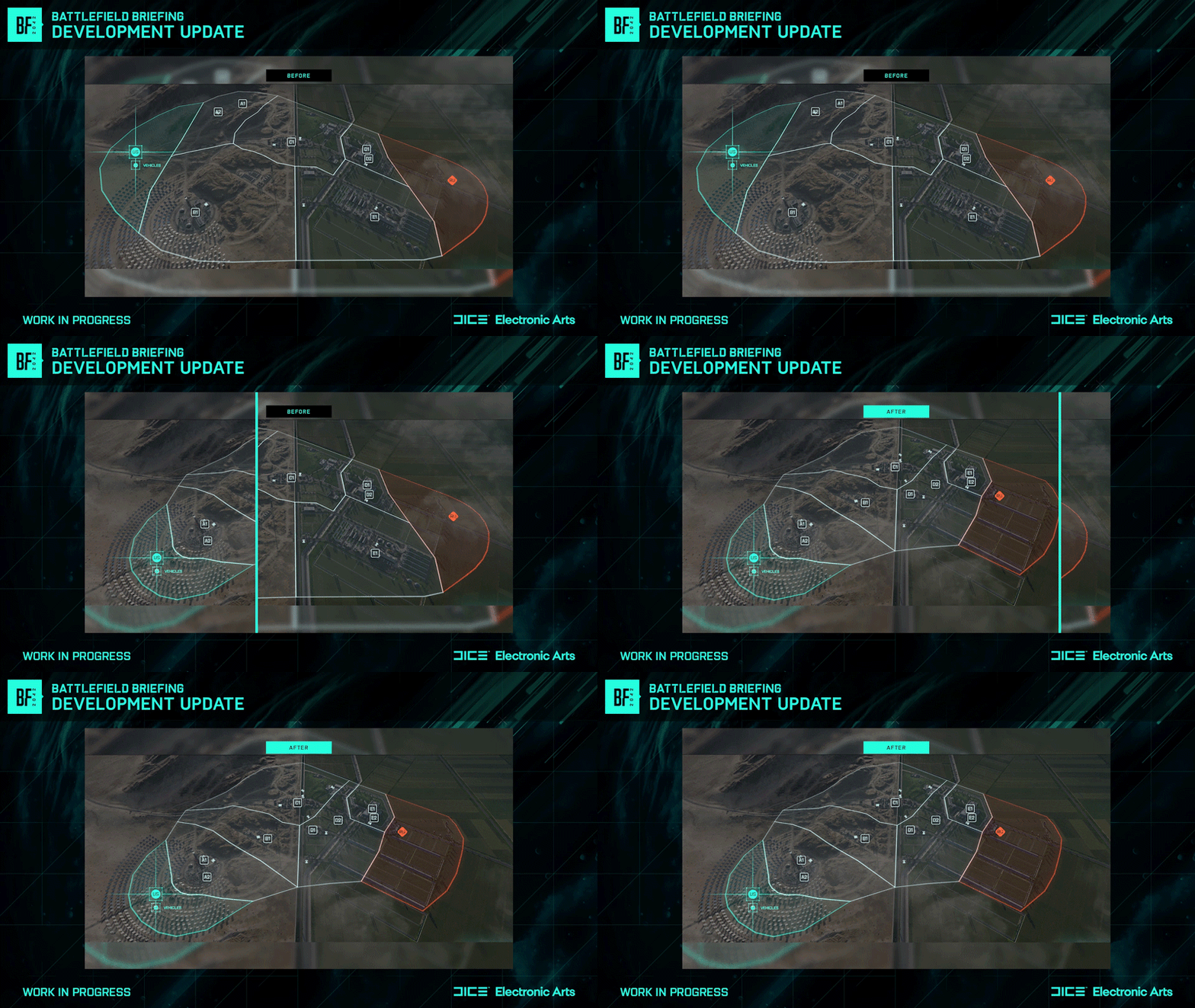
Our work on Renewal is also progressing well, adhering to these same quality improvements. Now scheduled to release some time after Season 1, the changes will help improve much of the infantry experience on the map, helping to eliminate playspaces that stretched the gameplay into quieter spaces (removing sectors A and E from the map), and focusing the action through the map's center.
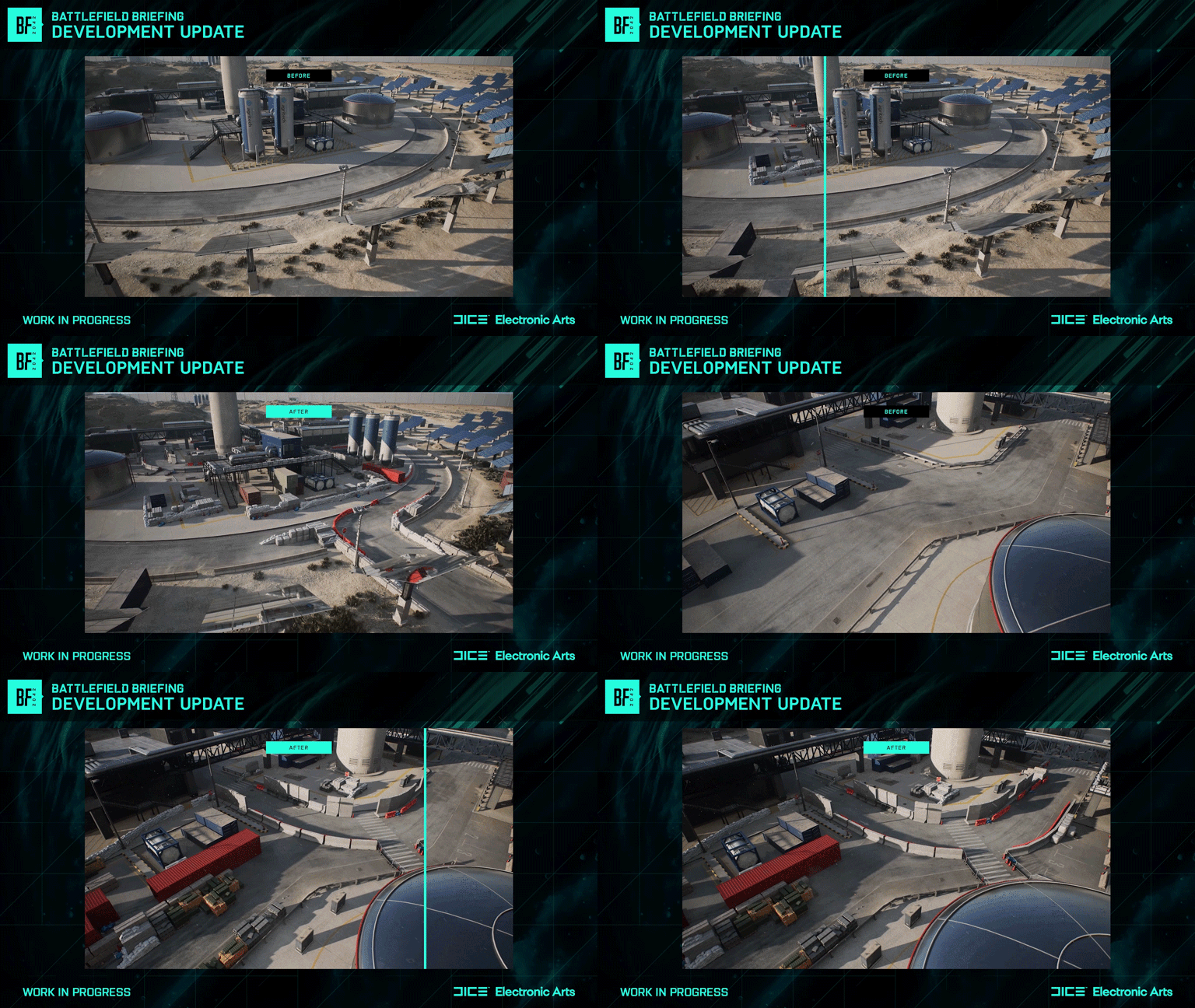
The Solar Station has been revised to include much more cover, new concrete barriers, sandbags, and assets that help to give the space a more occupied and entrenched feeling. The terrain connecting from here to the Security Checkpoint in the center of the map has been raised and modified to provide better cover for players, with a simplification of the layout taking place at the substation to help eliminate the numerous possible angles of attack.
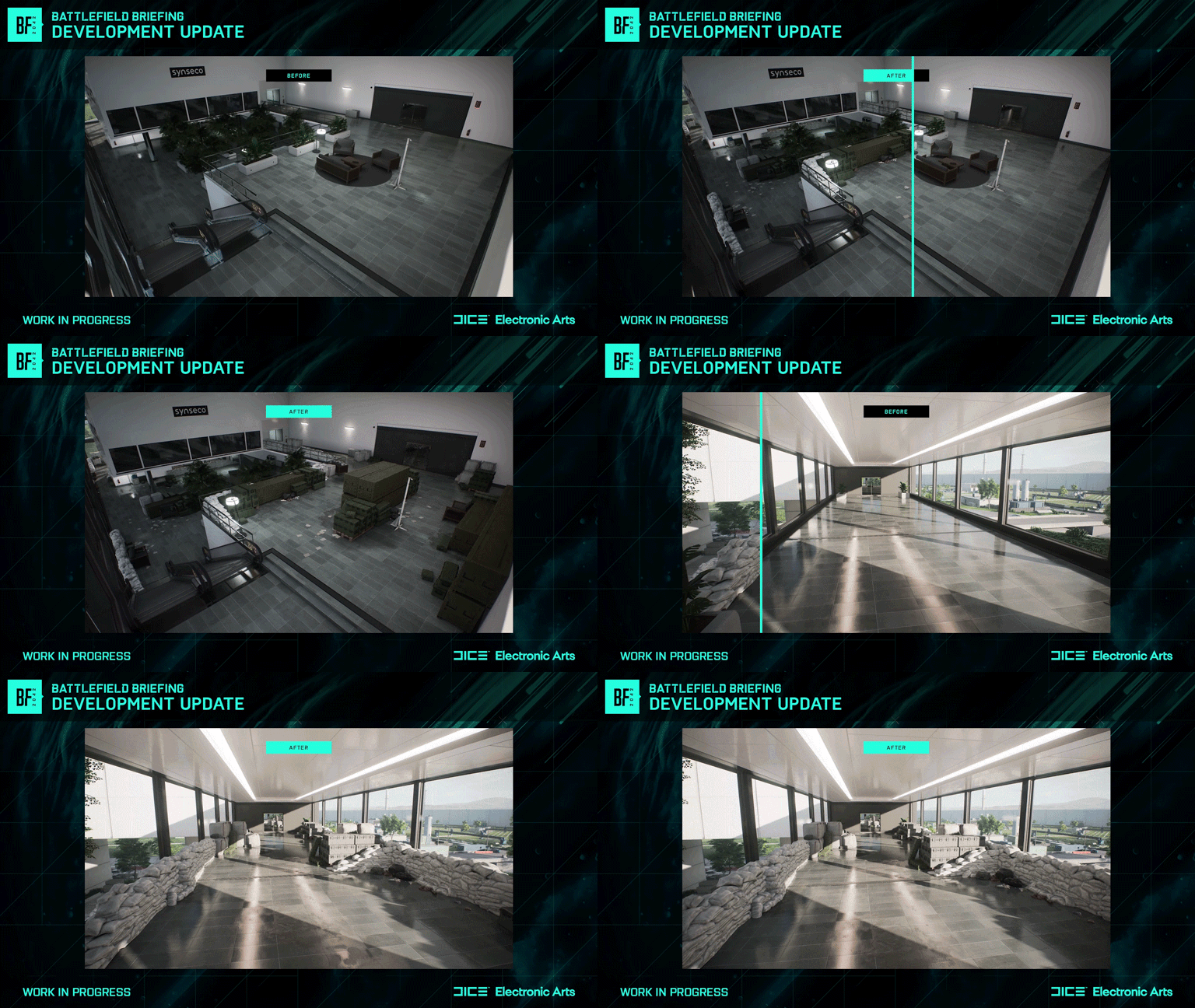
Connecting the Security Checkpoint to the Synseco Buildings, there’s now plenty of cover helping to link the playspaces, with the Synseco Buildings themselves featuring more internal points of cover that help to improve our standards of Close Quarters Combat.
Experiences and Modes
Connecting to the improvements that we’re making to our playspaces, we’ve spent our time over these last few months reviewing the experiences we provide with our game modes and challenged ourselves to ensure that we’re improving the quality of gameplay here too. Here we have two big focuses - the variety and depth of what you play, and the available options of what you can play.
As you’ve now experienced in our recent 0.4.1 Update - we have unshackled ourselves from 128 Player Game Modes when it comes to how we develop new modes in our game, and also in the play spaces we use in our maps.
128 Players won’t be going anywhere, we know it's great for some of our experiences. For players on Xbox Series X|S, PlayStation 5, and PC, we’ll continue to optimize our Conquest experiences around large player counts, but as we’ve done recently with Breakthrough, we’ve made the decision to keep this mode as a more tactical experience, better suited to 64 players.
Conquest experiences will at times feature less Sectors and Capture points as we introduce new content, and update some of our existing content. This is a change that helps us to better control the flow and pacing of combat, making sure that you’re spending more time engaging on the flags, and less time checking your phone while you wait for the capture to confirm.
In Breakthrough, the decision that moves us to 64 players universally, helps us to build more focused frontlines for the engagement, and the reduction in player count ensures that squads which look to work more tactically find more opportunities, and less chaotic resistance in the flanks.
We’re also looking expand and bring our official modes together to include Rush, our 32 Player focused experience during Season 1. We’ll have more to share about that when we reveal the Season next month, but we wanted to let you know to expect this expansion to All-Out Warfare, alongside core improvements to the Rush experience following its initial outings via Battlefield Portal. Speaking of which, starting in Season 1, you’ll see more of our existing Battlefield Portal maps joining the rotations in All-Out Warfare to help bring more variety to our Core Modes.
One final piece of news for you to take away from today’s video - we’re winding down future development on Hazard Zone. All of us on the team had great ambition and high hopes for this new Battlefield experience throughout our development, but we’re the first to hold our hands up and acknowledge that it hasn’t found the right home in Battlefield 2042 and that we’ll benefit greatly from letting our focus and energy stay on the modes we see you engaging most with.
Hazard Zone will stay as part of the experience, we’re not switching it off, but beyond addressing critical errors and odd behaviors that may appear in the future, we’re no longer actively developing new experiences or content for the mode, and you’ll find that maps that we release across our seasons will not be supported in Hazard Zone.
Core Gameplay
Let’s talk about Specialists. We know this is one of the main topics discussed across Battlefield Communities, and it’s an important priority for us too.
In terms of what you can expect to see on this topic, we are actively working to update the style and tone that our Specialists bring to the experience. We’ve started art passes on our Specialists that help to better reflect what we feel their place to be in the world, making them feel grittier, and closer to the more serious tone that we want to come across in our narrative.
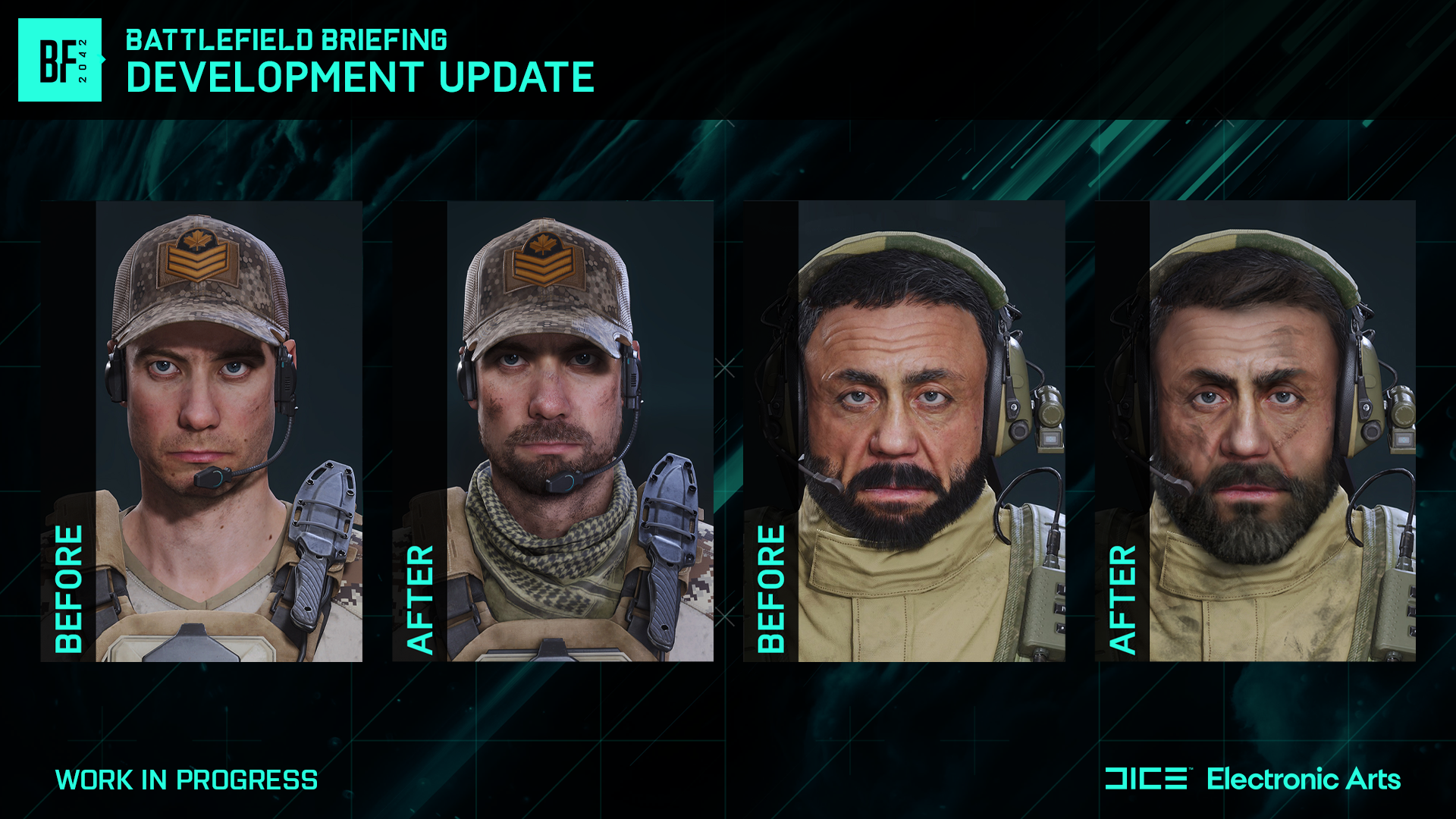
We’re also in the process of updating the voice lines that you hear from the Specialists, removing ones that we know break your immersion and connection to our characters, and will ensure that cosmetic options you’ll encounter in the future provide you with more grounded and more military-themed content.
On the gameplay side of Specialists, we’re still exploring bigger changes to their design and don’t want to commit into temporary decisions while this work is still ongoing. We are continuing to make regular balance changes, such as the recent nerf to Boris’ turret in 0.4.1, and the light overhaul made to Rao’s passive behavior in 0.4.0 just last month. We will continue to help ensure the experience you have with the Specialists is well balanced and able to provide good variety to the gameplay, but we don’t want to rush into any new directions until we’re 100% satisfied that what we do next is the right thing to do.
How Specialists fit into the game today can be improved. We’re sensitive to, and grateful for the feedback that we have received so far from all of you, but we recognise that making a sweeping change to Specialists would cause significant delays to our development, more so than we already have in our work to improve the experience ahead of the start of our Seasons. We do intent to make changes, but want to ensure they do not impact the other improvements, fixes and content that we’re bringing to the game.
There are initial ideas that we have, and when we’re on sturdier ground with the vision we have for the Core Gameplay of Specialists, we will come to you to share those ideas and solicit that feedback. The Core Feedback Loop for Specialists will come later than planned, but we invite you to continue sharing your thoughts around improvements that we can make here. We’re not walking away from Specialists, they’re a key part of the Battlefield 2042 experience, and we just want to make sure that we get this right.
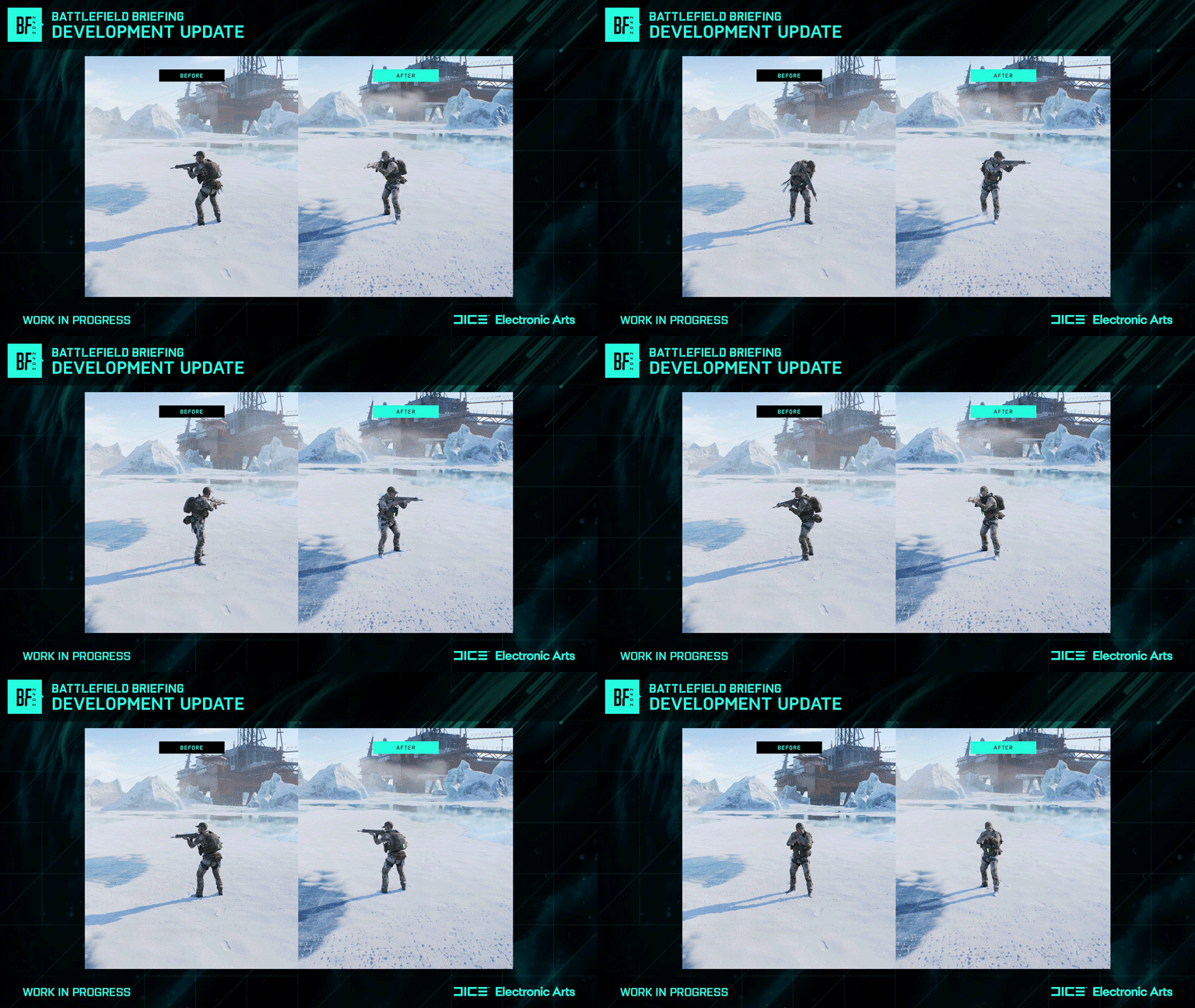
Elsewhere in Core Gameplay improvements, we’re looking to bring new 3rd person animation modeling to the game, giving much better readability to body motion and helping you to better react to enemy movement.
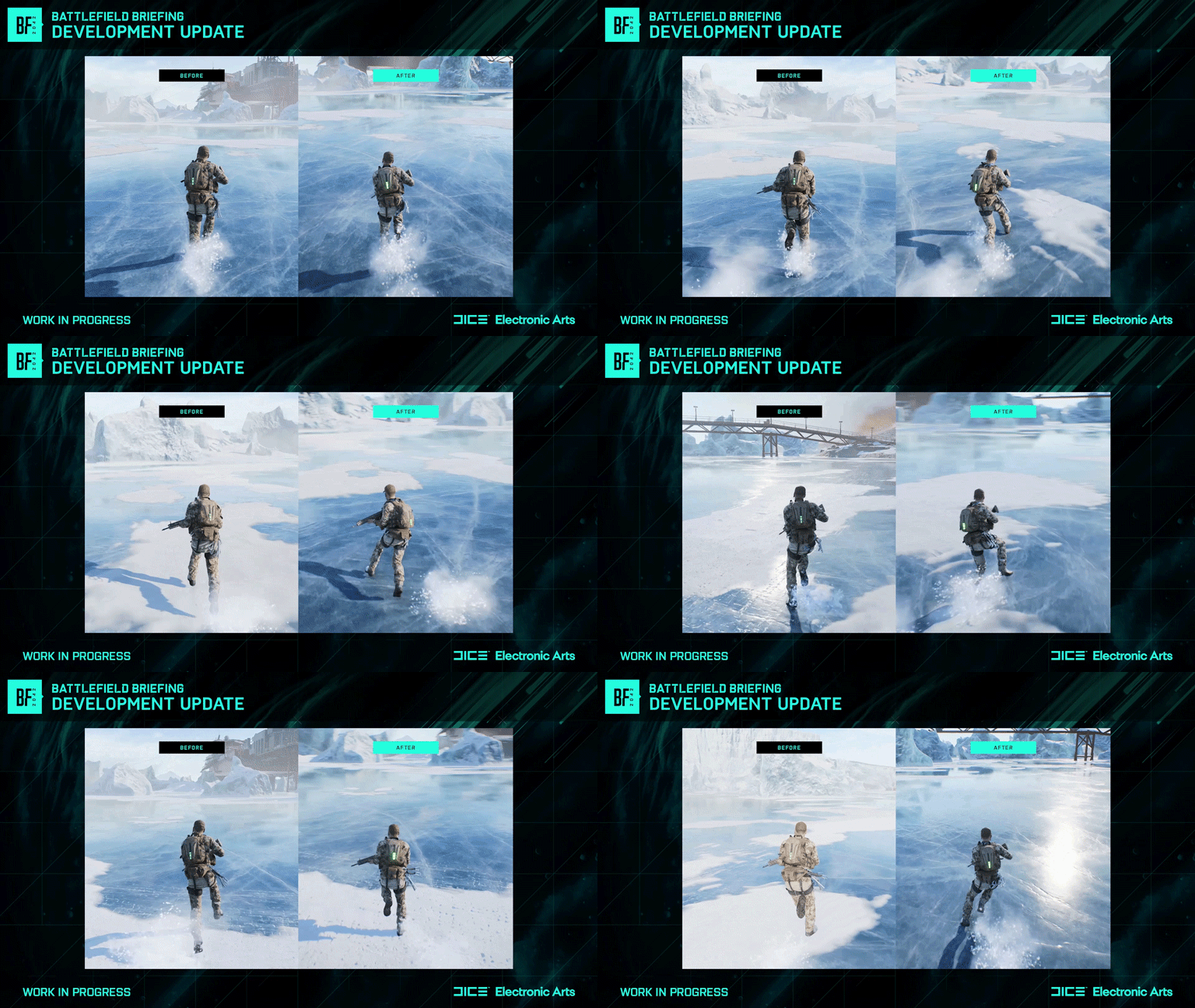
With Gunplay, you’ve already seen us bring improvements to our Weapon Attachments in Update 0.4.0. We’re going to continue balancing our weapons to ensure that they each have a unique application within the sandbox, and we’re working on changes to Visual Recoil to help improve the experience of firing our weapons.
Beyond this, we have new weapons and gadgets coming with each Season, and we’ve started work on a new initiative that will see us further add to our pool of Weapons and Gadgets, by introducing some of our Classic eral arsenal into the All-Out Warfare experiences. This isn’t a simple or fast change, it’ll take us some time to do. We need to ensure that these weapons are mapped properly to progression, that they’re appropriately balanced to the 2042 model of gunplay, and that they’re supported with appropriate mastery and cosmetics, but we’ve started work on this and we’ll have more to share further down the road.
On the Teamplay and Social side of our Core Gameplay loops, we’re making UI improvements during Season 1 that help enable better readability across our systems that let you understand where your friends are playing, finding new modes to play, and understanding what to expect when you jump in.
And finally on Performance, we’re continuing to ensure that the game is living up to your expectations of a technically sound experience that performs at the framerates you expect from your hardware. We took a big step towards addressing that with our Minimum Spec players in our 0.4.0 update, and there were positive knock on effects across the board that helped to see many players gain better CPU utilization, improved latency on input, and a smoother experience with less hitching than seen at launch.
This is work that we continue to iterate on, and work to find new improvements for, with more for us to do throughout Season 1.
New Content
Season 1 will launch next month, and will mark the start of a year of new content coming to the game. Four Seasons, four New Specialists, new maps, and new weapons and gadgets that help to expand the sandbox. We’re bringing a Battle Pass to Battlefield for the first time that will give players the chance to earn new gameplay items, all of which are on our free tiers, and new cosmetic items across both the free and premium tiers.
Next month with the release of Season 1 we’ll see a big update that will not only bring this new content to the game, but also deliver new Quality of Life enhancements, fixes, and improvements that demonstrate our continued commitment to Battlefield 2042 and our mission of restoring the trust that many of you feel was hurt when we launched back in November of last year.
All of us on the team are thankful by your feedback following the release of 0.4.0 update, which allowed us to make swift changes via a Hotfix the following day to address stuttering issues, and incorrect Ticket Counts for our Breakthrough 64P layouts. We are pleased that we now have the opportunity to show you even more of our hard work with the start of Season 1. Internally we’ve enjoyed playing its content for longer than we planned to, but we’re keen to maintain the right cadence of our updates from here, both for new content, and game improvements.

To see more of the changes, check out the video linked at the top of this article if you haven’t already and stay tuned to us here on the Battlefield Website, our Social Channels, and the Battlefield Discord.
Next month we’ll publish our complete Season 1 Update Notes, and return with a new video where I’ll be joined by members of the Battlefield development team to talk about Season 1, and to look ahead to more of the changes that we’re making to the game.
Until then, thank you for giving us the time to play the objective <3
Freeman // @PartWelsh
Community Lead, Battlefield
This announcement may change as we listen to community feedback and continue developing and evolving our Live Service & Content. We will always strive to keep our community as informed as possible.