Hello!
Today we’ve got a post to update you on what’s going on in the community and a little bit of information about Besiege’s development progression and coming update.
Since the release of Skin Packs we’ve seen a torrent of packs being uploaded to the workshop, here’s some that caught our eye:
Lego Skin Pack
http://steamcommunity.com/sharedfiles/filedetails/?id=703309217&searchtext=
Industrial Revolution Skin Pack
http://steamcommunity.com/sharedfiles/filedetails/?id=702049002&searchtext=
Steam Punk Skin Pack
http://steamcommunity.com/sharedfiles/filedetails/?id=707879976&searchtext=
These are only a few of the many and varied skin packs that are currently available on the Steam workshop, simply subscribe to the pack you want to use and then apply it in game!
I’m sure many of you may have noticed that the Spiderling Community Forums have been down for the last week or so but they are now pack online and ready to use! http://Forum.spiderlinggames.co.uk/ If you have trouble accessing it then you should try clearing your browser history/cache/cookies!!!
We decided to change the forum software that we were using in order to provide a faster and more pleasant experience for community members! Unfortunately the process of migrating the forum’s data across to the new software took longer, due to some problems we encountered during the process, than we originally intended and we are very sorry for any inconvenience caused! Unfortunately we haven’t had a chance to create a custom style for the forums yet and as such, for the time being, the forum is using a default style which is very different from the previous forum’s look.
Please be aware that all links to the old forum will no longer function correctly and will need to be updated manually. Also, for security reasons we ask that, if you are a forum user, that you change your forum passwords ASAP.
If you encounter any problems with the new forum software then please let me know, either through the forum or via our support email address: support@spiderlinggames.co.uk
Over the weeks since the last update we have been working hard to eliminate many of the bugs that have been slowly piling up as Besiege’s development has unfolded, therefore the next update will be a bug fixing update! Unfortunately we can’t really offer a firm release window for the next update but it’s safe to say that it will be coming soon!
We’d also like to reassure you that the team members working on new levels are not involved with other aspects of development and as a result level production is not hindered by regular update content. Level production is going well and soon we will be bringing you the last few levels of the Tolbrynd island as well as some levels on the new island Valfross. We do apologize for the long delay in releasing new level content and we are aware of how frustrated some of you are at the lack of new levels content being released. We have also brought a new artist on board to help with level production but it has taken quite a while to bring him up to speed with our level design philosophy. Now that we have done this, things are moving along at a much nicer pace!
I’d also like to take this opportunity to tell you that we will be announcing some of the new ‘long term’ features that we have been working on behind the scenes, in the coming weeks, so stay tuned!
Cheers,
Von
Update 14 - V0.30
Hello everyone!
Today is the day that we’re launching version 0.3 of Besiege! We had planned to release it Friday night but unfortunately we ran into some very pesky bugs at the last minute and its taken most of the weekend to resolve them, so we're sorry for the delay!
Version 0.3 includes two new sandbox levels as well as the new skin/model loader for importing custom textures and models into Besiege, alongside some bug fixes for a variety of issues.
The New Sandbox
Since the very beginning of Besiege, the sandbox environment has been the most popular choice for builders, machine fanatics and youtube showcases alike. For these reasons we spent a bit of time examining why people like the sandbox environment and what improvements could be made to expand the player’s experience.
The new sandbox environment is quite a bit bigger than the old one. The above image shows a white square overlayed to represent the size of the old sandbox level. It includes structures and elements from the game you’ve played through thus far and some that you haven’t experienced before! The level was designed with aircraft in mind, so should prove a more interesting testing ground for your flying machines.
In addition to the sandbox level shown above, we have also added another sandbox environment that is quite large but is quite barren in features. Those of you that love to create huge machines, this level should be just the thing for you!
The Skin Loader
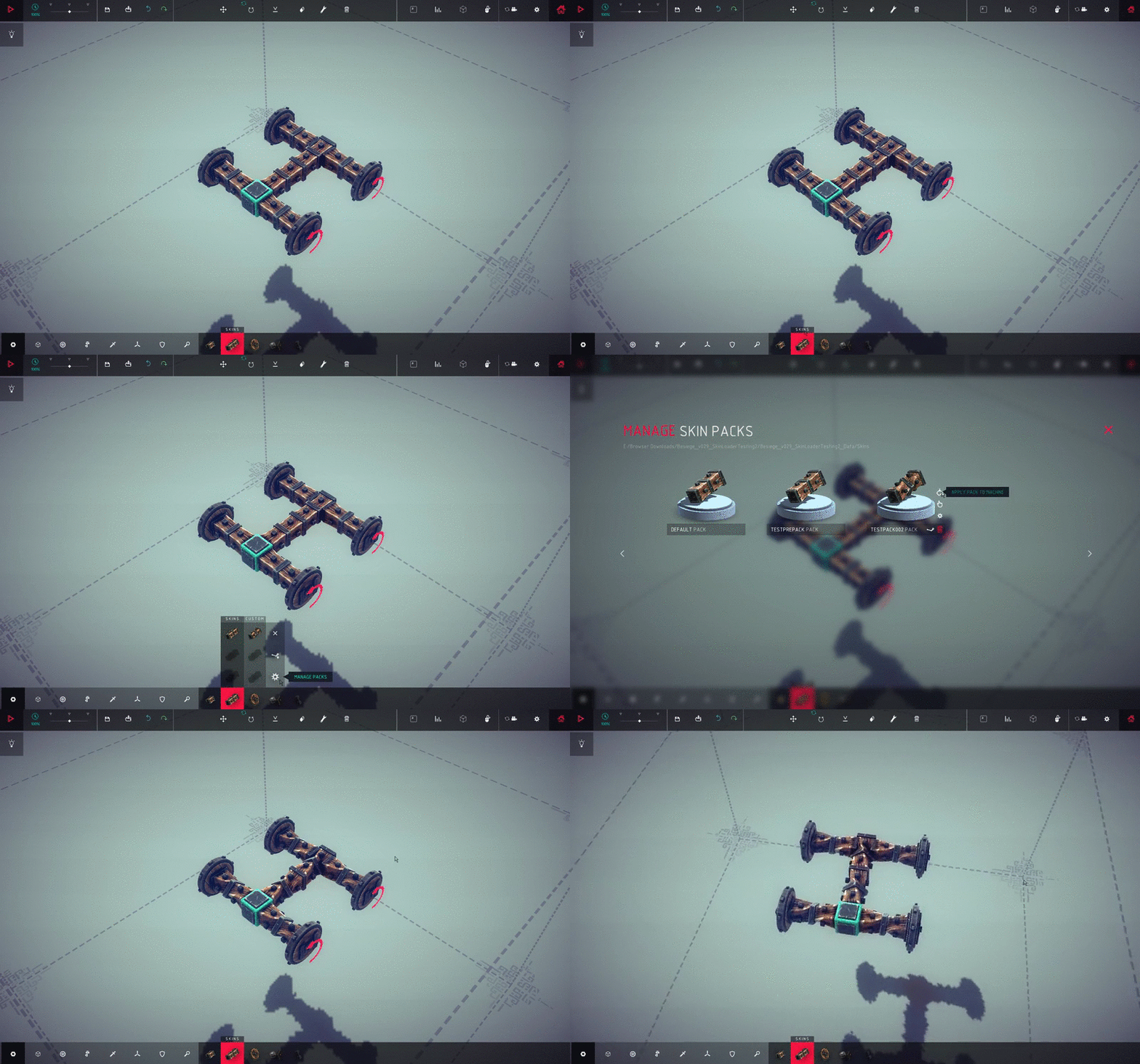
The other part of this update is the new ‘Skin Loader’, used for importing custom textures and indeed models to replace the default blocks in Besiege. Downloading and using custom textures/models is as simple as copying files into a folder or subscribing to a pack on the workshop. Once that’s done you will be able to apply your new packs to specific blocks or an entire machine.
Creating your own custom texture & model packs is also a very simple process and we plan to produce a video tutorial showing you how it’s done. But all you really need is to copy an image into a block’s folder and then it can be loaded as a texture, likewise creating a .obj model and putting that into a block’s folder will load the new model! Note that you don’t have to have a model to change a texture and you don’t have to have a texture to change a model.
As part of the ‘Skin Loader’s’ implementation we’ve reorganized the workshop and divided items into two separate types, Machines and Skin Packs. We’ve also created a new sub-section of the modding board on our forum, specifically for the publishing and discussion of Skin Packs.
I've also thrown together a basic guide on how to use and create Skin Packs, which can be viewed here: http://forum.spiderlinggames.co.uk/forum/main-forum/besiege-early-access/modding/skin-packs/43678
Alongside the above we have a number of bug fixes which will be listed in the patch notes at the bottom of the post.
We know that many of you are desperate to get your hands on new campaign levels and, as we’ve said in the previous fortnightly post, we are working on them. Unfortunately we can’t say yet when they’ll be ready but we hope that it will be worth the wait!
I’d also like to re-iterate that development is continuing on a number of features we, and you the community, want to see in Besiege before its official release. We’re also aware that some of you fear that Besiege will be one of those early access games that loses its way and never finds a release date, be assured that we have an internal roadmap and release target.
With all that being said, we really hope that you enjoy these new additions to Besiege and we can’t wait to see the creative stuff that you guys come up with!
Cheers,
Von
Changelog V0.3
ADDITIONAL CONTENT
Added New Sandbox Level
Added New Barren Sandbox Level
Added Skin Pack System
IMPROVEMENTS
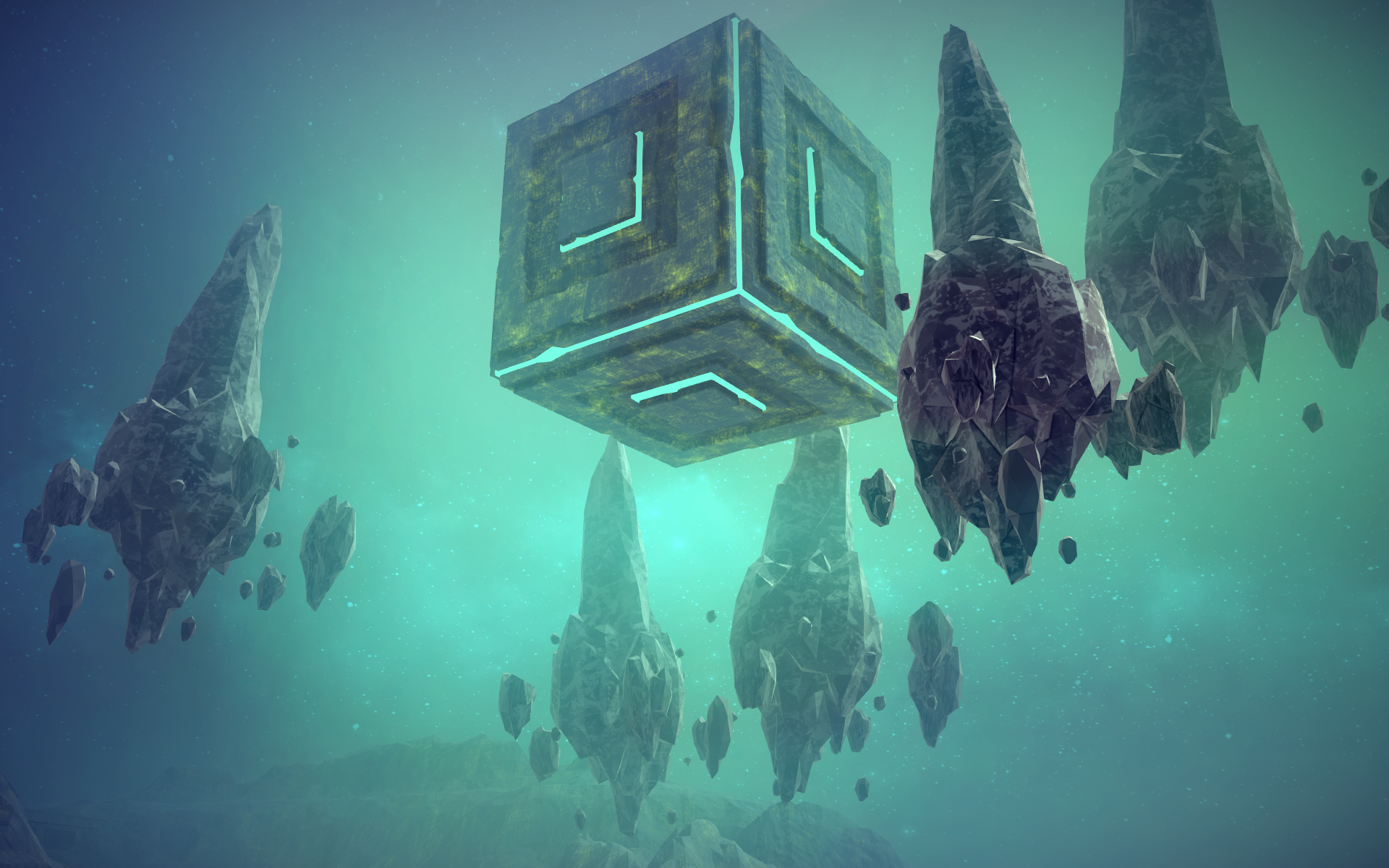
The Source Cube Block has had a bit of a makeover
Added Steam workshop support for Skin Packs
FIXES
Fixed issues affecting the Drag God Tool
Fixed an issue with Un-doing/Re-doing caused by duplicate guids
Fixed an issue causing the rocket block to put out fire
Steam is now able to push rockets
Pre-extended Pistons should now rotate correctly
Fixed a bug with save files, preventing machine information from being loaded correctly
The Fortnightly Post - Besiege (May 20th 2016)
Hello Everyone!
Today we’ve got the first fortnightly information post for you to sink your teeth into. Every two weeks we will be bringing you some information about what we’re working on as well as discussing some of the awesome happenings within the community!
So we’d like to start off with our ‘Community Spotlight’ section of the fortnightly post. We will be featuring media/machines/challenges or even just interesting discussions here that have caught our eye recently.
Last week Besiege’s Tieba community released another video showcasing a collection aircraft that they’ve created! It’s well worth a watch even if you don’t speak Chinese!
https://www.youtube.com/watch?v=N_ZltnH9U_Y
If you’re following us on twitter you may have noticed as tweeting about a couple of mods that we feel are very cool!
The first being Lench’s “Advanced Controls Mod” which, among other things, allows you to use a controller or joystick with Besiege!
http://forum.spiderlinggames.co.uk/forum/main-forum/besiege-early-access/modding/43206
The other mod that really caught our attention was Charlie Wang’s “Tracking Computer Block” which allows you to lock missiles onto moving targets in an attempt to destroy them!
http://forum.spiderlinggames.co.uk/forum/main-forum/besiege-early-access/modding/43124
If you are interested in community goings on, please do check out our forum, the Besiege reddit or follow us on twitter! https://twitter.com/spiderlinggames
So next on the agenda is the second half of the coming update V0.3. We’ve been working on systems to allow the community more creativity and flavor in their war machine designs. Whilst we have some other stuff in the works, the first feature that we’ll be releasing is a model/skin importer for Besiege’s blocks.
You will be able to use this to quickly load up custom models and/or textures to replace the ones that are in vanilla Besiege. Whilst the modding community has been working with one hand tied behind their backs to bring new blocks and styles to the game, we’ve decided to try and streamline this process as much as possible.
Adding custom models and textures to the game will be as simple as copying the appropriate files into a folder, just like with saved machines! No seriously, got a picture on your computer? Just copy it into the folder for the block you want to change!
We’ve been working on what we hope will be an intuitive management system, in game, for your model/texture packs and this is one of the things that isn’t quite ready yet.
We’re also working on a new workshop system that will allow you to upload your texture packs to the community and even link them as requirements for your uploaded war machines. This is something we really want to take a lot of time to make sure we get it right which is another reason that the update isn’t quite ready for release yet.
Our rough estimation for the update’s eta is 2 weeks. However we do still have a few loose ends that are still being tied up and we’re still in the process of polishing/optimizing the new sandbox environment, so it could take a little longer. We’re going try our best but please don’t hold your breath… you might hurt yourself.
Looking past the coming V0.3 update, we are working on a number of other big additions to Besiege and we’ll be using these fortnightly posts to reveal them to you as they get closer to completion!
I hope you found this post informative and in another 2 weeks we'll be bringing you V0.3 or another fortnightly post!
Cheers,
Von
Information About Version 0.3 and Beyond...
Hello!
So today we’ve got some information for you about what we’re working on and what you can expect to see in the coming update V0.3.
We are aware that many of you are growing frustrated at the seeming lack of development and ever longer periods between updates and this is our fault for not communicating more regularly with the community. We are sorry about this and we will endeavor to regularly post progress updates as we develop Besiege further.
Over the past few months we have been working on a number of long term large scale feature additions for Besiege. The development of these features is going very well and they are getting ever closer to a releasable standard. We don’t want to spoil the surprise just yet but it would be fair to say that these are things the community has been asking for from day one.
Development of Besiege’s next campaign continent, called Valfross, is underway and will bring new types of challenges and visuals that will hopefully be unique enough to justify the wait. Valfross is an icy, wind-battered kingdom that has been mostly deserted since ancient times. We’ll be giving you a sneak peak into some of these new levels after the release of V0.3.
Moving away from vague glimpses into the game’s future we’ve got some information about what you can expect to see in the coming update.
We’ve been working on a new sandbox environment with a unique design and a much larger scale. A lot more thought was given to the use of flying machines in this sandbox than the original because, to be frank, we didn’t expect anyone to ever master the art of flying. How wrong we were…
In addition to the new sandbox we’ve been working on another system for modding blocks that we’ll be unveiling on release day of V0.3, but suffice to say that it will offer a great deal more customization from Besiege’s modding community.
Unfortunately, and here’s the bit you’ve all been waiting for, we are still quite a way off from having the new version in a releasable state. We’re reluctant, as always, to set a firm release date but we are certainly still looking at weeks.
We know that some of you are disheartened by the recent pace of Besiege’s update releases but your patience is allowing us the time we need to develop larger-scale features for updates further down the line.
Finally, with regards to our abysmal communication with the community, we are going to be bringing you a regular update post every 2 weeks. This post will feature information about Besiege’s development and what is going on in the community.
We hope that this has reassured you that Besiege’s development is still moving forward and that we’re working hard to bring you the content that you want to see.
Thank you for your patience and continued support,
Cheers,
Von
PS: The plane used in our gifs was created by Flying Flapjack
Update 13 - V0.27
Hello!
Today we’ve got another content update for you, V0.27, which brings a number of improvements and some extra blocks for you to play around with.
Camera Block The camera block can be attached to your war machine and provide a second, fixed perspective of your contraption. The block should allow for much greater control of flying machines and easier navigation of the environment. It has 4 different modes to choose from and each mode has a number of options you can tweak to fulfil your specific needs.
The block is activated by a hotkey, which can be changed using the parameter tool, allowing you to place as many of them on your machine as you want.
Rocket/Firework and Large Unpowered Wheel We’ve added both an explosive Rocket and Large Unpowered Wheel to the array of blocks available to construct you machine.
The Rocket is highly customizable, allowing you to change; thrust, delay before explosion, explosive force and even the colour of the explosion itself.
They can be used as an offensive weapon to great effect or fixed to your machine to provide thruster capabilities to your war machine!
The Large Unpowered Wheel is, just like its smaller counterpart, a wheel that rotates freely without any torque behind it.
Other Improvements We’ve taken this opportunity to make some other useful improvements to the game, which people have asked for.
There is now an option in the Piston’s parameters to make them extend whilst your in build mode, before the simulation starts.
We’ve added a reverse option to the flying blocks parameters, allowing you to invert its thrust.
The flamethrower now has a range slider which can be altered.
I’m sure that many of you will be disappointed we weren’t able to bring you any new levels this time around but we are working on them and we’ve got some very exciting features for Besiege on their way.
We hope that you all enjoy the new blocks and we look forward to seeing more of your extraordinary and often terrifying creations.
Cheers,
Von
Changelog V0.27
ADDITIONAL CONTENT
Added Camera Block
Added Rocket/Firework Block
Added Unpowered Wheel
IMPROVEMENTS
Pistons can now be extended in build mode
Flying block now has a reverse option
Flipping a Steering Hinge now also flips the hinge’s limits
Flamethrower now has a range slider
FIXES
Fixed problem where ballast weight would not update correctly
Fixed a bug with toggle mode on contractible springs
Fixed Grabber’s grab static only option
Fixed Tank steering method that uses multiple key presses
Fixed the ability to skip a level by clicking along the bottom of the screen
Fixed placing rotation of blocks to be more streamlined
Valve in Zone 26 can no longer be moved in build mode
Barrels in Zone 16 can no longer be moved in build mode
Crystal in Zone 21 can no longer be moved in build mode
Completing Zone 20 now gives you the next level button instead of return
Fixed Undo/Redo bug that would sometimes remove more or less than it should
CHANGES
Blocks with ID 8 will no longer be loaded, this fixes an issue a lot of people experienced with Spaar’s Modloader
Modding Related:
-----Custom data can now be saved to machines, with events trigger
-----Added More BlockMapper types: In all: MKey, MMenu, MToggle, MSlider, MColourSlider, MLimits.
-----The offset position and rotation of ghosts can now be set easily
-----Undo/Redo now accounts for rotation/translation changes.
Update 12 - V0.25
Hello Everyone!
Today we’ve got the second half of our latest major update, Version 0.25.
Version 0.25 introduces; new features, improvements, bug fixes and a wide array of optimizations to the game.
Key Mapper Firstly we’ve completely overhauled the Key Mapper tool giving it a new look and greater support for mods. We’ve also added some new options for the following blocks; Wheels, Cogs, Drills, Steering Hinges, Spinning Blocks, Balloons, Cannons and the Grabber.
As shown above, Steering Hinges now allow you to set limits for their rotation, in order to prevent accidentally snapping your own wheels off.
Search Function As the list of blocks in Besiege continues to grow we’ve added a much needed search function, allowing you to quickly and easily find the block you need.
The search function is clever, you don’t have to use the full names of blocks in order to find them, even just a single letter from each word will work (For example, w b for wooden block). You can also use descriptive terms such as metal to show all metal blocks.
The new search function also works with blocks added by mods!
Save System Besiege’s save system as been completely reworked. War Machines are now saved in an XML format which allows for much easier and more powerful save editing as well as greater support for mods.
A number of minor issues with saving machines have also been addressed including being able to use special characters in the machine’s name and problems caused by foreign keyboards.
DON’T WORRY! .bsg machines can still be loaded in the game and the next time you save it will be converted to the new file type!
Other Useful Features We’ve added some extra functionality to the undo system. We’ve added the ability to undo deleting a war machine as well as a second shortcut for re-doing actions.
Holding X or delete for more than half a second will now start deleting multiple blocks, no more bashing the keyboard to delete sections of your machine.
Unfortunately we have decided not to implement the camera block in this update because we’re not happy with the way it performs. Apologies for the delay but it will be coming in a future update.
Beginning this month I’ll be making a monthly community post which will feature the best community creations of the month, competitions/challenges, new mods and information about Besiege’s development.
We hope that you enjoy this update and we’re sorry for the delay, unfortunately we had a major setback before christmas and it’s taken us longer to recover from it than we previously expected.
Thank you all for your support since our entry to early access, you’ve made this a fantastic first year for Besiege and everyone here at Spiderling!
Von
Changelog V0.25
ADDITIONAL CONTENT
Added New Search Function
CTRL + F Hotkey
IMPROVEMENTS
Improved Key Mapper window
Added reset option to the Key Mapper
Added toggle option to wheels and cogs
Drills can now be controlled
Saw rotation speed can now be altered
Balloon string length can be be changed
Added power slider to Cannons
Cannon balls now inherit the velocity of the cannon used to fire them
Added power slider to Water Cannons
Water now inherits the velocity of the Water Cannon that produces it
Added Auto-brake option to Wheels
Added Auto-Grab toggle to Grabbers
Holding X or delete for more than half a second starts deleting blocks behind the cursor
Changed War Machine save format, xml
---Special characters can now be used in machine names
---Each block now has an individual GUID when saving
---Blocks now store their scale in the save file (can be edited in save file)
---Blocks now save an unlimited number of hotkeys, toggles and sliders
---Blocks now save an unlimited amount of custom data
---Improved access to AddPiece, BoundingBoxController and MachineObjectTracker.
You can now double click or CTRL + A in a slider’s text field to select all
Improved Timescale slider, making it easier to drag
Added clicking sound to copy, paste and close options in the block mapper
Undo now works for un-deleting machines
Improved how the translate tool moves war machines
Opening a block that can’t be customized in the Key Mapper tool now displays a message
Added CTRL + SHIFT + Z shortcut for redo
Added warning when attempting to start simulation with god powers activated
FIXES
Fixed problem where some keyboards could not add a decimal in the slider text field
Starting simulation at 0% speed no longer simulates any physics upon starting the simulation
Fixed 0%>100% simulation speed bug
Fixed Translate tool arrows being slightly offset
Fixed some boundary box issues
Optimized a lot of the game’s code in a variety of areas
Update 11 - V0.23
Seasons Greetings!
Today we’re bringing you Besiege V0.23, which introduces 5 new levels to the Tolbrynd island.
Initially we had planned to release these levels alongside some other useful new features, but unfortunately we’ve encountered some serious performance issues which need to be resolved before they can be added.
As we are currently unsure how long these issues will take to resolve we’ve decided to go ahead and release the levels on their own. There is still a chance that we’ll be able to resolve the issues before Christmas but we are more likely looking at some time in January.
We’re terribly sorry about delaying the feature release but we felt it was best to bring you some of the update’s content now rather than postpone it until the other half is ready.
We hope that you enjoy these new levels and that you all have a great time over the holidays.
Von
Major Update 3 - V0.20 (Unity 5)
Hello Everyone!
Today we’re bringing you an update for Besiege, V0.2, which brings the game to the Unity 5 engine.
In addition to Unity 5 we have added a new block into the game called a Pin. The pin can be used to anchor the block it’s attached to, preventing it from moving until you press its hotkey.
We’ve also introduced a new god tool, Infinite Ammo, which prevents flamethrowers from running out of fuel and allows cannons to be fired an unlimited number of times. You can now also place stuff on Grabbers!
Unity 5 brings with it significant improvements to performance as well as some changes to the game’s physics which, on the whole, make for a more stable experience. Our testing has shown up to a 400% increase in performance on some machines!
We put together a quick video to compare the difference in performance between Unity 4 and 5:
https://youtu.be/hYuPNmSnrB4
Unfortunately, due to the engine’s current state, there are some bugs which we haven’t been able to fix or workaround. Whilst these issues are currently unfixable, we will endeavour to speak with Unity and hopefully they will be able to offer a solution in future versions of the engine. We’ve thought long and hard about whether to release Unity 5 in its current state, but we’ve believe the performance gains outweigh the downsides.
The two biggest issues we have named “Wobbly Wheels Syndrome” and “Symmetrical Vibration Glitch”.
Wobbly Wheels Syndrome (WWS) means that in some cases the wheels bend on their joints, often storing up force and then suddenly releasing it or causing enough pressure to break the block that they’re attached to. Most of the time WWS doesn’t impact gameplay what-so-ever but because of this issue, some steering methods can become extremely unstable, especially if used on a very heavy machine.
Symmetrical Vibration Glitch (SVG) normally occurs when you build a symmetrical pattern that is suspended from 1 central block. The engine appears to have trouble discharging vibration energy if a pattern is symmetrical, allowing it to become more and more violent until it rips itself apart. SVG can be prevented by bracing between the opposite ends of a pattern.
There are also several other minor issues that we need to fix (unfortunately we just ran out of time) and perhaps even some that we failed to find during our playtesting. We hope that you, the community, will help us find and identify any other problems through our forums or the Steam forums.
We know that many of you will be disappointed that we haven’t managed to pack more content into this update. Whilst we have been working on several features alongside the port to Unity 5, it has taken up a lot of our time and we weren’t able to get all of them into this release.
Below you can find couple of the things we’ve been working on that you can expect to see in the next update:
Camera Block
We’ve been working on an invisible camera block that can be attached to your machine. You can configure it to behave in a variety of ways, switching to the view of the camera block using a hotkey and it can be used for things like chase cams.
Block Search Function
The block search function allows you to quickly and easily search for blocks across all categories, including blocks that you add to the game using added by mods!
I’d also like to take this opportunity to remind you all of the wonderful and ever growing array of mods created by the Besiege community. Our Forum’s Mod Pages offer the best way to browse through all of Besiege’s mods and they also contain a simple and guide explaining how to install mods. http://forum.spiderlinggames.co.uk/modcategories
We hope that you enjoy the update and we apologize for the delays in bringing it to you.
Von
Unity 5 Progress
Hello Everyone,
Today we thought we’d take some time out to tell you a bit about what we’re working on at the moment and about the next update!
Most of you will be aware that we’ve been trying to port Besiege to Unity 5 for some time now with little success, that is until recently.
We are happy to announce that, owing to some significant breakthroughs in the past few weeks, Besiege will be moving to Unity 5 in the next update!
Unity 5 will offer some significant improvements to the game, the most notable of which is physics performance. Unity 5 uses a much newer version of PhysX which has support for multithreading, which will allow Besiege to use your CPU far more effectively than in the past.
We’ve put together an example for you below, showing the difference in FPS experienced while playing the game. I’d also like to point out that the Gif capturing software I used to create this comparison is the reason that the FPS is below 60 on the Unity 5 example.
Unity 4
Unity 5
The version of PhysX used by Unity 5 will also offer us changes to the stability of Besiege’s physics. Below is a comparison showing how Unity 5’s physics stabilizes in a more realistic fashion.
Although we expect most of the changes encountered will be positive, there is always the chance that existing machines could be adversely affected by the game’s physics performing differently.
Now on to the bad news, we’ve encountered some bugs during the port that we will need to get fixed before the new update can be released. This means that V0.12’s release will be delayed by about 3 weeks whilst we work to fix these issues.
We decided to include some of the issues in this announcement so that you can see for yourself the kinds of kinks that we’re trying to iron out.
Wheels in the new build are wobbly which causes a number of issues when it comes to the different steering methods that people have designed.
If particles collide with a moving object they appear out of thin air in the center of the world.
As well as some other issues that aren’t particularly interesting to look at.
So in conclusion, porting Besiege to Unity 5 is going well but there are still a few issues that need sorting out and because of this we are, unfortunately, pushing the update back by 3 weeks. As well as this, once the new update is out, we’ll be increasing Besiege’s price to represent the level of content now in the game. Hopefully you’ll see that it was worth the wait, and we thank you for your continued patience and support!
Minor Update 7 - V0.11
Hello everyone,
Today we’re releasing our latest update for Besiege, bringing it to version 0.11. We’re sorry that it’s a bit later than we initially planned, we encountered some pretty serious issues in our initial playtesting that needed addressing.
In this update we’re bringing you 2 new blocks and 2 more, newly titled, ‘God Powers’ for you to play with.
We’ve added a Water Cannon Block as well as a Rope & Winch block, which can be wound up or unwound and the rope can be cut by a sharp object.
The God Powers that we have added allow you to turn Gravity on and off at will, as well as the ability to drag objects around during the simulation!
Last but not least we’ve got a fix to a bug that a lot of you builders out there have found frustrating. We’ve finally managed to fix the issue where various mechanical blocks intermittently stop working.
Although we’ve tried very hard to avoid breaking any existing machines with this fix, there may be some machines that are adversely affected by this change. Be assured that we will do our best to address any issues that arise!
We really hope you enjoy these new additions and as always, thank you!
Von
Changelog V0.11
ADDITIONAL CONTENT
Added Water Cannon Block
Added Rope & Winch Block
Added Drag God Ability
Added Zero Gravity God Ability
IMPROVEMENTS
Improved Spikeball visuals
Created new ‘God Powers’ section in the settings menu
Optimized Knights in Ipsilion
Improved visuals of block selection menu
FIXES
Fixed Major bug where motorised blocks would randomly lock their rotation & position.
(Affected blocks include Steering Block, Steering Hinge, Decoupler, Piston, Spinning Blocks, etc)
Fixed Flamethrower having infinite fuel in toggle mode
Reduced jittering on the spring block
Fixed bug with visuals of propeller when flipped
CHANGES
Explosive Decoupler now has stronger joints
Lowered particles emitted on wood collisions
Removed drag on Metal Spike Ball
Removed drag on Wooden Pole
Reduced Grabber SFX volume
Moved Plow to Armour Tab