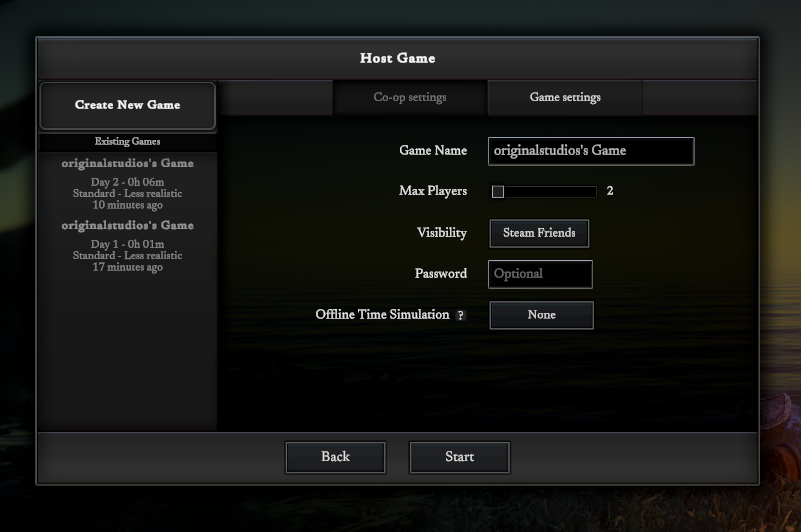
After a solid 5 months of work, the co-op multiplayer is now finally ready for testing with a wider audience! It was written from scratch with many of the game's logic needing to be reworked to factor in host and client game instance concepts.
Gameplay wise nothing has really changed much since the last updates in April. Almost all work has gone into getting multiplayer working smoothly. One exception was the hostile creature AI, it's been reworked a bit to add an aggressiveness factor that slowly increases as the creatures get more infected day by day. A lot more work still needs to be done on the AI of course, it will come with time.
Note: Single-player is disabled in the current playtest to emphasize co-op testing, please use the "Co-op multiplayer" button on the main menu to host or join a game. Don't worry though, single-player is still the main focus for the game and will come back for the release!
How Co-op works:
Getting started:
One player can "host" a game for their friends to join. Starting a game is similar to starting a new single-player game, but with a few more options. Currently single-player games and multiplayer games are separate - a single-player game can't be converted to multiplayer and vise versa. This may change in the future
The host can choose between it being private or discoverable to Steam friends, along with an optional password. There is no ability to host a public game at this time
Other friends can launch the game and then see the host's game show up in the "Join Game" menu if it's not set to private. If the game is private, the host needs to select "Invite Friend to Game" in the main menu when ingame. Needs the Steam overlay to be enabled.
Current max players is 4, this may go up in the future as the performance is tuned
Gameplay:
Sleep is still required to refill energy, so all players need to sleep at the same time to speed-up the 8 hours properly. Sleeping will always take 8 hours in co-op regardless of energy level
Speeding up various interaction like crafting or chopping is unfortunately not possible in co-op, so it may be a bit tedious. The interaction times will be tweaked during the testing phase
Creatures aren't scaled up to account for more players, but hunger and thirst requirements are implicitly scaled, so be aware. 4 players would require quite a bit of water and food if all at the same camp
Each player will have randomly chosen colors for their player character's clothing for slightly easier differentiation. This is just a temporary measure, there will be customizable characters in the game's release
The objective system has been changed a bit to handle multiple players. Some tasks like placing or building structures are shared amongst players, others like collecting certain items have to be done per player. The tasks will tweaked as testing continues
There is no friendly fire
There is only one main save for co-op games, you can't save to different slots like in single-player games. The host needs to click "Save and Exit Game" to save the game before shutting it down for others
After dying you can respawn and this will place you at the world's starting area again but with low hunger/thirst and low condition hatchet. The respawning system will be enhanced in the future so that there is an option to force a reload of an older save if any player dies (probably exclusive to the more realistic gameplay setting)
Some things to note:
This co-op implementation was written from scratch and is still very new so bugs are likely to be found, especially in networking setups with large packet loss chance or large latency due to physical distance
Co-op is host/client exclusive right now. One player needs to host and play the game for others to be able to connect. Dedicated servers will come later
The underlying networking is done via Steam Networking Sockets with Steam Datagram Relay. Basically this means that when a player joins a game, they connect to Steam first, Steam routes the traffic to the host via the Steam internal network. The host will receive data and respond via the same network. This means that one game won't see any direct connections or IP addresses of connecting players. Read more here: https://help.steampowered.com/en/faqs/view/1433-AD20-F11D-B71E (see section named "What about games that use Steam Networking APIs?")
Performance on the host computer may be lower depending on your CPU. There is extra load on the host due to handling connections, relaying messages to all clients, and simulating more of the world at the same time compared to single-player, especially if there are 4 players all in different parts of the world
Most of the internal testing was done with 2 player co-op setups, there may be undiscovered issues present when more than two players are present
To reduce bandwidth and facilitate faster game joining, less of the world is loaded around each player. You may notice parts of the world pop in as you get close to the edges of what's currently loaded. This will be worked on in the future
Other changes:
Updated Unity version to 2021.3.30f1
Finally fixed the crashes in the Mac version of the game! There was a Unity setting in the Mac build that was causing instability, turned it off and haven't seen a single crash during testing
Linux default Graphics API was set to Vulkan as performance seems better. Please report any issues you may see!
Another batch of bug fixes in this update thanks to all the great feedback!
This will be the last update for the demo, focus will shift now onto the remaining work needed for early access release later this year. The demo on Steam will shut off Monday April 17th. Really appreciate everyone's time trying the game out and providing your feedback!
The playtest/alpha build will stay up but won't be updated until close to release.
Balance:
Reduced time for distilling slime
Changed cleared blight zone regrowth to be prevented if the area was cleared within the last two ingame days
Fixes:
Fixed cooking/smelting progress being lost when loading a saved game
Fixed clicking on an ingredient in building list not switching to the search tab properly in the crafting recipe list for proper filtering
Fixed "Craft with..." while using a workbench preserving the workbench UI instead of closing it and opening normal crafting UI
Fixed very rare error when taking apart support beams causing the taking apart animation to be stuck on the character
Fixed error that happened in certain digging situations causing no dirt to be collected and the terrain not being modified
Fixed ranged attack aim triggering when attempting to use buildings like a fire pit with a stone or spear held
Fixed loose substance stockpiles like sand visually shrinking when more than 10kg is present
Fixed bellows indicator not appearing when placing hearth furnace
Fixed swamp mist effect showing up wrong in the distance and when behind transparent tree leaves
Fixed terrain digging by hand causing handheld items to take damage
Other changes:
Added speed-up ability to bergamot leaf application and also "Apply half" and "Apply all" context menu options
Changed stockpile placement to move all items of that type in your inventory to the stockpile instead of just the one that was right-clicked
Added grass flattening support to stockpiles
Changed large sandstone chunk and resulting grinding wheel to be only handheld and not placeable in inventory
Changed blighted zones to only show tall/wide cloud effects in village areas as originally intended, allowing more straightforward clearing of blighted zones in the wilderness even if they are very large
Added combustibility to more wooden items like improvised spears and various tool handles
Grass in forests and fields now also turn to dirt when run on over a long period of time
Added "Build with..." context menu action to slime oil oleander leaf
Update v0.6.11
Another batch of bug fixes in this update thanks to all the great feedback!
This will be the last update for the demo, focus will shift now onto the remaining work needed for early access release later this year. The demo on Steam will shut off Monday April 17th. Really appreciate everyone's time trying the game out and providing your feedback!
The playtest/alpha build will stay up but won't be updated until close to release.
Balance:
Reduced time for distilling slime
Changed cleared blight zone regrowth to be prevented if the area was cleared within the last two ingame days
Fixes:
Fixed cooking/smelting progress being lost when loading a saved game
Fixed clicking on an ingredient in building list not switching to the search tab properly in the crafting recipe list for proper filtering
Fixed "Craft with..." while using a workbench preserving the workbench UI instead of closing it and opening normal crafting UI
Fixed very rare error when taking apart support beams causing the taking apart animation to be stuck on the character
Fixed error that happened in certain digging situations causing no dirt to be collected and the terrain not being modified
Fixed ranged attack aim triggering when attempting to use buildings like a fire pit with a stone or spear held
Fixed loose substance stockpiles like sand visually shrinking when more than 10kg is present
Fixed bellows indicator not appearing when placing hearth furnace
Fixed swamp mist effect showing up wrong in the distance and when behind transparent tree leaves
Fixed terrain digging by hand causing handheld items to take damage
Other changes:
Added speed-up ability to bergamot leaf application and also "Apply half" and "Apply all" context menu options
Changed stockpile placement to move all items of that type in your inventory to the stockpile instead of just the one that was right-clicked
Added grass flattening support to stockpiles
Changed large sandstone chunk and resulting grinding wheel to be only handheld and not placeable in inventory
Changed blighted zones to only show tall/wide cloud effects in village areas as originally intended, allowing more straightforward clearing of blighted zones in the wilderness even if they are very large
Added combustibility to more wooden items like improvised spears and various tool handles
Grass in forests and fields now also turn to dirt when run on over a long period of time
Added "Build with..." context menu action to slime oil oleander leaf
Update v0.6.10
Fixing a bunch of big and small issues in this update, some balance changes, and lastly enhancements in various areas to make the gameplay that much better. Thanks for playing and giving feedback! Hope you enjoy.
Balance:
Greatly increased amount of quicklime produced by limestone burn piles
Increased generation chance of slime
Increased amount of slime oil distilled from slime
Reduced material requirements for leaf roof, stone floor and stone walls
Reduced burn time of oleander burn pile and made its clearing effect faster
Fixes:
Hopefully fixed cause of missing terrain chunks that some have reported. Please let me know if you still see it!
Fixed oleander burn pile not being destroyed after being burned
Fixed UI for oleander burn pile showing an empty "Produces" section
Fixed cleared areas of Blight coming back every day. The center of each Blight area needs to be cleared for it to stop growing
Fixed oleander burn pile clearing not working properly if the area is unloaded for the duration of the burn
Fixed toxic smoke particle effect not factoring in the fog when rendered
Updated water generation in newly generated chunks to reduce jagged shorelines
Fixed cases of the progress bar in the interaction UI (ex. "chopping...") from disappearing randomly
Fixed mid-air projectiles breaking when they are restored after a game load
Fixed lake/river container-filling to preserve initial click location when it starts so that mouse movement doesn't interrupt filling when the target point becomes too far
Fixed water not being tagged correctly internally which would prevent things like projectiles causing a splash when hitting it, code to check building placement in water not working correctly, and click-to-move mode not working correctly on water
Fixed thrown spears flying away too much after hitting the ground
Fixed Bloomery collider being too tall to fit under rafters/roof
Performance:
Disabling various physics-based checks for far away objects to slightly reduce CPU load
Visuals:
Reworked UI for active interactions like "chopping..." to look a bit better
Other changes:
Reworked throw attacks to feel a bit better: projectiles are much faster, the max range is a bit further, projectiles get launched at lower angles, and the spear throw animation orients the spear correctly during the throw
Reworked interactions in click-once interaction mode to greatly reduce the amount of accidental melee attacks happening when trying to interact with things while holding an axe
Allowed posts to be placed in shallow water
Added speed-up possibility to the level ground interaction
Hotfix v0.6.9
Quick hotfix for an issue introduced in the update earlier today (V0.6.8)
Fixes:
Fixed compass not showing up on the HUD beside the belt slot bar when held (only relevant for the more realistic mode)
Update v0.6.8
Spent some time working on performance and graphical tweaks to allow for further view distances after the previous camera angle update. Fixed a bunch of inconsistencies with the distance fog, rendering transparent objects and effects.
There is a new view distance slider in the graphics settings, defaulting to 50% which is what the game was previously. Keep in mind that at 75% and above the game will need to load more chunks in the distance to show the objects there, this will cause a much greater load on the CPU while loading/unloading chunks during exploration. Let me know how performance is for you, I'd love to hear how the game performs!
Note: most of the game's shaders were replaced in this update to help accommodate the new fog rendering. There may be a few graphical issues from this migration, please let me know if you spot anything that looks weird.
Features:
New view distance slider in graphics settings, allowing you to see more in the distance if your hardware can handle it
New "Speed-up camera blur effect" checkbox in gameplay settings to allow disabling of the blur effect when speeding up time
Performance:
Faster water reflection rendering - changed rendering pipeline a bit to avoid doing various setup processes to save a bit of time every frame
Greatly reduced game logic CPU cost every frame - world generated objects like sticks and stones no longer take up processing power to update themselves, wetness from the rain is now handled in a much more optimized way. Also greatly reduced the processing time every frame needed for physics based objects. These optimizations will only be present for items in chunks generated after updating to this version
More upfront memory use to pre-allocate a bunch of items/resources to make their creation during the first bits of gameplay faster
Misc optimizations across the codebase to make things a tiny bit speedier
Visuals:
Reworked distance fog rendering a bunch to fix up how transparent objects and particle effects look in the distance to be fully consistent
Reworked skybox rendering to look better across various cloud density and time of day combinations
Adjusted a few level of detail settings to avoid pop-in of trees and other objects
Fixes:
Fixed missing attack cursor when holding a melee weapon like an axe or knife (issue introduced a few updates ago)
Fixed crafting queue not stopping if forging on an anvil that breaks
Fixed refresh rate not being stored and loaded properly when the game is launched again - note that non-default refresh rates only work on the "Exclusive fullscreen" setting
Other changes:
Reduced generation of bushes that make a sound and slow you down in forests
Update v0.6.7
Tons of exciting new features and improvements are part of this large update! Wanted to prioritize a bunch of the bigger community requests over the past few weeks, needed to do a ton of rendering updates and optimizations to get it all in. Excited to get this out and see what everyone thinks!
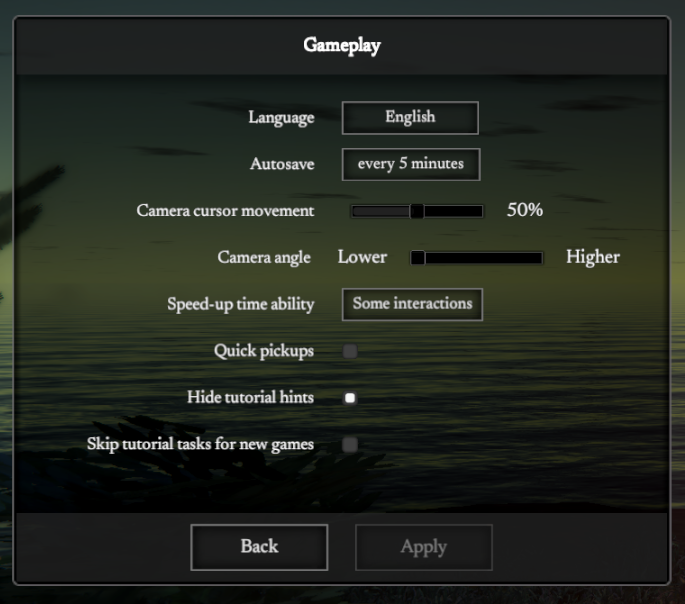
A few QoL features have been added that are new settings options in the gameplay settings screen. You can now change the camera angle to be lower to see more in the distance (has a small performance hit), you can enable speed-up functionality on almost all interactions like chopping or building, and you can enable "quick pickups" to make the picking up or gathering process instant.
Features:
New camera angle gameplay setting - a slider that adjusts the camera angles ingame. The "higher" side is the old camera angles from before. Keep in mind, lower angles require more to be rendered in the distance and will result in poorer performance.
Quick pickups - a new checkbox that allows instant pickup and gathering of items
Speed-up all interactions - new dropdown setting with "off", "some" and "all" options. The default and previous level was "some" which includes crafting, harvesting, and repairing. The "all" option allows you to speed up things like chopping, building and taking apart buildings.
Predator culling - killing predators enough will now prevent them from re-spawning in an area for a certain amount of time. This feature still needs a lot of testing and balance, please provide your feedback on how it's working!
Added a "camera cursor movement" gameplay option to control how much the camera moves as you move the mouse. Setting it to 0% will prevent all movement
Added a blood spray effect when attacking creatures
Added a progress bar above the player showing the strength of held-down attacks (since not everyone was aware of this before)
Performance:
Removed useless physics events for items near bushes (ex. in forests) that was eating up CPU for no reason
Reworked cloud rendering to be a bit more performant
Increased performance of rain particle system greatly, but with the loss of rain drop effects on the water - will be added back later
Enabled multi-threaded CPU-time rendering on the Windows build to increase performance when many objects on screen
May be a performance hit from the new SSAO effects and new fog rendering system
Visuals:
Better SSAO effect, but may have more of a performance impact - medium vs. high quality will have more of a difference now
New fog effects written from the ground up to account for lower camera angles - still requires tweaks and updates to look better in the future
Tweaked water rendering to look better at the shore when looking at an angle
Adjusted rain rendering to look more consistent regardless of time of day
Increased ambient light at night
Balance:
Drastically decreased bear health
Increased axe damage
Reduced amount of iron ore drops generated near outcrops
Increased pickaxe effectiveness
Reduced material requirements for stick wattle walls
Increased mud requirements for wattle & daub upgrade
Fixes:
Fixed placing dirt with shovel not showing dirt on the terrain
Fixed more repair menu refreshing inconsistencies
Fixed wattle & daub wall being shorter than the wattle wall it upgrades from
Fixed building process not showing clay bricks when building the clay brick based buildings
Fixed stack overflow crash when moving an item from within a held leather bag into the hand-slot the bag is in
Prevented case of double-click of a two handed container like a crucible or clay pot from mistakenly placing it into the inventory and emptying it
Fixed issue where using a workbench and selecting a tool causing that tool to stay selected when opening the crafting menu elsewhere, making the recipe break in certain cases
Fixed stockpiles from being placeable at far distances from the player
Fixed fence posts from placeable with less than 4 sticks in inventory
Fixed bronze anvil popping out from the clay mold when it's done hardening
Fixed the autosave timer so that it factors in main menu time and paused time properly
Other changes:
The speed-up process now adds a radial blur effect to the screen to better signify when time is sped up
Bronze axe blades, saw blades, and bronze knife now are 50% condition out of the mold, and can now be sharpened up to 70% with a sandstone chunk
Added a ranged attack cursor when holding a thrown item like a stone or spear
Adjusted a few animations and events so that chopping and attacks are triggered at the exact right time
Increased strength of the "smooth ground" option with the shovel
Added "Repair..." context menu option for items that have a repair possible
Reduced the disease exposure screen effect when eating lightly contaminated foods like rabbits. It now scales properly based on the level of infection from the food eaten
Update v0.6.6
Another update with fixes and balance changes thanks to everyone's great feedback!
Balance:
Greatly increased stick and long stick generation around groups of sparse trees
Increased generation of pine branch drops across all trees
Reduced starting infection level of all predators
Fixes:
Fixed backpacks placed on the floor not showing their inventory when used
Another attempt to fix fast-looking clouds in the water's reflection on some hardware
Fixed held items not being placeable on floors/bridge by clicking near the character
Hide toggled "show nearby items" labels during sleep
Finally fixed long-standing issue where felled trees infinitely fall underneath the ground in rare cases
Fixed large stones having shadows turned off when not that far from the camera
Fixed repairing not working for taken-apart buildings after the previous update's fixes to the damaged building repair process
Fixed missing hint text on the soaking basin to explain small stone or hammer requirement to take it apart
Fixed item repair window not refreshing button state of other repair options when the first repair is completed
Fixed leaf roof on four tall posts not protecting items on the ground from the rain
Fixed floor placement colliding with the posts it is snapped to
Fixed UI scale at 150% hiding the time control popup when the crafting UI is open
Fixed grinding wheel stand icon position issue in repair menu when the grind wheel stand is used
Prevented interactions like building or taking apart from damaging the held item if it's not a required tool, causing cases of a held small stone breaking when constructing a building that doesn't need it
Other changes:
Reduced max fuel for mud brick kiln and reduced max stack sizes for mud brick kiln slots
Added "can't pour" hint message for clay molds when holding molten copper
Changed up starting hint text around attack controls by further explaining how holding the key down affects the attack
Added new "Fires cast shadows" graphics setting that can turn off shadow casting from the fire pit to increase performance a decent amount
Removed "start stockpile..." option for non-player inventory slots to remove potential item duplication exploit
Stockpiles are now shown in the "highlight nearby items" state
More consistent water reflection rendering and potential performance increase when MSAA is used
Switched UI scale options to be in increments of 10% with a max of 150% instead of 175%
Added weights to a few of the heavier objects like iron ore, ingots, and large stone
New requirement for buildings like the fire pit to be only placeable on the terrain
Renamed "Post" to "Medium Post" to reduce confusion during the tutorial and added the tall post as an optional completion criteria for the first task
Updated shelter building tutorial task description to make tall post usage benefits more clear
Update v0.6.5
Another bunch of bug fixes and quality of life changes in this update, thanks for all the reports! The building process should be a lot less error prone now with less incorrect collisions and proper state setting, and clay gathering should be a lot less finicky and quicker.
Fixes:
Fixed rare issue where interacting with the UI a certain way causes all input to get locked and stops the character from being controlled and the main menu from being opened, forcing a hard exit of the game
Fixed stick rafters incorrectly colliding with the support beams they should be connected to and preventing placement
Fixed building system state tracking so that removing a diagonal support beam correctly refreshes the state and allows placing stick rafters in the new rectangular shape
Fixed weird looking terrain ridges near lakes in the world generation. Will need to start a new game to get the fixed world generation
Fixed repair UI not updating and resetting properly when a repair completes
Fixed repair of fuel burning buildings like the fire pit from clearing out all fuel and extinguishing the fire
Fixed fast moving clouds in the water's reflection on some hardware
Fixed clay candle mold crafting recipe incorrectly outputting in the hardened version instead of soft version
Fixed gates not moving if connected between posts or tall posts due to collision issues
Fixed bedroll from being placeable on plank and stone floors
Fixed missing recipes for melting hardened tallow back into liquid tallow, and smelting hardened copper and ingots back into molten copper
Fixed accidental attack if weapon is equipped and you click on an NPC, potentially hitting them
Fixed a bunch of missing and wrong map tiles for areas around lakes
Fixed sounds like fire pit burning/cooking from being present on fire pits that aren't ignited or cooking when coming back to camp
Fixed certain buildings like lean-to not allowing you to take them apart due to infinite walking from the character
Fixed red/green outlines for post placement not showing up over the water
Taking apart a roof piece will dump the materials below the roof to avoid them getting stuck up top
Fixed broken run animation for Cloaked Figure
Fixed missing repair functionality for walls and other non-hammer built buildings
Fixed tutorial task text for hardening the clay bowl to be in the kiln instead of the fire
Other changes:
Clay gathering is faster and less finicky, with more clay collected per gather
Clay clumps drop if trying to gather clay from the ground and your inventory is full to avoid losing the clay
Holding left shift + clicking the craft button now queues 5 recipes at a time to reduce the amount of clicks needed
Changed player icon color and made larger to be more obvious on the map
Reduced player-made map marker text size
Allowed the escape key to close the crafting/building menu if the search field is focused but empty
Gathering from the terrain doesn't stop if your character slides away due to a steep slope or item underneath
Added stockpile support for pine branch
Changed damage text color to be orange for player hits
Adjusted a few shelter tutorial task descriptions to make things a bit clearer
Update v0.6.4
Small update to address balance and some of the issues mentioned in the feedback so far. Thanks for all the great feedback so far!
There are still some intricacies with the building system that need to be ironed out, some edge cases that will prevent placement of roof pieces in certain situations. This will continually be addressed in further updates. Appreciate your patience!
Balance:
Greatly increased generation chance of Dogbane plants
Fixes:
Added missing recipe for Clay Candle Mold to allow you to create candles and use the alembic
Fixed missing repair buttons in the repair menu in 4k resolutions and higher
Fixed some roof pieces not being reachable by the character due to being too high up (ex. when placed on 4 tall posts)
Fixed support beams being able to be placed in positions where they collide and overlap, which would cause some issues with roof placement later on
Fixed a few objects like sticks and pine cones noticeably disappearing when a bit further from view
Fixed issue that causes eating a stack of food items in the inventory to constantly change which inventory slot shows the progress bar
Fixed rabbit skeleton being way too small
Stability increase to hopefully remove chance of the game's input locking up when interacting/eating and clicking quickly
Fixed item pickup interaction being interrupted if the character slides away slightly from the item due to steep terrain or nearby objects pushing the character
Fixed edge case where moving large amount of items from a stockpile could cause item stacks with negative amounts
Fixed pine branches flying around wildly when dropped from chopped young trees