

Blight
Next Fest Stream
Major update v0.6 and Next Fest!
Hey everyone,
Things have been a bit quiet since the last few updates but rest assured the game continues to grow and gain exciting new features and content day by day. Major update v0.6 has been released just in time for Next Fest February 2023!
One of the biggest new features is the building system that's been in the works for a while. A lot of thought was put into it to make sure it's interesting and flexible enough to allow for a ton of creativity and unique designs, not restricted by rigid piece sizes or grid based systems. The shelter layouts use posts driven into the ground as the basic building blocks, allowing you to connect them together in any position to later build roofs and walls between the posts.
Hope you enjoy the demo!
New features:
- Building system that allows you to build shelters out of sticks, leaves, mud, planks and stones
- Intricate terrain modification system that complements the building system. A shovel was added to allow for digging, raising terrain, and leveling terrain for floor piece placement. Collecting clay is now a process that directly modifies the terrain rather than gathering from objects
- New terrain types, new nicer looking visuals, overhauled terrain generation to look even more natural and interesting
- Extended story content around combating the Blight that sets up things for the eventual full story in the Early Access release later this year
- New attack swing holding mechanic to allow for greater timing precision and damage output when fighting enemies
- New distillation process to extract essential oils using a copper alembic, created from copper molded into copper sheets and using new candles as a heat source
- Standing torches, candles, and lantern as new lighting options for your camp at night. Candles can be extinguished by the wind so building wind-blocking shelter is key to protect them
- A few new resources, a new smaller tree used primarily as a tall post for building shelters
Other changes:
- Various CPU and rendering performance improvements
- Bunch of new craftable items and structures
- Tons of bug fixes
Update v0.5.13
New name
As you may have seen, the game was renamed recently to The Last Plague: Blight to make it more a bit more unique and recognizable.
v0.5.13
A small update to bring in the new name, upgrade to a stable Unity version, and a few small tweaks/fixes. Internally the game is still named "Blight" to keep the old settings and save files present when updating, but this internal name will change when the game releases.
Features:
- Added a "recent unequipped item" recall feature. Now when you pick up a log and your axe is automatically swapped to the belt, the axe will auto-equip again when you place down the log for further chopping
Fixes:
- Fixed issue that made the world look wet from the rain if loading or starting a new game while in an active game where it is raining
- Fixed some rare cases of uncaught exceptions that could cause some inconsistencies
- Hopefully fixed the crashes seen on the Mac version of the game with the Unity upgrade. Please reach out if you still see any crashes when playing on Mac!
Other changes:
- Upgraded Unity from 2021.2.18f1 to 2021.3.6f1 LTS
- New logo and icon added for the renamed game name
New Game Name!
Nothing has changed about the game itself or any planned content. Work continues on all the exciting new features that will be seen in the Early Access release hopefully later this year.
Check out the roadmap post to see the types of things planned: https://steamcommunity.com/app/1564600/discussions/0/2961670721755834442/
Blight Devlog #3
I wanted to share some of my favorite films with you. These were big inspirations for Blight, be it story, visual inspirations, music inspirations, all that good stuff, we’re hoping that Blight will live up to the legacy of these great films.
The Fog
This John Carpenter classic is a big inspiration for Blight. We hope you can see the visual similarities in the gifs and videos we share on our Twitter account (https://twitter.com/BlightTheGame).
Carpenter does an amazing job with creating a suspenseful film with a mesmerizing atmosphere.
The Fog’s story, dialogue, and characters are, of course, great, but the two elements that stand out for me are the visuals and sound track, Blight’s soundtrack is heavily inspired by Carpenter and we hope to honor his work in our visuals as well.
Aliens
James Cameron’s Aliens is not only an impeccably directed movie, oozing with a grimy atmosphere, the film's characters and writing are equally iconic.
The movie creates a team of likable characters that you really want to see make it to the end, and it’s always a shame to see any of them die. I'm hoping that, with Blight, we’ll be able to make you care about the main characters in a similar way to this classic movie.
In the Mouth of Madness
My personal favorite of Carpenter’s filmography, a beautiful descent into madness that culminates into a disturbing and surreal final act.
Carpenter’s creative imagery is complimented by Sam Neil’s amazing performance.
As you can see from the gifs and videos we’ve been sharing, we took a lot of inspiration from the chaotic, mind bending final act of the movie.
Blight will similarly unravel as we move through the story, making a journey from the natural to the extreme unnatural as madness becomes the new reality.
Sadly, a lot of people I talk to haven't seen this movie, if you're one of those people, do yourself a favor and check it out, you won't regret it.
The Evil Dead 2
The Evil Dead 2 for me is the quintessential horror comedy, it has just the right balance of funny moments and scares, it’s not too scary to be funny, and not too funny to be scary.
ED2 also has one of my favorite horror protagonists, Ash Williams is groovy, but he’s also human and you can see that he’s being affected and traumatized by the events that are unfolding around him.
In Blight, I hope to achieve a similar balance, along with cool characters who are also human, who won’t finish the story the same people they were at the beginning.
The Thing
A recurring theme on this list is isolation. The characters in The Thing are trapped in the arctic base with a monster. If they stay, they will likely die. If they leave, they will definitely die. No one is coming to help them, so their only hope is to figure out some way to solve the situation for themselves.
You might draw some parallels when you play through Blight.
Also, the creature design in The Thing is utterly amazing and a masterclass of practical effects.
The atmosphere is eerie and oppressive, with one of the most underrated soundtracks in movie history.
TerrorVision
TerrorVision was the 80s, most movies are little more than films, few can claim to be an entire decade, TerrorVision was one of those movies, fitting many of the archetypes of the decade into it’s 85 minute running time, along with being an homage to the horror genre, it’s the sort of movie that feels like it was made in the late 2010s as an homage to the decade.
Many of the characters in Blight are inspired by archetypes of the 80s; The punk rocker, the boxer, the nerd.
Return of The Living Dead
This gory, violent, exploitation classic, reanimated the zombie film genre with a punk rock attitude that set it apart from its predecessors.
With a dark sense of humor that provided comedy relief to the disturbing antagonists of the film, along with an oppressive feeling of isolation as the colorful cast of survivors are cut off from any chance of rescue, they must work together to survive as best they can as running away alone only brings death.
With its grim atmosphere, nihilistic humor and punk attitude, along with a stand out performance from Linnea Quigley, it's a Halloween staple for me.
The Crazies (1973)
Unearthly creatures invade the world of Blight similarly to the virus that rampages in The Crazies. I feel that the last days of Blight’s city went down in a similar way to how they unfolded in the movie, with the military doing all that they can to contain the situation through whatever means necessary, but they can only do so much before the situation evolves beyond their control.
The film captures the intense frenetic panic that would be felt upon finding yourself suddenly in an apocalyptic situation, where you need to first find out what is even going on, then either try to get out or solve the problem somehow.
I hope this watch list will help let you into our creative head space.
Thanks so much from the bottom of my heart for all of your continuous support.
Update v0.5.12
Did a big rewrite of how all the world chunk data is stored to accomplish two things: further reduce the jitter as the world is explored/loaded, and vastly reduce the amount of disk space the world chunk files take up. All the while keeping things backwards compatible, although the biggest performance and disk space savings will be seen in entirely new worlds. I wanted to tackle these important rewrites now to make sure things are stable and the game is in a good position for release later this year.
Performance:
- Reworked world saving/loading system even more to vastly reduce amount of disk space used in a large world with multiple save slots (every unique save has to duplicate all world chunk data to make sure the state is properly preserved)
- Related to the above change, another optimization was added to rework how the chunk data is actually stored and loaded to greatly reduce memory pressure in the game and reduce jitter even more, to almost non-existent amounts depending on your CPU/memory setup
Fixes:
- Fixed the labels that show up on top of the character for interactions and things like "LMB - Place down" from jittering a bit while you move
- Added more logic around the climbing-over mechanic to make sure the character isn't able phase through things like walls of a cabin (and getting stuck behind a chair on the other side for example)
- Fixed issue added in the previous update that would cause stockpiled items to lose their collision information allowing you to walk through them
Other changes:
- Added warning to smelting UI when trying to smelt too much bronze to fit into the crucible
Update v0.5.11
The Performance Update
Finally spent some time on performance which is something I've wanted to tackle for a while. Completely redid a lot of the internals of the game and really happy with the results, seeing solid framerate improvements (~34% improvement on my RTX 2080), as well as a fairly decent reduction of stuttering as the game loads and unloads chunks while running around the world. There is still some more improvement to be done here, but I'm happy with where it is for now.
A few other fixes and tweaks are included in this update. Please continue to report any issues you see! Thanks
Performance:
- Completely reworked internal saving/loading system for much less memory pressure. This greatly reduces some of the stuttering seen before when running around and loading/unloading the world. New games will see the most benefit vs. loading a pre-v0.5.11 save
- Tons of optimizations to rendering, culling, logic, etc. Should increase framerate by 5-30% on almost all configurations
Fixes:
- Fixed water reflections quality no longer actually using High when Medium is selected. The difference between Medium and High is whether the reflections will render shadows or not, a fairly significant performance impact
- Fixed rabbit snares losing their correct state sometimes when multiple are present in the world - some with and without trapped rabbits - when loading a game
- Clamped contamination of harvested creature items to 100%
- Fixed main menu background scene showing weird gray highlights if leaving an active game with heavy cloud cover
- Fixed rare issue where the construction materials shown in the character's hands during the building process would actually have collision enabled and would end up pushing the player around during the animation
- Fixed another cause of "ghost items" where trying to drag something like mud into the construction materials UI slot (instead of mud mortar) would cause a ghost item to get stuck in the slot
Other changes:
- Soaking slots will always show on the Soaking Basin UI regardless of how much water is present, and the UI was reworked to be more helpful in figuring out what is needed to properly treat the hides
- Times shown on things like remaining time for treating a hide are capped to 100 hours now to prevent overly large values from appearing in very inefficient treating setups
- Add stockpile ability for soft clay
- Slightly different looking bushes as textures/materials are consolidated as part of the general performance optimization above
- More interesting looking player/bush graphical interaction effect while walking through them
- Better transition between player character running and walking so it no longer appears instant
- Long sticks are packed closer together in stockpiles, allowing for more to be placed per stockpile
- Reduced how much impact each step has on changing grass to dirt over time
Update v0.5.10
Huge update for May! A lot of fixes, some new QoL additions, new map icons, more stockpiles, slight graphical/lighting changes, all that good stuff. A ton of these items are from the great feedback that's been coming in, so thank you for helping make this game the best it can be!
Features:
- New map icons on less realistic mode. In addition to the fire pits, now you will see any cairns, rabbit snares and hand carts you've created
- Added "eat/drink half" option to consumable stacks and containers
- Added wind force to all smoke from the fire pit, charcoal pile, limestone burn pile and smelting buildings
Balance:
- Considerably reduced rotten blueberry fuel time
- Increased amount of dogbane plants generated
- Greatly reduced stamina cost of blocking attacks to make the shields more worthwhile
- Reduced character knockback force from wolf and bear attacks
- Increased tanning time for coyote and wolf hides to differentiate them from rabbit hides
- Increased weather state duration (ex. cloud cover, wind, rain), but now rain will be prevented from happening again for quite some time after it finishes raining
- Reduced amount of Blight clouded areas in newly generated worlds to allow for a bit easier start and long-term gameplay
Fixes:
- Fixed quality-boosting exploit for liquids when mixing a low quality soup/tea with potable water. A proper fix for all quality combinations requires a big change to the internals of the game, this will come later
- Fixed another cause of "ghost items" in inventories by forcing item dragging to cancel if the game loses focus in any way (ex. alt-tab). Ghost items is when an inventory slot appears empty but would suddenly show an item when clicking and dragging the item out of the slot. Hopefully there are no more such causes
- Fix freeze when placing a building foundation down that attempts to add the above "ghost items" to the building
- Fixed very rare issue where Elric's camp doesn't generate fully and you'd only see a fire pit and potentially one or more bedrolls
- Fixed issue introduced in the last few updates that prevented the dialog options from being clicked (forcing you to use the 1, 2, 3 keys to select the options)
- Fixed blueberry bush sometimes getting into a state where it grows back very quickly after being picked
- Added missing localization for "mixture" text for liquids that are a mix of different things
- Fixed bug where rain in rain catcher would evaporate away very quickly after rain stops
- Fixed missing localization for the "empty X into Y" interaction text (ex. empty jug into soaking basin)
- Fixed wrong hint text in cooking UI, where it would show "missing cooking surface" instead of "try emptying cooking surface first" when the recipe is possible with the given ingredients minus whatever liquid is in the cooking surface
- Fixed issue where climbing over things would briefly re-show any roofs your character is under, such as the shade canopy
- Fixed missing collision checks for rabbit snare and bear traps
- Fixed bug where the bear trap can be "triggered" by momentarily moving a red/green highlight of another object you are trying to place over the bear trap
- Fixed huge sizes of the black and brown bear furs when dropped in the world
- Fixed weapons to properly take condition/quality/rust into consideration for damage inflicted to creatures. Before attacks would always deal the same full damage regardless of item condition
- Fixed issue where right-clicked inventory slot would stay open after pressing tab to close the overall inventory window
- Add range check to creature harvesting so that it's cancelled if the character drifts down the river during the interaction
- Added missing crafting recipes for mild steel bar to mild steel chunks and vise-versa
- Fixed issue where CTRL-clicking firewood from a stockpile wouldn't stack them properly into your hands and would drop them instead
- Fix missing parenthesis in "autosave" text on load game screen
Other changes:
- Removed Windows 7 warning now that it has been confirmed saving/loading works properly (yay)
- Reduced distance between X marker and label on the map
- Ability to stockpile sticks, long sticks, plant rope, copper/tin/iron ores, and iron blooms
- Cancel drinking/eating if you become full in thirst/hunger respectively. This check has been around forever but wasn't working because the math was slightly wrong
- Village labels on the map will become transparent when hovered over to allow seeing map features under them
- Map max zoom level made a bit larger to better accommodate the new icons
- Changed internals of tracking elapsed time for cooking/smelting when entering old areas. This should hopefully have no effect ingame but is a more consistent system internally
- Stockpiles now fill in width-wise first rather than length-wise for smaller items
- Added text on highlighted stockpile label to show which item it stores
- Added checks to make sure climbing over can't happen if the space above won't have enough vertical clearance for your character
- Increased amount of global lighting when there is overcast weather to better represent light scattering in the sun-less environment
- Larger item rust percentages now tints the item image brown in the inventory UI
- Hitting ESC while eating/drinking something will cancel the consumption first instead of closing the UI first and keeping the consumption active
- Moved the fastforward UI up a bit to make it appear more prominent when crafting or harvesting, and added small key labels to show the keyboard keys used for each button
- Liquids in a clay pot in the fire pit will now evaporate if the fire pit is not ignited
- Added crafting recipe to break large sandstone chunk down into small ones
- Reworded difficulty options to hopefully make things a tiny bit more clear
Blight Devlog #2
As part of our efforts to promote the game, I'd like to take a moment to introduce our character system. Blight features 5 main characters and several different types of enemies.
Like most games, our characters and enemies have a lot of data associated with them - they have meshes and materials which determine how they look, animations which allow them to move, sound effects which play during different events, and lastly attributes which control their health, movement speed, how stealthy they are, etc.
If you've been following us on Twitter, first of all, thank you for your interest and support! But if you found us there, you might be aware that we are using the Unity Engine to build Blight. One of the great features of this engine is the ScriptableObject class. This class is an excellent way to store data that will not change while the game is playing, and we've made use of this for our character attributes.
Below, we've got a short snippet from our attribute class. If you're not familiar with code, don't worry. Let me just go over a couple key points. We're marking the class as serializable, so that we can easily save and load this data later. We are also implementing 3 interfaces: ICharacterAttribute (a custom interface for this project), IEquality and IEquatable. These second two are useful when you store items in dictionaries or lists and when you want to be able to compare two objects.
*************
[Serializable]
public class Attribute : ICharacterAttribute, IEqualityComparer, IEquatable
{
[SerializeField]
private string attributeName;
[SerializeField]
private string description;
[SerializeField]
private float baseValue;
[SerializeField]
private float maxValue;
[NonSerialized] //Sprites are internal to Unity and cannot be serialized using System
private Sprite icon;
//we need to use field and nonserialized because otherwise Unity will try to serialize this, which is BAAD.
[field: NonSerialized]
public event AttributeChangeHandler AttributeChanged;
}
*****************
One other point worth mentioning is the special handling of the AttributeChangeHandler event. You can think of events similarly to subscriptions on an RSS feed or on Youtube - events that are used to notify other systems that something has happened. (A personal favorite example is the voice recordings in Dishonored 2: the robots in the clockwork mansion verbalize their internal state) When the movement speed is changed, for example, we can use this event to notify the animators or navmesh agents to change their speed, or if the health attribute is changed, we can notify the UI to update that, etc. Because we will be using this event in other pieces of code, and because the Attribute class is marked as serializable, when you try to save a character's data, the system will start going through all the code where you have used this event and try to save that code as well. This will lead to a huge number of errors (mostly because Unity has a built-in serialization system for its own data, and this system is not compatible with the native C# system), therefore we need to explicitly tell the computer not to save the subscriptions.
So, I mentioned that we are using Unity's ScriptableObject class, but you might have noticed that there is no mention of it above. That's because we are only using ScriptableObjects to store the data itself in Unity, as below.
*******************
[CreateAssetMenu(fileName]
public class AttributeSO : ScriptableObject
{
public List attributes = new List();
public List sprites = new List();
}
******************
Inside our characters, and that includes the enemies, we keep a dictionary of attributes which can be saved and loaded as needed. When we start the game, if there is no game save file, we can go through the attribute ScriptableObject and start assigning default values to the attributes. If there is a game save file, we can just load the data from there. Nice and easy! Because the attributes themselves are not ScriptableObjects, they can be saved both inside and outside of Unity. I think this provides a nice example of a way to use ScriptableObjects - they only contain a definition of each attribute, and the characters each have their own dictionary of attributes with their own values.
******************
[Serializable]
public class Character : ICharacter
{
private string id;
private string name;
private string description;
[FMODUnity.EventRef]
private string hitSound;
private Dictionary attributes;
//using float arrays because we can't serialize Unity's Vector3 or Quaternion class/struct
private float[] position;
private float[] rotation;
}
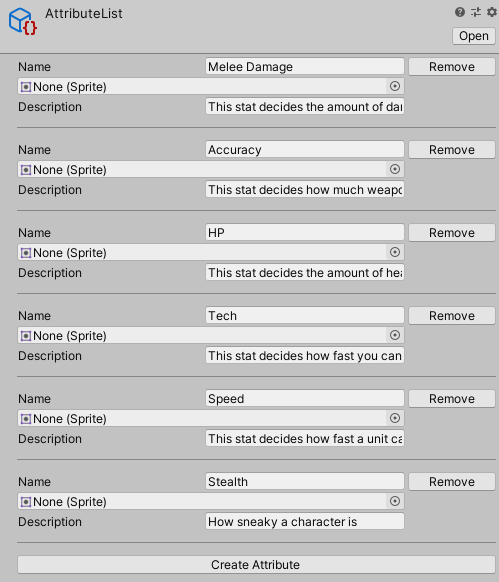
Thanks to some custom inspectors, when you make changes to the attribute list, the characters' and enemies' data also gets updated. So adding or removing an attribute from the list also adds or removes it from the characters.

There is a lot more we could cover on the subject of ScriptableObjects as data holders. For example, we are also using them to store the data for our characters, enemies, items, and weapons. ScriptableObjects provide a robust way for programmers to help the designers and the rest of the team get access to important data without going through lines of code. But for now, I think that gives a good overview of one way to use them. If you made it this far, thank you for your time and attention! We at Most Dangerous Games really appreciate your interest in Blight and we are hard at work pushing this project forward. We look forward to sharing more of the development process with you down the road.
I'd like to close by sharing a discussion the project lead, Peter, and I had many months ago. Blight is steeped in 1980's references, and Peter in particular is a huge fan of 80's horror movies. He was talking about a game mechanic idea that would involve collecting VHS tapes of fictional B horror movies, and I almost wet myself reading through the list of titles he had come up with. I'll only share one here, but I absolutely love how over the top they are and how they seem to pay homage to indie horror titles from the time. One of my favorites is "Attack of the Oversexed Monsters from Beyond the Colors of Space." As you play through Blight, you'll have his wit and creativity to accompany you and our 5 heroes on their adventure!
Update v0.5.9
Big new change: difficulty selection! Some people are still looking for a slightly easier experience and so a difficulty setting has finally been added.
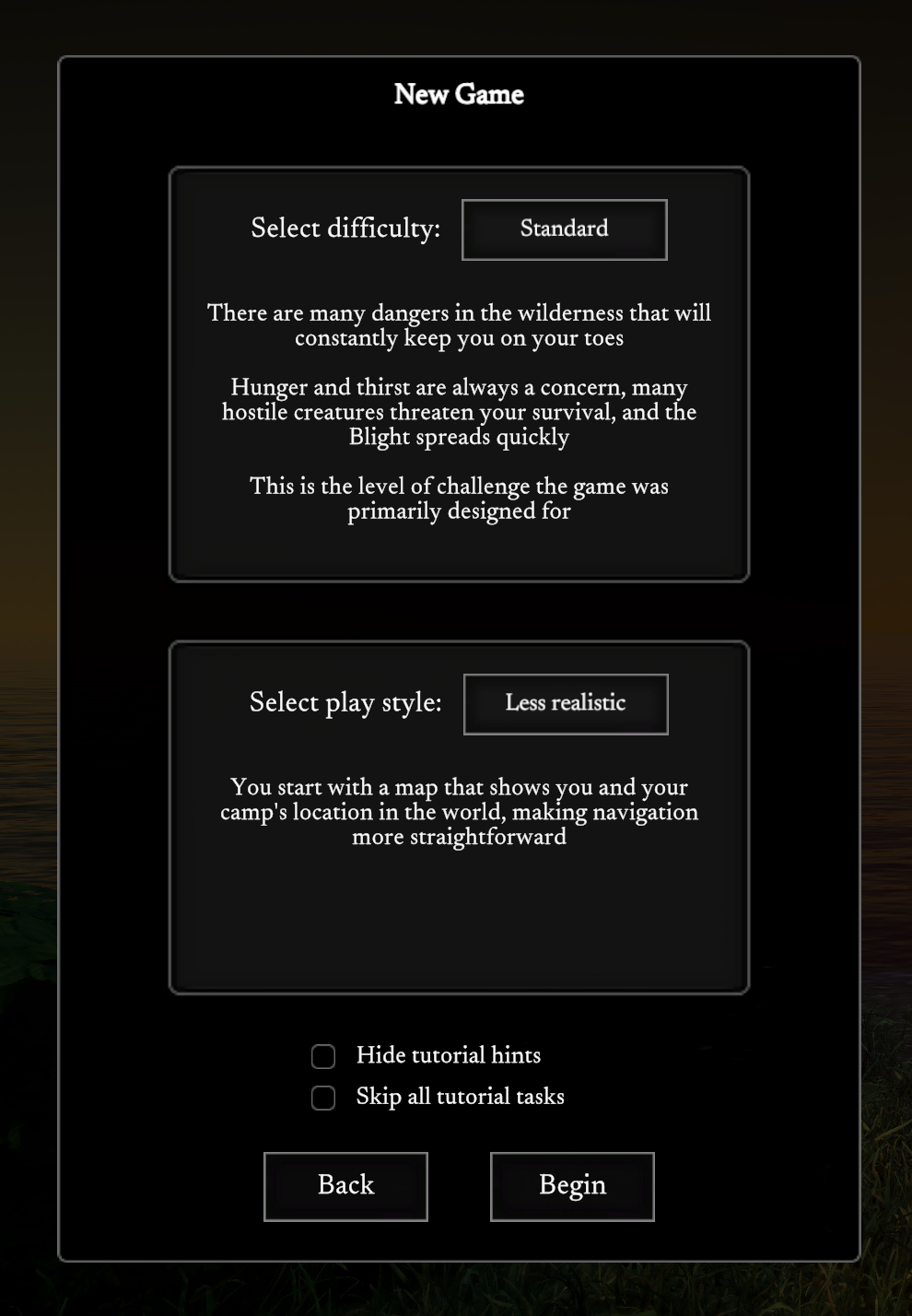
There are now two options when starting a new game, difficulty and play style. The play style setting is the same as it was before, switching between whether the map shows your location or not. The new difficulty setting has "Easier" and "Standard" options. Standard is what the game was before, but the easier mode scales down a few things like hunger/thirst, amount of enemies and how fast the Blight spreads.
Currently the difficulty can only be set at the start of the game. Remains to be seen if this is something that will be able to be changed ingame or not.
Features:
- Difficulty selection at the start of a new game with new "Easier" mode
Fixes:
- Fixed missing localization for dead creature UI harvesting options
- Fixed hardened mold UI layout issues when title is a lot longer in Russian
- Fixed rotten wolf meat burn time to be consistent with other meats
- Fixed flickering X button in controls settings when trying to clear out a key bind
- Fixed bridge piece placement being off in certain situations
Other changes:
- Changed Russian translation of Charcoal Pile to make more sense
- Changed "hammer" to "hammer or small stone" in crafting list UI and interaction hints for buildings to make it even more clear that small stones can be hammers
- All dropdown lists in the UI look a bit nicer now
- The first 10 small stones tutorial task is now skipped if a fire pit is placed before 10 small stones are collected
- The "click once" interaction style is now the default for new players
- Crafting list is starting to get a bit slow as more and more recipes are added to the game, reworked it so that only one recipe shows up per frame to distribute the processing power and speed up the initial display of the window
- Roads crossing rivers now have a chance to become bridges or fords
- Bridges no longer alter the terrain to create fords, they simply cross the river as is