For February, the starting town was completed and there was some clean up on character interactions and the UI. I wanted to make sure that the first town was completed so I can comfortably work on other tasks in the backlog.
Finished Building Interiors
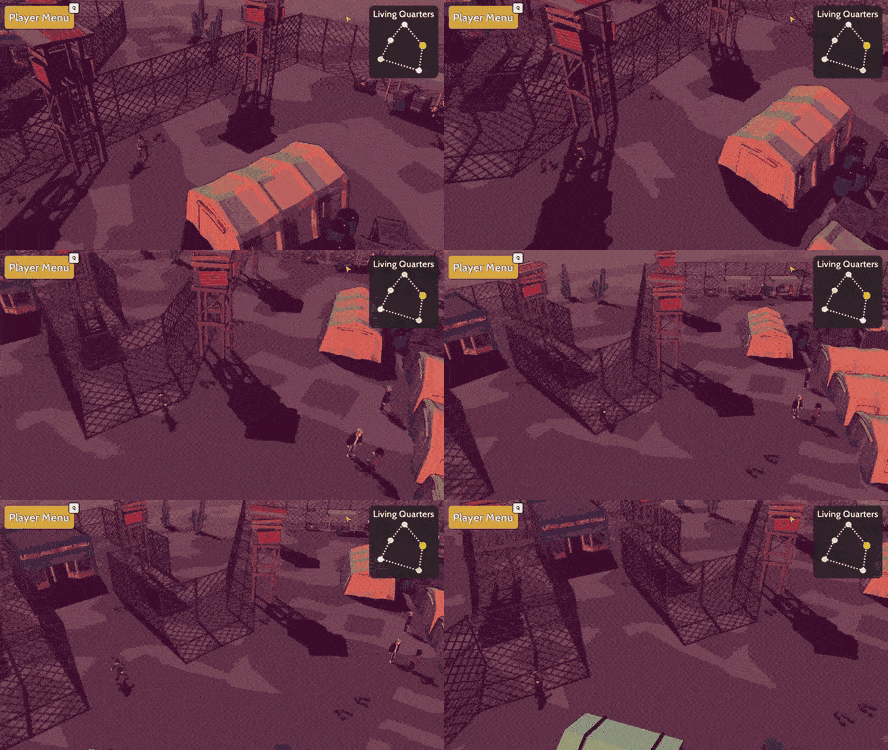
Near the end of last month, the building interiors started to get implemented and now they're all completed! In the starting town, there are three main areas that can be entered: the jail, the living quarters, and the academy. There is going to be story-related content inside of the jail and academy, but the living quarters are there to give a better idea of the personality of some of the characters.
After showing off the living quarters interior on social media, I got a recommendation to add some transition fading:
UI Polish
There were some minor graphical/cosmetic bugs related to the speech bubbles and activating the item shop which were resolved. Previously, the "..." would disappear after some time and you wouldn't be able to retrigger the same character's speech bubble without looking away. Fixing it for interactable characters also fixed it for the item shops, so that's one less thing to worry about now. Additionally, the minimap used to be custom drawn, but now it's more modular making it easier to edit and iterate if a map layout is changed.
Item Shop Controller Support
Most of the game already has controller support, but the item shop was something that still needed to be reworked to be able to support controllers. Fortunately, the base classes for controller supported UI elements like a vertical scroll bar for item selection, and tab toggle of item type selection, was already implemented. Unfortunately, the item shop UI was one of the first things implemented when the project started so the code wasn't written as clean as it is today. That means, a good amount of time was spent refactoring the item shop related code and prefabs.
Behind the Scenes
This is a section of the devlog where I like to talk about the parts of the game that were improved but aren't necessarily big enough to have their own section. For February some of the extra things completed were:
- Updated the run animation and transition.
- Fixed issue with laggy camera transition when moving between town locations.
- Fixed issue with control focus when speaking to a character or in an item shop.
Going Forward
With the starting town completed, it's time to start working more on the story related content. I wanted to start working on the intro cutscene, last month, so for March I really want to complete the intro sequence. So, the list of things I want to get done are:
Storyboard the intro cutscene
Implement the intro cutscene
Transition from intro cutscene to having the initial player control.
If you have any suggestions or want to give your opinion on the game, follow me on social media, I listen and respond to all comments! :D
For January, the starting town was reworked, building interiors started to be added, and implemented some data tracking. Got the flu mid-way through the month which really brought productivity down but at least some stuff was able to be completed, to inch Bright Red Skies closer to completion.
Rework Dosero
When I first made the layout and design for Dosero, I had a completely different opening planned. But now that the beginning events are a lot different, the layout of Dosero needed to also be updated. The key locations that were missing were the market, jail, and the academy. The original layout was too small so on the first pass of the update, the fence boundaries were increased to leave room for the new points of interest.
Once that was done, the rest of the town was filled in:
Building Interior
To me, it seemed like having a bunch of buildings in a town, but not being able to enter them, felt unsatisfying. So I'm starting to give some of the important buildings an interior. Hoping that this makes the world feel more alive and less static while allowing a possibility of adding some secrets in some of the buildings. It also helps to distinguish between what building serves what purpose, like it may or may not be obvious that this building was a jail, but seeing the jail cells should clear that up.
GameAnalytics
Something I wanted to be able to do for a while and implemented this month, is to track data in the game like seeing how far you get, how long you play, if there's anything that's confusing and gets you stuck, and finally if there are any game crashes that aren't being manually reported by people. Not everyone has time to give feedback, but having the data in front of me can be really helpful when trying to make game design decisions since it might be able to determine what features are fun and what aren't. Or if there are points in the game where too many people get stuck then I know to reduce the difficulty. But honestly, the most important feature would be automatically seeing any game crashes and the corresponding log message, since that will be huge when trying to test/debug the game.
Behind the Scenes
This is a section of the devlog where I like to talk about the parts of the game that were improved but aren't necessarily big enough to have their own section. For January, there were no extra features worked on.
Going Forward
January was a bit of a rocky start to 2020, but I'm still very optimistic about the possibilities for Bright Red Skies! For February, some of the things I want to complete are:
Finish the other 2 building interiors of buildings that can be entered.
Start working on the intro sequence.
If you have any suggestions or want to give your opinion on the game, follow me on social media, I listen and respond to all comments :D
First and foremost, Happy New Years here's hoping for a great 2020 for everyone!
Like I mentioned in the previous devlog, I was going to take it easy in December to give myself a little bit of a break from constantly working on Bright Red Skies. But now I'm going to try and bring the progression pace back to what it was before December. I did still manage to get some stuff done for this month, including better UI scaling for different screen resolutions, adding tutorial popups for when a new game mechanic is shown, and reducing the file size of the game.
Tutorial Popups
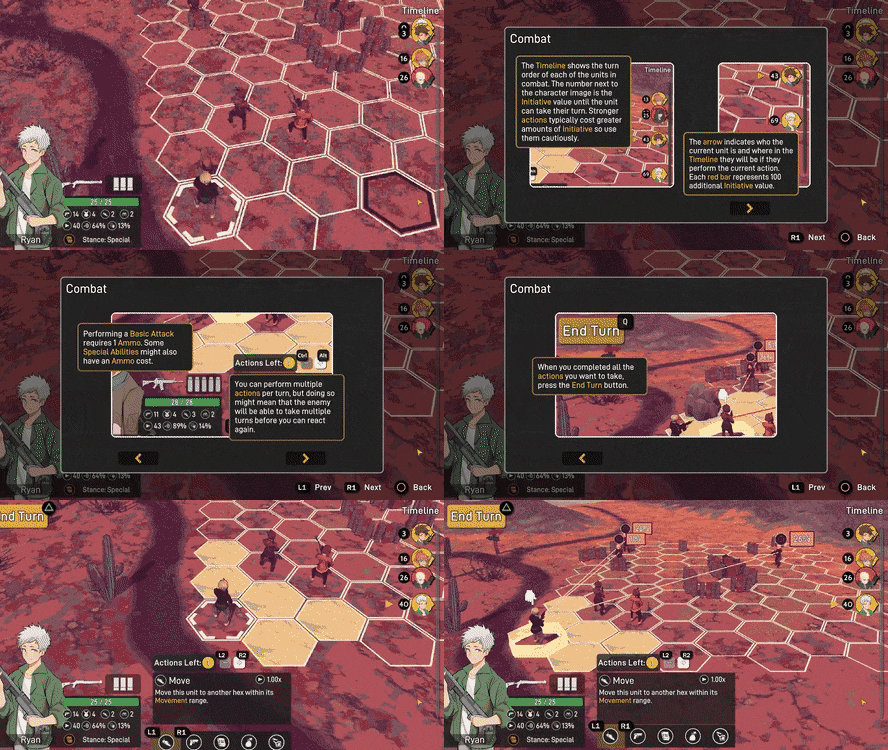
There needs to be a point in the game where game mechanics are explained so the easiest way to explain these concepts are through popups with images and text explanations. Since there are some concepts that aren't very intuitive, like initiative and taking multiple actions, it feels like there's no elegant way to explain these mechanics other than directly explaining them.
The game will keep track of when a new game concept is given to you and show the associated tutorial popup. This would be like something like an achievement system where special actions will trigger giving you an achievement. This should make implementing the achievement system easier in the future.
Screen Resolution
I received some complaints that the UI scaling was not working well for certain screen resolutions like ultra-wide screen so I updated all of the UI elements currently in the game including combat UI, player menu UI, and all popups to use screen percentage scaling rather than Unity's canvas scaler which scales based on either the width or height of some reference screen size. Doing it this new way makes sure that every UI element cover the correct proportion of the screen in both width and height. There may need to be more thorough tests done to make sure that the UI looks good for all the different screen resolutions, but all the important information of the UI should now be shown within your screen for any resolution.
File Size Reduction
There was some major need in cleaning up the project, in terms of there being a lot of unused assets. Also, there was no image compression being done, so the in-game sprite textures were taking up a lot of space. Fixing these issues allowed there to be about a ~40% reduction in the total game size (from 1GB to 600MB).
Behind the Scenes
This is a section of the devlog where I like to talk about the parts of the game that were improved but aren't necessarily big enough to have their own section. For December, not too much was done overall, as previously stated, but some of the other things that were done are:
Fixed bug with selection in the formation menu when using inputs with buttons and the mouse together.
Fixed issue with button visibility during the loading screen.
Fixed issue with line pointer UI, pointing at incorrect target when using very wide or tall resolutions.
Going Forward
So, taking a break was nice, but for 2020 I'm hoping to get a good amount of work done on Bright Red Skies! For January, some of the things I want to complete are:
A bit of a rework to Dosero, the starting town, to make it bigger.
Finalize the intro cutscene storyboard and start working on implementing it.
Analytics for the demo to track if errors are occurring and to gather data.
If you have any suggestions or want to give your opinion on the game, follow me on social media, I listen and respond to all comments :D
For November, most of the work was done in getting controller support in the game, but other improvements were made, such as the addition of squad formation bonuses and adding different engagement types for enemy encounters. Adding controller support is something I wanted to do for quite a while since I personally like playing RPGs using the controller, so I'm happy that I can do most of my future testing using the controller!
Squad Formation Bonuses
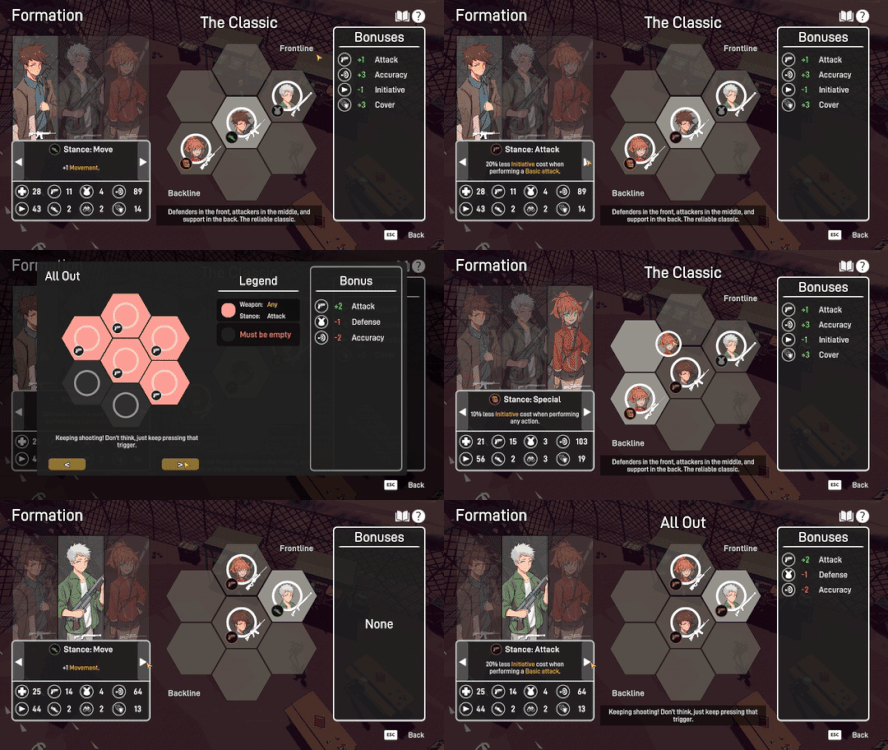
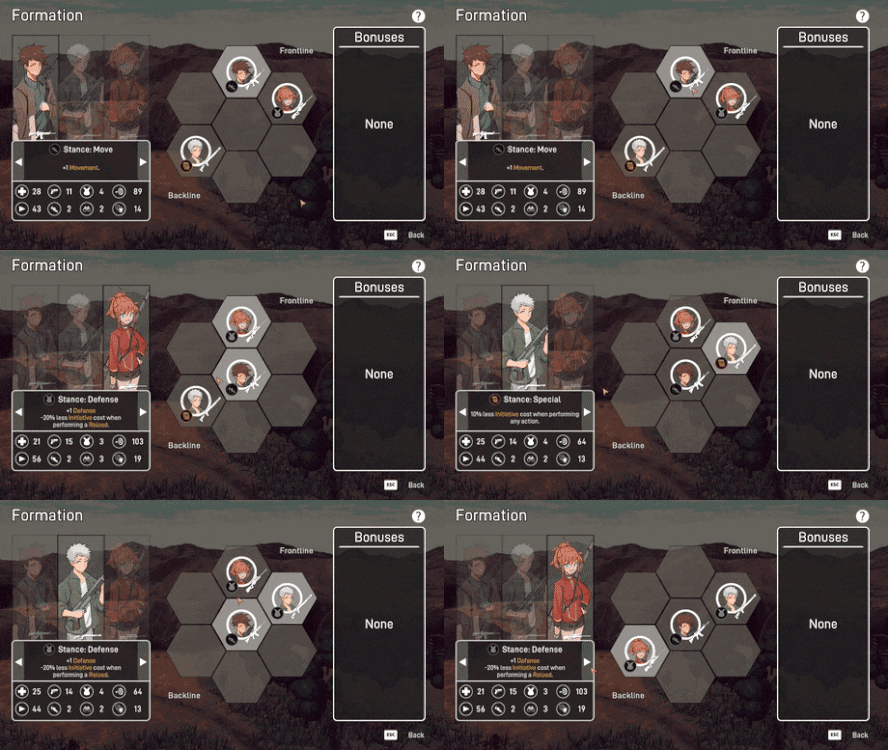
The position and stance that your party members have in the squad formation matter now, since a squad formation bonus is given to all party members during combat if the formation requirements are met. The three factors that are taken into consideration are: position, weapon type, and stance. Each party member fits certain archetype roles based on their weapon (i.e. the shotgun user is the "tank"), so the weapon type is noted when figuring out a valid formation bonus. You can look at the requirements of your known squad formation bonuses by looking at the formation book.
Controller Support
When updating Bright Red Skies to use controller support, every interactable UI element needed to be refactored to be able to understand what to do with the controller input. To make the controller input more generic, I'm using an asset called InControl which allows the game to support almost all controllers. Also, since the UI contains a lot of similar container types like single direction lists (main menu buttons, player menu buttons, item lists, etc.), or toggle lists (unit selector, item type selector, equipment type selector), it was a good idea to make these into generic container types to make the refactoring of the old code much faster.
One of the things that needed to be tested a lot was in the current focus of the controller. For UI like the player menu, the movement stick of the controller needs to act differently for each screen. This means that the transition for one UI container focus to another needed to be set and unset as you move through the menu. Like in the equipment screen, you can go from toggling through the party members and equipment types, to start changing your weapon attachments.
The controller also needed to be able to understand non-linear movement such as in combat where you need to be able to select different hexes on the map. The direction from one hex to an adjacent one is going to be angled so this needed to be taken into consideration in the setup.
Enemy Engagement Type
How you interact with a patrolling enemy now matters, since it determines if there's going to be an advantage or disadvantage in the fight. Like most other RPGs with patrolling enemies, approaching the enemy from behind will be recognized as a "First Strike" and being approached by the enemy from behind will be recognized as an "Ambush". The gameplay difference isn't currently in place, but the interaction is recognized.
Behind the Scenes
This is a section of the devlog where I like to talk about the parts of the game that were improved but aren't necessarily big enough to have their own section. For November, not many extra improvements were done behind the scene other than refactoring a lot of the UI. But some of the other things that were done are:
Fixed issue with party member using a healing item on itself.
Added sound to buttons missing them.
Audio changes based on enemy encounter type.
Going into the player menu freezes time.
Going Forward
Getting the controller to work feels good, especially since the control system implemented can be used in any other game that might be created in the future. I think I want to take it a little easier in December though. I've been working on Bright Red Skies for about one and a half years of my spare time and taking things slower for a month would do a lot of good for me. I always want to move this game forward, so for December, the things I'm looking to get done are:
Tutorial popups explaining how to move/interact with enemies/the combat gameplay elements.
Make the UI more scalable since a player who played the demo mentioned it not working for widescreen.
Clean up the project to reduce the size of the executable.
I'm optimistic about the future of Bright Red Skies and hoping for a great 2020!
If you have any suggestions or want to give your opinion on the game, follow me on social media, I listen and respond to all comments :D
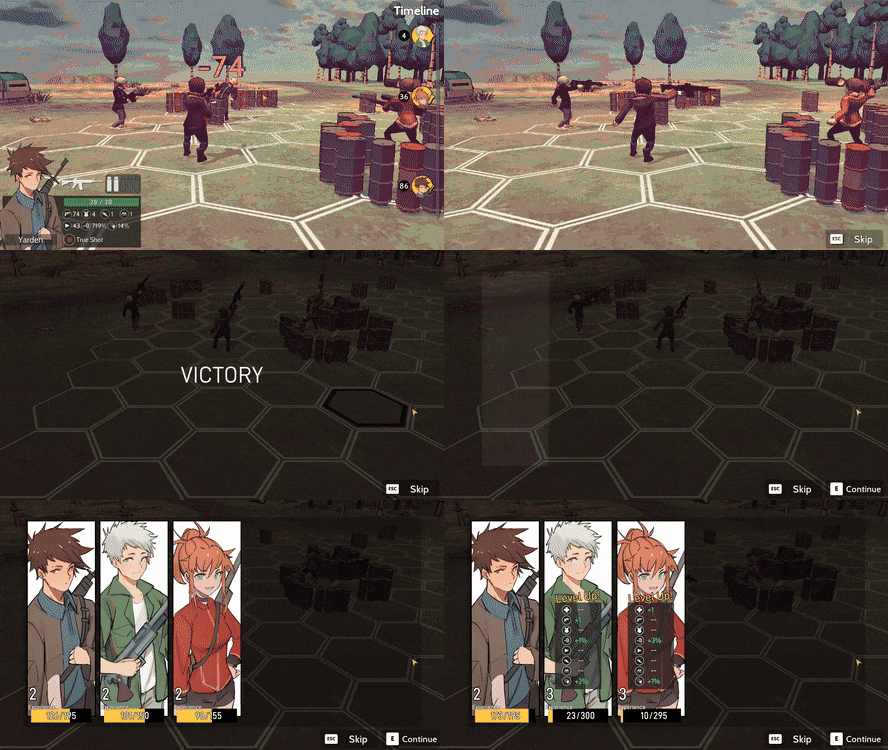
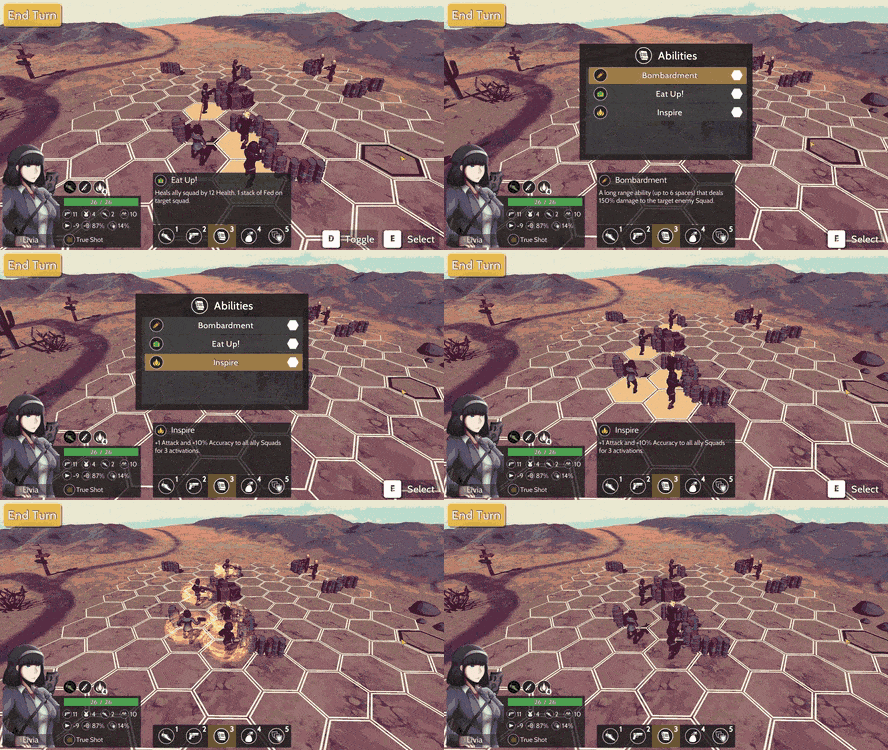
For October, the main goal was to get an early combat demo out so that people who wanted to, could test the game and give feedback to make the gameplay experience better and fix any bugs I might've missed. I'm happy to say, mission accomplished! The demo was just released and is ready to be played! It's available on Itch, Gamejolt, and Discord:
More specifically, the things that were completed include finishing up the player menu, completing the end of combat screen, adding destructible cover, and updating the world map.
Finished Player Menu
One of the bigger changes to the player menu was the formation menu. With the old version, it felt like a lot of information was redundant and some info was even missing or not very visible. So, to display the information clearly, the bottom info bar was moved to the left and the party member information was enlarged significantly.
Another update was with being able to use consumable items outside of combat. There was no user interface for using consumable items but now if a consumable item, like a healing item, is selected you can be taken to a party member select screen where you can pick any valid party member to use it on.
In general, the list of minor bugs for the player menu was resolved and the visual oddities that I noticed have been fixed. If there's anything wrong with the player menu, let me know and I can put it in the to-do-list.
End of Combat Screen
The end of combat screen was also completed in terms of functionality. So, when you win a battle, the victory screen will appear showing your party members gaining experience and the loot dropped. This can all be skipped if going through the entire sequence becomes annoying. So there are three steps to the victory screen: the victory text, fading in the party members/loot and incrementing the experience bar, and completing/exiting the battle. Clicking the "Continue" button will skip to the next step, so you can just spam the button to go through everything quickly.
When showing off the victory screen on social media, I got a lot of good suggestions but they haven't been implemented yet. I think there's still room for a lot of polish for the victory screen but right now the main focus is to get functionality.
World Map
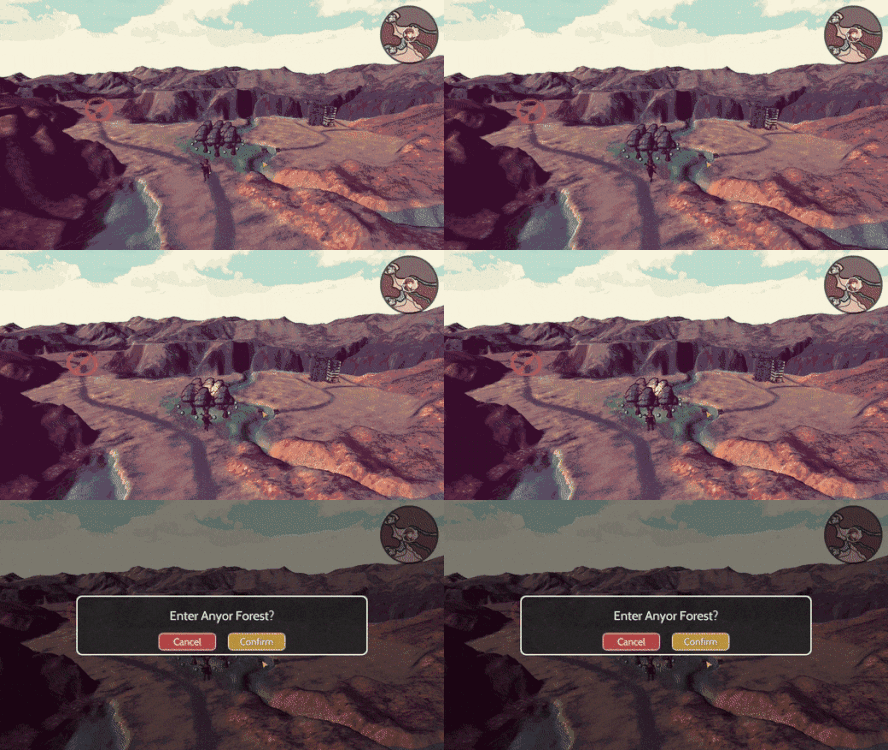
Another component of the demo that needed to be updated was the world map. Originally, the landscape was mostly desert, but I wanted people to be able to see the visuals for both the desert and forest combat scene, so a forest region was added. Also, the entrances into towns needed to be restricted since they are going to be reworked in the future, and this is mainly just a combat demo.
Destructible Cover
Finally, destructible cover was added into combat. Each piece of cover during combat has a certain amount of health and can be destroyed to make an enemy vulnerable to an attack. This is subject to change, but the way that it works is that if an attack misses, then damage will be done to the cover that a unit is hiding behind (if it exists). The only way to deal direct damage to cover would be with abilities.
Behind the Scenes
This is a section of the devlog where I like to talk about the parts of the game that were improved but aren't necessarily big enough to have their own section. For October, some of the other things that were done are:
Put character combat stances back into the game and updated the combat scene to apply stance effects.
Added sounds to UI interactions.
Fixed issue with the floating text in combat being displayed incorrectly.
Fixed issue with being able to have some control during the AI's turn or while already performing an action.
Updated descriptions for item/stats/abilities/stances/logs
Going Forward
It's great to have a demo out, but there's still a lot more development that needs to get done. For November, I want to take any of the feedback from the demo into consideration and figure out if any part of the combat needs to be changed. Additionally, some of the other things I'd like to complete for November are:
Squad formation bonuses.
Start to implement controller support.
Start implementing procedural generation for cover placement in combat.
Something I want to do is to update the demo at the end of each month so that all of the features and fixes implemented for that month, will be playable. I'd love to have a lot of people test out the game, so feel free to download the demo using one of the links at the start of this article!
If you have any suggestions or want to give your opinion on the game, follow me on social media, I listen and respond to any comment :D
For September, a variety of visual improvements were made as well as some combat mechanics improvements. In terms of the visual improvements, there was work done on combat where a victory screen, intro animation sequence, and AI action visualization were all added. Additionally, for combat since flanking is a mechanic in the game, there is now a way to set your end of turn orientation. And finally, some general UI and scene transition animations were implemented.
Combat Scene Visuals
I wanted to add some of the visual flair that a lot of other JRPGs have, so I added a victory screen for the end of combat. This screen will show the experience gained and eventually the loot dropped. I think this a great place to showcase the character art, so I made the portraits large!
On the other hand, at the beginning of combat, there's now an intro sequence that highlights both the enemy and player units on the map. This also pans around the map, so you can have a look at the landscape that you're fighting on. My guess is that seeing this will get annoying so don't worry, there's an option to skip this.
The last visual improvement to combat is with visualizing what the enemy AI actions are for the turn. I wanted everything to be more transparent so the range indicators are shown for whatever action they take, and the hex/hexes selected will now have a more obvious yellow highlight.
Can't Touch This
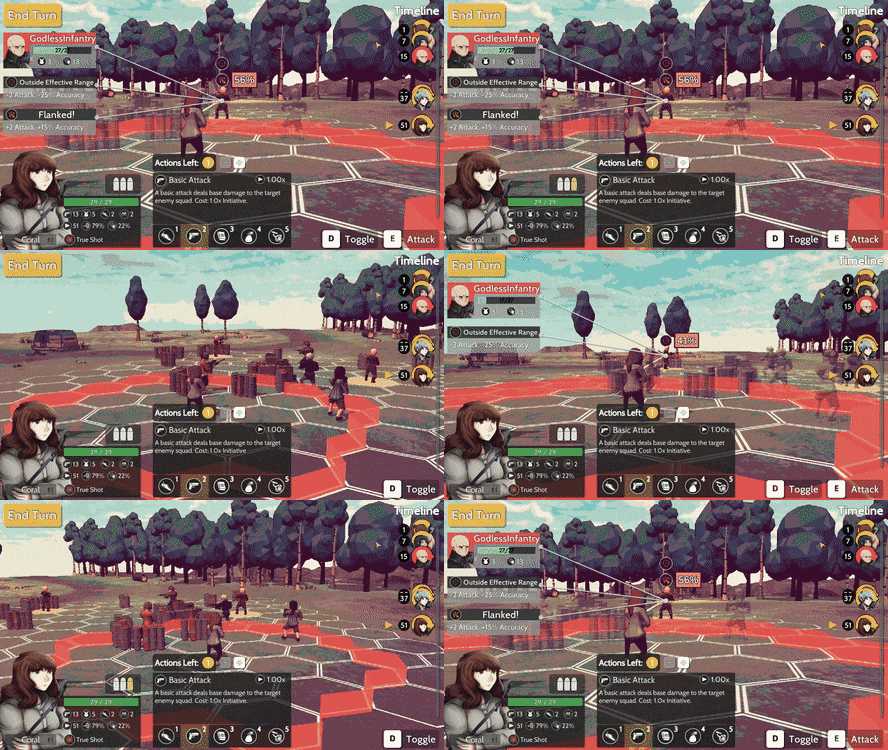
One of the combat mechanics that play an important role is the idea of flanking. Trying to get behind the enemy is great since they won't have their cover bonus, but if you're also within their flanking arc then you're able to have some extra stats boosts. The enemy can do the same to you though, which means that your character’s end of turn orientation matters a lot! To give you more freedom and prevent the game from unintentionally screwing you over, there is now a step at the end of turn to select your orientation.
General UI Work
Outside of the combat scene, there were additional improvements made in terms of scene loading and UI. I felt like there needed to be more flexibility when it came to the scene transitions between scenes so there is now an element that plays in the background that loads and unloads scenes and chooses the transition animation that should be used. Right now, I only have the "shutter" transition implemented, but there are many more that can be added.
The UI work done was on the player menu where a party member screen was added. It's pretty standard where you're able to select your party members and see what their stats and abilities are. Selecting a stat will give you detailed information about what the stat is for, so you won't be confused over what all the icons represent.
Behind the Scenes
This is a section of the devlog where I like to talk about the parts of the game that were improved but aren't necessarily big enough to have their own section. For September, some of the other things that were done are:
You can now select and use items.
Added Status Effects back to the character info UI.
Status effects that inflict an effect at the start of combat will visually show an animation.
Fixed the alignment and size of the icons that appear over enemy heads.
When selecting a position to move to, it now shows icons over the enemy for if it will be a flank or if you'll be outside of your effective range.
Fixed the rare issue with the image sometimes stretching.
Some Unity inspector quality of life improvements to make adding more images easier on my end.
Going Forward
Coming into the end of September I can see the game shaping up and I'm personally really happy with the progress made! I'm still hoping to get a combat demo out by the end of October, but it might be a little tight if I end up implementing everything I want to. Here are all the things I'd like to complete for October:
Destructible cover.
Enemy loot tables and corresponding UI elements.
Complete enemy AI (determine the best end of turn orientation, improve their best target selection, etc)
Make sure that the demo runs from start to finish on a new machine and release the demo!
Procedurally generated positions for the "Cover" objects (maybe, if time permits).
I'm also in the process of finding a character artist and have contacted a bunch of really talented people to see how they draw Yarden and Sofie, two of the main characters. The first gif actually had the images from one of these artists, but I still haven't figured out who I'd like to go forward with. If you follow me on Twitter I'll showcase all the art, so feel free to let me know which one you like best!
If you have any suggestions or want to give your opinion on the game, follow me on social media, I listen and respond to any comment :D
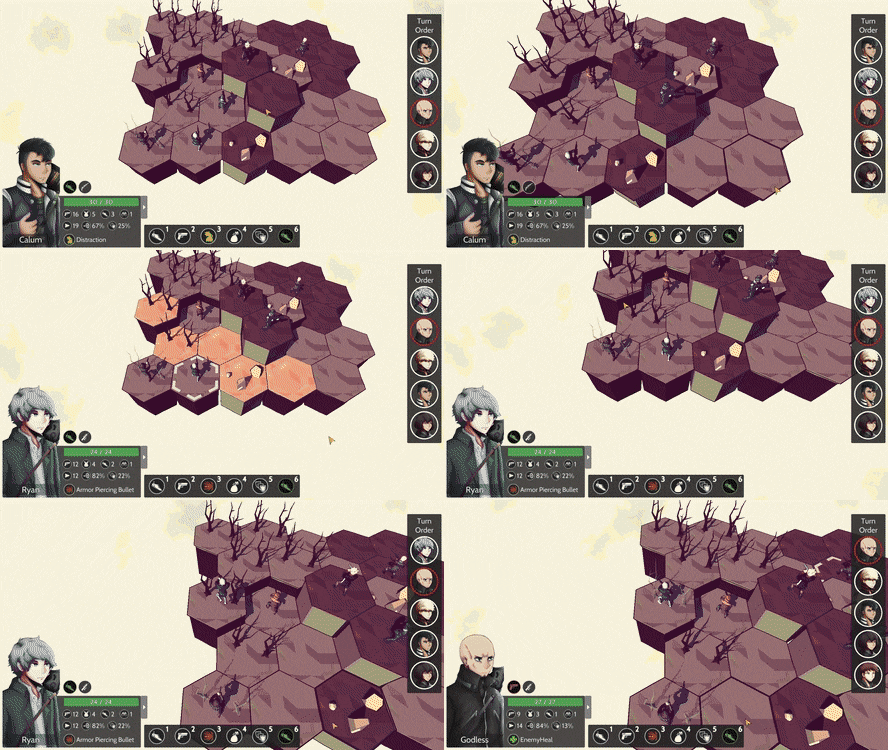
For August a lot more work was done in improving the combat. Three new combat mechanics have been added which are the flanking mechanic, effective range, and the ability to take multiple actions in one turn! Additionally, a majority of all the combat UI has been implemented, the camera has been greatly improved, and a dialogue editor tool has been created to increase the workflow of writing dialogue.
Got You in My Sights
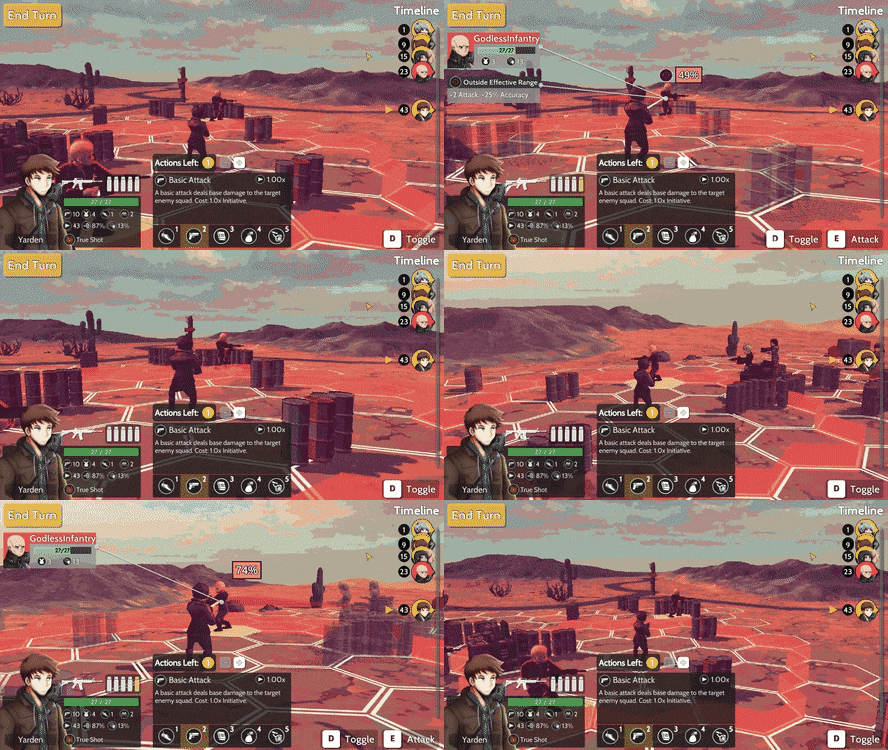
One of the newly implemented combat mechanics is the idea of an "effective range". When performing an attack, based on your character and weapon stats, the attack will have an "effective range" where attacking a target outside of this range will carry heavy negative stats effects. The idea behind this is to allow a character to attack any target they have a line of sight on, but also make sure that the different weapon types are used at ranges that are appropriate (shotguns used at close range, and snipers used at long range). To make this visually clear, there is a red border that is shown when making an attack that explains the character's range.
Another on the added mechanics is "flanking". In general, it's a good idea to get behind the enemy, so that you can make an attack where they aren't behind cover but getting the right angle for a flank will also be rewarded with an added stats boost. This is indicated with a cone behind the target. If your character's line of sight is within this cone, then the attack is considered a flank.
Anotha One
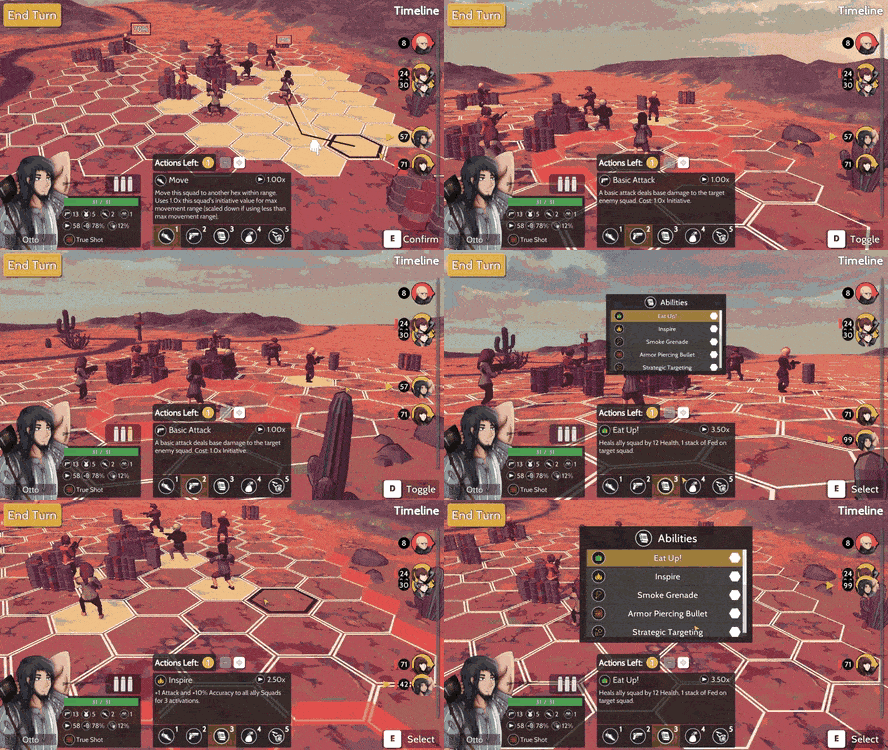
Inspired by the Brave/Default system from Bravely Default, I added a system where you're allowed to perform multiple actions in one turn. If you do multiple actions in one turn, this means that you will be much farther back in the turn order timeline and it will leave you susceptible to taking a lot of damage without being able to retaliate. Additionally, if a character reaches the fatigue threshold, they'll faint and be removed from battle. This was done so that characters are highly discouraged to perform three high-cost skills in one turn unless they're willing to remove the character from battle.
Dialogue Editor Tool
Dialogue will be prevalent in Bright Red Skies, so I was trying to find ways to increase the workflow of creating dialogue. The solution was to create a tool that would allow me to easily form branching dialogue trees where player choices can be added, and nodes can connect with one another. Also, there are options to modify the text, characters involved, the expressions that each character will have, and any story state changes that might occur by selecting a dialogue choice.
Cinemachine Camera
As you can see in the first couple of gifs, the camera movement looks much more interesting than it previously did. This is because the combat camera uses Cinemachine now. It's essentially like having the power of an entire camera team to control what you see! It makes sure that targets you want in focus, are always in focus and it lets you control the transition between different cameras a lot more easily. Eventually, I'd like to update all the camera controllers to use Cinemachine but for now, it's just the combat camera that has been updated.
Behind the Scenes
This part of the devlog is for talking about the improvements that were made but can't clearly be shown with a gif. It's done so that you can have a better understanding of all the things that have been completed. For August, the following was also done:
Fixed the pointer position of the extra info elements, so it targets the center of a target squad, not its feet.
Percentage box and status effect popups now scale with distance from the caster, so their sizes are more reasonable.
Removed all old code related to the previous implementation of the combat and info menu.
Fixed issue with the game not ending when the last enemy unit is defeated.
Updated how turn initiative is calculated.
Going Forward
August was a great month for development, and I'm pleased that a lot more was completed than I anticipated. In my opinion, the game is really starting the shape up and the combat is near being finalized. There is more work to be done on the combat, and I hope to get this done for September, or October at the latest. The current plan for September is to complete:
End of turn direction for combat
Ability to use items
Loading screen with scene transitions
Status effects and visually showing their effects
End of combat screen (success and fail screen)
Destructible cover (if time permits)
When the combat is complete there's going to be a demo that will be released that allows you to move in the world map and get into battles! Optimistically, this will be released at the end of September, but realistically it might be closer to the end of October. Keep your eyes out for it!
If you have any suggestions or want to give your opinion on the game, follow me on social media, I listen and respond to any comment :D
For July, a lot more work was done on improving the combat. The goals for this month were to re-implement the abilities using the new combat scene, brainstorm extra gameplay features to allow for more interesting action, and adding weapon attachments to weapons.
Cast a Spell on You
Since the combat loop code was being refactored, it was a great opportunity to also rework the code for how abilities are implemented. The major improvements were from separating the ability information from the visual sequencing that occurs when an ability is performed. There used to be one class dealing with how all the abilities visuals would appear and interact with targets but having them split up into individual classes makes it a lot more manageable to make changes in the how an ability will appear.
As in the above gif, there is now an ability selector since units now can have multiple abilities rather than just have one special ability. The original concept was to have a single ability since there would be a large pool of characters. But in order to have a game with characters that have character development, the number of characters needed to be reduced so that everyone has a significant role in the story. Also, having multiple abilities per character gives you more decisions to make, which should help in leading to more engaging combat.
Locked and Loaded
Having only 4 pieces of equipment per unit felt pretty limiting since the equipment used/received would be the same at the same points in the storyline. I wanted there to be a way for you to be able to make more fine-tuned decisions in what kind of character you want to make. Weapon attachments felt like the perfect thing to implement since they can act like gem/crystal modifiers in other JRPGs.
The UI for equipping/unequipping weapon attachments has been completed. What I'm thinking about now, is if there should be a system like in the "Tales of" game, where each weapon, or in this case weapon attachment, has a passive ability associated that can be permanently learned after some time using the equipment. This can lead to interesting scenarios where rare weapon attachments are being cycled through all party members, to be able to learn a certain passive or trying to weigh the benefits of stats vs passive ability.
Bullets!!
Something that felt like it needed to be added to combat was a resource system. Typical RPGs would use mana for magic abilities or even stamina since the characters physically exert themselves. In Bright Red Skies, the main method of dealing damage is through modern weapons such as guns, so mana and stamina resources didn't fit. But what does make sense, are bullets. By giving units a set amount of ammo, it should make you think harder since some abilities will use the ammo resource as well.
Knowledge is Power
I wanted to make it easier to understand the values of accuracy and damage when attacking a target, since looking at your unit's stats it might say that their accuracy is 70% and the amount of damage they'll do is 4, but the real chance to hit is 55% and real damage is 3. This might be confusing since you don't exactly know where these stat debuffs are coming from, so there is now UI indicators that will point at objects on the screen that are affecting stats. For example, in the gif below, when there is a full cover in the way, it will block 100% chance to hit. The full cover is pointed at and there is an info card explaining that it causes "-100% Accuracy".
Future Game Mechanics
There are still some more modifications that can be done to improve combat. One of the mechanics that still needs to be introduced is a weapon's "effective range". All guns, no matter what type, can shoot at a target no matter how far they are, but this doesn't really give weapon types a distinct feel to them. This is where an effective range comes in. The effective range is the hex range that the target must be in to be able to attack them with no stats debuff. If the target is outside the effective range then the target can still be shot at, but there will be major accuracy and a slight damage debuff on the attack. By doing this, weapons like the shotgun can be given a low effective range and snipers can be given a highly effective range so that the weapons are used like they are typically in other games.
Another mechanic that I'm thinking about introducing is being able to perform multiple basic attacks in one turn. The idea is to increase the ammo usage for each additional attack to give a large downside to making multiple attacks. For example, the first basic attack would use 1 ammo, the second basic attack would use 2 ammo, the third uses 3, etc. Making multiple actions would also put the unit in the turn order as if they used the same amount of actions, so there would be a period where they are extremely vulnerable. This mechanic seems like it would be great since it can be used to more quickly clear combat where you're against generic trash mob enemies, and in important battles, it can be used when setting up a string of debuffs on an enemy to capitalize on damage output in one turn.
Behind the Scenes
This part of the devlog is for talking about the improvements that were made but can't clearly be shown with a gif. It's done so that you can have a better understanding of all the things that have been completed. So, for July, the following was also done:
Removed the need to use colliders for ability interactions and instead purely using position and tweening, for performance.
Replaced the defend action with reloading.
Added a forest combat scene.
Updated the combat effects manager and how it instantiates effects on the map.
Going Forward
The combat is really starting to shape up, but there's still some more work to be done! For August, the plan is to complete the following:
Add the "effective range" combat mechanic.
Implement the system that allows for a unit to perform multiple actions.
Create a new UI for turn order.
Transition from world map to combat and combat back to world map.
If you have any suggestions or want to give your opinion on the game, follow me on social media, I listen and respond to any comment :D
For June, all the work done was related the combat system of Bright Red Skies. The main goals for this month were to conceptualize different gameplay designs, refactor the existing combat-related code, and making some quality of life improvements. Although the combat still needs to be improved some more, I'm really satisfied with where the combat is going!
Ideas, Ideas, Ideas
I felt like the old combat was lacking in some fun factor, so I decided to spend a good amount of time trying to conceptualize combat ideas. The first thing I tried was updating the current combat by adding a vertical component so that squads can get the high ground over their enemies.
The issue here was with the importance of having the high ground over the enemy. By adding more stats to a squad on the high ground, such as bonus cover/defense/attack, it effectively becomes a slightly improved version of a regular hex since each hex can have environmental cover. The vertical aspect didn't seem like it would really have much of an impact to the gameplay, so I ended up scraping the idea. Additionally, when the height of the hex was high, then the hex could block the line of sight but because of the shape of a hex, it would block the line of sight significantly which was unwanted.
After going through the idea with adding verticality, I started to think of creating a completely different combat mechanic. It would be a very similar to the very first version of combat where the game would play in real time with pausing allowed. It would take some time for a squad to reach its destination and complete an attack, so fast squads would be able to move away faster from special attacks compared to slower tankier squads.
After thinking about it more, this concept seemed like it also wouldn't be fun since either the game was slow enough for you to be able to comfortably command a squad to move or attack, but once the commands would be given then since the game is slow, there would be a lot of waiting. On the other hand, if the game was fast, then there would be little idle time, but you would be forced to go in and out of the pause menu so often, that it might as well be a turn-based game. Finally, a real-time game where you command multiple squads would be hard to do with a controller, which I'm planning on supporting.
So, the current version of the combat is back to being turn-based, but now there's a cover system. There can be half or full cover on either the edges of a hex or on the entire hex itself. Right now, the cover is static and will give a cover bonus if it's a half cover or completely block an attack if it's full cover. Also, as you can see, instead of having 3D hexes and a plain background, it's now 2D hexes on a 3D environment. In my opinion, this makes the environment of the fight much more recognizable and visually appealing.
Quality of Life Improvements
While making the cover system, I realized there was room to implement some quality of life improvements so that the information is easier for you to understand. The first improvement was for the attacker, target, and all associated elements to be highlighted when making an attack>
In the gif above, we can see that when a target is selected for attack all irrelevant object will be translucent. The attacker and their target will stay their normal transparency and any cover that contributed to the accuracy of the attack will also stay its original transparency. Additionally, if the cover involved is a full cover (thus reducing the chance to hit to 0%), then the line connecting the attack and target will be stopped and an icon will appear over the full cover to clearly indicate that the attack is blocked.
Sometimes, when moving to a new hex it's unclear whether a certain piece of cover is blocking the attack. With the second quality of life improvement, when trying to make a move, if you focus on a hex, it will show you which enemies you can attack and your chance to hit if you move to the new hex. This will save a lot of frustration from incorrectly estimating if you have the flank!
Behind the Scenes
This part of the devlog is for talking about the improvements that were made but can't clearly be shown with a gif. It's done so that you can have a better understanding of all the things that have been completed. So, for June, the following was also done:
Continuing to refactor some of the old combat code to prevent god classes
Combat actions can be confirmed by clicking the button or the shown keyboard key
Updated combat camera controller to zoom in/out appropriately with new hex layout and the camera can focus its view so that all targetable items are centered on the screen.
Added desert and forest combat maps
Going Forward
June has been successful and I'm really liking the direction that the new combat is going towards. The combat still needs some more work and I hope that most of it will be completed by the end of July. Specifically, what I hope to finish include:
Update squads so they have multiple abilities they can perform.
Refactor ability and item select UI.
Create map editor tool to generate map data for map configurations of hex cover elements.
If you have any suggestions or want to give your opinion on the game, follow me on social media, I listen and respond to any comment :D
For May, a lot of work was done on updating the world map from and on-the-rails systems to the more classic overworld map that lets you move your character freely as you traverse the world. Specifically, the world map includes interactable towns that you can enter/exit and enemies that patrol some specified area and trigger a combat event. Furthermore, code for the combat event has started to become refactored since it's the next major aspect of the game that going to be updated!
I Can Show You the World
Something that I've really wanted to update was the world map, since the original system felt constraining and not typical for JRPGs. As mentioned previously, it's now an overworld map where you move around and interact with the environment. For example, there are towns in the world map that you can enter:
Here you can see that some visual flair is added so that towns become recognizable on the map. Around the perimeter of the town there's a moving ring and the object lights up when you're close enough to enter the town.
On Patrol
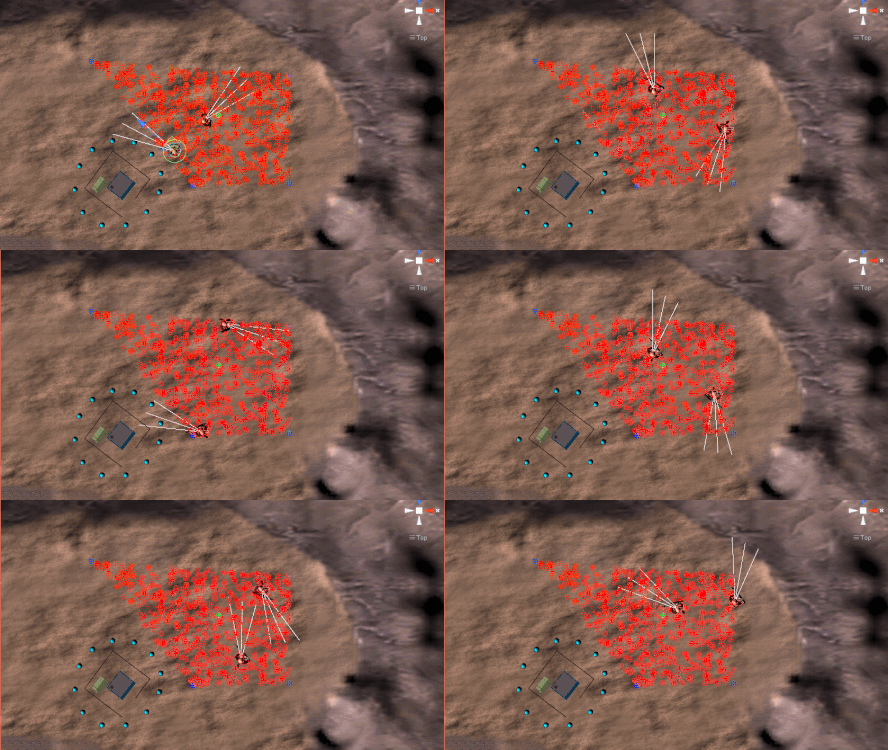
The big thing that was added to the world map were the patrolling enemies. Enemy spawners exist on the world map and variables are set, such as: spawn area, max number of enemies, and enemy types that can be spawned. When approaching an enemy's line of sight, it will begin chasing you until it loses sight of you for about 2 seconds. If it does catch up to you, the screen with shatter and you'll be taken into combat.
What's great about the spawner is that the spawn area can be any shape and the enemies will randomly patrol in that area. In the clip below, the blue points are the defined vertices of the polygon the enemies can patrol, and the red points are the random points in the polygon that the enemies are moving towards.
Lastly, some polish was done on the actual way that the enemies spawn. To prevent you from getting immediately surrounded by enemies when you walk into range of a spawner area, the enemies will spawn one by one until the max capacity is reached. Also, there's a brief pause when the enemy initially spawns to give you time to react as well as to see the awesome spawning particles haha.
You Shall Not Pass
The final thing added to the world map are boundaries that restrict movement. This might not sound like a good thing, but this was implemented in case there were parts in the story where you weren't allowed to go back to a previous area. Additionally, this could be modified so that instead, your movement would stop when entering a boundary point and dialogue would appear. But for now, it's used mainly there are a precaution for if I need to use it in the future.
Behind the Scenes
Sometimes there are aspects of game development that aren't shown since it's not a visual change, but I like to put this part in the devlogs to update you on any additional things that might've come up. So, some stuff that's also been worked on were:
Upgrading Unity to the newest version, 2019.1.
Beginning to refactor the combat scene code.
Updated how combat data, like enemies and map data, are stored and read.
Added outline material shaders to all prefabs that were missing them
Going Forward
I'm pretty happy with the work that's been done for May! Looking into June, what I want to primarily work on, is the combat. There are some overhauls on the combat that have been floating in my mind and I'm looking to test/prototype those this month. Specifically, what I plan to complete is:
Add vertical hexes and associated stats.
Create a map editor to more easily create specific map configurations.
Prototype different combat mechanics.
Change how movement is done in combat, to the more traditional style.
If you have any suggestions or want to give your opinion on the game, follow me on social media, I listen and respond to any comment :D