Was hoping this update would fix the performance degradation when the game window isn't in focus but apparently that is one tiny unity version away.
Waiting for 2018.3.10 to release for the next update...
Beta branch notice
Hey folks!
Sorry for going dark there for a bit, I've been hard at work with crushing bugs from upgrading Climbey's game engine and it seems like there's never an end to the bugs I'm running in to, so I figured I'd put up a new public beta branch!
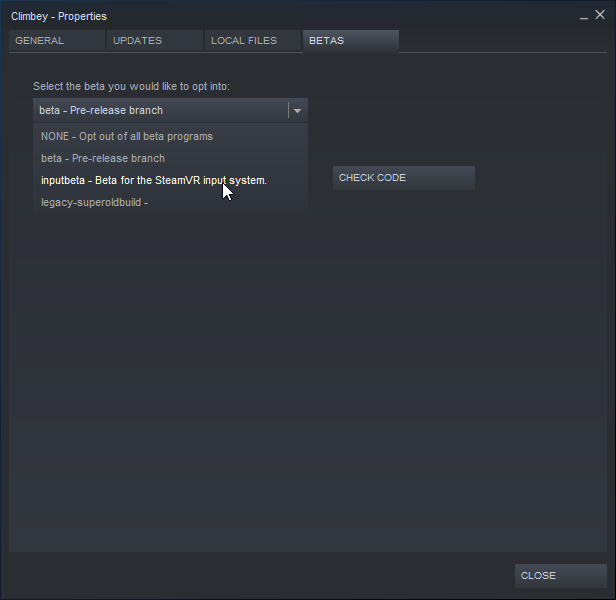
Again, to get into a game's beta branch just hit right click on the game in your steam library, go to properties, then hit the beta tab and select it from the dropdown.
I recommend Knuckles users switch to this beta as it makes the finger tracking work a lot more consistently.
Main game:
Upgraded Unity project from 2018.1.0f6 to 2018.3.5f1. This updates the physics engine which should bring performance improvements in some levels with a lot of moving platforms, for example.
Tweaked jump controller release timing, should make jumps more predictable and consistent.
Fixed retry bug that allowed you to fling across the map on retry.
Upgraded SteamVR plugin.
Reworked foot tracking implementation.
Made finger tracking future proof by making it use the SteamVR API for finger curls.
Added an ownership transfer button to everyone's names if you are the host on a server, which will allow you to transfer ownership to a specific person before you leave the server.
Added a check for duplicate names so they get (#) added to their name.
Made "forward" rendering mode turn off lights in levels to prevent flickering.
Level Editor:
Added a delay to the picture taking mode in the level editor to prevent accidental thumbnail pictures from being taken.
Level editor’s picture taking now needs both triggers to be pressed to take a picture.
The beta is currently quite stable but there's just a few quirks I'm not comfortable with.
Known issues:
The frame rate drops dramatically if you don't have the game window focused on your desktop. This seems to be a Unity bug and I'm not sure I can even fix it without just upgrading the engine again.
Feet left/right assignment sometimes doesn't match I think? Not entirely sure on this one.
The game will start with cameras in your hands sometimes, this mainly happens when you have the SteamVR overlay open as the game starts/loads, I recommend just hitting the "Start" button in the menu since it starts off open, assuming you can reach it, this should reload things and make your input work fine.
If you find any more issues do let me know!
Note: The new foot tracking requires people to set their left/right foot up properly in the tracker role assignments. Please make sure it’s set up right before starting the game.
Update 12/11/2018
Main game:
Fixed Radio station name disappearing from the music controls.
Added “Performance settings” panel behind the player in the main menu.
Misc backend improvements for multiplayer.
Current performance settings include toggling view distance cutting (A feature added in last update), toggling the snow particles, and switching the camera rendering mode from deferred to forward, which may improve performance in some levels while destroying performance in levels with a lot of lights placed in them.
I know, I know, I’m supposed to be working on more costumes.
Soon!
I got caught up in some other work in between.
Update 11/30/2018
Winter update!
Main game:
Added snow effects.
Added snow onto blocks.
Re-enabled haptics on Oculus Rift since the SteamVR Beta branch merged with Main.
Added frame counter which lowers view distance to try to keep framerate at or around 90.
I will be adding some new Winter costumes as December progresses, didn’t end up having time to prepare for this update very well because of backend things I was figuring out.
Enjoy! :)
Update 11/17/2018
Main game:
Disabled Haptics on Oculus as this would cause crashes when users weren’t on the SteamVR Beta branch, this will be reverted once Valve finally pushes the fix to the main branch.
Fixed the game pausing when going into the SteamVR menu.
Update 11/5/2018
NOTE: If you are on Rift I suggest you switch on the SteamVR beta if you are having any sort of issues.
Main game:
Turned lighting back to non-halloween lighting. Halloween costumes still stay.
Removed headlamps from players’ heads.
Fixed bug that would allow users with foot tracking to grab their feet in mid-air and keep jumping like that.
The next update will most likely be the Winter update!
There may be an update inbetween that changes some steamworks functionality around as I plan to rework the steamworks implementation of Climbey soon to make everything related to steamworks work smoother (Level up/downloading, level list sorting etc.).
Update 11/3/2018 - Climbey Demo update
Halloween note: I'm removing the Halloween lighting on Monday, so this will be the last dark weekend before things turn back to light.
Climbey Demo:
Updated Demo build to use the new SteamVR Input system already present in the full game, this will make the Demo compatible with Knuckles controllers and help Oculus Rift users figure out if the game will work for them on the new Input system or not.
I've had a couple Rift users tell me the game isn't working for them at all (Nothing shows in-headset and no controller tracking), sadly this is out of my hands because the new SteamVR Input system is to blame for this, which I don't control.
The new Input system is sort of a continuous work in progress it seems like, and it works for some Rift users but not for all of them yet, it appears.
The only thing I can recommend people do is get on the SteamVR Beta, which is where it'll get fixed sooner than if you were not on the SteamVR Beta branch, infact it might already be fixed for you!
Thank you for understanding and I hope everything gets back to working order soon...
Update 10/22/2018 - HALLOWEEN UPDATE
NOTE: This update adds support for the new SteamVR Input system, if you are playing on Oculus Rift I suggest you switch on the SteamVR beta if you are having any sort of issues.
Halloween is upon us again!
Main game:
Fixed buttons not being aligned in their surrounding frames on the level selection panel.
Re-did Halloween lighting from last year.
Turned players’ headlamps back on.
Added a button to headlamp’s band that allows players to turn their own head lamps on/off.
6 new Halloween costumes!
Thanks for everyone who participated in the input beta to make sure it wouldn’t make the game unplayable.
A couple of people have even said their jumps were better on the new input system, which is great!
I’m keeping the input beta branch active for a little longer so people who don’t want to be in the darkness of the Halloween update have something to switch to, they won’t be able to see the new Halloween costumes either however.
SteamVR Input beta! Testers requested.
IF YOU ARE ON OCULUS RIFT, ENABLE THE STEAMVR BETA.
A recent update to the SteamVR beta fixed a crash that was happening for Rift users.
Hey folks!
I added a new open Beta branch to Climbey which has the new SteamVR Input system implemented, you can access it here:
Note that if the inputs aren't working on first start, please restart Steam and the game and try again. Let me know if it still doesn't work after.
This beta is there to test if the new input system works for your controller/headset combo, let me know if there are any issues.
As an added bonus this new input system will also make Knuckles EV2/EV3 controllers work right out of the box and it gives other controllers the ability to crush snowballs with the grip button as well, a feature Knuckles controllers have had for a while.
Hope you enjoy and there aren't too many issues, as I would like to get this working right before I start working on the Halloween update for this year! :)
Sometimes you'll have to manually assign the default mapping, I'm not sure why or when exactly this happens, but what you do is go to the controller binding UI, which you can do in your browser by visiting http://127.0.0.1:8998/dashboard/controllerbinding.html while SteamVR is turned on and your controllers are too, and then hitting "view" on the controller default, then hitting "select this binding".
Update 9/26/2018
9/28/2018 hotfix: Fixed Knuckles EV3 not showing badge when used with finger curl value workaround.
Main game:
Fixed CTF being broken.
Fixed your body hanging in multiplayer if one of your hands turns off.
Made Leave and Forfeit button press-and-hold instead of press so people don’t accidentally press them as much.
Added “Use Trigger” option to the input menu for Knuckles controllers, for people that want to use the trigger button to jump/grab instead of the finger tracking.
Replaced dynamic cloud system with a different system that is hopefully more performant and fits the style of the game better. You can now have dynamic clouds on any skybox, or turn them off.
Added 4 new Autumn critter costumes.
Added a badge with your steam avatar on it.
Made feet calibration button press-and-hold.
Shifted option panel buttons over to the right.
Any press and hold buttons were reduced down to 2 seconds (from 3) and no longer additively remember how long they were pressed for.
There’s some more stuff coming soon, I want to get the new SteamVR plugin implemented with the action-based input system and skeleton api support for knuckles but that was a bit too big of a task to get into this one.
(There's a lot of devs getting EV3 knuckles in soon that will want to try Climbey with them, so I'm going to try to get the new input system in pretty soon as that's the only way to get them working right out the box instead of using some weird workaround or custom binding setup)