And thanks for your patience while we tracked down this bug. There was an issue with some of the newer pieces causing courses not to load properly and we can understand that's super frustrating when you spend an hour or two on a course and then it just breaks. We're hoping this has solved the issue. We're also now allowing you to edit holes you've already posted. This was something requested from the community as well.
Updates
Updated to Unity 5.5
You can now republish holes to Steam Workshop if you make changes
Fixes
Fixed issue where loading a custom hole with certain pieces caused the hole to not load properly
Fixed the invisible blue putter in online matches bug.
Cloudlands - 1.1.0 Update and Oculus Touch Support
Oculus Touch support is finally here! Thank you everyone for your patience. It took longer than we wanted to get this out the door. We feel it still needs more thorough testing so please report any bugs you find, and if there are any issues with the build for Vive users, you can always revert back to our previous build by opting into the "previous" Beta branch. The demo is also updated to support Oculus Touch.
Updates
Added Oculus Touch Support
Added more level editor pieces (new pipes and hole pieces)
Fixes
Snapping pieces in the level editor is more correct and robust
Warping to ball no longer makes the ball move
Level editor piece shelf now is properly placed within the play area
Future Plans
Update to Unity 5.5
Improve the fireworks visuals
Level Editor additions
Cloudlands - 1.0.3 Update and Updated Demo
A new update for Cloudlands is here that has a few new features, more editor pieces, and more optimizations!
Also the demo has been updated with all the latest optimizations and changes including a limited version of the level editor.
Updates
Menu options to change the power of your putter and the delay time between warping and being able to putt the ball again. (Found in Pause Menu -> Settings -> Gameplay Settings)
Ability to swap which controller to use (press start button on another controller or access it through the gameplay settings menu)
New option to turn off the sound effects in the settings menu.
Added new pieces: more terrain pieces, bumpy floor pieces, more pipe pieces, and a bounce pad
More performance optimization
Added some more details to certain UIs
Hitting into menu cannons is now easier
Floor to pipe connectors now work better
When playing local multiplayer, if there is a tie for the lowest stroke on a hole, if one of those players is wearing the headset they will start first for the next hole.
New music tracks for menus and Cloudlands holes, also available for use in the level editor.
Slightly improved putter-ball collision detection
Fixes
Ball should no longer be able to tunnel through portals
Broken achievements should now be working
Small bug fixes
Small visual fixes
Level Editor - Released!
Hello!
We're thrilled to announce that the Cloudlands Level Editor is officially released! After a very successful beta period we would like to thank everyone who participated in providing feedback and building over 200 new holes for players to play!
For those of you unfamiliar, the Cloudlands Level Editor will let you create your own golf holes and publish them to play online with friends. Check out our launch trailer below to see how it works and a sample of some of the amazing community built golf holes.
https://www.youtube.com/watch?v=hgMPPlx7Yj0
New Features
Level Editor!
Download and play custom holes (Steam Workshop Integration)
Playlists to load a set of holes (Also on the Workshop)
New advanced controls that allow you to rotate yourself in the game. Turn them on under “Settings” in the pause menu.
Medium and long putters are now slightly longer.
Other Updates
Updated to Unity 5.4 (Shows better performance on some systems)
Performance optimizations
Bug fixes
There are screenshots when selecting holes for a custom course
Updated tutorial
Future Plans
More Optimizations
Bug fixes
More Level editor pieces
More music
Fix controller detection issues on startup
Update Steam Demo
Known issues
In online multiplayer sometimes other player’s putters don’t show up correctly.
Visual issues such as the golf flag being too small in custom holes.
Editor pieces can get in a state where they have invisible snap points.
A few things are not translated into Chinese yet
For those of you who participated in the beta, you can now switch back to the Steam game default branch (opt out of any betas).
Course Editor - 0.7.3 Update
Hello!
A smaller update this week as we are fixing the lighting issues and working on polish and performance for the release to the main branch.
Updates
Performance improvements
Playlists are closer to final
Polish on various features
More pieces (windmikll, spinning and stationary wooden bars, triangle that spins counterclockwise, more pipe pieces)
Roadmap for next update
More performance improvements
More pieces
Bug fixes
Release on main branc
Fixes
Small bug fixes
Known issues
Lighting issues due to Unity 5.4 update. Solution discovered requires re-baking all lighting (not ready this week)
Game crashes when quitting by closing the game window.
Sometimes delete doesn’t work on pieces (a current workaround is to pick up the piece and then delete the piece while it is grabbed)
Course Editor - 0.7.2 Update
Hello!
Here's our next update. Big additions are the custom playlists you can create and share via workshop (still work in progress), group duplicating, wall physics fixes, and unity 5.4 update (performance).
Updates
Updated to Unity 5.4
Improved wall bounce physics on level editor pieces
Playlists have been added! They are still a work in progress. Once you create a list of holes to play in a custom game you can then save that list of holes as a playlist or publish that list to steam for other people to use. Playlist UI still needs work and Playlist searching is not implemented
Group delete and group duplicate in level editor. Just grab a group of pieces with the grip button and press the duplicate or delete button.
More new pieces such as straight and curved walls, as well as many new pipe pieces!
Roadmap for next update
Performance improvements
Fixing the lighting issues in default Cloudlands holes caused by shader incompatibility in Unity 5.4
Misc. bug fixes
More pieces
Finish up custom playlists feature
Preparing for release to the master branch on steam
Fixes
Warp portals now exit out the proper side regardless of their orientation
An assortment of smaller bug fixes.
Known issues
Lighting issues due to Unity 5.4 update
Game crashes when quitting by closing the game window.
Sometimes delete doesn’t work on pieces (a current workaround is to pick up the piece and then delete the piece while it is grabbed)
Course Editor - 0.7.1 Update
Hello!
We're trying to update the editor branch on a weekly basis on Friday's until we release it officially in the next few weeks. Here's a summary of what the update includes:
Updates
New pieces! 6x6 (really large piece), 6x3 (really large piece), 3x3, loop-de-loops, ramps (different widths and heights), a bunch of new hole pieces. To view them, go to the last pages of each category as we haven't organized them yet into the rest of the pages. We're waiting for a whole bunch of more pieces to come in before we do another piece organization. We've had a lot of feedback regarding piece types and by viewing what people are making. These will continue to roll in weekly. We've probably scheduled a doubling of the current amount of pieces (200) so expect to see more soon! Our 2 artists are pumping them out as fast as they can.
Custom hole sign at start of level easier to read
Custom hole sign shows piece count and difficulty
Difficulty and piece count is viewable on the hole browsing screen
Added a recenter hole button in the level editor
Added 4 zoom levels in the editor instead of just the original 2 zoom levels
Add your +/-to the flagpole score display
Allow re-opening of the hole rating board after you've finished the hole
Roadmap for next update (in a week or two)
We're working on providing a handful of larger pieces so that you can better create larger levels and make it easier to build larger prop pieces for landscape/beautification.
Custom Hole Playlists so that you can make your own "set" of holes
Misc. bug fixes
Physics fixes for existing pieces that aren't behaving properly
Group duplication and deleting in the editor (hold grip and press touchpad to duplicate entire groups of pieces)
Fixes
Tutorial can now be played more than once in a row
Normal tutorial works properly in conjunction with advanced controls
Fog no longer present in any custom holes
Previously unable to manual warp while ball was in the air
Many minor fixes
Known Issues
Putter replication on clients sometimes shows other player's putter incorrectly
Players joining games after it has already started will show incorrect difficulty and piece numbers (fix coming next week)
Level Editor - Early Test Beta Released!
Hello everyone! The beta of our Level Editor is now available to play on our test branch. It's playing pretty stable overall but there are a handful of issues and small bugs we know about that we are still working through but we wanted to get some community feedback on what we've put together so far. Levels built in this beta may be erased when we launch with the updated version. We don't think will be necessary but I thought I'd put in the disclaimer.
How to access the Level Editor Beta Branch
Right click on "Cloudlands: VR Minigolf" in your Steam library list and select "Properties"
Then select the "Betas" tab on the window that opens
Right click on the drop down menu and choose "level-editor-beta"
This should prompt Steam to opt into the Level Editor Beta branch and the game will update itself in Steam!
What's next?
We're still polishing bugs and small details and will be pushing consistent updates to this branch as we go. We're also still adding new pieces to create with. If you have any suggestions we would absolutely love to hear them. Suggestions for improvements inside the editor workflow, suggestions for new pieces, how you want to search for new levels, etc. We want to hear it all! Once we see that the Level Editor is stable and healthy we'll push it to the main Steam branch for everyone to use in the coming weeks.
A few extras we snuck into this build not Level Editor related
New advanced controls that allow you to rotate yourself in the game using the touchpad. Advanced controls can be enabled through the Pause Menu > Settings options (it's still a bit buggy!)
Longest putter is now much longer to accommodate taller users. Medium sized putter was also lengthened.
Some known issues
UI needs to be polished
Only supports English
If ball lands on rocks outside of the level, sometimes it doesn't respawn (use a mulligan to get it back)
Cannot play level editor tutorial more than once in a row
Multiplayer kicking with workshop courses can cause issues
Levels sometimes time out while downloading from Steam.
Advanced controls need a bit more polish as some edge cases are causing errors.
Normal tutorial has bugs with new advanced movement controls
Level Editor moving objects having physics issues
Normal mode needs more testing to ensure no regressions
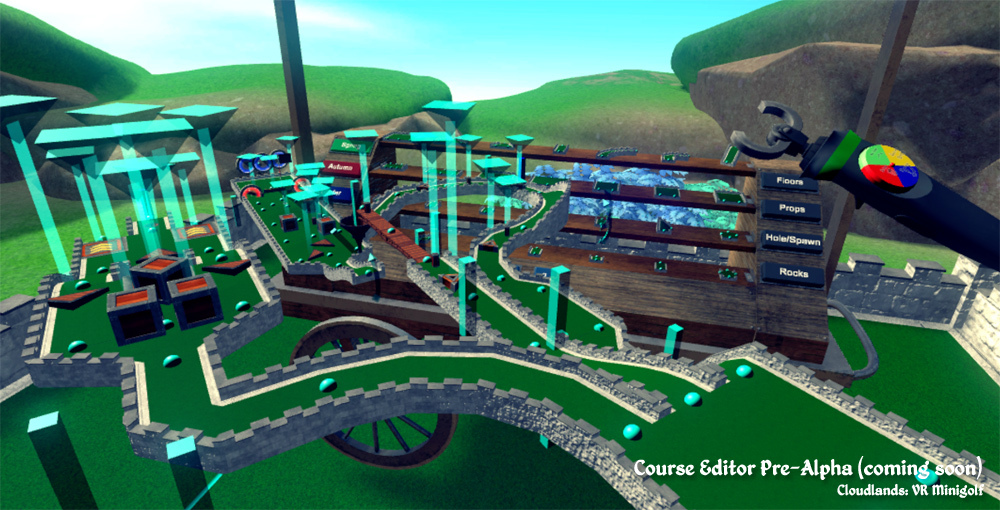
Course Editor - Sneak Preview
Hi everyone!
I know you're patiently waiting for new golf holes and we're very thankful for your patience. We wanted to give you a sneak preview of what the course editor is shaping up to look like! Included in the release of the course editor will be 2 more full courses: An easy classic 18 holes, and an advanced/difficult 18 holes. Everything will be built entirely using the course editor to showcase what can be created by anyone! Stay tuned for a video of the course editor in action!
Integrated Voice Chat - Now Live!
Hey everyone! We wanted to push this small update that includes a handful of minor fixes and one much requested feature: Integrated Voice Chat. No more waving your clubs and pointing like mimes (unless you want to)! Mic's are off by default. Turn them on using the large UI to the left in the Lobby/Room scene's or find the settings from the Pause Menu. We're unable to detect which mic attached to your system is the Vive mic, so you may need to go into the Pause Menu > Microphone settings and try out the different mics to see which one is the Vive one, or the one you want to use. Switching mics requires you to leave and rejoin the room which is a bit of a hassle and it's something we're working with the good folks over at Photon on remedying. Once you figure out what mic is the correct one, this shouldn't be an issue. You may also mute others from the same settings menu if you want some peace and quiet.
Music is also being re-worked. A few tracks have been created but we're not going to push them until all of them are done. We've set the music to default off for now (Music can be enabled from the Pause Menu).
Stay tuned for some sneak peek Course Editor pics coming in the next week or two.