

Color Oil
Fix 07.04
- Dither Overlay opacity now is set to 0.03 when first added to an image. Slider has been adjusted to make working with lower opacities more practical.
- Alpha Threshold filter no longer has a opacity slider.
- Internal update of the effects system that will make it easier to add new effects in the future.
Build 06 - Adobe Swatch Exchange format support
Build 06 Fix
- Add Open File and Open Location context menu
- Fix black Image export
- Fix Remap instances sharing dynamic remap settings
- Prevent actions while Window is not focused
- Dont trip img.load error message
- Fix Deletion Undo
- Fix trying to reacquire UDP socket every frame if it failed before
- Round color values when exporting to palette file to stay consistent
- Properly handle palette files with missing labels
- Fix palette labels not getting exported
Build 06 Patch 1
- Fixed "Import Colors" freezing the program in some cases
- Reference images now properly save the position and size of their window as was intended
Build 06 - Effect System Overhaul
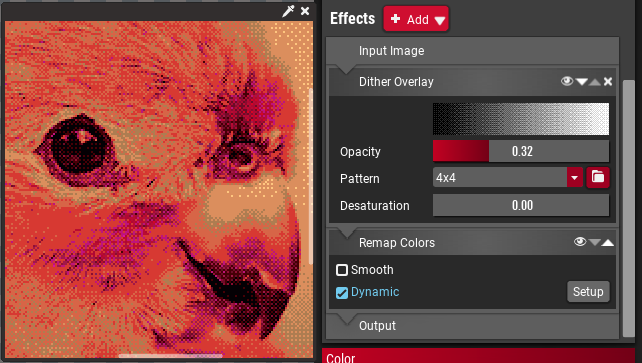
The effect system for reference images has been completely revamped. Every effect can now be applied multiple times, has a opacity slider and the order of effects can be changed. Also all effects can be applied after remapping if so desired.
This is a huge change in the internals of ColorTool and paves the way for a major feature in the next release and other additions over time.
New Effect: Rotate Hue
Allows you to adjust the hue of an image, and by adding an hue-multiplier to make an image overall more colorful, bringing out the hue-shifts more. This is intended to prepare otherwise rather monotone images to be remapped to rather colorful palettes.

New Effect: Replace Color
There is two variants of this effect, the first replaces a single color in the picture with another. This is very useful to change the color of lights or shadows in an image.

The second replaces a band of colors with a different band of colors and is intended for more specific tasks as changing the color of a material. It might be a bit tricky to use sometimes though since ColorTool doesn't have any masking capabilities.

New Effect: Preserve Lumiance
This effect is meant to be used in conjunction with the Rotate Hue and Replace Color effects. Since changing the hue also changes the luminance of a color it can mess up the image. By using this filter you can reset the luminance to the luminance of the original image while preserving any hue changes.
Quick Navigation dock

Allows quickly navigating between multiple folders, making it easier to access your collection of reference images or palettes.
Math expressions

Slider boxes (those red value input thingies) now accept common math expressions, such as multiplying or adding an value. Some mathematical functions are also available.
Other Changes
- Added the "Paste Reference Image" action to the context menu.
- Fixed Paint.NET palette export bug.
- Fixed crash when trying to import more colors than there are in a picture.
- Remapping now automatically gets disabled if the palette has 0 colors.
- Added a "Report Bug" entry in the "Help" menu. This opens the appropriate thread in the Steam Forums.
- Added a option to enable/disable the automatic sorting of palette entries.
- Added fallback fonts for non-latin writing systems, displaying them properly when used in filenames and as labels. (Chinese, Japanese, Arabic, Bengali, Gujarati, Gurmukhi, Hebrew, Tamil, Korean, Thai and more...)
Roadmap to Version 1.0
With this release ColorTool is inching much closer towards v1.0, e.g. the end of Early Access.
Build 07
Build 07 is planned to introduce the last major feature before release: Export Sets.
Export sets will be a replacement for the old, buggy and frankly not very well thought out bulk export feature. They will allow importing several palettes and images into a single file, setting up effects for them and then exporting them in bulk. This is targeted at game developers who want to manage either color variations or just color coordination over a large amount of files. Think of JRPGs which have stronger or boss variants of common enemies, strategy games that use different color palettes for different players or fighting games with palette swaps.
This is heavily connected to the Effects system introduced in the current version and there will be a few additions and performance improvements too.
Build 08 / Version 1.0
Finally Version 1.0 will clean up all the lose ends to make sure ColorTool is ready to use and will mark the end of the Early Access phase.
This means in particular:
- Add tool-tips giving basic information on most properties and functions.
- Add context menus in all the places you would expect them to be and add overhaul the existing context menus.
- Add some quality of life features.
- Create at least one tutorial video to give people a general idea on how to use ColorTool.
- Solve existing performance bottlenecks so it runs buttery smooth on a wide range of hardware.
- Extensive testing and bug fixing.
ColorTool Build 05 Fix
- Fixed a bug that occasionally caused a crash when generating a preview for exporting as palette.
- Fixed ColorTool not showing the proper icon in the task bar.
- Fixed ColorTool opening a console window when starting.
- Added the option to create a new Palette document in the File menu.
- When saving a Palette document it now shows the proper file endings.
Build 05 Hotfix
ColorTool Build 05
Performance Improvments
The automatic palette sorting as well as the image analysis have been ported to C++. They should be up to 100 times as fast as before and delays within processing should be far less noticible.
Copy & Paste
Copy and Paste functionality has arrived in ColorTool. You can copy nodes and colors from one document to the other.
Whenever you copy colors from a palette it will also create, allowing you to very quickly import colors from ColorTool into your drawing application, just through copy & paste.
Pressing Ctrl+Shift+V will put whatever image you have in your clipboard and imports it as reference image.
You can also export a reference image directly to the clipboard rather than to disk.
Copy Settings
Two small icons have been added to the properties dock, they allow you to quickly copy the settings of a ramp or image to other ramps or images.
Native File Dialogs
All file dialogs are now native, making navigating the file system a bit more familiar.

This can be disabled in the settings.
Import Colors
You can now import from a image. This action can be found in the properties of a reference image.

High quality Lanczos interpolation for reference images
A new interpolation setting has been added to the "Resize Image" effect where you can use the high quality "Lanczos" interpolation which creates a much smoother image.

Other changes
- New actions: Horizontal Flip (Ctrl+H), Vertical Flip (Ctrl+V).
- ColorTool has been updated to use Godot 3.2.3
- The accuracy of the Dynamic and Static remapping has been improved, so that if a image is remapped to it's own palette it won't actually change any of the colors.
- Minor UI improvements.
- Updated application icon on Mac, added Retina versions of icon.
- Windows now uses the size-appropriate native icon in the toolbar.