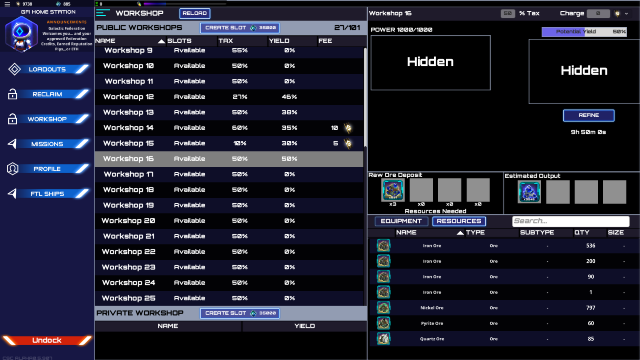
Refining UI has been updated to take account Augmentation modules to display the correct amount in the output slots. This will fix the issue with not letting you reclaim your items.
Known Issues:
GFI Security fleet still disabled
On rare occasions, the user's ship may become invisible after docking
When coming out of the jumpgate ship trail will flash across the screen
Closing the Navigation Map while in FTL won't allow you to reopen it
When coming out of the jumpgate ship trail will flash across the screen
Consuming a TCF canister in ship hangar will not decrease total count- undocking and re docking to station will fix it
Apply button does not work in the graphics settings.
This is rare, but if the button "Home Station" appears when you are not in FTL (or when you are just about to arrive) do not press it. Your ship will disappear and you will need to contact support to get it back
Some missions are leading users to a non existent station in Sol: GUx: 5,000.00, GUz: 10,000.00 – do not accept this mission
In rare cases, if a user is destroyed from mission NPCs, their ship may not appear in Reclaim
CSC Alpha 0.6.001 - Hot Fix
CSC Alpha 0.6.001 - Hot Fix
All Fixes:
Refining yields fixed
Issue with FTL ships not showing fixed
Known Issues:
GFI Security fleet still disabled
On rare occasions, the user's ship may become invisible after docking
When coming out of the jumpgate ship trail will flash across the screen
Closing the Navigation Map while in FTL won't allow you to reopen it
When coming out of the jumpgate ship trail will flash across the screen
Consuming a TCF canister in ship hangar will not decrease total count- undocking and re docking to station will fix it
Apply button does not work in the graphics settings.
This is rare, but if the button "Home Station" appears when you are not in FTL (or when you are just about to arrive) do not press it. Your ship will disappear and you will need to contact support to get it back
Some missions are leading users to a non existent station in Sol: GUx: 5,000.00, GUz: 10,000.00 – do not accept this mission
In rare cases, if a user is destroyed from mission NPCs, their ship may not appear in Reclaim
Alpha 0.6 Is Live!
Hello Commanders! 0.6 is finally here! The team has been working hard to get this next feature update released. There are some massive updates to go over so let's jump right into it!
Workshops
Refining is a massive feature that pushes CSC closer to having all the core gameplay integrated. Your "Workshop" is where users can create the components and refine raw materials into usable resources. Components and refined materials will be needed in later updates for manufacturing modules and ships (aka Crafting). All GFI and NPC stations will have private workshops that are available for purchase using GRP (Player-owned stations will be addressed in the following days as we finalize player-owned functionality). Commanders will be limited to One private workshop per-station. If a user wants to refine or craft more components at the same time they will need to purchase a public workshop from a station or use GFI workshops that can charge a Tax or Fee. Private workshops in the Sol system will cost 45,000 GRP (Note ALL pricing is not final and prices may fluctuate up or down during the Alpha builds). Station further away will have prices that differ based on distance and utility. The ability to purchase Public Workshops will be disabled for the first week or two of 0.6.0 gameplay to give time for players to understand this new game mechanic. Public workshop space can be made available to any user at the station or limited just to the owner's use. Public workshops can charge other Commanders a % of the raw resources used in crafting or refining and/or charge those Commanders a fee in GFC or GRP.
Missions
There are now missions in CSC! To start off with, missions are located only in Stations, but all stations have missions.
Users can check their status on a mission by going to the above screen from the Station. If you have completed an objective then you will see a green check-mark present on the icon. Missions that are repeatable will come back after you have completed it.
The type of missions you will see in the game are delivery and destroy types of missions. Commanders can only ever have 10 missions active at a time. You can always check what missions you have active by docking in any station, even if you accepted a mission from a different station. Some missions can only be completed within a window of time. If you accept a mission and do no complete the mission before the timer is up, then you must cancel the said mission. If you don't and you're at 10 active missions, then you will not be able to accept new missions, so be sure to clear your list if you ever need to. Currently, missions do not tell users when they have "failed" a mission, so any mission that you are no longer able to complete you will need to cancel it yourself.
Some stations have more missions than others and also might have a different refresh time on missions, keep this in mind if you are ever waiting for new missions. In general, random missions refresh in intervals between 4–8 hours.
Next to mission titles, you will see a number indicating the difficulty of missions. The higher the number, the more difficult the mission is. This Challenge Rating goes between 1–50. Rewards will also be random and will randomly be generated by the CR of the mission. While a majority of missions are random, we are offering some static missions. The GFI will have currency based objectives that will require GRP or GFC and provide the user with TCF or modules. During this release there will be a limited time mission in Lacallie 8760 System called "Dronian Terror," a dreadnaught-sized terror has appeared and the GFI needs all commanders to aid in defeating this Drone invasion. This mission expires 10/21.
Loot
NPCs now drop loot for players when they are destroyed. If you are the one to destroy a pesky drone, then you will be the only one to see the loot. Loot is highlighted green for easy visibility and to differentiate from the usual blue of crates that users drop. Loot will only be visible to the user who destroyed the NPC for the first hour. After that one hour, all users in the vicinity will be able to see the loot and pick it up. If loot has been untouched between 3–4 hours then it will disappear for everyone. Typically, loot will be components required to craft that type of ship. Rarer more challenging NPCs also have a chance to drop modules they used in battle. NPC loot drops can also be part of a mission objective.
Hangar Modules
Transporting your ships to another station is now a lot easier if you have Hangar modules. When you add a hangar module to your loadout, you will see a "Ship Hangar" option pop up the left hand side of the UI. This is where you are dragging ships from the right to. As you fill the slots you will see the numbers update on the left. If the hangar you have equipped can only fit two corsair ships, then you will see it says "2/2." If you see "0/0" that means that the hangar module you have equipped can not fit that ship class.
TCF Update
With refining now live, that means commanders can now refine their trilite into Trilite Concentrate Fuel, TCF for short. Canisters of TCF hold 2,000 fuel units, and your TCF bar at the top of your screen displays 2,000 TCF worth when full. If you ever need to know just how much TCF you have in your ship then go to Profile to check the amount.
You can consume canisters from your station hangar by right clicking them and selecting "Consume." You can also consume canisters that are in your ship inventory. Canisters will also automatically be consumed when attempting a jump more than 2,000 units. TCF is used to q jump locally or for interstellar travel. Read below for more about Q jump.
Ship Base TCF usage breakdown Scout - 50 TCF per 1 Light Year Intrepid - 100 TCF per 1 Light Year Corsair - 200 TCF per 1 Light Year Prometheus - 300 TCF per 1 Light Year Dreadnaught - 400 TCF per 1 Light Year
Ship Cargo TCF usage breakdown 1 kg = 0.0001 TCF per 1 Light year
Quantum Jump Drive
Commanders can now use their TCF to Q jump to other systems, cutting traveling time down to, well, instant! It is similar to using a jumpgate. However, not all systems have jumpgates so this is when using Q jump is useful for exploring the further reaches of the galaxy. Users just need the correct Q jump modules or ship. Q jump requires Trilite fuel, users can acquire fuel from missions or craft it in a Workshop.
If you are planning on traveling far distances, be sure to have extra canisters in your inventory. You will get a pop up letting you know when you must use extra canisters to make the journey.
Q jump has a cooldown timer that will prevent users from q jumping again too soon. How much fuel is used is dependent on the distance you are going and the total weight of your ship, this includes weight of ships that you are transporting inside of your ship hangar.
Multi-ship FTL
Planning on a long journey but still have another mission to take care of in your local system? Well now you can send out ships to FTL and command another ship at the same time. There is no limit to how many ships you can send out to FTL at a time. However you will only be able to switch from ship to ship from your Home station.
With this feature being added, we have removed the "Disengage FTL" button as users can now leave the ship that is in FTL and switch to another ship or their userpod by clicking "Home Station." Your ship that is in interstellar FTL cannot be damaged, and when your ship arrives at its target location it will remain in looping FTL till you board it and it will then start to disengage you from FTL.
Other
0.6 has a lot of new features for commanders to try out. This includes an additional 40+ star systems for users to explore. Some of these star systems will be Non-PVP so as to allow users to provide each other support while preventing friendly fire. FTL weapons have also been added to the 0.6 build. FTL weapons can prevent other users from slipstreaming or FTL-ing away in PVP enabled zones. Finally, some general bug fixes were added to this build.
Some other features that didn't make it into this initial build are the following:
Ship buffs & Ship Modules
Check In /Out - Resources & Modules
Fringe Check In
Discovery System
You can look forward to seeing these features in the coming 0.6.1+ builds.
Conclusion
That covers the high level of 0.6, jump into the build to try all these new features out for yourself!
New radar list window has been added to track nearby objects and users
Loot system - NPCs drop loot and is highlighted green
Q jump enabled - consumes Trilite fuel and amount of fuel used is based on total weight of ship
Missions now live in 0.6, currently can be seen in Stations only
Modules that disrupt ftl will now take into effect
FTUE training combat has been added for users who has not done it
Now able to dock ships into another ship that has a hangar module equipped
Now able to target but not attack user pods to view user
User pod can at least target one object at a time.
Ship bonuses now are applied to any module you have equipped. I.E If your ship has a bonus for sublight speed, any module that increases sublight speed will be applied.
FTL Swapping Ships
You can now go back to your homestation while in FTL in a pod and be able to use another ship. You will be able to go back to the ship in FTL in the station.
Right clicking on canisters now have a new option to Loot
New skyboxes added
40+ systems added
All Fixes:
FTL time has been fixed when stacking multiple FTL Boosters/Engine modules
Main Menu - Profile view of Modules - Details button
NPCs dont attack cloaked users
Modules disappearing when moving them
If user is in jumpgate longer than 60 seconds you must restart the client to get yourself out
Swapping error sometimes occurs when rapidly swapping modules - go a bit slower :)
Main Menu - Profile view of Modules - Details button
Undocking quickly after boarding a ship will cause an infinite loading screen or cause the ship to be invisible (restart client to fix)
Known Issues:
GFI Security fleet still disabled
On rare occasions, the user's ship may become invisible after docking
When coming out of the jumpgate ship trail will flash across the screen
Closing the Navigation Map while in FTL won't allow you to reopen it
When coming out of the jumpgate ship trail will flash across the screen
Consuming a TCF canister in ship hangar will not decrease total count- undocking and re docking to station will fix it
Apply button does not work in the graphics settings.
This is rare, but if the button "Home Station" appears when you are not in FTL do not press it. Your ship will disappear and you will need to contact support to get it back
***Evening Update - 10/4/19***
***Evening Update - 10/4/19***
Hello commanders! The Dev Q&A stream yesterday was a success! Big thank you to everyone who joined in and submitted questions! If you missed the stream you can watch it on the Lucid Sight Dlive under Replays. It is currently split into 2 recordings due to the technical difficulties we had 30 minutes in, so be sure to watch both! 0.6 was the main focus of this stream and gives you all a look into what to expect. https://dlive.tv/LucidSight
I know you guys have heard this a lot, but we're so close to 0.6! (Soon™️ :grin: ) But in all seriousness, we do expect to have it out by next week to you guys. The team has been really working hard on it and we all can't wait for it to be live.
That's all for now, Fly safe commanders!
Star Trek + CSC Divergence Event is officially over
Afternoon Update - 10/3/2019
Hello commanders! The Star Trek + CSC Divergence Event is officially done. It's been an amazing 5 weeks and a big heartfelt thank you from our entire team to you guys. We've really enjoyed being able to partner up with Star Trek for such an exciting event and hope you all loved it too.
The final shard event is over! Here are the winners! A fitting end to our shard event with those usernames. :star_trek: Congrats to you guys and all past winners of all events we had leading up to this! You guys have all done an amazing job!
Next thing to look forward to, our Dlive stream where Fazri answers your guys' questions and talks about 0.6 feature release at 4PM PST today.
Thanks again commanders, fly safe!
Screenshots courtesy of user Magick!
Star Trek™ + CSC — Events Final Week
Hello Commanders!
We are in the final week of the Star Trek™ + CSC Divergence Event! The entire event ends on October 3rd. The Star Trek™ Crate sale ends promptly at 3 PM PST. The remaining quantity of crates will be destroyed and the starship counts will be locked in. The final auction is currently live, we wanted to close out the event with the USS Voyager. These auction ships have the status of First Fleet (Unlimited Replication) and come with a set of tech level 2 Star Trek™ modules. It’s your last chance to get one!
Pirates in EQ Pegasi!
The pirates scouted EQ Pegasi last week and are trying to smuggle Star Trek™ crates out of EQ Pegasi and are illegally mining shards. All commanders are clear to engage the pirates on 10/3/19 - 11AM PST, location will be shared day of event. Anything dropped by the Pirates are up for grabs by commanders that help neutralize the threat.
Shard Event
The current shard event is still ongoing and ends Monday 9/30/19 at 3PM PST. After that, there is one more final shard event to close out the event. To reiterate the rules: The top 3 users with the most shards in their ship and station inventory will each win a Star Trek™ Supply Crate. There is a limit of 2 crates per commander for the Shard contest; users can only win twice throughout the entire 5 week event.The shard event only takes place within EQ Pegasi.
Today is the last of the hidden crate events. Two crates will be hidden in EQ Pegasi today, the 27th, at 7 PM PST. These crates will remain hidden until found. Since the crates were found easily last week, we though we would make it a bit harder this week with vague clues.
Two Clues about the crates hidden today (9/27/19): 1. Almost center of somewhere hidden 2. Good luck finding me, matey
That’s all for now commanders, fly safe!
Evening Update - 9/26/19
Hello commanders!
Hope everyone has been having a great week! The team is still working on 0.6 and some features are still in the QA process but we expect to have it out next week for you all.
The final ship auction is live! The USS Voyager is the last available auction ship up for grabs. As a reminder, this ship is First Fleet status and comes with the rare set of tech level 2 Star Trek modules.
We are having a Dev Q&A Monday the 30th at 4PM PST on Dlive. You can post your questions in the Discord room #qa-submit, we will stop accepting questions tomorrow the 26th at 4PM PST. I'm sure there's a lot of questions regarding 0.6 so get those in now!
The shard event continues and we have posted the current standings! Check it out below!
Tomorrow a new event blog will be posted outlining the final week of the Star Trek + CSC Event, this has been an amazing experience and we're sad to see it end! Stay tuned for that post tomorrow.
That's all for now, fly safe commanders!
Screenshot courtesy of Nevableed
Evening Update - 9/18/19
Evening Update - 9/18/19
Hello commanders! We've got a few updates for you all. The Star Trek Tech 2 modules have been updated to be more powerful by almost threefold. Giving them a massive edge!
With 0.6 in the works, we also wanted to let commanders know that 0.6 will have quite a few features that were from community suggestions. We value all your feedback and encourage everyone to continue to submit their suggestions to us through here!
Events Update
The hidden crates have all been found! Congrats to those two commanders!
The shard event continues and we have the current standings of the top 20 commanders so far! Keep it up guys!
That's all for now, fly safe commanders!
Star Trek™ + CSC - Events Week 3
Hello Commanders! We're at the third week of the Star Trek™ + CSC - Divergence Event! The power hours this week with streamers and players, & the Pirate event have been a lot of fun. Thank you to all who participated!
Shard Event
The shard event ended at 3PM PST. Here are the top 3 commanders who had the most shards: Congratulations Locutus, Noteboom, and MrSpock! The next round begins at 5PM PST, check below for the upcoming schedule! And here is a recap on general rules: The top 3 users with the most shards in their ship and station inventory will each receive a Star Trek™ Supply Crate as a reward. There is a limit of 2 crates per commander for the Shard contest; users can only win twice throughout the entire 5 week event .
Congrats to the users who found the hidden crates! Two more will be hidden today at 6PM PST in EQ Pegasi. Two Clues about the crates hidden today (9/13/19):
I can see the large rings from my position even though I'm surrounded by rocks, I must be close. A rock larger than most of the others sits just above my head.
Space is vast but this asteroid belt seems just as vast. Behind this small lone rock I reside.
Schedule
STARTS 9/13/19 6:00 PM PST - 2 crates hidden until found STARTS 9/20/19 12:00 PM PST - 2 crates hidden until found
Hunt the Dev
On 9/21/19 at 11:00 AM PST we the devs will be flying around EQ Pegasi. We will all be in random areas and you the community have to find us and destroy us to get a Star Trek crate. These crates are from our marketing pool that we mentioned in this blog post. So chances for certain ships are higher than in the general pool. Clues as to where each dev is located will be provided day of the event. More details on the event to come out next week!
---
Conclusion
That's all for now! Safe flying commanders!
Afternoon Update - 9/13/19
Thank you all again for your participation in the event, not just today but also the past week! The Pirate event this morning was a great way to test scalability of the server and the team is going to tackle some of the bugs that popped up from it.
As a reminder the shard event ends at 3PM PST today. Our next event blog will go live at 3PM as well and will show the final numbers and winners. The next shard event starts at 5PM PST today and 2 more hidden crates will be added at 6PM PST. Details of all the above will be in the blog post today. Screenshot courtesy of McRaven!