

cyubeVR
Weekly Report #3
the last weekly report was released roughly a "week" ago, so it's time for another one! Yes, it definitely is!
Actually, in roughly one hour Update 16 will be released. I hope releasing a weekly report and the patch notes for a new version at almost the same time doesn't confuse people too much :)
In the last two weeks, Update 14 and Update 15 were released. Update 14 was a bigger update, adding easter bunnies and more importantly the ability to put and grab tools in the world and directly use them, with both hands. Twice the mining speed due to dual wielding, and nice decorations.
Also, Update 14 added a nice small special april fools "feature": deers sometimes made elephant sounds! That was only active on April 1st though, just like the rabbits on the back of deers was only active on easter sunday and easter monday. It seems the elephant sounds surprised people quite a bit (multiple people mentioned it in discord), so it worked well :)
Update 15 was just a small bugfix release. This was due to after releasing Update 14, I started the process to update the Unreal Engine version used by the game. The current engine version is over a year old now, so it's definitely time for an update. The Unreal Engine used for cyubeVR is quite heavily modified by me with many small and some bigger improvements, especially related to performance to allow a game like cyubeVR (infinite world, dynamic lighting) to run well with good performance. That makes updating it quite a bit more work than it would normally be!
I got the hardest part done, but then I noticed I still have to wait for one fix to be applied to one plugin before I can do the rest. Originally it was planned that Update 15 would be the engine version update, but due to one crash introduced with Update 14, Update 15 became an update with just a bunch of fixes. Then it was planned that Update 16 would be the engine update, but after I noticed I still have to wait for that one fix, it was clear that Update 16 would be a "regular" update again, adding some content to the game. In this case, chairs!
So, engine update is planned for Update 18 now. You can expect to see quite significant performance improvements from that, and likely noticeably more resolution the game is rendered with. Also, the engine update is pretty much a requirement for nicely adding survival and multiplayer, so it definitely has to be done soon.
As I mentioned above, in roughly 1 hour Update 16 will be released, adding chairs. Most likely, you will have read the Update 16 patch notes before reading this not-so-weekly report :)
That's all for now! Thanks for caring about the game, spread the word about it wherever you can and make sure to make me aware of any feedback you have in the official forums or the official discord server where we have over 230 members already!
Also, if you use Twitter, don't forget to follow the official Stonebrick Studios account: https://twitter.com/stonebrickstud
Cheers!
Update 15 is live! Minor update fixing one crash and adding some optimizations
Update 15 is live, just fixing one reproducible crash and adding some optimizations.
- Update 14 introduced a crash that could happen when you tried to drag a compass out of the inventory. Evil crash, and evil crash needs to be fixed! Evil crash is fixed with this update.
No reproducible crashes should exist in the game, and whenever a crash like this is noticed I'll fix that as quickly as possible in an update. If you notice any reproducible crash in the game, definitely report it so that it can be fixed in the next update.
- In various areas performance was improved, especially related to the rabbits introduced with the last update, and performance of having a lot of torches active in the world was also improved.
- The "glow" around torches was sometimes disappearing or appearing in the wrong locations, that was fixed too.
That's all for today! Thanks for caring about the game and as usually, make sure to report all issues you see and give me as much feedback as possible in the official forums or the official discord server.
Cheers!
Easter Update (Update 14) is live! Easter bunnys, tools that can be grabbed and used with any hand, and more!
The easter update is live! This is Update 14, adding great looking easter bunnys and also an awesome new feature, making tools objects that can exist in the world and be grabbed at any time. This allows for dual wielding, so using tools in both your left and your right hand. Mining can be way quicker with this Update!
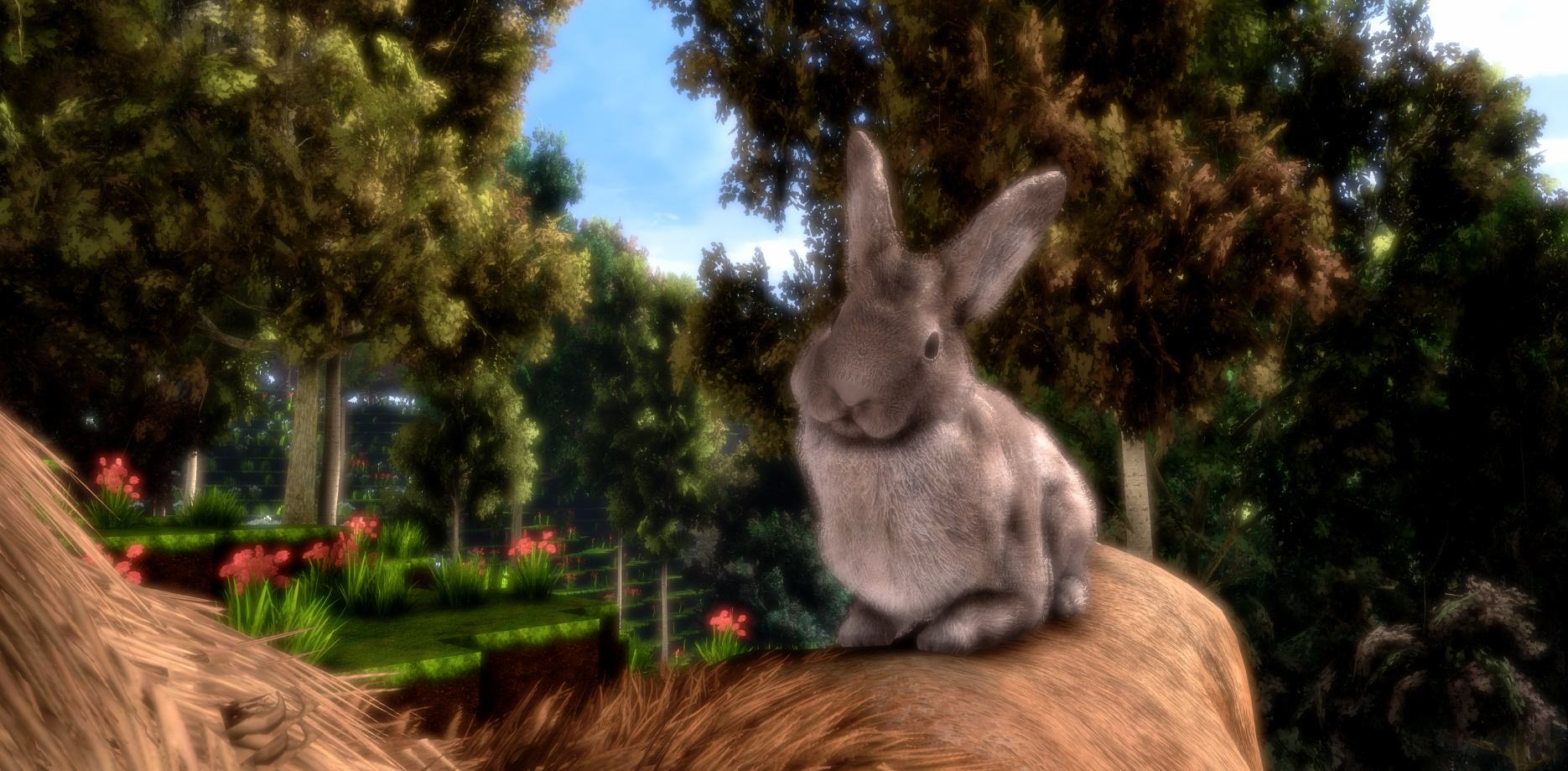
As usual, here is a very quick overview of the new things added in this Update, with more details below:
- Tools can be dragged out of inventory, exist in the world, are correctly saved/loaded and can be grabbed and directly used at any time
- Added rabbits, walking around in the world
- During easter (Sunday and Monday) you will see colored bunnys on the back of deers! They immediately became best friends!
- Increased resolution of deer texture to 8K
- Improved tiling of stone texture
- Improved lighting of block items
- Made "add to bucket" significantly easier to trigger
- Added music toggle button to the main menu (affects main menu and loading screen music)
- Deer is no longer making weird movements when dead
- Fixed issue that unlocked recipes would lag behind 1 recipe visually
- Fixed crashes that were reported
- Maybe something funny that only happens on April 1st?
Tools that exist in the world and can be grabbed at any time

You can now drag tools out of the inventory and drop them in the world! This works with all tools in the game.
You can grab tools in the world at any time using your hands and directly use the tool to destroy blocks. And you have two hands, so you can also grab two different tools with your hands and use both at the same time.
As a result, this allows for twice the mining speed due to being able to use 2 tools at the same time. It also also makes it possible to decorate your house with as many tools as you want, since they are all correctly saved/loaded in the world and will stay in exactly the position where you put them.
You can lean them on the wall, put them on the ground or build tables out of blocks for them to put them on top. It's great decoration, and you can actually grab and use them at any time!
Rabbits

The world is now populated by rabbits! They are looking great and you will mostly find them in groups.
During easter, so Sunday and Monday, you will find some deers with colored easter bunnys on their back, as shown in the first screenshot at the top.
April 1st
It's April 1st! So maybe there is something in that game that will be a bit different on April 1st. If that's the case, you will only notice that on April 1st and it will disappear the next day again :)
-----------------
That's all for today! Thanks for caring about the game and as usually, make sure to report all issues you see and give me as much feedback as possible in the official forums or the official discord server. If you don't like something about the game, tell me there and I'll try to improve it! I'm available to chat with anyone in discord.
If you like the game, don't forget to write a review if you haven't done that already. Writing a review and spreading the word about the game is the easiest way you can support the game!
Looking forward to hearing what you think about the new update :)
Cheers!
Update 13 is live! Red torches, no more forced tutorial and a few other improvements

Update 13 is live, adding red torches and some improvements to things that were just not very ideal before, like the tutorial. As usual, here is a very quick overview of the new things added in this Update, with more details below:
- Added red dye, collectable from red flowers
- Added red torches, craftable with the red dye
- The tutorial is optional now when you start the game for the first time, you can decide to ignore it and directly start the game
- Added a "tutorial" tab in the briefcase where you can access all the tutorial text that's also available in the main menu.
- Made the recipes for stone pickaxe and stone axe always unlocked, you no longer need to first find the papers for those
- Added recipes you can find for all the colored torches
- Fixed number above the bucket when adding items from chest into bucket (was always 1 before)
- Added button to the main menu that directly invites you to the official discord server when pressed
- Fixed small bug with items dragged out of chest
Red Torches

Red Torches are significantly more red than those torches that are not red. That's why you want red torches!
With the red torches added, you can now choose between the default colored torch, red, green and blue! More colors will come in future updates, like purple. If you want to have a specific color, please tell me in the steam forums or the discord.
Tutorial
Yes, the tutorial was not ideal before. The game forced you to read through all the text before you could even start the game. Many people weren't overly happy with this, and they were complete right of course.
So now, the tutorial is no longer forced when you start the game for the first time, you can directly start a new game without ever having seen the tutorial.
Instead, the tutorial is now available in the inventory briefcase in a seperate tab, so if you wan't to know something about crafting, you open the tutorial tab in the game, open the "Crafting" tutorial page and see what you need to know. Way more convenient!
2 recipes always unlocked
The recipe for the stone axe and the stone pickaxe is always unlocked in the crafting recipe overview now. This means you no longer need to find those recipes to know how to craft these 2 most essential tools in the game.
Before this, it could happen that you are someone playing the game for the first time and trying to find the recipes for an axe or a pickaxe, but just finding recipes for torches, chest, compass or any of those things that you don't actually need when you just started playing the game. And then you might end up using the stick to gather wood and stone for a long time, which is a bit too tedious.
So that's significantly nicer now!
-----------------
That's all for today! Thanks for caring about the game and as usually, make sure to report all issues you see and give me as much feedback as possible in the official forums or the official discord server. If you don't like something about the game, tell me there and I'll try to improve it! I'm available to chat with anyone in discord.
If you like the game, don't forget to write a review if you haven't done that already. Writing a review and spreading the word about the game is the easiest way you can support the game!
Looking forward to hearing what you think about the new update :)
Cheers!
Update 12 is live! Two awesome new blocks to build with, wallstone and flagstone!

Update 12 is live, and as usual, here is a very quick overview of the new things added in this Update, with more details below:
- Added wallstone and flagstone blocks
- Fixed bug that items could disappear in chests
- Added description text telling you the name of items you need for a recipe
- Fixed torch sounds sometimes not playing correctly
- Fixed lighting issue with chest and block items
- Fixed bug that you couldn't place a block below a chest
- Optimized visualization of recipes
- Adjusted view distance fog a bit
- Fixed crashes
- Other small fixes
Wallstone
A nice stone block that you can use for walls, or anything else. You can craft it using regular stone, and you actually get twice the amount of wallstone for every stone you put in!

Flagstone
If you have nice walls, you also want a nice floor, so you have a nice flagstone block now.

Display name of items needed for recipe
This was something that I quite often saw requested by people that just started playing the game. They would find a recipe, look at it in the crafting recipe overview and then think "what's this black thing that I need for the torch?".
So now, if you hover above the item in the crafting recipe overview, it will display the name of it at the top. If you hover above wood, it will display "Wood (any)", so it's way more clear now that all recipes crafted with wood do actually work with any type of wood.
-----------------
That's all for today! Thanks for caring about the game and as usually, make sure to report all issues you see and give me as much feedback as possible in the official forums or the official discord server.
Looking forward to hearing what you think about the new update :)
Cheers!
Video showing the chest mechanics and the new 100% free placement of objects in the world
https://www.youtube.com/watch?v=pb5b7AGy3oo
I hope you're as excited about it as I am! :)
Update 11 is live! Chest, free placement of objects in general and way more
After 15 different beta versions where hopefully all bugs were fixed, Update 11 is finally live in the stable branch of the game!

As usual, here is a very quick overview of the new things added in this Update, with more details below:
- This Update adds a chest, which is the first object using a completely new system allowing for 100% free placement, including rotation. No dependency on the voxel grid!
- Spawning of recipes is significantly more likely than before, and new recipes now correctly spawn in old chunks
- The brightness during day in shadowed areas was increased
- The side the arrow nocks on the bow was fixed
- A new, significantly better looking birch texture was added
- There now is a left handed mode which swaps the controllers, allowing left handed rift users to nicely play the game
- Block items now have an outline when selected instead of fully glowing yellow/green
- A different "experimental" algorithm for the dynamic res was added
- General optimizations
Chest
The chest is a complete new object type in the game. You can freely place and rotate it without any dependency on the voxel grid. Even after you placed it, you can still freely move it around. So if you don't like the position, you don't need to destroy it. Just like in the real world, you can just move it by grabbing it with both hands.
As everything else in the game, the chest is from the ground up built for roomscale VR. That means the chest has no UI, everything is done with your hands in VR. You need both hands to open the chest, one to lift up a latch and the other to open the chest.
You can add full stacks from your inventory to the chest by dragging them from the inventory UI into the chest, you can pickup items in the world and put them into the chest, you can move full stacks from one chest into another chest (not need to first put them into the inventory) and you can take individual items out of the chest and drop them in the world.
The chest is crafted with copper and wood and has 16 slots for items. Due to the chest now existing, inventory space was reduced to 28 slots.
I plan to make a short video showing the new chest soon, the Official Stonebrick Studios Youtube channel needs some more content :)
Recipe spawning
Recipes do spawn significantly more often now, so you have to spend less time with finding recipes.
Some previous update added a feature that recipes added with new versions of the game do also spawn on old parts of the world, but that feature didn't work correctly. This is fixed in this update, and especially new recipes are very easy to find now. This means you won't have to search long to find the chest recipe, you will likely find it quite quickly.
Due to some changes in the code, your recent "Instant Loading" files can't be used with this update, so they will be deleted and newly created. This means the first load of your world with Update 11 will be slower than usual, but when it fully loaded once and you leave the world and enter it again, you will see the usual (or better) loading speed!
Increased brightness in shadowed areas
Many people did say that shadowed areas are too dark in the game during the day, so this was improved with this Update 11. It should look more like day now.
Also, a major lighting bug that you probably never noticed was fixed. I have worked quite a bit on rain already, and there that bug was very significant.
Left handed mode
Vive users can just switch controllers, but left handed rift users do need a way to switch controllers to nicely play the game. This feature was not actually tested by any left handed rift user yet (none were active recently on discord), so don't expect it to be 100% perfect yet. If there are any issues with it, please report them in the steam forums or on discord.
To enable the left handed mode, go into %localappdata%/cyubeVR/Saved/Config/WindowsNoEditor/Engine.ini and add
LeftHandedMode=1 below [cyubeVR.Settings] In the future a nice UI can be added for that, but you probably won't often change that setting.
Different "experimental" algorithm for the dynamic resolution
cyubeVR always used dynamic resolution, and sometimes it could happen that when your CPU is at 100% usage because some software in the background is running (like OBS while streaming), the resolution in the game would decrease and the game would become blurry. This Update 11 added a different experimental way to detect GPU usage which should be less affected by 100% CPU usage.
You can enable the experimental algorithm in the settings. Most likely, you want to stay on the default setting though.
.
That's all for today! Thanks for caring about the game and as usually, make sure to report all issues you see and give me as much feedback as possible in the official forums or the official discord server :) Also, don't forget to write a review for the game if you haven't done that already. Writing a review and spreading the word about the game is the easiest way you can support the game!
Looking forward to hearing what you think about the new update, and I'm excited about Update 12 already which will most likely add at least 2 new blocks to build with :)
Cheers!
Weekly Report #2
the last weekly report was released roughly a week ago, so it's time for another one!
In the last 1.5 weeks I have worked on very exciting things. Update 10 was released with some minor optimizations, but the real work done was on the chest and a whole new "subsystem" in the game that will allow for 100% free placement of objects.
The chest is the first of those objects, so a lot of general work on that system was done that will apply to all objects in the future, not just the chest.
100% free placement means there is no dependency on the voxel grid at all. You can place these objects anywhere, and then even grab them with both hands after they are placed and change their position or rotate them, just like you would move around furniture in the real world!
This will allow for some very great interiors once chairs and other furniture is added. You will be able to arrange chests or chairs in a circle or do any other things that are quite unusual in a "voxel game". I'm sure people will be very creative with that!
The chest is now in the beta branch, so if you want to help test it and find issues that hopefully don't exist, join us in the official discord server where you can chat with me and talk to more than 200 other people about the game :)
If no major issues are found you can expect to see Update 11 with the chest in the next few days.
Also, take a look at this great screenshot taken by "Aelgiz" using the new 8K screenshot feature that was added in Update 9:
http://steamcommunity.com/sharedfiles/filedetails/?id=1315037047
I very much like seeing impressive things like that, so if you built anything great, don't forget to take a screenshot of it with pressing both teleport buttons for half a second.
That's all for now! Spread the word about the game wherever you can and make sure to make me aware of any feedback you have in the steam forums or on discord.
Cheers!
Update 10 is live! Just some minor tweaks
Update 10 is live, adding some optimizations and fixing some small issues introduced in Update 9.
Update 9 made removal of blocks a bit more "laggy", so that's fixed now.
This update also reduces the amount of bloom that is applied to the 8K screenshots, because it was just a bit too much. As a result, the 8K screenshots that you can trigger with holding both teleport buttons for 0.5 seconds appear significantly sharper now.
The next update will be more exciting and should be ready for testing in the "beta" branch quite soon.
It's mostly done already and will add a chest so that you can actually store things! Stay tuned :)
Cheers!
Update 9 is live! Instant World Loading (10000% faster), 8K screenshots and more!
Update 9 is live, adding Instant Loading which increases world loading speed by more than 10000%, new awesome high-res screenshots that are automatically added to your Steam Screenshot library, and more!
This update took significantly longer than other updates due to the complexity a 10000% increase in speed means. Between the release of Update 8 and today, 8 different beta versions were released and tested by players in the official discord server. Thanks to their testing, all issues are hopefully fixed and even a change as complex as this should be perfectly stable now!
Instant Loading
The new Instant Loading works by storing everything that's needed for the whole viewdistance to load on disk, so that the CPU has almost nothing to do when you enter a world or walk somewhere where you have been before.
In earlier versions of the game, depending on your CPU, it was possible that you had to wait 1-3 minutes when entering a world until all the world in the distance was loaded. Now, with the new Instant Loading, the whole view distance will be fully loaded once the loading screen disappears.
If you are coming from a world that was generated in an older version, you need to enter the world, wait until everything has loaded (that's not faster yet), then leave the world again. Once you enter the world now, you benefit from the new Instant Loading!
Awesome 8K screenshots
You can now take awesome very high resolution screenshots in the game by pressing and holding both teleport buttons for half a second. The game will freeze for a second while it takes an almost-8K screenshot thats also tagged correctly as "cyubeVR" on Steam.
You will hear the screenshot sound from Steam, and the screenshot will appear in your screenshot library where you can upload it with 1 click to the Screenshots Section of the game on Steam to show everyone what awesome things you have built, or special areas in the world that you find worth sharing!
If you have anything great to share, you now have the ability to take great screenshots that you can show to people on Twitter, Facebook, Reddit, Imgur or all other places in the internet!
The screenshot is taken with the maximum resolution that Steam supports, which is more than 3 times the amount of pixels of 4K. If Steam ever supports more, I'll add support for more :)
You can already visit the Screenshots Section on Steam to look at some of the screenshots taken with the new feature by people testing the beta branch of the game:
http://steamcommunity.com/sharedfiles/filedetails/?id=1312508212
http://steamcommunity.com/sharedfiles/filedetails/?id=1311405666
http://steamcommunity.com/sharedfiles/filedetails/?id=1313158338
Other things
- There is a version number in the main menu now, so you can easily see if your game is updated correctly.
- The teleport beam now takes a short while before it reaches full length again after a teleport, so teleporting huge distances at very crazy speeds is less possible now. For regular usage, you won't really notice a difference. The general goal is having teleport and smooth locomotion balanced, so in future updates the speed you can travel at with smooth locomotion will be increased.
If you see any crashes or other bugs in this version, please make sure to read this thread and report them correctly so that they can be fixed in the next update.
As always, please make sure to give me feedback in the steam forums or on discord :)
Cheers!