Dave the Diver cover
Dave the Diver screenshot
Genre: Role-playing (RPG), Adventure

Dave the Diver

10/28 (Mon) Hotfix

Hello Divers!

We have conducted a hotfix to address some of the issues that occurred after the update.
Please find the details below:


◈ Update Version:

  • Win: v1.0.3.1522
  • Mac OS: v1.0.3.508

◈ Update Content
  • Bug fixes


[Bug Fixes]


1) Missions
  • Fixed an issue where some newly added missions would cause graphical errors with the game background
  • Fixed an issue where completing some newly added missions would cause an infinite black loading screen


2) Other
  • Improved some text errors


Additional Information

  • If you experience any issues after the patch, please reach out to us through the official DAVE THE DIVER Discord server.
    Please compress the files from the path below and attach them to the ticket.
  • In case of crashes, freezing, or graphical issues, please refer to the [File Verification Guide] and follow the steps.

Windows:
%LocalAppData%\..\LocalLow\nexon\DAVE THE DIVER

Mac OS:
~/Library/Logs/nexon/DAVE THE DIVER/Player.log
~/Library/Application Support/nexon/DAVE THE DIVER/SData
or
~/Library/Application Support/com.nexon.dave/DAVE THE DIVER/SData

Steam Deck:
./.local/share/Steam/steamapps/compatdata/1868140/pfx/drive_c/users/steamuser/AppData/LocalLow/nexon/DAVE THE DIVER


◈ Notes
- If there are any changes to the details, we will update you through this notice.
- Please update Dave the Diver on Steam to the latest version for the changes to be applied.

A big thanks to everyone, including the individuals below who reported bugs. We appreciate your contributions!
Hun , @zty0679 , @hameeh , @heeju827_40085 , sing_berry , @ithkaty , @pingulas_62801 , @.symphy and more.

10/24 (Thu) Hotfix

Hello Divers!

We have conducted a hotfix to address some of the issues that occurred after the update.
Please find the details below:


◈ Update Version:

  • Win: v1.0.3.1513
  • Mac OS: v.1.0.3.503

◈ Update Content
  • Bug fixes


[Bug Fixes]


1) Sushi Restaurant
  • Fixed an issue with Dave's movement speed in Bancho Sushi


Additional Information

  • If you experience any issues after the patch, please reach out to us through the official DAVE THE DIVER Discord server.
    Please compress the files from the path below and attach them to the ticket.
  • In case of crashes, freezing, or graphical issues, please refer to the [File Verification Guide] and follow the steps.

Windows:
%LocalAppData%\..\LocalLow\nexon\DAVE THE DIVER

Mac OS:
~/Library/Logs/nexon/DAVE THE DIVER/Player.log
~/Library/Application Support/nexon/DAVE THE DIVER/SData
or
~/Library/Application Support/com.nexon.dave/DAVE THE DIVER/SData

Steam Deck:
./.local/share/Steam/steamapps/compatdata/1868140/pfx/drive_c/users/steamuser/AppData/LocalLow/nexon/DAVE THE DIVER


◈ Notes
- If there are any changes to the details, we will update you through this notice.
- Please update Dave the Diver on Steam to the latest version for the changes to be applied.

A big thanks to everyone, including the individuals below who reported bugs. We appreciate your contributions!
Tenryū, BaconKing, Scythe, 天才美少女羽川翼, Gremlin, 红军第一王牌机械师文工团首席男高音, ㅇㅇ, ark.rajang, Vanchinator, 伊斯拉尔 and more.

Dave & Friends – Collaboration Update

Hello Divers!🌴

New friends are visiting the Blue Hole for this collaboration update!
New content and various improvements have been added to DAVE THE DIVER. Check the details below!



◈ Update Version:

  • Win: v1.0.3.1511
  • Mac OS: v1.0.3.501

◈ Update Content

  • Collaboration content
  • New content & features
  • Improvements
  • Bug fixes


[Collaboration Content]


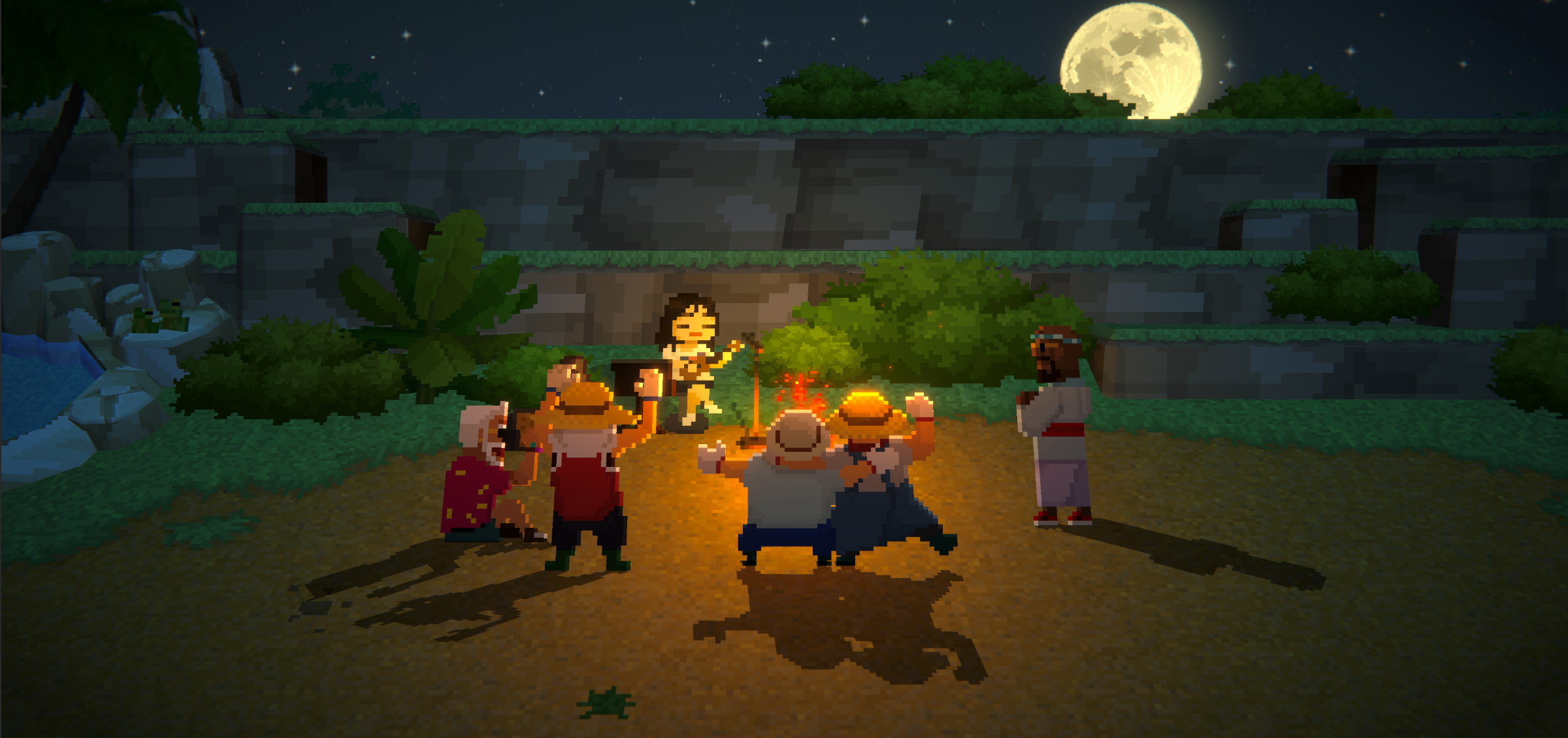
1) mxmtoon


Popular singer-songwriter mxmtoon visits Bancho Sushi!
Dive together, serve a special dish, and enjoy mxmtoon’s special concert!
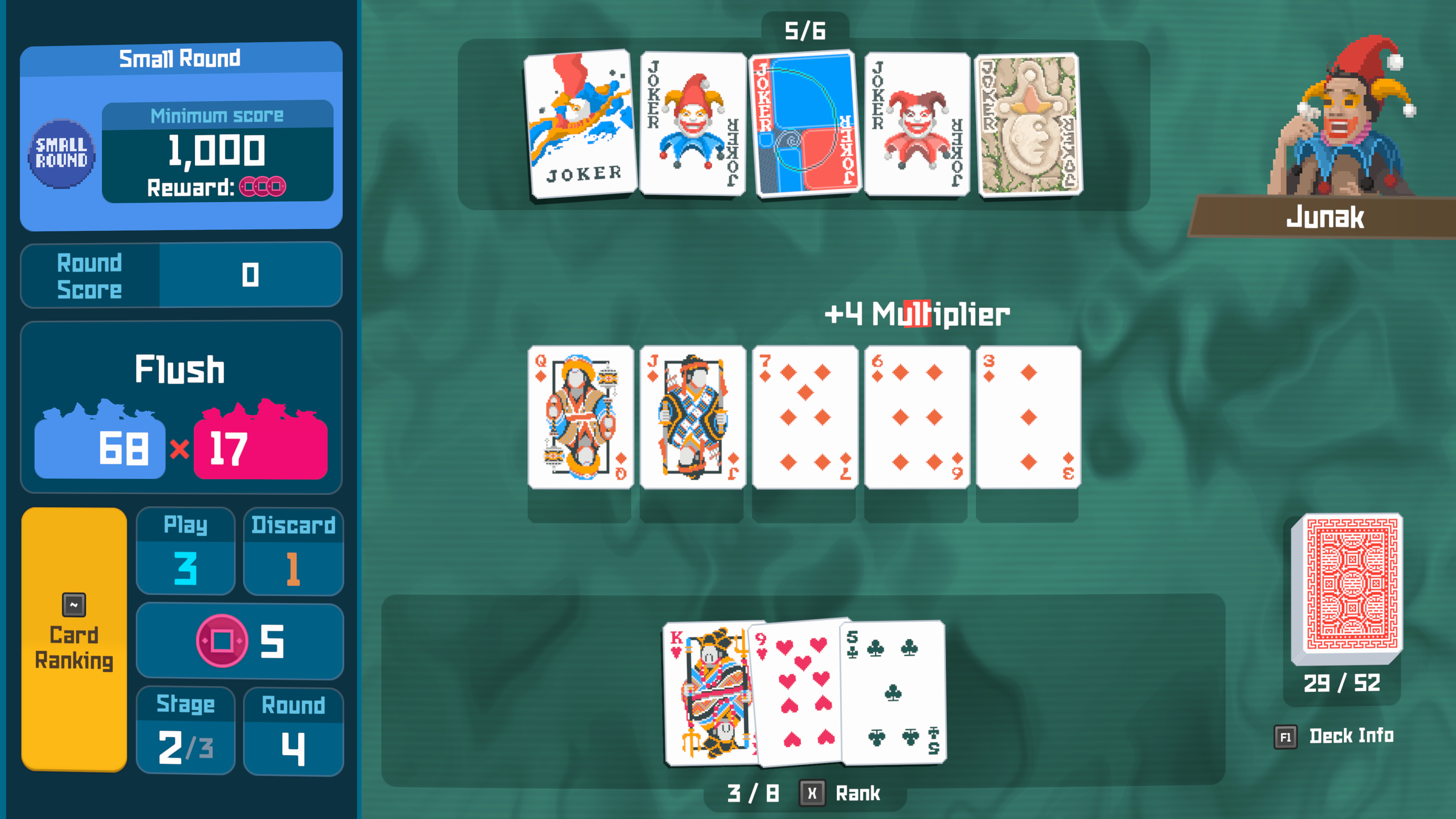
2) Balatro


It all started when Junak found a rule book for ‘Jimbo’s Game’.
This game has swept through the Sea People Village!
Play against the Sea People and earn a special Charm as a reward.



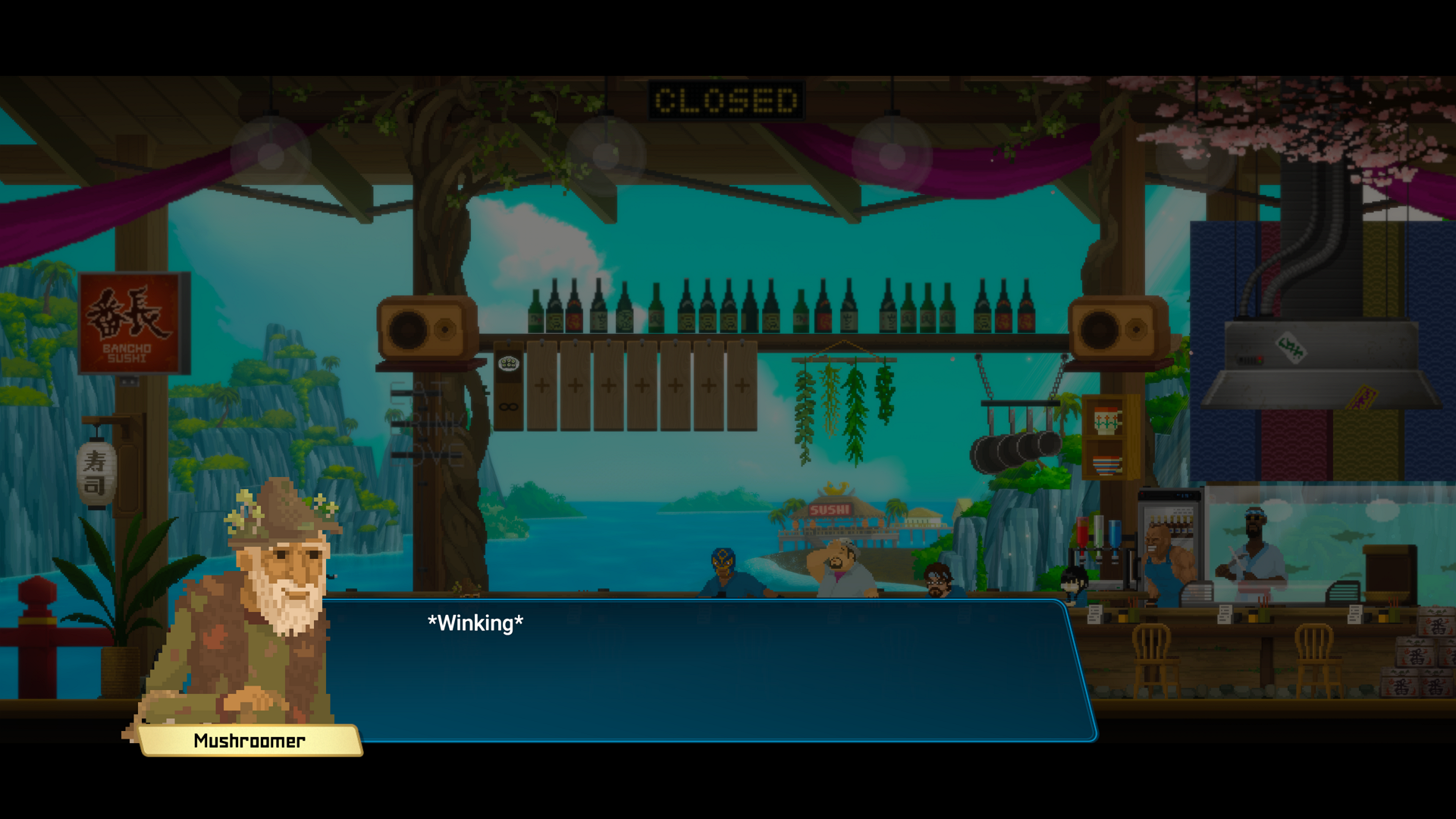
3) Potion Craft


Characters from the alchemist simulator game, Potion Craft, visit Bancho Sushi.

Help the Fellow Alchemist find his Magic Cauldron and earn a new crafting item! Use it to make potions with buffs and bait for the crab trap.

Purchase new ingredients and recipes from the Mushroomer.
4) Collaboration Phone Charms


[table]
[tr]
[th]Collaboration[/th]
[th]Promotion Code[/th]
[/tr]
[tr]
[td]mxmtoon[/td]
[td]MAIAANDDAVE[/td]
[/tr]
[tr]
[td]Balatro[/td]
[td]JIMBOISWILD[/td]
[/tr]
[tr]
[td]Potion Craft[/td]
[td]MUSHROOMER[/td]
[/tr]
[/table]
* How to claim: Smartphone - Call - Operator – Claim Reward – Enter Code


[New Content & Features]


1) New Mini-game

  • A new mini-game, ‘Bouncy Dumbo’ has been added to the Smartphone.

    • Purchase costumes for Dumbo with the coins earned from playing Bouncy Dumbo!
    • The Mini-game App will be open from the start of the game.
2) New Features

  • Tracking

    • A tracker to easily track materials for certain recipes or weapons while diving has been added.
      * This feature unlocks after a certain point in the game.
  • Smartphone charms can be swapped out for different designs.


[Improvements]


1) Sea Exploration

  • New locations for the Sea People’s Mirror have been added.
    • Sea People Record Chamber
    • [Post Chapter 4 Entry] Glacial Passage
  • Improved the crescent shaped QTE prompt for Tiger Shark counterattacks and similar actions to make it more intuitive.
  • Added a ‘Discard Melee Weapon’ guide pop-up.

2) Sushi Restaurant

  • Improved loading speed when transitioning to Bancho Sushi.
  • Added features to easily find and sort items.

    • Favorites feature: Pin recipes to the top of the menu list
    • Menu sorting options:

      • Enhancement: Sorts recipes that can be enhanced to the top
      • Party Menu: Sorts Party recipes to the top
    • (For DREDGE DLC players) ON/OFF option to display Aberrant Menu has been added.

3) Smartphone App

  • An interior item has been added as the final Ecowatcher reward.

    • Even if the final level has already been reached, the reward will be available after the update.
  • Improved clarity of when more contacts are added to the Contact list.

4) Sea People Village

  • Improved the gameplay flow for some gathering quests.

5) Farm

  • Added more animations for Sammy.

6) Other

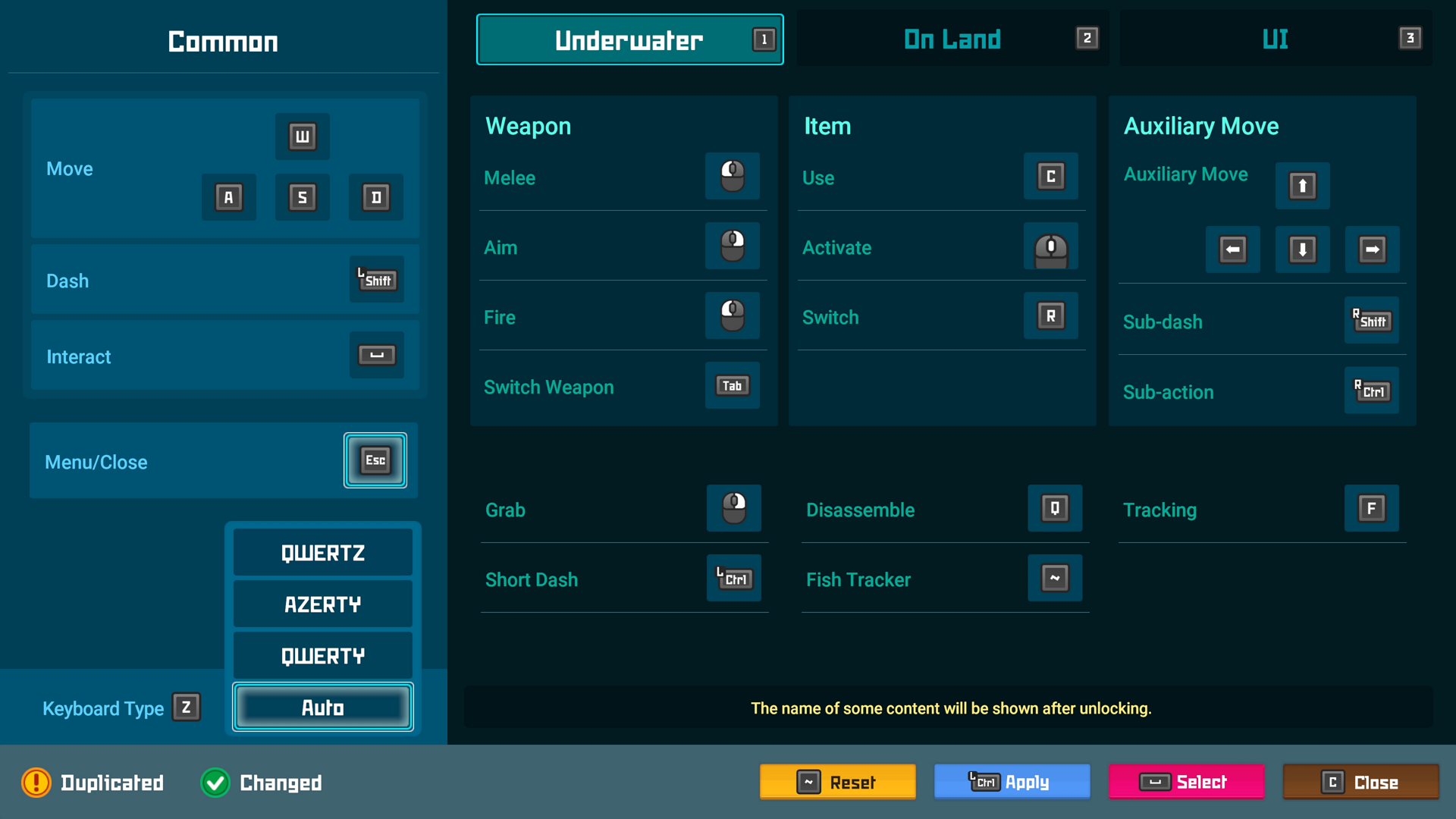
  • Added AZERTY, QWERTZ keyboard layouts.

    • Select preferred keyboard at [Settings – Keybind].
    • Continuing users’ settings will be kept to QWERTY. Please select preferred keyboard before starting the game.
  • Added controller vibration to the opening cutscene.


[Bug Fixes]


1) Sea Exploration

  • Fixed an issue where the Opah Photo Spot was not triggered in certain situations
  • Improved some awkward fish movements and fixed issues where certain fish would get stuck in the terrain
  • Fixed an issue where the indicator for some aggressive fish were not displayed
  • Fixed an issue where the net from net guns would not disappear
  • Fixed a display issue with certain coral on the terrain that occurred during certain missions
  • Fixed an issue where seahorses could be caught even with none around
  • Fixed frame drop issue caused by a certain FishMon
  • Added some fishes to the Loading tips screen
  • Fixed an issue where some fish would not react as they should when Lure Capsules or Doll Decoys were used

2) Missions

  • [Chapter 6] Fixed an issue where Dave could not be controlled in certain cases during the Third control room switch mission.
  • [Chapter 4] Improved Dave’s animations during the John Watson boss fight
  • Fixed an issue where certain FishMon missions would mark as failed when it could still be retried
  • Fixed an issue where Dave could be controlled during certain transition scenes
  • Fixed an issue where incorrect character images would be displayed during certain tutorial dialogues
  • (Only Mac OS) Fixed a display issue with certain Glacial Area maps where blue boxes were displayed on the top and bottom of the screen
  • [Chapter 4] Fixed an issue where Dave could die in situations where he shouldn’t during the Find Glacial Passage Key mission

3) Sushi Restaurant

  • Fixed an issue where the Branch summary screen and actual operation did not match
  • Fixed an issue where Maki and Sammy would sit in the same seat if missions were overlapped
  • Fixed an issue where ‘Empty’ text would be displayed incorrectly
  • Fixed an issue when interacting with NPCs or customers in a certain spot
  • Fixed an issue where multiple background audio would overlap in certain situations
  • Fixed an issue where the ‘New’ icon would not disappear for new interior items in certain situations
  • Fixed an issue where the interior item names would sometimes not be displayed at the Branch

4) Weapons/Items

  • [Post Chapter 6 Entry] Fish caught by Mjolnir’s lightning effect will be counted towards the ‘Predator of the Blue Hole’ achievement
  • Adjusted the NICE timing for Golf Club
  • Fixed a display issue where the Superalloy Harpoon Gun’s harpoon tip and muzzle were not aligned
  • Fixed an issue where the Eco Poison Resist Bracelet’s poison debuff effect was not applied properly

5) Bosses

  • [Chapter 6] Fixed a display issue with Kronosaurus when retrying the boss fight
  • [Chapter 7] Updated to prevent the Divine Tree Fruit from falling to inaccessible places during the Anomalocaris boss fight

6) Smartphone App

  • Fixed an issue where some buttons in Evil Factory could not be controlled with mouse
  • Fixed an issue where GYAO! Memories would be duplicated in certain circumstances

7) Other

  • Fixed an issue where some sounds were not played
  • Improved some text errors


📌Please Note:


  • The time-limited free DLC, [Godzilla Content Pack] is only available for download until [November 23, 07:59 UTC, 2024]
  • Once downloaded, [Godzilla Content Pack] can be played and reinstalled even after the period ends.


Additional Information

  • If you experience any issues after the patch, please reach out to us through the official DAVE THE DIVER Discord server.
    Please compress the files from the path below and attach them to the ticket.
  • In case of crashes, freezing, or graphical issues, please refer to the [File Verification Guide] and follow the steps.

Windows:
%LocalAppData%\..\LocalLow\nexon\DAVE THE DIVER

Mac OS:
~/Library/Logs/nexon/DAVE THE DIVER/Player.log
~/Library/Application Support/nexon/DAVE THE DIVER/SData
or
~/Library/Application Support/com.nexon.dave/DAVE THE DIVER/SData

Steam Deck:
./.local/share/Steam/steamapps/compatdata/1868140/pfx/drive_c/users/steamuser/AppData/LocalLow/nexon/DAVE THE DIVER


◈ Notes
- If there are any changes to the details, we will update you through this notice.
- Please update Dave the Diver on Steam to the latest version for the changes to be applied.

A big thanks to everyone, including the individuals below who reported bugs. We appreciate your contributions!
Clover-36, DoRaJi, Unoraptormon, Deadmano, Hamtigers, Xyriath, 𝕤𝕟𝕠𝕨𝕕𝕖𝕝𝕦𝕩𝕖 :], BILTH, Nix, Kefro and more!

9/11 (Wed) Hotfix

Hello Divers!

We have added some updates to improve the game and address some bugs.
Please find the details below:

◈ Update Version:

  • Win: v1.0.2.1474
  • Mac OS: v1.0.2.481

◈ Update Content
  • Bug fixes


[Bug Fixes]


1) Sushi Restaurant

  • Fixed an issue where not all staff were displayed in the Waiting Room when there were too many hires

2) Sea Exploration

  • Improved unnatural camera angle of certain scenes
  • Fixed an issue where using the Sea People’s Mirror would cause the game to stop in certain circumstances
  • Fixed an issue with the animation of certain fish species

3) Other

  • Fixed an issue where the guide pop-up displayed no text when the same promotion code was typed in twice (or more)
  • Improved some text and dialog


Additional Information

  • If you experience any issues after the patch, please compress the files from the path below and send them to our help center.
  • In case of crashes, freezing, or graphical issues, please refer to the [File Verification Guide] and follow the steps.

Windows:
%LocalAppData%\..\LocalLow\nexon\DAVE THE DIVER

Mac OS:
~/Library/Logs/nexon/DAVE THE DIVER/Player.log
~/Library/Application Support/nexon/DAVE THE DIVER/SData
or
~/Library/Application Support/com.nexon.dave/DAVE THE DIVER/SData

Steam Deck:
./.local/share/Steam/steamapps/compatdata/1868140/pfx/drive_c/users/steamuser/AppData/LocalLow/nexon/DAVE THE DIVER


◈ Notes
- If there are any changes to the details, we will update you through this notice.
- Please update Dave the Diver on Steam to the latest version for the changes to be applied.

8/12 (Mon) Hotfix

Hello Divers!

We have added some updates to improve the game and address some bugs.
Please find the details below:

◈ Update Version:

  • Win: v1.0.2.1450
  • Mac OS: v1.0.2.470

◈ Update Content

  • Improvements
  • Balance adjustments
  • Bug fixes


[Improvements]


1) Sea Exploration

  • Adjusted placement of minerals to prevent mined minerals from scattering in different directions

2) Mini-game
  • [Post-Chapter 4 entry] Adjusted unlocking conditions for ‘GYAO!’
    • Removed requirements related to main mission progress
    • Will be unlocked the day after clearing ‘Stormy Night 2’ mission

3) Sushi Restaurant
  • [Post-Chapter 6 entry] Improved Branch menu order display
    • When ‘Provide party menu to party guests only’ is turned off, the menu will now be shown in the order based on the selected Operation Policy, regardless of party or regular menu items.

4) Other
  • Improved the message displayed when entering a promotion code for content from DLC that is not installed


[Bug Fixes]


1) Sea Exploration

  • Fixed an issue where tuna species would get stuck in a certain spot in certain circumstances
  • Fixed an issue where certain hostile fish could detect Dave despite terrain obstacles
  • Fixed an issue where items did not drop when harvesting minerals and seaweed with Mjolnir Charged Attack
  • Fixed an issue where some conditions during photo missions were marked as unmet despite the photos being correctly captured
  • Fixed an issue where the camera zoom would change when retrying after failing certain boss fights
  • Fixed an issue where, in certain circumstances, sound effects were still audible even when the sound was set to 0
  • Fixed an issue where the screen would temporarily freeze at the start of specific boss fights
  • Fixed an issue where some fishes would move unnaturally in certain situations when using the Lure Capsule
  • Fixed a display issue that occurred in certain situations with the Steel Net Gun’s net

2) Sushi Restaurant

  • Fixed an issue where gold amount did not update immediately when dismissing staff
  • Fixed an issue where the animation of cats would occasionally freeze after feeding
  • Fixed an issue with unnatural placement of some interior items
  • [Post-Chapter 6 entry] Fixed an issue where the "Show Menu" button did not work at Branch
  • Fixed an issue where mouse dragging would sometimes not work in the Ingredients tab

3) Mini-game

  • Fixed an issue where the EVIL FACTORY mini-game would not pause during dialog when started in the sushi restaurant
  • [Post-Chapter 4 entry] Fixed issue that caused duplicate Favorites of GYAO! to be registered in certain situations
  • Fixed an issue where the NEW notification icon was not displayed when certain mini-games were unlocked

4) Sea People Village

  • Fixed an issue where the Beluga Taxi would get stuck in walls under certain conditions
  • Fixed an issue where pop-ups would appear incorrectly during certain actions in the Seed Shop

5) Other

  • Improved some translations and typos reported by the community


[DLC Related Fixes]


[Improvements]

1) Godzilla DLC
  • Some improvements have been made to adjust the difficulty of the Ebirah boss fight.
    • The attack range of the submarine bullets has been increased.
    • An option to deal "double damage" has been added in case of multiple retries.
  • Improved the display of deactivated UI buttons in certain battle situations.

2) DREDGE DLC
  • Improved spawn locations and movement patterns of aberrant fish


[Bug Fixes]

1) ALL DLC
  • Fixed an issue where Kaiju Figurines from Godzilla DLC could be found in the DREDGE ocean

2) DREDGE DLC

  • Fixed a display issue with Translucent Sturgeon that occurred in certain situations

3) Godzilla DLC
  • Fixed an issue where the BGM played incorrectly during the Ebirah battle


Additional Information

  • If you experience any issues after the patch, please compress the files from the path below and send them to our help center.
  • In case of crashes, freezing, or graphical issues, please refer to the [File Verification Guide] and follow the steps.

Windows:
%LocalAppData%\..\LocalLow\nexon\DAVE THE DIVER

Mac OS:
~/Library/Logs/nexon/DAVE THE DIVER/Player.log
~/Library/Application Support/nexon/DAVE THE DIVER/SData
or
~/Library/Application Support/com.nexon.dave/DAVE THE DIVER/SData

Steam Deck:
./.local/share/Steam/steamapps/compatdata/1868140/pfx/drive_c/users/steamuser/AppData/LocalLow/nexon/DAVE THE DIVER


◈ Notes
- If there are any changes to the details, we will update you through this notice.
- Please update Dave the Diver on Steam to the latest version for the changes to be applied.

A big thanks to everyone, including the individuals below who reported bugs. We appreciate your contributions!
Exciting_Guidance248, VinylScratch, ㅇㅇ, IAmTangoGolf, Monomancer, 슬라임라임, BILTH, 털김치, failure face, KiwiBeanie, Morif, Nidhogg and more.

7/5 (Friday) Hotfix

Hello Divers!

We have conducted a hotfix to address some of the issues that occurred after the update.
Please find the details below:


◈ Update Version:

  • Win: v.1.0.2.1429
  • Mac OS: v.1.0.2.460

◈ Update Content
  • Bug fixes


[Bug Fixes]


1) Missions
  • Fixed an issue where Dave could sometimes not be controlled when hiding behind the rock during the “Take Pictures of Manta Ray” mission
  • [Chapter 6] Fixed an issue in the ‘Lost Baby Manatee’ mission where clearing the entrance before the objective ‘Find a way to break the ice’ would block progression to the next area

2) Sushi Restaurant
  • Fixed an issue where some texts were not shown in the pop-up when sending ingredients to the Branch
  • Fixed an issue where ‘Show Menu’ did not respond to mouse clicks

3) Sea Exploration
  • Improved awkward movements of some sharks in certain areas of the Blue Hole
  • Fixed an issue where some characters could pass through the map terrain

4) Other Improvements
  • Fixed display issue of UI overlapping in certain circumstances
  • Improved line break of some in-game Smartphone app names
  • Fixed some typos


Additional Information

  • If you experience any issues after the patch, please compress the files from the path below and send them to our help center.
  • In case of crashes, freezing, or graphical issues, please refer to the [File Verification Guide] and follow the steps.

Windows:
%LocalAppData%\..\LocalLow\nexon\DAVE THE DIVER

Mac OS:
~/Library/Logs/nexon/DAVE THE DIVER/Player.log
~/Library/Application Support/nexon/DAVE THE DIVER/SData
or
~/Library/Application Support/com.nexon.dave/DAVE THE DIVER/SData

Steam Deck:
./.local/share/Steam/steamapps/compatdata/1868140/pfx/drive_c/users/steamuser/AppData/LocalLow/nexon/DAVE THE DIVER


◈ Notes
- If there are any changes to the details, we will update you through this notice.
- Please update Dave the Diver on Steam to the latest version for the changes to be applied.

A big thanks to everyone, including the individuals below who reported bugs. We appreciate your contributions!
LittlePingWing, Smuggles-skooma, failure face, Befbo, eyeris, ㅇㅇ, LordRiven, retro66boy

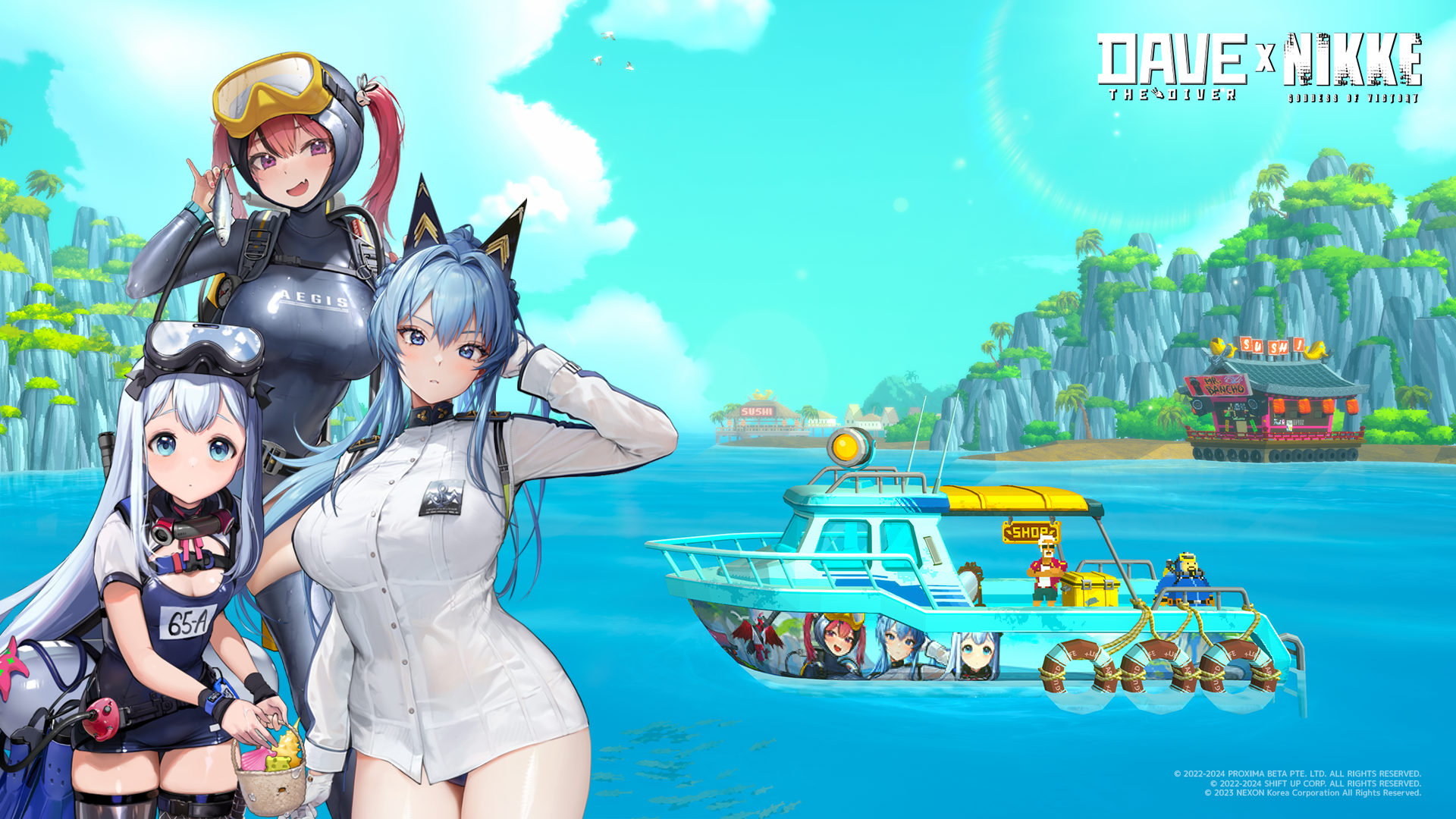
DAVE x NIKKE New Boat Skin!

Hello Divers! 🤿

DAVE THE DIVER meets Goddess of Victory: NIKKE !


The heat of summer is no match for this HOT new boat skin 👙.

Now you can proudly wear Mast, Anchor and Helm on your boat when diving into the Blue Hole!

How to unlock Aegis Boat Skin


  • 🚢Promotion code: AEGISTHEDIVER
  • Open Smartphone – Call – Operator – Claim Reward - Enter promotion code

7/1 (Monday) Hotfix

Hello Divers!

We have conducted a hotfix to address some of the issues that occurred after the update.
Please find the details below:


◈ Update Version:

  • Win: v1.0.2.1420
  • Mac OS: v1.0.2.453

◈ Update Content
  • Bug fixes


[Bug Fixes]


1) Display Issue
  • Improved display issues with letterboxes / pillarboxes when playing on resolutions other than 16:9


Additional Information

  • If you experience any issues after the patch, please compress the files from the path below and send them to our help center.
  • In case of crashes, freezing, or graphical issues, please refer to the [File Verification Guide] and follow the steps.

Windows:
%LocalAppData%\..\LocalLow\nexon\DAVE THE DIVER

Mac OS:
~/Library/Logs/nexon/DAVE THE DIVER/Player.log
~/Library/Application Support/nexon/DAVE THE DIVER/SData
or
~/Library/Application Support/com.nexon.dave/DAVE THE DIVER/SData

Steam Deck:
./.local/share/Steam/steamapps/compatdata/1868140/pfx/drive_c/users/steamuser/AppData/LocalLow/nexon/DAVE THE DIVER


◈ Notes
- If there are any changes to the details, we will update you through this notice.
- Please update Dave the Diver on Steam to the latest version for the changes to be applied.

A big thanks to everyone, including the individuals below who reported bugs. We appreciate your contributions!
Tex Mechs Mike, SPARKEY, SansFilet and more.

Dave the Diver Summer Sale! ㅣ 30% OFF!

6/27 (Thursday) Hotfix

Hello Divers!

We have conducted a hotfix to address some of the issues that occurred after the update.
Please find the details below:


◈ Update Version:

  • Win: v1.0.2.1418
  • Mac OS: v1.0.2.451

◈ Update Content
  • Bug fixes


[Bug Fixes]


1) Sea Exploration
  • [Chapter 6] Fixed an issue where dying while farming boss materials after the Kronosaurus fight could cause “Save” to fail
  • [Chapter 6] Fixed an issue where retrying the Kronosaurus fight after choosing "Give up and return" would cause items to spawn in overlapping positions

2) Sea People Village
  • Fixed an issue where NPCs would occasionally disappear during certain scenes

3) Sushi Restaurant
  • Fixed an issue that caused every tab (window) in the sushi restaurant to overlap each other at once


Additional Information

  • If you experience any issues after the patch, please compress the files from the path below and send them to our help center.
  • In case of crashes, freezing, or graphical issues, please refer to the [File Verification Guide] and follow the steps.

Windows:
%LocalAppData%\..\LocalLow\nexon\DAVE THE DIVER

Mac OS:
~/Library/Logs/nexon/DAVE THE DIVER/Player.log
~/Library/Application Support/nexon/DAVE THE DIVER/SData
or
~/Library/Application Support/com.nexon.dave/DAVE THE DIVER/SData

Steam Deck:
./.local/share/Steam/steamapps/compatdata/1868140/pfx/drive_c/users/steamuser/AppData/LocalLow/nexon/DAVE THE DIVER


◈ Notes
- If there are any changes to the details, we will update you through this notice.
- Please update Dave the Diver on Steam to the latest version for the changes to be applied.

A big thanks to everyone, including the individuals below who reported bugs. We appreciate your contributions!
joao luiz, Devilin, chanhub1 and more.