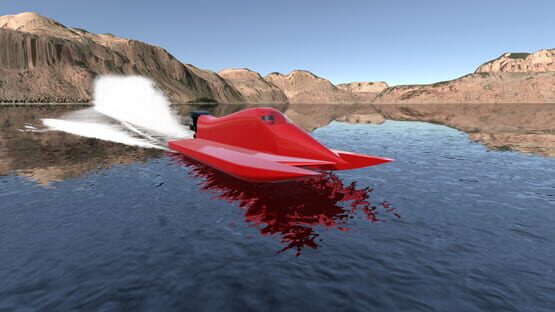

Design it, Drive it: Speedboats
Stern drives are here!
How to run the new stern drives: A pair of checkboxes now appears in the top of the engine panel in the design screen for switching between outboards and stern drives. You can load your previously saved vee hulls and switch them between stern drive and outboard quickly this way for some back to back comparisons or designing a stern drive using one of your outboard hulls as a starting point. Be careful though (or prepare for a good laugh at first), stern drive setups can be a lot heavier and more powerful than outboards, so a hull designed originally around an outboard won't work well with a high powered stern drive. There's nothing stopping you from trying though!
Other details:
FMod has been removed from DIDI Boats and the audio system has been rewritten using Unity 5.5's built in audio classes. A custom mixer has been written that worked pretty much the same way that FMod's integration worked previously, so the outboard engine will sound about the same as before. However, there are a couple of cool new changes:
1) This update brings proper 3D, directional sound. This isn't particularly noticeable unless you're using a Vive or Oculus Rift virtual reality headset where it's very noticeable as you turn your head. When driving, the engines are behind you and now sound like it.
2) The water spray sound volume is now controlled by a combination of boat speed and wetted area. This works for all boats (tunnels and vees). As your boat lifts out of the water with trim and speed, the spray effect sound may get quieter if it's airing out. If you drop the throttle to lose lift and set the boat back down or it porpoises/bounces and so forth, you'll hear it "whoosh.. whoosh.." You can trim boats a little bit by ear now by paying attention to the water spray sound. When you can barely hear it, your boat is barely touching the water! The effect is on the quiet side and deliberately subtle, while still being enough to bring a new audio dimension to the experience, making it feel a little more authentic. It makes it feel a little more like you're really there, especially in VR.
Have fun! Thanks for playing!
Multithreaded rendering released
-The patch before this had a second camera in the scene which was intended for the Vive. The camera was supposed to be destroyed if you were not running VR, but mistakenly was left in the scene. This too was slowing down rendering performance when VR was not being used. This has been fixed, so performance might be significantly improved between this and the new multithreaded rendering.
-The foam cutting across the water when you first get to or reset a water scene has been fixed.
HTC Vive support is here!
A recent update replaced the old vee hull system with a brand new one created from scratch using the new mesh generation system developed and used originally with the tunnel boats. The old, ugly, '80s-'90's low poly look to the vees is gone. The meshes are now much higher resolution and the paint is rendered with the new approach adopted originally for the tunnels which gives a shinier, smoother, sleeker appearance to the hulls.
Seven example vee hulls are included that are set up to be easy to drive with good to excellent turning response and very little chine walk. After you take the default vee for a spin, be sure to load the other examples as starting points to see what's possible to do. Be sure to save your own versions by saving with a new file name or the system might overwrite your file changes the next time you run DIDI Boats.
-Vee hull parameter adjustments: There are nearly twice as many adjustments that can be made now (43 in total) including some interesting new ways of shaping the deck. The center and edges of the bow deck can be flared, raised, the entire deck can be moved upwards for better visibility over the bow (or just a different look), the top of the transom can be raised to look like a scoop ahead of the engine, and lots more.
-Boat weights: Big boats are much heavier than before. The thickness of the material in the hull is now a function of the surface area (instead of a constant thickness) and has been tuned to give a reasonable weight for boats up to 50 feet in length. Boats of around 18 feet in length weigh about the same as before (maybe slightly lighter) while the big boats are much heavier. The weight adjustment is still there, so if you want to weigh things down more than this, you can.
-Windshields are optional and customizable. You can move the top and bottom position lengthwise along the deck, set the height, and adjust curvature. You can have a little stubby windshield, a giant one, flat across or curved to whatever degree you want, or no windshield at all.
-The pad can have a deadrise angle of its own, separate from the hull.
-Cockpit: The cockpit front and rear can now be moved separately with high precision lengthwise along the hull. No more "back/center/front" position choices, you now control the cockpit size and positioning much more exactly. This helps a lot with longer boats that often looked like an Olympic sized swimming pool could fit in the cockpit. No more, unless you want to!
-New steps/strakes: These no longer have to remain flat on the bottom. They can now be made to poke nearly straight down or at different angles. Tiny changes here have a huge effect on performance, so make use of the force vector view (TAB key when driving) to see what they're doing. When tuned very carefully, they can result in turning performance of 0.7-0.8g at 60-70 mph even with deadrise angles in the 17-20 degree range. That's more than double what the old vees could do before they started rolling out of the turns. Study the example vee files included with the update to see how they can be set up to give good turning performance.
-The pad can have a deadrise angle of its own, separate from the hull.
-Ballast in the bow! (Finally, right?)
-More than three engines: If your boat design's transom width is great enough , you can fit up to six outboards.
- More outboard engine choices including 90, 115, 350 and 400 horsepower options on the vees. By request, tunnels also gain 100 and 200 horsepower options to better match smaller formula style tunnels.
-New engine selection panel: Engines are selected on a new page via checkboxes instead of cycling through engines with the +/- keys. All of the engine options are visible together along with their peak power, peak power RPM, and weight (also on tunnels), so you'll know more about the engines. The data shown in the screen is pulled directly from the engine components so is always correct. No number fudging there.
-Engines gear ratio options are now available on most engines. Most have two ratios to choose from.
-Mass properties (center of mass position and inertia tensor) now change in real time while driving as engine steer, trim, and jackplate are changed. The largest effect is the jackplate, when you raise the jackplate you are raising the center of mass of the entire boat. On small boats this can be a significant amount. Each engine's inertia tensor is now included in the calculations too.
In lieu of a nice summary, I'll just say "have fun!" Please head on over to the Steam discussion area or join the Facebook group if you'd like to comment on the new update. And if you haven't done so already, please leave a positive review on Steam about Design it, Drive it : Speedboats.
http://steamcommunity.com/app/501090/discussions/
https://www.facebook.com/groups/405024603032224/
I hope you enjoy the update as much as I have! Thanks for playing. :)
New Patch : Faster rendering and more
While updating, it was noticed that the water reflections system was doing work on more cameras than it should have been. This has had a significant impact on rendering performance all along. This patch removes the extra computations so now the water reflection/refraction rendering effects are only applied to one camera.
This has a couple of effects: The inside of the windshield on the vee is now more reflective. In fact it was reflecting the bright floor so much that it almost looked like the windshield was hazy or dirty. The floor has been darkened which cancels out some of this, leaving the windshield looking pretty clean and clear.
The other effect of this patch is a significant increase in frame rate. Stuttering in the display (on the development hardware at least) is now reduced noticeably. While not perfect, it's quite a bit better than before. Virtual reality rendering performance also is improved and is a bit smoother.
There was another bug that could occasionally cause the simulator to crash after some time while changing scenes or out driving. This one appears to have been fixed in an unannounced patch that was snuck in yesterday, and remains in place for this patch.
Vee hull remake has been released!
This update replaces the old vee hull system with a brand new one created from scratch using the new mesh generation system developed and used originally with the tunnel boats. The old, ugly, '80s-'90's low poly look to the vees is gone. The meshes are now much higher resolution and the paint is rendered with the new approach adopted originally for the tunnels which gives a shinier, smoother, sleeker appearance to the hulls.
Seven example vee hulls are included that are set up to be easy to drive with good to excellent turning response and very little chine walk. After you take the default vee for a spin, be sure to load the other examples as starting points to see what's possible to do. Be sure to save your own versions by saving with a new file name or the system might overwrite your file changes the next time you run DIDI Boats.
-Vee hull parameter adjustments: There are nearly twice as many adjustments that can be made now (43 in total) including some interesting new ways of shaping the deck. The center and edges of the bow deck can be flared, raised, the entire deck can be moved upwards for better visibility over the bow (or just a different look), the top of the transom can be raised to look like a scoop ahead of the engine, and lots more.
-Boat weights: Big boats are much heavier than before. The thickness of the material in the hull is now a function of the surface area (instead of a constant thickness) and has been tuned to give a reasonable weight for boats up to 50 feet in length. Boats of around 18 feet in length weigh about the same as before (maybe slightly lighter) while the big boats are much heavier. The weight adjustment is still there, so if you want to weigh things down more than this, you can.
-Windshields are optional and customizable. You can move the top and bottom position lengthwise along the deck, set the height, and adjust curvature. You can have a little stubby windshield, a giant one, flat across or curved to whatever degree you want, or no windshield at all.
-The pad can have a deadrise angle of its own, separate from the hull.
-Cockpit: The cockpit front and rear can now be moved separately with high precision lengthwise along the hull. No more "back/center/front" position choices, you now control the cockpit size and positioning much more exactly. This helps a lot with longer boats that often looked like an Olympic sized swimming pool could fit in the cockpit. No more, unless you want to!
-New steps/strakes: These no longer have to remain flat on the bottom. They can now be made to poke nearly straight down or at different angles. Tiny changes here have a huge effect on performance, so make use of the force vector view (TAB key when driving) to see what they're doing. When tuned very carefully, they can result in turning performance of 0.7-0.8g at 60-70 mph even with deadrise angles in the 17-20 degree range. That's more than double what the old vees could do before they started rolling out of the turns. Study the example vee files included with the update to see how they can be set up to give good turning performance.
-The pad can have a deadrise angle of its own, separate from the hull.
-Ballast in the bow! (Finally, right?)
-More than three engines: If your boat design's transom width is great enough , you can fit up to six outboards.
- More outboard engine choices including 90, 115, 350 and 400 horsepower options on the vees. By request, tunnels also gain 100 and 200 horsepower options to better match smaller formula style tunnels.
-New engine selection panel: Engines are selected on a new page via checkboxes instead of cycling through engines with the +/- keys. All of the engine options are visible together along with their peak power, peak power RPM, and weight (also on tunnels), so you'll know more about the engines. The data shown in the screen is pulled directly from the engine components so is always correct. No number fudging there.
-Engines gear ratio options are now available on most engines. Most have two ratios to choose from.
-Mass properties (center of mass position and inertia tensor) now change in real time while driving as engine steer, trim, and jackplate are changed. The largest effect is the jackplate, when you raise the jackplate you are raising the center of mass of the entire boat. On small boats this can be a significant amount. Each engine's inertia tensor is now included in the calculations too.
In lieu of a nice summary, I'll just say "have fun!" Please head on over to the Steam discussion area or join the Facebook group if you'd like to comment on the new update. And if you haven't done so already, please leave a positive review on Steam about Design it, Drive it : Speedboats.
http://steamcommunity.com/app/501090/discussions/
https://www.facebook.com/groups/405024603032224/
I hope you enjoy the update as much as I have! Thanks for playing. :)
New Course Available: Abu
http://www.youtube.com/watch?v=dNPPl46aY-M&feature=youtu.be
New Patch : Leaderboards and more
-Top speed shootout leaderboard was showing top 10 from Steam and top 10 from non-Steam combined into one list by mistake. This left out everyone on Steam who was below #10. If it looked like your results should put you somewhere in slots #11-#20 but it didn't show up, this should be fixed now and any run you made before this that was missing should show up now.
Related note: The first time you run the top speed shootout it can sometimes show two leaderboards overlaid on top of each other, one from Steam and the other from the old website version that had its own leaderboard system. Haven't figured that one out yet, but if you see both, it'll most likely only be on the first run after starting the simulator. After that it should display correctly.
-Vee bottom pad height can now be changed in smaller increments (1/8 inch instead of 1/4). Extra digit added to the UI.
-Optimization for slightly higher rendering performance
-Tunnel boat shadows reworked. Cockpit/cell shadows and more complete self shadowing of the boat in exterior view added.
-MSVC 2015 runtimes added which will make it go through a "starting for the first time" process once. This might fix the problem a very small handful of Windows 10 users had starting the game.
New Patch: Bug fixes!
Main fixes of interest:
-The simulator was crashing on startup for a very small percentage of people running Windows 10 - 64. This has been fixed, so if you couldn't run it before, try it again now.
-The buttons in the ESC menu when driving the tunnelboat often didn't work at the end of a run, especially if the ESC key was pressed while the boat was rotating or accelerating quickly. This too has been fixed.
-The tunnel boat's windshield mesh in the design screen had some gaps between it and the driver's cell. This has been fixed too.
Tunnel boats are here!
http://www.youtube.com/watch?v=5c61WcnVwec
In the usual spirit of Design it, Drive it : Speedboats, you're free to modify the new tunnel boat as you see fit in much the same way you've been able to do with the vee bottom hulls.
Speaking of vee bottom hulls, after driver safety concerns were raised by many players, the driver has received a helmet too. This along with the new engine model gives the vee bottoms a more racey look that we hope you'll like!
Special thanks go to US Formula 1 boat owner and driver Morgan Williams of Bluewater Racing F1 for providing a new engine, new helmet, and billboard 3D models as well as providing constant feedback on the performance and feel of the new default tunnel boat. You can check him out on Facebook here: https://www.facebook.com/bluewaterracing/
Have fun!
Boat paint patch - Metallic
This new paint is automatically applied to all paint patterns, you don't have to select a specific pattern or do anything in the simulator to use it.
Screenshot:
http://steamcommunity.com/app/501090/screenshots/?p=1&browsefilter=mostrecent#scrollTop=0