

Diesel Railcar Simulator
Steam Remote Play Together for Diesel Railcar Simulator
Many thanks to player Overland for suggesting this feature and testing it!
If you have ideas on how to make better use of this kind of co-operative multiplayer for DRS, please post in the discussion thread. Some of the ideas may be implemented in the gameplay update!
Small patch to controls update
Editors
- Fixed crash when trying to add speed limit signs in route editor
- Fixed torque curve and profile editors in train editor
- Fixed missing controller setting move up/down buttons in train editor
Other changes
- Fixed Class 03 sometimes not shifting up properly under simple controls
- Fixed various problems in AI brake use
- Made HUD helper checkboxes more prominent
Facebook page
Youtube channel
Discord server
User interface update part 4: Controls
When using mouse, the camera is turned and moved ("unlocked") by holding down the right mouse button, just like in the earlier versions. This is the default setting and can be changed to another key or button. In addition there's a new separate camera lock toggling function that switches between locked and unlocked modes, instead of having to hold down the key or button. This is the default behaviour for gamepads, the mode being changed from the left stick button.
Cab controls can also be operated with a mouse by clicking and dragging the control in the 3D-view. Sensitivity of the controls can be adjusted in general settings (not under "controls"). The simple control slider also now responds to mouse clicks.
This version should also fix the "sticky" or "stuck" keys problems: 1. Key repeat rate is now independent of the Windows keyboard settings. 2. Cab controls again respond to keys when the camera is unlocked (moving or turning).
The old style of vacuum brake handling with separate keys (E, D, C) for releasing, lapping and applying brakes has also been restored. Free movement of the brake handle is still possible with keys T and G. Free movement now has a key stop feature to prevent accidentally going into emergency: movement stops automatically before reaching the emergency position. To engage emergency brake, release the key and press it again.
What's the difference between "+/-" and "notch +/-" in the controls configuration screen? The "notch +/-" inputs move the throttle/brake/etc. handle in either direction while you hold down the key. Note that the movement is not necessarily "notched". The other +/- inputs move the handle to the maximum or minimum value when you hold down the key and return it to zero when the key is released (simulating a joystick axis with a keyboard).
Other changes
- Various optimisations to reduce memory consumption, program starting time and stutter in the simulation
- Fixed missing sounds when there are multiple trains nearby
- Sorted trains by name in main menu trains tab
- Fixed signal arms or discs sometimes rotating the wrong way
- Changed "move to another train" key to skip unpowered and uncontrollable formations (static wagon rakes)
Editor changes
- Made signal and distant maximum AI sighting distances editable in route editor
- Added special colouring of signals and stops in route editor if they're placed within a fouling area (which may cause traffic jams)
- Added option to disable undo in route editor in order to speed it up
- Made it possible to use models from other routes and vehicles (as model node model source)
- Added error lists to route and train editors to show missing textures and models
- Disabled clouds in editors to make video editing easier
The next update will be the big scenery update, taking approximately 4-8 months to complete.
Facebook page
Youtube channel
Discord server
Poll results
Beta test for user interface update part 4: Controls
This update improves input handling and has better support for various controllers like gamepads and joysticks, without having to resort to Joy2Key or a similar program. RailDriver levers and buttons are probably supported, but its speaker and LED are not.
When using mouse, the camera is turned and moved ("unlocked") by holding down the right mouse button, just like in the earlier versions. This is the default setting and can be changed to another key or button. In addition there's a new separate camera lock toggling function that switches between locked and unlocked modes, instead of having to hold down the key or button. This is the default behaviour for gamepads, the mode being changed from the left stick button.
This beta version should also fix the "sticky" or "stuck" keys problems: 1. Key repeat rate is now independent of the Windows keyboard settings. 2. Cab controls again respond to keys when the camera is unlocked (moving or turning).
The old style of vacuum brake handling with separate keys (E, D, C) for releasing, lapping and applying brakes has also been restored. Free movement of the brake handle is still possible with keys T and G.
What's the difference between "+/-" and "notch +/-" in the controls configuration screen? The "notch +/-" inputs move the throttle/brake/etc. handle in either direction while you hold down the key. Note that the movement is not necessarily "notched". The other +/- inputs move the handle to the maximum or minimum value when you hold down the key and return it to zero when the key is released (simulating a joystick axis with a keyboard).
Other changes
- Made signal and distant maximum AI sighting distances editable in route editor
- Added option to disable undo in route editor in order to speed it up
- Other smaller fixes and optimisations
Still missing
- Controls configuration screen fonts, colours and translations
- Correct label for camera unlocking input (now says "lock" instead of "unlock")
- Key helper translations for new inputs like gamepad controls
- Various optimisations
Routes and trains saved with this beta version are incompatible with the current release version.
There will be at least one more beta version before the official release.
Poll: Which of the two major updates should be first?
- ːsteamthumbsupː Vote this post up ːsteamthumbsupː if gameplay should be prioritised over scenery
- ːsteamthumbsdownː Vote this post down ːsteamthumbsdownː if scenery should be prioritised over gameplay
Voting ends on 11th of April (new votes are still possible after that but will not count). You may vote even if you don't own the game. Up/down voting semantics do not reflect developer preference; they are just the technical means to conducting this poll.
What features are planned for the two updates?
Each update will take approximately 4-8 months to complete. The main features are outlined below, but the final set of features may be different:
Gameplay update
- Career mode
- Steam leaderboards
- Steam achievements
- Improved scoring
- Chaining services to make multiple runs with the same train in one session
- Conventional tutorials
Scenery update
- Better terrain textures
- Fields and dense forests
- Grass and bushes
- More realistic roads
- Better fences
- More house/building models
- More realistic and detailed track models
- Uneven track 3d-models to match rails to wheel movement
- Improved and more flexible bridge models
- Better station platforms, buildings and props
- Water (streams, river, lakes, seashore)
- Tunnels
What other new features and updates are planned for future?
Please see the first post in the updated development plan discussion thread for a wishlist, feature dependencies and prioritisation.
Updated development plan for Diesel Railcar Simulator
The next update will still be a small one, the fourth part of the user interface updates, focusing on optimisations and improvements to controls and input handling. After that, the following two updates will be large ones: a gameplay update and a scenery update.
A poll will be arranged soon to let users have a say on which of the two large updates should come first (gameplay or scenery).
See the full plan post and discussion
User interface update part 3: Editors
Common editor changes
- Changed zooming in 2D-views to zoom where the mouse pointer is rather than the centre of the screen
- Added side panel to all editors which makes editing easier. You can left-click on things in the main view to show their properties in the panel
- Fixed length and position fields to accept comma as the decimal separator if the operating system is set to use it
- Added undo (CTRL+Z) and redo (CTRL+Y)
- Routes, trains and timetables are now uploaded to Steam Workshop from the main menu instead of the editor
- Added Workshop preview picture selection for timetables and languages when uploading (routes and trains work as before)
Route editor
https://steamcommunity.com/sharedfiles/filedetails/?id=1668734729
- Fixed node elevation and pitch calculation when branching off from a non-level node
- Added missing new ModelNode creation option for custom 3D-model template editor
- Added min curve radius and max gradient soft constraints (track section is shown in red when it exceeds the constraints, but can still be placed)
- Added option to make automatically added track end buffers invisible
- Added option to make a platform invisible
- Added option to enter node position and direction numerically (node properties)
- Removed route deletion button from route properties
- Added refresh key (F5) for reloading models and scenery
- Added combined signal/distant. Works for a single-arm signal only. The signal and distant also need to be placed at the exact same location (zoom in until you can move the signal or distant in 1mm steps)
- Increased default AI signal sighting distance to 300m. Does not apply to existing signals until they are "touched" e.g. by flipping twice
- Added key for switching editor infra/scenery mode (default: space)
- Adding a new tree/building circle or a street grid now uses previously edited values as defaults for the new thing
Timetable editor
https://steamcommunity.com/sharedfiles/filedetails/?id=1492526313
- Fixed test runs to actually run
- Added options to disable one or both scenario types for a template. Disabling both scenarios makes the template AI-only
- Removed timetable deletion button from timetable properties
- Renamed order "dwell" to "stop"
- Added support for static services
- Added join orders
Train editor
https://steamcommunity.com/sharedfiles/filedetails/?id=2128160094
- Clarified vehicle tare and axle mass calculations
- Changed axle definition positions to be displayed relative to the centre of the vehicle rather than the front. This makes it easier to get the axles right since the majority of vehicles are symmetrical
- Added refresh key (F5) for reloading all models
- Added livery support
Other changes
- Fixed camera movement when "hold RMB to move camera" is disabled
- Fixed Siphon G tare and adjusted brake performance
- Fixed disc signal animations sometimes not working
- Updated signalling in Mountain Pass and added missing Little Bartby distant in down direction
- Possibly fixed missing speed curves in run evaluation graph when using a high screen resolution
- Removed separate "force constant GUI pixel size" checkbox from settings and added it as an "off" option in GUI zooming instead
- Fixed player role to make it possible to drive Harbord F401 service again
- Changed sim start procedure to make sure that trains that should be running at start will be running, at the expense of making the start take longer in some cases
- Added timetables tab to main menu
- Changed AI to not sound horn when approaching stops (waypoints) that have both "stop on left/right" boxes unticked
The next version is planned to focus on improving the controls (keyboard, mouse etc.)
Facebook page
Youtube channel
Wyvern server
Beta test for user interface update part 3: editors
This version is intended to improve the user interface of the train, route and timetable editors. Some new minor features are also added.
Timetables, trains and routes saved with the beta version are incompatible with the current release version.
Please first make backups of any files you're going to work on using the beta version!
Common changes
- Changed zooming in 2D-views to zoom where the mouse pointer is rather than the centre of the screen
- Added sidebar to train and timetable editors (but not to the route editor yet). You can now left-click on stuff in the main view to show its properties in the sidebar
- Fixed length and position fields to accept comma as the decimal separator if the operating system is set to use it
- Added undo (CTRL+Z) and redo (CTRL+Y) for train and timetable editors (but not the route editor yet)
Route editor
- Fixed node elevation and pitch calculation when branching off from a non-level node
- Added missing new ModelNode creation option for 3D-model template editor
- Added min curve radius and max gradient soft constraints (track section is shown in red when it exceeds the constraints, but can still be placed)
- Added option to make automatically added track end buffers invisible
- Added option to make a platform invisible
Timetable editor
- Fixed test runs to actually run
- Added options to disable one or both scenario types for a template. Disabling both scenarios makes the template AI-only
Train editor
- Clarified vehicle tare and axle mass calculations
- Changed axle definition positions to be displayed relative to the centre of the vehicle rather than the front. This makes it easier to get the axles right since the majority of vehicles are symmetrical
The following translation keys were added (if translators wish to update their language files):
- KeyRedo
- KeySaveChanges
- KeyUndo
There will be at least one more beta version before the official release.
User interface update part 2: translations
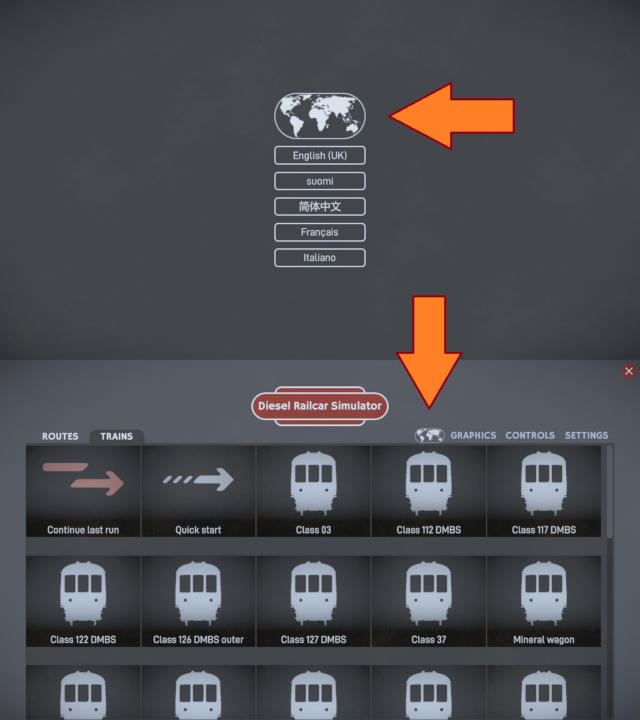
Currently two languages are included: English and Finnish, with more languages in the Workshop. Please see the translation guide if you wish to make your own translation and upload it to the Workshop.
For now, editors remain in English only because of the enormous task of preparing the translation tables and translating all the pieces of text.
This update also includes improved ambient occlusion to add better shadows under trains and bridges and within trees.

The railcar underframe components are also now modelled in detail:

Runs saved with an earlier version are incompatible with this one, so you may get an "error loading saved run" message when trying to continue your last run.
Other changes:
User interface changes
- Added HUD opacity slider
- Added brake setting notch percentage to HUD helper
- Added some (undocumented) debugging options to timetable editor test runs
- Changed brake lap key to set running position if there's no lap position
- Fixed cab change keys to work properly for some failed formations in rescue
- Fixed mismatch in positions of some signals (near stations) in the minimap vs. the real position
AI improvements
- Fixed AI insisting on driving from the wrong loco in a formation with multiple Class 03 locos if the leading one is running cab first
- Fixed AI not returning to the previous signal after SPAD in some cases
- Improved AI to ease throttle before reaching target speed to prevent speeding
- Improved initial speed calculation when spawning at speed to prevent immediate SPADs
- Fixed signaller to properly clear signals around spawning place in case it's divided in multiple blocks
- Fixed pathfinder to make sure that reversals have enough space to reverse the train
- Fixed pathfinder to find valid reversals in some cases
Other changes
- Fixed dragging brakes in some failed formations in rescue
- Fixed some potential crashes
- Added asset packing tool
The purpose of the new asset packing tool is to bundle files together in a format that is not easily accessible to the regular user. This is a requirement for using many commercial 3D-models licensed from sites like CGTrader and TurboSquid. The tool is described in the route editor and train editor guides.
The next update focuses mainly on improving the user interface of the editors.
Facebook page
Youtube channel
Discord server