Beta test: User interface update part 2: translations
The translation update is now ready for beta testing! Participate by opening your Steam client and right-click on the game, then select Properties from the pop-up menu. From the properties window go to the Betas tab and choose "beta" from the drop-down menu (no password required).
This update adds support for translating the user inteface into different languages. The first time you start this version you should see a menu for selecting the language. You can also access the menu through the settings screen if you need to change languages later.
Currently two languages are included: English and Finnish. Please see the translation guide if you wish to make your own translation and upload it to the workshop.
For now, editors remain in English only because of the enormous task of preparing the translation tables and translating all the pieces of text.
In addition, this update fixes one potential crash and has improved ambient occlusion (more shading within trees, under trains and bridges).
There will be at least one more beta version before the official release, intended to address these issues:
Possible problems with the translations
Minor user interface improvements
Traffic deadlock problems
Asset packing in editors
Runs saved with the earlier version are incompatible with this one, so you may get an "error loading saved run" message when trying to continue your last run.
User interface update part 1
The main focus of this update is to improve the usability and aesthetics of the user interface. The layout and colours may still be changed in future updates.
The user interface is now scaled to remain roughly at the same size regardless of display resolution. You can change the size at any time (except in editors) by pressing the shortcut keys CTRL & Numpad+/-. If you prefer the unscaled interface of the earlier versions, you can enable it by ticking the "constant pixel size" checkbox from the settings.
The old keys for changing cabs ("change vehicle" and "change panel") have been replaced with simpler "move to next panel in front/rear" keys. The keys are insert and delete by default.
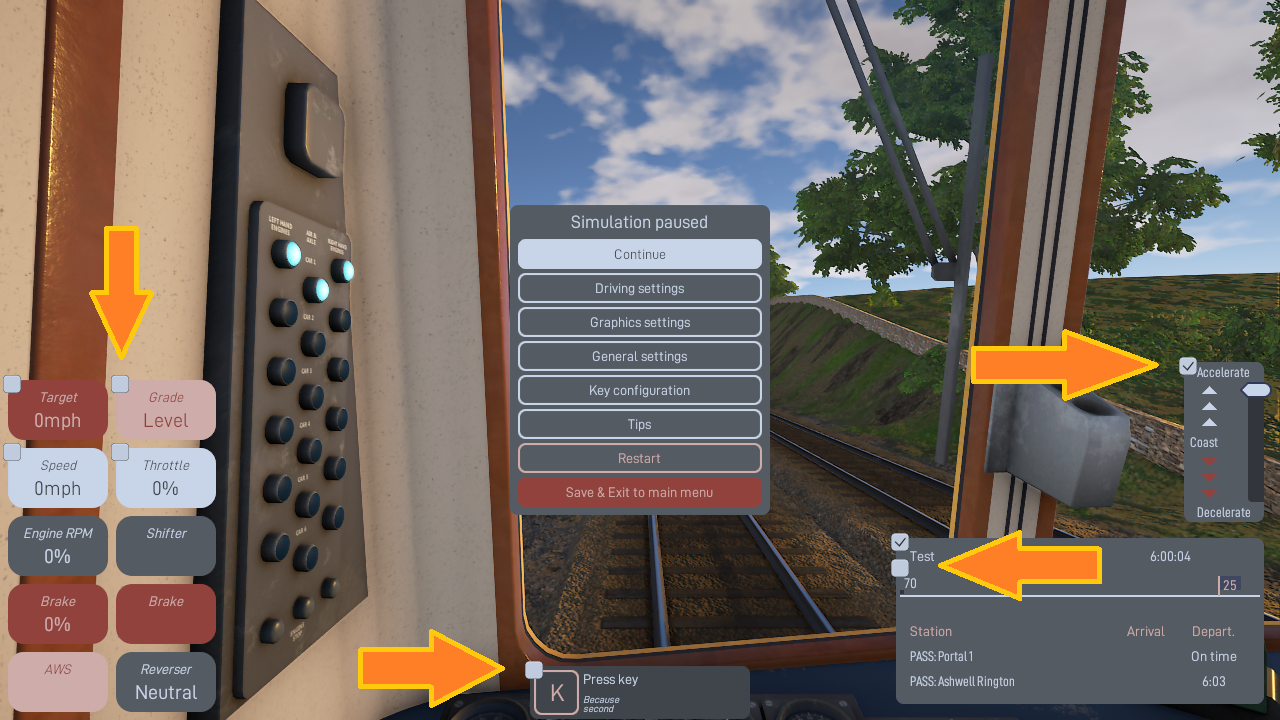
HUD helpers are now enabled and disabled from the HUD itself, rather than from the "Tutorials" button in the old version. Press Esc during the simulation to open the pause menu and click on the checkboxes to show or hide each helper (see image below).
Runs saved with the earlier version are incompatible with this one, so you may get an "error loading saved run" message when trying to continue your last run.
Detailed list of changes below:
User interface
Restored old target speed calculation
Added station stop waiting time helper
Fixed camera drift in free train camera mode
Changed zooming to work by holding down the left mouse button (instead of clicking on/off). The camera now zooms towards the mouse pointer.
Changed all camera modes to remember their own zoom setting instead of using a shared one
Improved lineside observer camera mode to look higher at the vehicle instead of track level, and changed key shortcut to reset the camera position if pressed many times
Removed restrictions on camera placement when in driving mode and using full controls
Fixed "continue last run" to restore camera in the right cab if it's not in the first or last cab in the train when saving
Fixed key helper to not spam with keys that have no effect
Fixed taking control of an AI train where the driver is not in the first or last vehicle of the formation
Added "Saving scenery" text to top-right corner when scenery is being processed (frame rate might be erratic while scenery is processing)
Fixed tooltips going vertically off screen
Other changes
Fixed ground signals to clear properly
Fixed invisible vehicles when clicking "Drive" or "Watch" before the train picture has finished loading
Fixed missing failed train in rescue scenario if it takes more than 20 minutes to reach it
Fixed target speed dropping too early when running light 37 in rescue
Fixed brakes getting stuck on Class 37 when changing cabs before brake pressures have normalised
Fixed AI to change panels correctly in some situations
Fixed AI sometimes trying to accelerate in wrong gear or fiddle with the shifter while waiting for brakes to release
Fixed incorrect energy consumption for Class 03 in some runs
Fixed sim sometimes stuttering or jumping backwards
Fixed possible missing vehicle body or bulkhead
Added signaller messages for SPADing or getting lost from the intended path
Added tread shine to some wheelsets
Added new DMU bogie model
Optimised sound clip loading
Editors
Fixed crash when trying to import some custom models
Fixed crash when entering negative or too high length values in editors
Fixed possible crash upon division by zero in custom bus data source functions
Fixed "isAlwaysUsable" controller property to work for all types of controllers
Increased max AI brake performance slider in timetable editor to 200%
Added separate checkbox to template properties in timetable editor to enable the downhill-aware AI target speed only for services where it's useful
Added max speed to template properties in timetable editor, for limiting the speed even further from what the vehicles are restricted to
Added node/section heading angle to route editor
The next update will be the second part of the user interface updates, adding support for translating the game to different languages.
Screenshot contest for GUI update
The forthcoming new user interface needs some fresh background images, so it's time for a small screenshot contest!
There's no particular theme for this contest. You can take screenshots of custom Workshop routes and trains if you wish, or just stick to the stock content.
A number of the best screenshots (as chosen by Lapioware) will be used as background images for various screens in the user interface (such as the loading screen), and the authors get their Steam username in the credits.
Opt-out: if you don't wish your posted image to take part in the contest, please state it in the description.
Tips
The easiest way to post a screenshot is to use Steam's built-in functionality, usually the F12 key
Use the maximum resolution that your system supports
Hide the timetable by pressing F2 and other parts of the HUD with F3
Choose the highest graphics level from the top of the "Graphics settings" screen (via the ESC menu)
Use the free roaming camera mode to position the camera
Use the pause key to stop all trains while finding a good position for the camera
Sunlight is most pleasing between 6-10 in the morning and 15-19 in the afternoon
User interface update beta test
First beta version of user interface update is now available! Get the beta by opening your Steam client and right-clicking on the game, then selecting Properties from the pop-up menu. From the properties window go to the Betas tab and choose "beta" from the drop-down menu (no password required).
The main focus of this update is to improve usability and aesthetics of the user interface. The layout and colours of the GUI are not final yet.
HUD helpers are now enabled and disabled from the HUD itself, rather than from the "Tutorials" button in the old version. Press Esc during the simulation to open the pause menu and click on the checkboxes to show or hide each helper.
Error reporting is semi-automatic. The crash screen has a separate button for sending an error report over the internet. The report includes the error message visible on the screen and your IP address.
Other changes
Changed zooming to work by holding down the left mouse button (instead of clicking on/off). The camera now zooms towards the mouse pointer.
Changed all camera modes to remember their own zoom setting instead of using a shared one
Improved lineside observer camera mode to look higher at the vehicle, instead of track level, and changed key shortcut to reset the camera position if pressed many times
Fixed camera drift in free train camera mode
Fixed AI sometimes trying to accelerate in wrong gear or fiddle with the shifter while waiting for brakes to release
Added signaller messages for SPADing or getting lost from the intended path
Fixed crash when trying to import some custom models
Fixed tooltips going vertically off screen
Fixed sim sometimes stuttering or going backwards
Fixed possible missing vehicle body or bulkhead
Added new DMU bogie model
Runs saved with the earlier version may be incompatible with this one, so you may get an "error loading saved run" message when trying to continue your last run.
There will be at least one more beta version before the official release.
Small patch to fix various problems
A small patch has been released with the following important fixes:
Fixed gearbox sound system to make it possible to add gearbox sounds in the train editor
Improved AI braking behaviour to take track gradient into account when computing braking target speeds
Improved Class 03/37/brake van brake performance and adjusted volumes
Fixed various LOD problems in vehicle bodies
Fixed pathfinding bug causing the sim to crawl to a halt on Frisia Western Lines map
Fixed crash when adding a custom scenery model template without name and then trying to add it
Fixed custom scenery models getting mixed with built-in ones
Runs saved with the earlier version are incompatible with this one, so you may get an "error loading saved run" message when trying to continue your last run.
Maintenance update released
This is mainly a quality of life update intended to improve the simming experience, but also has a couple of new features.
Saving a run and continuing later
Your run is saved automatically when you exit the simulation from the HUD menu (Esc). The run can be continued later from the main menu (first item in the list). Saved runs might not be compatible across different versions, so a run saved with an earlier version may fail to load if the program is updated.
Restarting the simulation after continuing a saved run restarts from the saving point. The save file is deleted upon successfully completing the run.
Custom scenery 3D-models
It's now possible to import and use custom 3D-models for scenery in the route editor. The supported formats are the same as in the train editor.
In order to use custom 3D-models for scenery right-click on empty space in infra editing mode and edit custom 3D-model templates. Model nodes are set up the same way as in the train editor, except that each node is just a template (or a "prefab"). Custom models are placed in the scenery the same way as other single buildings or tree models.
Custom 3D-models need not be imported models. You can also use models (like vehicle parts) from the built-in library, in addition to the predefined infra/building/tree models in the earlier versions. It's also possible to animate models. For instance, try prev + 0.01 as a rotation function (frame rate dependent).
Custom models can be used creatively, for example to create a river: https://steamcommunity.com/sharedfiles/filedetails/?id=2217092092
Unity 2019, DirectX12 and graphics
The new version has been compiled with a newer version of Unity and should run slightly faster with less stuttering. Memory consumption might be smaller and the game more stable. Imported models and textures are now loaded asynchronously without blocking the program.
The small starting popup with resolution and quality options has been removed (by Unity). Graphics quality can be changed from graphics settings and screen resolution from general settings.
The whole post-processing system has been updated. The overall look of the sim might be slightly different because it wasn't possible to directly migrate all the effects with identical settings. On the other hand, the new effects seem to run at a higher frame rate.
Shadows have also been updated to a new system. For some objects, like trees, shadows are drawn all the way to the horizon.
DirectX12 is no longer supported. The feature was experimental and turned out to be unstable, caused graphics glitches, and in some cases was even slower than DX11.
Signals
It's now possible to limit the number of semaphore arms for each signal, to prevent too large and unrealistic gantries at some locations. By default, the number of semaphore arms is limited to 2 on each side of the main arm. Right-click on a signal and choose signal properties to change the values. The x-position (distance from track centre line) of each signal can also be changed from the properties.
In addition to semaphore signals, there's a new ground disc signal type that can be changed from signal properties. The disc is just an alternative visual representation for the signal and will otherwise function the same way as a semaphore signal. The disc is automatically raised to canopy level if placed next to a platform (even if there's no canopy on the platform at that place).
AWS magnets now have an optional direction setting which can be changed by right-clicking on the magnet and editing its properties.
Editors
Fixed crash in timetable editor test runs
Increased AI braking performance maximum value to 150% in timetable editor
Fixed vehicle drop-downs when editing fixed formations in train editor
Fixed new gearboxes added with the train editor not transmitting any torque
Fixed minimum values for shaft angular mass and output ratio to prevent divisions by zero
Fixed crash when removing an axle in train editor
Fixed various crashes in train editor
Added window and door type cloning
Added missing "metals" material for exhaust pipes
Fixed missing stripes in some levels of detail (LOD) for vehicle bodies made with the integrated modelling tool
Fixed stripe colouring in vehicle body end corners
Fixed bug in the train editor where removing one vehicle definition would cause removal of all vehicle definitions that share the same physics device
Fixed various crashes in route editor
Limited 2D-overlay drawing range to speed up infra editing mode in route editor
Limited automatically generated Steam workshop item title length to prevent error when submitting
Route and train workshop submissions now also support "workshop_preview.jpg" as the preview picture
Miscellaneous
Fixed Class 03 LODs to display repaints correctly
Fixed Class 126 narrow cab brake handle to not turn inside the wall
Prevented wheels from getting blurred when using motion blur
Sparky's industrial buildings: added new storage tank models, applied some geometry fixes and fixed orientation of the buildings when used with automatic building placement
Added new AWS bell sound by Ron Hess
Improved handbrake performance and sounds
Fixed dragging vacuum brakes in wagons that are not directly connected to the loco
Fixed AI driver sometimes not accelerating after changing cabs
Fixed some "path not found" problems
Prevented spawning a train if one of its vehicles is missing (e.g. not downloaded from workshop) to prevent spawning a rake of wagons without a loco
Fixed bug and possible crash in LOD generation
Fixed possible crash when trying to start a rescue scenario
Fixed possible crash when changing camera views
Maintenance update beta
First beta version of small maintenance update now available! This is an additional update that was not in the original plans. Development and testing is intended to take no more than a couple of weeks.
Get the beta version by opening your Steam client and right-clicking on the game, then selecting Properties from the pop-up menu. From the properties window go to the Betas tab and choose "beta" from the drop-down menu (no password required).
Planned features include improvements to signalling, custom scenery models, saving a run and continuing later, Unity update, small bugfixes and optimisations.
Changes in the first beta
Added configurable limit to number of semaphore arms for each signal
Added support for custom 3D scenery models
Fixed missing stripes in some levels of detail (LOD) for vehicle bodies made with the integrated modelling tool
Fixed bug in the train editor where removing one vehicle definition would cause removal of all vehicle definitions that share the same physics device
Optimised memory use in pathfinding to reduce stutter
The number of semaphore arms is limited to 2 on each side of the main arm by default. Right-click on a signal and choose signal properties to change the values.
In order to use custom 3D-models for scenery right-click on empty space in infra editing mode and edit custom 3D-model templates. The model nodes are set up in the same way as in the train editor, except that each node is just a template (or a "prefab"). Custom model are placed in the scenery the same way as other single building or tree models.
Custom 3D-models need not be imported models. You can also all use models (like vehicle parts) from the built-in library, in addition to the predefined infra/building/tree models in the earlier versions. It's also possible to animate models. For instance, try prev + 0.01 as a rotation function (frame rate dependent).
Routes saved with the beta version are incompatible with the current release version because of changes to signal and scenery object data. Please make backups of any routes you're going to work on with this beta version.
Train editor released
The first version of the train editor is ready!
Left-click on "Train editor" in the main menu to start making a new train from scratch, or right-click to open one of the existing trains. (It's easier to make a new train by modifying an old one.)
In the editor, right-click on empty space or parts of the train to change the graphics, sounds and physics of the vehicles. See the guide for more details:
You can download more trains from the workshop. In order to use trains from the workshop, they first need to be assigned to a timetable. More information in this thread. There will be more timetables designed for the new trains and repaints in the future.
Important changes to driving
Railcars now have a working handbrake. Don't forget to release it before moving off!
The vacuum brake for the railcars has been changed to work by holding down the release or application key instead of a single press. You can control the rate of brake application or release by how much you move the handle. (The brake is still manually lapped instead of self-lapping like the Class 37 train brake.)
Friction characteristics of cast-iron block brakes are now modelled correctly (brakes are stronger at low speeds)
The default keys for changing vehicle and panel are now Shift+V and Shift+P respectively (avoiding accidental cab change when trying to brake)
Gear might no longer engage properly unless throttle is closed before shifting
Class 03 throttle handle moves faster and the right-hand side cab position faces backwards by default
Class 37 loco brakes have been strengthened
Signalling and traffic fixes
Fixed signaller bugs that caused it to clear some signals incorrectly
Fixed trains that span multiple signal blocks to spawn correctly
Improved train routing to reduce waiting times and prevent going through slow tracks for no reason
Fixed signals to update properly when editing the track they're on
Changed rescue scenarios to use Class 37 instead of 03 for heavy trains
Other changes
Added regency townhouses and Victorian factories by Sparky66 to the buildings library
Fixed missing rail joints between some pairs of turnouts
Fixed sounds sometimes not playing properly
Fixed AI driver sometimes having problems starting uphill with a Class 03
Fixed route editor making changes to the old route after saving as new
Fixed timetables not being shown in the menu for a particular route, even when the timetable file is placed in that route's folder
Various physics, graphics and audio improvements to the trains
Fixed several crashes in editors and driving sim
Small performance optimisations
Screenshot contest for train editor update
The next update is ready soon so it's time to find new pictures for the main menu! If you're up for a small contest, use the beta version to post one or more screenshots to the community area.
The theme for this contest is custom trains or repaints made by players, but the main subject of the picture should still be one of the stock trains included with the game. Otherwise players may get confused, expecting the custom train to be part of the core package, when it actually needs to be downloaded from the workshop separately. The custom train should appear somewhere in the background or be part of the stock formation as a trailing unit.
1 - 5 of the best screenshots (as chosen by Lapioware) will become the new main menu background pictures and the authors get their name in the credits.
If you don't wish your posted image to take part in the competition, please state it in the description.
Tips
The easiest way to post a screenshot is to use Steam's built-in functionality, usually the F12 key
Use the maximum resolution that your system supports
Hide the timetable by pressing F2 and other parts of the HUD with F3
Choose the highest graphics level from the bottom of the "Graphics settings" screen (via the ESC menu)
Use the free roaming camera mode to position the camera
Use the pause key to stop all trains while finding a good position for the camera
Remember to leave space (like plain ground) to the bottom-right corner for the menu
Sunlight is most pleasing between 6-10 in the morning and 15-19 in the afternoon
Train editor beta test
The first beta version of the train editor is now ready for testing! Get the beta version by opening your Steam client and right-clicking on the game, then selecting Properties from the pop-up menu. From the properties window go to the Betas tab and choose "beta" from the drop-down menu (no password required).
Left-click "train editor" in the main menu to start making a new train from scratch, or right-click to open one of the existing trains. (It's easier to make a new train by modifying an old one.)
In the editor, right-click on empty space or parts of the train to change the graphics, sounds and physics of the vehicles. More instructions to follow.
Features missing from the first beta
Submitting trains to Steam workshopDone
Importing custom meshes, textures and soundsDone
Tooltips for all the train properties that can be editedDone
User guideDone
Graphical improvements to existing trainsDone
Problems
Some of the new code is unoptimised, which may cause low or unstable FPS and stutteringFixed
AI doesn't handle the new DMU brakes very wellFixed
Trains may get routed poorly (e.g. down express trains along the slow line in North Landen)Fixed
Other changes
Added handbrake to railcars
Changed railcar wheel and joint sounds
Changed vacuum brakes to two-key operation (no more separate lap key)
Fixed crash when removing all speed limits of a particular speed but leaving a corresponding sign in the map
Fixed overestimation of train running times and inefficient routing in some cases
Fixed unnecessary red signals in some cases
Fixed train spawning if the train spans multiple signal blocks
Fixed Class 37 weak loco brakes and erratic sounds
Fixed Class 03 vacuum brake animation
Fixed tread brake friction behaviour (brakes are now stronger at low speeds)
Fixed a particular vehicle physics bug (the performance of Class 37 and other trains may be slightly different temporarily)
Fixed route editor making changes to the old route after saving as new
Fixed signal not updating properly when changing track
There will be multiple beta releases to fix problems and add missing features before the update is officially released