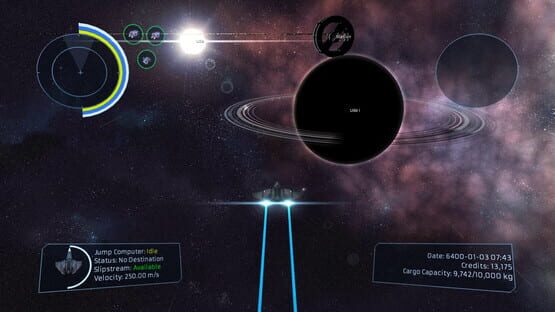
Drifter 0.8.4 is now live! This is the fifth release in the 0.8.x series, codename "Event Horizon".
I'm continuing to work on finalizing the various bits and pieces of the game that need to be done for 1.0 but in the meantime I've got a lot of fixes and quality of life improvements rolled up into 0.8.4. My plan is to go back to a more regular update schedule going forward and try and position 0.9.x as a PRE-1.0 shakedown cruise, so to speak.
What follows is a list of what's new, changed and fixed!
WHAT'S NEW
Added support for the SDL2 Controller API
Controllers are hot-swappable
Added support for controller button images
Added support for configurable joystick deadzones (configuration starts from the old default of 10% and goes to 20%)
Added initial HiDPI/Retina support
Game can now change resolution without requiring a restart
Added loading messages
Switched from depth test to occulsion test for sun flares; should improve performance on Intel GPUs
System map now supports controller zoom and yaw
JoyPointer now fades out if it hasn't moved for 2 seconds
Code cleanup
reduced number of compiler warnings
reduced amount of spurious log messages
3D engine moved to its own source repo
Cleaned up configuration UI code
BUGS FIXED
Fixed bug where station hitboxes in multi-station systems were not being initialized properly
Fixed bug where NPCs were not spawning under certain conditions
Fixed trail timer and missile timer bugs
Drifter 0.8.3 is out!
Drifter 0.8.3 is now live! This is the fourth release in the 0.8.x series, codename "Event Horizon".
We've finally converted the game to use SDL2 instead of SDL1 which means the game should handle monitors and resolution changes a lot more smoothly than before. Also while it's not 100% there yet it should better handle Retina/HiDPI displays as well. Eventually we will be switching over to the SDL2 method of handling gamepads/joysticks which should mean a lot better support there for auto-detecting controllers and all that good stuff.
In addition to SDL2 we adjusted the yields in ore processing to reflect the changes that were made a while back to the weights and prices on a number of metals. Hopefully this should make mining profitable again.
0.8.3 also features a number of bug fixes which should improve stability and the ability to complete certain missions.
What follows is a list of what's new, changed and fixed!
WHAT'S NEW
Switched to SDL 2 finally!
SDL 2 behaves better in general
Many graphics settings now take effect immediately
Initial improved resolution handling
More resolution improvements soon in 0.8.x
Please report any issues you have!
Adjusted ore processing yields
Accounts for reduced weight/price of metals from previous updates
BUGS FIXED
Fixed certain missions not completing automatically
Fixed scroll reset bug on Buy/Sell click in market
Fixed crash on new game/loading after having died
Fixed mail notification not being reset on new game
Drifter 0.8.2 is out!
Drifter 0.8.2 is now live! This is the third release in the 0.8.x series, codename "Event Horizon".
We've finally fixed the bug we were experiencing in lua that was causing some instability. The game should no longer crash on the starmap when you're running missions.
Also we've added a bunch of new stuff as we prepare to add pilot skills and attributes. You can see some of the new UI we've got in place but it won't be useful until we flesh these systems out over the next few weeks.
WHAT'S NEW
Initial Pilot Attributes
Attributes now exist in the game
Skills now exist in the game
You can't interact with them much yet!
You can view the Pilot Status UI though
Attributes will expand in 0.8.x
Initial Skills will be added in 0.8.x too
Initial Pilot Status UI's
Displays initial attribute skill trees
Displays initial factions reputation
Improved the HUD visuals and options
more HUD polish!
HUD now anchors at the corners when scaling
HUD now has X and Y offset for direct control!
Start tracking pilot specifics
Pilots now have factions, attributes and skills
Currently only used by the player
This will later be used by AI (but not yet)
More work on procedural planets
Added earth-like planet as a teaser
Making the planet editor lua scripted
Improved planet loading and unloading
Will make a difference in subsequent updates!
BUGS FIXED
Fixed crashes from lua stack overflows
Fixed Tables and Text views scroll resets
Fixed re-docking timer counting when it shouldn't
Fixed some station collision shape issues
Drifter 0.8.1 is out!
Drifter 0.8.1 is now live! This is the second release in the 0.8.x series, codename "Event Horizon".
In addition to a number of bug fixes we've finally completed the initial implementation of the faction system. You can't interact with it just yet but once factions are fully implemented it will allow all kinds of interesting things like faction specific missions, equipment and ships.
WHAT'S NEW
Initial faction system implementation!
Factions now exist in the game
You can't interact with them yet!
Initial territory capital selection
Initial procedural territory expansion
Initial territory visualization in galaxy view
Faction system will be fleshed out in 0.8.x
Faction specific missions on the way
Factions will be player joinable
Added keyboard shortcuts
Galaxy Map - G
System Map - H
Jump Console - J
Ship Menu - O
Comms Menu - K
BUGS FIXED
Fixed some stability and memory allocation bugs
Fixed dropdown menus being broken
Fixed system state clean up where ghost stations could persist
Fixed search dialog incorrectly popping up from remote system view
Fixed Jump Override slider updating when open and timer expires
Drifter 0.8.0 is out!
Drifter 0.8.0 is now live! This is the first release in the 0.8.x series, codename "Event Horizon".
The biggest reason we're moving so quickly from 0.7.x to 0.8.x is that we've finally implemented Lua script support and in-game missions are now completely scriptable instead of the horrible mission templates we were using before.
Because the Lua API for Drifter is still very new we are currently not providing the raw Lua source for missions but I'm hoping by 0.8.1 or 0.8.2 or so they will be raw text files that you can play around with and even make your own missions!
There's been a bunch more polish as well and stuff continues to look better and better. That said, we'll give you a bit of a rundown of what's new and fixed below.
NOTE: Older savegames still work but any missions you have that were in progress will not be able to be continued because the new scriptable missions are not compatible.
WHAT'S NEW
New Ship Status UI in the ship menu
Displays all equipment installed on the ship
Displays current ship statistics and status
New HUD mail message notifications
Messages now display read/unread state
Displayed on the bottom left of the HUD
And in the top left of the station headers
New jump status information in the HUD
New icons in the starmap and station views
Ship menu now has icons and is neater
New procedural mission system
Missions are now fully scripted!
This build includes improved versions of all existing mission types
With the new system, mission types and variation will get rapidly better.
Missions now visually formatted
Missions now send you mail when completed
Missions now display HUD messages
Missions now check and display requirements
i.e If you don't have cargo space for the mission item
Missions now have random mission-specific responses
Mission information in active list is now dynamic
i.e Distance to targets, etc
Missions display objectives more clearly
Missions display state more clearly
i.e Patrol missions show waypoint progress
Information displayed by mission is mission specific
Completion deadlines for urgent missions are clearer
Terminate missions now spawn the enemy when close
Fixes mission specific NPC's being killed before you arrive
UI polish and improvements
Main menu and pause menus visually polished
UI headers now display in all station views
Starmap search field now auto focuses
Plot course and View system buttons in Starmap Search
All tables and views polished further
Assets view shows ship icon
More scrollbar momentum and click improvements
Can no longer use jump console while jump state is active
Can no longer view the local station as a remote station
Can no longer load when no save is selected
BUGS FIXED
Jump state save caused some ships to become “stuck”
Afterburner sound no longer stays active while paused
Table sorting now works (again!)
Drifter 0.7.2 is out!
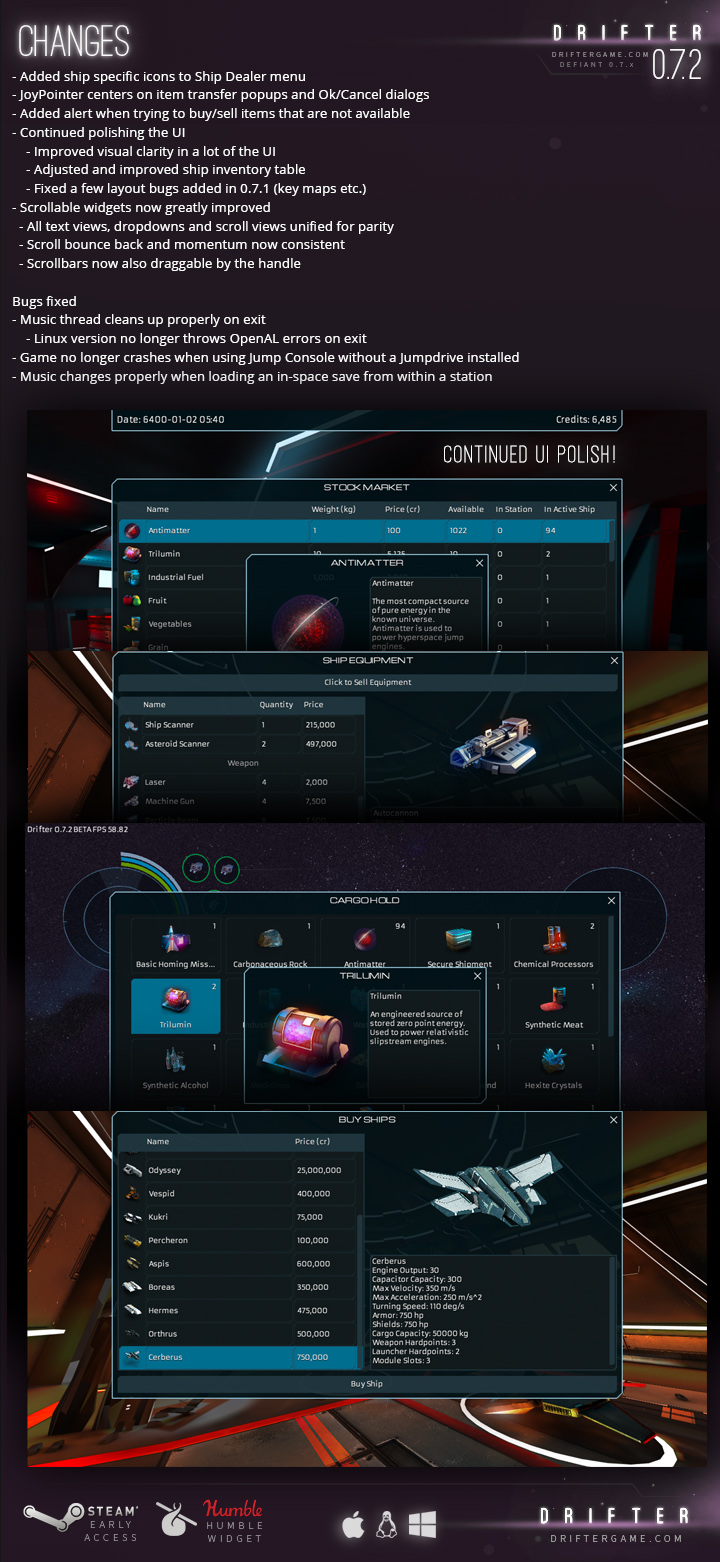
Drifter 0.7.2 is now live!
This week's build is mostly UI fixes/cleanup and bug fixes.
The full details as to what's new in 0.7.2 are listed below and are also over on the wiki: http://celsiusgs.com/drifter/wiki/Current_Build_and_Known_Bugs
Drifter 0.7.1 is out!
Drifter 0.7.1 is now live!
The biggest thing is Material Synthesis is now fully functional! There's still quite a lot of polishing and balancing to be done but now that I'm back on track we'll be doing that in the next few weeks.
Feel free to head to an Industrial type system and have a poke around. Right now I have blueprints for the new "synthesis materials" which are basic building blocks of a lot of more complicated recipes and there are blueprints for the currently available weapons in the game. Eventually there will be blueprints for new weapons and equipment which may not be readily available for purchase ːsteamhappyː
Note that nothing is really well balanced and it's all subject to change but I'd love to get some feedback for what you think based on what's there.
The full details as to what's new in 0.7.1 are listed below and are also over on the wiki: http://celsiusgs.com/drifter/wiki/Current_Build_and_Known_Bugs
Drifter 0.7.0 is out!
Drifter 0.7.0 is now live! This is the first release in the 0.7.x series, codename "Defiant".
Note: We've got a new trailer and new screenshots up on the store page, so you should definitely check those out!
Because I’m going to be in Seattle next week for Steam Dev Days I really didn’t want to delay updates any further so I decided to go ahead release 0.7.0! We managed to get the bulk of the initial 0.7.0 update done and Material Synthesis is about 90% of the way there. So the plan is for me to complete Material Synthesis and add it in 0.7.1 in 1-2 weeks time after I get back. In the meantime there’s a ton of new stuff in 0.7.0 and the game is looking amazing, even if I do say so myself.
We’ve spent a lot of time filing down rough edges and generally polishing the game to where we’re very happy with how it looks and feels. There’s still some work to be done but it’s much closer to feeling “done” as of 0.7.0. In addition to an all new starfield background we’ve improved the look and feel of the UI in a number of areas, station interiors are now more interactive and all of the current items and equipment in the game now have icons. That said, the full list of what’s new and improved is below!
One big change I feel is important to note is I removed the old controller UI interaction system as I was never particularly happy with it and it was proving to be difficult to maintain. So going forward the controller will use what I’m calling a “joypointer” where the left analog stick moves a virtual pointer. Pressing the “GUI Accept” button will click buttons and holding it will let you drag things like lists and sliders. Also if you press the “GUI Cancel” button it will allow you to quickly leave station areas and close menus instead of hunting for the close button. It’s still not 100% where it needs to be but it already works a lot better than the old system and we’ll be improving it in the coming weeks.
WHAT'S NEW
New trailer and screenshots
New (much better) starfield background
New UI and HUD color scheme and fonts
New ship radial menu colors and design
New ship radial menu icons for jump, stop, system, dock
New “joypointer” for better controller UI interaction
New integrated UI for Station interiors
New interior for material synthesis
New interior transitions with fades and audio
New docking sequence including docking animation
New fade transition on undocking, and rotating stars in bay
Player now lands in docking bay instead of the station hub
Player ship now docked in docking bay, with idle animation
Improved Odyssey model and texture
Improved pilot quarters and docking bay interior
Improved main and pause menu design
Improved station info bar
Improved item detail popover
Improved ship info block in Docking Bay
Improved sliders ui with a border
Improved ship display size in Ship Market and Ship Fitting
Improved star halo
Added comma separators to ship equipment amounts and prices in market
Added item detail popup for remote market view
Added Star halos and planetary atmosphere in system map
All current equipment and item icons are complete!
All existing icons polished up
17 new icons
Antimatter, Trilumin, Fusion Reactors, Chemical Processors
<*> Implemented 99% of Material Synthesis functionality and UI 0.7.x weekly builds will contain usable implementation
BUGS FIXED
Fixed memory leak in scene system
Fixed Rogue Librarian mission being incompletable
Drifter 0.7.0 is out!
Drifter 0.7.0 is now live! This is the first release in the 0.7.x series, codename "Defiant".
Because I’m going to be in Seattle next week for Steam Dev Days I really didn’t want to delay updates any further so I decided to go ahead release 0.7.0! We managed to get the bulk of the initial 0.7.0 update done and Material Synthesis is about 90% of the way there. So the plan is for me to complete Material Synthesis and add it in 0.7.1 in 1-2 weeks time after I get back. In the meantime there’s a ton of new stuff in 0.7.0 and the game is looking amazing, even if I do say so myself.
We’ve spent a lot of time filing down rough edges and generally polishing the game to where we’re very happy with how it looks and feels. There’s still some work to be done but it’s much closer to feeling “done” as of 0.7.0. In addition to an all new starfield background we’ve improved the look and feel of the UI in a number of areas, station interiors are now more interactive and all of the current items and equipment in the game now have icons. That said, the full list of what’s new and improved is below!
One big change I feel is important to note is I removed the old controller UI interaction system as I was never particularly happy with it and it was proving to be difficult to maintain. So going forward the controller will use what I’m calling a “joypointer” where the left analog stick moves a virtual pointer. Pressing the “GUI Accept” button will click buttons and holding it will let you drag things like lists and sliders. Also if you press the “GUI Cancel” button it will allow you to quickly leave station areas and close menus instead of hunting for the close button. It’s still not 100% where it needs to be but it already works a lot better than the old system and we’ll be improving it in the coming weeks.
WHAT'S NEW
New trailer and screenshots
New (much better) starfield background
New UI and HUD color scheme and fonts
New ship radial menu colors and design
New ship radial menu icons for jump, stop, system, dock
New “joypointer” for better controller UI interaction
New integrated UI for Station interiors
New interior for material synthesis
New interior transitions with fades and audio
New docking sequence including docking animation
New fade transition on undocking, and rotating stars in bay
Player now lands in docking bay instead of the station hub
Player ship now docked in docking bay, with idle animation
Improved Odyssey model and texture
Improved pilot quarters and docking bay interior
Improved main and pause menu design
Improved station info bar
Improved item detail popover
Improved ship info block in Docking Bay
Improved sliders ui with a border
Improved ship display size in Ship Market and Ship Fitting
Improved star halo
Added comma separators to ship equipment amounts and prices in market
Added item detail popup for remote market view
Added Star halos and planetary atmosphere in system map
All current equipment and item icons are complete!
All existing icons polished up
17 new icons
Antimatter, Trilumin, Fusion Reactors, Chemical Processors
<*> Implemented 99% of Material Synthesis functionality and UI 0.7.x weekly builds will contain usable implementation
BUGS FIXED
Fixed memory leak in scene system
Fixed Rogue Librarian mission being incompletable
Drifter 0.6.14 is out!
Drifter 0.6.14 is now live!
There's probably not going to be a build next weekend as we're pretty much in the final stretch for 0.7.0 and instead we'll be pushing on finalizing that so we can get it out before the month is over!
That said this week we've still got some new icons and a bunch of solid bugfixes lined up.
The full details as to what's new in 0.6.14 are listed below and are also over on the wiki: http://celsiusgs.com/drifter/wiki/Current_Build_and_Known_Bugs