

Dungeons and Kingdoms
Developer Livestream 2 - Steam Next Fest Demo
Developer play through livestream - going over game design and features, showcasing both the modular and creative building system, and answering questions about the alpha preview demo.
Steam Next Fest Demo - Alpha.0.6 Update
Alpha.0.6 Update
Release Notes
- Fix Settings/Game/Mouse Sensitivity - description and value labels were incorrect
- Fix Settings/Game/Mouse Sensitivity - this now syncs correctly with the sensitivity under Settings/Controls/Sensitivity providing a wide range from slow to fast for mouse speed
- Add Settings/Game/Mouse Wheel Sensitivity
- Cleaned up control mapping removing unused settings
- Improve Controller Support - now works for both sticks (player movement and camera rotation) and zoom
- Changed day/night cycle times - doubled 24 hr cycle, reduced night portion
- Set default settings - Mouse Sensitivity=0.1, Mouse Wheel Sensitivity=0.15
- Cleanup colliders on doorframes, remove threshold colliders
- Handle errors when pieces are activated for construction for AI
- Added Settings/Game/(Demo) Instant Building - this setting allows you to turn on/off AI building
- Survival needs were effectively turned off, they are back on now for Hunger and Unemployed
- Fixed bug when AI trying to find and pickup food to eat
- Unlocked “Lone Hero” party selection - Note, this is only the main player, no other AI so only useful with the Settings/Game/Instant Building option. Better performance and fast solo building.
- Fix tools vanishing when dropped
- Adjust pickup handles
- Add “Storage” as new build part filter button
- Increase “Tiddlers and Treats” party to 12 members - note this has performance cost
- Add Settings/Game/Disable Survival, turn off to improve performance
- Fixed “Control” feature on People tab in Kingdom UI - you should now be able to control all party members
- Add Settings/Game/Get Unstuck button - this will reposition the current character to the original spawn point
- Updated AI dialogue
- Improved AI feedback system - this is effectively the game tutorial. A good ruler listens to their people.
Harvesting Trees - Felling and Bucking: Alpha gameplay video
Dungeons and Kingdoms uses a minimal HUD. The concept is that the player looks at what is happening in the game world, not at icons or timer graphics.
In the new video we demonstrate how the player interacts with a tree during the felling and bucking process.
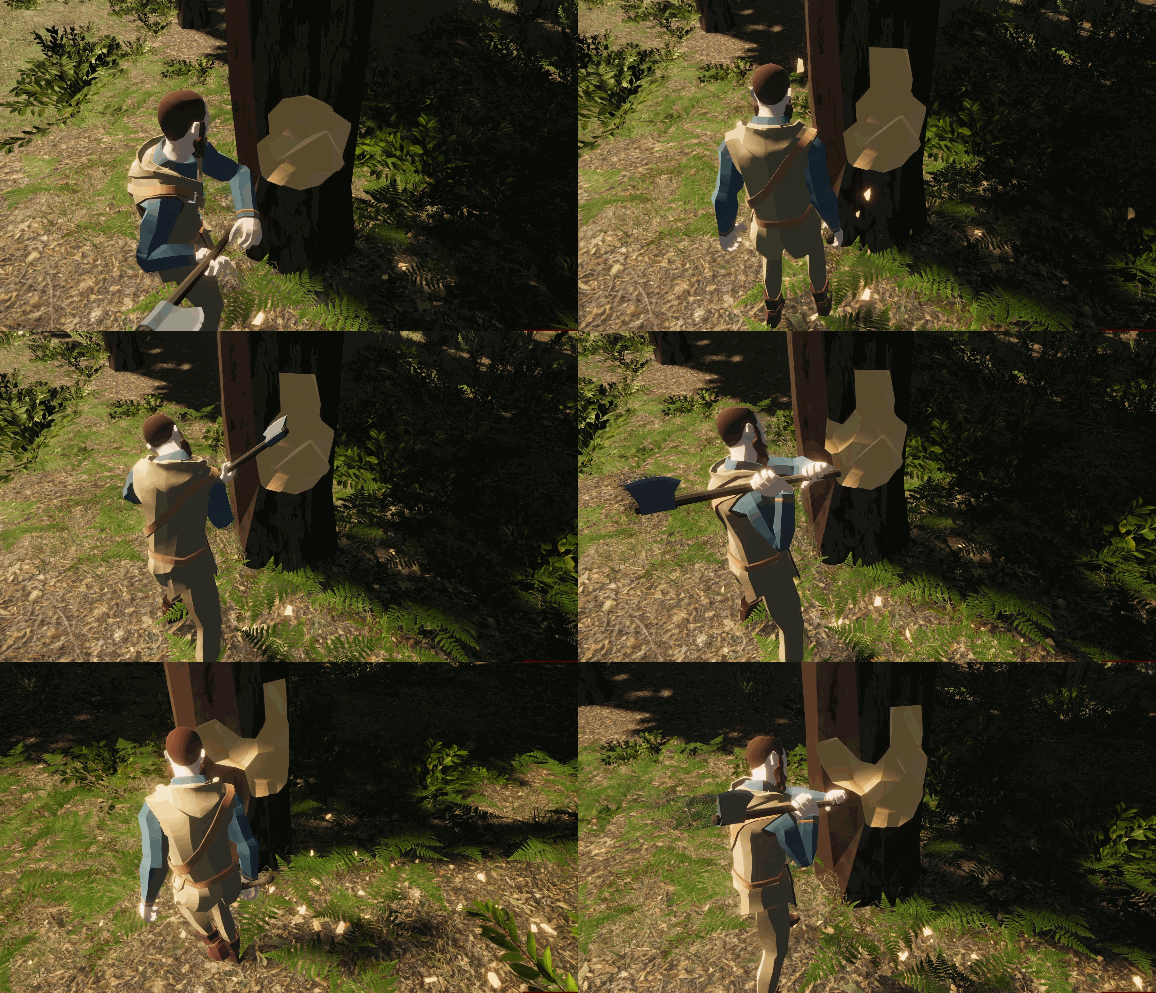
Each axe swing chops out part of the tree. This allows the player to control the direction of where the tree falls.
These features utilize the game's destruction and physics systems, where objects in the world can be destroyed, or damaged, or in this case cut in half and then smaller pieces to produce a new resource - Logs.
Release date also updated to Fall 2022.
"Creative Mode" alpha gameplay video part 3 - Castles Jul 02/21
Creative Mode
"Creative Mode" is the unrestricted building mode where everything is unlocked and you can place pieces instantly without cost or other requirements.
This new video demonstrates 150 new building pieces introducing the first Castle pieces:
- Walls, pillars, supports, stairs, floors, windows
- Towers, hoardings, rooftops
- Gates, drawbridges, portcullis
- Battlements and corbels
So far there are over 500 building pieces in the game. Hundreds more to come.
Blueprints
Blueprints are multiple building pieces saved as a single building piece. Like creating an entire house, then saving that house as a single unit to place over and over.
In this video several blueprints were used:
- Gatehouse - The main entry, a fully enclosed structure with a double gate and battlements on top
- Wall Section - a simple multi-level section of wall with battlements on top, makes for easy creation of long walls and different angles
- Castle Wall Tower - the primary wall tower used at all wall angle changes, multiple floors, open top carrying a mangonel and archers
- Keep Tower - based on the Wall Tower, modified to have a closed top with hoardings
- Six different simple house types based on the existing "Village" building pieces
Teraforming
Teraforming is the ability to change the terrain height and textures. Certain textures will clear vegetation.
In this video you'll see:
- Painting dirt textures to clear trees and vegetation for building
- Painting path textures to walk/ride on
- Raise, lower and smooth terrain height to shore up foundations around buildings
- Lower terrain height to dig a moat under the primary keep drawbridge
[previewyoutube="ECCdv8b4IY8;full"]
"Creative Mode" alpha gameplay video part 2 - Fortifications Jun 20/21
Creative Mode
"Creative Mode" is the unrestricted building mode where everything is unlocked and you can place pieces instantly without cost or other requirements.
The new video demonstrates 50 new building pieces introducing the first Fortifications:
- Palisade walls, various heights, widths, and styles
- Modular Watchtowers, supports, platforms, roofs, and stairs
- Window shutters, support beams
Sharing Blueprints With Other Players
Blueprints are now saved in a format that makes them easy to share with other players.
In the video, we make a large complex Keep building then save it as a blueprint. Then you can place copies of the entire Keep as a single building. Same thing with the watchtower placed around the walls.
[previewyoutube="TzBt-Lhf6Vg;full"]
"Creative Mode" gameplay trailer available (alpha) Jun 12/21
[previewyoutube="lCeqb-NxCN4;full"]
Creative Mode
"Creative Mode" is the unrestricted building mode where everything is unlocked and you can place pieces instantly without cost or other requirements.
The new video demonstrates some of the core building mechanics such as:
- Search for pieces by tags
- Load pieces to a hotbar
- Build directly from the master pieces list
- Teraforming - raise, lower and smooth terrain, paint grass, dirt, rock, and paths
- Blueprints - at any point save your building progress as a new piece that can be placed as a single item
- Props - interior and exterior decorations including animals and people
- Weather - manually adjust weather and time settings
In the video there are around 300 building pieces available which is a subset of building pieces from the "Village" theme.
Building Themes
There are multiple sets of building themes. Each having a consistent look and style.
The complete "Village" theme includes approximately:
- 500 building pieces - walls, floors, foundations, windows, doors, roofs, beams, supports, stairs
- 300 props - signs, planters, furniture, containers, ladders, lights, vehicles, workshop items
- 100 tools and weapons - swords, axes, maces, spears, bows, crossbows, tools
- 100 shields and armor - various clothing, armor, shields
- 100 fortifications - gates, walls, walkways, towers, defensive structures
Other theme sets include "Town", "Castle", and "Dungeon", all with their own unique style and building pieces. Other races have their own theme sets.
Much more to come!