Early Peek into the Vehicle System | 20% off is live
Greetings, fellow engineers.
Great to see you again at TGS2024. Last year we announced the Combat System update. This time, we are happy to bring you some news about the Vehicle System. So let's take a peek into what's been going on.
Like everyone else, we're looking forward to the details of the Vehicle System. We'll share the informtaion with you when ready, so stay tuned! And the updates for Combat System, including the well-anticipated Ultimate Weapon, will be introduced to you once at the right time.
While waiting for these big features, we'll still be bring you some other updates. We are working on adjusting the Transport System and adding more localizations. We're also optimizing the UI/UX to improve player experince and help you manage your factory with more ease.
Finally, don’t forget Dyson Sphere Program is at 20% off now. Join us in the galactic exploration!
Get the lastest news about Vehicle System at TGS
Greetings, Engineers!
We're thrilled to share the latest news about Dyson Sphere Program at this year's TGS.
Like you, we can’t wait to introduce the Vehicle System into the game, bringing new ways to combat the Dark Fog, enhance automation efficiency, and of course, extend your bedtime. But hold tight — the lightweight industrial mecha still needs a little more time before we can get this massive unit running smoothly.
Be sure to tune in to the Gamirror Games Now TGS2024 Special on September 26, 2024, at 11 AM (UTC+8).
Also, Dyson Sphere Program will be offering a 20% discount from September 21 to October 5 ! We welcome more engineers to join our great project, brick by brick, in expanding the vast universe. But remember to take care of yourselves, rest up, and keep your Fuel Power as full as Icarus.
「Space Builders」Bundle Available Now!
The Space Exploration Festival has arrived!
And We’re bringing you the 「Space Builders」 Bundle, featuring Space Engineers, Cosmoteer: Starship Architect & Commander ,Dyson Sphere Program.
Ready to Dive deep into the cosmos? Get the「Space Builders」 bundle at 10% OFF NOW!
Hope the weather is getting cooler out there (for the Northern Hemisphere). It's been over 40℃ (104℉) this week here. But don't worry, we are doing okay.
Here is the update for some issues addressed recently:
Version0.10.30.23430
[Feature]
Added [Bloom Effect] in the video settings. You can now toggle or adjust the bloom effect in the scene (if black spots or screen glare occur, you can choose to reduce or turn off the effect).
[Change]
Added a restriction on the difference in tilt angles at both ends of the sorter. When building the sorter vertically, sorters with sufficient length at both ends will no longer prompt "Distance Too Close."
[Bugfix]
Fixed a bug where the recipe for replicator would display correctly but could not actually be crafted in certain cases.
Fixed a bug where mining machines could not detect minerals that were too high or too low in elevation.
Fixed a bug where in certain situation, after building all the holograms and leaving the planet, an error might occur when the battlefield analysis base powered on next time.
Fixed a bug where some buildings would show a foundation requirement when pasting blueprints onto the Maroonfrost surface.
Fixed a bug where sorters sometimes would not rotate according to the tilt of the conveyor belt during manual construction.
Fixed a bug where sorters would not rotate according to the conveyor belt tilt when pasting blueprints.
Fixed a bug with incorrect collision detection for tilted sorters.
Fixed a bug where sorters could be constructed underground.
Patch Notes V0.10.30.23341
Hello, Engineers. Hope you had a great weekend. The update last Thursday has caused some issues. We've urgently fixed the bugs in this patch.
Here is the full patch notes:
[Change]
Optimized the performance of inserting cargos to Conveyor Belt line, ensuring that the first node in a closed-loop conveyor line will not stop when cargo is inserted.
When a blueprint contains only Conveyor Belts, Sorters, Traffic Monitors, and Spray Coaters, it is now possible to raise or lower all buildings in the blueprint in the same way as elevating Conveyor Belts.
[Bugfix]
Fixed the bug where the mineral reserves displayed for Advanced Mining Machines on remote planets in the control panel showed as zero.
Fixed the bug where minerals accumulated on remote planets could be taken from the control panel.
Fixed the bug where some UI text displayed incorrectly in the control panel.
Fixed the bug where the Battlefield Analysis Base could not be built or rebuilt on its previously planned building holograms.
Fixed the bug where inputting cargo into a closed-loop conveyor belt with the pile sorter could lead to data anomalies.
Fixed the issue where, when the mecha construction drone was turned off and a large number of blueprints were pasted, errors might appear when entering a new planet and planning buildings.
Fixed the bug where sorter collisions might behave abnormally when pasting blueprints.
Fixed the bug where turrets would rotate according to the incline of the conveyor belt when built on it.
Fixed the bug where half-level elevated conveyor belts might attempt to avoid horizontal belts by raising or lowering when encountering them.
Fixed the bug where conveyor belts would also automatically raise or lower by half a unit when passing through buildings like spray coaters.
Fixed the bug where the end of a line would not check for excessive twisting when planning connections to conveyor belts.
Fixed the bug where mining machines might cause an out-of-bounds array error in multithreaded mode.
Fixed the bug where conveyor belts with different positions and input-output will be merged into one section after blueprint copy-pasting.
Fixed the bug where excessively long blueprint file paths in the blueprint library caused incorrect UI display.
Patch Notes V0.10.30.23272
Long time no see, engineers!
It's been a while since the last update. We've received lots of feedbacks from you on the "Transport Update". So we've been working hard during the dog days, and now the update is ready for shipment.
Now a new transport Control Panel(I) is added. All types of transport across the cluster can be managed through here. You can also locate desired Stations or Distributors by clicking the locate button.
Added route display for paired Stations or Distributors. You can now have a clear view of the route and the items transported.
There is some complaints about the pairing system since the last update. So we decided to optimize it further. Now with "Designated Pairing", you can create isolated route(s) without being interfered by other Stations.
And more... Now you can "dive" the belts.
Here's the detailed Patch Notes:
[Feature]
Added a control panel (I) where engineers can view current information and settings for all logistics facilities in the entire cluster, aiding in better factory management.
Added the "Interstellar Logistics" tab to view the current status of Interstellar Logistics Stations and Orbital Collectors.
Added the "Intraplanetary Logistics" tab to view the current status of Planetary Logistics Stations, Interstellar Logistics Stations, and Advanced Mining Machines.
Added the "Logistics Distributor" tab to view the current status of Logistics Distributors.
Added a setting to automatically pause the game when switching to the background.
Added a upgrade [Conveyor Belt Slope Limit], it can be unlocked after researching [Super Magnetic Field Generator]. If unlocked, building a Conveyor Belt will not be limited by its slope.
[Change]
Optimized the construction system to reduce lag when a large number of building holograms on the planet have all been constructed or deleted.
In blueprint paste mode, copying a Satellite Substation now shows the blueprint hologram directly as an unpowered state.
Players not in warp or flight mode will no longer be attacked by the Phase Laser Towers of the Dark Fog Hive.
Added a designated pairing setting in the Interstellar Logistics Station behavior settings. When set, other logistics stations will not actively execute normal pairing tasks with this logistics station.
[Bugfix]
Fixed the bug where small wreckages would shake or sink on the ice surface.
Fixed the bug where after a Guardian blocking skill, there was a chance of appearing at the planet's core.
Fixed several bugs related to conveyor belt operations in blueprint mode.
Fixed the bug where some target indicator lines would occasionally flicker frequently.
Fixed the bug where cargo flow speed would be abnormal if the node at the head of a closed Conveyor Belt loop or a particularly short node in the line had a different speed from the previous section.
Fixed the bug where inputting cargo into a closed loop might cause the line to stop.
Fixed the bug where the flow rate might not reach the maximum when merging high-speed conveyor belts.
Fixed the bug where a mysterious black hologram sometimes appeared in the conveyor belt construction preview when right-clicking to delete buildings in a blueprint.
Fixed the bug where building holograms might display abnormally when dragging and pasting blueprints.
Fixed the bug where erroneous connection might occur if blueprint coverage objects were constructed or dismantled during the forced construction process of pasting blueprints.
Fixed the bug where holding Shift and moving with arrow keys in blueprint mode would move in the wrong direction.
Fixed the bug where too many Chinese characters in the blueprint introduction would cause the blueprint to become invalid.
Fixed the bug where too many types of buildings in a blueprint would crowd the blueprint code display space. Now, the content of the blueprint introduction can be fully displayed, and it will be presented in a scroll list.
Fixed the bug where changing the case of letters while renaming a blueprint would cause an error.
Fixed the bug where selecting a corrupted save file would prevent it from being overwritten.
Fixed the bug where clicking the reconstruct switch on a Battlefield Analysis Base without power would mark ruins as holograms.
Fixed the bug where, even without power, the Battlefield Analysis Base would mark ruins as holograms when placed.
Fixed the bug where, when two Spray Coaters extracted proliferators from the same Conveyor Belt section, dismantling this section and building a new one elsewhere might cause one Spray Coater to extract proliferators from the newly constructed Conveyor Belt.
Fixed the issue where planning routes between short-distance buildings like Spray Coaters and Traffic Monitors would be incorrect.
Fixed the bug where the pie chart continued to update after disabling CPU real-time monitoring in the statistics panel.
Fixed the bug where the foundation could not lift more than 1024 minerals.
Fixed the bug where some building UIs could not be modified using the recipe paste shortcut when opened.
Fixed the issue where actions like entering/exiting construction mode would affect Icarus' movement status.
Fixed the issue where the collision range of unbuilt sorter holograms would be abnormal and difficult to select upon reloading a save.
Fixed the bug where UI elements overlapped when planet names were too long in the Esc menu.
Fixed the bug where too many buildings in the range during demolition could cause errors.
Small Patch V0.10.30.22292
Hi engineer,wishing you a happy Children's Day!
[Change] - Adjusted the zoom scale of the camera to the target planet when selecting a destination for interstellar routes. - Interstellar route selection no longer jumps the camera to the destination. - Interstellar routes can now be established between any planets/systems, without the need for factories in the target planet/system. - The search box in the point-to-point transport panel will now display all matched logistics stations. - Optimized the WASD movement in the Technology Tree.
[Bugfix] - Fixed the bug where group settings did not take effect immediately after clicking the group setting button. - Fixed a bug where sand pile is picked up as a physical item. (Existing sand pile items will remain) - Fixed the bug where the UI display of Advanced Mining Machine is incorrect. - Fixed the bug where NaN was displayed in the brief information of the Eclipse Fortress under certain circumstances. - Fixed a bug where Technology Tree keeps scrolling if the computer is connected with a joystick, steering wheel, controller, etc.
A Shipshape Transport Update
Hi, engineers. Long time no see. You might already know Icarus was preparing some new fancy stuff for a future update. It’s a project that requires lots of resources from across the entire cluster. Icarus can only hope its vessels had brought enough warpers, or they would return 2000 years later.
CentreBrain already found the Interstellar Logistic Stations not being very “logical” when they are on many different planets. Like when one ship set off to deliver some ores, all needing stations are going overboard and spamming “Mine, mine!” in the transmission. So CentreBrain is now planting a logic chip into the Interstellar Logistic Station to make it function more properly.
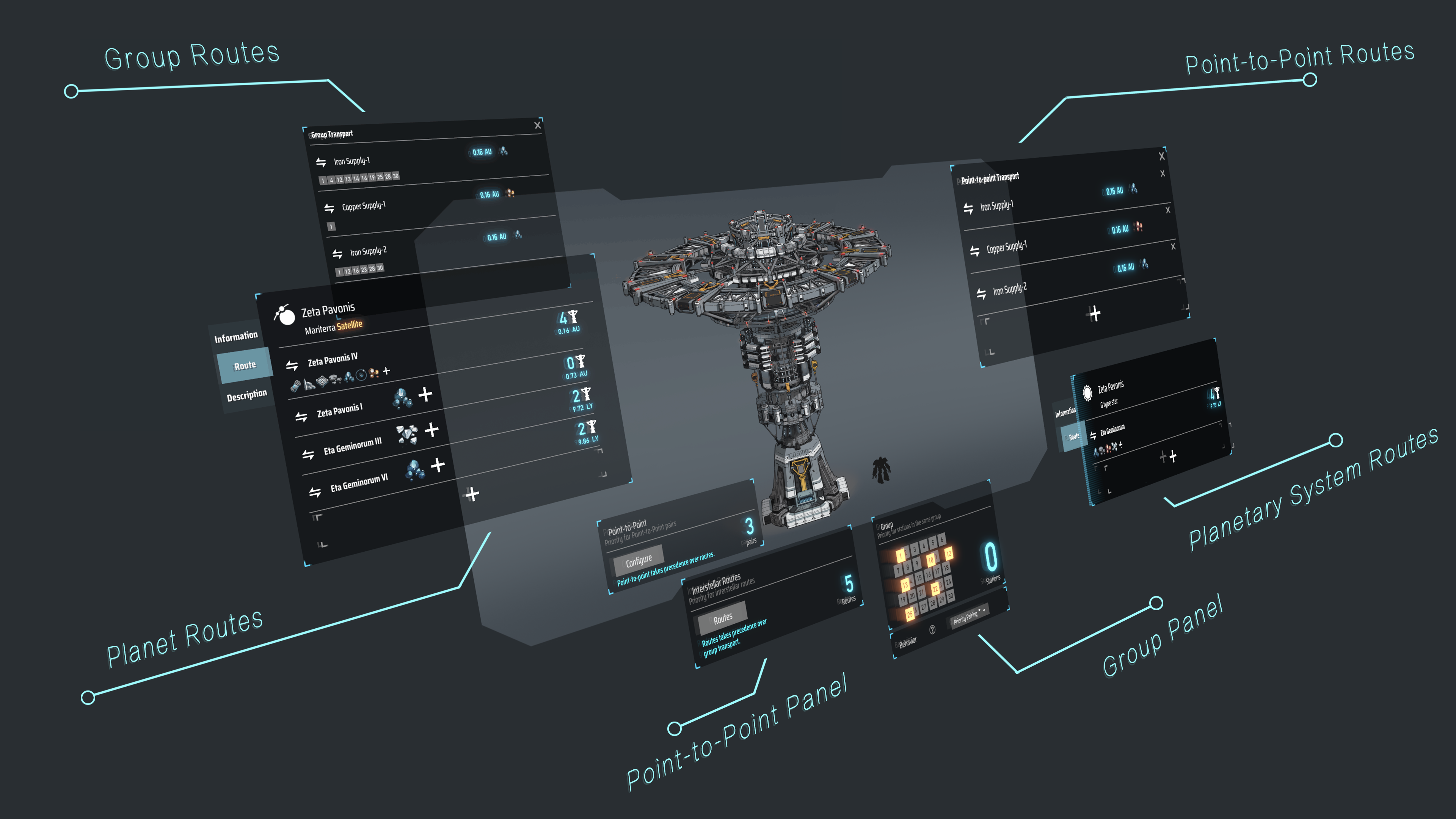
Now you can set priority settings in Interstellar Logistic Stations, it comes with a new shipshape UI will help you manage your transport priorities.
This is not a final update for the interstellar transport system, a few future optimization updates are planned for further optimization.
Here is the full list of this update: (V0.10.30.22239)
[Feature] - Added priority setting feature to the interstellar logistics system. - Added ability to set point-to-point transportation for logistics stations with highest priority. - Added ability to designate interstellar routes, which are high-priority transportation routes between planets/planetary systems for specified items. - Added ability to group logistics stations, with higher priority transportation between stations within the same group. - Added a 0.3x resource multiplier, adjustable from the start game interface. - Added setting to automatically mute the game when switching to the background. - (Experimental) Tilted conveyor belts can now be constructed; adjust them using the [←]/[→] keys during conveyor belt construction (no in-game prompt available).
[Change]
- [Battlefield Analysis Base] pickup speed x2.5; picking up sand pile will not affect the speed of picking up other items. - Added an option in the [Pickup/Drop Filter] panel to disable sand pile dropping. - Real-time height information is now displayed when constructing conveyor belts. - Add the "Free item" toggle setting from the sandbox mode replicator panel to the save file. - Now you can use [WASD] to navigate the Tech Tree(T). - Optimized docking positions for drones at the [Battlefield Analysis Base] to reduce clipping issues. - Increased on-screen rendering limit for Traffic Monitor.
[Bugfix] - Fixed a bug where, after a downhill slope with a curved bridge on a conveyor belt, constructing a sorter would result in the direction being the same regardless of how it was pulled. - Fixed an issue in sandbox mode where inputting items with proliferator point bonuses into locked slots at interstellar logistics stations would cause individual item proliferator point bonuses to exceed 4 points. - Fixed a bug where enemies would get stuck underground in certain situations, causing defense turrets to continuously attack the ground. - Fixed a bug where Icarus would incorrectly deduct energy shields in certain situations. - Fixed visual effects bug with the plasma projectile of the Dark Fog plasma sentry tower.
Dev Log - Interstellar Logistics Optimization
Interstellar logistics has always been one of the most complex systems in Dyson Sphere Program. It is not only complicated in terms of code but also in terms of design.
Many engineers have asked us this question, "Youthcat! Why does my ship go to a farther planet to get items instead of a closer one?"
Good question! In today's dev log, we will introduce the history and evolution of the interstellar logistics system. We'll roughly explain the iteration process of optimizing the interstellar logistics system experience.
Before the Update
In the previous interstellar logistics system, the transportation of an item from interstellar logistic station A to Station B was facilitated by a mechanism called Supply-Demand Pairing. Each supply-demand pair contained information about the supplier, the demander, and the item being transported.
Each interstellar logistic station managed all its supply-demand pairs internally. It needed to check with all other stations to see if its supply and demand could match with those of other stations, and then store all the matched supply-demand pairs.
All these supply-demand pairs formed a complex logistics network. For example, if there were 10 interstellar logistics stations in the universe demanding iron ore and 100 stations supplying iron ore, there would be 1000 supply-demand pair routes regarding iron ore.
After obtaining all the pairing information, logistic stations need to undergo periodic updates. As you all know, interstellar logistic stations are very convenient to use. You just take out items from your inventory, place them on the ground, set the items, and the goods start to be transported continuously.
Therefore, generally speaking, the number of interstellar logistic stations in the entire universe is not too small. Consequently, the pairing information within each interstellar logistic station grows exponentially.
To balance the entire supply-demand relationship (as well as optimize performance costs), each time a station judges the pairing information for picking up goods, it adopts a "fair share" strategy. This means traversing through all the pairings one by one and marking the last position after the traversal ends. The next traversal starts from this position to ensure that each pairing has a chance to be "loved".
Behind the vast transportation routes, thousands of stations and tens of thousands of supply-demand pairings perform logical computations every second.
Seeing this, you might already feel your brain getting a bit fuzzy, right? But the complexity doesn't stop here!
To avoid wasting transportation resources, if a pairing passes various logical checks (such as availability of goods, energy, transport ships, etc.), it also needs to consider whether it can conveniently deliver some additional items.
For example, when a vessel destined to pick up iron ore sets off, it needs to reevaluate if it can conveniently bring a small gift to the supplying station on its way. Similarly, when a vessel from the supplying station arrives at the destination and unloads the iron ore, it needs to check if it can conveniently pick up some other items to take back.
Our intentions were good, but things went awry during execution. Code is rigid. It doesn't care whether a pairing is closer or farther away. It simply follows the rules: if a pairing is detected and passes all logical checks in this frame, then that's the route to take!
This puts a strain on our engineers, especially when transport ships are relatively slow in the early stage. It's frustrating to watch a transport ship ignore a mining area just light-years away and instead head straight for a destination tens of light-years away, never looking back.
Beginning the Optimization
When the CentreBrain requested optimization of the interstellar logistics system, the designers were quite unwilling, even resistant at the beginning. The previous logic was already complex enough, and further optimizing the experience would only lead to considering even more complex situations.
As the saying goes, the complexity of design doesn't decrease; it shifts. Now that we have such a complex situation causing experiential issues, the only solution is to devise even more complex rules to match these complex demands.
After continuous battles between designers and programmers, we decided to expand the "pairing" mechanism into multiple dimensions. We allowed engineers to set priorities across different dimensions, ensuring that engineers could adjust the priorities by manipulating pairings across various dimensions. This approach aimed to reduce the occurrences mentioned before and enhance engineers' sense of control over the entire cosmic factory.
We can do it!
The new design of supply-demand pairings consists of five dimensions: ① Point-to-point priority pairing between individual interstellar logistic stations. ② Setting up "routes" between planets for specific items, with priority pairings for stations along these routes. ③ Setting up "routes" between star systems for specific items, with priority pairings for stations along these routes. ④ Grouping interstellar logistic stations, with priority pairings for stations within the same group. ⑤ Regular pairings for items not assigned any specific priority.
Their priority decreases sequentially, meaning that interstellar logistic stations will first check if point-to-point pairing (①) is feasible for transportation. Then, they will consider dimensions ②, ③, and ④ in order. Finally, they will only address regular pairings (⑤) if necessary, based on the settings.
After setting up a planetary route between the third and fourth stars, titanium glass will be prioritized for transportation between these two planets.
Just as we were eagerly diving into development, we encountered a problem after a week of joyful coding — the situation was far more complex than we had imagined.
During testing, we found that in specific situations, logistic stations planned for point-to-point pairings(①) couldn't transport due to reasons like lack of warpers or energy. They could still transport (either delivering or fetching) when considering regular pairings (⑤).
After obtaining items from regular pairings, when it's time to check point-to-point pairings (①), it may be discovered that there are no items available. Alternatively, in cases where transportation is not feasible in ①, some demanders from lower-priority routes might opportunistically "steal items". Because they do not know why ① doesn't work, whether due to a lack of energy or a lack of warpers, the handling methods for these situations are different.
Moreover, the lack of energy needs to be categorized into situations where power is disconnected or not. Some situations require waiting for higher priority, while others cannot wait.
If these situations are not addressed, low-priority pairings will almost always override high-priority pairings, leading to the prioritization meaningless.
A simplified transportation model, where arrows represent transportation direction, and double arrows represent high-priority pairings.
So we adjusted the design of priorities. Priority no longer completely determines who goes first and who goes later. Moreover, in situations where high-priority pairings cannot be transported, it is not guaranteed that low-priority pairings will be served next; it depends on the specific circumstances. By studying the departure conditions of transport ships, we found that there are 9 situations to consider for each station.
Therefore, there are a total of 9x9=81 different situations to consider for both the supply and demand sides.
The designers and programmers felt "intimidated" looking at this table.
Bad news: every 1000 logistic stations will increase CPU overhead by approximately 1ms on average.
some fake codes
To implement these mechanisms, not only do we need to synchronize the timing of updates, but we also need to introduce a "locking" mechanism. When a pairing is transporting items between each other, they will apply a lock to each other. If a lower-priority pairing attempts to transport items and finds a high-priority lock on the logistic station, it will "back off".
Conversely, if a higher-priority pairing attempts to transport items and finds a low-priority lock, it will simply ignore the lock. Of course, this is just a simplified situation. More complex situations, such as when a higher-priority pairing cannot transport items, are not discussed here.
A Shipshape Panel
Thank you all
After this update, the brand new interstellar logistics system is about to meet all the engineers.
We appreciate everyone's patience during this period without new features, and we are grateful for your continuous support and love for "Dyson Sphere Program".
As mentioned earlier, the complexity of design doesn't decrease; it shifts. However, we will always carefully consider engineers' needs and will not give up simply because of design or code complexity. In the days to come, we will continue to bring updates "Dyson Sphere Program".
Thank you all!
Icarus has some ideas
The dark fog is dangerous, and Icarus needs more power. He decides to create...
Dyson Sphere Program is now on a 10% discount on the Steam for two weeks (April 10 to April 24).
Come to build Dyson Spheres and fight against the dark fog!