

Eleven: Table Tennis VR
Paddle Spin patch
Patch to fix 7/27 bugs
One day we will become more professional developers. For now, we are just really passionate. As many of you have noticed, there were some bad bugs and made game play very difficult, confusing, or just weird. Thanks for being patient. The latest has been pushed addressing the following concerns/bugs:
- Points being messy in MP. This was caused whenever your application would send your opponents both a "ball was hit" and "ball is resting on a surface" message. We have resolved this.
- Physics: we revamped the physics a bit with new fancy colliders. However, to anyone who knows Unity, we forgot to place the new collision code in the same script order as the old one. So, the main physics code was preceding the object update code...hence the ball appeared to lag into your paddle as you hit. This is fixed.
- People have commented on how the ball is hard to see in certain envs. Now there is a ball color selection. Don't forget to try black..it actually makes spin more visible! (note, ball color currently isn't transmitted to your opponent, or to the replay engine. We'll add it to the replay engine later, but not sure if we should force both people to use the same color ball. Environments are one thing, but ball color doesn't affect game play..just visibility, which is by preference.
- Related to visibility, the ball and the table surfaces have been updated to look more real. Sorry this took so long to do.
- In testing out the paddle collision, I noticed the ball going through the floor in some places in the studio. Then I read that apparently this was a known issue from before. Sorry for missing it, but it has been resolved.
- Many of you have noticed the sound going in and out and doing all sorts of wrong things. This had to do with the slightly spaghetti code for multi threading the physics. This has been fixed. The spaghetti code will be fixed at a later time. (there may be one or two weird situation that may occur, but it shouldn't affect game play...for example, I was rolling the ball a lot on my paddle, and it disappeared to the floor. I tried to recreate this for a few minute straight and it didn't happen again..so some very edge case, but not something you do in a game.
- We have adjusted the paddle colors to be less blinding.
As always, thanks for playing the game! Since yesterdays big release, we have seen 1136 unique players play the game! That is so amazing and we are very very happy to have so many active users. We are aware of a problem where many people play for a short time. This is probably due to not being able to find opponents to play with? Well, a new multiplayer engine is coming out from us, and that should rectify this greatly.
We are no where near perfect. We may still be missing a bug or two, or maybe a new bug we don't know about. We are all ears and eyes. If a bug happens, feel free to post it on the forums, or in a private chat, or anywhere. If it happens during a game, please hit "save replay" and send me the replay.
replays found here: c:\Program Files (x86)\Steam\steamapps\common\Eleven Table Tennis VR\Assets\Recordings
i'm found here
carrotstien@gmail.com
-----
also, we have started a discord. Feel free to join and chat with us and each other:
https://discord.gg/s8EbXWG
-----
additional patch at 4am EST 7/29
- added some small logging. If you have game score issues, please send me your log.txt file...along with ask your opponent to do that same. This file gets filled at the end of your game, and at the end of your playing session.
- added some failsafes for multiplayer.
- Fixed issue where the table color wasn't being saved
- Updated internal game version, so that people in the newest build, can't play people in an older build. Started with this build, it will also match up against a remote server to check that you have the latest version (surprised steam doesn't offer this by default).
Also, starting from this
Environments, Masks, Paddles, and More

Void is a special environment in that it's empty but allows you to use your own 6 images to define the skybox, simply replace the images in the game folder under "Assets/Resources/VoidEnvSkybox/"
In addition, there are now vastly improved graphics quality options under the settings menu and each environment has its own savable options because they vary in resource demands. If your graphics card can handle it use "Ultra" settings to see the game in a higher quality than previously possible.
In multiplayer, there is now a practice break right before every match and rematch where the environment can be changed and both players will be placed into the same environment, during matches environment switching is deactivated.
There are now also a selectable variety of masks and paddles to choose from under the settings menu.
We have also been hard at work revamping the collision, physics, and multiplayer systems in anticipation of cross platform multiplayer and overall improved experience.


On a more technical front - we have rewritten the physics and multiplayer code to use up a lot fewer resources and bandwidth. If you thought that rolling the ball on the paddle was impressive before, you should try it now. No more is the collision detection simply "good enough".
Coming up Next:
in the coming days, expect to see various iterative updates to the game including a beta release of a brand new multiplayer system. We can't roll it out straight to the master branch as we have very little idea about how much load it would require.
We have not forgotten any issues raised by anyone. As always, please continue communicating with us on the forum. It is possible that in making such larger releases, we miss a bug or two. Please let us know and we'll fix it post haste.
Happy Ping Ponging,
Eleven dev team.
-------------------
I'm sorry I broke physics, I won't do it again
There are 2 ways to determine how fast your paddle is moving. One way is not a very good way, but happened to be the default - for all of the new paddles. Oops.
It was 1 check box away from being the good old physics we all love.
Just pushed out a small patch to fix this issue, and to fix an issue some people were having about the balls falling off of platform levels and not being reachable.
-------
Note
I am seeing that people are having issues with points in MP being incorrectly assigned. I haven't had a chance to see this. If this, or any other bug happens to you mid game, remember to save the replay, and send it to my email so i can analyze it. (carrotstien@gmail.com)
Recordings would be found somewhere around here
c:\Program Files (x86)\Steam\steamapps\common\Eleven Table Tennis VR\Assets\Recordings
Practice Launcher and Fixes
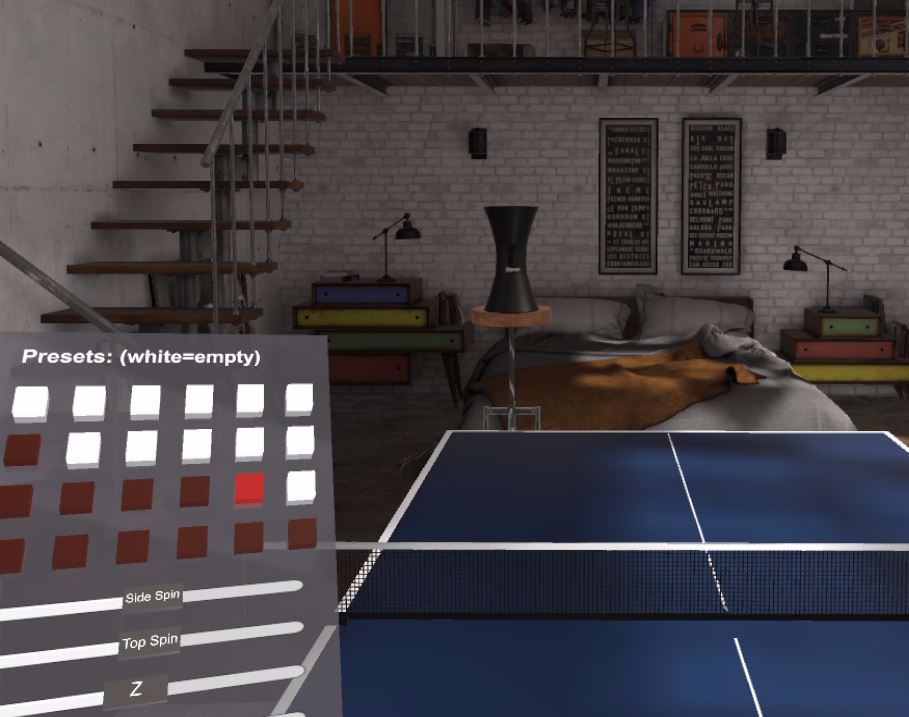
Hello All,
Sorry for the update delays, but we are getting back into rhythm. We are still working towards PSVR, but that is taking a lot longer and we don't want users to wait. Some changes just released:
- Practice Launcher. Set it up, move it around, save it, share with friends. You now have access to a ball launcher and a virtual tablet to control it. It's very new, so feel free to provide suggestions/comments. We have included a handleful of presets to get you going. The files are stored here: "C:\Program Files (x86)\Steam\steamapps\common\Eleven Table Tennis VR\\Assets\PracticeModePresets". If you want to change/copy/paste/share, etc, just keep in mind that the filenames must be "preset1.txt" to "preset24.txt". The number determines where on the grid the preset will appear. You select from the grid using the selection circle attached to your controller and the trigger button. You can drag the vr tablet around by grabbing its handle.
The Practice Launcher is under the MiniGames menu item. - Bug where ball disappears over the net: fixed.
- Bug where the AI forgets to serve: fixed.
- Bug where the Waves minigame launches the ball into the net, and never launches again: fixed.
Update: as per user request, have added speed and angle spread sliders. Also, reduced total ball count to 3 non active balls.
Watermark + Analytics Follow up Patch
- remove a watermark inapropriatley apearing in the bottom right corner of the desktop game window
- activate developer analytics to more easily collect user crash reports and engagement
New Default Mask and Game Breaking Fixes
Masks
A challenge we are facing with masks is we want people to choose their own masks over multiplayer, not chose to see your opponents with whatever masks you want locally. We are however going to revamp the multiplayer system for cross platform and so the masks update took a backseat.
But as a small compromise because the scary mask seems to really upset some peope we are pushing a patch now to replace the rabbit with something more acceptable to all ages. This mask will also be used in replays to replace the old white floating orb.

C++ Game Breaking Bug Fix
We have also included a fix for a major game breaking bug with frozen physics and animation that was ocuring for some users after a windows update broke their c++ redistributable.
Previews!
Finally, we know the wait has been long. So we are re-balancing the development priorities from our intense focus on cross platform to ship more regular small content updates. Here is a preview of the towers mode, practice mode, and the desert envrionment that will be in some of the next patches!


Followup Patch
- correct table spawning logic reinstated.
- corrected saving of paddle speed paramter that potentialy caused other settigns to not save correctly
Restart steam to get this latest update
Leftie + Oculus Models
In the coming days, we'll likely be pushing a bunch of small updates.
At any point, if something breaks, please feel free to post to the forums; we listen.
Tiny Patch
Fixes/tweaks:
- fix paddle turn off bug (thanks Tom for finding and providing video)
- Put the bunny to sleep (well almost, it shouldn't come up very often now)
- smoothen AI..speed up movement for lower levels, reduce shot speed and spin for pro
- fixed ball freeze bug after watching full replays
- added slider highlight on cursor-over
- sped up AI response time/speed for serve
Updates:
- Added player history. Whenever you play with someone, they get added to your history. We couldn't get the steam-recently-played to work, but it works in game. When you click on Multiplayer, you will see a new icon. Clicking it will show you a list of people you have played with and their states. If they are available, and you are friends with them, you can invite them to a match right from here. If you aren't friends with them, you can click their names to view their profile, and add them as a friend! No more "oh man i wish i got that person's steam account name"
- Now when you end the game, you have a prompt to save replay..in case you need to end the game early for some reason but don't want to lose the replay.
- While playing a player, you can view their profile and friend them.
Small Patch
Patch updates:
- Rematch button works now. If you are playing a multiplayer game, and you want to just free hit, press the menu button (on the controller) to hide the end of match menu. Note: you won't be able to start a game with that person again from the main menu directly if you do this.
- fixed bug where inviting a person on your list of friends sent the invite to the bottom list member
- Added the ability to invite a friend who isn't currently playing the game. In order for this to work, you need to have played with them at least once after this patch.
- Fixed a bug where the AI was invisible after ending a match sometimes
- fixed bug where ai would serve out of position
- fixed paddle reposition bug
- fixed replays getting cut short if you watch an instant replay.
- added a check box to choose to be able to reposition yourself while in menu or while out of menu. Many people asked for this as they were moving themselves accidentally.
- fixed bug where you'd be loaded in the game out of position.
- adjust friction numbers on the paddle (a bunch) and on the table (a tiny bit). Let me know how it is. Any tourney players out there can comment?