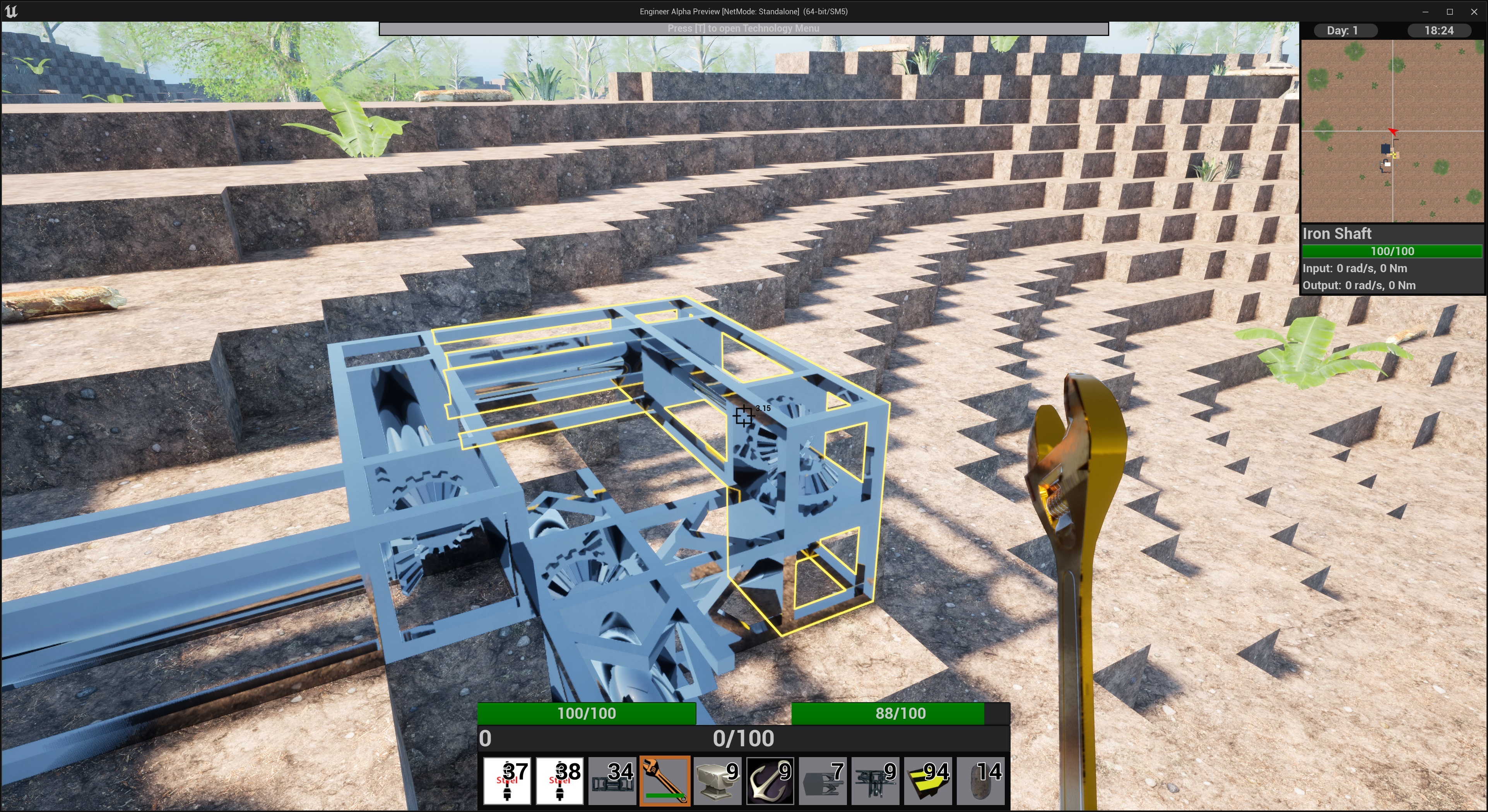
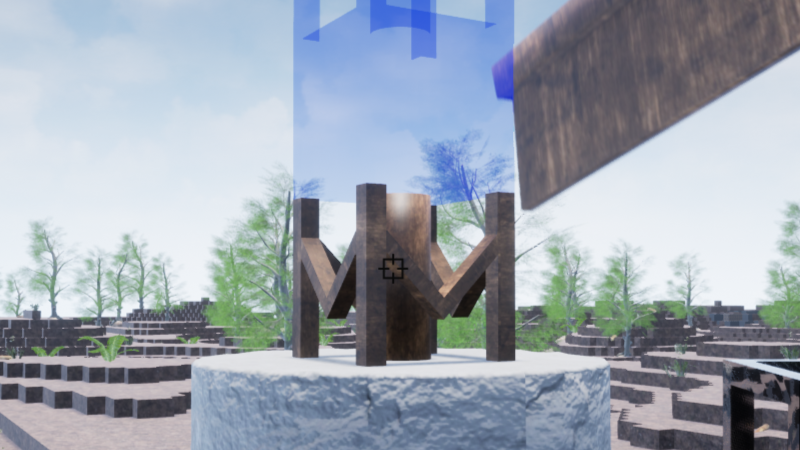
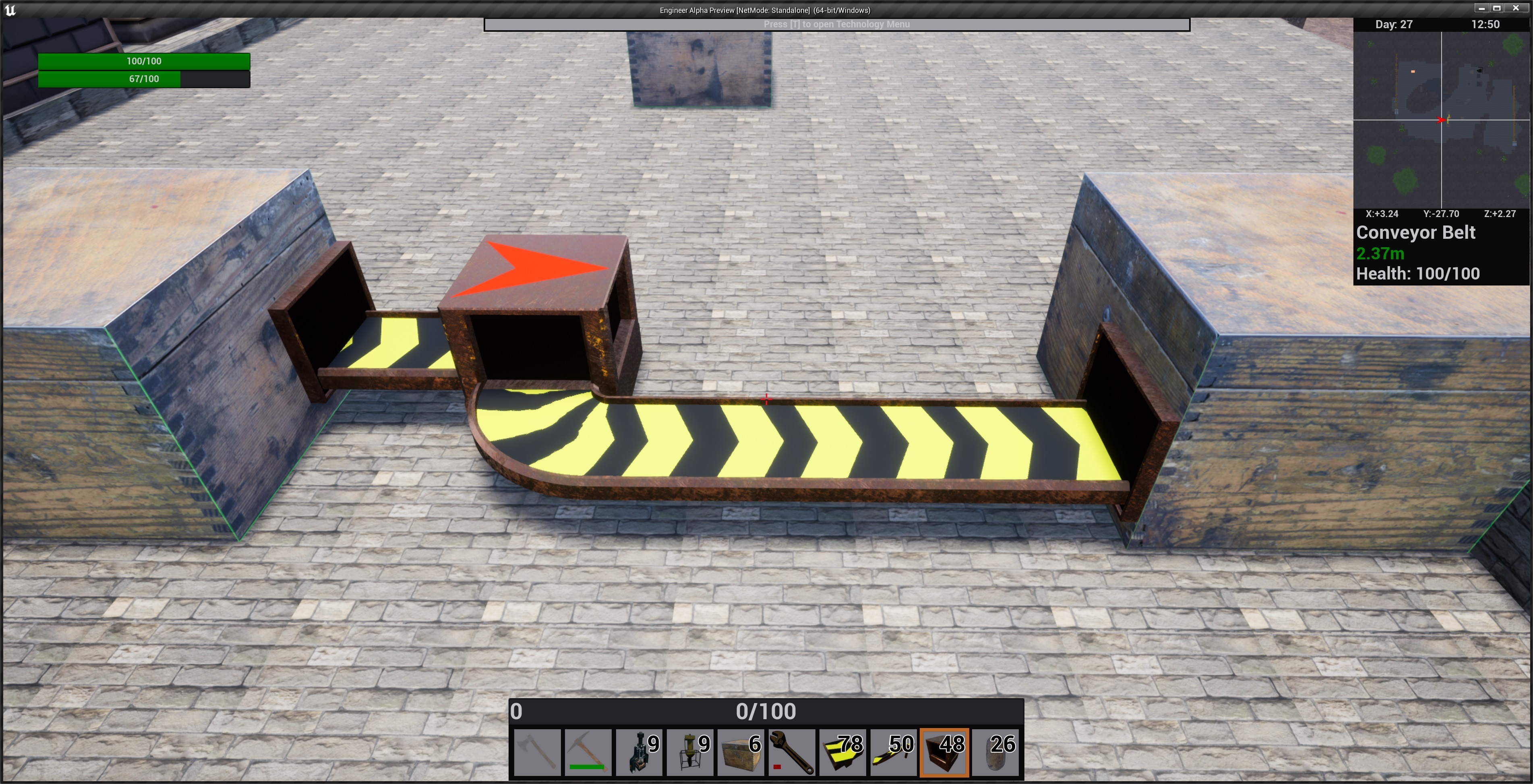
It is always my goal to make the game more accessible and understandable to as many people as possible. and to that end I have created an outline and information system that helps give info to the player so they know what they are looking at and what they can do with it.
The first thing is that any building that the player looks at within their observation range will get an outline around it showing its bounds in the world. I have found this very helpful for things like shafts that connect to each other and show no sign of a gap/transition.
When you get within interact range if the building is interactable your crosshairs will change color and you will get a text notification that you can press the interact key to configure or otherwise interact with the building.
There is also a second line of text that can appear that is item dependent e.g. with a wrench you will get a prompt to use the item and remove the building.
You may notice some other UI changes in the screenshots here my goal is to keep your eyes in the middle of the screen with the most relevant information as much as possible and not be hunting all over for the info you want.
Unfortunately the outline will not be coming to blocks or plants created by world gen this build but the text prompts still will, this will hopefully change in a future update.
Engineer Alpha's Log #39: UE5 and Raytracing
As you may, or may not, know Engineer Alpha is being developed using Unreal Engine. I chose Unreal several years ago when I first started largely because writing my own engine felt like reinventing the wheel and I would save an unbelievable amount of time and energy not having to write my own. When I started the only version of unreal was UE4 and it seemed like it had the features I wanted and needed so went ahead with it and all released versions so far have used Unreal 4. Now in the past year or so you may have heard of something called Unreal 5 which is the latest version of Unreal. Unreal 5's biggest change is more support for Raytracing, I know raytracing has some bad mojo around it in some circles as just an EZ-PZ framerate dropper but it does matter. So today I will give you the basics of why Engineer Alpha really wants raytracing and all future versions will be on UE5.
Most games when you play them have parts of the world that are static (things that will never change) and this allows what is called baked lighting. Basically since you know what the space looks like beforehand and nothing can ever change you can figure out how everything will be lit beforehand and save it for later. This is great for saving computing power while the game is running as all the hard work was done ahead of time. This is a problem for Engineer Alpha as nothing is static by design, the entire world can be changed and therefor all the lighting must be done in real time.
In the current version (0.3) you will notice lighting is rather uninteresting. The world essentially has a brightness everywhere that doesn't really change (inside a cave is no darker than outside) making it feel awkward and uninteresting.
Raytracing is how you get good looking lighting calculated every frame. I want Engineer Alpha to look good, It will never look super photo-real being block based, but I still want the best graphics I can get (within reason of course) and raytracing on UE5 will be a big help.
There are lots of features coming in the next version and next week I will be covering one of the biggest in great detail.
Engineer Alpha's Log #36: The Last 0.3 Feature
This past weekend I was playing a different factory game and I realized that my rotation system was missing something. I needed a way for shafts to snap to input/output connectors when you are building them. This fixes a lot of the issues I had with the connection of the mill stone and other buildings at weird angles. Now the snap area is rather small as it just uses the hidden geometry for the connector that the player can't see. However it does give something tangible to aim at so it is mush easier to think about and just do. Now this only works for things with fixed inputs or outputs so shafts are excluded as they will adjust themselves when you place something near them and it just wouldn't work all that great to have it snap.
Now if wondering why this is the last 0.3 feature; that is because I have already branched version 0.4 and any code has to be replicated on the new version as well. I am absolutely willing to fix any and all bugs should they arise.
The feature list for 0.4 is starting to take shape and the big features are starting to come along nicely, more on that in the coming months/weeks.
0.3 Release!
Engineer Alpha Version 0.3 has been released for all users. The extensive set of changes in this version can be found in the new in-game Change Log when you first start the game or in the settings menu.
As was previously stated the price of the game is to increase to $10 USD. This is to happen on August 1st so please be aware if you are planning on purchasing in the near future.
Engineer Alpha's Log #35: Call me a Liar.
This past week a player went on the steam forums here and posted a few suggestions for content they would like to be added. While some of the things where relatively simple changes that only took a minute there was one bigger ask, Ladders.
Ladders were always something I know the game would need eventually with so much verticality in the world but the were not my first concern as they are more of a convenience item than a gameplay addition item. So my answer to their suggestion was that ladders would be added eventually, most likely with 0.4 (the feature list for that is starting to form but more on that in the future).
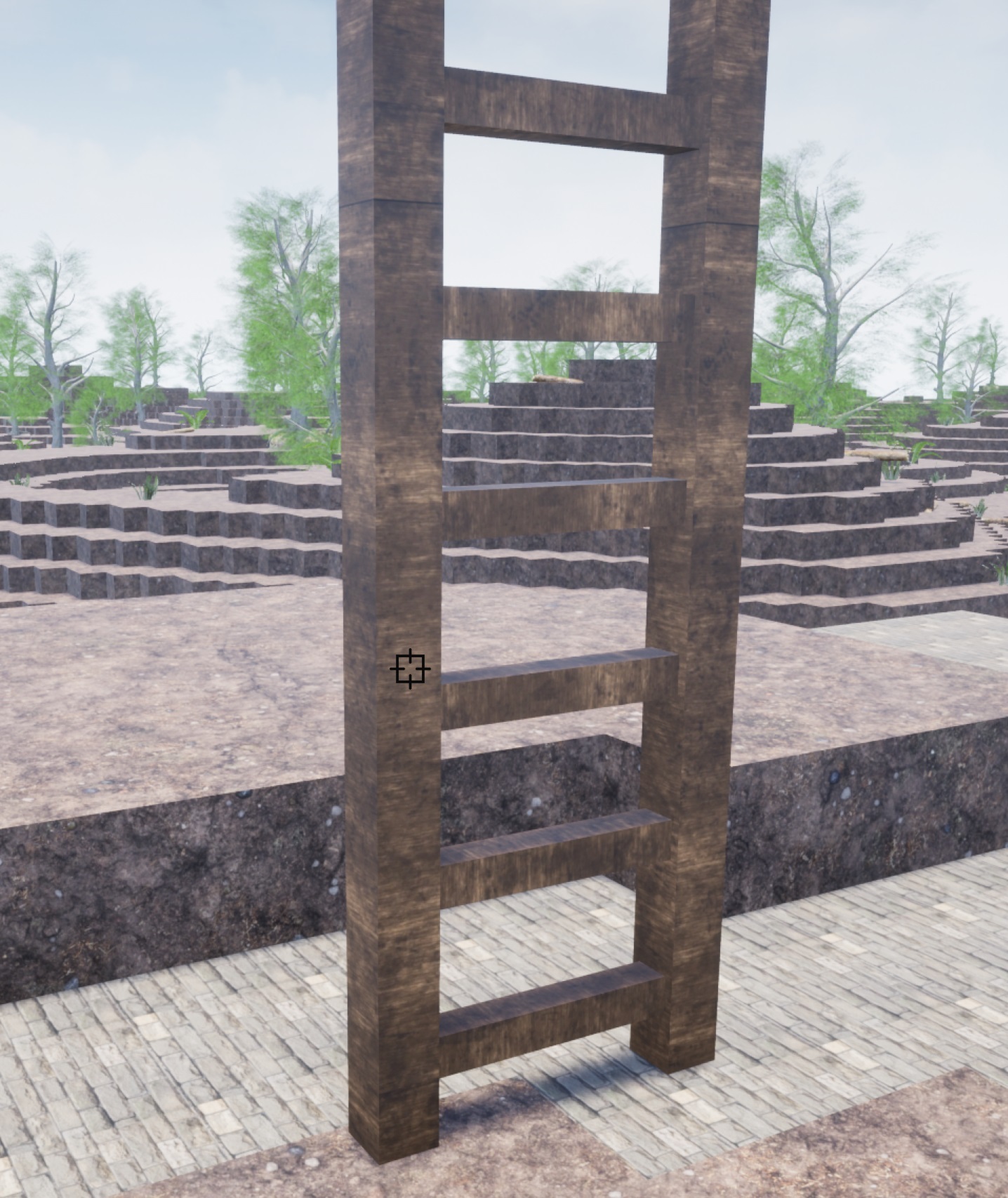
But over the weekend I sitting around doing nothing of consequence and how to make ladders work the way I wanted hit me so I went to work on it. I managed to get them working in a way that I am happy with and they are included with this weeks build. Ladders are a 2x2x4 building that are almost entirely empty space. They allow you climb up or down within their 2x2 column and can be stacked on top of each other.
Engineer Alpha's Log #34: How it all Lines up
This past week I have been adjusting how all the machinery in the game lines up with each other. If you were observant in past versions you noticed that providing machines like the Stirling Engine provided the exact amount of power that consumers would need. This led to a rather uninteresting gameplay experience where you would just set down a pair of machines and connect them together and everything worked just fine.
So of course, I wanted to change this and there are two initial directions you can go; a consumer requires more power than a single provider can give or a provider gives more power than a consumer needs. I have gone in the direction of a provider gives more power than needed. This is due to the fact that if you connect things 1 to 1 they still work just not perhaps in the ideal way and as we are still in the early game things should be easy to make work the first time.
This also led to another change in how machines work. Previously if a machine like the power hammer was given an input with a higher speed than was required its craft speed would scale linearly with the input. E.g., an input of 2rad/s could give a craft speed of 1 while 4rad/s would give 2. This presents problems as it makes it so the best solution is always run every machine at max speed and never add more until what you have is maxed. Different solutions (add more machines or increase the speed of what I have) should be viable in different situations (I have excess materials or I have excess energy). Craft speed now scales with the square root of input speed. So in the previous example an input of 4rad/s would now only give a craft speed of 1.4, 100% more in for 40% more out. I have started with a simple square root as it is the easiest starting point but if things would be better with a cube root or 1.5 root or whatever I will make changes as necessary. If you are at all confused by this don’t worry as I have added a crafting speed indicator to all crafting machines that can scale so you can see how changes in input affect the machine.
There are of course many other bug fixes and balance changes this week as well as changes to the workbench recipe organization, quick pick action and crane movement (acceleration now included!). I also updated how shafts load so that if multiple are placed next to each other they will always load in the same way they were saved, please be aware this may cause some unintended behavior loading any old shafts from before todays update.
The current goal is to have a stable release of Version 0.3 for July 18th.
Engineer Alpha's Log #33: The bugs that bug you.
One of the bugs in the game that has bothered me for the longest time is adding multiple items to inventories. When the game wants to add an item to an inventory (be it the player, a chest, or anything) it calls the function "can add to inventory" which gives back some information about how many of the item in question could be added to the inventory, be it none, one, or 10,000. The problem arises when you want to add multiple types of items to an inventory all at once. You can't just call "can add to inventory" for each item as putting the first into the inventory might prevent the second from being added and the add to inventory function only works on the current state of the inventory not potential changes. This week I finally decided to tackle this problem as I was tired of thinking about the lost items and dupe bugs that could arise (yes these are the things that keep me up at night). I went with creating a "test inventory" that is an exact copy of the destination at the time of the move and adding the items that need to be moved into that test inventory. The test inventory gives back a simple yes or no and the items in question can then be added to the destination if they will fit. The most common use case for this is the removal of buildings as now you will not be able to remove a building if all the items in every inventory in the building and the building itself fit in your inventory.
There were a lot of other small fixes this week including a first pass at science diminishing returns as well as an update to player reach distance. Build range up to 5m and mining range down to 2.5m if that mining range feels too short let me know as I am on the fence about it myself.
If there are any other bugs that are bugging you let me know and I will try to fix them.
Engineer Alpha's Log #32: Ever the Perfectionist
Version 0.3 became available last week and if you have yet to play the new version and are unsure of how to get it; in you steam library hit the gear icon and go to properties -> betas and select the development branch.
There is also a new build this week version 0.3.2 which adds a whole bunch of bug fixes and changes to the game. Including fixing that annoying bug where your action bar would be on the wrong item until you scrolled also you can now change your active action bar while you have a GUI open. Fixes to plants, cranes and a whole bunce of other things.
There is only one version of Engineer Alpha I will ever be happy with and that is a bug free one because I am a perfectionist, to an amazing degree. So every little bug no matter how tiny or seemingly insignificant I want fixed and sometimes spend a long time trying to fix. Even when I am writing the code for a new feature I keep writing and re-writing because it could always be a little bit better. So please if you find a bug or something breaks on you let me know so I can fix it, because honestly I want to know so that I can fix it. I can find a lot of bugs on my own but I can't find them all.
Besides that things are looking really good for 0.3 stability wise.
There are a few more things that need to go in in the next few weeks hopefully. Including an update to science so that lower level parts have lower gains the further down you get in the tree
Version 0.3 Development Release
The time is finally here for the release of the next version of Engineer Alpha. There are a lot of great changes and updates in this version that really enhance the game.
I was planning on getting this out last week but but a rather crippling crash was isolated and took quite a while to iron out. While the fix isn't perfect by any measure it should work for the time being.
But prior to that I was fixing cranes for this update, as I had not touched them in a while, and put in some nice additions to their functionality.
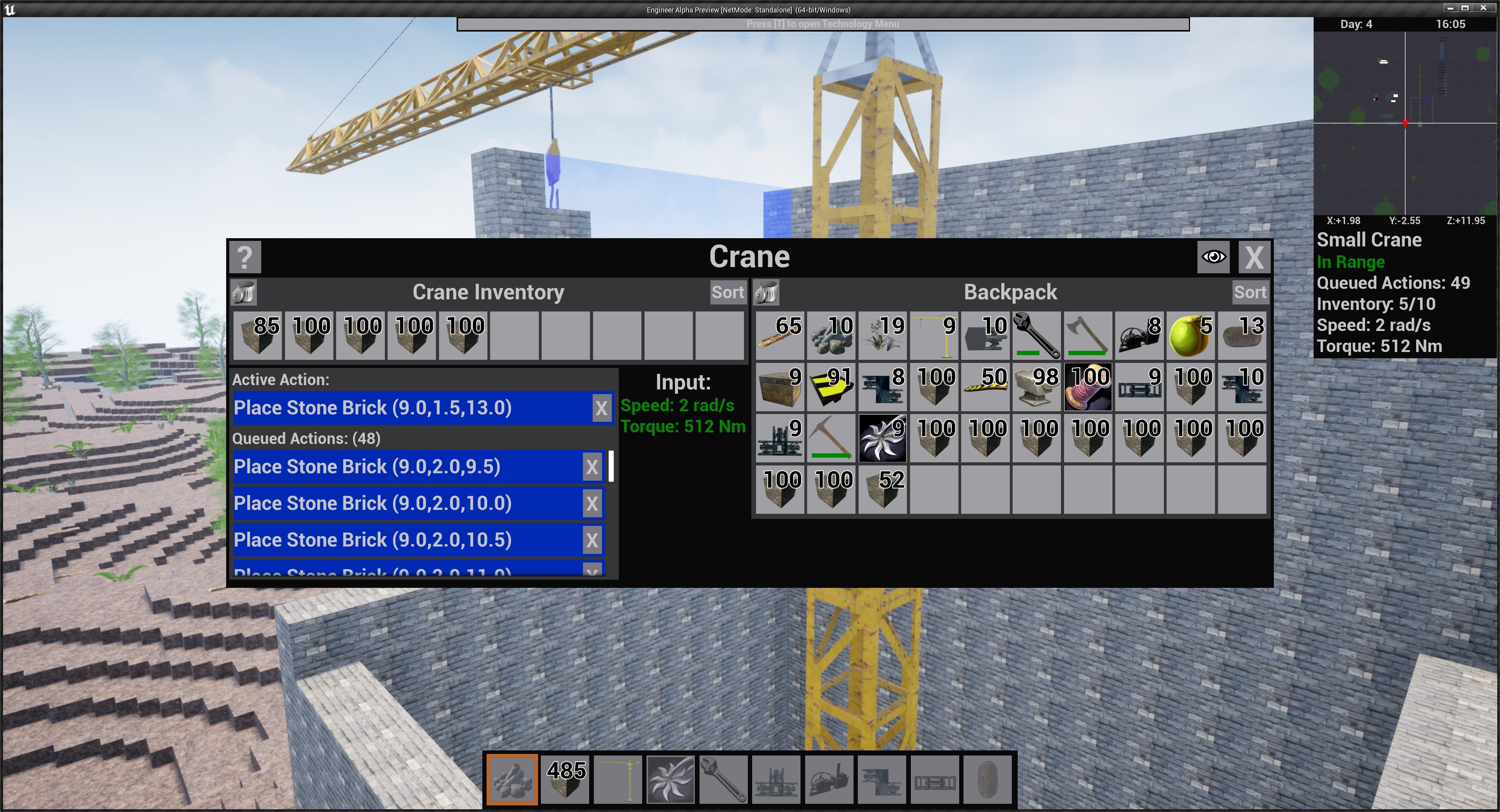
Cranes now require power from shafts to operate at 2 rad/s and 400Nm. This can be provided by 2 Stirling engines merged together. All actions in the crane's queue are now displayed as a list in the crane UI and individual actions may be canceled with the X button. Also all crane actions are now saved when you save the game and exit.
These are just a few of the changes in this version and here is the current patch notes. There are not complete notes as I Know there are changes I have forgotten but the important stuff is here.
Added a new main menu
Added many new game settings for audio and video that can be accessed through the main menu as well as the pause menu
Game save format has been completely overhauled, old save games cannot be loaded, apologies for the inconvenience.
Any number of save files can now be saved with player chosen names
Games can now be created in survival or creative mode, this cannot be changed once a game is started
Added a Technology bar to the HUD that shows the progress of the current tech
World generator altered to have smaller hills
All buildings now use a universal input and output connector
Shafts no longer require buildings at either end
Shafts have received a complete visual overhaul with corner gears and new animations
Added shaft splitters to allow a single shaft’s torque to be sent into 2
Gearboxes now have multiple options for speed or torque multiplication based on their tier
Removed the shaft support item/building
Shafts are no longer limited in length when building
Improved shaft collision while building
Many building have been updated with new animations
Added a second tier of conveyor with 2x speed
Added a third tier of conveyor with 4x speed that is only available in creative mode
Updated tree collision to only include the base and trunk
Trees drop saplings which can be grown into trees given enough time
Added a very crude train system that is only available in creative mode
Conveyors can now only connect to buildings in places designated for inventory connection
Conveyor ramps now automatically adjust their incline to adjacent conveyors
Added a visual indicator for when a conveyor connects to a building inventory
All buildings now snap to the world grid by a single point that also serves as its local rotation point
Improved the back end code of nearly every building/object in the game for performance and future feature expansion.
While controlling a crane in creative mode the player’s movement is no longer limited
Cranes now show their queued actions as a list in the Crane GUI
Cranes now require power to function (2 rad/s, 400 Nm)
The player can now move while an in-game GUI is open.
In game GUIs will close if the player moves too far away from the source of the GUI
Small mining drill size increased and mining area increased to 2x2
Added an FPS counter that can be toggled with F5
Blocks can now be placed in multiple at a time. Adjust the current size of block placement with the [Z] key while holding any block. The player may place up to a 4x4 at once while a crane may place up to 8x8.
Placing blocks now consumes a small amount of food for each block.
While controlling a vehicle unimportant UI information is hidden (XP Bar etc.)
Engineer Alpha's Log #31: Adding a Little Nothing
As 0.3 release looms and the feature lock sets in more and more I keep looking for little things to add that won't be too difficult or game changing but still improve the game. Also barring any horrible catastrophes the first 0.3 build should be out next Monday. This past Friday I found one such feature that I started to call the conveyor void.
The conveyor void is essentially nothing, it has no collision or function within the game but it does so much to answer so many of the player's questions (some in a good way and some less so). But why does it's existence do so much?
It should come as no surprise that many of the design ideas I have for Engineer Alpha come from my experience playing other games in the genre. While I love the automation and simulation genre one of the titular problems it has faced is how to get things from A to B and by that I don't mean from chest to furnace I mean from chest to conveyor then conveyor to furnace. Some other games choose to solve it with "robot arms" or "inserters" and while this works it leaves an unfortunate gap in the technology of the game where you can only build a steam engine but also a semi-autonomous robot which can feel a little weird. Another solution is to have predetermined connection points for your conveyors which is essentially saving the machine can put things on/off a conveyor but only where the design of the machine allows. While I like this solution in theory; in my gameplay experience it tends to make things too rigid. In a world that should feel like virtual LEGO's it becomes a jigsaw puzzle, as there is only one way the pieces can fit together. This was not what I wanted from my game and I knew I wouldn't do things that way early on.
So I decided that the best answer to this question is no answer. I considered making another part that was a conveyor 'inserter/extractor' but ultimately that would just be part bloat that served no real purpose. Making the gameplay expedience be the best possible without weighing it down was the most important thing. All the while filling in the gaps in the brain for what is happening behind the scenes with nothing, just an empty void.