

Engineer Alpha
Engineer Alpha's Log #30: Price and Release
The price will however go up. The first price increase is planned to take place this summer (so no sooner the June 21 2022) after the release of Version 0.3. The current plan is to increase to $10 usd.
As for the release of 0.3 the current hope is to have a development version available here on steam within the next two weeks. This will be an optional branch that you can choose to get if you want to try out the latest toys before they go live for everyone in the following weeks.
Engineer Alpha's log #29: Enhancing the Spectacle
Now we are building a video game here and in video games, like many things, spectacle matters. Because we are not playing a glorified menu clicker here we want to see our machines work in some capacity. so while the old completely static versions were ok for version 0.2 I wanted to update and improve them for 0.3.
Some like the sawmill are just a very simple rotation animation that plays when it has an input.
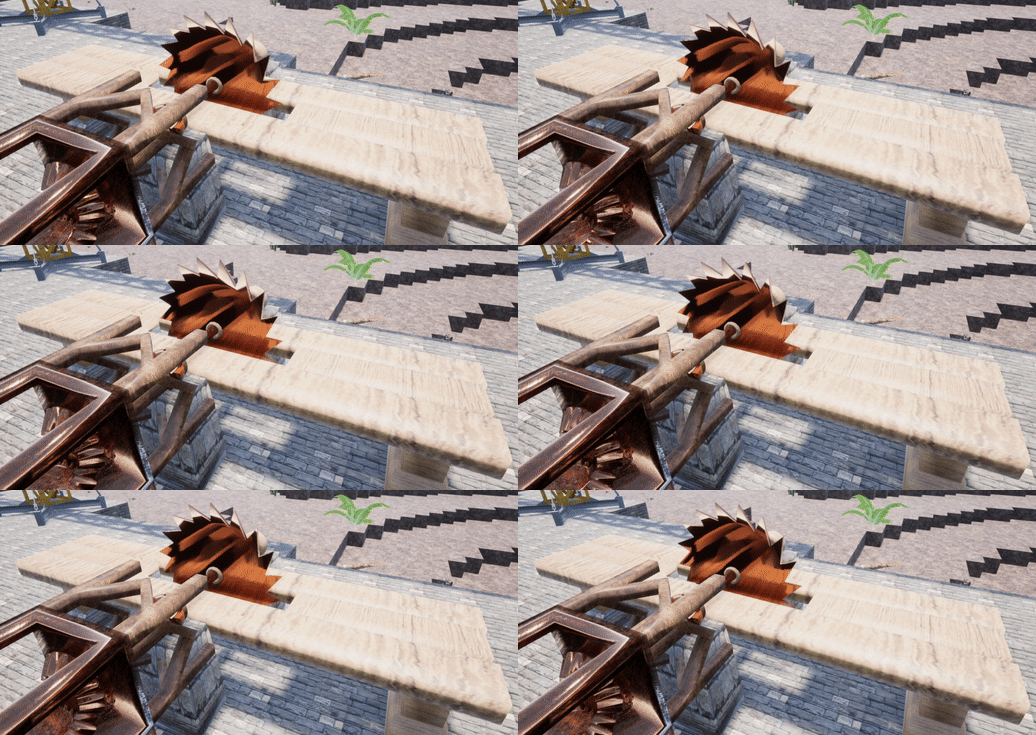
The mining drill is not quite finished yet but also rotates and has a bit that extends down to where it is currently mining.

The power hammer moves up and down with its input as well.

and the stirling engine rotates with arm and piston movement. I even added some smoke effects out the stack while it is burning fuel.

Not going to lie I stared at this for way longer than I care to admit when I got it working in game.
Engineer Alpha's Log #25: The 0.3 Timeline
I also have been working on some other cool things that will likely make it into 0.3.
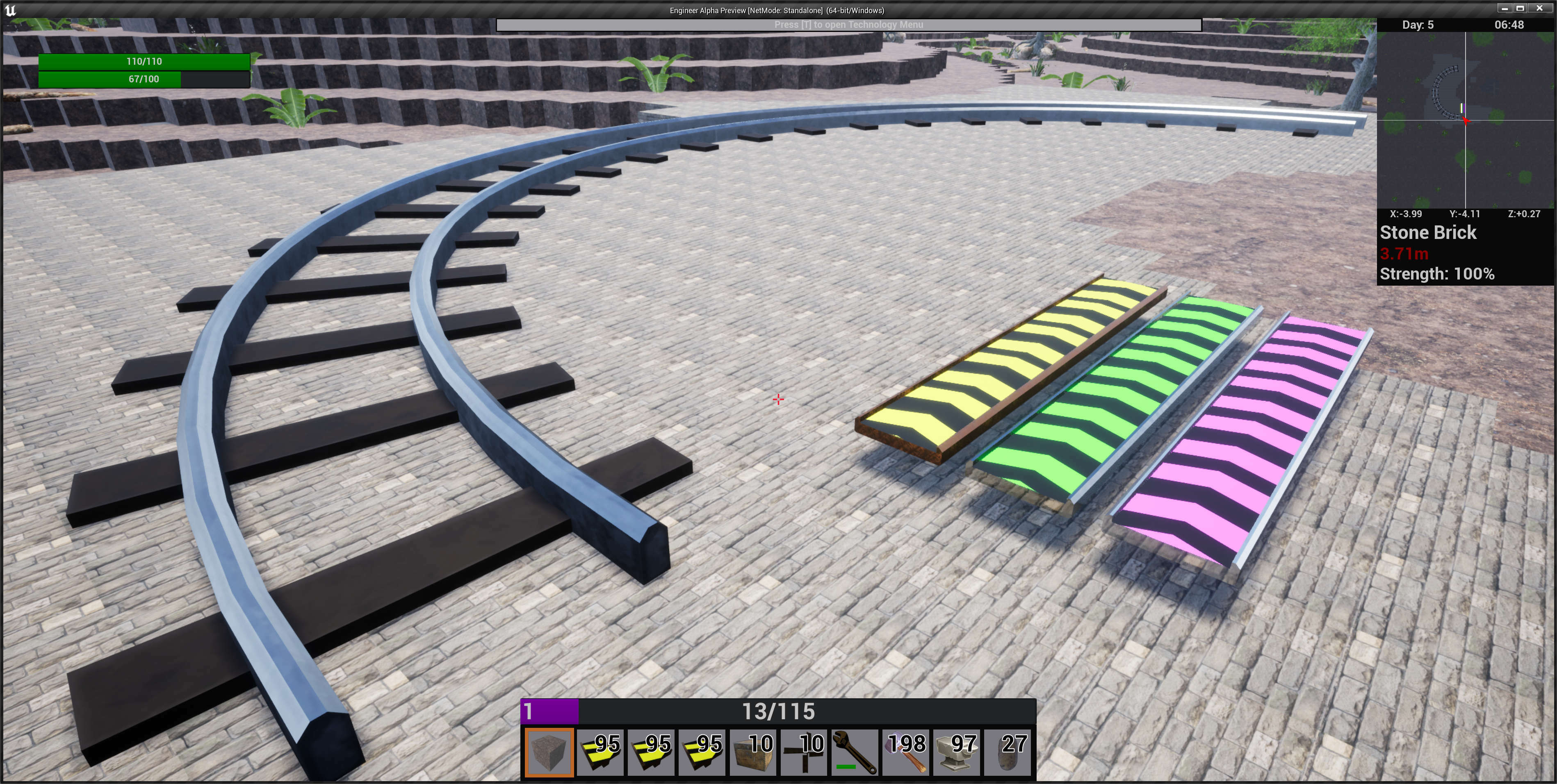 Train tracks and the purple conveyor 3 (x4 speed) will likely be creative only. The green Conveyor 2 (x2 speed) is added to the tech tree in iron.
 Engineer Alpha's Log #24: The Main Menu
So here is the new Main Menu
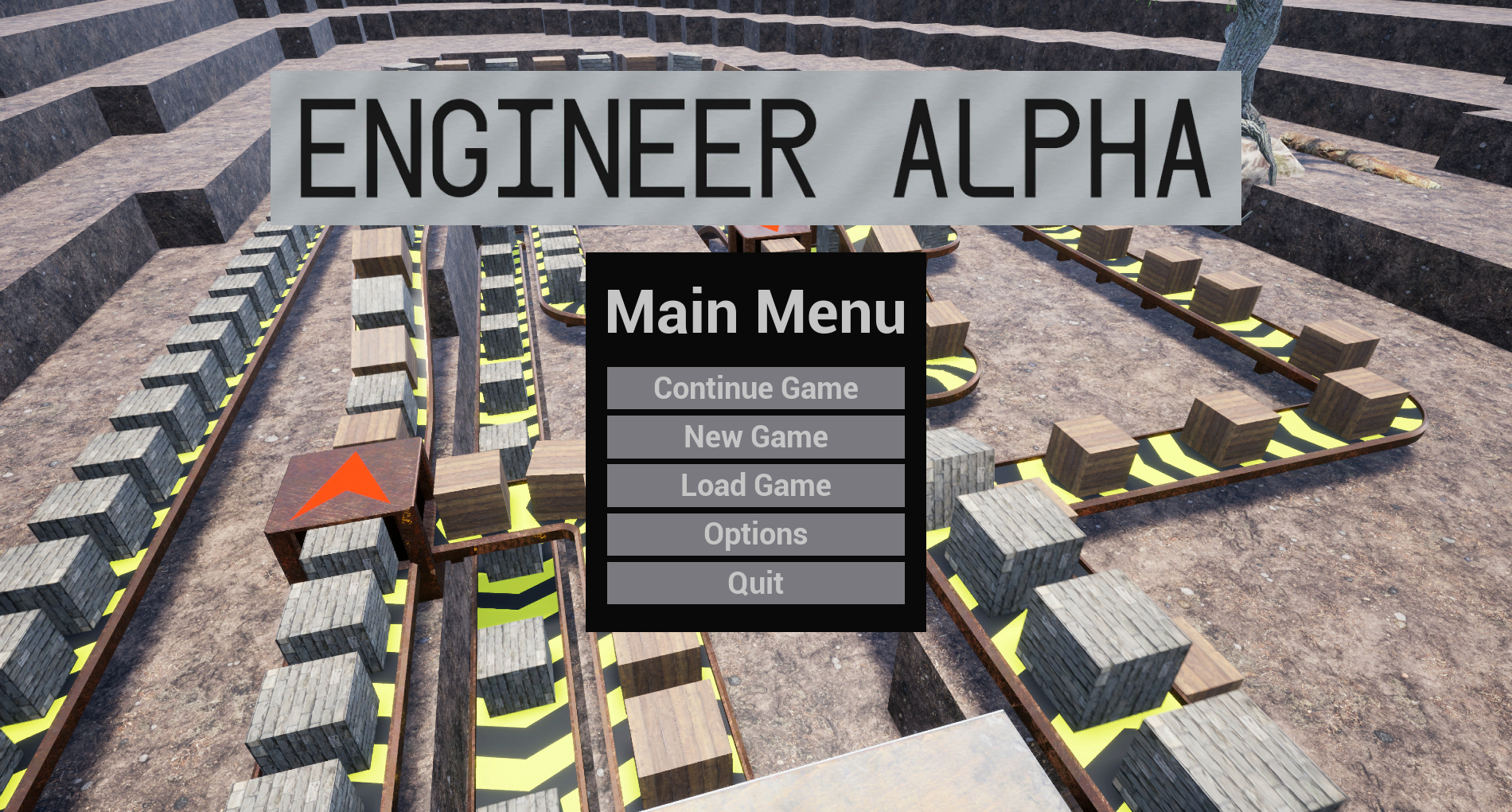
It retains the same simple design from before and trades the empty horizon line for a static image back ground and a much bigger game logo. The first button in the list has changed to now be continue this will load whatever is the last save that was created with a single button press as being able to load up the game and get back to where you were as easily as possible is invaluable.
Next is the new game button which we will circle back to in a little bit.
Load Game has been completely redesigned.

Gone is the old 4 slot system and in with the new named save slot system. You can have as many saves as you want now and when you select a save it gives you some info about the save including a thumbnail image of what you were looking at when the save was made, the time the save was made in real world time, the in game time, and whether this is a creative or survival save. Creative and survival saves will be mostly similar except creative saves will have access to the cheat menu and unlock all the recipes at the start of the game. There are 2 similar versions of this screen accessible from the pause menu that allow the game to be saved and loaded.
Options now has real options.


Screen resolution was previously the only option and is now one of many. The 4 graphical options as well as the sound options are all saved and loaded on a per system basis. Sound is split into 3 main channels: music, for the in game music track; effects, relevant sounds that convey information to the player such as your stomach growling when you get hungry; and ambient, sounds that add to the feel of the world like your footsteps. The Master channel is a parent of all 3 of these and changes to it affect all of them. The controls menu is largely unchanged and access to it and the getting started guide has moved here largely to reduce clutter on the pause menu. An identical copy of this menu can also be accessed from the pause menu.
Finally that brings us back to the new game screen.

The new game screen is very similar to its 0.2 counterpart but without the text dump. Seed is randomly chosen or you can put one in yourself. Creative mode is just a checkbox but this is the only place it can be changed. I would like to add a few options to the the new game screen for this version but have yet to decide what they should be. So if there is anything you would like to see as an option leave me a comment. I was thinking perhaps some king of ore density and food decay options but let me know what you think.
Work on other parts of 0.3 is going well and hopefully I will have the new rotation and shaft system to show in a few weeks.
Engineer Alpha's Log #23: Automate, Advance, Survive
First is Automate. You have been given a monumental task, prepare a planet for colonization, that you cannot possibly complete on your own without the help of automation.
Second is Advance. As you build and dig you discover better machines, more advanced technologies, and increase you own abilities to become even stronger.
Third is Survive. You have been thrown into a potentially dangerous world with no help and no supplies, you might struggle to stay alive.
Today I want to focus a little on the 3rd thing because it might seem a little out of place with the other two.
First off the survival element of the game is third on purpose so do not expect hardcore survival systems that will make every second feel like a struggle. So then why is it there at all you might ask? The primary reason is to give your time as a player value relative to your machinery.
Picture this, you just started playing the game and you haven't completely gotten your head around the whole automating thing and you manage to make 1 part that you need automated. But it runs horribly slowly. You can either keep playing the game or because you just automated you could just walk away and do something else while your automation does it for you. The food bar, which is currently the only real survival aspect of the game, exists to try and help prevent this by making the time you can be inactive finite.
For now the food bar will remain the only survival element. There is no plan to add any more "maintenance" meters to your character like thirst as functionally they are identical to food for the purposes of this game. There will likely be other things added in the future that will hinder your survival but they won't show up for a little while.
As this week is was a little light on the 0.3 content I will make it up to you next week by showing the new main menu in all its glory.
Engineer Alpha's Log #22: The fastest options in the west
Initially I was planning on having it so that you could change all 3 dimensions you were placing in independently, as that would give the player the most control. However this is intended to be a time saving feature so if you can't get it to do what you want quickly, its trash. So I set out to make it as streamlined as possible with as few options to choose from as I could.
The first change I made is to limit it to 2 dimensions. The third dimension is in fact largely unnecessary; the most common things to build are walls and floors which are both 2 dimensional. So that option was taken out.
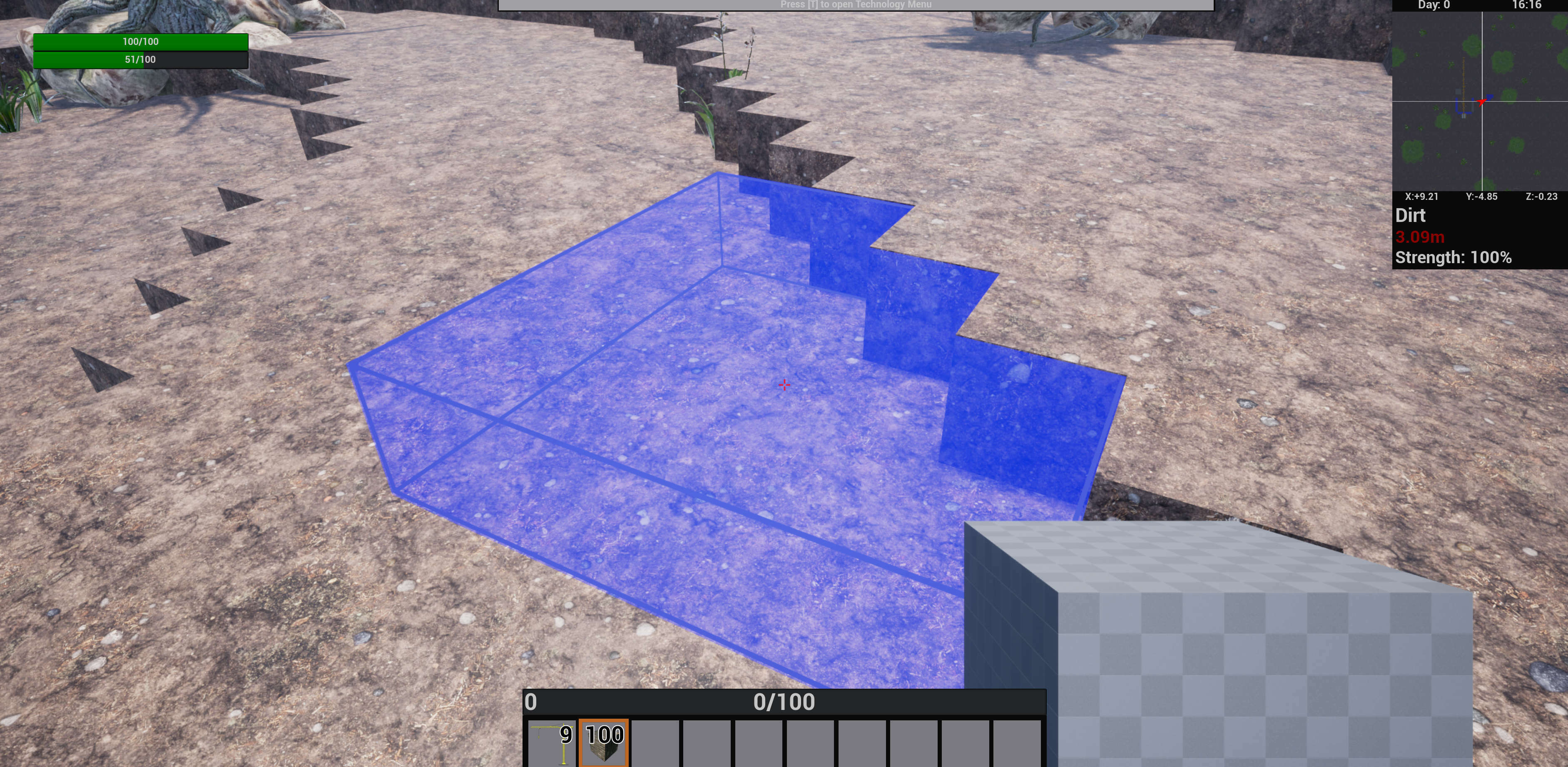
Placing a floor of voxels.
The second change was to make it so each voxel is checked individually this means that the entire volume does not need to be empty to be placed. With this change the selection of the second dimension is not nearly as necessary so the placing volume can be simplified down to a square.
The final thing was that if we are only building in 2 dimensions there are only 3 options for orientation (X,Y,Z) so I created a special Scroll option so every orientation is only a single scroll away.
With these changes there is only a single value we need to select outside of the action to place. To ensure it is as fast as possible I went with a radial interface as they are a great way to choose options quickly. A single button can be pressed while holding any voxel and it will change the placement size for every voxel that character places for the remainder of the play session.

The engineer voxel size menu.

The Crane voxel size menu.
Also in 0.3 there are some changes to where character info is stored. Your action bar is now stored on your "controller" so it will be universal no matter what you are controlling be it an engineer, a crane, or something else. I increased the number of bars to 10 to compensate for this and made a little indicator to show which bar you are currently on so you don't get lost.
Options like your voxel placement size are stored on the character level so each individual one will have its own. This is import because as it is right now the player character has a max of a 4x4 voxel placement size while the crane has a max of 8x8. And let me just say that being able to throw down 64 blocks at a time with a crane really takes them from a cool idea that is just there to something useful and helpful in the game, which is how it should be.
Engineer Alpha's Log #21: The perils of Voxel Size.
There are many ways to do a voxel world and one that I wanted to look into in the beginning is something called "marching cubes" which essentially lets you shrink the area the voxel takes up based on its neighbors by making all the voxels "push" on each other. Using this method you can approximate other shapes beyond cubes. But early on in the development I realized two problems with this method and the game I wanted to create.
First was building placement. when you have voxels that do not take up a predefined space because their neighbors are pushing on them you can't know where a building is to be placed before hand so it has to be "off grid" and and I was trying to think of a situation where you would want to build off grid and I couldn't come up with any reasonable answer.
The second problem was placing new voxels. Because a voxel could not take up its entire space it becomes very difficult to translate them into items which I wanted to keep as integer values (e.g. you can have 1 or 2 dirt not 1.462) for their movement by machines. As well as when placing you essentially have to do a push/pull style of addition which just didn't feel like it would fit.
So because of these reasons I decided to go with a cubically rendered world for my game. Now the default for voxel world is 1-meter per voxel which is very easy to wrap the brain around and just makes sense. But I didn't want to go with what everyone else does just because I wanted to make my own game so I cut the voxel size in half.
When I did this It just felt right and things started to fall into place.
But it comes with it a problem as voxels are volumetric they scale with the cube of size. So by cutting their size in half I increased the number of voxels in the world by a factor of eight! This means anything you want to do will take eight times as long if you are doing it one voxel at a time such as building or mining. For mining I wasn't overly worried about it as by the time you reached the point you wanted to remove massive amounts of voxels you should have machines that do it for you. But building is another question.
For building I knew there needed to be a way to place a significant number of voxels at once. While this feature was needed in my mind I ran into a few problems and decided to table it for a little while but it will be coming in 0.3 if all goes according to plan.
I plan to add reasons for you to build in the future. I am aware there really aren't any at the moment. some will be buildings that require specific land formations like the windmill and others could be defensive of enemies. But before I can really do that building need to feel quick and easy. If you can't throw up something of reasonable size in a matter of a couple minutes I would not call it easy.
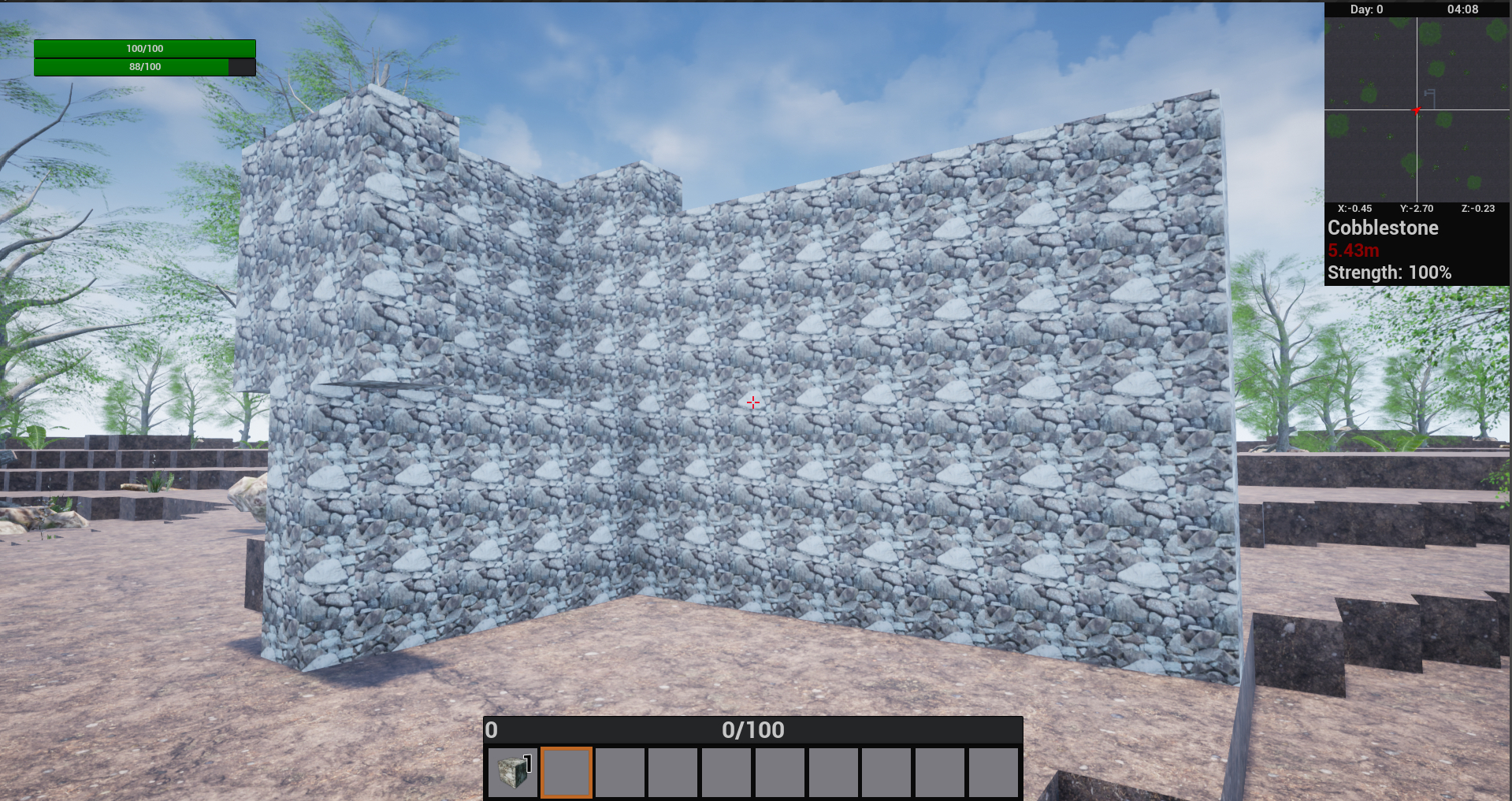
I built this in under a minute 9 blocks at a time.
"So how will it work?" you may ask. The plan as of right now is that when want to place down a voxel you will have the option to change the size of the area you are building e.g. you could do a 2x2x2 or a 3x3x1 you will have full freedom up to the max your current character allows. An engineer (your base character) will likely be limited to about 3 or 4 in ay dimension while a crane will have a bigger maximum.
But it gets even better. As you increase size precision can be a bit more difficult so it will not be required for the entire volume you want to place to be empty. If any voxels are full when placing they will simply be skipped over and you will only use the number of items out of your inventory that were actually placed.

a completely valid voxel placement.
The only real question that remains is UI for how you will choose the size you want to build with. What form exactly that will take is going to require some testing be it a radial interface or just a menu with the integer inputs. If there is something you think would work great let me know and I will consider it.
Engineer Alpha's Log #20: Break it then build it better
0.3 is starting to form and unfortunately it might take a little longer than was originally planned. The thing is that in my time of developing the game I have learned a lot about how to make good and efficient code that can also be flexible for many different situations. So as I go through and update things for 0.3 there is a lot that I go "wait this should be changed".
To give a specific example in 0.2 an "assembler" is a type of building with 2 inventories (input and output). The "assembler" takes items from the input, waits a set amount of time and puts a different item in the output. All of this is set in stone you cannot change or meaningfully add to it in any way. If you wanted to have a two step process with 2 assemblers and 3 inventories for example, there would be no way to do it. This is changing in 0.3 I can now add as many "assemblers" to a building as I want that can connect to any inventory (I could even make them craft in a circle).
So at this point in time nearly everything is broken ːsteamsadː. There is some old saying about omelets and eggs that feels a little relevant. But fear not getting it working this time is much, much faster than the last.
The first thing that I tackled, and is pretty much done, is the new Main Menu. So that I will show off hopefully next week.
Engineer Alpha's Log #019: Spreading the Word & Some Other Things
As 0.2 is a major update to the game I have changed out the screen shots in the store and created a new trailer to highlight some of the new features.
[previewyoutube="m77cEcAM57o;full"]
If you have a cool screen shot and you wanted posted to the store feel free to send it engineeralphagame@gmail.com and If it is any good I will post it.
0.2 feels like the first version that is a complete game that has everything it needs to stand on its own, and while it is far from done, it doesn't play like an empty game anymore it plays like an early access game which feels really good to be able to say. So with that in mind it starts to be time to think about promoting the game. I will be doing some around the web where I can, but the best way is you. I can't keep doing this forever if no-one buys the game and I want to keep making the game as long as I can. So spread the word; tell your friends because word of mouth is the best advertising there is.
A word on sales/price; please be aware that there are no plans for the game to ever go on sale and the price is only going to increase so if you have yet to buy it or are planning to now will always be the best time. There will likely be a few dollar increase with the release of 0.3 in a few months.
Work has begun on 0.3 and it is coming along well. I will get into what exactly is included in the coming weeks.
Version 0.2
The time has come for version 0.2! This is the first major update for the early access of Engineer Alpha.
Please be aware that while this build is save compatible with previous versions some things have changed and may not be exactly as you left them.
There will of course be bugs, unfortunately, and If you do find any please let me know so they can be fixed.
Build Highlights:
Updated Conveyor Belt model and items move on a belt with increased smoothness.
Updated Icons and models for all Items.
Grappling hook.
A completely hollow win condition.
Rebalancing of energy consumption and crafting times.
Updated Windmill.
Conveyor sorter.
Redone User Interface.
More Sound Effects.
Campfire now burns! (seeing and feeling)
And some more minor things.