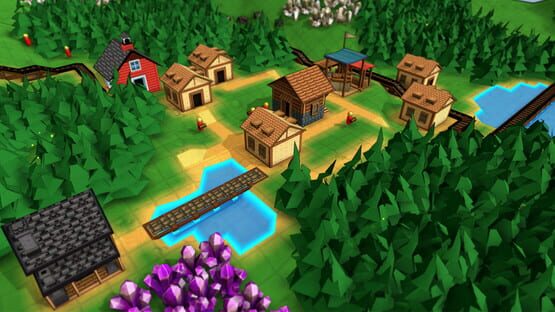

Factory Town
.142 Patch Notes
- Fixed Bug: Clicking on an inventory slot while the item filter panel up would break cursor functionality
- Fixed Bug: When moving buildings, checks for valid support underneath new foundation positions was not performed
- Fixed Bug: Activating Move Tool while moving something caused cursor to get stuck in unexpected state
- Units with more than 1 inventory slot (Caravans and Cargo Boats) can open up an expanded inventory detail panel that shows all slots at the same time
- When moving a single building over a cliff, the cursor will jump to the height of the top of the cliff as it does when creating a single building
- Building placement is now correctly marked as invalid when moving or pasting into a center position that is occupied by a terrain cliff
Resource customization is here!
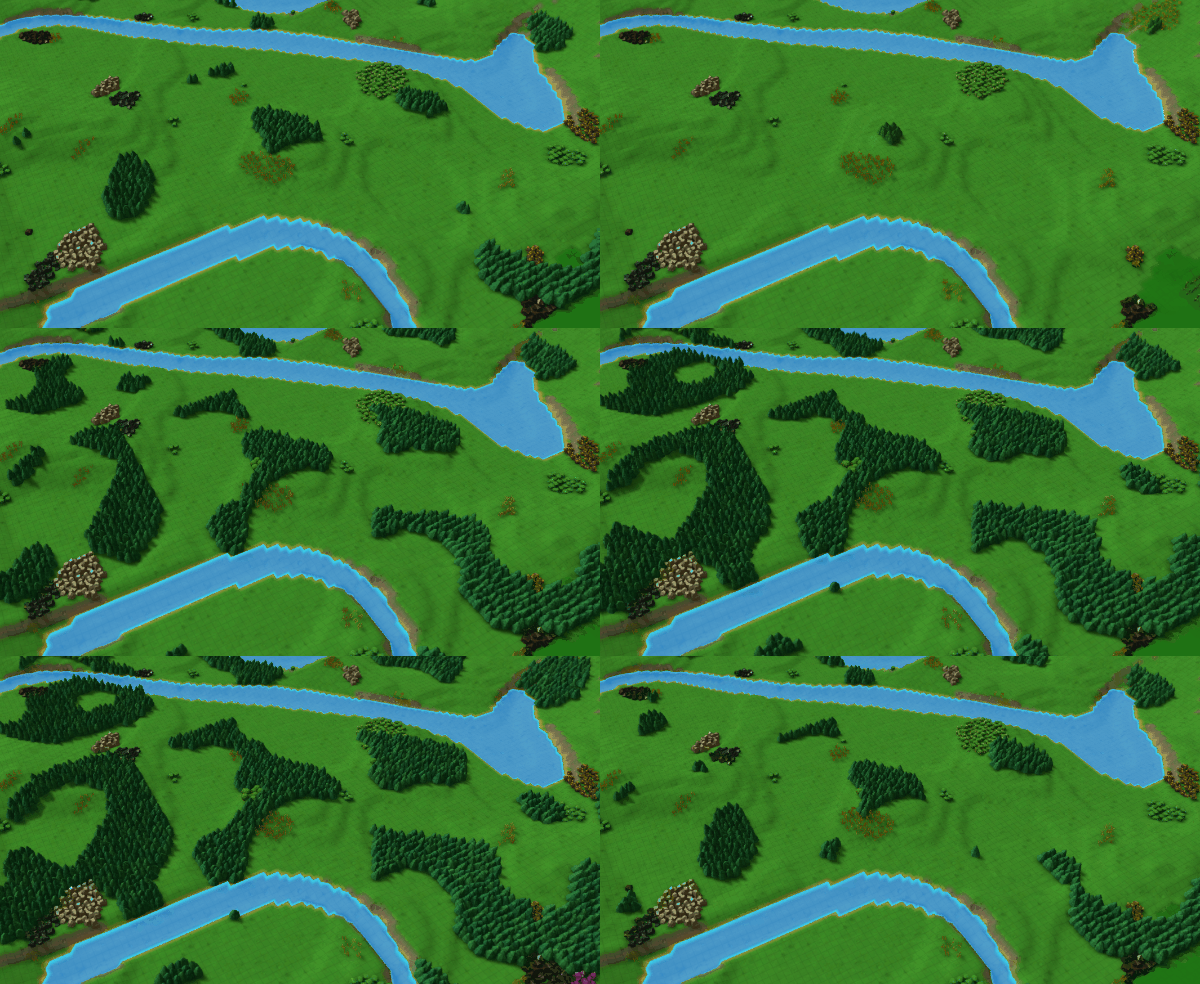
Version .141 is now live! It contains a new feature that lets players adjust all the resource distribution & richness to their liking.

When creating a new game, select 'Advanced' to bring up the full list of map options. Then click on 'Resources', and you'll see a huge list of sliders that let you change how frequent the various resources are on the map (as a % relative to the default amount), and how many resources they contain.
As a plus, you can now see all the resources on the map during creation, so you can adjust and see the results in real-time!
And there are some presets you can choose from, or just hit Randomize.
The Hotbar has also been increased from 8 to 20 items! The number keys (0 through 9) can be used to activate an item in the bottom row, and hold down ALT and press a number key to activate the top row. You can still use F1 through F4 to switch between the 4 available hotbar pages.

There are a number of other improvements & fixes in this build:
UI and Gameplay Improvements
- Can move most menus by clicking and dragging on headers
- Can pin menus by clicking the nail icon in the header
- Performance improvement for resources with detail meshes (Gold Ore, bushes, fruit trees, etc)
- Naturally-spawning Temples' glow effect is now preserved until the temple produces an item
- Allowed camera controls to work even if modal menu visible
- ESC key can be used to cancel a control rebinding request
- Screen will smoothly animate to focus on a unit selected in Worker overview panel
Balance Changes
- Cost for removing crops is now 0
- Reinforced Plank crafting cost change: 1 Iron Plate instead of 2, 2 Nails instead of 4, 6 seconds instead of 10
- Reinforced Plank sell value change: 18 red coins instead of 22
- Pickaxe sell value change: 25 red coins instead of 30
- Trees and crops no longer have increased spawning rates near bases, to allow more building space in early game
- Stones no longer generate in water
Bug Fixes
<*>Non-alpha keys are represented by their character, not a long string
<*>Fixed bug - mapping a control to left click would mess up many menu functions
<*>Fixed bug - missing localization when remapping Hotbar shortcut keys
<*>Fixed bug - terrain not extending exactly to map edge for small or large maps (only affects new maps going forward)
Enjoy! Am hoping to add workshop sharing features very shortly.
.140 Patch Notes
- Moving a single building will show tile placement highlights again
- Improved performance on rail carts by removing wheel rotation
- Fixed bug - directional logistic blocks displaying wrong direction when moved
- Fixed bug - Farms were not highlighting water-adjacent tiles in blue during placement
.139 patch notes
Fixed bug - error preventing copying of Mana Transmitters and Receivers
.138 patch notes
Patch Notes - recent bug fixes
..But I'll try to also post patch notes in this section as well!
Here's what has changed in recent patches:
Patch .133
- Selected Inventory Sensor will attach or detach from a building with a right-click (instead of having to select Offset attribute first)
- Inventory Sensor performs an assessment whenever its linked Building or item filter is changed
- More consistent display of cursor icons when adding / removing computational block links
- Fixed bug - Idle Worker notification overlapping the Select tool option buttons
- Fixed bug - Logistic block connections were not included in copy/paste
- Fixed bug - Copy/Pasted buildings might not correctly start their recipes
- Fixed bug - Duplicating fixed-recipe buildings (like Shrines, Steam Generator and Mana Transmitter) would result in duplicate recipes.
- Fixed bug - Copy/Pasting a building would paste in-progress recipe state to new building.
- Fixed bug - Was able to use group copy/paste to create duplicate logistic blocks onto the same tile that couldn't be deleted
- Fixed bug - Chute informational popup would appear repeatedly if no chutes built even if tutorial is off
- Fixed bug - UI would lock up if you opened Move or Remove Block Tool via bottom-left toolbar, then deactivated via hotkey
- Fixed bug - Moving structures to positions that overlap previous positions would sometimes result in visible, but ineditable blocks
- Fixed bug - Moving and rotating Pipe paths would not properly apply rotated pipe directions
Patch .134
- Added 'safe mode' launch option that sets all video settings to off or low (hold down Ctrl while launching game to select)
- Pipe Connector previews now indicate the pending transfer direction
- Fixed bug - paths would not always update display or pathing data when path planner tool dragged over existing structures
Patch .135
- Highlight tiles update when moving or pasting objects in 2D layer
- Fixed some underground pipe connections breaking or duplicating when moving buildings
- Mesh Instancing is automatically disabled when Intel HD Graphics 4000 detected, due to incompatibility
Patch .136
- Increased efficiency and range of boat pathfinding
- Fixed bug - copy / paste does not cost resources
- Fixed bug - missing icon and label for Build Group tool
- Fixed bug - copy / paste was copying instance data like house happiness, steam & power charge levels, etc
- Fixed bug - copy / paste in Creative mode was inadvertently limiting number of available houses
- Fixed bug - moved structures have wrong rotation (when mesh instancing is off)
- Fixed bug - Conveyor Belt path could be placed across a perpendicular ramp via cursor drag
Patch .137
- Fixed bug - house deliveries not working as expected on first house built
- Fixed bug - deleting or moving mine shafts would not recalculate Mine influence networks
- Hotfix .137b - Fixed some newly introduced pathfinding logic errors & performance issues related to workers harvesting resources
- Hotfix .137c - fixed bug - any copy/paste action flagged as invalid if reached max number of houses
- Hotfix .137d - fixed bug - workers poorly prioritizing resources to harvest if they were blocked by another worker
Next up, I'm hoping to add lots more options to the Create Game setup (like resource distribution & richness) and some Steam Workshop features to share stuff you're making!
Major Quality-Of-Life update
It starts with two new tools: Column Select, and Block Select. These let you drag to select a region of blocks in worldspace. Column Select will copy the entire vertical column (including underground objects), while Block Select can be used to specify a flatter region. With the Block Select tool, hold down CTRL to change selection height.
This tool selects any grid-based item - buildings, paths, structural, and logistic blocks. (It doesn't copy workers or items moving down a path)
Once you have a group of selected objects, you can then hit C to copy the entire block to your cursor. At that point you can place it down on the map as often as you want (assuming you have the resources!)
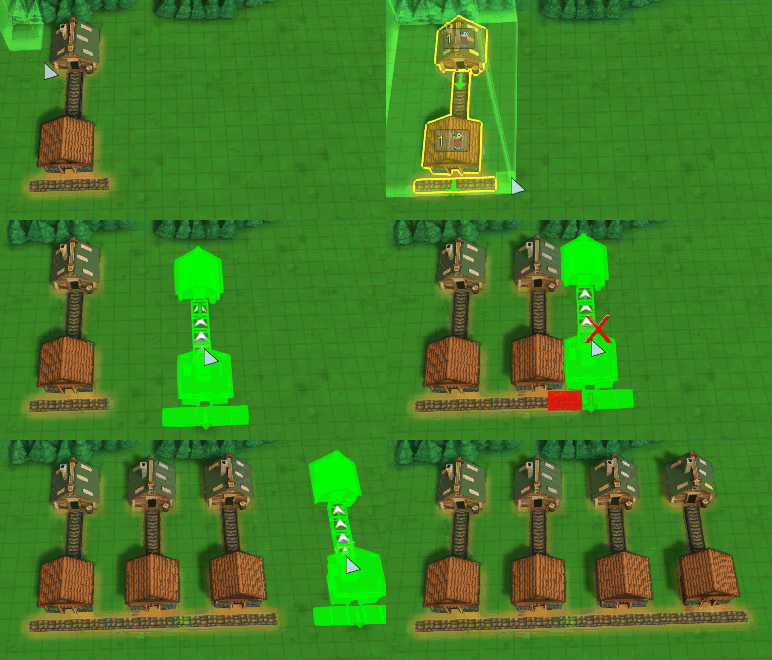
Or, you can open the Move tool (default: M) and click on your selection to move the whole thing to another location. Again, this includes blocks which previously could not be moved.

Here's moving a big block of buildings and paths!

Here's the Block Select tool used to select a cubic region, ignoring objects outside of the selected height. (NOTE: to change the height region, CTRL was held down while dragging)

Now that the Move tool works on structures and paths, it can no longer be used to clean up items on chutes or belts. So there is now a dedicated 'Pick Up Item' tool you can use to transfer path items to your base.
In addition, the bottom-left toolbar was getting too crowded with all these new options, so now it has been consolidated into sub groups: Selection, Build Options, Tools, Grid Views, and Menus. Hover over each category and a button appears that you can click to expand and view all the items in the category. (In the future I plan to make this toolbar customizable as well). You can right-click these icons to bring up the additional functions as well.

To access these tools: When in normal selection mode, hit TAB to toggle to Column Select. You can TAB to toggle back to normal selection mode. Block Select can be accessed in the Build / Tools menu, as well as by expanding the Selection toolbar icon at the bottom left then clicking on Block Select.
This kind of group selection functionality will allow me to later on implement a blueprint system, so you can copy a region and save it as a standalone file you can edit, and import into your other maps!
Also coming soon will be Steam Workshop tools to share maps & blueprints, and more detailed map editing & resource generation options.
Thanks as always for playing!
Erik
Bug Fix Bonanza
A couple small features worked their way in (like Idle Worker notifications and copy/paste of worker behaviors), but most of these patches in the past two weeks were about just removing a huge of pile errors or inconsistencies that may have been annoying. So here's a big list of all the stuff that was fixed!
Coming next: My plan is to start working on a blueprint copy / paste tool. After that I'll probably do a big overhaul to resource generation, so that maps don't feel as crowded and so that there's a good reason to expand to all corners of the map.
Ok here's the patch notes:
Version .125
- Fixed crash/hang that might happen when deleting building that was receiving belt or chute items
- Fixed display bug where buildings would display icons of inventory items they no longer own
- Assigned worker behaviors are displayed immediately, even if assigned while game is paused
- 'Deliver Everything' behaviors will display valid items being transferred
- Can highlight objects and move camera while Data Overlay view activated (Default key: F)
- Improved constrast on Build menu to improve readability
- Fixed Fish resources no longer being visible
- Farm 'Harvest Grain' recipe time increased from 1.5 to 2 seconds
- Forester 'Harvest Wood' recipe time increased from 2 to 3 seconds
- Gold Ore mining regeneration speed increased from .0015/sec to .0025/sec
- Elemental Ores mining regeneration speed increased from .0025/sec to .003/sec
Version .126
- Pasture reverted to 25% bonus per worker (down from 100% per worker)
- Made Mine-Resource link calculation much more efficient
- Buildings will cycle through available output items when auto-outputting to chute, belt, etc.
- Rails and chutes will no longer cost resources for updating existing endpoint when extending in new direction
- Help key (Default: '.') will open help panel even if no object selected
- When Help key is pressed while object selected, Help menu will properly jump to and expand the entry for that object type
Version .127
- Organized Filter Selection panel a bit more
- Top-level filters like 'Basic Foods' will now match with sub-filters like 'Vegetables'
- Fixed bug: item tooltips for many filters were not showing component item details or sell values
- Filter OmniTemple Offerings now works and has correct label
- Fixed bug: Rail Tiles not correctly connecting to existing paths when existing path was facing a building
- Fixed bug: belt / chute item and building inventories were not being properly refunded to player on deletion
- Fixed bug: Item tooltip on Gourmet Foods not formatted correctly
- Fixed bug: Goods panel would sometimes endlessly scroll to bottom of list when sorted
- Fixed bug: Workers would often fail to discard owned items when assigned a new behavior
Version .128
- Added notification button when a worker is idle - click on button to jump to next idle worker
- Worker panel is sorted with Idle workers at top
- Worker panel is pinned to left-side of screen, so it doesn't obscure selected worker
- Worker panel will show icons for Move behaviors
- Worker panel will show natural resource icons for Harvest behaviors
- Can issue commands to workers selected via Worker panel without dismissing panel
- Markets no longer have a 'max path distance' limitation when connecting to Houses.
- Markets will only connect to houses that are at or within 12 world unit heights
- Added option to lock framerate to 70 FPS
- Active radius is drawn for all Markets when placing House
- Fixed bug: missing changelog on launch menu
- Fixed bug: wagons & caravans would often re-route to storage buildings when trying to pick up partial cargo loads
Version .129
- When creating worker units, preview shows correct worker type instead of basic cube highlight
- When placing a Rail Cart, the cart direction will be shown and automatically maps to valid underlying rail paths
- Can use the Rotate key to change direction of a selected or Moved Rail Cart
- Simplified Rail Cart controls button and improved display - now just Forward, Stop, and Reverse.
- Fixed bug: deleting paths underneath workers or belt items might leave them suspended in mid-air
- Fixed bug: adding underground mining layer for legacy maps might result in conflicting target IDs
- Fixed bug: deleting Chute or Belt would not refund the items sitting on them to your Base
- Fixed bug: changing cursor action while dragging camera view was getting stuck in camera drag mode
- Fixed bug: growing crops and trees would be positioned too high above the ground
- Fixed bug: Item Filter display missing on Agent Trigger
Version .130
- Copy / Paste will now apply a Math block's right-hand operand
- Copy / Paste will now copy worker behaviors
- Paste can be applied to multiple selected units at a time
- Fixed bug - Completing any Infinite Research would deactivate that research recipe at any other schools
- Fixed bug - Pasting to a selected object would not update its displayed detail panels
- Fixed bug - was able to inadvertently delete terrain paths while in 2D layer using right-click deletion
- Fixed bug - Worker Units would discard valid items when targeting Barn if any slots had non-matching item filters
- Fixed bug - Changing active Hotbar would inadvertently preserve the highlighted hotbar item slot
- Fixed bug - Storage Buildings would output items from 'Input-Only' inventory slots if it had the same type of item in a Storage or Output slot
- Fixed bug - water-accepting buildings like Pasture and Farm would automatically initialize with 1 water, even if not near water source
Version .131
- Fixed bug: ESC would not close out the Market or House happiness detail panels when pinned with mouse click
- Fixed bug: Infinite research would not update costs when a level completed, unless recipe was toggled off and on again
- Fixed bug: Deleting an Idle worker wouldn't update the Idle Worker alert notification
- Fixed bug: ESC key would not close the Worker Overview panel
Whew!!
P.S. Patch notes are also always posted in this sub-forum, you can 'Subscribe to Forum' and get notifications whenever I post something here:
https://steamcommunity.com/app/860890/discussions/3/
Mining Overhaul!
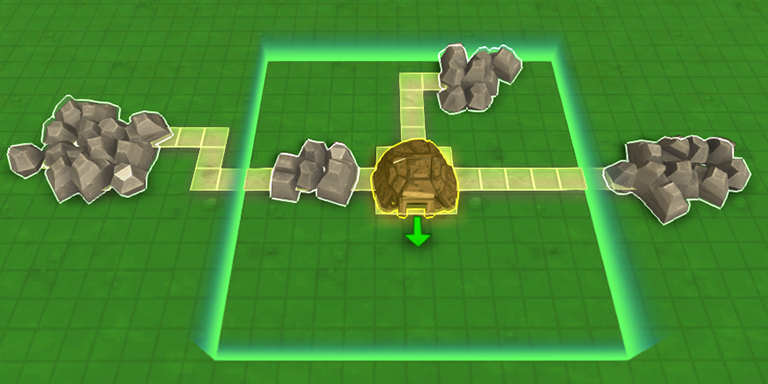
Big improvements have been made to the mining system! Some highlights:
- New research "Deep Mining" which allows you to build Mine Shafts on a brand new 2D mining layer. Mine Shafts extend the reach of mines and allow you to access underground ore deposits
- These underground ore deposits never fully run out, instead they replenish after a 'Mining' cooldown
- You can create new underground ore deposits using 'Ore Prospecting' tool
- Supplying Pickaxes to the mines will speed up the underground ore regeneration process
- Above-ground minerals & ores will now disappear when fully mined. They don't enter Depleted state. Nor do above-ground minerals confer a speed bonus on nearby Mines
- However you can now add 10 workers to Mines, each of which adds 100% speed bonus
- New OmniPlanters, which allow you to place new above-ground ore and mineral deposits
- Earth shrines connect to crops, trees, and OmniPlanters to speed regeneration rates

Background:
For a long time I've wanted to improve the Mining system in the game. I want to make sure players can't run out of ores and minerals, but still make it worthwhile to find & develop new natural deposits.
Previously I had a system where minerals wouldn't run out, just enter 'depleted' state that was slower, but that system was pretty easily exploitable and was a bit too easy to just arbitrarily place giant square fields of ores, even halfway through the game.
Now, mines can be expanded through development of underground mining tunnels. This gives you access to a whole new 2D mining layer full of resources that never fully deplete. There is a recharge time on those resources, so it's still in your interest to connect your mines to as many patches as possible.
In late game stages, you can research OmniPlanters which allow you to place minerals and ores in arbitrary locations. From there, they will slowly regrow and can be harvested - just like crops! But since there's a high upfront cost, and requires late-game tech, I think it preserves the usefulness of Mines & Mine Shafts throughout the game.
Many players have been asking for additional uses for tools, and I'm starting to work that in - in this version, Pickaxes can be supplied to Mines. They will be automatically distributed amongst the 2D layer, and greatly speed up the Mining process that regenerates depleted underground ore nodes.
The full patch notes are here: https://steamcommunity.com/app/860890/discussions/3/1694969361090603581/
As always, very interested in any feedback you have about how this new system works and how it is balanced. Please drop a note in the Steam forums or on the Discord! https://discord.gg/factorytown
Patch .123 released
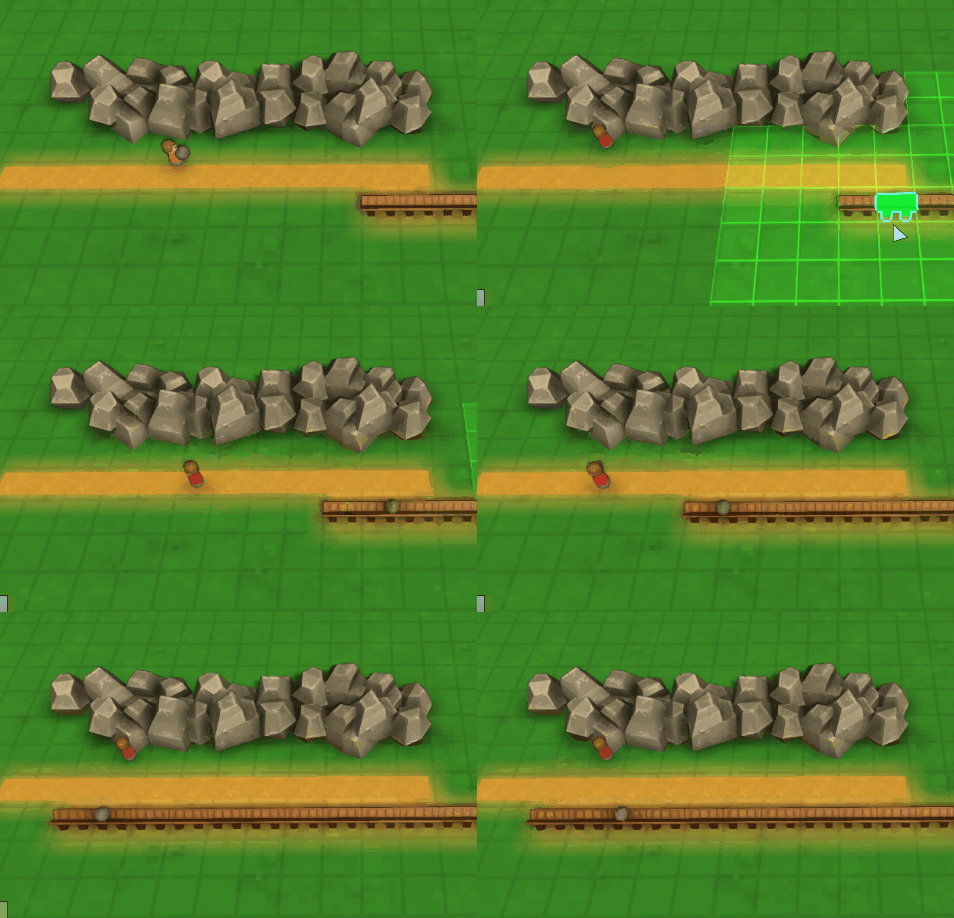
- Workers will re-target resource dropoffs to the new chute endcaps when chutes expanded or deleted
- Item Targeting panel will display item options based on specified slot filters, even if building does not contain those items yet
- Can specify Random Seed on create game menu (existing seeds can be found as 'randomSeed' value in save files)
- Improved loading times
- Fixed bug: Lots of lag when placing Farm Tiles or Planters when lots of Farms/Foresters existed on map
- Fixed bug: Lots of lag when removing Omni or Mana pipes from large pipe networks
- Fixed bug: several sellable items not showing destination market or price in item tooltip
- Added option to select 'All' available Biomes in Create Game Menu
- Bases no longer start out with designated inventory slots, as 16 unique slots is now sufficient
- Improved visual tooltip for Steam Power
- Depleted resources are now walkable