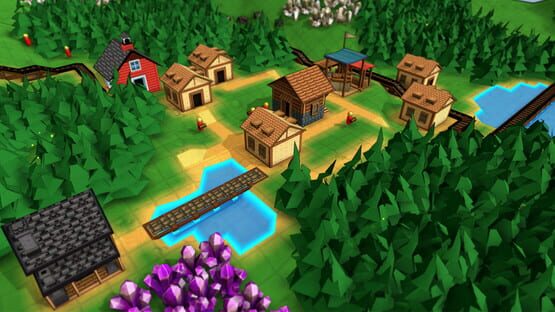

Factory Town
.151 Patch Notes
- Fixed bug: items were being loaded onto trains regardless of item filters. New behavior is that minecart filters take priority when loading its own items, if the minecart filter is blank, it uses the Train Engine’s filter
- Fixed bug: buildings created with no workers (if was previously at population maximum) were not flagged as inactive, and were able to produce goods
- Fixed bug: When changing number of assigned workers, the worker number icon was not updating immediately
.150 Patch Notes
- Fixed Rail Loader placing items in Trains’ inventory
Hotfix .150a: Fixed Mana Transmitters failing to output they were loaded from an older version in the 'Output Full' state
Trains now available!
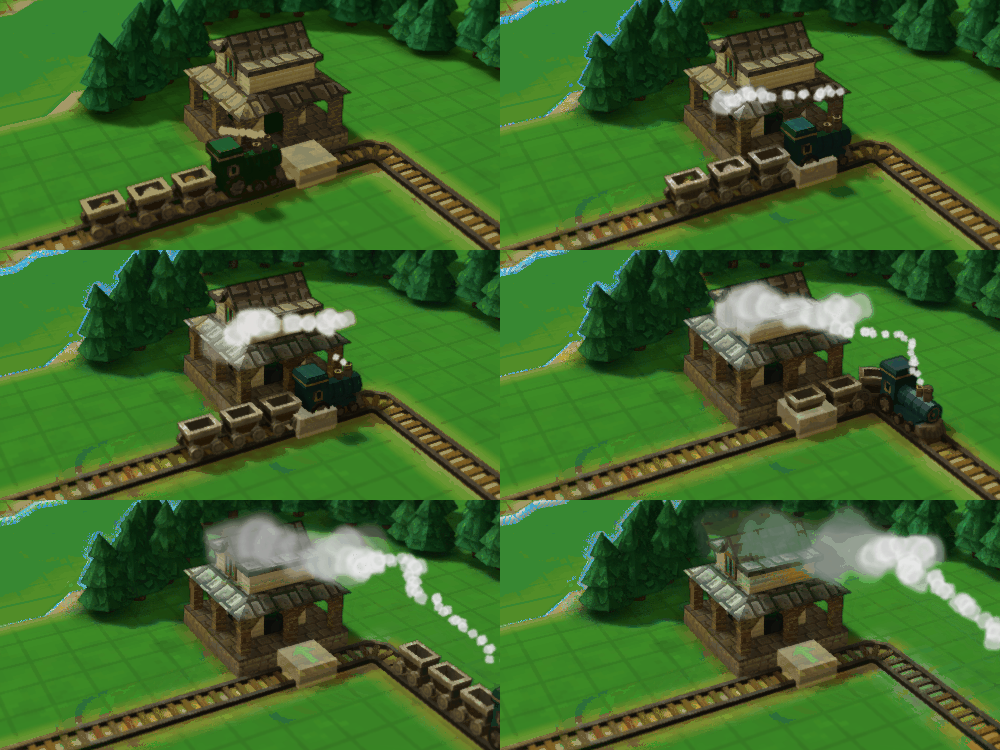
With the new Steam Locomotive, you can chain together multiple minecarts and deliver a huge amount of goods across the map!
The engines consume fuel (wood, coal, etc.) and water. They can only load or unload their contents at a Train Station, so they're best for long trips with lots of items. A Train Stop connected to a station can be configured to load or unload, select specific items, or wait until the train is empty, etc.
They can be assigned 'Signal Tag', which is additional text property that can be used as a way to route trains onto different tracks - just write the same tag on a railway Logistic block and that block will only affect trains with that tag.
The other helpful thing about Trains is that they can pull a train of cars uphill...since Minecarts can no longer magically move uphill on their own. You can, however, place a Mechanical Rail that will pull the carts uphill! This uses a new 'Rotational Power' supply, which works when you hook up a Steam-Powered engine to it.

Speaking of Steam Power, it's been totally revamped so that it makes a lot more sense - you'll see little units of Steam moving through the pipes, which then reach the destination and fill a Steam meter. Along with that, you'll also now be able to move water (and other liquids) through Fluid Pipes.
All these changes are especially handy with the new Water Pump, which accepts Steam power and produces Water that can be piped to any building that needs it.

Mana has also been improved - you can now configure inputs & outputs separately. Now it should work much more like other objects in the game.

You can also build Signposts (in the 'Decor' category) and write a label on them. That label will then show up when you hold the 'data overlay' key (default: F)

There's a bunch of other big & small changes, so check out the full patch notes below!
Changes to Rails / Trains
- New unit type: Steam Locomotive. Is powered by water & fuel, can move large trains of minecarts (attach with the Move tool, or place new minecarts directly on end of train). Fuel is consumed more when going uphill, less when going downhill or pushed by Powered or Magic rails. Fuel can be added via Rail Loaders (previously: Rail Stops).
- Train inventory can only be loaded or unloaded at Train Stations, via Train Stops. These stops will load or unload a train’s contents based on whether the Train Stop is set to ‘Load’ or ‘Unload’. The Train Stop additionally can have a flag to ‘Hold Until Full’ or ‘Hold Until Empty’ which will force the train to wait at the Train Stop until that condition is met. (Usually, the train will depart as soon as cargo is attempted to move but fails due to inventory constraints)
- New unit property: Signal Tag. Is a text property, and currently only on Steam Train Engines. Path logistic structures (like Pushers) can be assigned a Tag as well, and then those logistic structures will only activate on units that have a matching Tag.
- New global rule: Minecarts Use Gravity. When On, minecarts can not simply climb uphill. They can only climb uphill if driven by a Train Engine, or is on a currently active Powered Rail. This rule defaults to ON for new games, defaults to OFF for previously saved games.
- New path type: Mechanical Rail. When provided with Rotational Power (e.g. via new standalone building Steam Engine), will provide a minimum speed for Trains & Minecarts.
- New building: Steam Engine. When supplied with Steam Power, provides Rotational Power to nearby connected Mechanical Rails.
- Fixed bug: Rotating or Moving a stopped rail cart sometimes caused it to start moving
- Only 1 item shown in rail carts, for easier viewing
- Rail Stop “Input” and “Output” renamed to “Unload” and “Load” for clarity
- Magic rails now accelerate up to a max speed, instead of instantly setting at a max speed
- “Rail Stop” renamed “Minecart Loader”. This continues to only work on solo minecarts.
Changes to Steam, Fluid Pipes, and Water
- Steam now uses pipe ‘agents’ to transfer value, instead of instantaneous ‘power’ system
- Steam pipes are now placed directionally like Mana and Omni pipes, to allow for easier routing of Steam through a pipe network.
- Can now have separate ‘output’ Mana Pipe attached to building to get rid of Depleted crystals, instead of requiring the transfer happens in the middle of a single continuous pipe
- Steam production bonuses are now provided by “Steam Boosters”, which are a specific upgrade that can be applied to a subset of buildings. Any buildings on previously created maps with a Steam connector already in place are automatically provided this upgrade to avoid breaking existing builds.
- Steam Pipes can now be built in Crossover arrangement like mana pipes and omni pipes
- Well water production speed slowed from .2 seconds to 2 seconds per unit of water
- Wells can now link to nearby water tiles (up to 40), which add 1 water / sec passive intake speed
- Other buildings’ passive water intake speed slowed from 4 water / sec to 1 water / sec
- New building: Water Pump. Must be placed on terrain, and near Water. When supplied with Steam power, produces a large amount of Water. Can also be powered by Rotational Power (e.g. via Steam Engine), which is more efficient.
- New pipe structure: Fluid Pipes. made from Wood Planks at the Lumber Mill. Requires Fluid Pipe research. These pipes can transmit a variety of fluids: water, ether, milk, juice, potions, fish oil, etc. They are placed directionally and can be above or below ground like other pipe types.
- Fluid Pipe connectors can be assigned an item filter
- Steam Power research now requires Fluid Pipe research first (older games where Steam Power has been completed will automatically have Fluid Pipe knowledge completed)
- Mana Connectors can have filters
- Only Houses, Storage buildings, and buildings that produce physical items will get an automatic rail stop when placed near a rail tile
Changes to Copy/Paste
- C now only performs a ‘light copy’ - type & facing direction of highlighted or selected object, will not copy the selection as a full blueprint. However, holding Ctrl when building will automatically paste properties from the copied item
- If an object is selected, but another one is actively highlighted by the cursor, the ‘Copy’ function will target the highlighted object
- Ctrl-C will copy all selected objects as a single or group blueprint (includes properties), and load into cursor state so it can be pasted with a click. This works any group of buildings and structures. It will currently work on worker units, if only one is selected.
- If nothing selected, but object highlighted, Ctrl-C will copy just the properties of the object (item filter, active state) which can then be pasted
- Paste properties will work when object is highlighted, if nothing is selected
Misc improvements & balance changes
- Added Sign Posts with editable ‘Label’ property that shows up when you activate the Data Overlay (default: F)
- Grabber will automatically be created if dragging belt directly away from the edge of a building
- Magic Rail now requires Powered Rail as input
- Power inputs are treated more like default inventory inputs. (Instead of being continually drained, they are consumed once each time the recipe begins production)
- Magic Rails now cause rail carts to hover and show particle effects
- OmniTemple and Enchanter can no longer support Steam Power boosts
- If a building can link to water blocks, the count of linked water is always shown on the selection status panel
- Mana connectors now have Active State, that can be controlled by computational blocks
- When dragging pipe in 2D layer, will automatically assign Output access type from the start pipe, and Input access type to the end of pipe, if those ends connect to a valid building
- Added overhead grid view for building & editing from a top-down perspective. Accessible by pressing the ‘Display Grid Overlay’ button (default: G)
- Overhead views for various editing layers (steam, mana, omni, etc) are now truly isometric, avoiding unintentional grid discrepancies for objects near edge of screen
- Improved performance of activating Data Overlay view (default: F)
- Automatically-placed pipe connectors are removed when the attached building is deleted
- Bottom-left action label reflects the structure or building being created
- Removed costs for Steam and Mana connector
- Filters, Sell Categories, and Satisfaction Categories are more clearly labeled and have distinct icons in the Item Filter Selection panel
- Improved icons for pipe & pipe connector structures
- Default keybinding for ‘rotate camera left’ and ‘rotate camera right’ have been removed
- Default keybinding for ‘pan camera’ is now middle mouse button
- Default keybinding for ‘rotate camera’ is now right mouse button
- Default binding for Pipette tool (previously: Copy Cursor Tool) is now Q
- Steam Power now shows ‘Steam Generator’ as a provider in item tooltip
- Can place new production buildings even if at max population capacity. The building will be created without any workers and will be flagged as missing a worker until the building is assigned a worker
- “Issue Command” now shown in Context Commands menu when a worker unit is selected
- Camera Move (default: RMB) can be used when placing structures, as long as cursor is not over a deletable target
- Wells can now auto-output in forward direction
- Added alert for a Train Stop / Minecart Loader without underlying rail
Misc bug fixes
- Fixed bug where a multi-item delivery to a Market (e.g. from a Rail Cart) would cause some delivered items to be lost in some cases. (Linked houses were not updating internal consumption state mid-delivery, so potentially try to receive more items from the Market delivery than it actually had storage room for)
- Fixed bug: Mana Transmitter recipes in-progress show the Crystal version of the item, not the Power version of the Mana
- Fixed bug: Mana Transmitters would get stuck in ‘Output storage is full” if a recently produced pipe item had only one direction to go and that direction was blocked by another pipe item
- Fixed bug: Non-Mana underground layer highlights had incorrectly low brightness
- Fixed bug: fixed preview icons and preview paths being too transparent on 2D pipe overlay views
- Fixed bug: ESC key was not dismissing text & number entry fields
- When dragging rail near building and Rail Stop will be created automatically, correct preview block is shown
- Fixed Well not automatically absorbing nearby water
- Fixed “RMB = Cancel” tooltip showing up in Context Tip menu when placing a building or performing a Farming action, as it is not functional
.148 Patch Notes
- Outputs from natural resources are now considered when determining if any custom recipes have obsolete inputs that need to be removed
- Fixed formatting issue on header of ‘Save before closing?’ menu
Hotfix .148a:
- Fixed some buildings loading with incorrect recipes
Hotfix .148b:
- Fixed "ItemLabelKnowledgeSteamTrainEngine" showing up prematurely in Research options
.147 Patch Notes
- Obsolete items (those that are not outputs of any recipes) are automatically removed from recipe inputs, upgrades, building costs, and OmniTemple offerings when applying custom rule sets
- Rail Mania scenario re-enabled building of physical rail tiles
- Belt Mania scenario re-enabled building of conveyor belt items
- Pipe Mania scenario re-enabled building of conveyor belt items and rail tile items
- OmniConnectors can output to Computational Blocks, sending a 1 value whenever an item is transferred
- Can enable / disable Logistic Blocks and OmniConnectors by control-clicking them
- When a Computational Block is selected, will highlight potential logic link targets
- Fixed incorrect description in Rail Tile that it is produced by Rail Depot
- Fixed bug: Computational Set block would display transmission effect on inactive visual layers
- Fixed bug: Edit Rules menu would show previous sub-menus if closed and re-opened, and then Back navigation was used
- Fixed bug: setting a single cost / input / output value to 0 in Edit Rules mode would be ignored if it was the only row
- Fixed bug: non-standard size on some Inventory Sensor icons (e.g. Rollable filter)
- Fixed bug: formatting issue in French-localized tutorial
- Fixed bug: MultiPaths (e.g. Chutes) would lose some path directions during copy / paste / move
.146 Patch Notes
- Fixed logistic blocks with no item filter appearing with Question mark
- Also removed Question Mark icon from some instances in UI where it didn’t make sense
- Items with no sell cost do not trigger coin gain alerts or show coin values in UI
- Fixed small localization issue in French tutorial
Modding and Workshop update IS HERE!
Ever since I first started working on Factory Town I pictured it almost as a platform for players to create their own automation + management games-within-a-game. Today this update is a big step towards that idea, with tons of flexibility for adjusting current item production chains or adding brand new ones. Custom map sharing is easier too. And if you're more interested in just playing some new stuff, you'll be able to download other people's creations that they share on the Steam Workshop.
So here's some more details about things you can do in this update:
Custom Items & Recipes
You'll be able to modify existing recipes, or create totally new recipes and assign them to various buildings. Change the inputs, outputs, crafting time, and display name. In addition, you can create new items from scratch, with your own custom images, and assign those to recipes. They'll work like any other item, and you can also decide if they are sellable and how they are consumed.
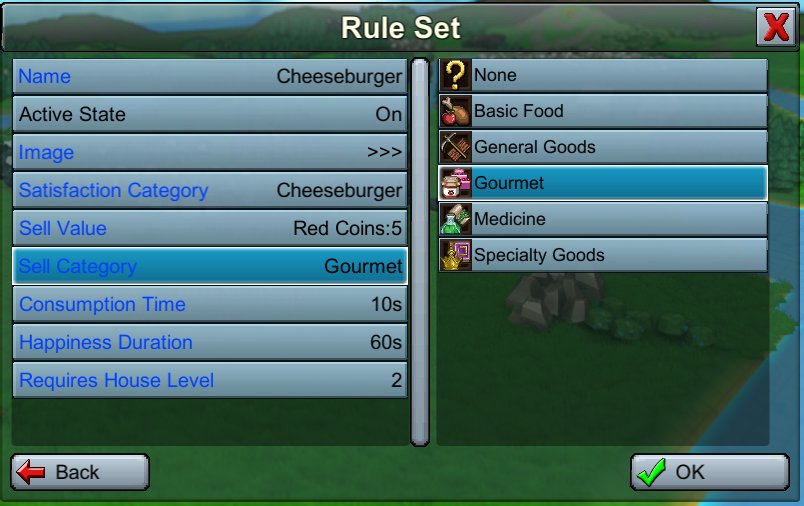

Building Costs
You can change the costs of any building, structure, tool, or worker. If you want roads to be made out of potatoes, that's fair game! Or you can disable an object entirely to create an extra challenge.

Game Rules
There are a number global rule variables you can adjust as well as drill down into each building and change things like maximum number of workers, worker bonus speeds, maximum number of allowed buildings of that type.

Scenarios & Starting Conditions
Take any map and save it as a 'Scenario'-type file and you can then use it as a starting point for new games. Scenarios include custom rule sets, the amount of resources the player starts with in their inventory, as well as which research has been completed when the new game launches. Or just edit these manually in the Custom new game setup.

Exporting and Sharing
Once you've created a map or rule set that you like, you can save it as a preset or share it on the Steam Workshop. You can also download others' creations and import into your own game.

You'll can select between new file types so you can have granular control over what kind of data is being shared:
- Save File: The entire current game state and set of rules
- Starting Map: Just the terrain & resource data
- Rule Set: Custom configurations of costs, recipes, and items.
- Scenario: Combination of starting map, start conditions, and custom rules for use when starting a new game
Presets
To get players started, I created a few built-in Scenarios with custom rule sets that will significantly change the gameplay. Give them a try and see if you can complete the OmniTemple in each world!
- Rail Mania: Most worker types disabled, but rails accessible from the start and much cheaper
- Belt Mania: Most worker types disabled, but conveyor belts accessible from the start and much cheaper
- Pipe Mania: Omnipipes available from the start. Terrain is very mountainous
- Big City: Population per house is lower, but many more houses available at each Base upgrade level. Production buildings limited to 1 worker each. Terrain is mostly flat. Research is much more expensive
- Delivery Challenge: Markets are disabled - all items must be delivered by worker units or automated means! But per-item happiness lasts twice as long.
- Islands: Regular rules but starts with a set of island-based biomes
As always, there's lots more I want to add - like the ability to add new buildings & workers using custom 3D models, change research requirements, custom victory conditions, and add more global rules & preset maps. Please let me know in these forums or the Discord what kind of additional customizations you'd like to be able to do, and I'll try my best to add to a future update.
Enjoy!
Erik
p.s. other patch notes from this version:
- On Save File panel, can now right-click on files to either delete them, or show the file in its parent folder
- Quit now always quits to main menu, rather than offering option to close application
- Added new ‘Editor’ menu from main game menu, with option to Reset current map to its initial state
- Added better ‘loading’ transitions
- Fixed missing icon for OmniPlanters
- Added Units display to Mana Power Supply gauges
-Buildings only show Mana Charge bars that are applicable to currently assigned recipes
- Fixed bug - loading game in admin mode wouldn’t correctly load population value
- Added Pipes to Guide Menu
- ‘Advanced’ option when creating new game renamed to ‘Custom’
- Locked items now show up in build menu search
- Fixed unlocalized label for “Resources” filter
- Renamed ‘Goods Supply’ menu ‘Supply’ to avoid conflicts with ‘Goods’ panel
- Tutorial is skipped when starting an Advanced map setup
- Creative Mode and Infinite Markets are now moved to Options / Editor / Game Rules
- Updated ‘Earn Red Coin’ tutorial step to avoid confusion
- Natural Resources are now shown in recipes that harvest them from surrounding tiles
- Fixed bug: selecting resource generation preset created duplicate menu items
- Fixed bug: Notification Panel becoming off-centered when reappearing
- Fixed bug: ‘unmappedKey’ showing up in tooltips for player actions that don’t have hotkey mapping
- Added better label resizing to some menu buttons to avoid text overlap / truncation
Modding & Workshop Update - Coming Soon!
I've been working on a big new set of features that will allow players to modify the game in lots of interesting & different ways, then save & share those presets with other players on the Steam Workshop. Here are some of the things you'll be able to do:
Custom Items & Recipes
You'll be able to modify existing recipes, or create totally new recipes and assign them to various buildings. Change the inputs, outputs, crafting time, and display name. In addition, you'll be able to create new items from scratch, with your own custom images, and assign those to recipes.
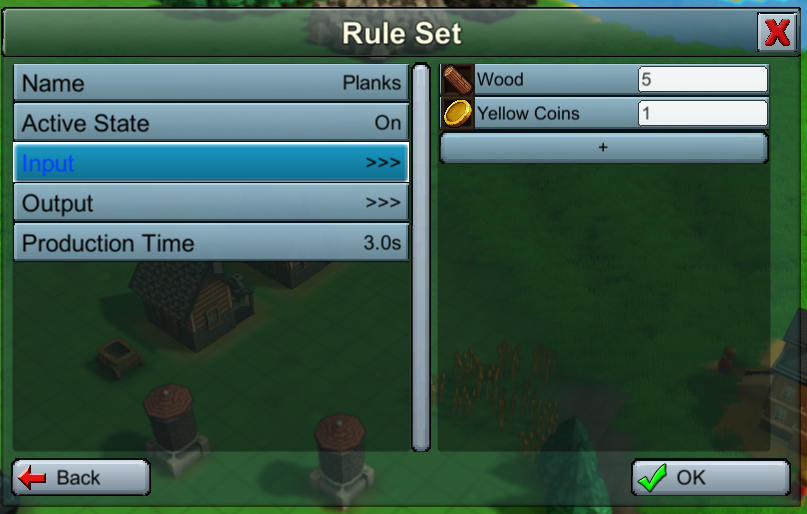
Game Rules and Building Costs
There will be a number of 'global' rule variables you can adjust (research speed, goods consumption rates) as well as drill down into each building, structure and tool to change its cost and availability.

Starting Conditions
Change the amount of resources the player starts with in their inventory, as well as which research has been completed when the new game launches.
Exporting and Sharing
Once you've created a map or rule set that you like, you can save it as a preset or share it on the Steam Workshop. You can also download others' creations and import into your own game.
You'll can select between new file types so you can have granular control over what kind of data is being shared:
- Save File: The entire current game state and set of rules
- Starting Map: Just the terrain & resource data
- Rule Set: Custom configurations of costs, recipes, and items.
- Scenario: Combination of starting map, start conditions, and custom rules for use when starting a new game
Even with all these additions, there's still lots more I want to add down the road - like custom victory conditions, changing research requirements, importing 3D models for creating buildings & worker units from scratch, and fully configurable upgrades. But I figured this would be plenty for a first attempt.
It's hard to give an estimate on when all this will be done - these are strange times and work schedule is very disrupted - but hopefully it's helpful to know that it's in progress and will be available as soon as I can get it out!
If you'd like to get an early look, you can playtest these changes on Factory Town's beta branch. Also see the #beta-branch channel in the official Factory Town Discord server: https://discord.gg/factorytown
Erik
.144 Patch Notes
- Added 50% and 75% UI scaling options
- Achievement for Base Level is no longer triggered in creative mode
- Pick Up Item tool now has a rebindable hotkey (default: J)
- Fixed bug: Opening & closing an individual Market’s goods supply window, then using ‘Goods Supply’ hotkey, would only show that market’s filtered goods list instead of all goods
- Fixed bug: Harvester drill was showing visible inventory contents
- Fixed bug: inconsistent appearance of ‘Close’ and ‘Pin’ button on Goods Supply panel
- House Happiness Panel is now pinnable
- Fixed bug: tutorial tips specified the ‘Move Tool’ instead of the ‘Pick Up Item Tool’ for removing items stuck on chutes
- Fixed bug: copied buildings with elemental boosters would not have the correct booster when pasted, nor could the booster be added manually
.143 Patch Notes
- Fixed bug: Clicking on a new grid-based inventory slot while item filter selection panel is visible breaks cursor behavior
- Fixed bug: was unable to create buildings on scaffolds