
- Single-placed chutes will automatically create a Grabber if next to a building. This will not be performed if another path or building exists at the other endpoint, and the placement position is flat, as it is ambiguous which way the direction of travel should be
- Fixed visible seams in water
- Fixed ambient audio loading incorrect clip on first map launch
- Directional arrows near buildings are no longer displayed when building chutes or belts - it is irrelevant now that buildings do not auto-output in their facing direction
- Environmental audio will crossfade between clips when changing
- AoE Radius is shown when placing or moving a Town Center
- Can now remove an input binding in Controls by right-clicking on the item and hitting ‘Remove’
- File 'Show' button is disabled for Steam Cloud saves as it is not possible to derive the parent directory
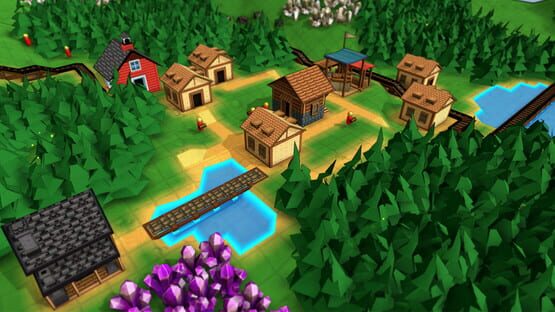
Factory Town
.209 Patch Notes
.208 Patch Notes
- Added ambient environmental audio
- When building a filtered path (chutes, mana pipes, fluid pipes, etc) or a filtered worker (Minecarts, Tanker Car) an icon will be shown indicating the filter restriction. Clicking this icon will open a panel listing all items that can be transported by the path or worker.
- Fixed clipping of items on belt ramps
- Forge texture is slightly more orange to differentiate from Trading Post
- Fixed tutorial counters of Wood or Planks decreasing and potentially going negative if player spent items while collecting them
- Removed blurriness from several parts of UI text and buttons
- Resized Hotbar to match other UI icon sizes
- Performance improvements
- Added Japanese localization
- Fixed bug: Worker units would not Hold Until Full as instructed, when picking up from storage buildings
- Fixed bug: was highlighting tiles near center of map when building an entity and a menu button was hovered over
- Fixed bug: Completing Campaign 8 would show a “Next Campaign” option that would cause game to become unresponsive
- Fixed some recipes missing from customize recipes list like Juices, Jams, and Knowledge Tomes
Hotfix .208g: Fixed missing Japanese characters
.207 Patch Notes
- Updated models for kitchen, train station, forge, lumber mill, and food mill
- Buildings no longer auto-output in facing direction. Grabbers are automatically added to legacy maps to replicate the old functionality (a production building facing a belt or chute with no other logistic block in its output location)
- Prevented remapping of mouse left click (unless it’s for the Primary Action control)
- Updated icon for Mine Shafts
- Fixed bug: workers would sometimes perform their assigned tasks in the wrong order if they were trying to pick up an item that was still being produced
- Upated render for physical log item
- Made Idle Worker flag work more accurately
- If a Market is part of a Town, the Town’s AoE radius will be shown whenever the Market is highlighted (to better indicate that the Market shares AoE with its Town)
- Fixed shader errors on water and AoE highlights when viewing map in overhead mode
- Belts & Chutes can now deposit into the center forward block of a building (previously this was reserved for automatic item output, which has been removed)
- Fixed some cursor highlights not updating during cursor rotation
- Fixed bug: Loading a Campaign 1 map after tutorial steps had been completed would not display victory conditions
-
.206 Patch Notes
- Owning a belt, rail, or pipe item will allow construction of that item, even if the research for it has not been completed
- Improved display of Version and Discord buttons on home panel
- Added new steps to Tutorial for teaching camera movement and underground pipe layer access
- Fixed incorrect icon label for “Deliver to House” tasks
- Added ability to specify Maximum Population Level in global rules
- Set Maximum Population Level to 4 for Campaign 1
- Fixed bug: After completing tutorial, the final tutorial confirmation would still appear on subsequent saves / reloads
.205 Patch Notes
- Launch screen is now a static map instead of constantly rotating
- Simplified worker Pick Up and Drop Off targeting menus, but added button to expand the menus to show full size with all options
- Added better loading transition screen
Multiple commands per-worker
So in this update, you can now assign multiple commands to a single worker!
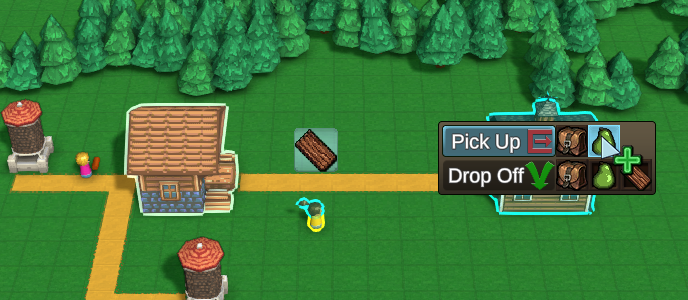
Basically, hold down SHIFT when assigning a task to add it to the worker's list of tasks, rather than replacing. But it's worth going into a few specific scenarios:
Two different Sources and Destinations

This is the most basic scenario. Assign the first behavior as you normally would, from 1st source to the 1st destination. Then, select the same worker, hold SHIFT and drag from the 2nd source to the 2nd destination. The Worker will be assigned both jobs, and will attempt to perform them sequentially. If it can't perform one of the Pick-Up actions (e.g. no items to pick up) it'll just move on to the next job.
Note, you can use this to supply inputs to a building, and then also carry its outputs to another building!
One Source to Multiple Destinations, split evenly

For example, you have one workshop making Cloth and you want some to go to one Tailor, and some to go to another Tailor. This is actually the same case as above - assign them as two separate jobs, holding SHIFT when assigning the second Pick-Up action.
One Source to Multiple Destinations, with priority

For example, you have one workshop making Cloth and you want some to go to a Tailor, and ONLY if the tailor is full, to deliver the rest to a General Store.
In this case, select the worker, click on 'Pick Up' cloth at the workshop, and when choosing the Tailor destination, hold SHIFT while you click on 'Drop Off'. This will tell the game that you want to append another destination. Then hover over the General Store and hit 'Drop Off' cloth. (No shift necessary, unless you want to append a third destination)
Multiple Sources to One Destination

You can also tell a worker to Pick Up from multiple sources, and then finally deliver everything to one destination. This is useful for things like Caravans that can carry multiple types of goods. To do this, simply click 'Pick-Up' in order at each of your sources, then click 'Drop Off' at the destination. The game assumes that multiple Pick Up options should be appended on top of each other, so there's no need to hold Shift in this case.
Tasks Panel

Now that worker assignments can be more complex, a better way to display them was needed. So now each worker has a 'Tasks' button on their status panel, and clicking it shows all the currently assigned tasks. Clicking the '...' button lets you delete or re-order them. It also lets you set a flag to "Hold Until Full" or "Hold Until Empty". This will make sure the worker doesn't move on to its next task if it still has capacity to Pick Up items, or is still holding items to Drop Off, even if it can't currently complete the transfer.
Other changes were made related to multi-commands:
- Improved worker targeting behavior - now shows specific items when assigning a dropoff target. This allows players to either left or right click when targeting. Default ‘Drag and Drop’ behavior is preserved for convenience.
- When assigning Pick Up or Drop Off behavior at a building, the item selection panel has been improved to include labels, as well as a specific 'Everything' icon that will tell the worker to pick up anything at the target.
- Workers will simply discard obsolete held items (those that don’t match any current behaviors) instead of trying to drop them off at closest location.
- 'Supply' action has been removed, as it can now be reproduced more precisely with multi-commands. All legacy ‘Supply’ behaviors are migrated as regular Harvest or Deliver actions, based on what previous source and targets were.
And some other changes in this version:
Balance Changes
- Lowered Linked House Level requirements for base levels 9 and 10
Bug Fixes
- Fixed “LogicMessageTypeNone” appearing instead of “None” when configuring Computational blocks
- Added spacers in Logic Connections pop-up menus to more clearly separate functions
- Can delete and re-order tasks in the Worker Tasks menu
- Added ‘plus’ icon modifier to cursor when shift is held down and is assigning worker behavior, to communicate that it is appending a task
- Added preliminary Japanese localization
- Fixed workers showing very large list of items on cursor hover when supplying house or market without a specific item filter
- Fixed memory leak of build action buttons that would slowly degrade performance over time
- Fixed some icons not being centered on logistic blocks or Package filter
- Fixed some physical items being shown in wrong orientation when carried by worker unit
- Fixed some computational block icons being the wrong size
- Fixed right-click to delete on a single tile triggering a Cancel action that resets the cursor
Getting closer to the 1.0 release date (this Nov 17)! Going to try and fit in a few more small patches with tutorial & quality-of-life updates before then.
Campaign 8, Computational Blocks, Worker customization, and...1.0 Launch Date!!
1.0 Launch Date
I'll get the big news out of the way upfront - Factory Town is finally ready to graduate from Early Access as a full "1.0" release! Development & free updates will definitely continue after the launch, but I feel the essential gameplay systems are solid, the game is stable to run, and has enough content & replayability to earn the 1.0 label.
The official launch date is November 17th, 2021 (in about a month).
If you've been enjoying the game and all the updates, you can do me a huge favor by writing a review on the game's Steam page. Having recent reviews will help make the launch successful & bring new people into the game, which all supports more & bigger future updates.
Speaking of which, there's quite a few changes in this version:
Campaign map 8
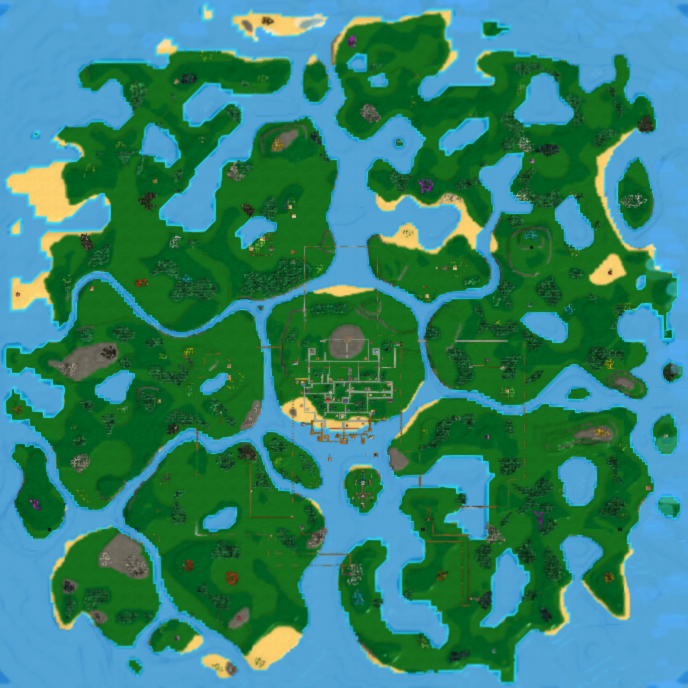
The eighth and final campaign map is now available. The player starts with quite a bit of unlocked technology, a giant rail network, and a production facility for making OmniPipes - which are a powerful pipe transport system that can move *any* item through them, both above- and below-ground. However, there is still quite a bit of work to do - the player must develop lots of physical & magical production capabilities to unlock the last level of technology and complete construction of the OmniTemple. This final building requires expensive inputs, but rewards the player with research that can infinitely speed up production and transport.
Additionally, a new set of Achievements have been added that are earned by completing each of the campaign maps. They are awarded retroactively so there is no requirement to re-play campaigns you've already completed.
Worker Customization

The worker units are no longer identical clones. They are randomized with an array of skin tones, hair styles, hair colors, and shirt colors. You can select an individual worker and change these attributes at any time by clicking the 'Customize" button.
Computational Block Updates
The computational block system has been a bit of a 'black box' for quite awhile, and this updates aims to make them easier to use and also more flexible. At its heart, the computational blocks are a way to control the transport and production of goods using a series of logical and mathematical operators. They can be configured to interact with each other via signal messages, like a visual programming language.
But the behavior of each block was very obscured. Now, the player can view and select from a number of Output Functions and Message Types so they know when a block will trigger an output, and how it will affect the target block.
For example: There is a Timer block that can receive values from other blocks. You can choose if this input value will set the timer duration, toggle a 'repeat' option on the timer, start/stop the timer, set an internal value that will be delayed for the timer's duration, or to simply output its current value. The timer itself has two output functions: "Timer Completed" and "Timer State Changed". The first will only output the timer's internal value once the timer has fully elapsed. The second will output a 1 ("on") or 0 ("off") whenever the timer changes from running to stopped. You could use this second function to easily control the active state of a Grabber or open & close a railway gate.
It's still a complex system and is not required to complete the game, but for players who like extreme efficiency and intricate transport solutions, it should give them many more options and a smoother experience overall.
Here's a detailed list of changes to the Computational Block system:
- Can right-click on a computational block to choose the Output Function. This usually defaults to “Output”, which is sent whenever its primary value is modified. But for things like Agent Trigger you can specify if the output happens when an agent enters, or exits the block. Once an Output Function is chosen, then the player is able to select a target of the logic message with right-click.
- When choosing the target of a logic message, players can now choose between several Message Types. This changes the effect the message will have on the target block. For example you can set a timer duration, start the timer, tell the timer to delay a value by a certain amount, or specify which side of a math equation is being updated.
- Computation is now processed in one large batch instead of one update every frame
- New block: Inverter. Acts like the previous “Bool Function” of 'NOT'. Old Bool Function blocks configured as 'NOT' are migrated as Inverters
- Logic Pusher is renamed Trigger to more clearly reflect its role
- Can now Ctrl-click on Triggers to activate them, on Counters to increment, on Timers to start the timer, and on Number blocks to send their value on to linked blocks
- New Logic Connections panel that lets you delete, re-order, modify, and add logic links
- Inventory Sensor and Agent Trigger can be enabled and disabled manually or with logic message
- Counter has a Loop function that will act as a built-in modulo function if > 0. It can be set manually or with a “Set Loop Value” message.
- Timer has “Repeat” property that can be set manually or with “Set Repeat” message
- Computational Blocks now show list of available Actions / Triggers when you select it, allowing for manual activation
- Updated most Computational block icons
- Changes should be backwards compatible with most existing computational block setups
And the other changes in this update:
Balance Changes
- Removed Magic Conveyor Belt from OmniPipe required inputs
- OmniPipe recipe now consumes 2 Mana Pipes, but also outputs 2 OmniPipes. Omnistone input is kept at 1. This is to decrease the ratio of Omnistones needed per OmniPipe
- Increased Tech Level 10 OmniPipe requirement from 25 to 200
- “Collect Bonus” option on OmniTemples is now always on, and option to toggle it is removed. No additional bonus is granted when offering is complete, instead, the recipe just automatically cycles to another random set of items
- All MegaRecharger recipes' speed doubled
- Harvester Drill research now costs 1000 Industry Points and 1000 Red Coins instead of 2000 of each
- Health Potion is worth 20 Blue Coins instead of 5 Purple Coins
- Elixir is worth 40 Blue Coins instead of 32 Blue Coins
Misc Improvements
- Re-organized default Hotbars
- Entity Outlines are preloaded on logic structures and buildings to reduce lag when highlighting
- Removed excessive targeting arrows from all available Markets when placing Houses
- Town happiness is only recalculated once per second, to avoid rapid fluctuations in value
Bug Fixes
- Right-clicking on main menu could hide it, resulting in empty interface
- Typo in Omnistones pro tip
- Obsolete tooltips for rail cars said they required “Rail Stops”.
- Additional cases where resources could be placed inside structural blocks
- Global Hotbar was not saving state when updated via right-click ‘delete’ option or dragging from Build menu
- Antidote in Campaign 4 was listed under its own satisfaction category / item filter
- Tutorial instructed player to bring 2 wood to craft a plank, when it’s now 1 wood
- Tutorial would replay ‘tutorial step complete’ sound effect if player kept repeating the completion condition
- Fixed inconsistent linking of pipe connectors between underground & overworld layers
- Fixed excessive delay for pipe items transferring between underground & overworld layers via connectors
- ‘Nothing’ item filter now works on units that are not carrying anything
- Fixed flickering that would occur on the entity status panel when the selected entity’s inventory changed
- Fixed performance issue when targeting Markets while the game is unpaused
- Fixed Inconsistent item output order when multiple pipe & output types (especially mana) existed on the same building
- Advanced Medicine would automatically be completed if you loaded a map with Intermediate Medicine completed
- Fixed null references when trying to place Steam Engine over water tiles
- Fixed production output inventory counts not updating when displayed as a grid
- Fixed selection of advanced filter (e.g. ‘Only Allow Packed’) appending to existing filters even if shift button not held down
- Fixed double-click on Grabber only intermittently opening the filter panel on large maps, due to delay of drawing logic target outlines
- Fixed text overlapping on Omnitemple construction progress panel
- Fixed ‘Packed only’ / ‘Unpacked only’ sprites showing up as blank squares in grid-based inventory like Train Stations
- Fixed ‘Packed only’ / ‘Unpacked only’ filters appearing as the regular item if slot was empty
- Fixed ‘Packed only’ / ‘Unpacked only’ filters overriding the actual slot item if it didn’t match the filter
- Fixed Package Filter remaining active when changing a filter via single-click on a regular item
- Fixed non-localized text when OmniTemple is ready for bonus to be collected
- Goods Supply and House Supply panels would show in a non-scrollable state if you first hovered over status icons, hovered out, then opened the menus by other means
- Fixed Elixir not being sellable in Campaign 4
- Fixed ‘Goods’ panel showing stale data when changing maps
.202 Patch Notes
Bug Fixes
- Steam Engines were not transferring Rotational Power to Water Pumps
- Steam Engines were not showing alert when not connected to a Mechanical Rail or target building
- Unresponsiveness could occur when rotating Steam Engines
- Steam Engines could link to Mechanical Rails even if tile in front of it was not a Mechanical Rail
- Was able to place crops and trees in the same block as several decorative items, creating unremovable objects
.201 Patch Notes
Misc Improvements
- Can now apply package filters on individual inventory slots
- Screen Edge Scrolling defaults to On again, but margin for triggering scrolling decreased. Scroll acceleration increased
- Happiness is no longer displayed in abbreviated format (e.g. now shows as 1234 instead of 1K)
Balance Changes
- Added Coal deposits to Campaign 1 map
- Campaign 3 Max Tech Level reduced from 10 to 5
- Campaign 3 now has Apothecary enabled
- Campaign 3 now has alternate Metal Belt and Metal Rail recipes enabled at machine shop
- Tech Level 7 now has requirements of Medical Wrap and Mana Pipe, instead of Mana Brick
Bug Fixes
- Victory Conditions would display as blank row and ‘ready for victory’ in creative mode even when no victory conditions specified
- When using block copy tool, was able to copy & paste settings like House Upgrades, OmniTemple completion state & water/fertilizer status
- Was able to create map with no resources (besides trees) if editing a text-based map creation parameter and clicked “Create” without first exiting the text field
- Map Reset was creating different resources on map regen (this fix only works on new maps created going forward as they can re-use a specific random seed, and older maps did not do this)
- Map Reset was showing ‘fake’ resources across entire map
- Map Reset was not preserving auto-base creation parameter
- Map Reset was not drawing grass
- Erroneous label was displayed when pasting groups of objects
- Was unable to move groups of objects that involved support structures
- Using Remove Block tool with increased cursor size was not able to delete objects above terrain baseline or below water
- Moving pipe paths would cause them to break
- Steam Engine links were not being updated correctly when rotated
- Rotating an entity would not visibly update highlights on newly linked or unlinked entities
Happiness & Goals Overhaul
Happiness Overhaul
Major rework was done to the Happiness system to make it more meaningful to progression and also more reasonable to achieve when using multiple Town Centers.
Previously, there were about 50 different 'Satisfaction Categories' that each contributed 1 point to overall happiness if their item(s) were continually supplied to a House. Most items were in their own individual category, so players had a reason to make lots of different items.
But this started causing big problems as soon as I allowed multiple Town Centers...delivering 50 different items to one Town is hard enough, but delivering to 2 or more is simply an overwhelming challenge that is tough to enjoy.
Happiness provided a passive production boost to buildings in a town, but was calculated only based on the local Town Center. So satellite towns with a few houses had miniscule bonus potential. And basically, players could ignore the whole happiness system altogether if they boosted production in other ways.
So it needed some changes...
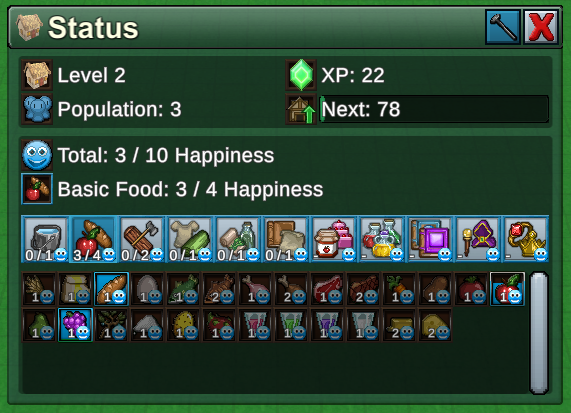
This is the new Happiness Status panel, shown for a selected House. There are now just 11 Satisfaction Categories such as "Basic Food" and "Magic Supplies". Each item supplied within a category can contribute to Happiness, but there is a maximum amount of happiness that can be earned from each category. So there is still a reason to provide lots of different items, without needing to provide every *single* item. This all makes it much more viable to operate multiple Town Centers.
One nice effect of this is new consumption items can be added easily, without increasing the overall burden for players. Instead, it just gives them more options to earn happiness in a category! Some other notes on this:
- The maximum happiness for each category increases as the House levels up. For level 1 houses, they can consume luxury goods but don't earn any happiness from them. At level 10, houses can earn lots of happiness from a wide variety of categories.
- Some items are worth 2 or even 3 happiness. This gives the player a choice to provide a lot of simple goods, or a few advanced ones, to max out happiness in a category. (Or both, if you just want lots of coins)
- The Happiness production bonus now applies globally to *any* production building that is linked to *any* Town Center. So even a small Town Center can be a useful way to boost up local production.
Population Level

Happiness provides a production bonus which is nice, but I wanted to make it more of a focus for players. So now, Happiness determines how large your town can grow. Players must increase Happiness enough to hit certain target values. Each time they reach a target, they increase their Population Level. Higher Population Levels allows you to build more Houses, which hold more workers.
So raising and maintaining happiness is now a key component of growing your towns.
Don't worry, if Happiness drops you won't lose any Population Levels you've already earned. But you will need to bring it back up again if you want to reach the next level.
If there are plateaus where you're running short of Workers and can't build any more Houses, simply take a look at your House's happiness levels and see if you can deliver new & different items that will bump it up enough to achieve a higher Population Level. Note that you also can also raise up the House limit by performing Civics research.
Tech Level

In the previous version, the available research & technology was gated by your highest Town Center level. This mostly worked, but a big problem was that it consumed items that first needed to be placed into storage. So you often needed to temporarily store some odd item like Antidotes just to perform the upgrade.
Now, research is restricted based on the player's "Tech Level". Increase the Tech Level by making specific items, which will unlock new research tiers. It uses mostly the same types of items that were previously used in Town Center upgrades, but the key thing is it measures items *produced* (not owned in storage) and doesn't consume them when the level increases.
Visible Goals
The game hasn't always been very clear about what specific targets the player should be looking to achieve, and these goals were often buried in menus. Now that there are Population Levels, Tech Levels, and Victory conditions, a new way to view active goals was needed.
So now there is a new panel on the left-hand side of the screen:

It displays current progress towards the next Tech Level, Population Level, and the map's Victory Conditions. When the requirements have been achieved, the button glows and players can click it to unlock the next level or claim victory.
If players want to free up some screen space, they can click the header to minimize this panel:

The Tutorial in Campaign 1 also uses this panel to display the goals of the current Tutorial step.
House Leveling
In a recent version the House Upgrade system was changed to consume the required upgrade items from market deliveries and perform the upgrade automatically. This avoided lots of unnecessary clicking, but also forced the player to deliver & consume specific items that perhaps they didn't want to get rid of (like Planks).
Now, Houses can level up from *any* item that it normally consumes. Each item has an Experience Point ("XP") value based roughly on how hard it is to make, and earns this XP when an item is delivered. With enough XP, the house gains a level and provides additional population capacity.
You can view a House's current XP progress when it's selected, and by opening its Status panel:

In addition, houses now have 10 levels, each with their own look. Each level raises the population capacity by 1.

Town Center Levels & Specialties
Now that Research is determined by Tech Level, and Max Houses by Population Level, that means the Town Center lost a good chunk of its previous functionality. With these changes, why would the player even bother to upgrade the Town Center?
One reason is it still gains area-of-effect radius when upgraded, allowing you to spread the Happiness production bonus further. But the new big reason is that Town Center level now determines the power of its chosen Specialty.
Previously, a Specialty would double the output of relevant recipes for all buildings in the Town. But, that was pretty overpowered. So now a recipe will only double its output based on a probability. This probability rises with the Town Center level. Simpler specialties like Forestry start at 20% probability and gain an additional 20% per level, maxing out at 100% probability at level 5. The advanced specialties like Artistry rise only 10% per level and require a level 10 town to reach 100%.
A related problem is that Town Centers were easy to power-level once you had enough items. Now, there is a requirement that a Town Center must have a big enough town near it in order to earn the next level. This is measured by "Linked House Levels" - it's the sum total of the number of linked Houses, plus the number of level upgrades they've received.
For example, this Town Center needs 48 Linked House Levels to advance to level 4. That means 48 Level 1 houses, or 24 level 2 Houses, or 12 level 4 houses (or any similar mixture) need to be connected to the Town Center with roads.

Note that if you remove Houses from a town, or delete the paths that connect them to the Town Center, the 'effective level' of the Town Center will recalculate. It will decrease to the maximum level based on its active linked houses. This will negatively affect the specialty bonus rate. However, you can resolve this by re-connecting to a sufficient number of Houses.
Mega Recharger

Rechargers are a critical building in the magic stage of the game, used to refill the energy of the battery-like Crystals that power late stage Towns. They are 1x1 so are small, but they also process crystals pretty slowly. This mean players often needed large swaths of space taken up by rechargers.
This update introduces the Mega Recharger. It's a 3x3 building that is extremely fast at recharging crystals. The catch is that it does require a physical input like Mana Shards and Elemental Stones to perform the recharge. Still, this may well be worth the value in having a fast, centralized recharging location.
Misc Improvements
- Notification panel is centered on screen better
- Using ‘Remove Block’ tool when a pillar and path were present now prioritizes deletion of pillar
- Added Wooden Minecart to Quick Access menu
- Renamed Grain Mill to Food Mill, to better reflect its variety of recipes
- Added Status panel & Status hotkey (T)
- Quick Access menu now available in the player actions grid in bottom-left
- Grid-based Icons on Item Tooltip Panel use the full width so they don’t take up as much vertical space
-Added a new Alert when a Town Center doesn't have a specialty assigned (goes away once you select any specialty, even 'none')
- Double-clicking a Town Center will open up its Specialty selection panel
- Property Selection panel (e.g. Access Type, Math Function, Town Specialty) is now resizable and scrollable
- When dragging a path that needs automatic scaffolds, game will use an Arch instead of a full scaffold block if it detects a path underneath it
- Placing a single path (belt / chute / rail) using cursor offset (PageUp) will now automatically try to create a support arch beneath it
- Automatic supports created underneath buildings are now Wood Platforms, not hollow scaffolds
- Standardized icons for Market-based categories in item filters
- Cursor selection boxes on House and Town Centers now match the visual model more closely
- When a worker is selected, other workers won't be targeted by the cursor (unless Shift is pressed to select multiple). This makes it easier to issue commands in high traffic areas
- Tutorial runs in minimized mode if you hit X on the window. Can re-maximize by clicking the Tutorial button in bottom-left
- Notification panel is centered on screen better
Balance Changes
- Plank recipe cost lowered from 2 Wood to 1 Wood
- All tree types no longer require Tree Planter. (Tree Planter will still double yield)
- Coin Cost for planting fruit trees increased
- Cost for planting Herb changed from 10 Red Coins to 40 Yellow Coins
- Cost for planting Cotton changed from 20 Yellow Coins to 40 Yellow Coins
- Cost for planting Cactus Fruit changed from 40 Red Coins to 100 Yellow Coins
- Dragon Punch is now classified as a 'Gourmet' item instead of 'Basic Food'. That means it is sellable at the Tavern, not the Food Market
- Herb is sellable as a Basic Food for 2 Yellow Coins
- Cheese recipe now requires 5 milk instead of 3, but produces 2 cheese instead of 1 (cloth cost still is 1, so there is an improved ratio of cloth input to cheese output)
- Added recipes to make Animal Feed from Carrots or Potatoes
- Kitchen can now be unlocked at Tech Level 3
- Town Center costs 40 Planks instead of 40 Reinforced Planks
- Herb, Sugar, Cotton, Wood Wheel, Iron Wheel, and Gear are now sellable
- Water is now a requested item by houses, but must be provided directly to houses (is not distributed by Food Market). This can be done easily with underground Fluid Pipes. Providing water earns 1 gold and 1 XP, is consumed every 20 seconds and Happiness lasts for 10 seconds after last consumed.
- Increased Wood Conveyor Belt speed by 50%
- Increased Cloth Conveyor Belt speed by 25%
- Apples, Pears, and Dragonfruit removed from Farming specialty (still are contained within Forestry specialty)
- Adjusted happiness production speed bonus thresholds to align more closely with new Population Level thresholds
- Elemental Refinery output capacity for Ethers increased from 10 to 40
- Mine output capacity for all recipes increased from 10 to 20
- All pipe producing recipes’ output capacity increased from 10 to 20 items
- Caravan uses 4 Wood Wheels instead of 4 Iron Wheels, only requires Metallurgy instead of Machinery, and requires 4 Reinforced Planks instead of 10
- Town Center victory conditions no longer can be specified per-specialty. There is now only one value that can be specified, which represents the maximum Town Center level on the map. In cases where legacy maps had multiple victory conditions for different specialties, they were merged into a single victory condition using whichever one had the highest max level.
Bug Fixes
- Fixed incorrect formatting when resizing Work Units panel
- Global Hotbars were not saving or loading items correctly
- Column Select used in the overworld would include underground pipes and structures
- Was unable to use hotkey to assign Worker units to Hotbar
- Pause / Unpause button would not update image or tooltip when clicked manually
- Was able to move a support block from underneath a building or path, as well as attach one to the side of an elevated building without a support. This caused the path to hover in midair and often be un-selectable and un-deletable
- Move tool would select the scaffold block underneath a path instead of the path itself
- Unable to select the path on top of scaffold blocks when assigning a sensor offset
- Number-based victory conditions were not pre-populating the text entry field with current values
- Rail Transfer blocks would become inoperable if a Signal Tag was added, then removed
- Workers were not carrying items at the correct angle
- Town Specialty would not be correctly removed when required buildings removed from the Town
- Some button tutorial highlights would persist on loading new game
- Tutorial was not fully resetting if partially completed when new Campaign 1 map started
- Work Units panel would automatically hide if Work Units icon was hovered on & off again