
Factory Town
.199 Patch Notes
- Incorrect slope calculation on chutes & belts when no ramp scaffold present (using just terrain) was causing items to sometimes accelerate uphill
- Upgrading a belt or rail would not immediately affect the speed of the units on the path
- Items being deposited onto chutes or belts would not reflect the correct speed of the target path, especially when being deposited by a worker standing on a road or foot path
- Pipe items would not always deposit correctly if the pipe length was 2
- Minecarts were disregarding Signal Tags
- Fixed bug: Copy selected object was only working properly if the mouse was also hovering over the selected object
- Pipe Connectors weren’t casting shadows
Quick Access Menu
Quick Access Menu
Factory Town has a ton of things to build, but switching frequently between items is a bit unwieldy and can mess up your flow.
The Build menu has everything in it and lets you perform a full-text search on items, but that often means taking your hand off the mouse.
Hotbars are customizable, but they're limited in how many items they can display at once.
I originally wanted to have hotkey combinations on the Build menu for the most useful items, but these interfere with the regular text search.
So, to solve these issues and streamline the building process I created the Quick Access menu!
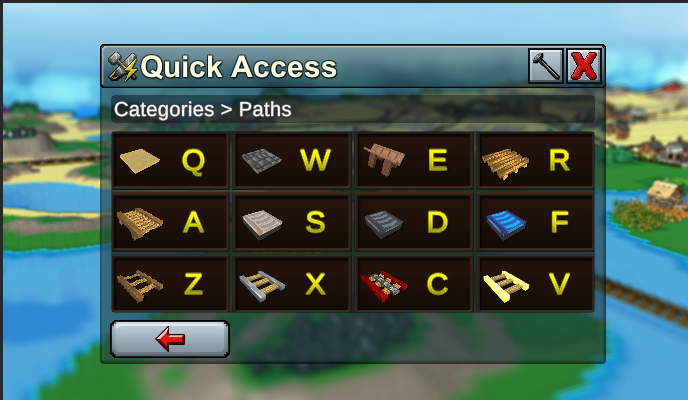
It uses a nested hotkey system - one key to select a category of item, and another key to select the item itself. This means you can access most items in the game with just 3 keys. For example:
- Press E to open the Quick Access Menu
- Press A to select Paths
- Press W to select Road
Although it would take a lot of practice to remember the key code for each item, it can still be easy to think "Oh I need a path" and hit E+A to view the paths, then select the one you need with the displayed hotkey.
The hotkeys map to the left-hand side of the keyboard (QWER, ASDF, ZXCV) but they are remappable. Just right-click on the Quick Access slot and hit 'Assign Control' to change to whatever keys you find useful (if you are left-handed, or use AZERTY layout, etc).
Misc Improvements

- Items traveling on a belt or chute are no longer obstructed on a path based on the full block above it. For example, a regular scaffold block can be used above a belt instead of needing an arch
- Items rolling downhill on a wooden conveyor belt will slightly speed up, but will slowly decelerate to normal wooden belt speed on flat terrain
- Can use combination tags (“A,B” = tag A or tag B) on rail cars
- Signal Tags can now be triggered based on tag existing on train cars, not just the locomotive
- Changed Field Of View to make the game look more isometric
- Item Filter and Text Input panels are now resizable
- Improved visual display of belts to remove gaps on ramps
- Improved visual display of chutes
- Game will no longer automatically minimize when it loses focus
- New Interface option: Run In Background. Keeps the game running when it does not have focus
- Build Menu search is more forgiving (e.g. “Wooden Rail” will be a match for search text “Wood Rail”)
Balance Changes
- Fish Oil recipe now only requires 1 Fish instead of 2 Fish
Bug Fixes
- Pipe items would sometimes get stuck if you created a pipe crossing over an existing one that contained items
- Automatically placed Rail Transfer blocks were not having Fuel transfer option checked on by default as intended
- Plant Dragon Fruit was linked to a requirement of Farming instead of Forestry
- Steep paths were not always connecting to neighbors if placed individually
- Some Traditional Chinese characters were not displaying
- “Supply X” localization error in European Portuguese
New Low-Tech wooden gadgets!
Low Tech Gadgets
A key part of Factory Town is developing tech like conveyor belts, rails, and pipes that let you automate & streamline delivery of goods between production buildings. Yet, a lot of that fun stuff was locked in the tech tree until nearly the middle of the game. That meant that players had to focus too much on micro-managing worker units and population capacity. I decided to add some new lower-tech gadgets that will let you use all these fun & useful features much sooner!
Wooden Conveyor Belt
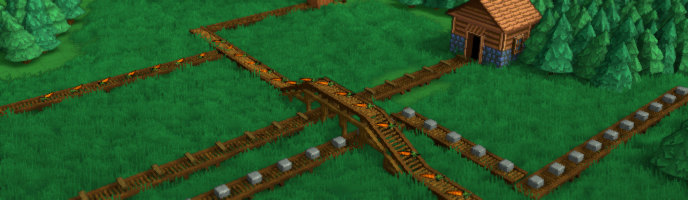
The player can now build Wooden versions of conveyor belts as soon as they have completed Basic Logistics and Woodworking. They are made at the Workshop from Planks and Wood. They can carry everything that the higher tier conveyor belts can. The catch? They're SLOW. So they're great for moving an item between nearby buildings, but for longer routes you'll still want to use Wagons, Chutes, Rails, or...
Wooden Railroads

These new lower-tech railroads will help move bulk goods (grain, crops, flour, stone, ores) around your early-game town. The rail tiles are available to build at the Workshop, and cost Planks and Stone. Wooden Minecarts are available, using up Wood Wheels and Planks. All rail cars move slower on wooden rails than the metal rails available later in the game. Wooden Minecarts can't carry very much, but don't require a worker unit and can (slowly) move uphill, unlike chutes.
Rafts

Another new early-game option are Rafts. They cost 4 Planks to build. They move in the water (again, very slowly) and can carry 5 items at a time. They can also harvest Fish, and any resources on the shoreline. So if you have a map with lots of water, you will be able to move stuff across rivers or islands without having to get too far in the tech tree.
Improvements to Train Loading

Because the train system has changed so much over time, the process for loading them was kind of a clunky patchwork. You had to choose between Minecart Loaders, Train Stops and Fuel Loaders, and very often the game would place one of them automatically when the player actually wanted something different. And there was no way to switch functionality without deleting and rebuilding a brand new loader! I decided to finally consolidate all these rail loading and unloading functions into one "Rail Transfer" block, with a bunch of options you can turn on and off anytime to change how it works. This gives more control to players who need specific behavior, while keeping convenient automatic setup functions when you just need something quick & simple.
Here is the list of improvements to railway-related items:
- Rail Transfer block has several options that mimic the older blocks: Transfer Minecart Cargo, Transfer Train Fuel, and Transfer Train Cargo. Those settings can be changed on the fly without having to delete and rebuild a different block type.
- The new Rail Transfer blocks can be assigned multiple behaviors at the same time (e.g. load Train fuel AND cargo)
- Legacy Minecart Loaders, Fuel Loaders, and Train Stops are converted to Rail Transfer blocks, with the appropriate settings enabled to maintain previous behavior.
- Rail Transfer block is now the block automatically created when placing a building that faces a rail tile. It defaults to be able to transfer everything (Cargo and Fuel, from both Minecarts and Trains)
- 7 Rail Transfer block presets are available in the build menu: Minecart Loader & Unloader, Train Loader & Unloader, Rail Loader & Unloader, and Fuel Loader. However, they all create the same basic block type with the same flexible parameters.
- Improved Input / Output icons on Rail Transfer blocks, and in menus
- All rail cars have configurable Signal Tag values
- Signal Tag Filters can now use the format “A,B” to trigger for worker units tagged with A *or* tagged with B.
- Moved all Rail Transfer blocks (plus Barrier Gate) into new Build menu category “Rail Control”
- Rail Transfer blocks no longer have any research requirement so they can be used as soon as the player can build any type of rail item.
Misc Improvements
- Added a new Interface preference: 'Global Hotbars'. If enabled, the game will display a hotbar that is automatically saved & loaded at the player account level, instead of the per-map level. The global hotbar is synced by Steam Cloud along with other player data
- Changed title on agent filters (on Agent Triggers, and now Rail Transfer blocks) from “Workers” filter to “Agent Filters”
- Context controls menu is draggable / resizable
- Added button on pipe connectors and Mines to jump directly to the relevant underground view
- An alert will appear on a Rail Transfer block if there is no connected building
- Fixed performance issue: Building status / Inventory panel being redrawn several times per frame when inventory changed multiple times during frame
- Fixed performance issue when trading posts were running multiple recipes very quickly. Was also preventing them from running at maximum transfer speed
- Build menu clears Search Text when new category selected, to prevent inadvertent filtering
- Improved performance of Rail Tile rendering
- When a player can’t afford an action due to lack of currency, the error message now instructs player to sell more goods instead of bringing more items to storage
- Silos and Crates now default to being placed on lower level of terrain, and are allowed to overlap with 1 unit of terrain slope. This is to avoid common placement errors (i.e. too high on scaffolds) preventing worker access
- Can now use PageDown to lower cursor offset below initial location
- Changed some labels: Magic Rail Tile is now Magic Rail, Fishing Boat is now Boat, Cargo Boat is now Cargo Ship
- Mine Shaft moved out of the “Paths” build category into “Farming / Mining”
- Moved all rail cars out of the “Workers” build category and into new category “Rail Cars”
- On the Item Tooltip panel, a recipe’s inputs are shown in-line with its producing building to make the layout more compact
- Improved the Mana Tutorial
- Added Enchanter tutorial map
Balance Changes
- Steam Locomotives start with some fuel and water when first built
- Crates now contribute to shared player inventory
- The rule ‘Minecarts use Gravity’ will now default to off, so they can climb hills on their own
- Minecart inventory increased from 20 to 50
- Removed Elixir cost from Omnipipe recipe
- Fishing Boat inventory increased from 8 to 10
- Fishing Boat speed reduced from 5 to 4
- Cargo Boat speed increased from 4 to 6
- Cargo Boat population requirement reduced from 2 to 1
- Cargo Boat can now harvest fish directly
- Airship population requirement reduced from 4 to 2
- Crates cost 4 Wood instead of 4 Planks, and no longer require Woodworking research
- Basic Logistics cost of General Knowledge points reduced from 50 to 25
- Removed research requirement for Barrier Gate
- Chute requires its own research (instead of unlocking with Basic Logistics), has prerequisite of Woodworking
- Increased coin and research point costs for several early game researches
- Added alternate recipe for Metal Conveyor Belt that uses more metal but doesn’t require a Cloth Conveyor Belt
- Removed Stone Slab requirement for Metal Rail recipe. Decreased output from 2 tiles to 1 tile.
- Removed Stone Slab requirement for Cloth Belt recipe
- Fish tiles now disappear when fully depleted
- Worker units can harvest Mana Shards & Elemental Stones
- Magic Rail Tile recipe now requires Metal Rail instead of Mechanical Rail (Is preserved as Mechanical rails on legacy maps)
Bug Fixes
- Changing recipes on a building with a Steam Booster would assign existing Steam as ‘Storage’ slot and render the booster unusable (legacy maps that encountered this problem will be automatically fixed)
- Rail Controls button was visible for train cars, when it should only be shown on the engine
- Storage buildings with some inventory item filters would not show filter options for all inventory contents
-When placing Grabbers or Rail Transfer blocks, the potential linked building was not being highlighted
-Steam Locomotive was outputting smoke even when running on Magic Rails, consuming no fuel
-Game was not clearing cache that stored references for Sensor blocks (e.g. Agent Trigger), causing null references and unexpected behavior when subsequent maps were loaded
- Redundant unlock notifications for items that are both a structure and a recipe, e.g., Cloth Conveyor Belts
- Unusable Intermediate Grain Processing” was showing up in ‘unlocked research’ menu (is a not yet fully implemented feature)
- Placing or dragging a path facing away from a building, where the path was on a ramp beneath the building, would not create the correct Grabber structure automatically
- Text on House Upgrade request was too large, resulting in truncated ‘Supply Reinforced Plank’ text
- Unable to highlight or inspect Fish tiles
- Fish tiles would be depleted but harvesting workers would get stuck trying to continue its harvest action
- Inadvertent building highlights when placing a single conveyor belt facing into a building, or a single pipe path near a building
- Changing an inventory slot’s access type (Input, Output, Storage, Off) would not immediately update the visible tooltip
- An item produced by more than one recipe would not show any of them in the item’s tooltip panel
- Campaign 7 Trading Posts were unlocked
- In some situations, purchasing a new terrain chunk would not establish correct navigation links into the new chunk
Enjoy! As always, if you're enjoying these updates, reviews & ratings are much appreciated.
With each update the game is getting closer to "1.0"...will keep everyone updated when I have a specific timeline for official launch. Cheers,
Erik
Quality-of-Life Improvements to Pipe systems
Pipe System Improvements
Pipes are an incredibly useful way to move water, steam, magic crystals, and all kinds of goods around your town without using up population capacity. But, there were several aspects about them that needed improvements. The new version is meant to be more user-friendly but also more customizable.
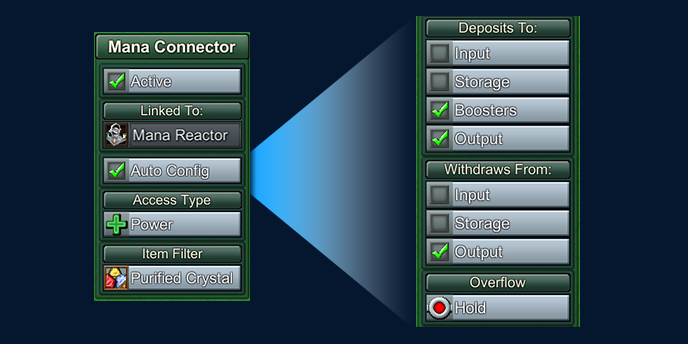
- Added new 'AutoConfig' flag on pipe connectors. This setting will allow connectors to update its ability to Input, Output, or Boost based on the type of building it's connected to and whether there are pipes flowing into or out of the connector. In most cases players can just leave this on and use the default behavior.
- AutoConfig will also automatically set the Overflow flag to Hold if it's targeting a building that consumes depleted crystals and outputs charged crystals (or vice versa) to prevent unwanted items in downstream pipes.
- AutoConfig can be turned off, which will allow the player to very specifically control pipe connector behavior, and it won't automatically get changed if the building or connected pipes change.
- Pipe Connector behavior settings that can be independently changed are: Deposit to Input / Output / Storage / Boost, and Withdraw from Input / Output / Storage. This allows players to chain together buildings in new ways (like filling up one building's output slot directly from a pipe inlet).
- Removed ‘Default’ option for connector overflow behavior. The proper setting (Bypass or Hold) is now detected and applied based on previous 'Default' logic.

- Buildings now have dedicated inventory slots for Steam Booster and Mana Booster inputs and outputs. This makes the booster behavior more obvious and allows for buffering of boost ingredients.
Only items supplied using the ‘Deposit to Booster’ setting on connectors will fill these slots, and only items in these slots will be consumed to power the Booster (not recipe inputs).
- Resolved bugs that occurred when placing pipe connectors independently
- Pipe connectors can only face one direction. It was too limiting to force them to connect to the buildings on either side. Instead, they only link with the building they are facing (- This will break In+Out connectors that had directly connected buildings via a 1x1 pipe but otherwise should be backwards compatible with all previous layouts)
- Can choose pipe connector input type when placing individually, cycle through options with TAB. When placed individually, they AutoConfig setting will not be enabled as it is assumed the player specifically wants Input or Output as a fixed setting.
- Added new filters for “Charged or Depleted Mana Crystal” as well as all elemental crystal types
- Pipe connectors that transfer between overworld and underground layers can transfer items regardless of Input/Output settings.
- Stopped depleted crystals from leaving through other Input connectors
- Fixed clipping on pipe connector icons
- Using Pipette tool on a connector will copy its connection settings
- Internal pipe flows are displayed while a connector is selected
- Steam Power Plant no longer automatically creates an underground steam connector at its origin
- Changed icon on boost-targeting mana connectors to match the standard Booster icon
- The 2D icons on the underground layer indicating available pipe connections are now circular and tinted green if there is a matching booster or input slot on the building.
- The status panel of Pipe Connectors will display what building they are linked to
- Access Type icons are more consistent with the icons that appear on pipe icons
- Pipe Connectors will be automatically configured with the ‘Nothing’ item filter (preventing all output) if they are created or modified while attached to a building that has ambiguous output, and that would go through that connector (to prevent unwanted items in pipes). For example, a Kitchen making both Apple and Berry juice will default to a 'Nothing' filter on the connector when drawing pipe outlets.
Misc Improvements
- Performance improvement due to optimizing player inventory UI
- Performance improvement from optimizing rail cars
- Can reposition the status/inventory panel (top-right) and activity panel (bottom-right) by dragging on the header
- Added logic to prevent player from dragging menu panels off-screen
- Pipe Connectors and Grabbers will automatically assign an initial item filter if the linked building has exactly one output. If more than one output, will still be flagged as ‘Nothing’ filter which requires the player to choose a filter. This should prevent unwanted outputs when a recipe is changed or added.
- ‘Storage’ data overlay only shows buildings that supply to shared inventory (e.g. Barns, but not Rail Stations)
- Square highlight no longer appears on grid view if nothing highlighted
Balance Changes
- Fish Oil now requires 5 work units instead of 10
- Increased maximum allowed houses for all base levels 5 and higher
- Ether production is now enhanced by the Magic town specialty
- Infinite research for Production Speed now requires Industry Research Points instead of General Research Points
- Ward is now buildable as soon as the player has Enchanters, to provide another way to earn Purple Coins at this stage of the game. Previously it required Magic Jewelry research
- Books are now included as part of Knowledge specialty
Bug Fixes
- Fixed bug: Campaign Map 7 was requiring Writing Supplies for Mana Reactor research. New and legacy maps will have this setting reverted to new (correct) defaults
- Fixed bug: visual artifacts on some menu buttons
- Fixed bug: hitbox on Medicine Hut was too large
- Fixed bug: costs for research would be invisible if loaded a map where research was complete, then loaded a map where research was not complete
- Fixed bug: in campaign 4, books were not sellable at schools
- Fixed bug: in some legacy campaign 2 maps, Intermediate Logistics was not available, so the player could not build the required conveyor belts
- Fixed bug: Potato Bread recipe was not benefiting from Production town specialty
- Fixed bug: Game was failing to load assigned Purple Coin Boosters
- Fixed missing icons for Knowledge Tome satisfaction category filters
- Fixed bug: Incorrect tooltip for Knowledge specialty (it doubles Tome production, but it no longer doubles Research Point gain)
.195 Patch Notes
- Trains will load or unload 10 items per attempt (once every ½ second) from non-Train Station buildings (e.g. Silo), up from 2
- Each level of infinite research for Temples, Shrines, and Rechargers now provide a boost of .5 work units per second instead of .25
Bug Fixes
- Fixed bug: Trains would stop temporarily at buildings that, based on filters, did not have any valid items to transfer
- Fixed bug: Trains would stop temporarily at buildings that were full
- Fixed bug: Train would not depart station if Signal Tag was changed during the load or unload process
- Fixed bug: Train would not stop at production buildings that didn’t have any workers
- Fixed bug: Research menu would sometimes not show costs for research
- Fixed Packager showing too many items when trying to issue a command to a worker to deliver something to or from it
- Fixed bug: Infinite Research for Air Shine speed was missing
.194 Patch Notes
- Fixed Caravan unit being hidden in campaign map 3 despite research being available
- Fixed typo in Logistics tutorial map
- Fixed incorrect size for ‘invalid item’ icon
.193 Patch Notes
Misc Improvements
- More optimization of UI
Balance Changes
- Trains can now transfer 10 items at a time to and from non-train station buildings (up from 5)
Bug Fixes
- Fixed bug that would cause some campaign maps to crash on load if houses were fully upgraded
- Fixed pipe items getting stuck at connector if the recipe changed (e.g. at Omnitemple)
- Fixed incorrect icons for Shrine-related infinite research
Hotfix .192n
Research Overhaul! + Laboratory, Mage Tower, & Coin Boosters
First, a little background on why these changes were made:
Old Research System
Previously, the School was basically a production building that generated units of research in exchange for paper, books, and sometimes a special ingredient. But it had several things I didn't like:
- It was clunky to have to keep switching the research 'recipes', especially when trying to use multiple Schools.
- When a new type of special ingredient was required, you'd often have to destroy & rebuild supply lines and also wind up with wasted items.
- It was usually simpler to place Schools a good distance from your town and just set up an isolated book delivery loop. This kind of breaks expectations, which is that schools should be near population centers.
- Players could just steamroll through the tech tree without using the tech they had unlocked. The system wasn't flexible enough for me to require specific items to unlock higher tiers.
New Research System
To fix these problems, a number of changes were made. The biggest one is the introduction of Research Points. These are basically a special currency that is earned by delivering paper, books, and other research items to Houses. Once you have enough Research Points, you can open the Research panel (R) and purchase an available technology to unlock it and begin using it immediately.
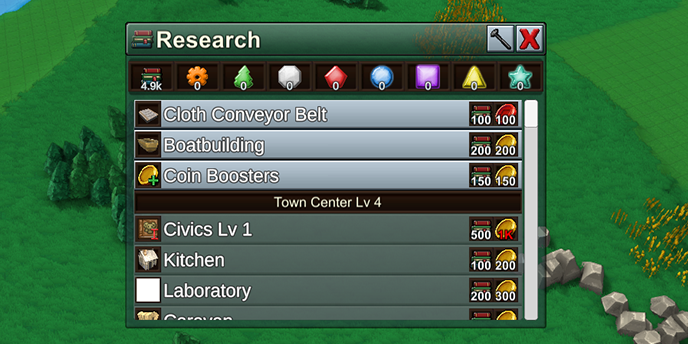
The research panel - with a list of specialty Research Points across the top
However, there are several different types of Research Points like "Industry", "Nature", and "Magic" which are needed to unlock related technology. To earn these, you must craft and deliver several different types of specialty Books. These require a lot more advanced resources to produce.

A row of icons representing different types of Research Points

Various types of Research Tomes that generate special Research Points
These specialty books or "Knowledge Tomes" are available at three tiers of quality. Higher tier tomes require more advanced ingredients, but are much more efficient at producing large quantities of Research Points. These tomes are produced at two new buildings: the Laboratory (for Industry and Nature), and the Mage Tower (for Mana & Elemental stuff).

Laboratory (left) and Mage Tower (right)

The recipes available at the Laboratory that produce special Knowledge Tomes
The School no longer produces anything directly. Instead it simply acts like a Market, distributing all the types of books to any nearby connected House. So players should position one or more schools within their Town Centers and then deliver books to those Schools.

A school, connected to several Houses via roads (just like the Food Market)
Although it sounds like a lot of changes, the basic flow is still very similar:
- Produce Books and special Research Tomes...
- Deliver them to a School (which will distribute to nearby Houses)...
- This will earn various types of Research Points...
- That you spend to unlock new technology using the Research Panel (R).
Coin Boosters
One new technology that can be unlocked are Coin Boosters. It is an optional upgrade on production buildings that will slowly spend coins in exchange for production speed. While it is active, production speed will be raised and a coin will be spent every few seconds. You can easily deactivate the coin booster, or crank up the upgrade amount to spend more coins for more boost.
In exchange, coin cost has been removed from almost all recipes. The Forester, for instance, no longer consumes Yellow Coins when it's producing wood. So now you get to control coin spend.
This is meant to address a few problems. One, players often found themselves with a huge surplus of coins at different stages of the game. Two, a recent update moved the Happiness bonus to only apply within town borders, meaning that external factory units didn't have a good way to keep up speed. Three, when coins are a required part of the recipe, it can create ugly bottlenecks that are tough to resolve. But now, if you run out of coins, the recipe will still produce, just at its normal un-boosted speed.
Now, players can very carefully fine-tune their coin spend at specific buildings, and with its boosted output the player can free up workers for other purposes. Different buildings allow different types of coin boosters (Yellow, Red, Blue, and Purple).

With coin boosters, it'll now be more important than ever to keep track of your coin income and expenses. Fortunately, the Coin Production menu has been updated to be more useful. It clearly shows coins gained and spent within a certain interval of time, which you can adjust.
Coin spend is now shown per-building as well, and if you click on one of the building rows the camera will zoom right to it.

Stonks!
Here's the rest of the patch notes:
Misc Improvements
- Added highlight on water-connected tiles when placing a building that can be connected to water
- Added tooltips to show currency & research point sources
- Lines are no longer drawn outside of the production chart
- On Production chart, only one coin type is drawn at a time, and scale is set to show smaller changes easier
- Made Fish tile highlights more visible when Fishing Boat selected
- Renamed ‘Fire Purification’, ‘Water Purification’, etc research recipes to ‘Fire Power’, etc
- Starting a new campaign map now fades in from black
- Can click during opening campaign cutscene to skip
- Added admin command to configure inventory slot size for worker units. E.g. “set Boxcar ObjectPropertyInventorySlotCapacity 2000”
- Rebuilt Research panel to not be as cluttered, and to group items according to required Town Center Level to make it more clear what research items are potentially available at the current Town Center Level
- Added alert icon if Market or School is not connected to any Houses. Shows an informational popup tip if you click on the icon
Balance Changes
- Removed mandatory Coin inputs from most recipes. In some cases increased required work units (idea is they can be compensated by optional Coin Boosters).
- Added lots of new individual research for different blocks & buildings, so that one research doesn't unlock too many new things
- Advanced Logistics now requires Base Level 5
- Added specific Town Center level requirements for research items that were only implicitly restricted based on other prerequesites
- Deep Mining research requires base Level 5 instead of Level 4
- Jewelry research requires base Level 5 instead of Level 6
- Added new recipe to make a Book from 4 Paper and 2 Cloth
- Chute requires Basic Logistics
- Basic Logistics available at Base Level 2
- Harvest Fish uses 6 work units instead of 5
- Fish Oil uses 10 work units instead of 8
- Cloth Conveyor Belt requires Intermediate Logistics
- Pusher, Sorter, and Splitter require Basic Logistics instead of Intermediate Logistics
- Plank cost for Foresters reduced from 20 to 10
- Mining Research no longer dependent on Railway logic, is dependent on Metallurgy instead
- Mines no longer cost Railway tiles, they cost Pickaxes. Reinforced Plank cost decreased from 40 to 20
- Town Center upgrade to level 3 costs 10 Stone Slabs instead of 20
- Town Center upgrade to level 4 costs Cloth Conveyor Belts and Stone Slabs
- Town Center upgrade to level 5 now costs Rail Tiles and Iron Wheels
- Town Center upgrade to level 6 now costs Metal Conveyor Belts and Antidotes
- Town Center upgrade to level 7 now costs Mana Bricks and Powered Rails
- Town Center upgrade to level 8 now costs Enchanted Books and Health Potions
- Town Center upgrade to level 9 now costs Magic Rails and Magic Conveyor Belts
- Fishing Boat no longer requires Iron Plates and Fishing Boat Research no longer requires Metallurgy. Instead requires Base Level 3 and Woodworking
- Removed Fixed ‘Fish’ filter on Fishing Boat. Can now transport up to 8 items of any single type
- Health Potion requires Advanced Medicine instead of Intermediate Medicine (since it lines up better with unlock process for Enchanting)
- Mana Power requires Base Level 7 and Mana Purification, not Mana Transmission
- Added individual research for Magic Belt, Magic Rail, and Powered Rail
- Tavern unlocks with Kitchen research
- Apothecary unlocks with Basic Medicine research
- Specialty Goods store unlocks with Mana Power research
- Apothecary cost of Iron Plates replaced with Planks
- Removed Water cost from Egg and Chicken recipes at Pasture
- Removed Fertilizer output from Chicken recipe at Pasture
- Removed Fuel requirement for Mechanical Rail
- Mana Brick is now sold at the Specialty Goods store instead of the General Store, and is no longer in the same satisfaction category as Stone Brick
- Cake and Apple Pie now sell for 4 Purple Coins each (instead of Yellow Coins)
- Magic Rail Tile and Magic Conveyor Belt now output a depleted elemental crystal instead of consuming it. Fuel input removed. Recipe also moved from Magic Forge to Enchanter (though will remain at Magic Forge on legacy maps for compatibility)
- General Store costs 20 Stone instead of 10 Stone Slabs
- Cost for Steam Locomotive increased from 50 red coins to 200 red coins
- Cost for Boxcar, Hopper, and Tanker car changed from 500 yellow coins to 100 red coins
- Pasture requires terrain under all 9 foundation positions
- Mine only requires terrain under center foundation position
- Steam Booster upgrade cost changed from 20 Iron Wheels and 10 Gears to 10 Iron Wheels and 10 Steam Pipes
- Cost for Steam Generator changed from 100 Iron Plates and 100 Stone Bricks to 20 Iron Plates and 20 Steam Pipes
- Removed Steam Booster upgrade option from Medicine Hut
- Modified Consumption Time and Happiness Duration for most items, generally increasing consumption time and decreasing happiness duration
- Houses will consume Items much faster if they are required for a current upgrade
Bug Fixes
- Fixed bug: ‘No Recipe Assigned’ tooltip would remain on cursor after double-clicking a building
- Fixed bug: Affordability of cursor action was not being recalculated when player’s resources changed
- Fixed bug: unable to customize item filters on Storage item slots configured as ‘output’
- Fixed bug: Storage item slots set as inactive were displayed under the ‘output’ category
- Fixed bug: Houses would not connect to all Markets in the same town, if the House was not in range of any single Market (even though during placement preview it would indicate the connection would succeed)
- Fixed bug: Experimental terrain tools ‘smooth up’ and ‘smooth down’ were useable and buggy, hid them until further development can be done on them
- Fixed bug: Top-level building filters of 'Packed' or 'Unpacked' were not successfully filtering delivered items
- Fixed bug: Filters on a Locomotive were always overriding train car filters, instead of merging their list of allowed items
- Fixed Cactus Fruit not being growable on Beach Sand which was visually identical to Desert Sand
- Fixed bug: double-clicking to move camera on a campaign map after the campaign animation completed would show the campaign welcome message again
- Fixed bug: ‘Create Workers’ tutorial step would complete after creating just 1 worker instead of 2
- Fixed bug: Production Buildings’ happiness bonus was not being recalculated when their town connection state changed
- Fixed bug: Some campaign maps had objects with target id of 0 which could cause unexpected behaviors and missing production chart data
- Fixed Campaign Maps 3 and 4 using a legacy recipe for Steam Pipes
- Fixed bug: In Creative Mode, underground ores could not be accessed by Mines unless the Deep Mining research was completed (even if mine shafts were built)
- Fixed bug: incorrect preview blocks shown for auto-placement of rail stops
Up next will be Campaign Map #8. And a friendly reminder - if you feel like writing up a review on the game's Steam Store page it would help me out a lot, as it brings new people into the game and helps fund further development. Thanks!
Erik
.191 Patch Notes
- Fixed Omnistones, Research, Steam Power, Water Pump, and Fertilizer not correctly doubling output based on town specialty
- Fixed out-of-date tooltips on various production speed boosters