

Fallout 76
Fallout 76 Maintenance Announcement - October 22, 2024
Stay tuned for the release notes which will be shared tomorrow.
Get Ready for the Fallout Day Broadcast
Tune into the Fallout Day Broadcast on October 23 at 3pm ET to join the developers of Fallout 76 for a preview of all the exciting updates coming to Fallout 76, including the C.A.M.P. addition you’ve all been waiting for: Pets!
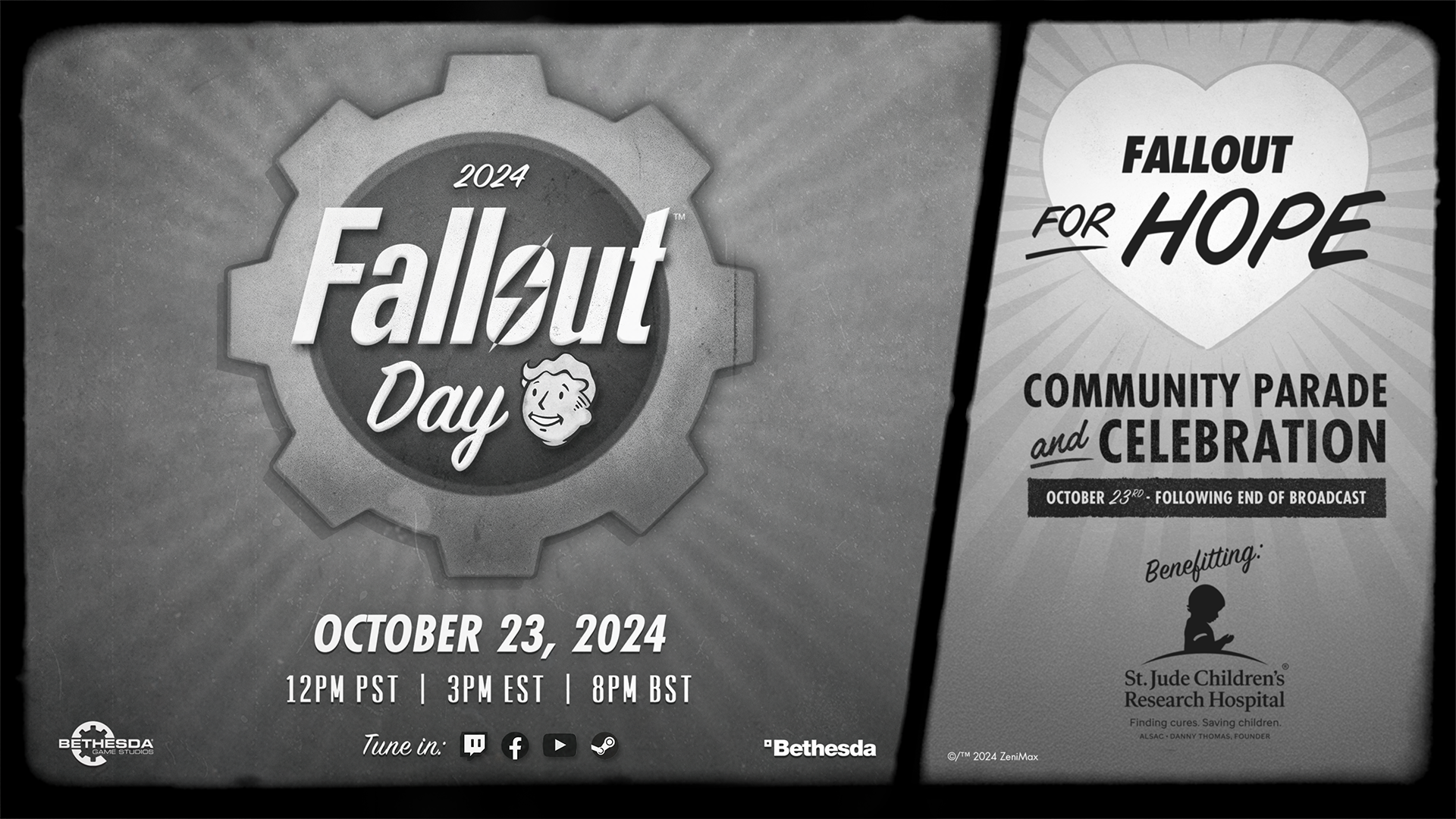
After the broadcast, tune into the post-show, with Fallout for Hope, hosted by Kenneth Vigue, for even more Fallout Day fun. Fallout for Hope is a Stream Team of content creators who fund raise for charities like St. Jude’s Children’s Research Hospital.
See you on Fallout Day!
Milepost Zero Hotfix – September, 17 2024
The new quest “A Bump in the Road” will start your career as a caravan leader as you make your mark on Skyline Valley.
You'll find the patch notes for today's update below:
- Various stability and performance improvements
- Fixed an issue causing the Red and White Rose Bushes and Meat Locker to appear invisible when placed
- Fixed an issue that caused downed enemies to despawn without leaving their loot piles
- A prompt will now appear when attempting to scrap any item that has a skin, is a seasonal item, or is from the Atomic Shop
Fallout 76: Milepost Zero Release Notes
We hope that this gives you enough time to work through the new Legendary Crafting system and make sure you're prepared to stake your claim on Skyline Valley when the new caravan and outpost systems are released!
---
Update Highlights
- Legendary Crafting – Craft your ideal weapons and armor with this updated take on crafting that gives you more control over the mods that are on your Legendary items.
- Best Builds – Submit, visit, and rate C.A.M.P.s from across the Wasteland for all to see!
- Vendor History Log – Returning customers are key, so find out who is buying from your vendors and make sure you give them a nice wave when you see them around Appalachia!
- Start your own Caravan – Later this month you will be able to protect your Caravan from raiders and creatures alike as you make deliveries around Skyline Valley.
---
Update Version 1.7.14.15 & Sizes
Fallout 76’s overall file size is getting smaller! Thanks to the work of our tech team, we now expect the total size of Fallout 76 to be around 95 GB (with some variance for the different platforms).
To reach this new size, all players will have to redownload the game. This is why you may notice that update size for Milepost Zero is larger than normal. Thanks in advance for your patience!
Note: You do not need to uninstall the game to receive the Milepost Zero patch. You will notice a large update that you will have to download. The platform you're playing on will do the rest
Check the download size below for today’s update:
- **PC (Steam)**: 82.07 GB
---
Legendary Crafting
We are excited to introduce this new iteration of Legendary Crafting that gives you more direct control over the Legendary Mods that appear on your Legendary items.
Before you can start swapping Legendary Mods onto your gear, you will need to obtain the mod you want to craft in one of two ways:
- Trading for the mod with another player;
- Scrapping Legendary items with your desired mod on it.
Every time you scrap a Legendary item you will get Legendary Scrip and have a chance at receiving Legendary Mods in the form of a crafting item. There is also a chance that you will permanently learn how to craft one of the mods on the item you scrapped too. Those loose Legendary Mods can be traded with other players, but once you craft that mod onto an item that item becomes character bound. Meaning it cannot be traded, sold, nor dropped in the world.
Once you obtain your desired mod, you can head over to your Armor or Weapons workbench to attach it to a legendary item in exchange for Legendary Scrip. Each time you replace a mod on an item, the cost to replace another will increase.
If you are lucky enough to learn how to craft the mod, head over to your Tinker’s workbench to craft it. The crafting cost will vary depending on the mod. Mods require Legendary Modules and various other items to craft that you can find around the Wasteland.
To aid in the exploration of new mod combinations, we have relaxed the Legendary Mod restrictions on weapons. We are excited to see what you craft!
Legendary Cores Discontinued
In August we announced that Legendary Cores will be discontinued as we consolidated the currencies used in Legendary Crafting. This means Legendary Cores will no longer be usable across Appalachia. When you login after downloading the patch, any remaining Legendary Cores will be converted into Legendary Scrip at a 1:1 conversion ratio.
Best Builds
Best Builds is a new social system that allows you to submit, visit, and rate C.A.M.P.s. The C.A.M.P.s with the most votes will be shared and populated though out wasteland for all players in Adventure Mode to see. You will be able to visit these amazing creations and enjoy the comforts, design, and unique tastes the builder has in store for its visitors. While visiting, if you happen to appreciate the builders C.A.M.P., you can show your support by leaving a 'Like'. We hope this allows our dedicated player builders an opportunity to show off their creations as well as inspire other players to create and submit their own Best Builds.
Submitting Your Camp
Once you have a C.A.M.P. that you would like to show off to the wasteland, you can submit your C.A.M.P. though the Best Builds Submission option. This is found by opening the 'C.A.M.P. Slots' list on the Paper Map and selecting the C.A.M.P. you wish to submit. Once you have entered the submission window, you will be able to take a few photos and tag your C.A.M.P. with the appropriate identifiers, to help make it stand out from the crowd. Once you are happy with how your C.A.M.P. is represented, you can submit your Best Build. The Best Build will be added to list of other players created Best Builds.
If you happen to make changes to your Best Build, you can easily resubmit the newly remodeled C.A.M.P. without losing any Likes previously earned. You can resubmit you Best Build by going to the 'Manage Best Builds' option also found activated 'C.A.M.P. Slots' list on the paper map.
Visit
Upon your travels in the wasteland, you will notice a few new locations with a blue ribbon on the paper map and on the compass. These are player created Best Builds. You will be able to fast travel to these C.A.M.P.s the same as you would any other C.A.M.P. While visiting, please take time to sit down, relax, and enjoy the experience the builder has instore for you. Do not delay on checking out a C.A.M.P. that piques your interest. Best Builds rotate in and out every hour.
Rate
If you happen to find a Best Builds that you fancy, feel free to show your support to the builder by giving them a Like. You can 'Like' a Best Build by going to the Best Build icon on the paper map and selecting 'Like'. Giving the builder a Like will help show other players that this C.A.M.P. is indeed a Best Build.
Vendor History Log
Learn about the hottest items at your C.A.M.P. Vendor with the Vendor History Log. Accessible from the Paper Map or your vendor, this log shows you what items were sold, their price, and who bought it.
The Vendor History log only stores transactions that happen during your current play session. After your session ends the log will be cleared so you receive a fresh log when you start playing again.
“A Bump in the Road” - Arriving Later this Month!
Near the border of Skyline Valley, you will come across the ruins of an abandoned headquarters once owned by the Blue Ridge Caravan Company. They have had a challenging time operating within the presence of the storm, but luckily for them you arrive! A seasoned traveler of the region, well-versed in all forms of combat and even a few forms of diplomacy (although that will not work here). The company decides to give you franchising rights to start your own caravan branch under their flag.
Once setup, you will escort caravans across the Shenandoah region and recruit a strong crew of varying professions. This crew will help you build up your own personal outpost where new rewards await you.
While you are traveling across Skyline Valley make sure you take a beat to help your fellow aspiring business dwellers with their own caravans. Events Public Team bonuses apply to Caravan events and helping someone else will get you back to starting your own caravans that much quicker.
Season 18 – Country Roads
Check out our Season 18 – Country Roads article here!
Combat Rebalance
Milepost Zero continues the work we started in Skyline Valley to update our combat systems. This patch we are focusing on changes to Fire and Poison damage and how the damage over time (DoT) effect works. There is also more rebalancing for creatures and many other changes.
There is a lot to dig into, so grab a cup of coffee or tea and dig in.
Player Weapons
**Fire/Poison Weapons and Mods**
Fire and Poison damage will typically include a DoT effect, with Fire damage trending towards shorter durations and higher Damage Per Second (DPS), with Poison trending towards longer durations and higher overall damage.
The following weapons, armor, and mods have been updated to align with this Fire and Poison Dot adjustment. Paired with the creature adjustments further below, this generally represents an increase in damage dealt:
- Acidic Gulper Smacker
- Alien Blaster Poison Mag
- Alien Disintegrator Poison Receiver
- Burning Auto Axe
- Poisoned Auto Axe
- Baseball Bat Heated Coil
- Blue Ridge Branding Iron
- Bow Flaming Arrows
- Bow Poison Arrows
- Bug Grenade
- Burning Legendary Armor
- Burning Love Bow
- Burning Sheepsquatch Club
- Burning Sheepsquatch Staff
- Chainsaw Flamer
- Civil Engineer Armor
- Compound Bow Flaming Arrows
- Compound Bow Poison Arrows
- Crossbow Flaming Frame
- Crossbow Poison Frame
- Crusader Pistol Pyro Receiver
- Electro Enforcer Poisoned
- Enclave Plasma Gun Beta Wave Tuner / Gamma Wave Emitter
- Flamer
- Flamer Compression Nozzle
- Flamer Napalm Tank
- Flamer Vaporization Nozzle
- Floater Flamer Grenade
- Floater Gnasher Grenade
- Gatling Laser Beta Wave Tuner / Gamma Wave Emitter
- Gulper Smacker Acidic Gulper Hand
- Hellstorm Missile Launcher Napalm Payload
- Holy Fire
- Laser Gun Beta Wave Tuner / Gamma Wave Emitter
- Molotov Cocktail
- Paddleball Fire Ball
- Perfect Storm 10mm SMG
- Pitchfork Flamer
- Plasma Cutter Flaming Blade
- Plasma Gun Laser Beta Wave Tuner / Gamma Wave Emitter
- Poisoned Sheepsquatch Club
- Poisoned Sheepsquatch Staff
- Power Fist Heating Coil
- Pumpkin Grenade
- Sheepsquatch Shard
- Shishkebab
- Shishkebab Extra Flame Jets
- Sledgehammer Heavy Searing Sharp Rocket
- Strangler Heart Power Armor
- Super Sledge Heating Coil
- Syringer Radscorpion Venom Syringe Barrel
- The Kabloom
- Toothed Shepherd's Crook
- Toxic Legendary Armor
- Ultracite Gatling Laser Beta Wave Tuner / Gamma Wave Emitter
- Ultracite Laser Gun Beta Wave Tuner / Gamma Wave Emitter
- War Glaive Flaming Blade
Additional Weapon and Armor Adjustments
- Adjusted the damage dealt by the Thorn armor
- Increased the damage for the Gauss Shotgun
- Increased the damage for Floater Freezer Grenades.
- Reduced the Damage over Time for the Cremator’s burn to account for it now scaling with weapon damage bonuses. (More info in the “Bug Fixes & Improvements” section below)
- Reduced the self-damage dealt to the player when firing the Kabloom at close range.
- Reduced the recoil and base AP cost for the Railway Rifle.
- Reduced the fire rate and removed the AP cost reduction for the Railway Rifle Automatic Piston Receiver.
- Headhunter Scythe’s damage type has been changed to Bleed.
- Adjusted the damage dealt by Electrified legendary armor.
Creature Balance
Like the adjustments made in the Skyline Valley update, the following creatures have updated Health, Resistances, and Damage. Our goal is to smooth out their difficulty from low to high level play making them a reasonable threat for all players.
Be sure to try some of the updated Fire and Poison weapons against these creatures as there is now more contrast in their resistances to each damage type:
- Alien
- Alien Invader
- Attack Dog
- Bee Swarm
- Bloatfly
- Deathclaw
- Eyebot
- Fog Crawler
- Honeybeast
- Mega Sloth
- Radrat
- Robobrain
- Scorchbeast
- Snallygaster
- Stingwing
- Tick
- Vicious Dog
- Wolf
- Yao Guai
Creature Weapons
Weapons used by the following creatures have also been updated. Like the updates to Fire and Poison damage on players’ weapons, creature weapons with Fire damage will typically have a DoT which has higher DPS, and weapons with Poison damage will typically have a DoT which deals more overall damage per hit:
- Angler: Spit Attack
- Assaultron: Shishkebab
- Blood Eagle: Flamer
- Competitor Blazer: Flamer
- Cultist: Flamer
- Fanatic Warden: Flamer
- Fanatic: Shishkebab
- Floater Flamer Fireball
- Floater Flamer Flamethrower
- Floater Gnasher Bite
- Harvestron (Test Your Metal): Flamer
- Juchi Batsuuri: Flamer
- Mirelurk Hunter: Spit Attack
- Mirelurk King Melee Attack
- Municipal Auditor: Flamer
- Scorched Exterminator: Plasma Launcher
- Sentry Bot: Flamer
- Showman: Flamer
- Trog Superior: Acid Reflux
- Wendigo Colossus/Earle: Poison Spit
Perk Changes
- Vaccinated: Increases Disease Resistance from all sources, based on your END stat.
- Thirst Quencher: Increases Action Points while not diseased, based on your END stat.
- Iron Stomach: Increases Damage Reduction while not diseased, based on your END stat.
- Natural Resistance: Increases your Energy, Fire, Cryo, and Poison Resistances while not diseased, based on your END stat.
Region Bosses
The following creatures have had an adjustment to how incoming damage is reduced. This primarily affects cases where V.A.T.S. Critical Attacks and Damage over Time effects would bypass a portion of the intended damage reduction.
- Scorchbeast Queen
- Wendigo Colossus and Earle
- Ultracite Titan
Bug Fixes & Improvements
C.A.M.P.
- Mothman Windchime now correctly displays in Atomic Shop
- Fixed and issue with Chattering Teeth Flair not appearing in the tinker's bench or placed on display
- Fixed an issue with Plank Partitions and Junk Walls not appearing in Build Menu and being unable to be edited
- Fuzzy Mothman Plushie no longer faces backwards when placed in display cases
- Fixed an issue with the Pillar Display requiring wood to be built despite being made from stone
- The fluorescent lamps in the "Iceglo Refrigerated Display Case" appear to shine when not powered
- Fixed an issue where the 'Fort Fortress' Wall Walk Posts can be attached to the same attach point
- Fixed an issue where two Fort Fortress Fences can be attached to the same attach point
- Atomic shop purchases from the build menu will again correctly give the player a confirmation prompt before completing the purchase.
Combat
- Made an adjustment to damage modifiers for creature weak points. This will result in additional damage dealt to creatures when weapons with lower damage per hit are used.
- Damage Over Time effects now scale with bonuses to weapon damage.
- Addressed a series of inconsistencies with how certain damage effects (primarily Damage Over Time) were dealing incorrect damage types or were un-typed damage without a corresponding resistance.
- Addressed an issue where Damage Over Time effects dealt by players would not scale to match the creature’s level.
- Fixed an issue where certain effects such as Damage Over Time and the Vampire’s legendary mod could stack when applied multiple times simultaneously on a single target. This commonly occurred with Shotguns, but could also occur when using the Two Shot legendary mod or the Multi-Shot Cremator mod in V.A.T.S.
- Addressed an issue where DoT damage dealt by NPCs could be lower than intended
- Fixed an issue that could prevent the Poison aura on the Strangler Heart Power Armor from affecting nearby enemies
- Adjustments to how damage increases from Perks are applied - this will generally result in an increase in damage dealt to targets with higher resistances, especially for DoT effects
- Melee weapon DoT damage now scales with strength
- Fixed an issue with Grenadier perk that resulted in explosions scaling up to twice as large as intended
- Fixed an issue that could cause some explosions to be scaled smaller or larger than intended
- Effects which increase explosion damage (Demolition Expert, etc.) should now increase the damage dealt by DoT effects from explosions
- Addressed an issue where the Danger Cloud mutation would deal more damage than intended
- Addressed an issue where DoT damage could persist on a player when entering the DBNO (Down But Not Out) state, resulting in the player dying immediately instead of being able to be revived.
- Addressed an issue where the bonus to DoT damage from Strength (for melee weapons) and Perks could be higher than intended
- Addressed a display issue with the description text for the Strangler Heart Power Armor’s set bonus
Gameplay
- Changed how Explosive Bullets mod how it interacts with various weapons
- Fixed an issue with the Light Em Up Plasma Gatling flickering on the front neon tubes while in first person
- Fixed an issue with the Harpoon Gun's crosshair disappearing during the precise aiming in the first-person view
- Fixed an issue where the Cultist Monarch Mask did not state its protection against damage and disease from airborne hazards in its description
- Damage from Fire and Poison damage over time effects should now be properly reduced by Fire and Poison resistance
- Improved Chainsaw durability
- Perk effects will now persist when player exits world and returns
- Fixed an issue where adding the Blue Ridge Guardsmen Paint removes legendary mod prefixes from the armor's name
- Players will be asked if they want to change servers when logging into a nuked zone.
- Fixed an issue where the Broken Prosnap Deluxe Camera item could no longer be looted from tourist corpses and toolboxes if the player had completed the Bucket List quest and deleted the camera.
- Fixed an issue which could cause power armor to animate incorrectly while using the Brotherhood Salute emote.
- Extended the no C.A.M.P. zone around Meat Week to prevent camps from impacting the event
- Fixed an issue preventing duplicate plan drops from Holiday Gifts
- Fixed an issue which prevented corpses from turning into goo piles after being hit by a plasma arrow critical shot
General
- Fixed a crash when fast travelling while camera is half underwater
- Fixed an issue with the "Gain XP" Challenge giving an incorrect amount of S.C.O.R.E.
- A few Daily and Weekly Challenges will now be auto-tracked upon logging into a server
Quests
- Seismic Activity: Fixed an issue which could cause a crash for certain consoles
- Safe and Sound: Fixed an issue where enemies could get stuck during encounter waves
- Oldest Trick in the Book: Player will no longer lose cultist outfit when engaging with combat outside of the quest area
- The Powerhouse of the Cell: Fixed an issue which cause shadows to continue attacking players during the conversation with Hilda
- The Powerhouse of the Cell: Fixed an issue that could cause a soft lock when injecting Serum into the Sedated Lost
- The Powerhouse of the Cell: Fixed an issue causing required enemies not to spawn
- I Am Become Death: Players who have previously completed the quest but not received the achievement can now receive the achievement by launching a nuke again
- Blue Ridge Branding Iron: Fixed an issue that could cause the unique skin to be unobtainable if removed from the weapon
- I Am Become Death**: Players who have previously completed the quest but not received the achievement can now receive the achievement by launching a nuke again
- Ally: Thicker Than Water**: Fixed an issue that prevented Frankie from killing The Claw
- Fixed an issue with Audrey Stolz's end dialogue inconsistencies
- Fixed an issue that could cause players to lose the Enclave questline after logging out
- Fixed an issue with the quest marker for objective 'Enter Vault 63' placement
- Eviction Notice: Thank you all for your feedback around the change made to Eviction Notice during the Public Test Server. We have decided to revert the change we made to the Legendary Creature spawn rate in the PTS while we spend more time investigating how we want to make sure all public events are rewarding.
UI
- Fixed a display issue in the Pip-Boy effects tab
- Fixed an issue where some icons were incorrect in the Pip-Boy effects tab
- Items will indicate if they count as a costume when inspected
- Weapons will indicate classification information when inspected
Vendors
- Giuseppe now sells Mystery Bobblehead Boxes for 20 Stamps (6 per day)
Known Issues
- The team is aware and are continuing to investigate reports of lag when using the Pip-Boy. We thank you for your patience. If you are experiencing this issue, please contact our Customer Support team so we can collect more information.
Milepost Zero Maintenance Announcement
On September 3 at 10 AM ET, Fallout 76 will be brought offline to deploy the Milepost Zero update.
This update will require a full redownload of the entire game due to a repackaging effort which will make the overall game size smaller.
The expected final file sizes will be in our release notes.
Season 18: Milepost Zero – Country Road
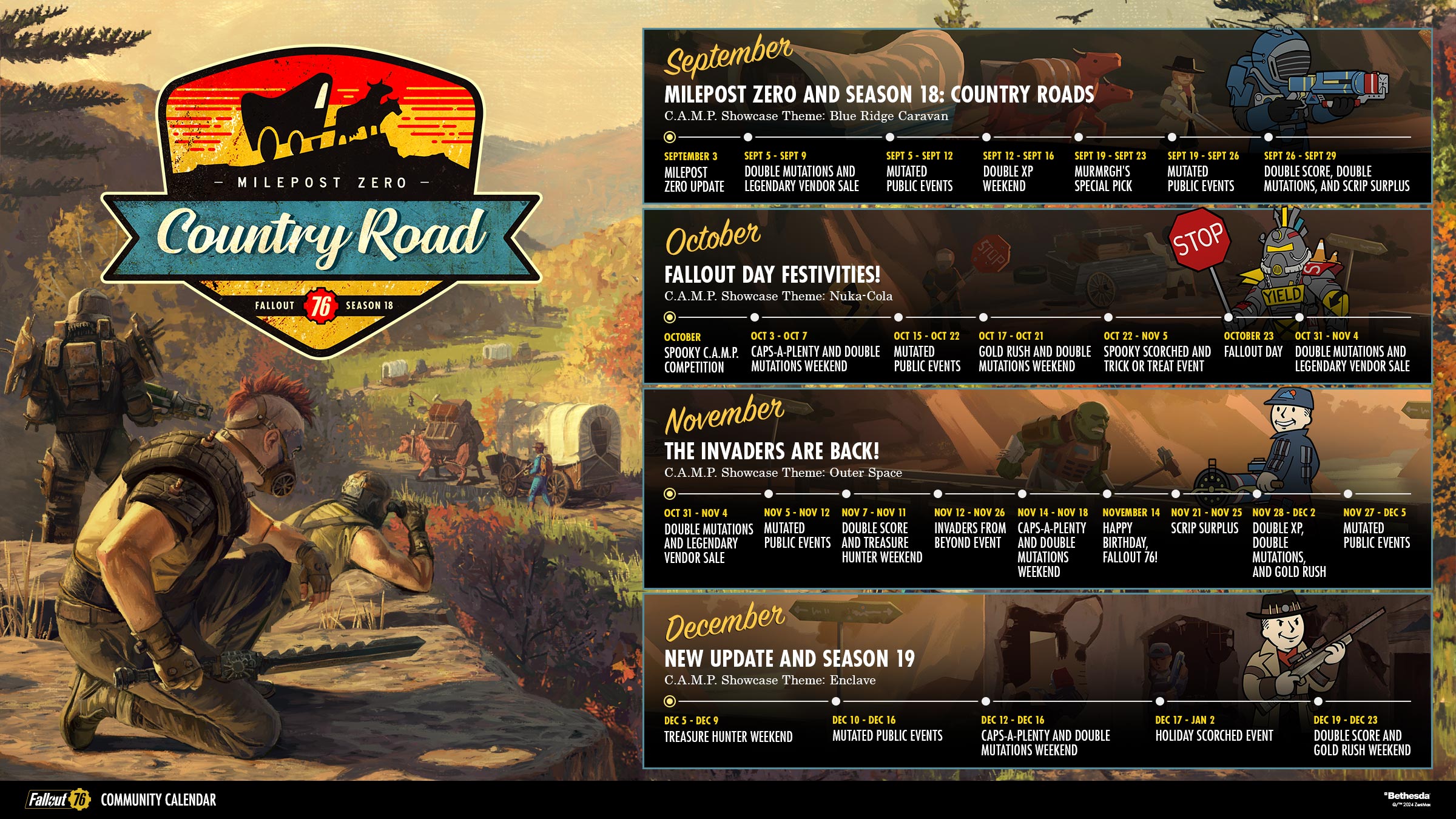
Fallout 76’s upcoming Season, Season 18: Milepost Zero - Country Road, starts on September 3, releasing alongside the Milepost Zero update.
Unlock exciting rewards from the Seasons pages, like the Blue Ridge Power Armor and Weapon Paints, the Rusted Power Armor and Weapon Paints, the Raider Lodge and even a Brewing Vat for making tasty brews in your C.A.M.P. There’s also the Stop Sign Paint for your melee weapons so you can beat back your enemies with a big metal sign. Unlock even more rewards with the Fallout 1st Seasons Pass (included with a Fallout 1st membership).
Along with Season 18, we’re adding a post-level 100 challenge! In this repeatable challenge, players over level 100 will now earn 300 S.C.O.R.E. when they complete three Public Events.
Check out some more of the rewards you can earn in Season 18 in the preview video here.
Milepost Zero Developer Preview
Join Creative Director Jon Rush on the country roads of Skyline Valley in our video preview of Milepost Zero. You’ll learn more about Caravans, where you’ll protect your brahmin as they travel from outpost to outpost. Jon also introduces Best Builds, a new way to vote for and feature the most exciting C.A.M.P.s. The best C.A.M.P.s will be featured across servers! Finally, we’ll preview Legendary Crafting, adding the ability to scrap Legendary weapons so you can learn, craft, sell and trade your Legendary Mods.
Inside the Vault – Update on Legendary Cores
At the release of Milepost Zero on September 3, Legendary Cores will be discontinued as we consolidate the currencies used in Legendary Crafting for a more streamlined experience.
This means that Legendary Cores will no longer be usable across Appalachia. After the update, events that currently drop Legendary Cores will drop Legendary Modules instead. Any unspent Legendary Cores will be converted into Legendary Scrip at a 1:1 conversion ratio when Milepost Zero releases.
To help you spend your cores, the Scrip Surplus event will be extended and will continue running until Milepost Zero is available.
We hope you’re looking forward to Milepost Zero!
Pioneer Scouts: Uncharted Lands Challenge Event
Join us in Fallout 76 for the Pioneer Scouts Challenge Event, Uncharted Lands, starting August 6 and running through August 20. Take photos, gather resources and set up C.A.M.P. in the uncharted region of Skyline Valley.

Remember to pick up your Marshal Mallow T-Shirt and Shorts outfit for free in the Atomic Shop and wear it while completing the daily challenges to get your rewards. Finishing 5 daily event challenges will automatically complete the weekly challenge. Each week will have its own set of challenges and if you complete both weekly challenges, you’ll earn the Roasting Stick weapon skin so you can roast not only marshmallows, but your enemies as well! You can also earn the Marshal Mallow Figure and a “I’d Rather Be Camping” poster for your C.A.M.P.

Fallout 76 Update Notes – July 23, 2024
Update Version 1.7.13.12 & Sizes
Check the download sizes below for today’s update.
PC (Steam): 6.9 GB
---
Quality of Life
- Updated help screen and loading screen text relating to gaining levels and perks
Weapons
- Improved the uncharged damage for the Gauss Pistol
- Players can now revert Tire Irons and Walking Canes to their base appearance when removing another skin
World
- The event Dangerous Pastimes is now a part of the regular event rotation
- Various balance adjustments to the Storm Goliath Boss
- Strangler Bloom will now have a chance to spawn in nuked regions where Strangle Pods are located
Quests
- Into Lands Unknown: Placing signal flares during the quest no longer causes soft control lock
- Oldest Trick in the Book: Objective markers will no longer appear over already killed cultists in the Crimora Mines
- Between the Lines: Fixed an issue that could cause teammates to be blocked by Laser Grids when helping a team leader
- Powerhouse of the Cell: All players should now correctly receive a keycard
- Duty Calls should no longer become stuck after picking up brains
- Patrol Duty: The robot now properly paths into the prison yard and back out again when necessary
Bug Fixes
- Fixed various localization issues
- Fixed missing voice lines for Lane Platte
- Fixed an issue that prevented Neon Letters from being placed in your C.A.M.P.
- Fixed an issue where players could not access radiant quests after completing Sofia's questline
- Biv has sobered up enough to give out Daily Quests again
- Union Power Armor Jetpack can now be crafted
- The blue Headlamp for T-51 Power Armor can now be crafted
- Revealed Perk Packs now show the proper maximum rank
- Mothman Tome buff persists when exiting & reentering server
- Equipping the Red Fedora now counts towards the Possum Archaeology Challenge of bone collecting
- Steeped Thistle Tea should now properly appear in a players inventory selection when attempting to place it in a refrigerator
- Colored Hard Hats will now maintain their color when picked up
- Applying the Fallout 1st Atomic Paint material to any Scout Armor piece will successfully block the item from appearing in and being destroyed at a Legendary Exchange vendor
- Prewar flags now correctly display 12 stars
- Selecting “Max” when exchanging treasure notes now selects the correct amount
- The Nocturnal weapon mod will now correctly increase damage during the nighttime hours
Known Issue
- When viewing Bundles in the Atomic Shop, disclaimer text on where to craft items may appear cutoff