- Firecrackers can be acquired during the event and used to exchange items at the Festival Shop. - Items exchanged at the Festival Shop will be sent to the gift box. - When you access during the event period, you can obtain 1000 Firecrackers for the first time. - You can obtain 30 Firecrackers per regular match, with a limit of 10 times a day. - If you and your team members succeed in shooting during the regular game, you can earn up to 100 Firecrackers per day. Only the regular match (BZ/FS) channel is available.
• When the second period begins after the end of the first period, the purchase count will be reset, and the products will be changed.
• All Firecrackers acquired from the event will disappear once the event ends.
Festival Shop sections:
Representation:
Available Freestyles per position:
Outfit Section:
Card Section:
Materials Section:
Pieces Section:
Other section:
Thank you for your continued support!
- FreeStyle 2 Team
5 Days of Happiness
5 Days of Happiness indeed!
Join us for five days filled with delightful surprises, where you can enhance your gaming experience simply by logging in every day!
Simply login everyday and get rewards by redeeming it!
Embrace the spirit of happiness and share the excitement with your fellow players!
- Freestyle 2 Team
Candy Factory
How sweet are you? Get tons of reward by making Candies in the Factory!
Creating candies in the factory is not just sweet, it's a rewarding experience!
You'll receive tons of rewards by making candies in our factory!
Whether it's crafting, earning, or just enjoying the delightful process,
there's a lot waiting for you in our candy-making adventure!
Event Period:
2023/11/29 00:00 - 12/5 23:59 PST
Event Guidelines:
1. You can use Candy Syrup to make candies.
2. Once the syrup goes up, you can make special candies in each section
3. You can check rewards in candy preview.
4. You can create various types of reward.
5. You can make special Jelly bear for a very special rewards.
Complete Guide:
Create more candies and have some fun! Supplies till lasts!
- Freestyle 2 Team
FREESTYLE2: STREET BASKETBALL - LABOR OF LOVE IN THE STEAM AWARDS 2023
Expressing gratitude for the fantastic 9 years of ballin' with our dear FS2 Ballers! Kindly consider casting your valuable vote in the 2023 LABOR OF LOVE category!
Seize this opportunity to showcase your support and further inspire us! Make sure to submit your nominations before November 28 (UTC).
2023.11.22nd Patch Notes
Greetings Ballers,
Please check out the notes below for the details of the game update today!
2. November Improvements We want to let everyone know that we've made significant changes in the hopes of making Freestyle2's overall functionality much more accurate, as well as balancing other game aspects. Link: https://freestyle2.joycitygames.com/news/event/18322
[Events]
1. Your Private Restaurant Greetings! Welcome to Your Private Restaurant! We prepared a full course meal for you! Click on the each for to obtain FS2 coins and awesome prizes! Link: https://freestyle2.joycitygames.com/news/notice/18316
2. Bingo Event Login to earn one (1) Bingo Coin. Get three (3) Bingo Coins byy playing a match (Regular or BZ match). Complete the lines and missions to win special items! Link: https://freestyle2.joycitygames.com/news/notice/18324
3. Team The Forgotten: Eugenie A dynamic newcomer has graced the court – none other than Eugenie. While beauty may be a matter of perspective, Eugenie's captivating presence is universally acknowledged. With her stylish short hair and eyes that sparkle with a vibrant spectrum of colors, her charm is truly magnetic. Link: https://freestyle2.joycitygames.com/news/event/18320
4. Eugenie Pick Up Event! Eugenie has arrived! Catch her while you can! This is the perfect time to obtain a unique character like Eugenie! You can get her through this Pick Up event. Link: https://freestyle2.joycitygames.com/news/notice/18315
5. Item Draw Event Are you ready for a thrilling shopping experience like no other? Join us for the Item Draw Event where exciting prizes and discounts await you! It's a first-come, first-served discount opportunity, so don't miss out! Link: https://freestyle2.joycitygames.com/news/notice/18318
7. The Infinite Machine Infinite Enhancement Machine is back! Do you have what it takes to challenge the Infinite Enhancement Machine? Test your mettle on this event! Link: https://freestyle2.joycitygames.com/news/notice/18314
8. Green Skull's Package Purchase Event Green Skull's Package Sale Event is back! Check out the Moon Rabbit Bountiful Package at a 90% discount! You can also obtain the same package if you have accumulated a total of 35 purchases from the event! So, what are you waiting for? Come and check out this limited-time package sale. Various items are also up for grabs! Link: https://freestyle2.joycitygames.com/news/notice/18313
10. Let's Get It The 'Let's Get It' event is now open! Purchase a Track now and receive random rewards. You will have a chance to obtain awesome rare items! Link: https://freestyle2.joycitygames.com/news/notice/18312
11. Resell Shop Never had the chance to get the previously released Item Ball Items? We got you covered! Join our Resell Shop Event now! Link: https://freestyle2.joycitygames.com/news/notice/18311
13. MegaPass Season 33 Mega Pass is back for its 33rd season! Complete all the levels and acquire this season's exclusive Cosmetic Items as well as other goodies! Link: https://freestyle2.joycitygames.com/news/notice/18321
- FreeStyle2 Team
11.22.2023 Balance Patch
Hello Ballers,
This is the Freestyle 2 Development Team.
On 11/22/2023 (Server Time), the balance of all positions will be adjusted during the regular maintenance.
- Following maintenance, 100,000 points have been granted to all accounts, and the Mastery of the SF position have been reset. *Please verify if items have been received and Majesty have been applied before playing the game.
Normal Skill Balance Changes - The One Step Pass skill for the PG position has been removed.
Play Coefficient Changes A. V-Cut - There has been a slight increase in Stamina consumption when using the V-Cut skill.
B. V-Cut Drive Upgrade - There has been a slight increase in Stamina consumption when using the V-Cut Drive Upgrade skill.
C. Away Screen Move 1) Increased Stamina consumption for Away Screen Move - The Stamina consumption for Away Screen Move, which was the same as a normal Dash, has been increased. 2) Adjustment of Away Screen Move usability - Stamina will not be recovered while Away Screen Move is usable. (This applies to Stamina recovery skills and Stamina buffs.) 3) Tripping added to Away Screen Move - Stamina will be increace while tussle - Face Up Tuessle cause 100% fall and significantly reduce stemina.
D. Last Resistance Upgrade - If the C, PF, and CT positions possess the ball for longer than 0.8 seconds, the “Last Resistance Activation Chance” gradually increases. (0.8 seconds: 40% chance, 2 seconds: 100% chance)
Please be guided by the following tables below showcasing the changes made so you can modify your character attributes to align with the adjusted balance.
[C] Position
[SF] Position
[PG] Position
[DG] Position
~ Freestyle 2 Team
Freestyle 2nd System Improvements
Greetings Ballers,
We want to let everyone know that we've made significant changes in the hopes of making Freestyle2's overall functionality much more accurate, as well as balancing other game aspects. We also want to share the most recent information we have about the system improvements that we've made specifically for the user interface of Freestyle.
We hope that these changes will make reading/viewing more convenient for our beloved ballers.
I. Updated main window of Freestyle Before
New version
We've added an 'UP' tag and it will serve as a reminder to users which Freestyles are currently upgradable. The UP indicator will only occur when you have sufficient Freestyles for upgrades.
II. New pop-up reminders for levelling up Freestyles Freestyle Level Up
Quick Level Up
Those two pop-up messages will occur if you attempted to level up your freestyle without sufficient resources.
III. Updated Help Window Freestyle Level Up Help Section
1. Among owned Freestyles, the "Freestyle Level Up" button will be activated for those with an "Up" mark. 2. Clicking the FreeStyle Level Up button will open a separate Freestyle Level Up pop-up. 3. You can adjust the number of level-ups based on the number of low Freestyles you own. 4. The resources needed will change based on the number of level-ups and will be displayed in the pop-up. 5. However, if you do not have enough resources, the deficient amount will be displayed in red, and you will be unable to proceed with the chosen number of level-ups.
Quick Level Up Help Section
1. Among unowned Freestyles, you can Quick Level Up those with a border or marked with a red dot. 2. Quick Level Up is a system that allows you to obtain unowned Freestyles by using low Freestyles. 3. Clicking the Quick Level Up button will open a separate pop-up. 4. The amount of resources needed will be displayed in the pop-up. 5. However, if you do not have enough resources, the deficient amount will be displayed in red, and you will be unable to proceed with Quick Level Up.
Change Set Options Section
1. Set Option Change is a feature that allows you to change the existing set options on a 5? Freestyle by using Freestyle Training Tickets. 2. Clicking on the Set Change button will open a pop-up related to set option changes. 3. You need 10 Freestyle Training Tickets to change set options, and the button will not activate if you do not have enough tickets.
Welcome to the latest shop update!
Explore our refreshed collection with brand-new outfits and exciting additions.
Upgrade your style with our latest update!
Outfit Section
Mileage Section
Outfit Preview: Military Training Outfit
Rising Star Training Outfit
Ball God Outfit
Our goal is to continuosly produce beneficial updates and make the game better for everyone. We hope for everyone's continued support.
Enjoy gaming!
- FreeStyle2 Team
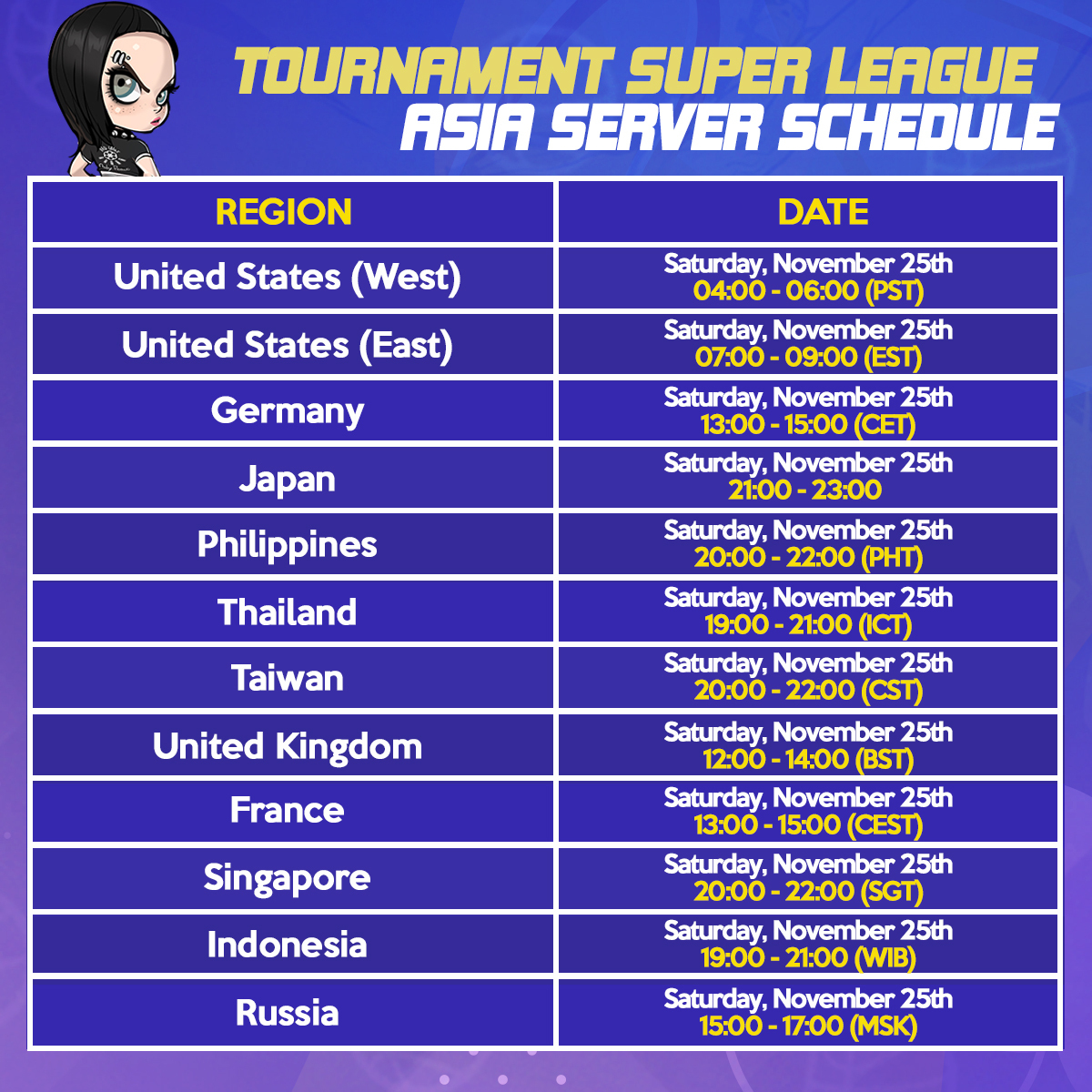
November Super Tournament and Crew Tournament Schedule
Welcome to our Freestyle 2 November 2023 Tournament Update!
Form a team and be the best by defeating many of the great teams on each server!
Both the Super Tournament and Crew Tournament will be held three (3) times on November 25, 2023 (PST).
Check out the schedule below.
--Tournament Schedule--
Asia Super Tournament Schedule:
Asia Crew Tournament Schedule:
EU Super Tournament Schedule:
EU Crew Tournament Schedule:
NA Super Tournament Schedule:
NA Crew Tournament Schedule:
--Super Tournament Mechanics--
- Players can participate in other servers (Asia, EU, NA) regardless of the server focus time.
Example: During Asia Server Focus Time Tournament - Players in the Asia Server that are participating in the event may earn the Special Rewards. - Players playing on the other servers (NA or EU) will not be able to earn the Special Rewards. - Coin Rewards will still be distributed regardless of server and tournament focus time. - The player's location or country does not matter, only where the player is currently logged in the server.
Participation Conditions - Bronze rank or above in the Ranked Game - The tournament consists of a 16 rounds, and a total of 48 players can take part.
--Super Tournament Rewards--
1. Coin Rewards
The tournament will be open to ALL Server Regions and can earn Coin Rewards.
2. Special Rewards Players who are participating in the Tournament during the FOCUS TIME of each server are eligible to be rewarded with Special Rewards.
*The personalized uniform reward for the winner will be distributed individually. *The character name will be engraved on the back of the uniform.
Outfit Preview
Conqueror's Gown
Super Conqueror Frame
Winner’s Personalized Uniform
(Lettering functions can be applied in this uniform.)
Exclusive Tournament Outfit
Lettering Outfit and Magic Pen added to Super League Tournament Rewards
Lettering Outfit Preview (M/F)
Additional Details about the Lettering Outfit
- You can obtain lettering outfits from the Tournament Shop - You can use the lettering function to write your own text and select colors! - When using the lettering function, You can make the first change for free. Afterward, lettering items will be required to make changes. - Lettering outfits are divided into tops and bottoms. - Outfits with a "Pencil" icon on the bottom left can be used as lettering outfits.
a) Top: Jersey
b) Bottom: Leggings Shorts, Regular Shorts
* Before using the lettering function, the basic settings are as follows: Text: FS2, Color: White, Stroke: Black * An error notice will pop up when clicking on the lettering function on unequippable outfits.
Lettering Items
- Use 1 Lettering Item to apply lettering one time. - Lettering Items are shared within the account, and you can have up to 999,999,999.
How to Apply Lettering
Step 1. Go to Locker and click on the lettering function of the Lettering Item. Step 2. Select a lettering outfit and change the lettering and color settings. Step 3. Click the “Apply” button to save settings. * An error notice will pop up when clicking on unequippable lettering outfits. * View options can be changed to show only the outfits without the character.
1. Lettering Settings - You can use English, Korean, and Chinese characters as well as numbers for lettering. - Special characters and spaces cannot be used. * You can enter up to 12 characters. * Banned words or names of the lettering outfits themselves cannot be used.
2. Color Settings - You can select one of the displayed colors.
3. Lettering Trial - Hover mouse over a lettering outfit to see the lettering trial button. - Press the button to try the lettering function.
Important Notes: - Rewards will be distributed after the event ends. The schedule will be provided separately.
- Duplicate participation will be not be considered for multiple rewards. If a player participates multiple times in the tournament, the player will be rewarded with only the highest rewards they achieved during the tournament.
- Character selection coupons will be sent after the winning team is determined, and participants can specify their desired characters through separate 1:1 inquiries.
- Choose 1 reward (Premium Sub Att x100 or Character Coupon x1) and contact our support team at steam_support@gamekiss.com
Premium Character Reward List:
- In case of match failure or disconnection due to PC/network issues, it will be considered as a loss.
- If a system error occurs during the finals, the match may be held again at a later time.
- Any other issues that arise will be addressed promptly, and any changes or updates will be communicated through notices.
--Crew Tournament Mechanics--
- Participation is limited to 3 individuals from the same crew. - A maximum of 2 teams can enter one Crew Tournament. - There is only one tournament open, consisting of 16 rounds.
1. The Button for [Crew Tournament Open] will be visible on the main screen of the Crew. 2. Upon opening the tournament, a room is generated automatically. - Throughout the event, a single round takes place in a room. 3. Recruit fellow players and assemble a team. - In the waiting area, all three members from the same crew team must be present, and only the room leader has the authority to apply for participation. 4. If all team members, except the room leader, consent to participating within 10 seconds, participation is confirmed in the order it was received. 5. All teams participating will compete simultaneously. 6. The games persist until the Crew Tournament concludes, iterating through game progress, game completion, and round completion.
- Leaving the crew, deleting a character, or dissolving a crew does not erase ranking record data. - Within the Ranking page, a Crew tab has been introduced in the Tournament section. - In the Crew Ranking page, a Tournament Ranking tab is now available. (Rankings are determined by aggregating the TP Points earned by each crew.)
On the lobby screen, you can view the details of the winning team from the Crew Tournament.
a) Requirement: After the conclusion of the Crew Tournament, the ranking is updated, and the insignia of the first-place crew is showcased. (In typical tournaments, the Crew Tournament airships are exhibited at random.)
Channel: FS Channel Details: The crew emblem and name are visible for viewing.
Rewards:
You can use the lettering feature to specify text and color. When setting lettering for the first time, it's free, but for subsequent lettering changes, you'll need to consume lettering items. Lettering outfits have unique marks for identification. You cannot set duplicate lettering for different lettering outfits (case-insensitive for alphabets). Magic Pens can be obtained from the Tournament Shop.
Lettering Items
- Use 1 Lettering Item to apply lettering one time. - Lettering Items are shared within the account, and you can have up to 999,999,999.
How to Apply Lettering Step 1. Go to Locker and click on the lettering function of the Lettering Item. Step 2. Select a lettering outfit and change the lettering and color settings. Step 3. Click the “Apply” button to save settings. * An error notice will pop up when clicking on unequippable lettering outfits. * View options can be changed to show only the outfits without the character.
1. Lettering Settings - You can use English, Korean, and Chinese characters as well as numbers for lettering. - Special characters and spaces cannot be used. * You can enter up to 12 characters. * Banned words or names of the lettering outfits themselves cannot be used.
2. Color Settings - You can select one of the displayed colors.
3. Lettering Trial - Hover mouse over a lettering outfit to see the lettering trial button. - Press the button to try the lettering function.
- Freestyle 2 Team
Time Zone Adjustments for Freestyle 2 Tournament Schedule
Greetings Ballers,
We hope that you are doing well!
Due to the summertime update, please be aware that Tournament schedules may experience delays in some countries.
We appreciate your understanding as we work to ensure a smooth gaming experience for all.
Thank you for your patience and continued support!