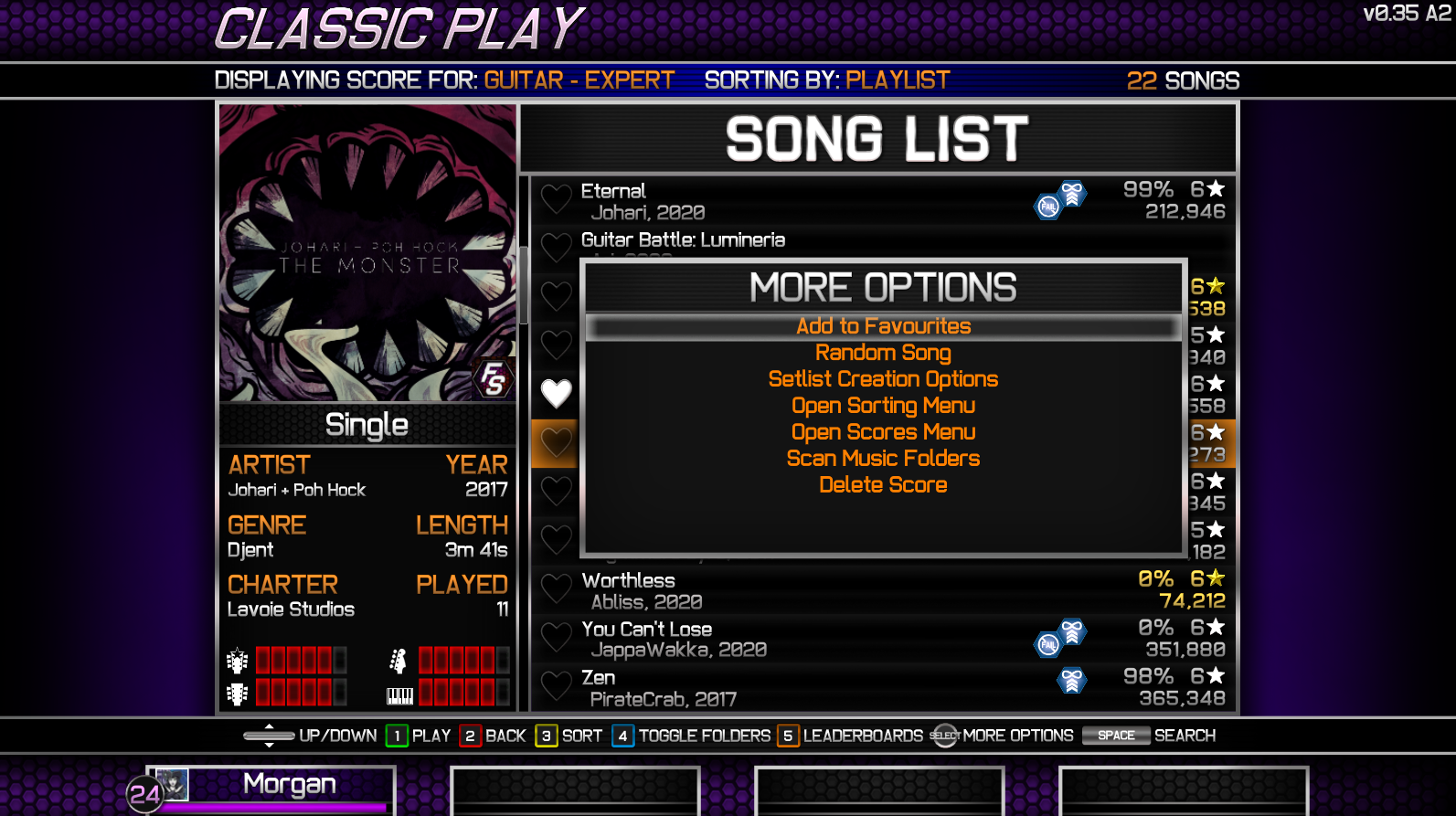
- Added an Overstrum Protection setting - Added a Streamer Cutout toggle which will essentially make the background a void for transparency capture - Added a selection of splash texts for the main menu - Added the ability to open the song search menu by using the more options menu in song select
BUG FIXES
- Fixed an issue with how video backgrounds handle positive values for video_start_time tag - Fixed an issue that caused the game to softlock when selecting random song while all song folders were collapsed - Fixed an issue for if a chart can't be loaded that it would cause a softlock. Will now boot you back to the song select menu with an error message - Addressed an issue with large gameplay stutters happening when sustains were on screen - Fixed an issue with song speed indicator not being updated upon load in practice mode if song speed does not equal 100%
ADJUSTMENTS
- Completely overhauled the video background logic - Redesigned the hit flame animation to be more fluid and responsive - Adjusted how song cache is handled during gameplay and should improve performance for players large custom setlists - Search box will now display what your search is based on in the title text - Made some adjustments to how custom themes import sprites - Updated Debug Mode text to display the Overstrum Protection timer with 'OP:'
Fret Smasher Patch v0.35.6 A2
Change-log:
BUG FIXES
- Fixed an issue with the Sorting Preference setting not saving the "Supports Leaderboards" option - Fixed an issue when opening the sort menu in song select with Supports Leaderboard as the sorting method that the index would be off the visible menu - Fixed an issue with charts with long song names not saving to leaderboards
ADJUSTMENTS
- Leaderboards will now track & display Pro Full Combos and Big Brain Mode cheats in the entries - Swapped out the infinite frontend icon in the leaderboard menu to use the low resolution texture
Fret Smasher Patch v0.35.5
Custom Leaderboards
This feature is currently experimental and may see frequent changes or times when the option is disabled. Leaderboards are now supported for customs but they'll only have a leaderboard generated if you select Create Leaderboard in the ready up menu. This option is only available in classic single player and will only appear when new leaderboards are allowed to be generated.
What do we mean by allowed to be generated? Well since we want to control the incoming wave of custom leaderboards and ensure that customs that come in will be ones that have more than 1 uploaded ranking, we'll be moderating customs frequently. If there's a time when we need a moment to clean out some customs or add in leaderboards for new official setlist songs, we may disable the ability to create new leaderboards. When the ability to create new leaderboards has been toggled, we'll make an announcement over in our Discord server.
Supports Leaderboards Sorting Option
This sorting option will allow you to sort songs by if they have an existing leaderboard or not. However this will not automatically scan songs for leaderboards. Songs are only marked as supporting leaderboards if a leaderboard is found when pressing Leaderboards in song select, if one is found when readying up, or if a leaderboard was created/a score was uploaded at the end of a song.
So while this won't show you exactly which songs have leaderboards in real time, it will allow you to return to any songs you've played or have looked at that currently support leaderboards.
Change-log:
ADDITIONS
- Custom Leaderboard Support - Added settings for Leaderboard Viewer (Leaderboard Type & Leaderboard Entries) - Added a sorting option for leaderboard supported songs
ADJUSTMENTS
- Holding down Sort or Leaderboards in song select will take less time to pull up their respective hold menus. - Moved Highway Speed setting from Gameplay to Customize
Fret Smasher Patch v0.35.4 A2
New Theme Features
New for user themes, you can now import your own custom fonts for the score, streak, notifications, song info, countdown text and more! Inside your theme.ini file, you can now also toggle overlay flames which will overlap the flame animation instead of resetting when hitting the same note colour in a row. Additional settings in the ini include the multiplier tick fill origin & method, song info colours, and an alternate streak/hf ready notification animation. A few new textures are also available for the song title cards and the countdown background.
Leaderboard Viewer
New for v0.35.4 A2, you can toggle an in-game leaderboard that will display your real time progression up the ranks as you play a song! This board will display up to the top 50 scores and can be dragged around with mouse to a new location, just like the score box, chaser box, and input viewer. Don't want to play with the leaderboard viewer? You can toggle it off in the settings. The leaderboard viewer is only available for songs with a valid leaderboard and with 1 entry or more. Leaderboards are disabled when playing with cheats, modifiers or bots.
The design of the leaderboard viewer is not final, we're currently focused on ensuring the logic is all there.
Change-log:
ADDITIONS
- Added New Theme Features - Added Leaderboard Viewer
ADDITIONS FOR THEMES
- Import Fonts -> Fonts support .ttf and .otf file types. Font file naming includes: notif.ttf, info.ttf, score.ttf, streak.ttf, star.ttf & countdown.ttf - Song info panel textures - Countdown background texture - Song info font colour - Set the fill origin & method for the Multiplier Tick - Toggle overlay flames (Instead of resetting the flame animation per hit, the game instantiates a new flame allowing for flames to overlap) - Alternate streak/hf ready notification animations
BUG FIXES
- Fixed an issue with bot level 100 not having perfect accuracy - Fixed an issue with bots attached to player 1 stuck using bot skill 1 - Fixed various typos - Fixed an issue with the control mapper and the main menu controls both listening for inputs simultaneously - Fixed an issue with the News tab soft locking the game when attempting to interact with the News when in the main menu for the first time in the session - Fixed an issue with the song.ini parser not converting preview_start_time correctly - Fixed a soft lock that would occur if the player levels up when Steam hasn't been initialised correctly or when Steam is offline - Fixed an issue with certain setting options not initialising correctly - Fixed an issue with sustains not swapping to the dropped material immediately after a miss - Fixed an issue with the ready up sound ignoring the current volume settings - Fixed an issue with the highway in/out sounds in multiplayer all playing at once instead of just having a single highway play the sound. This causes the sound to be much louder than expected - Fixed an issue where it was possible to see the leaderboards of a locked song in Career Mode - Fixed an issue where it was possible to see the song info of a locked song in Career Mode - Fixed an issue that would cause the game to soft lock when loading a song with hit flames disabled
ADJUSTMENTS
- Updated the song scanner visuals and improved scan speed for first scan of the active session - Made some tweaks to the outdated save data message
Fret Smasher - Quick Hot Fix
Quick hot fix just to fix the song scanning not parsing out song meta data correctly. Make sure to rescan your music folders to have the fix applied to your song cache.
Fret Smasher Patch v0.35.3 A2
Change-log:
BUG FIXES
- Fixed an issue with song metadata not parsing out rich text tags correctly - Fixed an issue with lefty flip not registering the correct input directions on start up
ADJUSTMENTS
- Updated Rewired to the latest release - Out of date or corrupted save data will now provide a warning message on the title screen. Players may attempt to push through but may lead to errors or a forced data reset if data is unreadable
Fret Smasher Patch v0.35.2 A2
Audio Stuttering/Skipping
Very recently we had a well known streamer (Acai) check out our game on twitch where a major bug with the audio was discovered. This was an edge case scenario where only they were seeing these issues. To ensure that everyone regardless of hardware can have a smooth audio experience, we've added 3 new settings to the Calibration settings.
Detect Audio Latency - This setting will observe your current device's audio latency from when an audio stream is triggered to when it's sent to the speakers. However keep in mind that if your using a wireless speaker setup, this doesn't detect latency to the actual speakers, just to the system audio player. So use the detected value as a minimum setting and move the audio offset up in value if further tweaking is needed.
Desync Threshold - If you have been experiencing frequent audio stutters or skipping, this setting will find more useful results over cranking the audio buffer to high values. This setting will allow you to pick how much of a desync between audio and gameplay time needs to occur before a desync fix is attempted.
Desync Interval - If putting the threshold above to a really small value is causing massive stutters, this setting will help allow you to keep the short threshold value without presenting audio issues. Increasing this setting's value will space out the interval between each desync check. So using these 2 settings, it's best to find a good balance between threshold amount and how often you want to check that threshold to keep the audio in sync as much as possible without causing audio stutters.
Big thank you to Acai for not only discovering this bug, but for also helping with the testing side of our fixes.
Bot Skill Overhaul
We've overhauled our bots! Bots are no longer restricted to 4 skill levels but instead, 100 of them! Set the bot skill from a value between 1 - 99 where level 100 is the original perfect skill.
We hope that introducing these levels will allow players to further test their skills in face-offs and battles against the bot along with custom careers having a more fine tuned skill applied to their boss battles.
These new bot skill levels will also be displayed in the results and gameplay allowing for players to share which bot level they were facing.
We also might have done this because the expert skill was completely overpowered in battle and too many players were attempting to fight that bot level over novice & advanced
- Fixed an issue with career descriptions not updating correctly - Fixed an issue with face-off with 4 players not basing the display score on 1st place correctly - Fixed an issue with career menus not reading volume settings - Fixed an issue with hopo/tap chords allowing anchoring logic regardless if the cheat is active or not - Fixed an issue when backing out of profile selection/options for the first time causes the main menu camera to trigger an animation from another menu script - Fixed an issue with the Drums_4 audio stem not being applied any volume settings
ADJUSTMENTS
- Overhauled bot skill levels to be a range of 1 to 99 with 100 being perfect - Adjust the descriptions of some settings - Updated the demo career (scores will be reset with the new career file) - Updated the song audio and chart for Guitar Battle: Lumineria - Profile menus now begin scrolling at the middle index instead of the top/bottom index
Fret Smasher Patch v0.35.1 A2
Change-log:
ADDITIONS
- Added Source sorting as requested on Discord (This is based on the song icon tag)
BUG FIXES
- Fixed an issue causing boss battles in Career Mode to not position the highways correctly - Fixed an issue with random song causing a soft lock - Fixed an issue with allow duplicate songs not being toggled correctly - Fixed an issue with sort options menu not moving the height index correctly on first load
ADJUSTMENTS
- Tweaked song icon loading to check the song folder for icons before searching the icon folder
Fret Smasher Update v0.35 A2
New Song
We've added a brand new song with v0.35 which was produced and composed exclusively for Fret Smasher! This new song is the perfect tune to play when you battle it out in Battle or Face-off modes. The song introduces 2 new instrument tracks splitting the 2 leads into their individual tracks for perfect battle play. Want to play both solos in one track? Play the standard lead track and put your skills to the test.
New Song Select Controls
Brand new song select controls are included with this update allowing for new tools. These tools include the ability to add songs to your favourites, create or randomly generate a setlist, or even delete a single saved score.
To open this new menu, press the Select button on your controller in the song select menu.
Solo Bot Play
You can now add bots to your game in Classic, Battle & Face-off without the need of an additional controller. Simply select a song, pick your instrument/difficulty/modifier and on the final menu for the ready button, move down to "Add Bot". Just like normal multiplayer, up to 4 profiles can be used for all modes.
Updated News Panel
Finally we've updated the news panel allowing players to better observe the posted articles. When an article is selected, the window will now display the text at a more legible size and to see more, simple scroll down by pressing up/down on your controller. You can also open any attached links by pressing Green (links will be shown to the left of the input so you know what you'll be opening). Did I mention that this new system also displays images too?!
With this new panel, we'll be refreshing our list of articles with Update v0.35 being the first article of this new system.
Change-log:
ADDITIONS
- Added 1 Song - Guitar Battle: Lumineria by Lavoie Studios - Added 2 Sorting Options - Scan Date, Favourites - Added 1 Cheat - Anchor Chords - Added More Options Menu for Song Select - Added the ability to create Setlists - Added the ability to Favourite songs - Added Delete Score option - Added Chart Preview Mode - Added Player Bots for solo coop/versus play - Added Song Icons - Added Difficulty Icons
BUG FIXED
- Fixed an issue in Practice Mode where pressing Select to restart a section was possible when the game is paused - Fixed volume settings not being applied to specific audio clips - Fixed an issue when switching to the results screen cuts off the highway out outro audio clip - Fixed an issue causing "New Highscore" to appear on the scorebox of songs with no saved score data - Fixed an issue with "Start" not registering on the title screen - Fixed an issue with the bot having reversed logic for lane speed attacks
ADJUSTMENTS
- Overhauled song select controls - Updated menu animations to be snappier, quicker and more responsive - It's now possible to cancel a ready up in local multiplayer ready up menus - Volume sliders now update their variables while adjusting the setting - Pressing "Back" on a setting option will now visually display the value input was cancelled - Updated search functionality allowing for certain sort options to use song name (Alphabetical, Favourites) - Overhauled the News tab message system - Updated various scripts to be more efficient
Fret Smasher Patch v0.34.2 A2
ADDITIONS
- NEW Video Highways | Select any video in your highways folder and use it as your highway/HF highway (.mp4 | .avi | .webm)
FIXES
- Fixed an issue with pull offs that would infinitely hit a note ahead after the fret was let go - Fixed an issue with pull offs not accepting a note hit if frets below the note were held which only occurred with the default window (no hit logic cheats) when pulling off uses the frontend logic - Fixed an issue where songs with single note HyperFlux phrases would soft lock the game during the loading process