[Major Update] 2.0.0 - UI Overhaul, Global Resources, Ship Designer, and more!
I'm happy to announce a major update to Galactic Dominion bringing to you much needed improvements to the UI, quality of life controls, tutorial, gameplay balance, and new features. Here are some highlights. Hope you guys enjoy it!
UI Overhaul
Global Resources, Balance & Optimization
First Time User Experience
Full Changelist
[1] UI Overhaul One of the biggest complaint was the game's controls. I've gone through each of the menus and controls in the game and re-implemented and expanded on quite a number of them. The new UI is more streamlined and efficient for fast gameplay. All the menu animation has been sped up to not waste precious time on menu transitions.
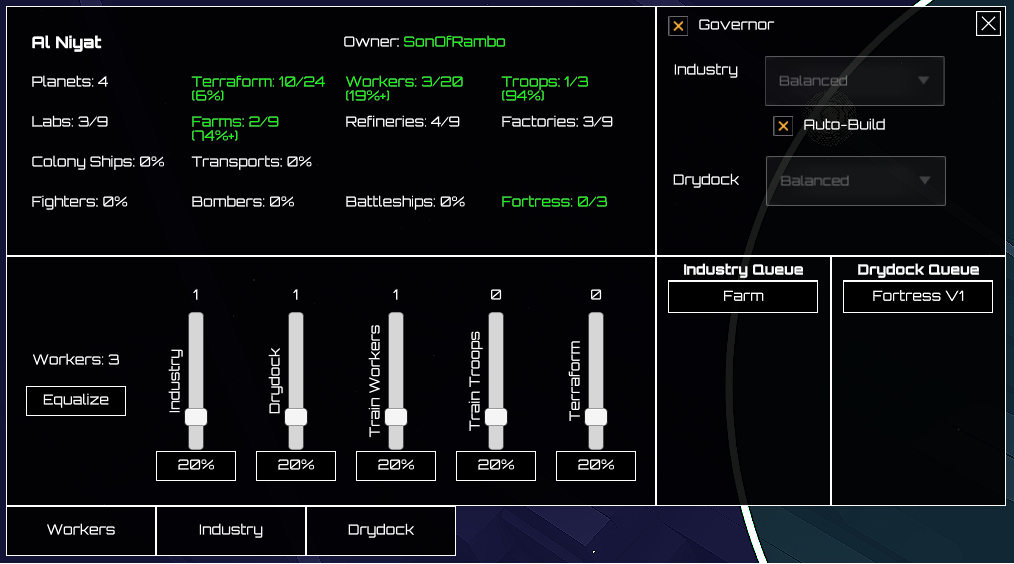
The Star Control is now a movable window that can stay open even when you select a Fleet. You can also clearly see both the Industry and Drydock queue as well as manage the Workers, Industry, and Drydock all in one panel.
Clicking on the Drydock panel will reveal the build commands to queue all the different ship variants. More on variants later.
The Fleet Control also received a major overhaul. You can now see detailed info on the health and hardpoints of each specific ship within the fleet. Furthermore, the previous need to "stage" ships before you can set a command in version 1.x has been removed. You can now click directly on the control commands on top that become available when the respective action is valid.
The Outliner is a brand new tool to improve the quality of life. It lists all the Stars and Fleets under you command and shows some important info regarding the state of the unit. A right highlight indicated that your Star or Fleet is engaged in combat. If you click on the item the camera will automatically pan to its location.
The Ship Designer brings a complete new layer of depth to the game. You can now design up to 3 different variants of a ship type by loading different weapon hardpoints. In fact, after unlocking the properly technologies your Colony Ships and Transports would be able to be equipped with weapons and engage in combat. Each ship variant comes with a different voxel model which allows you to know you fleet composition at a glance.
[2] Global Resources, Balance & Optimization In the new update the empire resources are generated from industrial capacity. There are 4 types, Refineries, Factories, Farms, and Research Labs. Refineries generate Minerals, Factories generate Ship Parts, Farms generate Food, and Research Labs generate Crystals and add to Scientists to your empire. Resource cost of industries and ships are consumed upfront now. If you cancel the build from the queue the cost will be refunded to you.
This has allowed for a great number of optimization to the game. The number of supported stars has been increased drastically for all galaxy sizes as well as increases the max speed to x5 and x10. Compare that to the previous x2 max speed.
Because of both the way resources are calculated and consumed, the research and its effects have been re-balanced (in some cases reworked), the AI has been improved, and the Campaign chapters have been updated to reflect these changes.
[3] First Time User Experience One of the biggest problem was introducing new users to some of the quirkiness of the game. I've added a tutorial (Chapter 0 of the Campaign) which hopefully will guide the player through all the major controls that they need to know in order to play the game effectively.
[4] Full Changelist For those interested in all the changes, the list can be found here:
UI Overhaul
Control access now has icons and placed on the left side.
Added Ship Designer.
Added Outliner.
Complete overhaul of Star/Fleet Controls (more intuitive to use).
Time Control (added fast forward x5 x10).
Star & Fleet controls can be opened at the same time.
Tooltips show more relevant info.
All menus reviewed.
Menu transition animation sped up.
Hardpoint concept
Colony Ships and Transports can support weapons.
Ships can support multiple hardpoints.
Supports up to 3 variants.
Research Tree updated
Global resources
Star industries contribute to Industrial Capacity which in turn generate resources.
Resources are consumed upfront when queuing builds and returned when cancelling
Removed complexity of Infrastructure on Stars.
Added Research Labs to boost Crystal and Scientists.
Worker boost to industry, drydock, and growth updated.
Campaign
Added First Time User Experience Tutorial.
Balance campaign based on global research and updated technologies.
Hardpoints are carried forward in Campaign (similar to Research).
Research & Hardpoint progression can be changed by replaying a Chapter.
Improved AI behaviour
AI will now more aggressively try to colonize the entire Galaxy.
AI will no longer remove queued Ships since costs are debit upfront.
Various improvements to AI mission selection.
Optimization
Optimize the way the Stars and units were updated.
Optimize the texture and text.
Increase max number of Stars for each galaxy size.
Increase max speed for fast forward.
Balance
Initial Star always starts with a StarFortress.
Rebalance research technologies.
Rebalance economy based on global resources.
Nerf Missile damage.
Cheat mode now enabled (for those who can find the cheat codes!)
And more!
Bug fixes
Players can now take back control from AI once empire assistance or Total War is activated.
Fixed issues with Tooltips not updating in realtime.
Fixed issue with sliders distributed incorrectly.
Fixed Star Fortress potentially getting stuck when reaching destination.
Fixed issue where unoccupied Stars show incorrect max Star Fortresses.
Fix potential crash when unloading in GroundInvasion.
Fix Star Lanes loading crash when StarLanes are generated or loaded from xml.
Fix sliders not distributing correctly when locked.
And more!
Until next time!
[Update] 1.1.0.a - Fix starvation issue on larger galaxies
Release Notes:
- Fix potential starvation issue on large galaxies when Food Supply consumption exceeds the (previous) max of 10k
---
Previously, the maximum amount of Food Supply was 10k. This meant that on larger galaxies you can have population consumption that exceed this amount, even when all technologies are maxed out - and if you are prevented to produce more than 10k this essentially means that your empire was starving.
This limit has been increased to 100k.
For existing games, loading a save file will automatically update the max Food Supply to the new value. However, if you were previously producing more than 10k, your Food Supply may suddenly increase to a high amount. New games should not have any issues.
---
I hope to be able to roll out more updates in the coming weeks!
Galactic Dominion - Version 1.1.0 is Now Live!
We've finally incremented the build to Version 1.1.0 with a brand new Steam logo.
Since 1.0 the game has come a long way and been patched 12 times. I want to take this opportunity to summarize all the changes that has gone in since 1.0.
1.1.0
Focus on Unit Hotkey: If you have a Star, Star Fortress, or Fleet selected you can hit by default to pan to it. If you hold the key it will follow the Unit. You can change this key in the Input Mapper.
The Unit selection circle is now thicker and green for easier visibility.
Fixed an issue where the Star Fortress HP was not showing in the battle info panel.
Fixed and issue where in Turn Base Mode a Units destination Nav point was not positioned correctly.
Star Names will now be shown while Zoomed Out if your Scanner Verbosity is set to at least Low (default value)
1.0.0
Initial Release.
---
Until next time! ːsteamhappyː
[Update] 1.0.2018.08.18.l - Research tweaks, Speed Control, and other Quality of Life changes
Release Notes:
Game Speeds: x0.5, x1.0, x1.5, and x2.0
Research Game Settings: Randomized Effort Factor
Research Tree Zoom In/Out and Middle Mouse pan
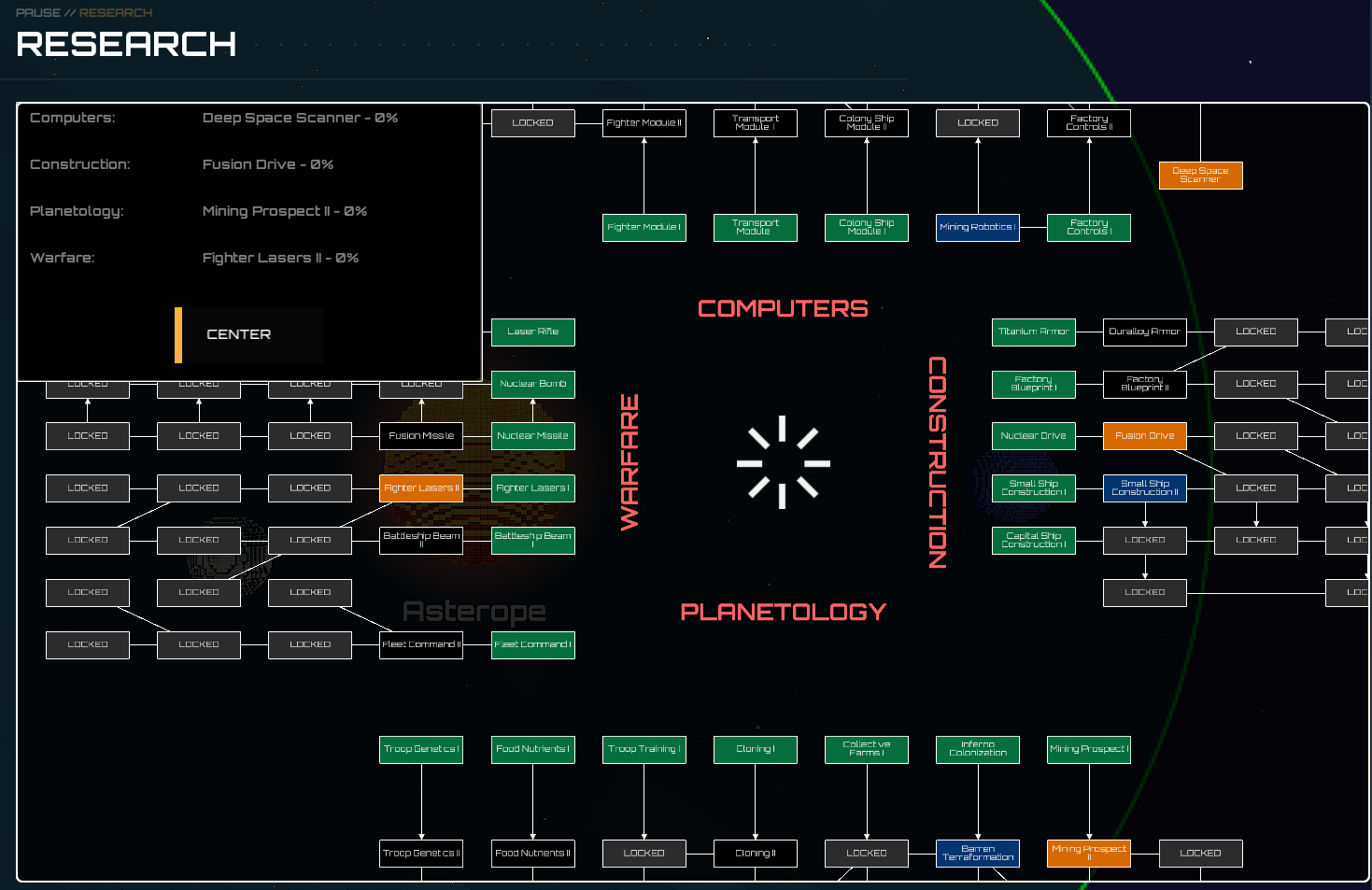
Research In-Progress is now an different color
Fleets can now be Split while In Dock
Fleets will now move to an offset location if the dock is occupied/full
Fixed issue where the Objectives button disappears in Turn-Based Mode
---
[1] Game Speeds
You can now toggle the speed with the "-" and "=" keys. These are customizable in the Input Mapper. Unfortunately, if they are not map you will have to reset to default first.
During early game you can speed up the game to get things moving and then if it gets too intense you can slow it down.
This is only available in Real-Time Mode.
---
[2] Research: Randomized Effort Factor
This option will multiple a Research Topic's effort by up to +/- 10% in order to give more variation to Research costs.
This is enabled by default and applies to all Campaign chapters. You can disable it in the Quick Play settings.
When resuming a save from previous versions this setting will be automatically applied and research effort will receive a random factor. Saving with this update will maintain the proper value.
---
[3] Research Tree Zoom and Pan
You can now Zoom In/Out with the Mouse Wheel as well as Pan with the Middle-Mouse button. The behaviour is a bit closer to in the Game Scene (although not exact)
Because of this the containers, borders, and fonts for the topics have been increased.
---
[4] Research In Progress
Any research in progress now has an orange color to make it easier to identify at a glance.
---
[5][6] Fleet Splitting & In Dock
You can now split you're Fleet while it's in Dock.
The new Fleet will automatically move to an offset position near the dock.
Similarly, if your Fleet arrives at a dock that does not have enough space or is occupied by an enemy it will also move to an offset position.
---
[7] Bug Fixes
Fixed an issue where if you end your turn in Turn-Based Mode the Objectives button disappears.
---
Hope you guys like the latest updates - Let me know!
[Update] 1.0.2018.08.18.k - Hotkeys and Input Mapping
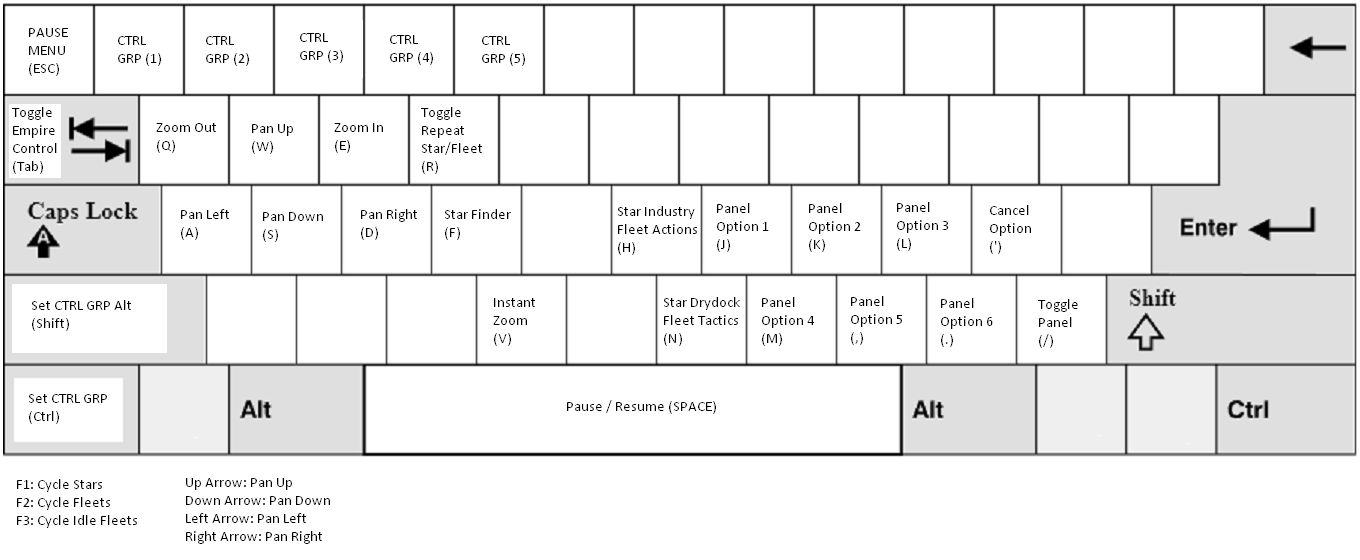
Been working on this update the last couple days. There's now an input system that can be customized to your liking. By default the keys are laid out as follows:
---
Customization of your hotkeys is done through the Control Mapper button in the Options Menu. Clicking on this will open the mapper where you can set the General keys or the specific Star and Fleet Panel keys:
Star Industry
Star Drydock
Fleet Actions
Fleet Tactics
---
The hotkeys for the Star and Fleet panels are laid out by default (on a standard US Keyboard) to match the layout of it's corresponding button layout:
If you have a Star selected then you can quickly toggle between the Industry and Drydock panel through the H and N keys respectively.
Likewise, if you have a Fleet selected you can toggle between the Command and Tactics panel through the same H and N keys.
Once the panel is activated you can access the shortcuts for the corresponding panel.
---
This update completes some of the larger control changes. Next time we'll get back to adding some general improvements and enhancements to the game.
Until then!
[Update] 1.0.2018.08.18.j3 - Zoom to Mouse position and other tweaks!
---------------------
Release Notes:
---------------------
1. Zoom In to Mouse position
2. Tweak thresholds for Camera panning near the screen edges
3. Slider panel lock distribution ToolTip
---------------------
[1] Finally - You can now zoom in to the Mouse position!
However, if you prefer the old way (i.e. zoom to Camera center) you can toggle it back the Options menu. 'nuff said.
[2] The thresholds for the screen edge pan have been decreased so it does not overlap the zones of the Minimize/Close buttons of the Star/Fleet Control. This way you should not accidently pan when trying to close these panels.
[3] There's now a little text in the ToolTip when you hover over a Slider Control (i.e. Worker distribution in the Star Control or Scientist distribution in the Empire Control) - that says "Click on percent to lock distribution."
[Update] 1.0.2018.08.18.j2 - Camera Pan Sensitivity slider
Small update today!
In the Game Options you can now adjust the sensitivity slider for the Camera Pan. Previously, the value was around 20, now it's default to 10.
Also, this should be the last update that will reset your Game Options. Under the hood i've done some refactoring of the code to make it more scalable so going forward if we need to add new options it will perserve your existing option values. ːsteamhappyː
[Update] 1.0.2018.08.18.j - Research Update and Quality of Life changes
---------------------
Release Notes:
---------------------
1. Research now has a small chance of a Scientist boost
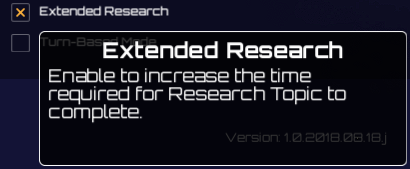
2. Quick Play now has Extended Research setting
3. Options Menu now has Screen Edge Pan
4. Fix Star Spectral Type not showing the proper Star type
---------------------
[1] Research should have a bit more randomness to it as there's a lot of uncertainty involved when doing research. So now every "tick" there's a small chance that your Scientist, or Scientists if you have multiple assigned, will have some deep insight in the topic increasing the amount of progress they contribute in that tick. With this, no two topics will progress at exactly the same pace.
---
[2] Since research boosts effectively reduces the overall time needed for research you now have a new Extended Research setting in Quick Play. This will increase the amount time needed for research significantly.
If you found that research was progressing too fast this is also a good setting to try out!
---
[3] In the Options Menu you can now toggle Camera panning on screen edges. Basically, if you move your mouse to the edge of the screen it will pan the camera as if you were using the WASD shortcuts.
This option is enabled by default but if it gets in your way you can disable it at any time. (If you play in Windowed mode the panning might be undesired at times - your game will also need to be in focus before panning will happen)
---
[4] Each Star has a Spectral Type: Cold, Warm, or Hot - represented by a Blue, Yellow, or Red Star. They contibute slightly to the amount of resources a player will find on them initially.
There was a bug previously where when you load the game the Spectral Type is different from when you saved.
This was only a visual issue as the actual type was loaded correctly. Nevertheless, it was strange to see Stars changing colors on every load (or if you use Star colors as visual references :P)
---
That's it for now - I wanted to get one more update in before the end of the weekend. Enjoy!
[Update] 1.0.2018.08.18.i2 - Fix Achievements not unlocked for some players
For players who won some Quick Play games before Tuesday's 1.0.2018.08.18.h2 update there's a chance that the Achievements did not unlock.
If that happened then the opportunity to unlock them became lost for certain achievements - (e.g. Galactic Solider, Leader, Commander, etc set of Achievements). The reason is that the condition to unlock the achievement was very precise, for example, to unlock the Galactic Leader you need to win exactly 5 QP games, less than 5 and more than 5 will not work - and if you won exactly 5 before .h2 you might not have unlocked the achievement - so even if you keep playing and won more games it would not go back to do the Achievement check.
This has been fixed now, so if you did not get your Achievement - next time you win another Achievement enabled QP game - it will trigger all the checks.
Unfortunately, for the one time achievements such as Tactical Genius, Real-Time Reactions, Nothing is Impossible, etc you will have to replay the QP with the same settings to unlock if it happened before .h2 - sorry about that ːsteamsadː
Otherwise - Happy Achievements hunting!
(I forgot to increment the update to .i2 so it stayed at .i ːsteamfacepalmː)
[Update] 1.0.2018.08.18.i - Star Info ToolTips and Game Styles!
I've been experimenting and working on some bigger updates in the last few days.
Here's a rollout of what's new with 1.0.2018.08.18.i (I'll talk about the versioning numbers in a future post).
---------------------
Release Notes:
---------------------
1. Star Info ToolTip will now show up if you Mouse over a Star
2. ToolTips now show up slightly faster in general
3. Star Influence border is now highlighted in the Empire color
4. Game Style (Palette and Pattern) can now be changed from Options Menu
---------------------
[1] Star Info ToolTips
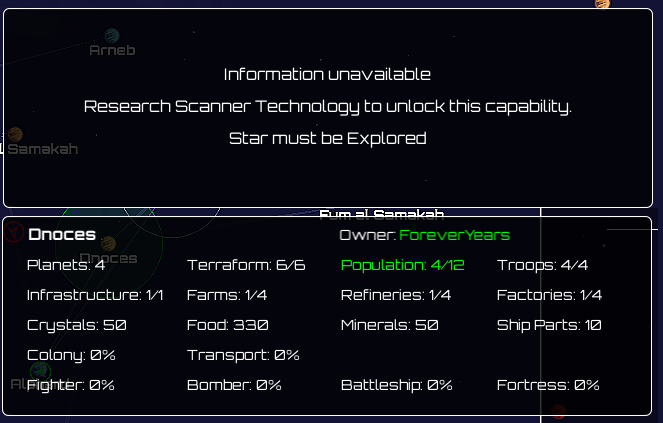
If you Mouse over a Star (whether zoomed in or out) you will now see the same information as if were to click on it. If you have not unlocked the proper Scanner technology or explorerd the Star you will see the "Information unavailable" ToolTip - while if you have fulfilled all the requirements you will see all the same info details and it will change as the Star updates.
[2] Because of the usefulness of ToolTips the delay has been shortened so you will see them sooner than before.
[3] Star Influence borders are highlighted in the color of the Empire to make it easier to see, particularly when you are zoomed out.
[4] Game Styles
Game Styles is a new feature available in the GameOptions menu.
The dropdowns consists of some Palettes and Patterns that I thought looked pretty good with the game and gave it a different atmospheric feel.
Beware though - Some of these makes the game harder as the color contrasts are different. So Default is always an option and can be toggled anytime.
Here are some sample screenshots:
If you have some palette combinations that could be interesting to try, let me know in the Discussion forums!
Finally, you may also notice that the Main Menu now has the same darker tone as in the Game Scene. I think it fits a bit more thematically with the game.