This Iteration was basically to add more needs of the persons, but i got some good testers, suggesting a lot of useful things and improvements. They also build very large ships with >50 persons. The performance was fine, but not at the target. Due to i wanted to add more features it was needed to refactor the architecture of the simulation, so it gains a big performance boost.
Mood
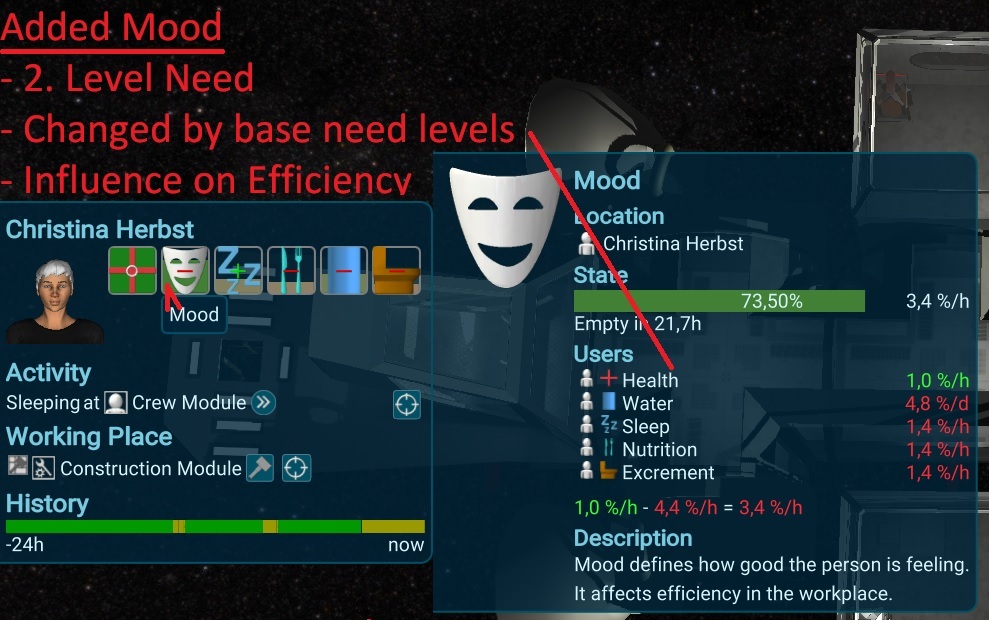
Persons now have a Mood. It's a 2. Level need, influences by the basic needs like nutrition or sleep.. The Mood has an influence on the activity productivity when the person is working (more to that below in the Productivity section). Later its planned to add also a 3. Level like rebellion stage or hope, that changes even slower. It's also prepared to add some long term effects on it, like good or bad news from earth could have a slow effect over a given time, that could also reflect the thoughts of the person.
Improved Performance
New Resource Event Architecture
Most of the simulation time goes to set up the next tasks for the resources, hitting a limit. This was improved now, so all resource calculations (air, tubes, boxes, needs, ...) are now done with a single code base. This allows to manage it just with a single next event, instead of all keeping all events. It improves the simulation up to 2-3 times in the editor and should have also a big effect as bigger the ship will become.
Activities
I made also a very big refactoring by promoting the activities of a building to separate simulation objects. Before they were a part of the building causing an inefficient architecture. This separation now allows several optimisations and further features, like having multiple same activities in one building. Also the algorithms to detect the state of an activity e.g. for an interior light or animation can now directly check in the hierarchy for the related work, instead of searching for it. I could also do a lot of optimisation for larger ships.
Productivity
Another advantage of operate the activities was to be able to cache there the productivity. I refactored that part also a lot, so its now just calculating the changed productivity parts and is able to performant and flexible recalculate the productivity. E.g. it can also calculate the Productivity without the customers, so it can see if the customers stops to being active without big effort. This makes it finally possible to rethink the service activities, working now like all the others (so 1 of 2 customers will have 50% efficiency).
Persons Metrics
The last part of the performance improvement was to make the metrics faster to update. When searching for something to do its caching the main values. When a service building gets available, the person checks first its faster than the current one, before recalculating all other options he has.
All in all it gained a huge performance boost. The starting ship can push now the first 3 months of playtime in a few seconds.
Async Save games
Big ships had some troubles with long save duration. It took ~5s for a big ship. To prevent a big lag at the autosave, it was necessary to split separate the save process to be able to render frames in the meantime. I was able to copy the complete simulation of the big ship in ~100ms, and could than run async on this data, so the main simulation can still continue while saving! Its now just 1 small frame drop when the autosave start, to prevent saving inconsistent data. Till its done, i can set up a maximum time the save game should use, to not drop the fps too much, so its similar as the Person Generation and the Simulation Tasks.
I also improved the general save process, so if something happens while saving, the save game is not gone like before. Its first saving it to a temp file and just using it when everything is successfully finished preventing corrupt save games.
Its now also showing it, when its auto saving and the save game dialog got a progress popup.
Zoom to Mouse
To make it easier in large ships to move around, i added a zoom to mouse feature. Before, the camera just zoomed to the center of the screen, what was usually not what the player wanted to see. Now it's zooming directly to the mouse-cursor, except when the player moves the camera at the same time.
Zoom and Follow Entities
In large ships it was also not so easy to find buildings or persons. To make this easier, i added a zoom to the building and interior, when clicking on the big icon at the details. For persons its similar, but the camera will directly follow the person, till the camera moves away. Zooming and rotating the camera did not stop that, to give more controls over it.
More options to Events
Due to a player feedback, i improved the events (e.g. out of energy). He wanted to have the info panel, but without stopping the simulation. The main usage i is for the arrived supply ship, that is a good info, but there i usually no need to stop it. To make this good visible, i added a toggle button to the event Panel. Its also changeable in the options any time for any event. (Thanks to BurritoBotV3000)
Other smaller changes
Fixed missing Personages when loading a game
Fixed wrong gender for new crew members (not matching the name)
Fixed missing corner of one building
Fixed Removing Interior left over meshes (Thanks to BurritoBotV3000 for report)
Fixed Exception in some cases with Tooltips (Thanks to BurritoBotV3000 for report)
Fixed Problem that work targets are not cleared when dismantle (Thanks to BurritoBotV3000 for report)
Improved Error Handling Screens
Fixed Update of Work Container Warnings
Added Click on ResourceOverview select related Buildings (Thanks to BurritoBotV3000 for report)
Added in or out hint to the production labels (Thanks to hackerintraining)
Prevent problems caused by single exceptions in ui (more robust)
Fixed smoothing issues at the Starting Rocket in the intro
Start with more methane to prevent running out of methane too early (thanks to hackerintraining)
Added Problem Pump Interior to the Water pipe warning event (thanks to hackerintraining for report)
Fixed drop down options can be not visible
Added Scroll bar for Choosing Popups for large ships
Highlight dismantle button red when over and confirm (thanks to BurritoBotV3000)
Added Stop Time warp button to Events (thanks to BurritoBotV3000)
Performance improvement for find users and find next activity
Added Info to UI if the person generator is running
Fixed Perspective Overflow not working anymore
Only show the Interior-Tiles when its needed, to see the floor wall textures better
Fixed wrong camera movement first time entering the interior configuration
Fixed Unity issue, that parent and children are wrong (problem with save games in special situations)
Fixed selection issue of special case in Photovoltaic Panel under construction (thanks to BurritoBotV3000 for report)
Fixed exception when try to add another storage in interior configuration with ctrl
Fixed Maintenance not stop maintaining when loosing connection (thanks to ichao for report)
Make Snapshot releases (Test version) have a reasonable Date
Persons stay longer at the current service building before leaving to other things
Starting Generator gets directly the ThrowOutIfFull, so new players not get a problem with it too early.
Added More speed options (30s, 10 m/s and 5h/s) to have more flexibility (thanks to BurritoBotV3000 for the hint)
Changed Construction Icon to the Hammer, to prevent confusion with Maintenance
Fixed Feedback Popup could be behind tutorial-tooltips
Make the border red on empty container values, to hint the player more to problems.
Fixed missing and wrong updated Colors of ConnectedStorages Icons
Fixed wrong status on full single box storages at connectedStorage Icons
Make sure Space bar also stops the time warp when a TextDield is focused
Changed WorkingS lot Click Behavior to use a more usual key-binding (Thanks to BurritoBotV3000 for the hint)
Increased building layer size of the photovoltaic panel, to prevent confusion due to multiple layers
Keep the Rotation when switching from interior to con fig camera
No Condition impact to the Service Activities to prevent unrealistic duration. (thanks to BurritoBotV3000 for testing)
Release 0.68.0 - More Rooms
Release Video
[previewyoutube="dQ4ubfGPiyE;full"]
Factory Room
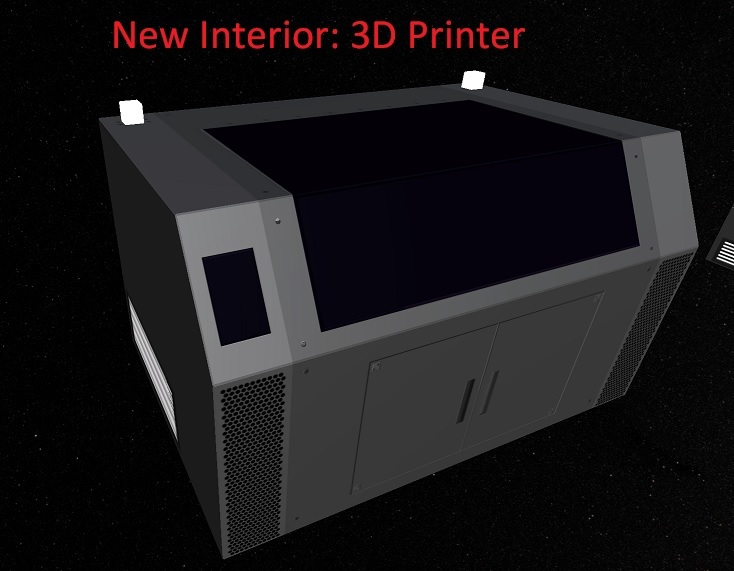
A new Room has been added to create tools by the player itself. A new 3D Printer can now print out tools so there is no longer need for the supply from earth. For now, it just needs Steel, later i might add some more rare materials. To complete the resource cycles, i also added a Smelting, to convert the Garbage Iron to Steel. This might also just temporary, maybe more things will be added in between later on.
Converted more Buildings to Interior
The process of the conversion from the old buildings to the new Interior has been continued, so the chemical buildings are now also converted.
Modular Buildings
The Basic Buildings to drop interior in has been updated to a more modular approach. So they are created out of several reusable peaces. For this iteration, they are not changable by the player and always the same for the basic buidlings, but its prepared for a more dynamic approach, where each dropped building could look different or even that the player can configure them completely free :)
Selectable Interior
The new System allowed it to create several works in one building. To get a better overview for the player, i made the interior also selectable like buildings and Persons. For now, it just shows the related work, but in future, i will add more useful things to it.
Different Storage types
The current storage could take 3 boxes and needed 2 tiles space. To make it more flexible, i readded the small box stoarge as an interior. Its just using 1 tile space and cost half of the resources.
Custom Templates
The Templates can be now created and deleted by the player. For customized buildlings, there will be a button in the building details to create it.
Better Person Animations
Persons are now idle randomly moving around the station when idling. They also switch between the interior when working on them. The interior lights are now also react on the working persons on them.
Seal Button WorldElements
To make the seal buttons more convenient, i moved them to to the doors as World Elements. They are just moved to the place, where the door is rendered, so its way more intuitive what button will close what door. I also fixed the delay there, so its now instant following the camera.
New Icons
I created more Icons and added layered Icons, that are also capable to render in 3D. A usage e.g. is for works, with combined icons like recycle water or recycle iron. Till now, i needed to create for each one an individual new model and add it to my icon generator. Now i can reuse the basic icons, to just setup a custom icon. It can be also used for the scene-overlays, so the calculation done in the UI is also done in 3D with the models to build up a similar look. I also updated the icon-camera, so its a less 3d effect, turns into more clear and larger icons.
Live update Language changes
To make the community translation process faster, i added a live update feature. When the file is changed outside of the game, the game detects that and updates most of the text direct, without any need of reload.
Person Icons
The person icons are now created from the actual generated models, so it feels, the player got more closer to the persons, they are not so anonymous anymore. They are used everywhere in the game now.
Other smaller changes
Fixed Popups could appear through blocked panels
Fixed general 1 frame delay for the UI
Fixed delay of world-elements (e.g. interior panels above the models)
Fixed maximum height of buildings with a lot of activities.
Emissions of Interior is now related to the Work
Working lights of Interior works same as emissions
Fixed Animation Path of Dock Module
Not executing shortcuts, when focus in on a text field
Stop interior drop when closing the panel or cancel the work
Persons start work-animation instant instead of waiting for end of idle animation
Hide Section Panel, when no other details are shown
Fixed not showing a problem when the water tubes are empty
Added an Event for water pipe empty and explain the problem (Thanks to gus)
Removed interactive part of the help (outdated)
Support more than 4 holes cut in the floors of buildings (e.g. for storage)
Move Resource Boxes move always to the lowest position
Closing Build menu keep starts walkway (due to search blur)
Fixed exception when person walking somewhere and updating in a rare case. (Thanks CadetKael for report)
Gather up Exceptions when save games are broken (or in too old version), so still debuggable
Improved zoom close for Inside camera
Release 0.67.0 - Graphic Performance
Release Video
[previewyoutube="arugEJB9k1k;full"]
Graphic Performance Improvements
The change of the rendering and added realtime lighting had impact on the performance. The minimal ship already hit a very high amount of verticies, so it was needed to improve that. I added LOD support to the system, so when zoom out, so the model swaps to a less vertecies version. I created for most of the expensive models some LOD versions and added them and could push the vertex count for the starting scene >50% down. It should have a big impact on big ships, due to the content of the container took a lot of verticies.
More Interior and rooms
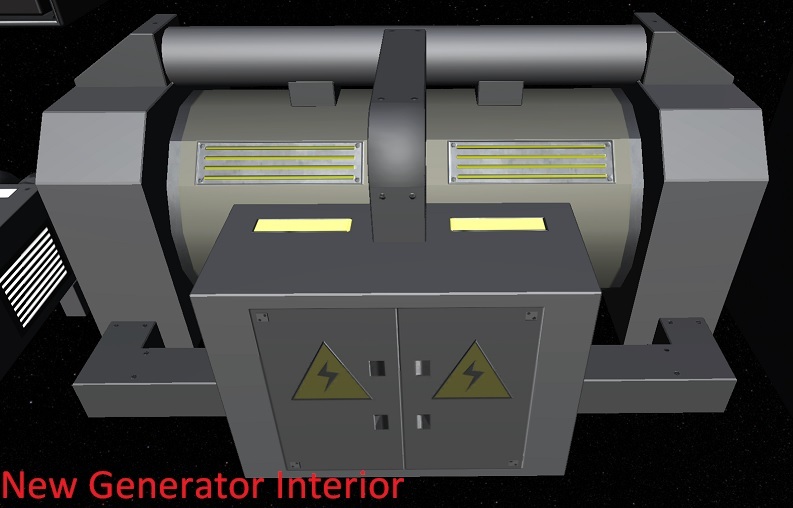
The Air Buildings and the Generator has been converted to the new interior system, so they can be placed as the other buildings. In addition, the style of the starting satelite has been adapted to fit to the buildings.
Tutorial and Achievements
The tutorial has been updated to cover the customized buildings. Its now requesting to build one lifesupport backup building instead of the 4 specialized air modules. To fix some issues with the starting generator being damaged, its now the dock, that is damaged. It has no relevant implications, so its an easier target for the start for being repaired.
Other new Models
The new Resourcebox. No wood anymore, but steel and also added a small light, to be maybe used later for the fillstate.
Resource Merging
Due to its now possible to have partial resources for the construction, there was also a way needed to merge them together again. For now, i added a merging mechanism that starts, when a storage is full. Its than merging all resourceboxes with the same resource as much as possible together. Later i plan to add this as a storage option like the "Throw out when full" Option and add a manual "Merge" button.
Building Templates
Due to more and more buildings are converted to the new templating system using the interior, the template choise is moved to the Buildmenu. This makes it searchable and easy choosable. Its shown as a kind of tree-structure and showing all details of the building while hover over it.
Internal improvements
Most of the UI Logic has changed by using now Prototype Entities instead of GameObjects. Due to this the GameObjects are not lying around, so no performance impact anymore from them. With that, the game initialisation process could be changed to be more clean and easy. The other setup has been also simplified by more generic systems. All of that is also needed for a mod support later. The new change had some performance impact to the tests so it took ~15min to run all of them. To fix that a cache has been added pushing the usual 1.2s initialisation time down to 200ms by reusing the first init data, so they run now in 5min.
Other smaller changes
Improved Detection if the Cursor is over a menu element
English locale improvement (Thanks to BurritoBotV3000)
Removed Big Dock due to exceptions (Thanks for report to BurritoBotV3000)
Fixed problem with SaveLoad properties could lead to illegal states (Thanks for report to BurritoBotV3000)
Changed logic for autoselecting interior to work also for machine room
Fixed new bug dismantle when buildings with customers (Thanks for report to BurritoBotV3000)
Fixed problems where moving persons on very high speed are the wrong position.
Improved internal Animation calculation for more performance.
Removed GridStructure from some buildings to look nicer (Thanks to Melodie)
Fixed shadows are wrong on highhest zoom levels
Prevent some rounding errors to stable the simulation.
Handle Exceptions while loading a broken savegame
Autosave in general checks for thrown exceptions (Thanks to Ichao)
Fixed Shadows are wrong in loaded games
Fixed wrong shown values
Added Resource users to resourceBoxes popup (same as for other containers like electricity or air)
Fixed extrem vertex count for Icon-Meshes
Fixed Person Pathfinding not working in a special case
Fixed shortcut for directly start planning a building using enter in searchField
Added a hint to the building rotation in the totorial (Thanks to "Gideon_Medic")
Photovoltaic Panel visual fixes
ProblemText now better eadable
Release 0.66.0 - Interior placement
Release Video
[previewyoutube="zLeMfoEjkP8;full"]
Updates in this Iteration
This iteration tooks a bit longer than usual, but its a very big think added, causing a lot in the game and tests to change. Hope you enjoy it and tell us if you like it :) I was also able to fix a unity bug, causing the simulation not run with burst (so x20 slower), but a sad news for MAC users: For Mac i couldn't fix it. I hope unity will fix this issue soon.
Interior placement
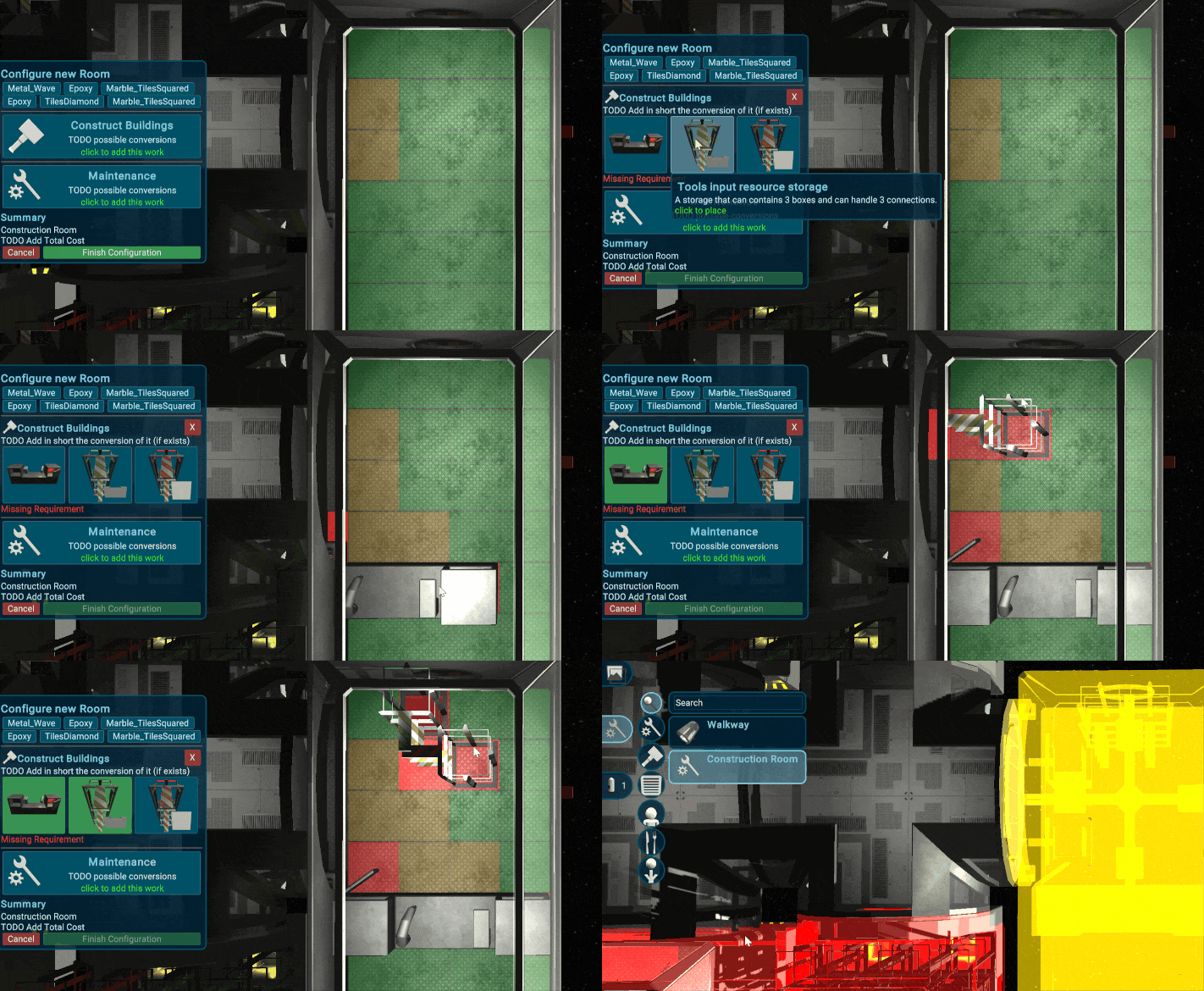
The player can now customize the interior of a building and setup the work. It will now effect the efficiency and speed of a building and the maximum number of workers or users.
Templates
Some of the buildings were migrated to templates for the basic buildings, so when placing a construction room, there are some default buildings. Later the player can also create custom templates.
Game Sceen Ui Overlay
To show the details of the placed interior, the ui panels can now stick to the gamescene camera. This is also used for seal icons of the doors, and maybe later also for more details of the buildings or storages.
Partial Resources
To make the interior also cost some reasonable amount of resources, its now possible to have partial building resources. The boxes are automaticly split to the correct size and transfered. Merge two boxes will come in the next iteration.
New Planning Shader
To make the planning look more clean and nicer, i polished my old shader from the start of the game development two years ago. Its just rendering the model as a wire frame. The rendering logic is also changed, so there are no more overlapping renderings so it looks way nicer.
Other smaller changes
A lot of UI Fixes (thanks to Ichao)
Fixed wrong display of building mass
Fixed Selection in high zoom levels have a small offset
Moved the walking area to height 0 (from 1m)
Fix update of customer slots in UI
Improved FastForward and Assign Buttons in Person (thanks to Gideon_Medic)
Better visual separation of Building Parts (Thanks to Gideon_Medic)
Prevent Walkway to be rotated wrong with r key
Added Rotation with Middle MouseKey to Building Planning
Enabled Burst mode for Simulation again (was broken after a unity update)
Fixed section-details-headline was not shown after loading
Fixed problem with search field getting back the focus
Inflatable Walls have no longer unrealistic openings