After the last article, where i presented the new resources, i'm proud to present you some new interior Items and their new Design:
Photovoltaic Panel
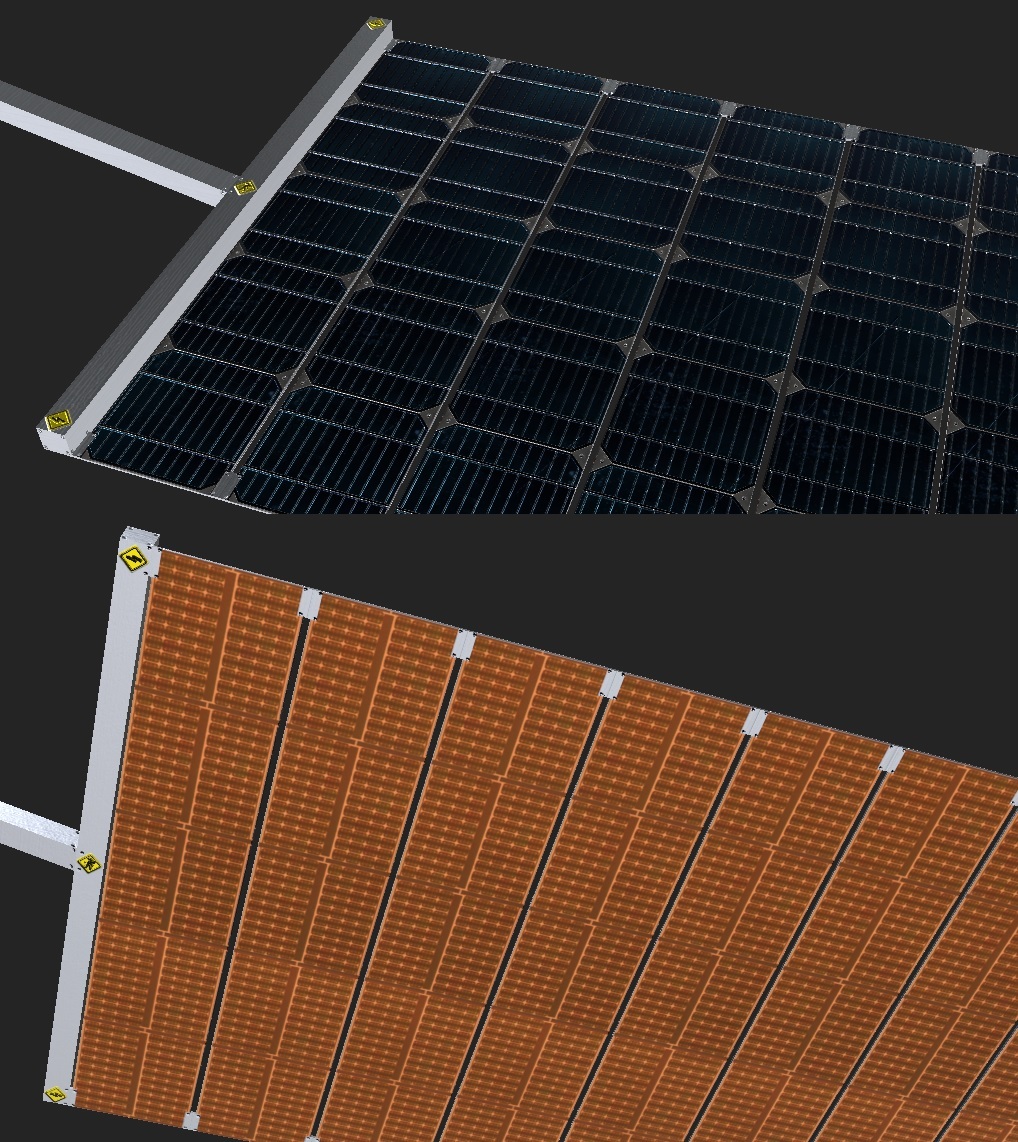
The photovoltaic Panels are updated to the new Graphics
They are now also interior items, that can be dropped in an electrical room. They causes a large change. Its now possible to add outside interior items to the rooms.
The idea of that interior item is to have them extendable, to be able to easy maintain them in the inside of the ship. As before, they extend depending on the energy needs, so you can see that at the model.
Another feature is, that the solar panels will orientate towards the sun, what brings a bit more movement to the timewarp.
Engine
Another outside interior are the new Engines. They replace the old spinning engines and can now also be used later for accelerating the ship.
You have to build engines in spinning and against the spinning direction and the system will detect the orientation and turn them on when needed for the artificial gravity adjustments.
New Storages
To achieve the target to make as much things as possible to interior items, i also enhanced the General Storage. You can now drop Storage Interior with general storage or special storages not related to the activities. Means, you can setup a complete custom storage by yourself.
Here the new General Storage with also 14 box space like the old one as a room.
It also causes a rework of the UI in that part, but that i will show in a separate article when its finalized.
Methane Generator
The first update was for the Methane generator. Here a comparison from old to new.
Water Pump
Pumps water to the ship pipes, to be used everywhere in the ship, like toilets, water dispensers and more
Fuel Cells
Using H² and O² to generate electricity
3D Printer
This machine can create Tools. It just get a new painting.
Toilet
The Toilet got a complete redesign. Its now opened on the side, and includes a slidable door to close it. While doing that, i improved the animation system to have nicer and smoother animations
Hygiene Area
The old sink got replaced by a hygiene area. This is also used in the ISS, due to normal washing would not work well on 0g. It contains a towel drying area, mirrors, a small water dispenser and some private closets for the astronauts with toothbrush and others.
Small Table
The small table with chair got a more futuristic design and more colors that the old plain steel one.
Water Dispenser
The water dispenser got another update, that makes it easier to see and more colorful
Bed
The bed just got a painting update to look similar as the other interior items.
Medical Bed
The Medial bed to increase the health of the crew also got nicer painting
Want to see more?
So far to this part, i also started to rework the Buildings and the rest of the game. All of that are huge changes in the design and effects a lot of the code. I'll create a post like this when the rest is ready. I also post the progress and more pictures to our Discord:
And don't forget to wishlist and follow us to keep up to date.
After the last article, where i presented the new resources, i'm proud to present you some new interior Items and their new Design:
Photovoltaic Panel
The photovoltaic Panels are updated to the new Graphics
They are now also interior items, that can be dropped in an electrical room. They causes a large change. Its now possible to add outside interior items to the rooms.
The idea of that interior item is to have them extendable, to be able to easy maintain them in the inside of the ship. As before, they extend depending on the energy needs, so you can see that at the model.
Another feature is, that the solar panels will orientate towards the sun, what brings a bit more movement to the timewarp.
Engine
Another outside interior are the new Engines. They replace the old spinning engines and can now also be used later for accelerating the ship.
You have to build engines in spinning and against the spinning direction and the system will detect the orientation and turn them on when needed for the artificial gravity adjustments.
New Storages
To achieve the target to make as much things as possible to interior items, i also enhanced the General Storage. You can now drop Storage Interior with general storage or special storages not related to the activities. Means, you can setup a complete custom storage by yourself.
Here the new General Storage with also 14 box space like the old one as a room.
It also causes a rework of the UI in that part, but that i will show in a separate article when its finalized.
Methane Generator
The first update was for the Methane generator. Here a comparison from old to new.
Water Pump
Pumps water to the ship pipes, to be used everywhere in the ship, like toilets, water dispensers and more
Fuel Cells
Using H² and O² to generate electricity
3D Printer
This machine can create Tools. It just get a new painting.
Toilet
The Toilet got a complete redesign. Its now opened on the side, and includes a slidable door to close it. While doing that, i improved the animation system to have nicer and smoother animations
Hygiene Area
The old sink got replaced by a hygiene area. This is also used in the ISS, due to normal washing would not work well on 0g. It contains a towel drying area, mirrors, a small water dispenser and some private closets for the astronauts with toothbrush and others.
Small Table
The small table with chair got a more futuristic design and more colors that the old plain steel one.
Water Dispenser
The water dispenser got another update, that makes it easier to see and more colorful
Bed
The bed just got a painting update to look similar as the other interior items.
Medical Bed
The Medial bed to increase the health of the crew also got nicer painting
Want to see more?
So far to this part, i also started to rework the Buildings and the rest of the game. All of that are huge changes in the design and effects a lot of the code. I'll create a post like this when the rest is ready. I also post the progress and more pictures to our Discord:
And don't forget to wishlist and follow us to keep up to date.
The last months i worked on new graphics, models and some other larger changes. In this post i will show you the new graphic style that brings the game to a new level of detail.
New Resource Boxes
New Painting
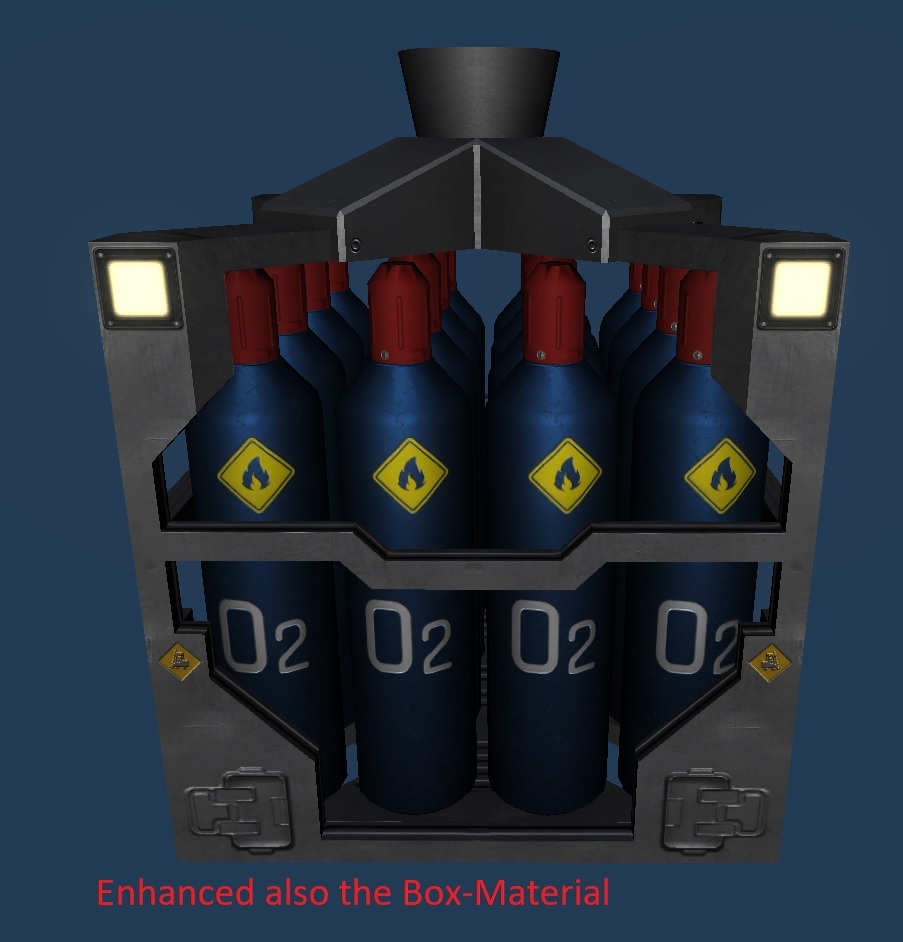
Lets start with the Resource Boxes, some i just updated a bit, like the gas bottles or the steel and glass boxes shown here. They got a detailed painting, labels and signs on it:
New Models
Others got a complete new model like Biomass and Iron Garbage.
For the liquids i added an industry like container that can show the filling state as before.
Random Details
To make it look a bit more realistic, i created a shader that is moving and rotating the single items in the box, what is nice visible here at the new cooked food model:
The first feedback i got was to add an OCD Mode, so i made it possible to turn it off in the options :)
Here you can see all Resource Boxes i updated:
New Room
Design
The Rooms got also a complete rework, they have thicker walls and have some panels outside. When spinning or increasing the game speed very fast, some players reported some motion sickness, what was even worse in the first person mode. So i keep the new Rooms completely closed.
Later i plan to let the player choose some parts of the building, so he can exchange some walls or roofs to ones with windows.
Hide Top
To make it possible to hide the top part of the rooms. I added 2 different heights, like in many other games.
Customize
The system is designed, that the player can later exchange different walls through walls with windows or do other customizations. Till now, the player can customize the wall color, maybe I'll add more colors to be picked later.
A big new feature what i did while creating the new design was to make the Floor space can be setup by the player. Till now there is a maximum size given (~20 tiles). Maybe i need to add some downsides for larger rooms later, like the persons will not like it, or additional interiors need to be placed to enlarge it.
Lens flare
The new Unity update finally supports the Lens flares for my experimental renderer i use, so i could finally create it!
Want to see more?
So far to this part, i also started to rework also the interior. I'll create a post like this when everything is ready. I also post daily the progress with pictures on our Discord Server:
And don't forget to wishlist and follow us to keep up to date.
The last months i worked on new graphics, models and some other larger changes. In this post i will show you the new graphic style that brings the game to a new level of detail.
New Resource Boxes
New Painting
Lets start with the Resource Boxes, some i just updated a bit, like the gas bottles or the steel and glass boxes shown here. They got a detailed painting, labels and signs on it:
New Models
Others got a complete new model like Biomass and Iron Garbage.
For the liquids i added an industry like container that can show the filling state as before.
Random Details
To make it look a bit more realistic, i created a shader that is moving and rotating the single items in the box, what is nice visible here at the new cooked food model:
The first feedback i got was to add an OCD Mode, so i made it possible to turn it off in the options :)
Here you can see all Resource Boxes i updated:
New Room
Design
The Rooms got also a complete rework, they have thicker walls and have some panels outside. When spinning or increasing the game speed very fast, some players reported some motion sickness, what was even worse in the first person mode. So i keep the new Rooms completely closed.
Later i plan to let the player choose some parts of the building, so he can exchange some walls or roofs to ones with windows.
Hide Top
To make it possible to hide the top part of the rooms. I added 2 different heights, like in many other games.
Customize
The system is designed, that the player can later exchange different walls through walls with windows or do other customizations. Till now, the player can customize the wall color, maybe I'll add more colors to be picked later.
A big new feature what i did while creating the new design was to make the Floor space can be setup by the player. Till now there is a maximum size given (~20 tiles). Maybe i need to add some downsides for larger rooms later, like the persons will not like it, or additional interiors need to be placed to enlarge it.
Lens flare
The new Unity update finally supports the Lens flares for my experimental renderer i use, so i could finally create it!
Want to see more?
So far to this part, i also started to rework also the interior. I'll create a post like this when everything is ready. I also post daily the progress with pictures on our Discord Server:
And don't forget to wishlist and follow us to keep up to date.
The simulation of the game has a detailed algorithm to calculate the efficiency of an Activity. To make this better visible, i am proud to introduce you to the new Interface for activities.
Due to the feedback, i received from some playtesters, i thought about the layout of the activity ui and found a good way to merge the productivity, storages, workers and more together to one single interface.
The new Interface
At the headline its still similar, showing the title, and the main Problem. Below there is the current Productivity where the player can turn it off, or setup the productivity. If there is a target, the state is also shown below with a smaller line.
What influence the Productivity
Below are the new items showing several details of it. Its split up in single items that have 3 columns:
The first column has a large icon, showing the type of the influence. Clicking there can navigate to the items or change them. In the followed column a short headline with details are added. At the end of this column are some details. It ends with the influence change.
Condition
The first influence is the condition of the Building. Its reduced over time and can be increased by the maintenance activity.
Gravity
Some Activities are influenced by the gravity. It belongs to some internal processes of the interior item are more efficient with gravity. Also when workers need to do something on the machine, on low gravity it took more time.
Player
Here the player can set a maximum efficiency, to e.g. reduce the amount of energy or other resources are used. He can also turn it off completely.
Resource-Boxes
If the Activity creates or uses Resource Boxes from storages in the rooms, they are also shown. In this line, there is also shown how much resources are used and how much would be used with 100% productivity.
Ship Section-Resources
Some Activities using from or adding gas to or using it from the air of the section. The maximums here can be controlled by the ship section, to adjust automatically the amounts in the air.
Ship-Resources
Additional to the Ship Section Resources, there is also Energy, used by the whole ship. If there is not enough energy, or the batteries are full, this value will be regulated by the ship automatically.
Target
Some activities have targets, like the maintenance or construction activity. Usually the distance to the Target influences the efficiency.
Workers
If the activity needs workers, they are shown here. Some need special skills, that are shown next to the headline. The mood will influence the productivity a lot, so if that is low, they will not work well.
Users
Service activities will increase or decrease values of users of the activity. E.g. a Dringing activity will increase the H²O value of the person.
Calculation
There are different calculation methods used for every line. They are applied from top to bottom, showing the total efficiency till the row.
Multiply
Multiply Average
Minimum
Minimum Average
Subtract Relative
Thanks
to the growing community for all the ideas and feedback. Thank you for reading. we would be happy to welcome you on our discord.
Storages are one of the main gameplay elements, so its important to make them act understandable are easy configurable.
Old Storages
Since the last iteration, the there existed input and output storages, that are related to the activity. Activities needed an input storage for consuming and output storages for producing resource boxes. Beside that there are general storages that can have in and out behaviors, special storages e.g. for the dock or the shuttle bay and many more.
The old design had several hardcoded behaviors, depending on the type of the storage and how they are used. It was build at the start of the development and being improved a lot of times, but the major design survived till these days.
New Storages
Now all of that has been replaced by just one kind of storages with several options. These options replacing the old special behaviors and make them way easier to understand and as a good side effect, the player can change them to their needs. It depends a bit on the kind of storage what options are changeable by the player or not, due to for some special storages, it doesn't make sense to change them.
To make it easy, the activity storages get automatically options, depending on what interior items are placed in the blueprints. So if activities just using it as an input storage, the storage will be preconfigured as only input behavior, but it can be changed later afterwards.
The Options
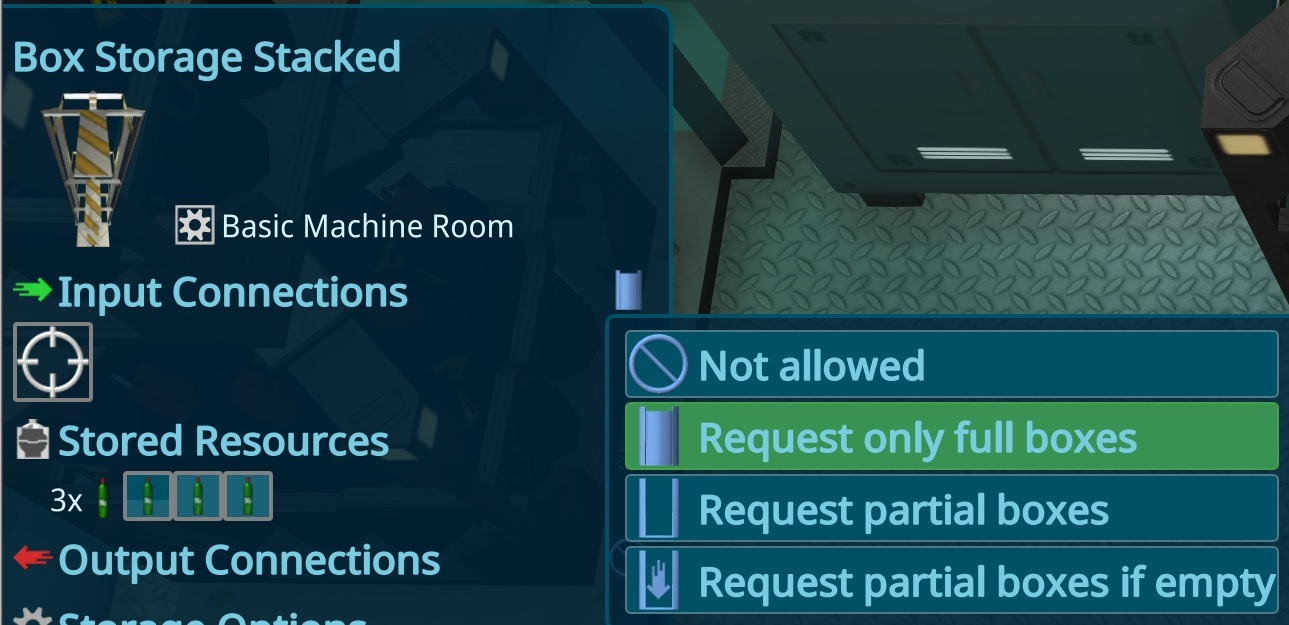
Input Storage Option
Not Allowed No Input connections are allowed. Request Only Full Boxes This is the default behavior for the Activity storages. They just request boxes when they are full, so not so many transport actions are triggered. Request Partial If Empty In some cases the other box is filling very slow, but its essential to get that as fast as possible, to get the activity to be able to work. This will be only triggered when the storage has no more boxes, so its not filling all up. Request Partial This is a special option that is default for construction storages to be able to grab all resources they need at the building lot.
Output Storage Option
Not Allowed No output connections are allowed. Auto Send Only Full Boxes This is the default behavior for Activity storages. They just send boxes when they are full. Auto Send Unused In some cases it can be useful to send a box out, when its not used by the room anymore, e.g. when an activity stopped. Force Empty This is a special option and is used e.g. for the Dock or dismantle building lots.
Problem Option
There are 2 different problems that can be configured. Full storage and empty storage. After several playtests i figured out, that players use the storage in different ways, so sometimes, the "full" is good, sometimes its bad. For each Storage, the player can now configure them depending on the usage:
Error (Red Icon)
Warning (Yellow Icon)
or nothing should be shown
Choose Connection Overlay
To round the storage changes up, i also improved the Connect Storage Overlay. I used the new approach what i developed for the Person Activity and added also existing ones and show problems e.g. for maximum connections.
Thanks
to the growing community for all the ideas and feedback. Thank you for reading. we would be happy to welcome you on our discord.
And don't forget to wishlist and follow us to keep up to date.
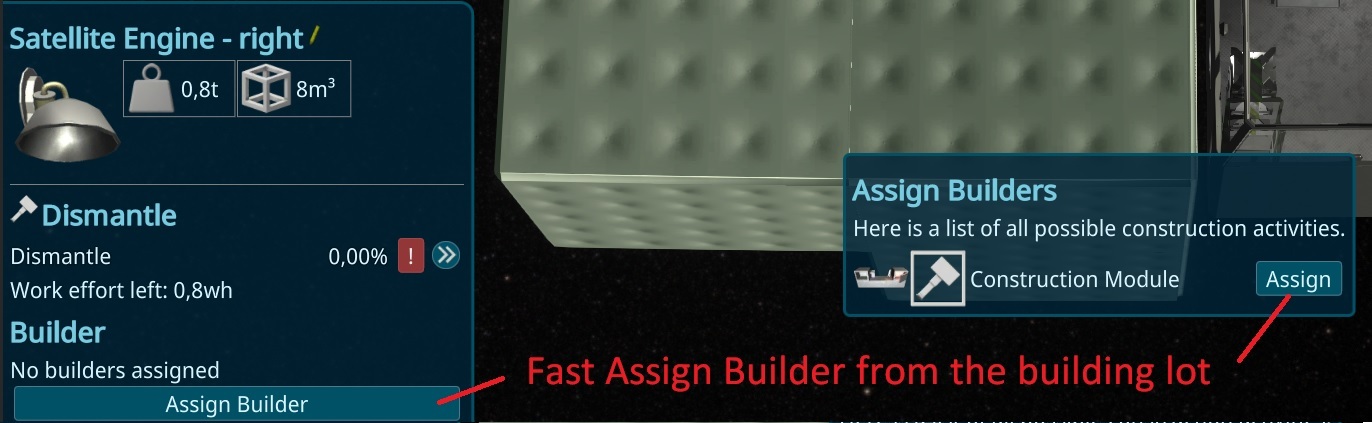
To make the builder assignment easier, i added a popup-button to the Construction Sites. It shows all possible Builders and an easy assign button, so its not needed anymore to assign it on all construction rooms in all interiors, what was a bit much work.
Assigned Workers
After the change of the working places it was not easy visible how many workers are assigned to a room. To make this visible, i added a list of all persons, assigned to the selected room to the details panel.
Hide Top of Rooms
To have a better view to the inside of the ship, there is now a button to hide the upper part of the rooms. I'm thinking to close the normal rooms in general, so its more realistic and they can be darken better when adding a night mode.
Construction Priorities
Due to a lot of feedback to the construction Priorities, i added more priorities to let the player differenciate easier. It also contains a Pause Option, so the building is not automatically choosen anymore.
Player Group Hotkeys
Like in most Strategie games, you can now use Ctrl+(1..0) on the keyboard to save the selected things and restore it with a simple press on the (1..0) Keys. Thanks to BLUESKY-WR for the idea.
More
This are just the smaller changes of this new Version. Larger things will be published from now on in more detail besides that updates.
Smaller changes
Changes
Always show the Unseal Buttons even when the building is not selected
Better text alignment in FillBars (Thanks to Revolus for report)
Add Arrow-Keys to WASD to move camera (Thanks to Revolus for Report)
Shift For SupplyRocket to completely fill/empty (Thanks to Revolus for Report)
Using lower value check for Air-Values to check for equals
Added Support for Click on the Buildings in the Resource-Overview Tooltip
Added Support for Click on the ContainerUser Window
Added General Burst to options for debuging hard crashes
Set Minimum Center of Mass Distance for spin to -1m to make Mass Balancers optional
Hide +-0 at gaugepanels when not updated
Improved Light setup for BigHemisphere
Shortcuts for Select or Choose are now correct shown in the current Shortcut area
Performance
Improved performance for Supply ship Setup
Bufixes
Fixed Unity Bug where space was used as mouseevent on a not shown button (thanks Glitch for report)
Fixed missing Unit in GaugeElements
Fixed Empty Area of Configurator blocked dropping Interior Items (thanks to Revolus)
Fixed Interior Items can't be dropped when over 0 cylinder position (thanks to Revolus for report)
Fixed Crash using the delete button in the interior Item list (thanks to Revolus for report)
Prevent Autosaves when game is already removed to prevent broken savegames (thanks to Revolus for report)
Fixed Crash like UI Update after special kind of big bugs due to History (thanks to Revolus for report)
Fixed Endless update Loop where a patient wanted to heal himself (thanks to Revolus for report)
Fixed not shown Storage at Mass Balancer
Fixed overlapping Resource-Overview Panel (lower left) to all resolutions (thanks to Revolus for report)
Fixed Buildmenu could open in first person mode
Thanks
to the growing community for all the ideas and feedback. Thank you for reading. we would be happy to welcome you on our discord.
And don't forget to wishlist and follow us to keep up to date.
This release took a bit longer, due to a 3 week vacation after working every day over the last 2.5 years.
Skills
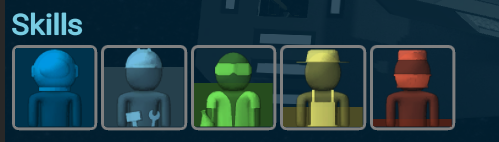
This iteration skills for the crew was added. They have now 5 basic Skills that have different impacts. A general skill is the astronaut skill. As higher it is, as less impact the 0 gravity will have and as better the person is in navigating and steering the shuttles. The other skills are for the specialized machines and activities. As higher, as faster they can do the work and some are restricted with a minimum skill.
Release 0.71 - Room Update
Release Video
[previewyoutube="j-xKmRdCrMI;full"]
The main change this time is a larger change on the rooms. They are now not activity oriented anymore, to make it easier to build them up. Instead the interior items are the main thing in rooms now. Each of them have their own activity and that leads to larger changes also in the UI and interactions. Due to that large changes i couldn't add so many new needs as i wanted. Instead just the hygiene and a med bay has been added for the persons.
Combined Rooms
The main change this iteration is a new approach for the activities. Instead of having the activities to be choosen in a building, now each interior item can be dropped to add an activity. Each one has its own to make it easier to understand.
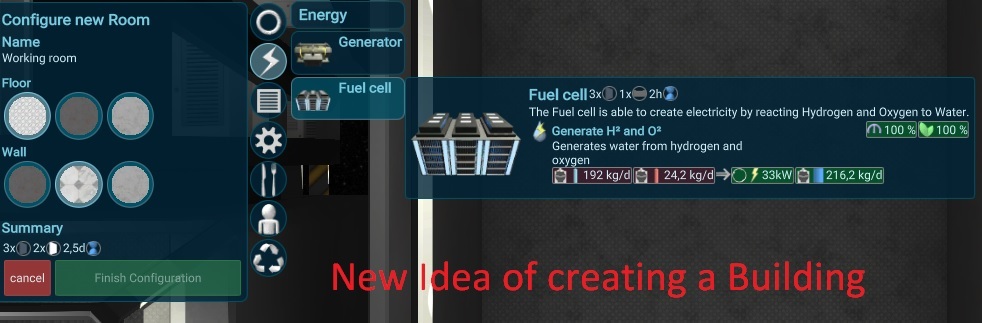
To make it easier to find interiors, i combined some of the rooms. Before the rooms than would have had too many activities to choose, but now its way cleaner to do so. When opening the configuration, there will be a interior item build menu, where all possible interior item are grouped in categories. When an interior item is dropped the needed storage will appear in the first "storage" category. Later i plan to let also other storage droppable in that category.
Choosable Room Icons
The change to have all interiors possible in one room made the Icon obsolete. To make this still useful, the player can change the icon to some preconfigured icons.
Interior Problem Icons
Due to the new Gameplay with exactly one activity on one interior item, its now possible to move the problem icons directly above the interior items. Also problem markers for storage have been added to hint better to potential problems.
Choose Activity
The choosing of the activity of a person also needed to be adjusted. The Player can now directly choose the interior of the activity to send him to this. Only possible, not blocked ones are shown. While updating that, i also fixed some performance issues with that topic, leading on some point to lower fps.
New Workplace
With the new systems it become not useful anymore to assign a person to an activity whats not a single machine. This part has been changed a lot in this iteration, so now the persons can search ship wide for works to do. Its possible to filter these tasks for each individual person by assigning a workplace. This is now a building, and you can assign as many as you want. The person will than just work in this building. In later iterations its planned to add more filters, like activity type specific, so you can let him only grow plants or maintain the buildings. Maybe also to assign a daytime range when he should work, to have kind of shifts in the game.
Construction Calculation
The Construction and Maintenance activity can now work paralel on the same item. This was neccessary, due to its no more possible to build one big construction activity, but having many small ones instead. I added a "Effort" unit mesassured in wh (working hours) and used the usual container logic to represent the build. Each worker now just adds deltas as all other systems and use events from the building instead of precalculated times.
New Room: Med bay
Big thanks to BlueSky-wr to design the medical bed. Its directly added to the only interior item for a new room (more will be added later). The healing is a new kind of activity, what needed a small change in the simulation, so customers can also go there, even if there is no worker attached.
New Need: Hygiene
The person now also needs hygiene. To add a washing activity without gravity, astronauts using simple washcloth. So i used the sink to show that in an easy way. The Drink activity now uses a new water dispenser instead.
Resource Quality
To add the new Wash activity to increase the hygiene, it was needed to add content of the resources. Brown water contains nutrition, that can be filtered by the purification plant. Till now, this amount was fixed, due to it was just created by the toilet. The wash activity now should also create brown water, but with way less biomass inside. To make this work a quality has been added. In case of brown water, higher quality means more biomass contained. Later this can be also used for food quality or harvested iron ore.
Other smaller changes
Changes
Force a person to do something will now just increase the metric so he working longer
Prevent Persons idling in buildinglots
Added Ambient Occlusion effect
Better layout for Configurator
Added edit-button to all changable Names
Changed Worker Color to orange, to make the type better visible
Shuttle bay send also partial resources out automatically
More possible crashes are converted to Error Logs
Also stop sleeping when being on a mission, to prevent emergency sleep while mission
Use a large Storage for the starting Toilet module, to make the start easier.
Prevent transferring empty boxes (due to leads to other problems and useless)
User nicer and smaller on/off button as a phone like button
Performance
Prevent updating not shown things in the UI
Improved UI for storage with many connections
Improved UI performance for Choose Actions
Improved UI performance for Person Overview
Better cutting, to use less verticies for buildings
Bufixes
Fixed Visual cuts in buildings
Fixed Partial full Boxes are not send out by general storage
Fixed Crash when assign a person to multiple Missions
Fixed Effect of Shuttle not stopping when load a save game where shuttle is gone
Fixed Wrong visual position of collected boxes
Fixed Person not hidden after loading when was on a mission
Fixed I18n Mixed Texts for Fuel Cell and Electrolytics (thanks to Erosis)
Prevent showing warning when person goes to fulfill a low need at 10%
Fixed special case where UI didn't detect the cursor is on the scene.
Make RequestIfEmpty to minimum 1% to prevent problems and too much transfer.
Fixed Problem with loading wall materials
Fixed not animated Resource box when moving it inside of a building
Release 0.70.0 - Residence
Release Video
[previewyoutube="mDERJr8Ev-A;full"]
Special Thanks to BlueSky-WR for the good testing this iteration! Due to the changes in the last iterations the demo got really short. I added more stuff to the playtest demo version. The registration ended in the last week and i keep adding more and more playtesters every release, to get feedback to the newest changes. If you still feel the demo too short, you can get the community license by joining our Discord at https://discord.io/generationship
Residence
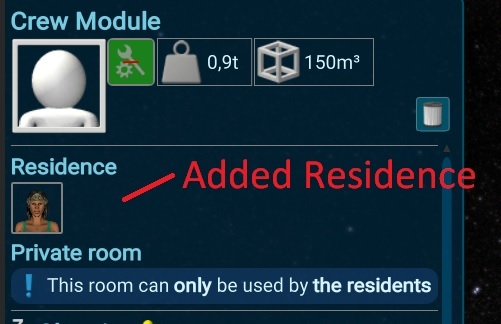
The main simulation feature this Iteration are the residences. Crew rooms with beds can be converted into private rooms by assigning the persons to them. Private crew rooms can just be used by the owners. Later the interior of this room will also effect the person. For the start, the person will just get a mood panalty if there the person has no residence assigned. I improved the UI for the Person, so there is a big resident and workplace area to choose it.
Thoughts
The next new simulation feature are thoughts for persons. They are added when the person is in a special state like he has no resitence or an event happened like he pee himself. Thoughts can have a duration and effects the mood over time. Later a news from earth or other things would also be added as thoughts to effect the mood. New Crew members got also an additional bonus when they arrive in the station.
Walk in Station Camera
There are new cameras added to the game: The Walk in station camera will allow the player to move inside of the ship in first person view. Its a part of a further planned feature to add player controllable drones, to repair buildings in case of emergencies or push persons to work harder. Till now, it's just another view angle that can be entered with Num-4.
Free Camera
Another new camera is a free that is active when holding the mouse-wheel down. Than the player can look around with the mouse and move with WASD. There is no gameplay planned with it, its just due to it can be nice to look around :)
Visualisation of Connections
To make it easier to see and configure the building connections, i added a visualisation. Its following the box-paths the connections will use, so they directly start and end at the storage. Its selection sensitive, so when a storage is selected directly, its just showing the connections of it. Similar for interior showing all related storages to the activity the interior belongs to. By hover over a connection, it just shows the connection, to identify them faster. Its also possible to see all connections with a given resource by hovering over the resource overview in the lower left. I also added a walking path to the person, to have a nice visual.
Cheat option
The cheats i used in the editor for development are now also available in the compiled version. It can be enabled in the options. Enabling it results in no more steam achievements and high scores. Also future stats (steam and for the player) will be also disabled than. The cheats are a bit hidden implemented, most of the time its using the regular ui with some modifier keys. E.g. with Ctrl and click on an empty resource box will fill up the storage. A ctrl click on the Start Planning cause an instant finish the plan. Holding additional shift will fill up all storages in the buildings and alt let workers spawn. The idea of that is to have kind of a sandbox mode, so the player can quickly build large ships or what he wants. (thanks to ichao for the sandbox idea)
Distance specific productivity
To prevent having one big maintenance building for the whole base, i added a distance panalty. As further the target to maintain or construct is away as more panelty will be added and as longer it took.
Worker use idle time
Till now, workers were just working in the buildings if there was something to do or not. Now, they will just go to the building, when there is realy something to do so they can fill up their mood till the next task starts.
Warnings and Error Report
I started a while ago to migrate the crashing exceptions in the simulations to simple errors, so the player can keep playing. Also some auto repair features, so the bugs will not cause an unplayable state of the game. To make it visible to the player whats happening i added a small warnings and errors element to the UI. Its shown at the debug section and a popup with details will open. It also contains a one click report option.
More Performance
As started at the last iterations i also improved the performance again this time. I recalculate the positions for most of the entities less often and added a dirty mechanism also to other parts. I changed the approach to change the walkways to allow them also to use different LOD levels to reduce more verticies to draw on further distances, added camera frustrum culling to the self rendered objectes and render also less things separate from unity. I also moved some systems around, to make them work on other cpu cores while long running unity processes are executed. All in all i could increase the speed for a large ship in the editor by a factor of 2. It should have a bigger effect as less cores the player has.
Other smaller changes
Fixed Problems with the Tube System (thanks to BlueSky-WR for report)
Make a rare case not crash the game for no need (thanks to BlueSky-WR for report)
Fixed a rare UI bug happend when seal a building in a special situation (thanks to BlueSky-WR for report)
Fixed missing route check when sealing in a special condition (thanks to BlueSky-WR and ichao for report)
Improved Shadow quality
Readded Photovoltaicpanels curving to ship shape (thanks to BlueSky-WR for the hint)
Fixed rare problem at the TaskManager at end of a gameyear (thanks to BlueSky-WR for report)
Max size for worker/customer panel for large buildings
Fixed wrong calculation in build menu templates (thanks to BlueSky-WR for report)
Fixed Name of normal buildings didn't use the correct language (thanks to BlueSky-WR for report)
Using the real name of the building if possible in activity user label (thanks to BlueSky-WR for report)
Fixed Pathfinding for full circles (thanks to BlueSky-WR for report)
Fixed buildings like greenhouse were not working well (thanks to BlueSky-WR for report)
Fixed Exception when multi Select a buildinglot (thanks to BlueSky-WR for report)
Only update the floor holes if its needed to reduce cpu load
More reduction of verticies with lod and culling for resources and doors
Persons can eat and drink more, to stop changing tasks too often (thanks to BlueSky-WR)
Fixed left over interior in special case (thanks to BlueSky-WR)
Readded color in multi selection represents the state
Added F5 for a general consistency check and cache refresh of selection
Fixed wrong animationPaths when running on very high simulation speed (thanks to BlueSky-WR for report)
Removed no Customer warning, due to it was missleading
Fixed problem where persons selecting wrong servicebuilding (thanks to BlueSky-WR for report)
Fixed missing normalize in grid rotation caused problem with effects (thanks to BlueSky-WR for report)
Fixed Problem with gametime calculations on extreme high millisecond additions (thanks to BlueSky-WR for report)
Improved Path of Boxes to exit
Fixed In Animation position on 90° rotated buidlings
More error tollerance in creating savegames to prevent the savegame is completely broken. (thanks to BlueSky-WR for report)
Fixed bug when configuring a building and person is idling in a buildinglot next to it. (thanks to BlueSky-WR for report)
Fixed Problem where the next ResourceEvent was missing in a special case (thanks to BlueSky-WR for report)
Improved Merging of Container Users for very large ships (thanks to BurritoBotV3000 for report)
Fixed Change of Floor and Wall was not persistent
Fixed Animation bug where persons walk through walls
Fixed metabolism not starting instant when e.g. nutrition is empty and person starts to eat
Fixed wrong problem shown in the Metabolism warning