Genre: Role-playing (RPG), Hack and slash/Beat 'em up, Adventure
God of War
Patch v1.0.2 Released
Patch v1.0.2 for God of War is now live.
Please restart Steam to receive the update immediately.
Thank you to everyone who helped us confirm these fixes on the Experimental beta branch. At this time, you should switch back to the default branch as the Experimental beta branch will no longer be updated.
To switch back to the default branch, follow these steps:
In your Steam library, right click on 'God of War' and select 'Properties'
Select the 'BETAS' tab
Change the drop down to 'none'
Patch Notes
Bug Fixes
Fixed an issue where users with Intel 12th Gen CPUs could not boot the game without disabling their integrated graphics card
Fixed a UI issue that was causing a small memory leak
Other Changes
Added an error message for when saving the game fails due to a missing "Saved Games" folder or a related permissions issue
Added an error message for when a GPU stops responding. This error is often due to a driver issue or instability from overclocking
We are continuing to investigate the memory leak issues and the rest of the Known Issues. If you are experiencing these problems, submitting a ticket greatly helps us gather all of the information we need to properly access each one.
God of War Trading Cards & Points Shop Items Now Live!
We're excited to share that the Steam community items are now live for God of War!
You will have access to Trading Cards and Points Shop items including:
Experimental Branch – Test Fix for Out of Memory Errors
We've seen a number of people reporting issues with "Out of Memory" errors on start up when the computer should otherwise have ample memory. In our investigation of these issues we found that the vast majority of these were happening to people with new 12th Gen Intel CPUs with integrated graphics and that disabling the graphics card allowed people to work around the issue.
We've prepared a hot fix to resolve this issue and would love your help in validating the fix if you're willing. We've setup a separate branch on Steam called "experimental" that will allow you to download this hot fix and see if it resolves the issue.
Note that we have not completed our full round of quality assurance testing on this build, so there could be instances of instability that we have not identified yet. Still, if you're willing to help, please download this new build and let us know how it goes.
To access the experimental branch, follow these steps:
In your Steam library, right click on ‘God of War’ and select ‘Properties’
Select the ‘BETAS’ tab
Change the drop down to ‘experimental’
If you do not see the branch in your drop down, please restart your Steam client.
To switch back to the default branch, follow these steps:
In your Steam library, right click on ‘God of War’ and select ‘Properties’
Select the ‘BETAS’ tab
Change the drop down to ‘none’
Patch v1.0.1 Released
Patch v1.0.1 for God of War is now live.
If you have preloaded God of War, you will have this small update before launching the game. If you have not downloaded God of War, this version will be incorporated into the general download.
Please restart Steam to receive the update immediately.
Patch Notes
Performance Improvements
Fixed an issue that could cause performance degradations after prolonged play sessions
Fixed an HDR issue that could cause scenes to be too dark
Fixed a few issues that were causing sporadic crashes
God of War is now LIVE on PC!
We are thrilled to announce that God of War on PC is now officially live! Thank you for all of the support you’ve shown in the lead up to the release, your excitement has been a constant source of inspiration for us as we navigated the unfamiliar waters of porting this game to PC.
We have a compiled an FAQ here in the Steam Discussions should you have any questions or want to reference information like our Systems Requirements. If something does arise, please submit a ticket on our Support Portal for our developers to investigate.
Whether you're picking up God of War for the first time or playing it again on a new platform, we hope you enjoy your journey through the Norse wilds with Kratos and Atreus!
- Santa Monica Studio + Jetpack Interactive
God of War PC Ultrawide Trailer and Gameplay Tips for Launch
Tomorrow on January 14, God of War (2018) launches on PC. To ensure you’re ready, we’ve released our PC system requirements and features – be sure to check them both out!
Ultrawide trailer
One of the unique PC features that we’re very excited about is the 21:9 ultra-widescreen support that will allow you to play the game with an incredibly unique theatrical feel. Take a look below:
[previewyoutube="u9wM2Zdeloc;leftthumb"]
Nine Realms survival guide
With our release on the PC, we’re hoping that many new players will be able to experience Kratos and Atreus’ story for the first time. To help you get started, we’ve put together some beginner tips that will prepare you for the journey to come.
Don’t forget your Boy
Atreus may be young, but he’s one of your best assets in combat. As your journey progresses, Atreus will grow stronger and gain access to abilities that can make all the difference in your toughest fights like being able to stun monsters, bring Kratos back from the brink of death, and unleash powerful magical abilities along with his bow attacks.
Atreus has three different gear sets that can synergize with your playstyle. Make sure you’re equipping him to best support Kratos’ needs in combat. At their first tier, the sets have the following effects:
Sharpshooter Garb: Lower the Talon Bow recharge time. Aimed shots fired at enemies in the air deal extra damage.
Fighter Tunic: Boosts melee damage and exposes enemy weakness. Choked enemies will take increased damage.
Runic Vestment: Increased recovery speed from enemy attacks and provides Healthstone assistance. When Kratos is injured, Atreus has a chance to find Healthstones.
Upgrading Atreus’ abilities and equipment will be as important as upgrading Kratos, invest in his progression early and often!
Friendly Favors
In God of War, there are side quests called Favors. Some let you get to know your allies better, like helping the blacksmith brothers Brok and Sindri, while others will let you journey deeper into the rich Norse mythology of the world.
All offer rewards that will help you in battle. Alongside the XP you’ll earn, many of the Favors will also give you equipment and ability upgrades.
Earn XP with the Labors of Kratos
Labors are tracked activities that will reward you for interacting with the world and playing the game. Completing them will grant you a big chunk of XP, so they’re great for leveling up. They’ll also encourage you to switch up your playstyle, try out new tactics, and explore the world.
Labors come in four different categories:
World: Engaging with the world by completing activities like closing Realm Tears and finding Hidden Chambers.
Crafting: Crafting and upgrading your gear.
Skill: Killing enemies in a specific way, like lighting them on fire or performing parries.
Kill: Defeating a certain amount of an enemy type.
Bestiary combat tactics
Atreus will keep notes of all the enemies you face in the Codex. Not only is it a great way to track the information you learn on important figures and the realms themselves, the Bestiary section will also provide helpful gameplay tips on the weakness of monsters. Enemies are not one-size-fits-all, if you’re having difficulty with a certain type of creature, make sure you check Atreus’ notes for tips on how to dispatch them.
Understand your Gear stats
Your combat style can greatly benefit from the gear that you equip. Once you figure out the type of gameplay you like, there will be gearsets that help you excel in that area.
Whether you want to focus on standard attacks, your runic abilities, or a mix of both – understanding your gear stats will help you decide which pieces to invest in.
Strength: Increases the damage for all standard attacks.
Runic: Increase both Runic Attack and Elemental Damage.
Defense: Reduces all damage taken.
Vitality: Increases maximum health and decreases the severity of hit reactions from enemy attacks.
Luck: Increases Perk activation chance. Increases XP and Hacksilver gains.
Cooldown: Reduces recharge time of Runic Attacks, Runic Summons, and Talismans.
Certain gearsets will also be better for a specific playstyle, make sure you find the one that works best for you!
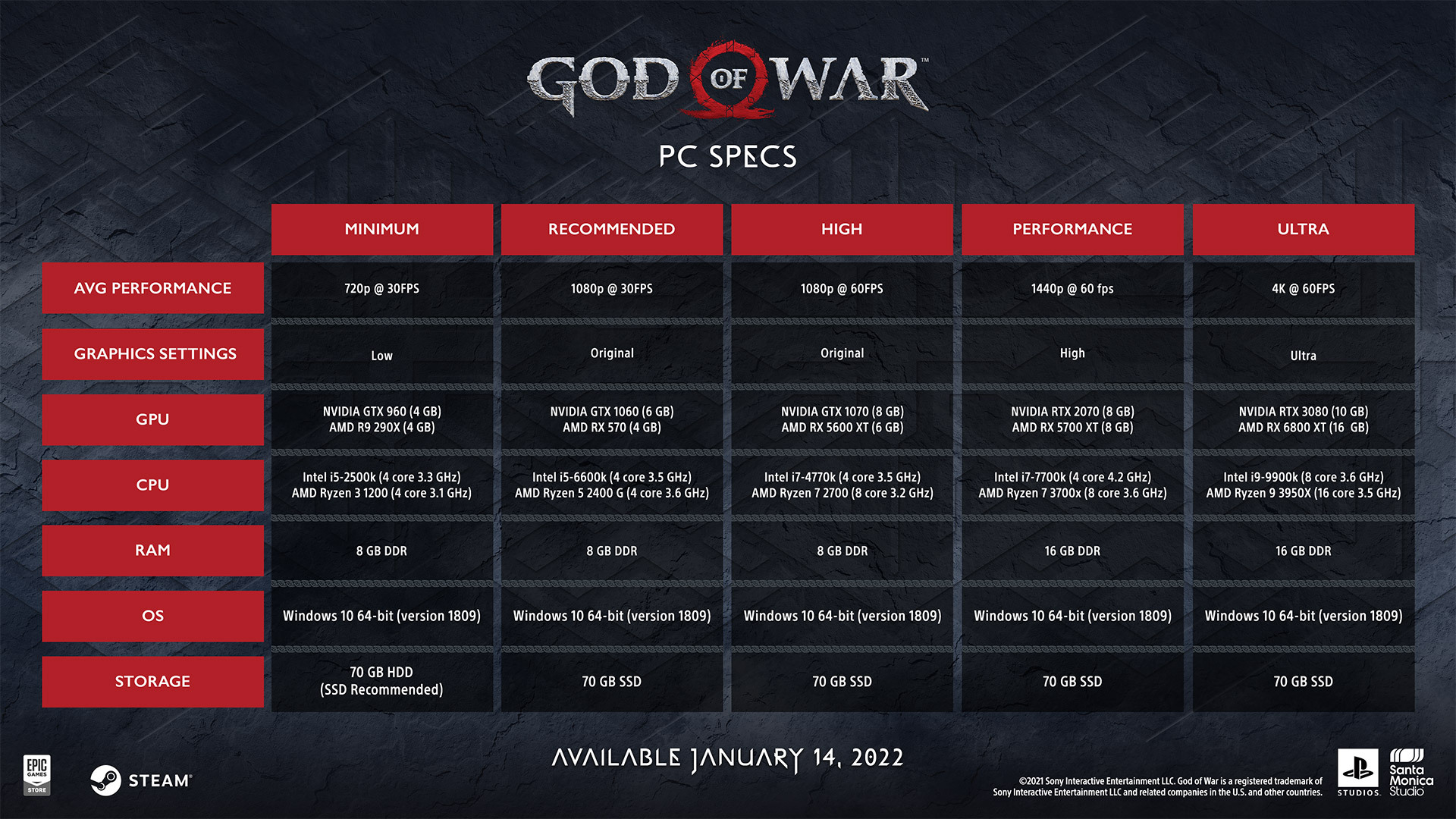
God of War (2018) PC System Requirements and PC Features Trailer
Coming to you on January 14th, 2022 – God of War (2018) will launch on PC for the first time ever!
SYSTEM REQUIREMENTS
To help you figure out which setting will run best on your setup, we’ve put together five spec configurations.
PC FEATURES TRAILER
Our collaboration with NVIDIA means that PC players with GEFORCE NVIDA RTX GPUs will be able to take full advantage of amazing features that will make the game feel even more sharp and responsive.
[previewyoutube="RQK_40a0XUY;leftthumb"]
NVIDIA DLSS AI PERFORMANCE BOOST
Using NVIDIA’s revolutionary Deep Learning Super Sampling (DLSS) software combined with their exceptional RTX GPUs, players will be able to experience God of War running at increased resolutions while retaining high frame rates. DLSS uses machine learning to upscale the game resolution giving you amazing picture quality without the sacrifice to performance.
NVIDIA REFLEX
When facing your toughest opponents like Sigrun the Valkyrie Queen, how quickly you can react to her attacks can make all the difference between life and death in a fight. With NVIDIA Reflex, gameplay on God of War (2018) for PC will be responsive with reduced system latency across several generations of NVIDIA GeForce RTX and GTX GPUs (NVIDIA Reflex is supported on GTX 900 series or better).
AMD FIDELITYFX SUPER RESOLUTION
We are also happy to support AMD FidelityFX Super Resolution (FSR) so our players with AMD GPUs can take advantage of their visual enhancement technology!
ENHANCED GRAPHICS
Higher-resolution shadows, improved screen space reflections, enhanced Ground Truth Ambient Occlusion (GTAO) and Screen Space Directional Occlusion (SSDO), alongside highly detailed assets and rendering solutions means God of War on PC will be a beautiful, crisp visual experience.
From the frozen wastes of Helheim with its jagged, icy terrain and ghostly green skies to the lush Lake of Light in Alfheim whose shores are home to exotic plants and crystalline waters – the mythical and stunning environments of God of War will shine on PC as you journey through them on your quest.
For the latest updates on God of War for PC, make sure you follow Santa Monica Studio on Twitter, Instagram, and Facebook!
God of War (2018) is coming to PC
We’re thrilled to announce that God of War (2018) will be coming to PC on January 14th, 2022!
All of us at Santa Monica Studio have been humbled by the immense amount of support and passions fans of the God of War series have shown in the latest chapter of Kratos’ story since its release. As of August 2021, 19.5MM copies for God of War on PlayStation 4 have been sold and we can’t wait to share that experience with a whole new group of players on PC!
[previewyoutube="HqQMh_tij0c;full"] Our primary goal when bringing God of War to PC was to highlight the exceptional content the team created and leverage the powerful hardware that the platform offers to create a uniquely breathtaking and high-performance version of the game.
You’ll be able to enjoy the full potential of our cinematic, no-cut camera as it follows Kratos and Atreus across the realms with the option of true 4k resolution, on supported devices, and unlocked framerates.
Our PC version includes a wide range of graphical presets and options so you can fine-tune your visual experience based on your setup. From higher resolution shadows and improved screen space reflections to enhancements to the ambient occlusion pipeline with GTAO and SSDO – God of War on the PC can create striking visual quality unique to the platform.
We’re also happy to announce that we will have full integration with NVIDIA Deep Learning Super Sampling (DLSS) available on RTX™! You won’t have to sacrifice high graphical settings and output resolutions for high performance in God of War.
In addition to DLSS we will also NVIDIA Reflex low latency technology available. Reflex delivers a more responsive experience allowing you to react quicker and hit harder combos.
Alongside the graphic and performance improvements, we are also offering 21:9 ultra-widescreen support!
From the heart-pumping clashes in combat to the quiet moments where you can take in the otherworldly beauty of the Norse wilds across the Nine Realms, our panoramic widescreen support will make every moment feel more like a truly theatrical experience.
Our plans for God of War on PC include robust controller support and keyboard mapping customization.
For those of you who would prefer a controller, we will support DUALSHOCK®4 and DUALSENSE® wireless controllers in addition to a wide range of other gamepads.
For our keyboard and mouse players, you will be able to fully customize the bindings to create a control setup that works best for you.
Finally, the purchase of God of War on PC will also contain the following digital content:
Death’s Vow Armor Sets for Kratos and Atreus
Exile’s Guardian Shield Skin
Buckler of the Forge Shield Skin
Shining Elven Soul Shield Skin
Dökkenshieldr Shield Skin
That’s all we’ve got for now! We’ll have more details to share over the next few months as we get closer to release on January 14th, 2022.
We appreciate your continued support of God of War and hope that this version of the game will create a one-of-a-kind cinematic experience for returning and new God of War fans alike!
For the latest updates on God of War for PC, make sure you follow Santa Monica Studio on Twitter!