This is a fairly sizable update featuring a rework of various online multiplayer menus, some new achievements, various quality of life additions, and bug-fixes.
New Pre-Game Lobby
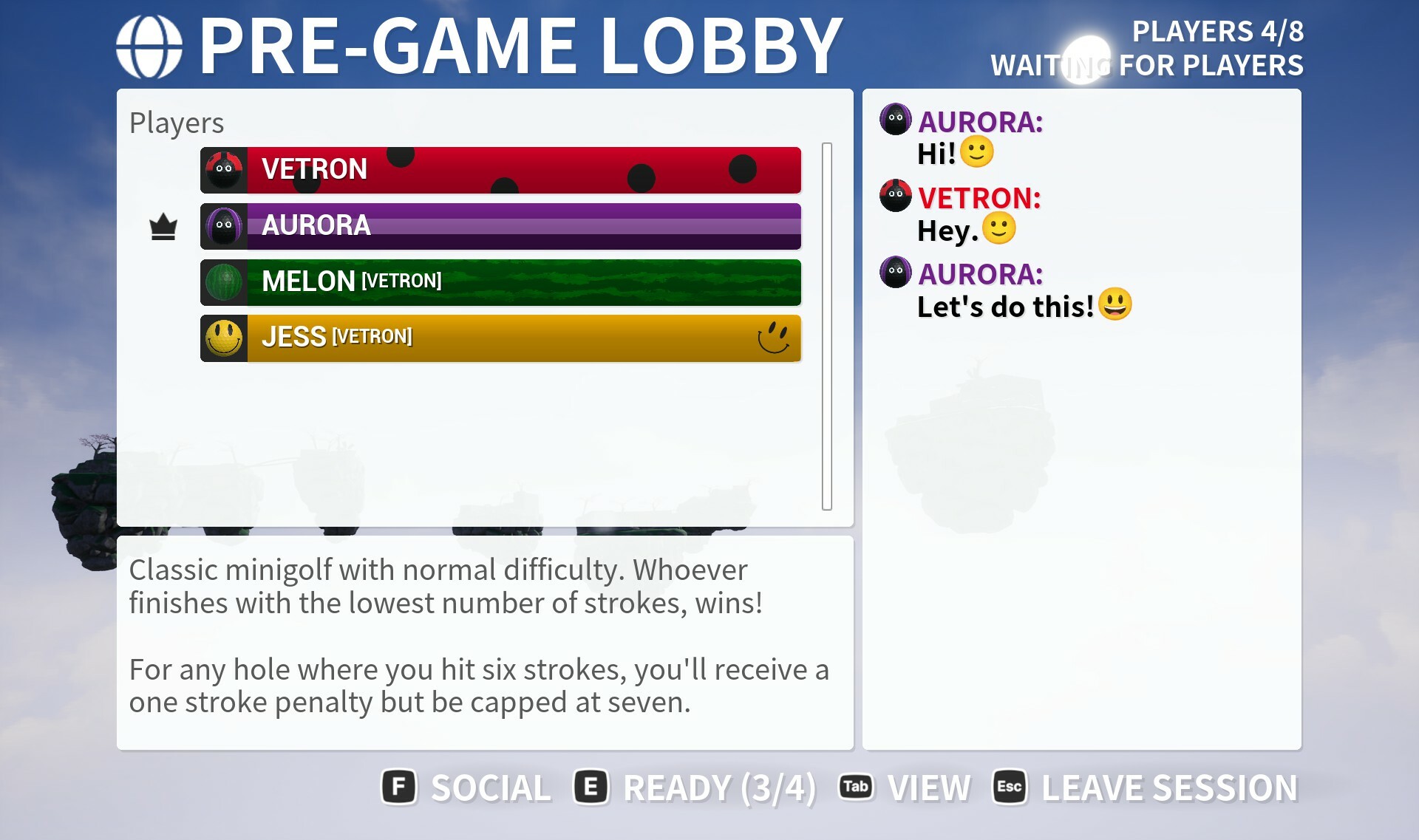
The previous lobby has been completely re-done, instead of a small widget this is now a full size menu with access to lots of different information and function. For starters the quick chat is available on the side list rather than to side of the menu so have dedicated space to see messages.
At the bottom of the menu is a brief description of the current game mode including what you have to do to win. You can via gamepad or the onscreen buttons at the bottom of the screen reach the full social menu if you wish to invite friends, block players, or send a friend invite.
This menu now has a 'ready' system rather than direct host control for starting sessions. The host still has some control, as when the host selects ready the session will begin a 20 second countdown, if all bar one player has readied up this will be immediately cut down to 10 seconds, and if all players are ready then it will begin in 3 seconds. The point of this timer is give players a chance to perform any actions in the menu's if they need to without it holding up the game starting by any more than a few seconds.
By pressing tab or start button you can switch the menu view where you can instead of accessing quick chat be able to navigate the player list and inspect anyone as needed. Once you inspect someone you get direct access to any actions such as sending friend request or blocking.
At the bottom of this page is also a more detailed breakdown of the settings the sessions have set. So if this were a custom session in particular you'd be able to see any changes to the standard preset the host had chosen if you've forgotten since reading via the session list info.
Reworked Online Multiplayer Scoreboard
On the scoreboard when playing in online multiplayer you will now have the ability to use quick chat in a right side panel. Previously on some small screens the menu would kind of get in the way when the chat was to the side. An option to reach the full social menu is accessibly by Y or by pressing the button at the bottom.
To make room for this a slightly different stats layout features in this mode. You can press the view button to view scoreboard details as previous, and this will hide the quick chat to make room.
On the details page you can inspect players in the same way as added on the new pre-game lobby menu.
Improved player inspect
This menu was introduced in the last update but has been updated to now include all the back-end support to offer a link the players steam profile (providing that player is playing on steam).
If you open this while in a scoreboard or pre-game lobby you will see any relevant countdowns such as till next hole start or session start. This is replicated across all social menus.
Cross network leaderboards
This is in addition to existing steam leaderboards, but you will now be able to switch the menu on any menu where leaderboards are displayed between the current platform (steam) and a more global leaderboard set that includes players from anywhere.
These global leaderboards obviously do not make use of Steam leaderboards so lack functions like being able to compete against another players ghost, or watch their replay. Your highest score (as well as ghost) will however be uploaded to both leaderboards going forwards (if you view the leaderboards or replay a particularly level this action will occur then).
As previously mentioned, Golfing in Aether is only available on Steam but was developed in a way to allow cross network play so some day it may be available on consoles or other pc store fronts. I like supporting Steam specific features such as the leaderboards so you'll basically have both systems working along side one another with the default visible being Steam.
New achievements and icons rework
This update features 4 new achievements, two of which I felt offered a fun side challenge, and two others that are more of a progressional metric to track.
The first is "Speedrun", which is a reasonably difficult challenge of having to complete a 9 hole session in under 90 seconds. This only factors in actual gameplay time, so is the time stat shown on the scoreboard.
You don't need any particular stroke count to complete this challenge, so using a mode such as race may be easier. You can use custom session settings and pick 9 levels you feel most confident in. Generally you'll want to have a bunch of levels that you can complete in around 5 seconds to free up some extra time for other levels that take longer than 9 seconds to complete.
In testing it took me a few attempts as it is fairly difficult but as its a time focused one it isn't a long grinding one to complete.
The second achievement is "Barkie", which is a fun one where you have to complete a hole with a score of par after for whatever reason hitting a tree with your ball. Full size tree's or just stumps will count, but logs (like you find on the course itself) will not. You can do this in any mode including practice, but cannot use the reset or undo function after hitting a tree (as you've un-done your shot you'll have to hit a tree again for it to count).
This is one you can chase after as a side challenge or you may end up with it someday following a questionable shot, as you only need par following it's not supposed to be particually difficult and just a bit of fun.
Next is "Fashionista", this is a straight up tracking achievement I've placed to really gauge how many players are making full use of customization. To complete this you just need to have any ball design other than the default white ball, as well as equipping any accessory / hat option other than the default none option.
Finally is "On the Green", which makes use of an added additional style XP rule where if your ball comes to a stop within the marked area surrounding the hole on your first shot you will receive an ‘on the green’ bonus of 50 XP. I added this XP bonus as a way to highlight particually a shot in a hard level that would otherwise of been a hole in one if playing on easy (due to the sloped holes). The achievement will unlock when reach XP / Scoreboard menu following this action.
All the achievement icons have been reworked to feature a border showing their type. Bronze achievements are relatively easy to complete, Silver are more time or progression focused, and Gold offers some difficult challenges including the completionist achievement.
The goal was always to offer a balanced mix of your standard progression types as well as some more unique fun side challenges to complete. I'm not against adding more in future but I would want those to fall more in the 'fun side challenges' category rather than progression.
I deliberately avoided arbitrary ones for say getting birdies, bogies, par a hundred times as nobody wants that. Some progression or tick box achievements such as "watch a replay" or "reach XP level 3" are always necessary as it helps with gauging players interest. This lets more development be put either into better explaining how features work so more players know how to use it, or just focusing on features that players actually are using.
I'm always open to hearing feedback on these. Long term I'd like to look at doing more with how achievements are represented in-game and perhaps offer some rewards for completing the actions that leads to them being earned.
Focus flag and level name widget behavior
When you use the focus flag button (middle mouse or right thumbstick press) after holding for a second or so the name of the level and any other relevant information will fade into view. This is the same widget that is displayed at the start of the session following the level sequence.
This widget has also been tweaked to appear on each screen during split screen and fade out rather than disappear as it did previously when playing local multiplayer.
Skip Level Sequence during singleplayer
A requested feature, like with what was previously implemented for practice mode, you can now hold down either spacebar or A on gamepad (or equivilant) and be able to skip the level sequence.
This will also work when playing a session with local players in any combination. However online multiplayer sessions do not feature skip behavior due to issues it could cause.
Level tweaks
The level short spring now has one of the flipper obstacles that was added in the dustbowl expansion. This I feel adds to the gameplay of the level, it was originally something I wanted to have feature. It also offers an additional route to getting a hole in one, to aid perhaps overly high previous difficulty.
Various other previous levels I have gone back and improved sound placement, and several have various small tidy ups as well.
Levels that include the rotator obstacles have had their ground pieces reworked to fix a an issue that could occur where was possible for a player not able to regain input if the ball stopped in a particular spot where the rotator couldn't hit them, but were still considered in the bounds.
Various bug fixes
As this is a fairly large update please check the full notes below for all the changes made as its hard to mention everything, if you are aware of any issues then please let me know so they may be hotfixed.
Added change to flag raise detection on short spring.
Added “Speedrun” achievement for completing a 9 hole session in under 90 seconds. This only factors in gameplay time (so from point of hole starting to holeout etc. not scoreboard/menu time), which you can see as a stat that’s displayed on the scoreboard. You can do this with a custom level selection via custom session if you wish.
Added new readying up system for multiplayer sessions to replace sole host starting. This behaves somewhat similar to existing scoreboard skip behaviour. The way this works is if the host sets ready the game will begin a 20 second countdown, alternatively if 50% of players (when total players is greater than 2) set ready this countdown will be set to 10 seconds. If all players go ready the session will begin immediately. As a note, existing behaviour is that any player who’s idle during the first hole once they receive their 30 second countdown is removed from the session. This way you’ll never get stuck on that 1 player who doesn’t ready up or just goes idle.
Added ability to skip the level sequence in any offline mode similar to how practice behaves.
Added ability to pause the game session when playing with local players in any hotseat mode.
Added a tweak so when playing hotseat with local players, if a player doesn’t take their turn they are made invisible again so don’t overlap the next player taking their shot.
Added a tweak so when playing hotseat if a player goes out of bounds while on the tee they are made hidden again.
Added tweak to how FOV is handled with two player splitscreen as it was a little close.
Added additional rule check for the situation where one play finishes a round while the other is still on the tee and thus hidden. Now when spectating the selected player will always be visible regardless of any override.
Added ability to pull down previous leaderboard scores and xp stats to update save-games in case of a cloud save sync failure at platform level.
Added an additional check for out of bounds water using different method to help with reliability.
Added a remote play touch input configuration for mobile. I would recommend playing with some kind of controller but if you absolutely have to use purely touch input this will make it playable.
Fixed values for Completionist and Around the World achievements not factoring in level totals from recent free expansion which introduced 10 new levels bringing total levels to 70 (not 60).
Added new function where if you hold the flag focus button down for more than a second the level title (as shown at the start) will reappear. It will fade out again as you release the hold.
Added fashionista achievement for both customizing your ball (to any configuration besides default white) and equipping a hat.
Added additional style XP rule where if during a ‘Hard’ level (i.e. without sloped holes) your ball comes to a stop within the marked area on your first shot you will receive an ‘on the green’ bonus of 50 XP. You will not receive this as part of a hole in one, its simply a way to differentiate a shot that was close to being a hole in one. You will not be required to get the ball in the hole on the next shot to get this bonus, simply come to a stop in the marked area (usually marked in yellow on a hard level).
Added On the Green achievement which makes use of the above mentioned on the green bonus.
Added Barkie achievement, which you can get for hitting both par (or better) and a tree during a level. Note if you use reset/undo this will also undo registering hitting a tree. Trees and Stumps count, logs do not.
Platform
Added new achievement icons featuring bronze, silver, and gold outlines which give a difficulty or value indicator of the achievement.
Added an official touch controls controller config for Remote play on Phone and Tablet.
Environment
Added Flipper from recent Dustbowl expansion to previous “Short Spring” Level. This is a balance to bring an additional little bit easier method to get a hole in one as well as at same time adds a fresh hazard to the level that can add a bit of challenge if you aren’t careful.
Fixed a slightly incorrect fence collision.
Fixed various physical materials to compensate physics at an engine level have shifted over time (things should be more consistent now as UE5 matures).
Fixed a physical material generation issue on some ground pieces in some rotator configurations such as on “What goes around…”, “Downhill from here…” and “Waterhole” that could cause a ball to not trigger the power meter upon stopping.
Fixed one of the grass physical materials not having the sufficient restitution.
Added logs to list of meshes that won’t block the camera.
Fixed a small wall alignment issue on “Ponds of rage”
Fixed sound placement of various levels from Leviathan Expansion.
Fixed a scalability issue that could lead to a hole blocked on “Whirly Fun” preventing holeout.
Fixed a small wall gap on “boneyard”.
Fixed a small gap that could occur on some cornered walls.
Fixed flag not rendering correctly for remote client players on Up, Down, and Around.
Added unique surface type to differentiate between trees and logs.
Interface
Added improvements to the subtitles on all main menus to show the current active platform player e.g. if playing on Steam your Steam name.
Added tweaks to the news area on the main menu to be more consistent.
Fixed editing an existing profile the text entry field would display a helper text in the wrong state.
Added improvements to how alignment of scoreboard headers is handled at extreme or irregular resolutions.
Added improvements to quick chat search when typing Japanese.
Added character limit to quick chat search function.
Fixed an issue where if you searched for quick chat message, sent it, then opened a fresh search and pressed a number key without typing the same message could be sent.
Added new text strings (including localization) for all stats displayed on the scoreboard.
Added ability to quick chat within the scoreboard with it visible when not in details view.
Added replaced emoji set for quick chat using Noto fonts, this replaces previous emoji licenced from Twitter.
Fixed an issue where ‘vote skip’ would be shown if you had leaderboardless mode enabled in some game sessions when on the XP page.
Added ability to open full player inspect menu from either session replay, recent players, or in detailed view on the scoreboard.
Added ability to open the players steam profile from the player inspect menu.
Fixed some inconsistent shadows on the main menu.
Added tweaks to spacing of bottom glyphs to help fit more text on some smaller menus under localization.
Added a change to how multiplayer custom sessions are setup by removing the session name option. Sessions are shown in the session list and info by player names anyway so this just simplifies things.
Fixed an issue with very slightly inconsistent shading on some menu widgets.
Added “levelname” console command which will display the current level name.
Fixed some wrap behaviour on button glyphs when moving between some menu states.
Fixed inconsistent corners on some description boxes.
Added ability to open social menu from scoreboard.
Fixed a padding issue with the quick chat search box in which some menu combinations an inconsistent spacing could appear.
Fixed an issue relating to overlapping inputs that could potentially occur in some menus when using both a prompt and quick chat search at the same time.
Fixed an issue where if you picked a local player profile for player 1 you would see the settings menu for primary profile and not that specific local profile.
Added optional non-steam leaderboards which will work across all platforms. On leaderboards menus you can press the view button to toggle between seeing either global or platform specific (steam). Note that steam leaderboards make use of ghosts for other players whereas global do not. When viewing the leaderboards menu or completing a level the best score will be submitted to each leaderboard automatically, including copying an existing better leaderboard score from one to the other.
Fixed an issue with playing in shared input competitive mode during offline where it could be possible to open more than one pause menu as any other player besides player 1.
Added an indicator to all in-game menus that highlight the name of the player the menu relates to as well as whether this is a local or platform profile.
Added additional text to pre-game lobby and scoreboard (as well as session replays) which indicate the account name the local player is tied to.
Added an additional check to handle local players quick chat in split screen when playing with keyboard on player 1 to retain gamepad glyphs for other players.
Fixed an issue where the HUD would be temporarily hidden while in local multiplayer and one of the players opened a sub menu from the game menu.
Fixed some local player menus able to stay open in some combination when a round ends.
Fixed some local player menu background blur having inconsistent sort order.
Added a prompt explaining player was automatically removed from a session due to inactivity.
Fixed some standalone scrollbars that had an inconsistent appearance during hover (they’d loose their round corners).
Fixed an issue where it were possible if a local player left, on the next hole a name widget would be shown with invalid information. The widget for this player is now removed properly.
Fixed some states where if players spammed the quick chat before game was properly loaded it was possible to trigger a message without a valid player name.
Fixed an issue where player name was not visible on quick chat prompt when in sequence and playing with multiple local players.
Added level title widget to each player screen during split screen and fade out.
Added new achievements and updated achievement icons to the achievements menu.
Discord Server
Be sure to check out the official discord server with channels for Golfing In Aether and my other various projects.
Golfing In Aether Update Released [1.6.5]
This is a small update containing a couple of fixes following on from the recent update, which you can read about via the link below. https://steamcommunity.com/games/1914980/announcements/detail/3870345047345223950
Various bug fixes
Check the full notes below for all the changes made, if you are aware of any issues then please let me know so they may be hotfixed.
Fixed a text string on the scoreboard not behaving correct when in leaderboardless mode.
Fixed various text strings.
Discord Server
Be sure to check out the official discord server with channels for Golfing In Aether and my other various projects.
Golfing In Aether Update Released [1.6.4]
This update adds some seasonal christmas items you can unlock as well as various bug-fixes and quality of life improvements.
Christmas Unlocks
Until the 14th of January you will be able to unlock some seasonal items just by logging into the game.
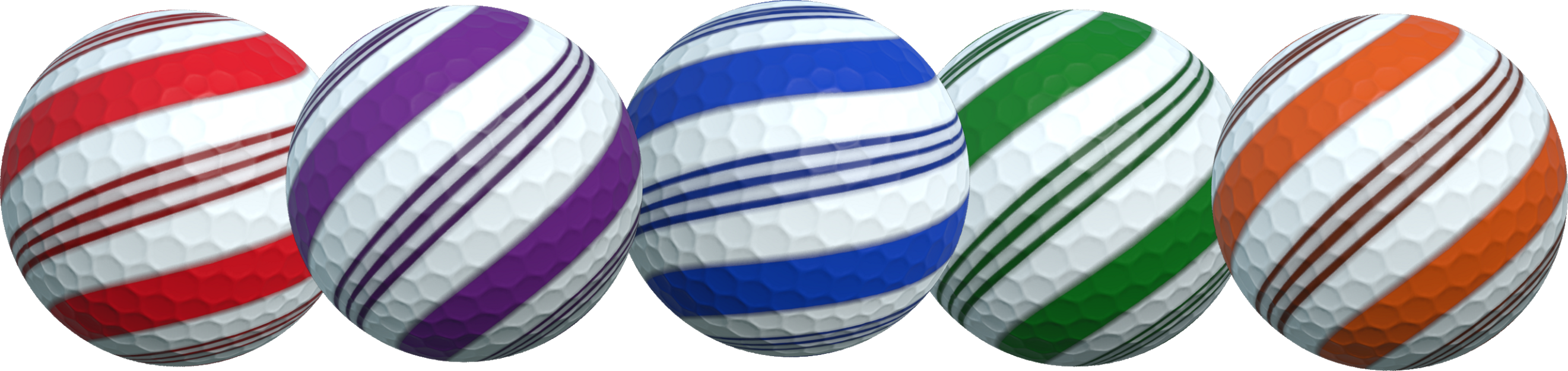
Firstly a repeat of last years reward which is the Candy ball which can be color customized.
Also new for this year in addition to the candy ball are two themed hats, an elf hat, and a festive bobble hat. These can also be picked in all typical pickable color options as-well.
These are just some fun customizations to add to your seasonal game sessions.
New Social Menu
Also as part of this update is a new menu system that will expand upon the previous invite menu by letting you inspect recent players and managing a block list.
When blocking a player you won't see any messages for them, their sessions won't show up, and they won't be able to join your session. This block list is independent to the Steam block list as it will support blocking players that are playing the game through potentially other networks (currently the game isn't available for sale anywhere else besides steam but crossplay with consoles is being looked at and the game was designed around it being a thing someday).
As part of this new social menu it will now always be visible even during sessions where you lack invite permissions. Essentially when you go to select the invite button it will tell you that session doesn't allow you to invite, but you'll be still able to check out recent players and other menus.
Various bug fixes
Check the full notes below for all the changes made, if you are aware of any issues then please let me know so they may be hotfixed. I've been doing some extended testing of levels so have caught a bunch of minor things that you'll find fixed.
Added improved handling of invite menu in relation to game or waiting for players menu.
Added improved friends list loading behaviour when visiting new social menu (will load much faster).
Added Christmas event. This is a return of last years unlock event with the addition of two extra reward items, the Elf hat, and the festive bobble hat. Simply log in to obtain this reward.
Added multiplayer server versioning so only servers that match your game version number will show up.
Added support for player blocking. When blocked (via social menu / online service) the player will not be able to join your session. The blocked player’s hosted sessions will not show up to you either. If you join someone else’s session and they also join, you will not see their messages.
Customization
Added Elf hat as reward item for Christmas login event.
Added Festive bobble hat as reward item for Christmas login event.
Engine
Added various refactoring of network plugins.
Added various refactoring of some internal networking references.
Environment
Fixed a mover using the wrong type on Speed Bump.
Fixed vertical 2-blade windmill using an incorrect material in dustbowl theme.
Fixed one side of an inverted vertical mover using an incorrect material in dustbowl theme.
Fixed the flag raising detection area for “Drop to the Left”, “Zig Zag”, and “Turn Ahead”.
Fixed a physical material on the hole in one path for “Sink Hole”.
Added a change to the hole-in-one pipe entrance area in “Fork in the road” to swap it to the more sloped kind to reduce ball coming to a stop there.
Fixed an issue with the snow on walls in low settings on the level “shortcut”.
Fixed the appearance of snow on the level “Rebound”.
Interface
Fixed the theme select menu sometimes not cancelling highlight when hovering over a new button with the mouse following recent update.
Fixed level up text description in Japanese doesn’t fit the space.
Fixed description for text entry (e.g. player names) not disappearing after recent engine update.
Added new social menu which will be hub for the sending invites, friend requests or blocking players without having to leave the in-game interface.
Added new recent players menus for sending a friend request or blocking.
Fixed the ‘Waiting for players menu’ not being removed immediately during returning to main menu.
Fixed formatting of invite code entry when pressing buttons rather than typing.
Added new blocked players menu where you can choose to unblock any players you previously blocked.
Added a size increase to the waiting for players menu so you can see more players without scrolling. This also makes it consistent for size with the game and social menus.
Added filter to restrict cross-network sessions. Enabling this setting would filter out sessions that would allow players from other networks to join.
Added custom session setting to restrict session to players from the same network (Steam) only.
Added change to ‘invite’ menu displays, now the social menu will appear in its place and always be visible even when you cannot invite players. On this menu will the context specific options.
Fixed various very small alignment issues with the game / pause menus (there was about one pixel of extra padding causing a visual inconsistency).
Fixed invite menu not inheriting the custom UI scale setting.
Fixed some localized level names.
Fixed a scoreboard countdown issue where if playing multiplayer, one player skips the xp screen then triggers a skip, the other player would briefly see an out of sync countdown.
Fixed an issue where “skip” wasn’t always visible on the XP screen.
Added improved contextual appearance for the bottom glyph buttons on scoreboard (e.g. details button will only be visible on the scoreboard page, not podium).
Discord Server
Be sure to check out the official discord server with channels for Golfing In Aether and my other various projects.
Golfing In Aether Update Released [1.6.3]
This update contains a handful of fixes to the recent major update in which the fourth free expansion was released, which you can read about via the link below.
Check the full notes below for all the changes made, if you are aware of any issues then please let me know so they may be hotfixed.
A couple of noteworthy things fixed that showed up since last update was a small wall gap in one of the new expansion levels, also some wierd physics behavior on a couple of the large ramp levels such as "See you on the other side" and "Go for it".
Fixed a issue with physical materials notably for level “See you on the other side” and "Go for it".
Interface
Fixed an issue where the scroll bar on the new level theme select menu wasn’t inheriting the dark theme when enabled.
Fixed a text string not correctly localized in the custom levels menu.
Fixed a text string not correctly localized as part of the XP breakdown.
Discord Server
Be sure to check out the official discord server with channels for Golfing In Aether and my other various projects.
Golfing In Aether Update Released [1.6.2]
The fourth free expansion to Golfing in Aether is here, bringing ten new levels for all modes and themes as well as introducing the new "Dustbowl" level theme.
Above is a link to the free DLC (it should be downloaded automatically). The levels will work with all previous themes and in all game modes.
The level breakdown is as follows, one large late game level, one mid-game, and eight early. This brings the total number of levels to 70, with 10 being late, 30 mid-game, and 30 early, overall balancing out the random level selection more evenly.
Remember via custom sessions you can individually pick levels you want to play, as well as preset playlists such as 'early only' or 'mid and late' only depending on how you wish the play the game. All levels work with all existing themes so if you wanted to check out all these new levels in the winter level theme instead (with the seasonal holidays soon approaching) then its perfectly possible to do so!
As an additional note the new level theme will be made available to the demo version of the game but the same demo limitations such as only 18 levels and only able to reach XP level 3 are in place.
Unreal Engine 5 updated
With this expansion release the game engine has also been move forwards to the latest version of Unreal Engine 5 so please let me know if you encounter any issues as I'll be doing hotfixes to any issues over the coming weeks. The primary reason for this engine version change is to keep overall support with newer devices and latest versions of SDK's. This includes the latest DLSS3, and FSR2 versions made available.
Enjoy playing the fourth free expansion and I welcome any feedback you may have.
Added migration to game engine from Unreal Engine 5.1.1 to 5.3.2.
Added latest plugin versions for DLSS3 and FSR2.
Environment
Added dustbowl expansion assets and content.
Added flipper obsticule as part of new levels.
Interface
Added improved theme select menu which will add support for additional themes. Scrolling to the right is where you will find the new Dustbowl theme and others in the future.
Discord Server
Be sure to check out the official discord server with channels for Golfing In Aether and my other various projects.
Golfing In Aether - FREE Dustbowl Expansion Coming Soon
Today I want to show off the upcoming free expansion coming this November which you can find listed below as coming soon. It will include a new theme that works with all existing levels as well as introducing 10 new additional levels.
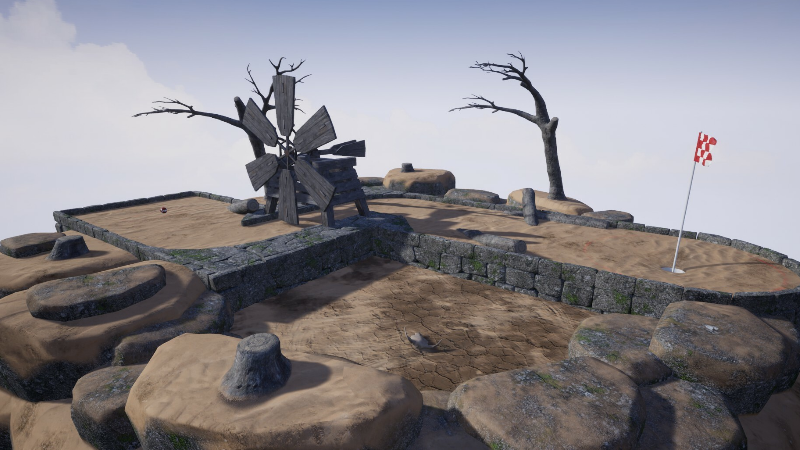
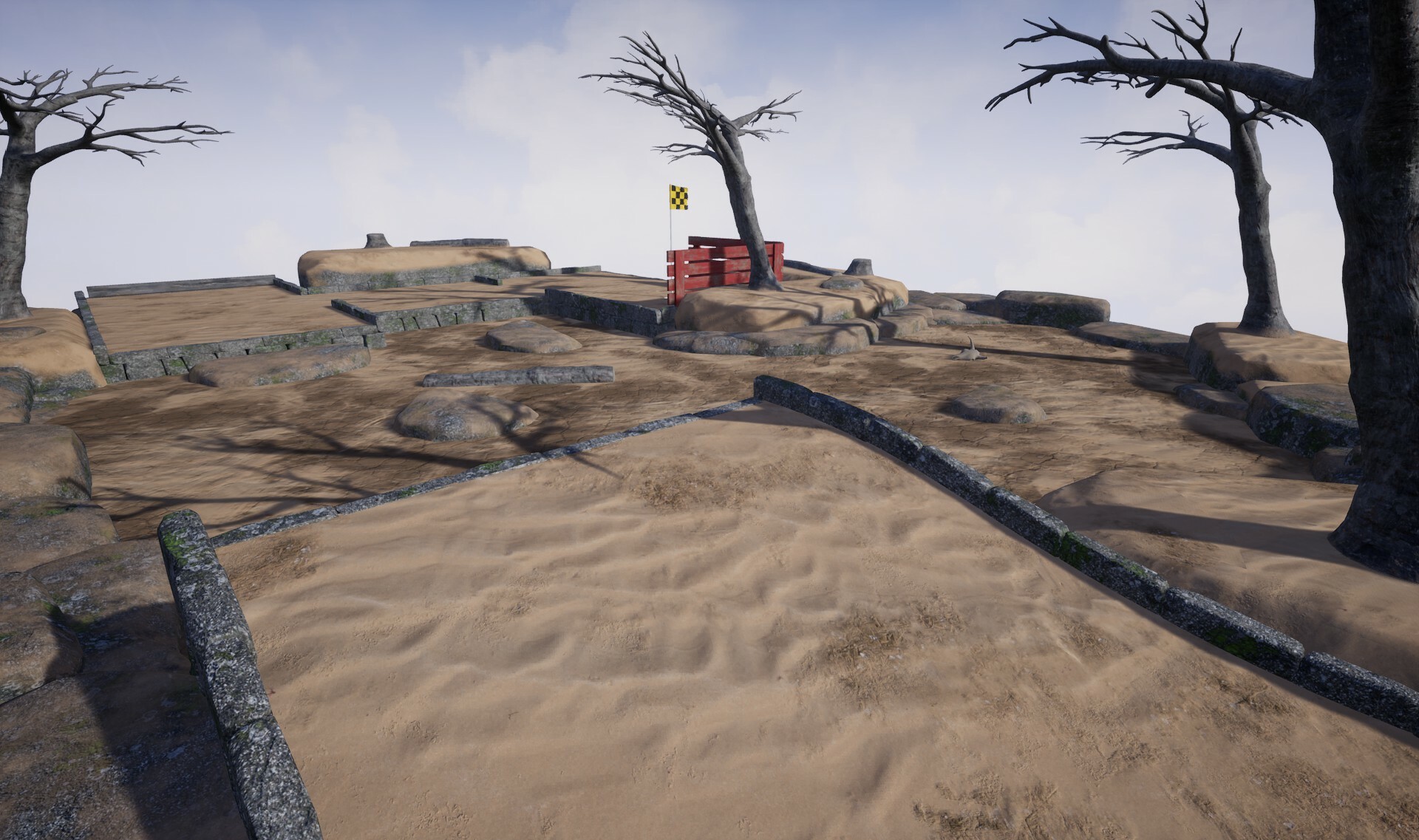
For this theme it introduces a desert-like environment, with as the title suggests a lot of sand and dust has been thrown up, covering the otherwise grassy levels. You will also find the water areas dried up and lots of things normally found in the levels worn down compared to usual.
Beyond the reskinning you'll find a few new art assets such as animal skulls in some of the dried up water areas, and music specific to the theme. There is also a new obstacle type / mechanic which I will discuss later in this post.
The above screenshots are from existing levels 'Leapfrog' and 'You feeling lucky?'. All existing levels will be able to work with this new theme.
Levels 'Through the gap' and 'Go for a putt'
For this expansion I wanted to add some more earlier levels to help improve the balance when it comes to how levels are chosen as part of the random courses. Following feedback these levels also have more of an emphasis purely putting rather multiple holes.
While these levels are small they still do offer an element of challenge if aiming for a hole in one.
Levels 'Fore fun' and 'Mini jump'
These next two levels I'm showing how they look with existing 'Spring' and 'Winter' themes, all new levels will work with previous themes adding to the overall diversity when it comes to playing a random course whichever theme you wish to play with.
The levels shown above also feature a new obstacle type know as the 'Flipper'. This behaves similar to vertical movers (barricades that go up and down) except in this case offers a ramp, which can be to your or advantage or not depending on the level. A few of the levels will feature this new mechanic in different ways.
Level 'Fork in the road'
Of course not all levels are small in this expansion and this is a late level included which includes a similar theme of maze-like behavior as found in some of the existing late game levels. There is about a half dozen or more possible ways to complete this one, so you'll have to find the best path to a hole in one.
Just a reminder that this expansion is entirely free and will be available November 14th. If you wish to keep track of when this will be released then add it to your wishlist.
https://store.steampowered.com/app/1914980/Golfing_In_Aether/ Golfing in Aether is currently on sale for 70% off till the 8th November along with a currently running halloween event ending on the 14th. Dustbowl will be the fourth free expansion released bringing the games included level count to a total of 70. More content is planned.
Discord Server
Be sure to check out the official discord server with channels for Golfing In Aether and my other various projects.
Golfing In Aether Update Released [1.6.1]
This is a small update that implements the Halloween Event content which you can read about in the event post below.
There are no other changes in this update besides enabling the event content but if you are aware of any issues then please let me know so they may be hotfixed.
Added pumpkins to the Autumn level theme for the duration of halloween event.
Added pumpkins to all newer levels added to the game since previous Halloween event.
Interface
Added pumpkin hunt tracker to main menu for duration of event.
Discord Server
Be sure to check out the official discord server with channels for Golfing In Aether and my other various projects.
Golfing in Aether - Halloween Event
For update 1.6.1 we are bringing back our Halloween pumpkin hunt event from last year, we've also updated the two more recent level expansions to include the Pumpkins as well. Hunting 10 Pumpkins will unlock you three Halloween themed balls :)
Pumpkin Hunting 101
What do I have to do?
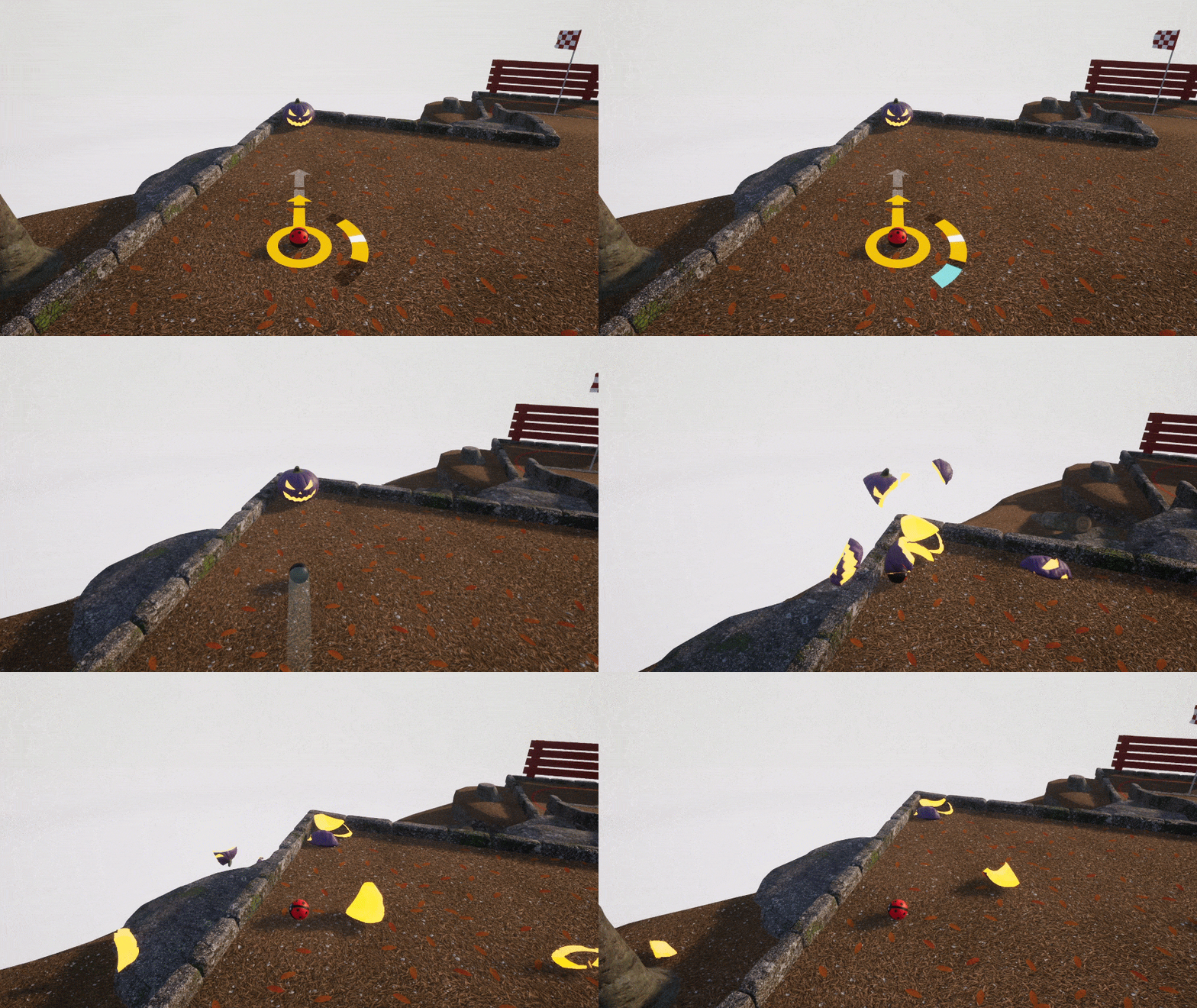
To hunt a pumpkin you simply need to hit them with your golf ball. There are 60 purple pumpkins in the game (one per level), but you only need to find 10 to unlock all the rewards. There is no reward for hunting the orange ones, but feel free to smash them to your hearts content.
What do I get from doing this?
The above three golf ball designs are unlocked from completing this event. Each feature color options and an accompanying faceplate.
If you successfully hunted 10 pumpkins last year then this reward will remained unlocked.
How do I track my progress?
A progress bar and counter can be found on the main menu below a description of the event.
How long will it take me to complete this event?
This is not supposed to be a grind, and if playing as normal you'll probably complete it a couple of hours after playing a few different sessions. If were to do it solo in purely in practice mode you could probably do it in 10 to 15 minutes. Some levels will be harder than others to get the pumpkin, but theres enough of them that its just a bit of fun to enjoy the halloween theme rather than be an overall challenge.
Can I complete this in local play?
Yes :) If any local players hits a pumpkin it will count for the primary profile so you can enjoy sort-of a co-op activity while you hunt them down.
How long does the event last?
The event will conclude on November 14th giving you more than a couple of weeks to complete it.
Yes - simply grab the demo from the store page and you play through this event with that. You can also join your friends who own the game in multiplayer while hunting for pumpkins.
If you enjoy playing the game then you'll find it on sale for 70% off till the 8th November! Any demo progress will carry over to the regular game too when you purchase.
The demo only comes with 18 levels (but you can join other players online sessions fine) and is locked to level 3 for regular progression.
Discord Server
Be sure to check out the official discord server with channels for Golfing In Aether and my other various projects.
Golfing In Aether Update Released [1.6.0]
For this update Japanese Localization has been added as well as several quality of life improvements.
Added Japanese Localization
Localization for Japanese includes all in-game texts, store pages, and achievements.
When playing by using the in-game quick chat these messages are all translated automatically (players see these messages in their local language) so you can play and communicate with players at a basic level without the language barrier.
Another feature is the on-screen keyboard when using this localization supports hiragana and katakana.
Steam recently announced changes to how controller support is listed on the store page specifcally to list support for DualShock and DualSense.
There was already support for these controllers and you may of noticed the option to set the glyphs ingame but as part of this update we've added the ability to automatically detect and set the glyphs for them when Steam Input is enabled. When controllers are disconnected the game menu will appear with a 'controller disconnect' warning.
Vibration support
Its now possible to have controller vibration with various settings to adjust how it behaves. Firstly you can set it to be either 'On' with full surface feedback, or can limit it to just impacts and hits, such as bouncing off a wall. You also have the option to disable it.
We've set impacts only enabled by default - as this will work with the widest range of devices. Official controller types for the various consoles tend to have much better vibration than third parties or 'officially licensed' copies - to the point where having full surface feedback can be rather unpleasent and annoying. We've also given an intensity setting you can adjust as well.
Menu layout improvements
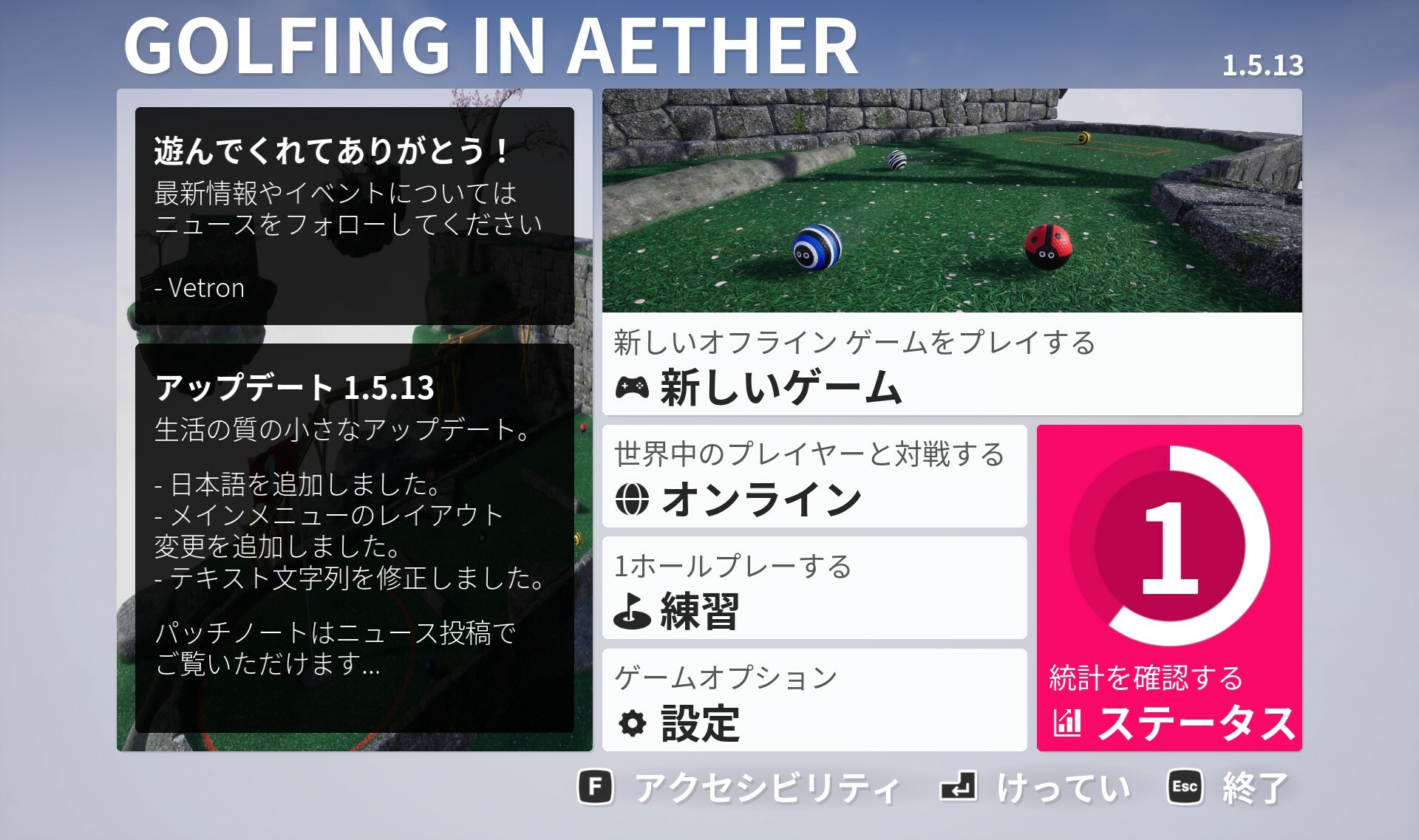
As part of this update is a change to layout of the main menu and placement of online functions. Previously there was a general new game menu and then a join game menu but we've instead moved all online functionaliy behind the online button. This lets us have a clear dedicated offline section of the game, centalize online multiplayer to one spot and also offer us more space to implement additional functions in the future.
The online menu has buttons to either join sessions, or create a public or invite only session.
To create a custom session you select a base permissions type, and then press custom session on the next menu or after selecting which preset initially. The idea is you can go through the standard menu flow and only have to customize the final result if you wish.
The overall thought process behind these changes is to make things more straight forward for either playing offline with say singleplayer or local play, or when you specifically want to play online. Overall the same options are available and you can customize as you could previously could in the custom sessions menu.
Another small change is we've hid the third button on the customization menu for now (until such feature is implemented) and also when selecting no headware option you'll see a faint X rather than purely empty box.
Invite code improvements
This has been given some tweaks so the code is displayed to you in a 111-111-1111 format and when you go to enter it will automatically handling the seperation. The point of this being to make it easier to read as much easier to keep track of 3 to 4 number blocks than a ten number block.
Menu scaling options
A new option to game and accessibility settings is to adjust the scaling of the overall UI independent of regular DPI scaling. This lets you effectively zoom in the UI so it fills your screen, something that can be very useful when playing on a small screen such as a handheld device.
It also just makes everything a bit bigger if you have trouble reading the text and the default scale.
Additional achievements
You'll find two new achievements - "Seasonal" for playing a session in each of the three seasonal themes, and "Levelling Up" for reaching Level 3 or 18,000 XP.
Both these achivements have had existing stat tracking so you may find yourself mid way through progress or even completed right away.
The reason behind these two is we can look at overall playerbase figures to get a good sense of feature utilization. All of this including existing achivements paints a picture of what players are using as a whole, where to focus our energy and any improvements we may need to make so players understand features.
New balls and hat added to Deluxe Edition
We've expanded the deluxe edition with two additional ball options - firstly for the Sports Balls we added a baseball, and for the seasonal halloween content we added a Vampire ball (which goes pretty well with various hats). Also in the deluxe edition is a new hat the Capotain.
If you already have the Deluxe Edition, then you will get these new items automatically at no additional cost.
Note there will be a halloween event later this month so do keep an eye out for halloween ball items you can unlock in-game via that (these are different to the deluxe edition).
Various other changes
Check the full notes below for all the changes made, if you are aware of any issues then please let me know so they may be hotfixed.
Coming Soon!
A halloween event will be available sometime next week so keep an eye out for that!
Also as part of the 1.6.x series we are migrating Golfing in Aether to Unreal Engine 5.3 and also releasing a new free expansion sometime in November. We'll do seperate news posts about those nearer the time.
Added support for Japanese localization. This includes custom on screen keyboard support. Please share any feedback you may have.
Fixed an issue where if you played a practice level with split screen enabled, then via the game menu selected ‘retry’, after the restart the other split screen players wouldn’t function correctly.
Added controller vibration support.
Fixed an issue where if an initial player were to time out in shared input the second player wouldn’t get correct camera until pressing camera button.
Fixed a camera delay for the Level Sequence for "Around the Bend'.
Added 'Vampire' and 'Baseball' balls as well as the Capotain hat to the Deluxe Edition DLC.
Platform
Added store page translation in Japanese.
Added achievement translation in Japanese.
Fixed some achievement global progress values.
Added new achievement “Seasonal” for playing a session of each of the three seasonal themes.
Added new achievement “Levelling Up” for reaching level 3 or 18,000 XP.
Added some Steam Input API support to track disconnects and specific glyphs. We already have built in input remapping and support for various glyphs this change will just hook it up to Steam when enabled. Disconnects for player 1 will pause the game where applicable.
Environment
Added LOD models for falling leaves and petals.
Added support for falling leaves and petals in ES3.1 mode.
Fixed a physical surface inconsistency with Autumn and Winter themes.
Interface
Fixed potential issue where if you held the Thumbstick navigation while pressing ready up on the choose players menu it could be possible to hear ongoing navigation sounds.
Added change to ‘Text contrast’ to instead name it “High Contrast” and give the options as “on” or “off” rather than the previous “medium” or “high” to make things clearer.
Added change to ‘Highlight color’ and instead named it accent color. This is because its used in more than just highlighting.
Added number prefix to level names in practice menu.
Added small layout change to main menu to free up room for localization.
Added new DPI setting for interface to replace previous DPI scaling. This is to solve the problem of ever increasing resolution handheld devices that still have small screens. With this setting enabled you’ll have the UI expand outwards to fill the screen, essentially remove the empty space. I’ve set a flag so if running a Steam Deck then by default this will get set enabled.
Added significant improvements to UI scaling during split screen modes. Menus will now correctly factor in both vertical and horizontal minimum scaling, as well as auto hiding of HUD elements when absolutely necessary.
Added additional options for configuring controller vibration. You have to option to set it to full surface feedback, hits and impacts only, or off. There is also a setting for intensity.
Added additional prompt when naming a local profile that it cannot contain invalid characters (due to file names e.g. !
@ etc.). This is existing behaviour as it wouldn’t allow you save previously, but now there is a message saying specifically why it won’t save.
Fixed navigation and gamepad behaviour with enter invite code prompt.
Fixed a potential issue relating to the animation for the flashing timer (< 30 seconds) on the HUD.
Added a credits/legal menu accessible via settings menu from the main menu.
Added improvement to the format of 10 digit invite codes. Codes will now be displayed and entered in 123-123-1234 format (- spacing) to make entry easier (you don’t have to type the -).
Added improvements to how the holeout animations are played in various split screen modes, previously I felt they would be a bit small so I’ve cropped the edges and zoomed where appropriate.
Fixed a navigation issue with returning to practice menu after entering a leaderboard.
Fixed pressing back on a invite code entry being treated as entering a code.
Added additional option to set glyphs to “Auto” in the gamepad and local settings menus. When set to this it will try pull the glyphs from Steam Input. You can set to any other value to override as you wish.
Added improved handling of the level title at start of session where it will be hidden immediately should you open the game menu to prevent an overlap.
Added a tweak so the 'waiting for players' menu does not occur when playing an exclusively offline session.
Fixed D-Pad navigation of the achievements menu not working correctly.
Fixed various minor navigation issues.
Discord Server
Be sure to check out the official discord server with channels for Golfing In Aether and my other various projects.
Golfing In Aether Update Released [1.5.12]
For this weeks update I've implemented a couple quality of life improvements as well as fixes to any reported issues.
Join via invite code
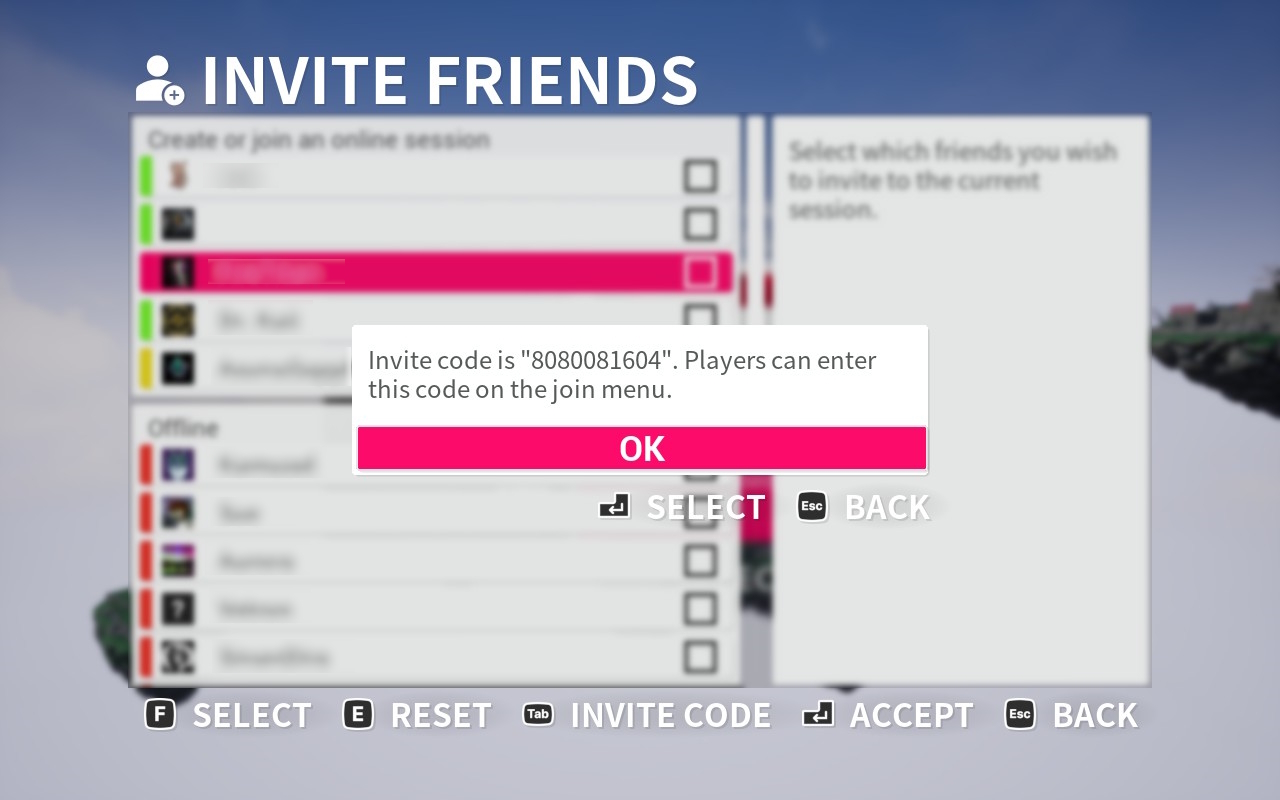
With this additional feature you can now invite players who aren't on your friends list to private or friends only sessions. The way this works is via generating an invite code which will be a unique 10 digit code that is only valid for that session. You can share this outside the game via any means you want, and then players will be able to enter that code on the join game menu to reach your session.
An example where this could be useful is perhaps if you were to have a clan or group you play with, but don't have every member you want to invite on your friends list. So rather than have an open session you can still create a private one but just share this code with whoever you want.
In terms of security the invite code is only created when you request it. The number itself is 10 digits and unique, plus only valid to that session. This means if you end the session and create a new one you'll need to generate a fresh code. You can press the invite code button again within the same session and it will display the code previously given to you.
Onscreen keyboard improvements
This is whats used by gamepads when creating a local player profile or naming your multiplayer session. What I've changed is build in support for more characters for localization in a future update, I've also made some of the buttons more pronounced and use more recognisable symbols so its easier to tell what does what.
Various other changes
Check the full notes below for all the changes made, if you are aware of any issues then please let me know so they may be hotfixed.
One thing I specifically fixed this update after it was reported earlier today was an issue with the shared input mode not working correctly. This has all been fixed and I've corrected a few other minor things while testing it.
Added ability to create an invite code you may share with other players as an additional method of joining. The point of this is so you can have a private or friends only session but allow someone not on your friends to join if given the code. Invite codes are only generated upon request and unique to that specific session.
Fixed an issue relating to shared input mode with hotseat mode. Other local shared input players were not getting loaded in correctly.
Fixed an issue where mouse and keyboard inputs were not loading seamlessly with other shared input players.
Environment
Added improvements to lighting in ES3.1 for winter theme in order to make more consistent with appearance as found in the full DX12/Vulkan render.
Interface
Fixed potential to open accessibility menu and a different menu at the same time with gamepad (if pressing multiple buttons).
Added improved onscreen keyboard for create player and server names.
Fixed the local player settings (via game menu) not allowing gamepad navigation to reach zoom out button for remapping due to an incorrect column span.
Fixed some text strings.
Discord Server
Be sure to check out the official discord server with channels for Golfing In Aether and my other various projects.