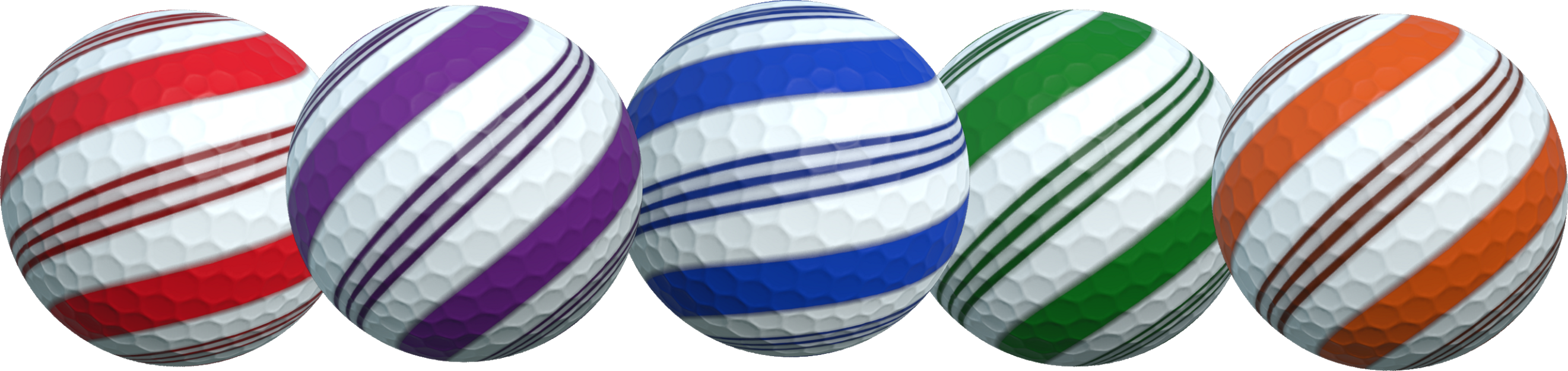
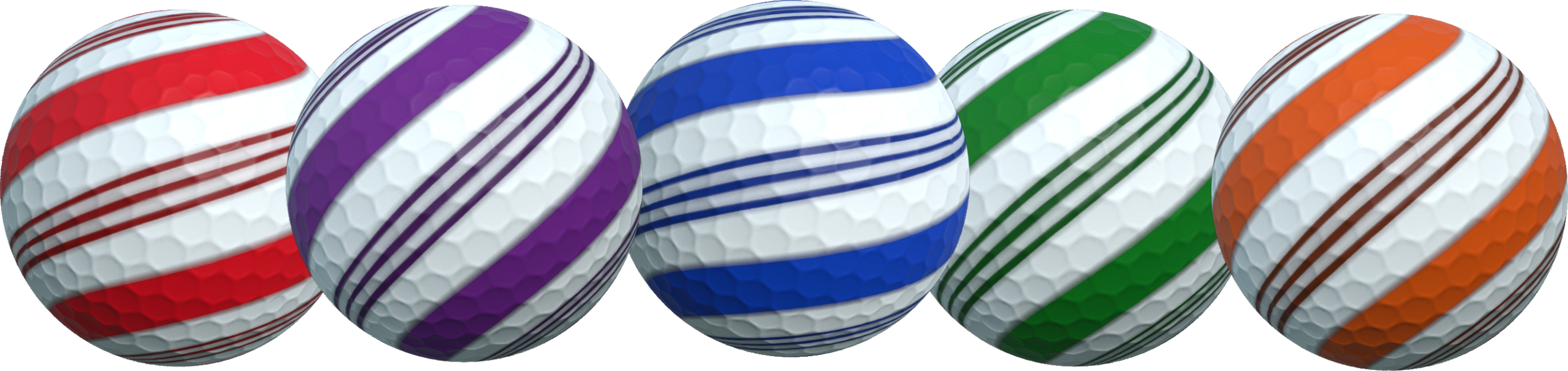
As a Christmas gift, by launching the game between now and January 15th will automatically unlock a Candy themed ball customization. Enjoy!
This is a pretty straight-forward event but I'm creating a post to answer any questions you may have and so the event duration can be tracked.
Christmas Gift Event
What do I have to do?
To get this gift simply launch the game and it will become automatically unlocked as you reach the main menu.
What do I get from doing this?
You unlock the above ball customization which is a single design featuring color customization.
How do I track my progress?
You should see the Candy customization unlocked right away. However to check, simply start any session or practice game and look through the ball customization to find it.
How long will it take me to complete this event?
You only have to launch the game and reach the main menu, so seconds at most.
How long does the event last?
The event will conclude on January 15th giving you more than a month to complete it. This is indeed a long time, but will mean any players who purchase the game over Christmas and New Year also have a few weeks to obtain it.
Check out the above post for the major update and free winter expansion release which brings both a new Winter theme and several new levels all completely free.
Discord Server
Be sure to check out the official discord server with channels for Golfing In Aether and my other various projects.
Golfing In Aether Update Released [1.3.0]
The second free expansion to Golfing in Aether is here, introducing a winter theme along with several new levels. Theres is also a fair bit to talk about with there being a christmas gift log-in event, the deluxe edition getting updated with extra customization and the game also being on sale for 50% off.
Above is a link to the free DLC (it should be downloaded automatically). The levels will work in both the new winter theme shown or in the previous spring and autumn themes.
The level breakdown is one late game level, then five early and three mid game levels. The total number of levels in the game is now 50 excluding variations. As this is a free DLC, both achievements and the store page have been updated to factor in these new levels.
Hope you enjoy playing these levels, I'm fully open to feedback on any of them :) Hitting the 50 levels milestone means the game does have a fairly good level selection with it taking several sessions worth of random levels before you encounter a repeat level. You can of course also play each of these new levels individually via practice mode and compete against other players via the leaderboards.
Above is a link to a seperate blog post discussing a christmas event currently active. Essentially if you play the game between now and January 15th you will unlock a Candy ball customization gift automatically.
The above image is of the balls you can unlock. These are only available via this event and for a limited time. You have till January 15th to play the game and get the gift.
Deluxe Edition Updated
Three new balls (shown above) have also been added to the Deluxe edition based around the Christmas Theme. The Belt design features color customization options whereas the Snowman and Pudding are fixed.
For the remainder of this week Golfing in Aether will have a 15-50% off sale, with 50% being on the base game and 15% on the deluxe edition DLC. So if Golfing in Aether has been on your wishlist then its a perfect time to pick it up and also get a free seasonal gift.
https://store.steampowered.com/news/app/1914980/view/5723537538091769835 https://store.steampowered.com/news/app/1914980/view/3413191463111280586 It's worth mentioning the two previous major updates since launch, including native Linux support and the previous Autumn Expansion which also added a bunch of a new levels.
Patch Notes
General
Added support for Christmas Gift Event.
Added support for Free Winter DLC, which includes the Winter Seasonal theme and 9 new levels.
Added five holiday themed quick chat messages including “Merry Christmas!”, “Happy Christmas!”, “Happy New Year!”, “Happy Holidays!.”, and “Bah Humbug.”. You can find these using the search function on keyboard (5 key), or add them to your quick chat choices under game settings if using gamepad.
Added internal stat for number of different themes/seasons played.
Added improved packing to the decal faceplate texture.
Customization
Added Christmas candy themed ball unlockable by completing Christmas gift event.
Added three Christmas themed balls as part of the Deluxe Edition (different to the event ball).
Environment
Added improved tangents to the ramp in Goofy Golf. While not immediately apparent with darker grass, it showed up looking rather poor once testing with snow added so I reworked it.
Added improved tangents to various hole meshes.
Interface
Added option to select new Winter theme when starting either a session or practice.
Discord Server
Be sure to check out the official discord server with channels for Golfing In Aether and my other various projects.
Golfing In Aether Update Released [1.2.8]
Todays update has lots of bug-fixes and quality of life improvements, I had delayed doing updates during the autumn seasonal sale so more to talk about than usual this week. For those of you who have just started playing I hope you are enjoying it, I typically do small updates at least once a week so if you encounter any issues or have suggestions let me know as theres generally quick turn around on that.
https://store.steampowered.com/news/app/1914980/view/3464985397053869703 If you haven't yet seen the post for the upcoming free winter expansion then be sure to check that out in the link above. All level/theme expansions are free with Golfing in Aether but if you wish to support this kind of developement then please consider picking up the Deluxe Edition as its a big help :)
Game Requirements
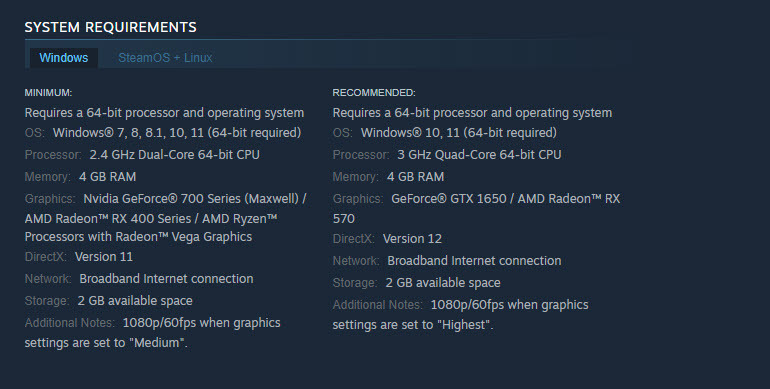
Game requirements indicated on store page have been lowered for both minimum and recommended. Specifically, the memory requirements, which I have it now listed as 4 GB. Going with a total system value here and its working with the presumption windows will gobble up more than 2 of that. For Linux I’ve listed the minimum as 2GB. The game only uses around 1-1.5 GB even when running on highest settings loading all 9 islands.
I had it listed as 8GB previously as wanted to see how the expansions would work out first. According to the steam survey only 0.18% of users have less than 4GB so I’m not going to worry about it beyond this. This is really just so players using systems such as portables with 4GB can see they can run the game.
For installation size I’m keeping the 2GB install for future proofing, but the actual install size has dropped from 1.9 to around 1.7 GB. This was achieved through compression of uncommon color textures, which will not have a meaningful effect. A Linux install is only 1.4GB. Upcoming Winter assets are already in the game files so there won't be much of an increase as remaining levels get completed.
Out of Bounds and Rolling Behavior
I did a few tidy ups to out of bounds respawning and some connected quirks with ball roll behaviour on specific surfaces.
Firstly some ground surfaces around holes were being misread and causing the ball to roll greater than they should. Essentially the ball would roll over certain tiny sections and its was then no longer behaving physically correct and would appear to lose the friction slowing it down.
Another area I targeted was falling into water, I found the ball could still move quite freely so added a bit of resistance to slow it quicker. Exiting pipes has also been tweaked so the ball will read the ground surface more responsively and act accordingly. There were examples of it rolling too much so I’ve fixed this as well.
I also found some examples of the ball not rolling enough due to a miss match on the physical materials in a couple of levels and these have been fixed. They were pretty apparent after making the above changes.
Please share any feedback you have and do let me know if you find areas you feel things could be improved as it helps to have feedback to refine this.
Obstacle Determinism
Next up I looked at some bugs/behavior with obstacles determinism. Previously if you reset back to the start of the level, including using the undo feature these were always syncronised. However, if you undid your shot from say 4 back to 3, the obstacles were not undone correctly. I’ve fixed this and reworked the system behind it to run off a single time variable and be standardised where its declared so this will help a lot with future error prevention.
Game Menu Improvements
Another thing I’ve done is made a couple changes to the game menu, firstly pressing escape or B on a controller will be treated as having selected resume. Secondly player 1 during practice will get a dedicated option to restart the level. This will behave identically to the button on the scoreboard.
Note: You can just press backspace or back/select to reset back to the start of the level, it will cycle through each of the shots you’ve taken. So you do not have to restart the level via this game menu thing, but I’m adding it as the reset functionality isn’t immediately clear.
Single Joycon Support
I got my hands on a pair of Switch Joycons in the Black Friday sales to test out and build a configuration for which I have now done. So if you wish to play with a singular joycon, select “Left Joystick Only (Joycon)” from the gamepad settings menu for overall layout presents.
Essentially this will only use the left joystick for all actions, and the configuration is similar to the D-Pad only config. I did however find the process of connecting Joycons to Steam via Big Picture a bit involved at current as for whatever reason the triggers and some buttons didn't map correctly so you may have to set that up first. Essentially ZL and L should be mapped to triggers, for me at least, I found they weren't automatically mapped to anything at all.
So far I’ve personally tested Xbox controllers 360 through Series X/S, PS4 Dualshock, and PS5 Dualsense, Switch Pro, Joycons (in both dual and single), Steam Controller, and various RetroBit six button controllers (Megadrive and Saturn). You can have a different controller type per each local player and store configurations on each profile too, options for both glyphs and control preset are available for easy picking so it’s really easy to switch stuff around if need be.
Fixed a rare possibility to end up reset onto an out of bounds area. I’ve added a check so the ground surface you are being reset to must be valid, if it is not it will return you to the spawn. Through a chain of events I saw it was possible to get respawned in water, so this just clears up this rare event from being possible.
Added a slight redesign of the slope in “Downhill from here”, specifically reduced two rows of the pinball-like obstacle at the edges and one from the middle. The point of this is to give the ball exit a greater roll speed so you more likely make it to the vertical windmill. By removing a single center post theres a greater chance of getting the hole in one.
Fixed when restarting a level the reset steps from the previous level hadn’t been cleared so it was possible to reset out of bounds.
Fixed when restarting a level planar reflections for water would stop working.
Fixed various timing visual bugs when restarting a level.
Fixed some issues where some reset steps weren’t correctly resetting various obstacles to the correct positions when in practice mode. E.g. reset to tee worked, but going from step 3 to 2 didn’t correctly handle the obstacle.
Added new uniform system to handle mover reset stepping with the purpose of error prevention, this will handle both the various horizontal, vertical, and inverse variations.
Environment
Fixed a ball bouncing over a flat hole (e.g. like in ‘Midhole Madness’ causing the ball to roll longer than it should). Essentially it was reading the surface of the pipe angle and the ball was being treated as if entering a pipe it shouldn’t stop in. Instead, there is a delay check for entering this state overriden by transitioning to a pipe hole state in which it will begin immediately.
Added a bit more resistance from water when your ball lands in it, this will mean less time waiting for it to come to a stop.
Fixed some pipes having a bit too much delay with detection of next physical surface during exiting, this would sometimes cause a delay on the ball knowing it was on ground again (and thus rolling a bit much).
Added a revised mesh for the square hole areas you typically fall into off the edge of ledges, this is sloped better to avoid getting stopped in parts, which would disrupt the gameplay flow.
Fixed some wall gaps on “Spin Cycle”.
Fixed various issues with resetting during practice mode and how some obstacles were handled.
Interface
Fixed a padding issue on the replay buttons.
Fixed a glyphs issue with the session replay being incorrect.
Added ability to exit game menu with the esc key or b button.
Fixed an issue where switching glyph mode while in a session replay didn’t update the glyphs for the replay buttons.
Fixed an issue where setting Glyphs keyboard only in the gamepad menu would cause some gamepad glyphs in that menu not to render correctly.
Added dedicated ‘Restart Level’ button to the game menu when playing practice. While it is possible to reset the level just by pressing the backspace or back button to undo back to the tee, this offers an alternative method, and will behave as if restarting the level via the scoreboard.
Added a single joycon config to the gamepad settings. Essentially this just picks the left joystick as the device for everything. Everything else should work as is, but I found the process of connecting a Joy Con to Steam a little more involved as by default triggers weren’t mapped correctly in big picture, so you may have to set that up first (this is nothing to do with, and outside this game though).
Discord Server
Be sure to check out the official discord server with channels for Golfing In Aether and my other various projects.
Golfing In Aether - FREE Winter Expansion Coming Soon
Today I want to share some screenshots of the upcoming free expansion coming this December which you can find listed below as coming soon.
Like the previously released autumn expansion, the seasonal theme is a reskin of levels to match the seasonal appearence. This includes not just new textures, but also several new or significantly changed models.
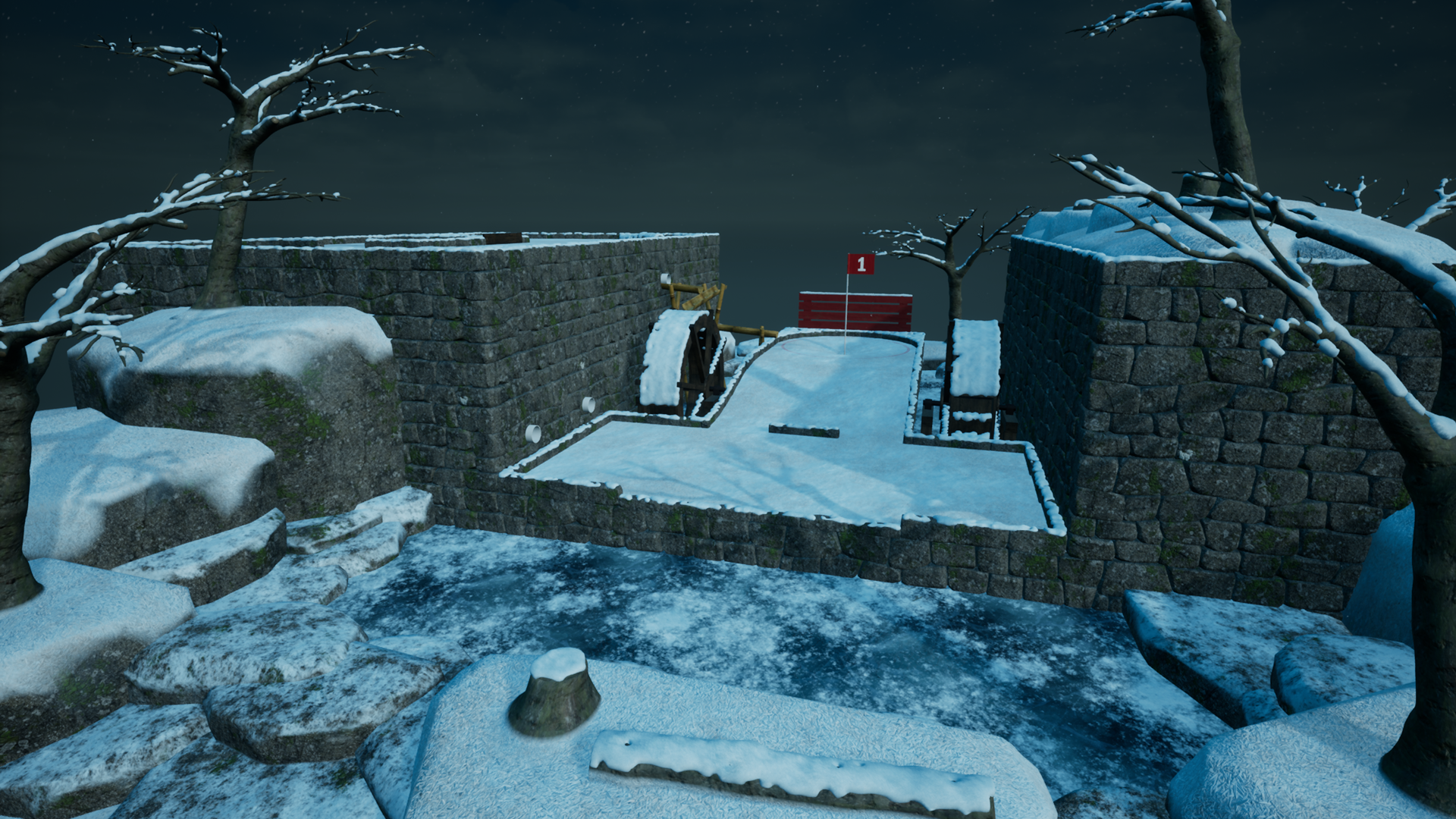
Every existing level in the game will work with this theme chosen, and you'll see in the pictures above that the levels are visually quite different during winter. For starters all ponds are covered in ice and water wheels no longer function. For levels that revolve around a water wheel you'll still be able to play these but will find the wheels covered in snow and essentially roll over that.
All the walls, tree's, fences, windmills and all other elements have received variants covered in snow. This is actually a custom mesh rather than just a texture change, and took quite a bit of time to make. Playing in this theme has new in-game music that fits the season and you'll also find falling snow particles while playing on higher graphics settings to add to the ambience. There is even little details like particales where snow has been kicked up from initially hitting your ball.
Unlike previous themes this one is set at night and is illuminated by a combination of moonlight and glow from aurora. Specifically for gameplay purposes I didn't want to make these levels overly dark, so they should be as navigatable as you'd find in regular themes, just with lighting to fit the theme.
Level 'Sinkhole'
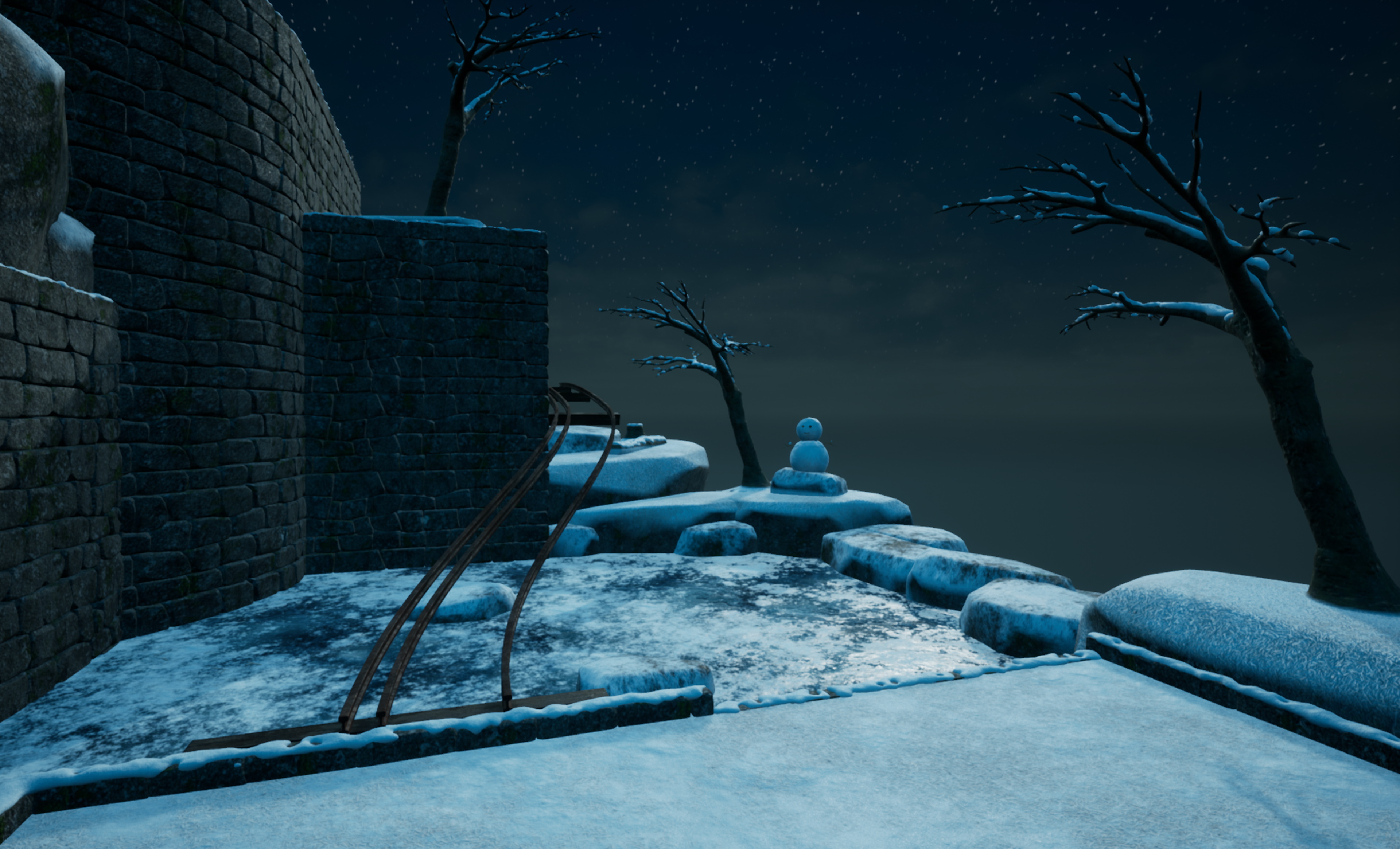
There will be 9 new levels as part of this expansion, and the first which I'll be showing off today is one of the late game ones. This as name suggests features a large downward area which leads to different directions depending on how you enter it,
One of the exits leads to the hole in one while the other leads to this lower section near the goal via a section involving rails.
This level like all added levels will also work across all seasonal themes and game modes so you can play them as you want to. With the 9 new levels from this expansion, this will bring the total in-game levels playable across all modes and themes to 50.
The rough date for this expansion being released is December 5th, but that could change if I feel it needs more time. I'll update the DLC page nearer the time with an exact release date, but if you add it to your wishlist you'll get a notification when its available.
Discord Server
Be sure to check out the official discord server with channels for Golfing In Aether and my other various projects.
Golfing In Aether Update Released [1.2.7]
This update contains several fixes after doing some extended testing to ensure everything is working correctly as both the holidays are soon approaching and I’ve been doing a lot of feature updates recently.
Most of what I found was minor stuff as a result of recent updates and I’m not aware of any outstanding issues, so if you encounter or know of anything else then please let me know :)
I’ll be holding off on any feature updates over the next week to ensure everything remains playing nice. But I can certainly do a hotfix or two if any issues are discovered. Otherwise my focus will be getting levels done for the upcoming free winter expansion that I hope to put out in early December. Keep an eye out for a blog post on that soon.
Fixed an issue with the inversion of the x axis during free camera movement.
Environment
Fixed a camera on ‘Drop to the left’ being connected to the wrong hole.
Fixed a half corner ground mesh like found on ‘Mind the gap’ clipping through the wall slightly.
Fixed small gaps on some ground pieces with hole parts.
Fixed an overlapping ground piece on the three hole ground piece.
Fixed a very small out of alignment ground piece on mid-hole madness.
Fixed non smooth normal appearance on the cup.
Fixed normal and optimized the large ramp on ‘downhill from here’.
Fixed various minor alignment issues on ‘Drop to the Left’.
Fixed an issue with physical materials that would stop the ball a little too quick in some spots.
Fixed some seasonal behaviour with water wheels.
Fixed winter coming a little too early via the presence of a rouge snowman.
Fixed placement of some fences that were a little too close to the track on rounded end pieces. This includes levels like ‘drop to the left’, ‘curve it’, ‘bogey town’, and ‘one hill over’.
Interface
Fixed an issue where the fading in of top HUD was no longer seamless since a recent update.
Fixed an instance where the achievements menu couldn’t load an image putting a bad texture instead.
Fixed an issue where creating several profiles one after the other during shared input mode would not reset settings to default during each new creation.
Discord Server
Be sure to check out the official discord server with channels for Golfing In Aether and my other various projects.
Golfing In Aether Update Released [1.2.6]
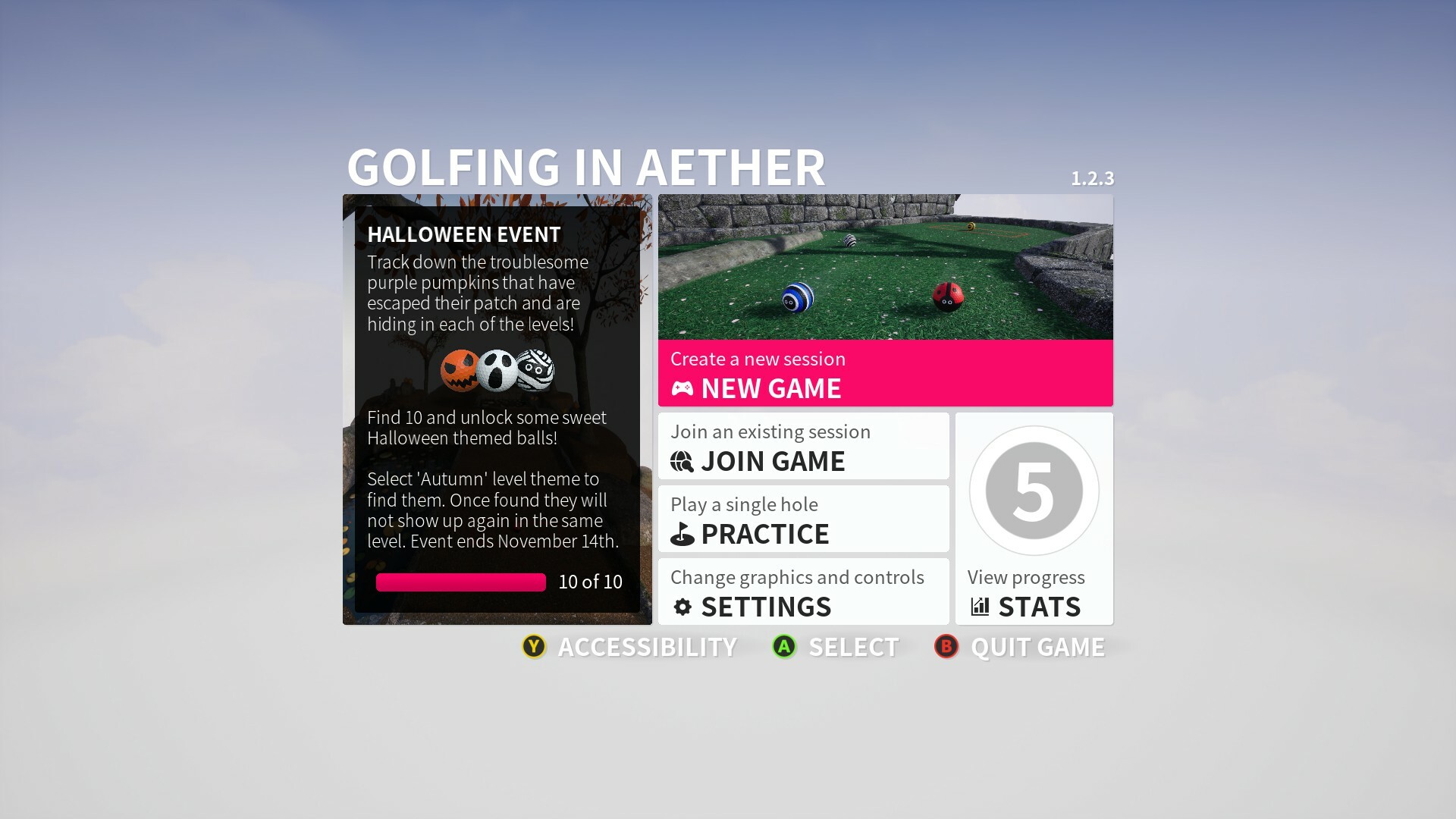
Just a small update today to remove the now expired Halloween Event. Any rewards earned will remain and so will the Autumn seasonal theme, just without the pumpkins. Hope you enjoyed playing it!
Achievements Menu
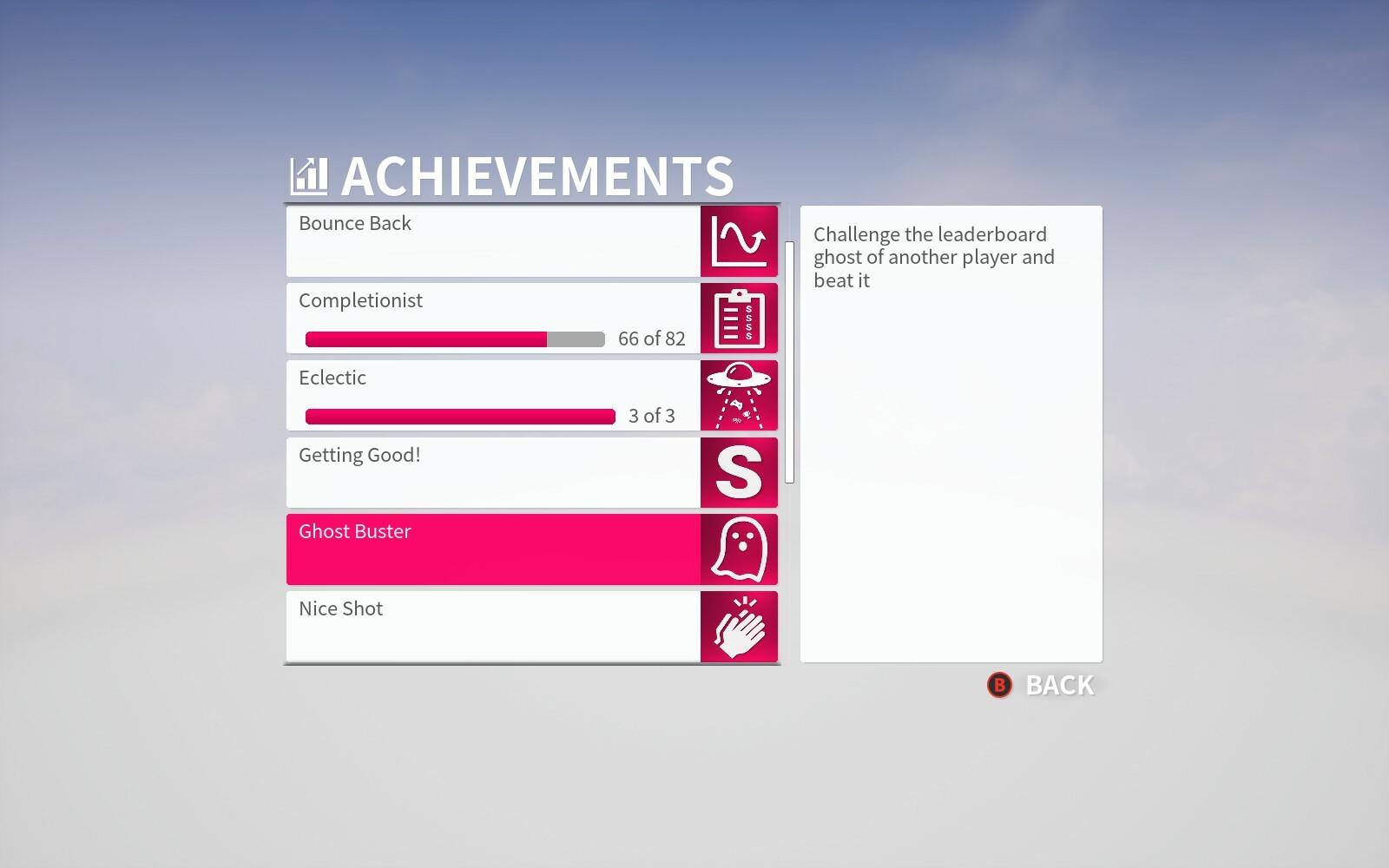
Since yesterdays update I got chance to make an achievements menu found via the stats menu. This is nothing fancy and the information you'll find here is identical to the info you'll find in Steam. The point is just that it is more easily navigatable when using a controller in-game, as well as being a press away from the rest of your stats,
Removed Halloween 2022 event. Rewards unlocked from completing event will remain.
Environment
Fixed minor wall gaps on ‘Crazy Golf'.
Interface
Added changes to main menu and season select menu to remove references to Halloween event. Autumn season minus the pumpkins remains.
Added achievements menu found via the stats menu.
Discord Server
Be sure to check out the official discord server with channels for Golfing In Aether and my other various projects.
Golfing In Aether Update Released [1.2.5]
This is a quality of life update that also includes various fixes. I saw room for improvement when it comes to the gamepad controllers and setting them up, especially when factoring in local play.
The update is a few hundred mb due to upcoming free winter DLC content continuing to be added to the game as well as various background changes to support it. This is due for release in December and I'll discuss it more in a seperate event post soon.
Gamepad Improvements
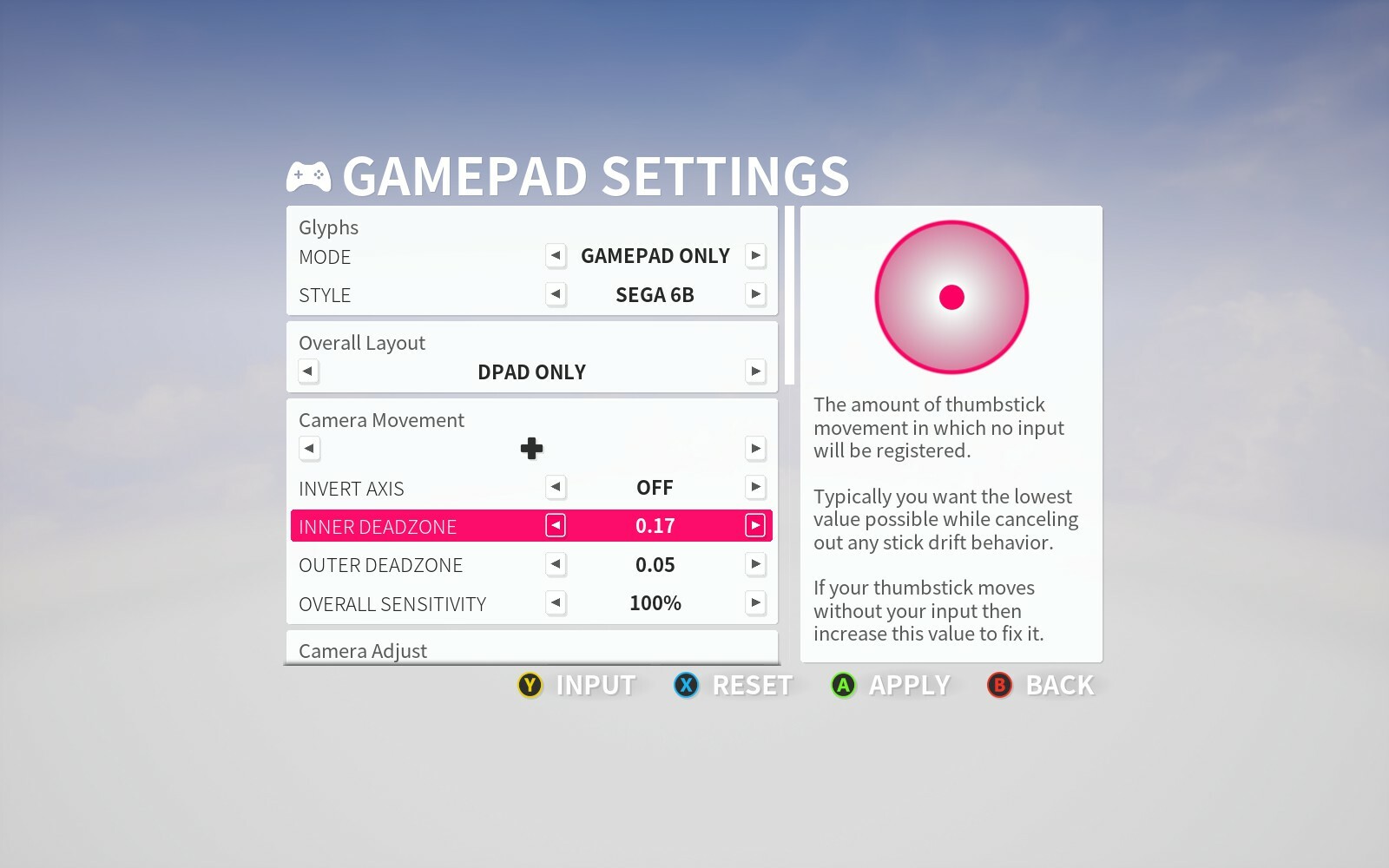
Support for single stick or D-pad only controllers
Firstly I wanted to support controllers that aren’t your standard twin stick variety, this could be perhaps a single switch joycon or even retro controllers like the Six Button Control Pad which have several remakes by companies like RetroBit and 8BitDo. These may only either have a single stick or dpad input, and/or not have the full button set.
To solve this I’ve given the option to define what controls the camera, which can include mapping to a DPad. I’ve added button behaviour for switching to free camera, allowing you to press and hold the mapping previously assigned to just ‘top camera’ so you can also enter free camera. When free camera is mapped to the same control as regular camera a combination mode that lets you move forwards and back, and turn side to side. When enabling free camera in any mode I’ve set it so the vertical camera is aligned flat as well.
Local player controller remapping
Secondly, I wanted to allow local player controllers to be remapped. For this end I’ve created an independent system from the keyboard and mouse remapping that handles gamepad mappings on the fly based on what local profile you’ve chosen.
To make remapping controls to the types of controllers I described above an easy experience I’ve added a DPad only preset. I’ve also added a Southpaw layout (swaps sticks) for anyone who would want that. I don’t currently have an individual Joy Con preset but plan to test these in the future and set this up. If you can think of other preset configurations that would be desirable to have then please let me know.
Previous button mapping settings for the gamepad will be lost, but everything relating to deadzones and sensitivities will remain. Local players couldn't remap controls previously so the only place you will need to adjust anything is in the main gamepad settings, but this is only if you wish to have a custom mapping.
Gamepad Settings menu tidy up
A third improvement I wanted to make was to group remapping’s and settings by an overall category. For instance you’ll see ‘Camera Adjust’ which groups the Zoom and Switch camera buttons together, which is found directly below ‘Camera Movement’. I also wanted to reduce the vertical rows so achieved this by having some options such as for zoom in and out, next to one another on the same row with an indicator for + or -.
Additional glyphs for Six Button Sega Controllers
Another addition is I’ve made further improvements to controller glyphs and also added a new option for Sega pads. This was born out of personal interest in getting a pair of RetroBit controllers I had working seamlessly. By default, triggers are mapped to C and Z, so those glyphs have been changed to match. I’ve also given a matching look select and start buttons.
I’ll be testing other pad brands over time and perhaps other kinds of retro pads, but these were just controllers I already had and used. But by all means discuss controllers you have and your experience with them, as I’d be happy to expand support where it makes sense to do so.
As part of this update I've also allowed local players to set their own button glyphs with the default being Xbox. These are only displayed in places like the settings menu itself and game menu.
I was able to identify and fix a few other issues while doing testing for the gamepad changes including instances where the quick chat appeared as if it was hotseat mode when playing split screen, and i've also tidied up some non-clipped text for player names on the HUD if you have a really long name.
Please let me know if you encounter any issues, I'll be doing a small update tomorrow to remove the Halloween event and can include hotfixes to any issues then.
Patch Notes
Environment
Fixed minor wall gaps on various levels.
Fixed lilly blocking camera when you fall in the water which could cause abrupt camera movements.
Interface
Fixed an issue with overflowing text when the player has a very long name and you are playing split screen.
Fixed Quick Chat not appearing on each players screen in split screen. It was only showing on screen one due to a behaviour issue treating regular play as hotseat.
Fixed scaling of gamepad settings menu for player 1 in split screen.
Added controller remapping to local player settings.
Added glyph setting for local players.
Added ability to define the input for camera, free camera and quick chat in gamepad settings. Presets for D-pad only and Southpaw have been added to quickly change stuff.
Added improvement to gamepad settings menu by condensing and categorising options to reduce the number of vertical rows.
Added glyphs to match Sega six button control pads.
Discord Server
Be sure to check out the official discord server with channels for Golfing In Aether and my other various projects.
Golfing In Aether Update Released [1.2.4]
While starting work on the upcoming free winter expansion I was able to make some performance improvements and fix various issues found. This update makes a lot of changes to various level geometry and shaders, so why it is a few hundred MB. Normally I try spread updates out but due to certain fixes being made and the decent improvements to performance I didn't want to delay it till next week.
Before I get into explaining the improvements I just want to say as always the FPS in this game is certainly not low, pretty far from it. None of these changes are reactionary, its simply a case that I continuously like to make improvements where and when I identify them.
While users running mid-high end systems already will have fps in the hundreds, improvements like these can let lower systems reach higher settings easier as well as save on energy when running identical settings if a battery powered portable for example.
Reflections
I’ve managed to come up with an additional way of reducing the reflection pass, by around 40% this time. Essentially what I went and did was disable the full lighting pass from being executed in the reflections. Now normally this would of course leave you with essentially full bright meshes and it would look horrendous, but by going a step further I instead set specific meshes for the reflection capture with identical color to what they would have previously been when shaded.
Essentially, you’ll be able to notice no difference from a visual standpoint but with a 40% reduction in rendering cost of the reflections.
Shader Costs
A second idea I came up with was to reduce the shader cost of rocks either surrounding ponds or those closest to the track. Basically the rocks normally have a form of terrain blending so they aren’t sharp against the connecting terrain of the island and this is relatively costly to perform.
But what I noticed was in a lot of levels if you have a stack of rocks, only the very outer rocks actually connect visibly with the terrain, so from your gameplay perspective most rocks don’t actually need to perform this function. Of course these rocks are generally the closest to ponds as well, so a bonus benefit here is the secondary rendering cost of these going via the planar reflection is reduced as well.
Shadows
Next refinement was to manually optimize shadows for specific levels and geometry. Due to the unique circumstances of having isolated floating islands, and each level being independent this gives real opportunity go that extra level with tailoring the shadows to certain setups.
Essentially if a level is small the shadow range can be decreased, meaning a side effect is the resolution over range increases, thus this and the cascades can be reduced boosting performance. In fact due to these tweaks the relative shadow resolution has actually been increased at the same time as performance being increased. A number of meshes I also gave custom geometry for shadows to help reduce noise.
With such targeted shadows you start to notice things like normal irregularities and general quality issues more significantly, so I also did a full pass on every single track mesh to really bring in line the seamlessness of the modular parts. I also noticed some bizarre behavior in one of the shaders relating color between pipe meshes, rocks a couple other things and have fixed this.
Various Other Fixes
I identified one of the season select menus had an issue with dpad navigation after the recent update (thumbstick worked) so thats been fixed. There are also various collision and physical material related issues on different levels and these got tidied up as well.
If you encounter any issues let me know as I can often hotfix them pretty quick.
Patch Notes
Environment
Fixed several very minor visible seams on grass where track pieces connected.
Fixed some collision gaps with some wall mesh types, such as found around the edges of the ponds in ‘Ponds of Rage’.
Fixed a coloration mismatch between rocks with moss/grass on top vs ones without.
Added significant performance optimization to shadows so that the render cost is around half of that previously while also improving the overall resolution slightly.
Added performance optimization to water reflections by faking the lighting pass on the meshes inside the reflection.
Fixed various wall gaps on ‘Rock Bottom’.
Fixed a coloration miss-match between different parts of pipes.
Added some assets and tweaked existing to provide support for future Winter Expansion (December).
Interface
Fixed an issue with navigating one of the season select menu’s when using the dpad.
Discord Server
Be sure to check out the official discord server with channels for Golfing In Aether and my other various projects.
Golfing In Aether Update Released [1.2.3]
This update gives the interface a tidy up, brings new controller gylphs and lets you navigate via the thumbstick. There are also some in-game performance improvements and several bug-fixes.
This update continues the trend of various tidy ups and small improvements. I was able to reduce the render cost of the water reflections in highest quality mode by quite a bit so expect performance improvements if you are still GPU bound.
Highest settings make use of a planar reflection for water, which is pretty costly in relative terms, probably occupying about a 3rd of the whole GPU pass. However, in actual numbers this still leaves FPS very high in the hundreds, so its use here is fine. In this update I set the planar scene captures to use a manual list of objects rather than the whole scene as previous, this also takes the island LOD rather than the current visible. At no noticeable difference the cost here has been reduced by more than half. As this reflection type is exclusive to highest settings you will not see any difference or performance gain on other settings.
I also managed to identify a graphical glitch relating to the priority of the reflections which could see them not being visibly active during sessions and this is now fixed.
Interface Improvements
Thumbstick menu navigation
I’ve added in the ability to navigate all menus using the Thumbstick, previously only the dpad was supported. Operating the Thumbstick will behave identical to the Dpad.
Reworked Text
The font itself has been changed very slightly for practical reasons. Specifically, the previous font didn’t have the characters and formatting in an ideal setup for localization and required fallback fonts which just made everything looking mismatched and tacky. The new font is very similar in type to the old one.
This does however bring general improvements to the readability on small displays and I’ve done a ton of fixes to alignments to make sure everything is consistent.
Reworked Icons
Every icon graphic has been reworked to appear sharper at higher display resolutions as some were appearing very slightly blurry previously. This includes the controller and keyboard button glyphs which have been completely reworked. The keyboard glyphs specifically now use images rather than text on-screen so take up the same room as the controller glyphs would.
The light and dark options are now directly hooked into your menu theme choice. Essentially when you pick the dark theme you get the light icons that appear against the dark background in places. Having white on white was pretty pointless, and dark only icons without an outline didn't show up too well against dark backgrounds.
There is support for Xbox, PS4, PS5 and Switch Glyphs as before.
Various Other Fixes
With more testing and various issues being reported there are several fixes in this update which you can read about in the full patch notes below. If you encounter any issues then please let me know as this can likely get hotfixed pretty quick.
Patch Notes
Environment
Fixed a rock clipping a wall on Goofy Golf.
Added performance improvement to water reflections when in Highest quality settings (specifically targeting planar reflections). This makes the water use the reflection of the island LOD meshes instead of the active meshes, which are much cheaper to render and in the reflection hard to really notice the difference.
Fixed some T pieces with ledges having slight wall gaps.
Fixed the intro being cut-off when accepting an invite mid process.
Fixed a graphical glitch that could leave the water reflections sometimes being disabled while playing a session with other islands active.
Fixed an issue with bamboo path on Tee Time.
Fixed a roll issue on some levels like Mid-Hole Madness due to taking physical material from the wrong mesh lod.
Fixed an issue with the right hole on Mid-Hole Madness not triggering camera.
Interface
Fixed progress indicator for pumpkin event (and what I’ll use for future events) not inheriting the correct highlight color.
Added revised bottom glyphs text appearance, this uses a regular font rather than a bold upper case.
Added changes to the fonts used to better improve character support, notably with localization.
Added rework of the prompt background for all menus that make use of it. This will fully support extreme resolutions and peculiar ratios.
Added new controller and keyboard glyphs set that scale better and focus on improve readability.
Added new menu icons for various setting menu’s and the return to main menu button.
Fixed an issue where the Free Camera Remapping icon in gamepad settings wasn’t updating when the glyph set was changed.
Added ‘Enter’ as select button in menus and set as the default Glyph for keyboards. Spacebar is still present as a means of select but not advertised.
Fixed accessibility menu not showing deadzone in the camera axis widget.
Added ability to navigate all menus with the Thumbstick which functions identically to the dpad.
Discord Server
Be sure to check out the official discord server with channels for Golfing In Aether and my other various projects.
Golfing In Aether Update Released [1.2.2]
This update focuses on various tidy ups and bug-fixing any issues found. I’ve started working on localization and this update comprises of the work to the back-end of the interface as-well.
The first language I’m working on is Japanese, for the simple reason that its one of the languages I speak. Following on from I will start to look at the common European languages. If anyone wants to help speed translations along then I can certainly provide the .po files / string tables at some-point, just get in touch. Other than that, please don’t expect translations to be a quick process if you want them to be actually correct, but it will be progressing along.
As with last update, the performance numbers are already very good but that doesn’t mean things can’t be constantly improved as this can benefit the energy consumption of devices at very least. Specifically in this update I was able to reduce the shader instruction cost notably of the flat track pieces and a few other parts of the track. As part of changes every level got a slight update and check to ensure there are no artifacts from changes made. This helped catch a few unrelated minor stuff too.
Various Fixes
With more extended testing following on from the recent major update I was able to identify a few more minor issues and fix them, you can see all of these in the full notes below. As always if you encounter something odd or broken please let me know.
Patch Notes
Environment
Fixed a mesh in Speed Bump where a hole was out of alignment.
Added performance improvements to all flat ground meshes without holes.
Added performance improvement to the ramps in learning curve and curve it.
Added performance improvement to the multi hole piece in Mid-hole madness.
Added performance improvement to the square hole mesh piece found in various levels.
Added performance improvement to the round areas that vertical windmalls spin in.
Added slight performance improvement to the really tall ramp in Go for it.
Interface
Fixed an inconsistency where the graphics settings menu had the title “Graphics” and not “Graphics settings” despite it being called that on the previous menu.
Fixed “Player” on scoreboard not working correctly with text contrast setting.
Added improvements to the Nintendo Switch Glyphs by switching the order around where the layout typically differs.
Fixed an incorrect difficulty string being displayed on the session list.
Fixed the resume button on Game Menu or Local Game menu having incorrect icon for Resume.
Fixed a quit game description string referring to “Exit to windows” when running Linux, the menu now says “Exit to desktop” instead.
Fixed ‘back’ button on the season select menu when creating a custom session not working.
Fixed various string inconsistencies.
Fixed a few stat display inconsistencies.
Fixed a typo in the Gamepad settings menu.
Fixed Switch glyphs incorrect for the + and – buttons.
Fixed the save prompt not inheriting the glyph changes immediately after you’ve changed them in the gamepad settings menu.
Fixed some settings menus going small compared to other menus on very small screen sizes.
Discord Server
Be sure to check out the official discord server with channels for Golfing In Aether and my other various projects.