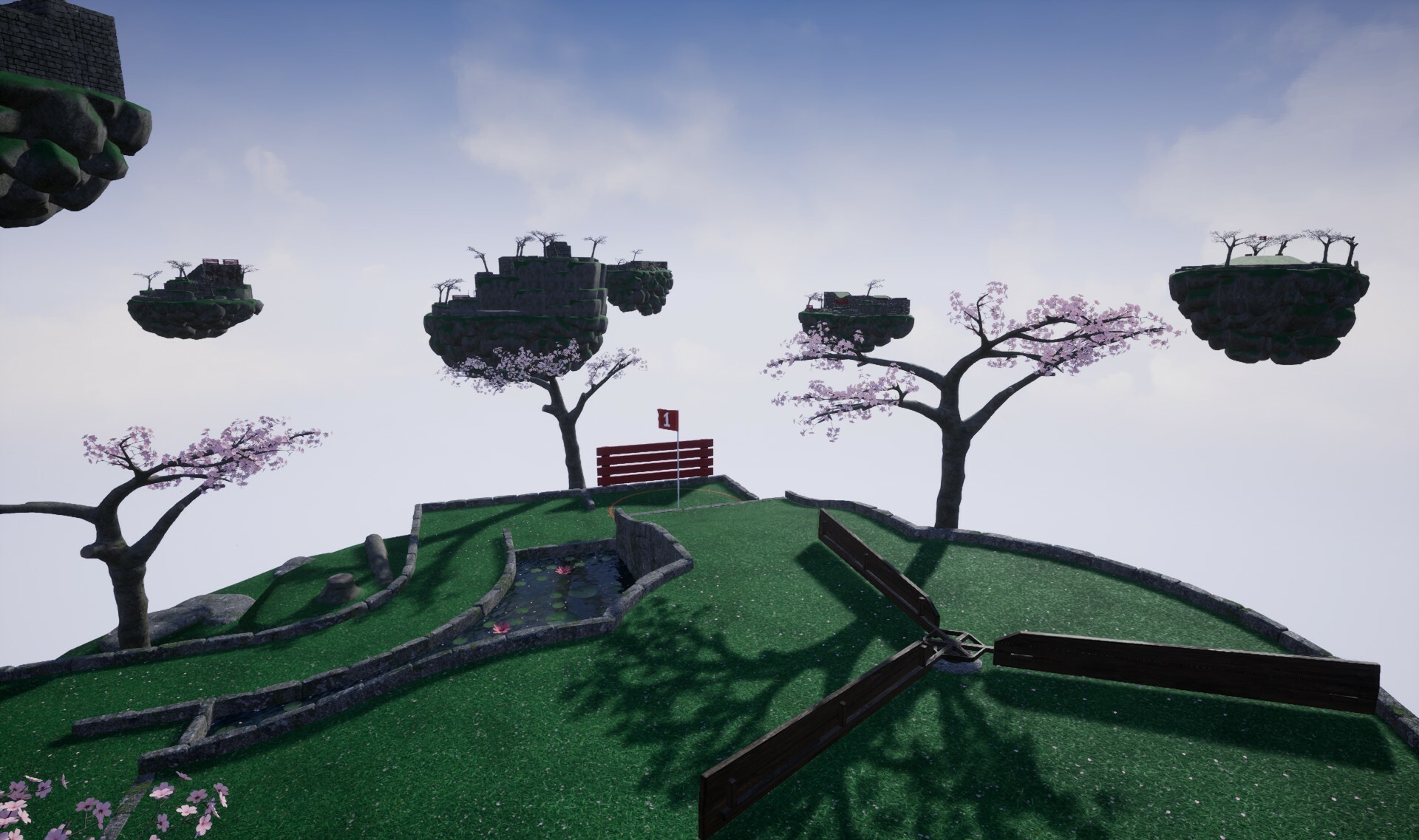
Golfing in Aether is participating in the Steam Sports fest this week. As part of this event, we will be offering a playable demo and running a 70% discount!
Playable Demo
The demo which is compatible with both Windows and Linux (natively) comes with 18 playable levels and capped XP progression to level 3. You will be able to continue your progress in the full game from the point you reached.
Beyond these above restrictions you can play the demo in any single or multiplayer mode, with full options available, including all three seasons, and split screen play.
70% Discount
The base game will be 70% off for the next week, the largest discount so far. If you like what you see in the demo, then you’ll find a total of 60 levels in the full game.
The deluxe edition upgrade is also available for 15% off. The discount on this DLC specifically, which is the only paid DLC to the game will not increase any time soon as essentially it’s a handful of non-gameplay cosmetics for a few dollars extra which really does help put more funds towards on-going development.
You can see this reflected in the fact this past year I have released three completely free expansions, containing 28 levels in total. I plan to do more, and these will remain free additions to the game.
Keep an eye out for more news!
For those of you who already own the game then please do check back this coming Thursday where I’ll be announcing a pretty cool addition to the games customization that’s been underworks these past couple weeks.
In the mean time if you want to be a big help in supporting the game, then please do mention the availability of the demo to any friends you think might be interested or put a review for game. As Golfing in Aether is a solo developed project and there’s no big publisher backing, any added exposure can really help with how crowded Steam can be for games these days.
Discord Server
Be sure to check out the official discord server with channels for Golfing In Aether and my other various projects.
Golfing In Aether Update Released [1.5.1]
Todays update comprises of various bug-fixes following on from the recent major update. Golfing in Aether will also be taking part in the Steam Sports Fest due to start later today and I wanted to get various fixes to the game in before that goes live.
As part of the Sports Fest there will be a playable demo version of the game and a store discount. I also have something fun to announce relating to ball customization later in the week on Thursday. So keep an eye out for that!
If you are aware of any issues not fixed by this update please let me know so I can address them.
Fixed Snowman and Pudding balls not correctly unlocking initially with deluxe edition purchase.
Added a change to how v-sync setting is stored as built in engine setting in proving unreliable. It is now stored as part of the system savegame, and will be enabled at the same stage as the frame limit. You will need to re-enable vsync one time as a result of this change.
Environment
Added further tweaks to shadows for highest quality settings following on from recent update that tweaked shadows at all quality levels.
Fixed a wall placement on ‘See you on the other side’.
Fixed a wall gap on ‘Speed bump’.
Fixed a floating set of petals and wall gap on ‘Spin Cycle’.
Fixed a duplicate wall on ‘Crazy Golf’.
Fixed a wall gap on ‘What goes around’.
Interface
Fixed a couple of transparency sort order issues with interface shadows relating to customization items from recent engine update.
Fixed rendering of some shadows on the ball selection widget.
Fixed placement of global header on leaderboard screen.
Fixed a couple color/hole out issues with the scoreboard from recent update.
Added some background improvements to the customization screen for future feature support.
Fixed incorrectly giving ‘retry’ button when opening the game menu in a replay from the practice menu.
Fixed edit profile button not appearing immediately after creating profile.
Fixed a couple overlapping sounds relating to replays when navigating with a gamepad and opening a settings menu.
Fixed a scoreboard color issue from recent ruleset change.
Fixed a couple of scoreboard number padding issues so everything is more seamless.
Fixed a display issue with levels played on the stats menu.
Discord Server
Be sure to check out the official discord server with channels for Golfing In Aether and my other various projects.
Golfing In Aether Update Released [1.5.0]
This update started with migrating to the newest version of Unreal Engine 5 (5.1.1 from 5.0.3), but following on from that I've also taken a good amount of time to complete various performance improvements and add quality of life features.
New random level ruleset
After listening to various feedback I’ve worked on a new rule set for how levels get divided up with the idea of adding to diversity. Previously levels had three stages, Early, Mid, Late, with groupings being every 3 levels. For a new rule set I’ve changed the Early and Mid-categories to be groups of four, with a final late game level chosen. Additionally, some levels have been moved to different categories.
For the most part baring a few exceptions (such as mid-hole madness) ‘multi-hole’ levels are now not part of the early category and now part of the mid category. With plenty of mid levels not having these multiple hole setups there should be a better divide up of levels. Part of the feedback received was too many of these were getting picked, and with random being ‘random’ there was a case where you could have some in both early and mid making the game very focused on that. With there being no shortage of variety this change will help show that off a bit more.
After recategorizing it works out as 23 early levels in the game, 28 mid, and 9 late. When I get to working on a next free level expansion, I will be balancing those numbers out better. Its worth noting that no repeats will be picked when creating a session until you’ve played through every level in a category. Also this is only the default preset and via custom session settings you could already pick various presets or individually whatever levels you want.
I did move some levels around in the practice level menu, specifically mid-hole madness is now fifth in the list. Just to space things out a bit better so the first level people play isn't one with multiple holes like that.
Improved Water and Shadows
For all quality levels (but more noticeable for the lower settings) is the quality of the water has been improved. Specifically you'll see visible depth even though the water is still plane based for performance. Secondly I wanted to make the lower settings a lot closer to how higher settings render it, to this end I've faked the reflection using essentially a cube map capture of the sky, so you get the appearance of a kind-of reflection based on your camera angle. Of course this is no where near as good as having actual reflection capture but at quick glance it will still look a lot better than it was.
Besides water I've also taken another look at the shadows. Specifically far shadow cascades have been added (replacing distance fields) which actually led to a performance improvement. The number of shadow cascades in the near scene has been increased slightly too, which should give a better overall shadow appearance. In the above image you can see how in close scene vs far scene how the quality of shadows transition.
I came up with idea of basically doing proxy shadowing for several geometry pieces. Essentially some wall pieces cast as if they are low poly plane object which considerably reduces the shadow cost. This way as a whole better shadow quality can introduced for the objects you'd actually notice for a net similar performance.
This is an area I will likely continue to improve, there’s always the balance of both not impacting performance too much and also not overdoing the sharpness of shadows via too many cascades given things like tree branches are what you commonly see most.
Performance Gains
Continuing on from the 1.40 update which focused on an improved instancing setup to reduce render primitives, this update now includes an overhaul of shaders to significantly reduce their cost as well. Medium (and below) and ES3.1 modes have their own material variations that reduce the cost even further. Quality in some cases has been improved including notably a much better water setup, but I'll cover that in a separate section below.
For actual performance numbers I was able to get the following in medium settings on my AMD 3200G test pc which is similar ball park to the steam deck.
Small Levels
Gentle Swing - 95 fps to 113 fps, 18 fps gained Around the pond - 81 fps to 104 fps, 23 fps gained. Tee Time - 81 fps to 117 fps, 36 fps gained.
Large Levels
Waterhole 67 fps to 89 fps, 22 fps gained. Go For it - 84 fps to 103 fps, 19 fps gained. See you on the other side - 86 fps to 99 fps, 13 fps gained.
The fps gains do vary, but if just looking at the lowest fps in a level, then around 90fps is obtainable at 1080p. While its harder to benchmark the randomness of having nine islands rendered, in tests at least 60fps was present, meaning you can now have the 'other islands' option enabled as part of medium settings. If you were running on a Steam Deck then it is actually a bit faster than the 3200G mentioned here, plus the fact it only renders at 1280x800p on its screen means you should see a fair bit higher performance.
Newer Engine Version
Previously the game ran on version 5.0.3 of Unreal Engine 5 which was released back in July 2022, and I’ve instead moved the game to the newer version 5.1.1 released February 2023. The primary reason for the change was to improve platform support and just keep things up-to-date.
A couple of small benefits to this newer engine version is firstly the included SDK version for Steamworks has the function to identify if the device being played on is a Steamdeck, so I'm able to make sure the medium graphics preset is set correctly when you launch the game for the first time on these devices.
Next static meshes can have functioning wind without artifacts (some engine fix occurred) in the forward rendering mobile config Golfing in Aether uses for the ES3.1 mode, so the flag will be able to have visible wind movement. Note in regular graphic modes there was already flag wind movement, it was only this low-end performance mode that lacked it.
I’ve also been able to enable a couple of material optimizations game-wide after some specific graphical artifact issues were fixed at an engine level (specifically to do with vertex fogging in the forward render). This will give a very slight performance boost.
Addition of AMD FSR 2 and Nvidia DLSS
I’ve looked into and implemented various methods of upscaling including a better setup of Temporal Super Resolution, Nvidia’s DLSS (and DLAA), and AMD’s FSR. Nvidia DLSS has specific hardware/driver/OS requirements whereas FSR and the built in TSR are way less restrictive. For the ES3.1 performance mode there is a mobile orientated version of FSR1 available.
In the graphics settings menu you'll find the new "Anti-Aliasing and Upscaling" section with more options than previous.
At first I was looking at better image quality for really low settings such as in the ES3.1 mode which by default has a 75% 3D resolution setting. Using the included FSR1 you can get a mostly close to 1080p image and at very least looks a lot better than before. As upscaling can also help when you want to hit higher resolutions such as 1440p or 4K while still maintain a decent framerate, I went and added both DLSS and FSR2 to the regular version of the game.
I will be enabling DLSS when supported automatically (set to auto) and TSR as a fallback. This will only apply to new players during the benchmark stage, so if you’ve already played the game before then you will have to enable the method you wish to use from the graphics settings menu.
It should be noted that its probably more than possible to hit 1440p resolutions on a 360hz monitor without any need for upscaling at all with where the game is at (with a recent mid-high end gpu) It is certainly not a demanding title to run. But as you start to look upwards of that, with 4K or more resolutions and still want those kinds of framerates they'll become really useful to have.
Installation Size reduction
Installation size has been reduced by more than 700 MB on Windows (a reduction of 42%) to just under 1.0 GB with a download of 920 MB and a slightly smaller 400MB (33%) reduction on Linux for 1.0 GB install and 880MB download.
This is achieved though a one-time redownload of most of the game (which isn't very much, see above) to take advantage of newer packaging such as IO store rather regular pak method earlier unreal engine versions used. To make full use of this one-time redownload I’ve done a bunch of other changes such as taken time to better divide up the chunks better to push patch sizes smaller and have enabled Oodle Texture RDO. All of this will make the game much lighter on disk space and perform some loading operations slightly quicker.
Improved UI scaling for portable devices (e.g. Steamdeck)
I’ve played around with how the UI scales which should benefit portable devices especially (such as the Steamdeck). At 720p the menu will remain a constant size as if it was 1080p, essentially loosing just the empty space and making full use of the space for readable text. Outside of these ranges it will continue to scale as it did before, so if you are using 1080p or above you will notice no changes.
Improved menu navigation for portable devices (e.g. Steamdeck) and gamepads
Firstly as shown in the screenshot above I've made scroll-bars proportionally a bit wider so users with a touch screen can better select them. Overall these have an improved appearance that better fits the menu theme as well.
Secondly when using either a d-pad or thumbstick and holding a specific direction the menu will now cycle through options after a delay. So if you hold e.g. down for 0.5 seconds, following on from this while still holding down every 0.125 seconds it will move an additional step. For some menus that are really long like the practice menu this will be a big help for navigation.
Particle effect improvements and perfect stroke effect
Most notably when getting a perfect stroke you'll see an added particle orb effects emit as part of the trail. This is just a small addition to mostly more behind the scenes work as I improved and tidied up various effects with performance optimization in mind.
When playing in ES3.1 mode you should now see particle emitters such as from tree's (petals, leaves etc.)
Various bug fixes
Fixes to several issues that showed up while testing as well as for issues previously mentioned, please see the full notes below for these. Of course this is a huge update so its quite possible there are issues introduced somewhere, please let me know if you spot any as they can be hotfixed pretty quick.
Added some tidy ups to optimize frequency of saving events, specifically from choosing profile to beginning a level.
Added improved asset parenting to ball materials to help with error prevention.
Added restructure of game files to further improve loading times and reduce future patch sizes.
Added small addition to ball trail particle effect when a perfect stroke.
Added change to ball trail particles and level sequence spline so in ES31 mode they will run on GPU not CPU. This is because some really low end systems can cause artifacts with the particle failing to follow the target accurately. CPU based particles for path-based stuff visually look better as was how they were previously set, and on PC you are more likely going to be GPU bottlenecked anyway.
Added small tick optimization to movers by implementing similar world position offset behaviour to the rotators so only the active level is ticked on CPU.
Fixed field of view not setting when changed while playing.
Added improvements to temporal AA implementation, specifically to help reduce shimmering.
Engine
Migrated from Unreal Engine 5.0.3 to Unreal Engine 5.1.1.
Added change to re-enable vertex fogging for the forward render now that this version of the engine no longer produces artifacts. This gives a very slight performance boost.
Added change from pak to io store for files, as well as enabled Oodle RDO.
Added change to force SM5 when using DX12 as no SM6 specific features are used (plus SM5 gave higher fps in testing).
Added FSR Mobile (FSR1) exclusive to ES3.1 mode.
Added improved temporal super resolution support.
Added FSR2 support.
Added DLSS and DLAA Support.
Added replacement to rotating movement for e.g. windmills/waterwheels due to engine level issues.
Platform
Added Cross Platform Steam Cloud support (previously only worked with local platform).
Environment
Fixed a small wall gap on ‘see you on the other side’.
Fixed a tiny ground gap on ‘across the pond’.
Added moving flag in wind in ES3.1 mode.
Fixed pipe alignment on 'Center Path'.
Added small shader instruction optimization to the sky, reducing instruction count by about 12%.
Added significant shader instruction optimization to red wood fences, windmills, and water. Reducing by 11% for High, 45% for Medium, and 73% for ES3.1.
Added rework of all wall meshes to be both higher quality and slightly reduced triangle counts. Higher quality involves giving all ramp walls consistent depth with normal walls, these were only 6cm deep due to an alignment issue with ramps but this has been worked around and these have now been given the full 12cm appearance. Triangle reduction is from a combination of better boolean accuracy and re-running simplification for LODs. Visually they’ll be the same, just some triangles you would never see on the back face have been removed.
Added improved LOD models for all aquatic plants. Primarily for performance but should also give better performance as these LODs changes are more targeted.
Fixed one end of the back wall of the ramp in learning curve not being seamless.
Added improvements to the angle of a few exit pipes so they do not dip below the exit height. This means they don’t have to rely on ball speed for the ball to exit, which should help clear up some very rare cases of the ball not behaving when entering these specific pipes.
Added improvements to various levels by trimming any wall meshes that intersect with terrain.
Added improved LODs for windmills and movers. This is better targeted so should be both better visual quality and lower poly at the same time. Added improved ground to top of tower.
Fixed some tree placements on 'All tee’d up'.
Fixed a wall gap on ‘Law of Reflection’.
Fixed some wall gaps on 'now where do I go".
Fixed a few unneeded wall pieces not visible under one of the structures in Spin City.
Added improvements to ‘All tee’d up’ by trimming several wall pieces intersecting with terrain to save on poly. Some of the tree’s and rocks outside playable area have had their placements tweaked slightly to improve visuals on lower graphics settings.
Fixed an issue with collision on a half meter height corner piece.
Added improvements to ‘Speed Bump’ by reducing the level triangle count via trimming of several walls intersecting with terrain. The primary pipe has also been adjusted. Several rocks and tree’s have been shifted around to fix various issues. A couple rocks were completely occluded by other rocks or walls so have been removed.
Fixed various rocks clipping with walls on Spin City.
Added a rework of all island meshes to bring additional LOD levels.
Added improvements to normals on various pipe meshes.
Interface
Added usability improvement to scroll bars by increasing their width by 50% (12 to 18px) as on small touch screen displays it could be a little awkward to select them.
Fixed a typo on the hole-out screen.
Added visual improvements to scroll bars by using rounded corners like other elements feature and adjusting the top/bottom padding so it sits in line with other elements.
Added new “Anti-Aliasing and Upscaling” section to the graphics settings menu with added options for FSR and DLSS. These two new options have their own sharpening methods and screen percentage is controlled, so you will find a ‘sharpening’ setting where 3d resolution normally is.
Added re-order of some levels on the practice menu. Specifically moved ‘mid-hole madness’ to the fifth level in the list and gentle swing to the first. My reasoning is for players who first play the game and pick a practice level, I didn’t want to introduce the multiple holes as the absolutely first level they play.
Added improvements to ES3.1 graphics menu, with similar “Anti-Aliasing and Upscaling” section available. Because not all AA methods work in this mode (it is mobile rendering after all) you will find a reduced list of MSAA,TAA, and FSR1 compared to the regular desktop renderer.
Fixed gamepad navigation on the custom levels menu.
Fixed thumbstick navigation on the achievements menu.
Fixed the right scrollbar in the custom levels menu not inheriting dark theme correctly.
Added improved navigation behaviour allowing continuous movement in a direction after a short delay.
Discord Server
Be sure to check out the official discord server with channels for Golfing In Aether and my other various projects.
Golfing In Aether Update Released [1.4.1]
Todays update has various bug-fixes and a few quality of life improvements. Notably included is improved loading behavior, and the ability to skip level sequences while playing practice mode.
Loading Screen Improvements
Some backend engine work was done to remove dependency on a plugin used for handling loading transitions in favour of a more native implementation that will help with future migration to newer engine versions.
Some discrete loading text has been added to the bottom corner of the screen while level loading is underway. Loading is practically instantaneous on recent hardware (and this update increases that speed slightly) however some older devices can take a few seconds.
Skip Level Sequence (Practice Mode)
While in practice mode during a level sequence you can press and hold either the menu reset, or accept button (space bar, gamepad A or X etc.) and you'll be able to skip the sequence. A prompt showing the hold progress will be visible (and takes about 2 seconds) as shown in the screenshot above.
Skip XP Animation (Practice Mode)
Another change for practice mode is you can press the skip button (gamepad X) while in the scoreboard and the ten second countdown will be reduced to 3 seconds with the final score shown imediately. If less than three seconds remain you can skip instantly. This also works in combination with the 'retry' button pressed, so you can play the same level again.
Hard to show off with a screenshot, but you can see the button prompt at the bottom of the above image.
Various bug fixes
Following on from the previous major update there were a few issues caught and these have now been fixed, see the full notes below. If you are aware of any issues not fixed by this update please let me know as I'm not aware of them.
Fixed some redundant code that would cause a 0.2 second delay in total during loading all levels.
Fixed an instance where restarting the level could cause the ball to sometimes roll from its start point before playing.
Added ability to skip level sequence when playing practice mode. Hold either the menu reset, or accept button (space bar, gamepad A or X etc.) and a indicator will appear, hold for 2 seconds and the sequence will be skipped.
Fixed restarting a level, taking a shot and then resetting not allowing tee movement until one further reset.
Fixed an instance where it was possible to time out while playing competitive mode with local players if the level has already ended within a set time.
Engine
Added a reduction in plugin dependency by removing a plugin used for handling loading screen effects. This has been replaced with a more native solution that will make updating the engine easier.
Environment
Fixed main menu sky not loading correct preset in some states.
Fixed some bones having incorrect ground blending material.
Fixed a sequence camera on ‘center path’.
Fixed an inverted wall piece on 'learning curve'.
Interface
Added discrete loading text while transitioning.
Added ability to ‘skip’ the scoreboard animation when in practice mode, this will reduce the timer to at max 3 seconds depending what time you have remaining.
Fixed an instance where restarting a level cosmetically didn’t reset the timer to zero until the level starts.
Fixed achievements menu displaying incorrect total for completionist and around the world (wasn’t factoring in the new leviathan expansion).
Discord Server
Be sure to check out the official discord server with channels for Golfing In Aether and my other various projects.
Golfing In Aether Update Released [1.4.0]
The third free expansion to Golfing in Aether is here, and the first update of season two, bringing ten new levels for all modes and themes. Update also brings a significant performance increase for lower-end systems, along with several quality of life improvements. There is also a 66% discount on purchasing the base game till Monday!
Above is a link to the free DLC (it should be downloaded automatically). The levels will work with all previous themes and in all game modes.
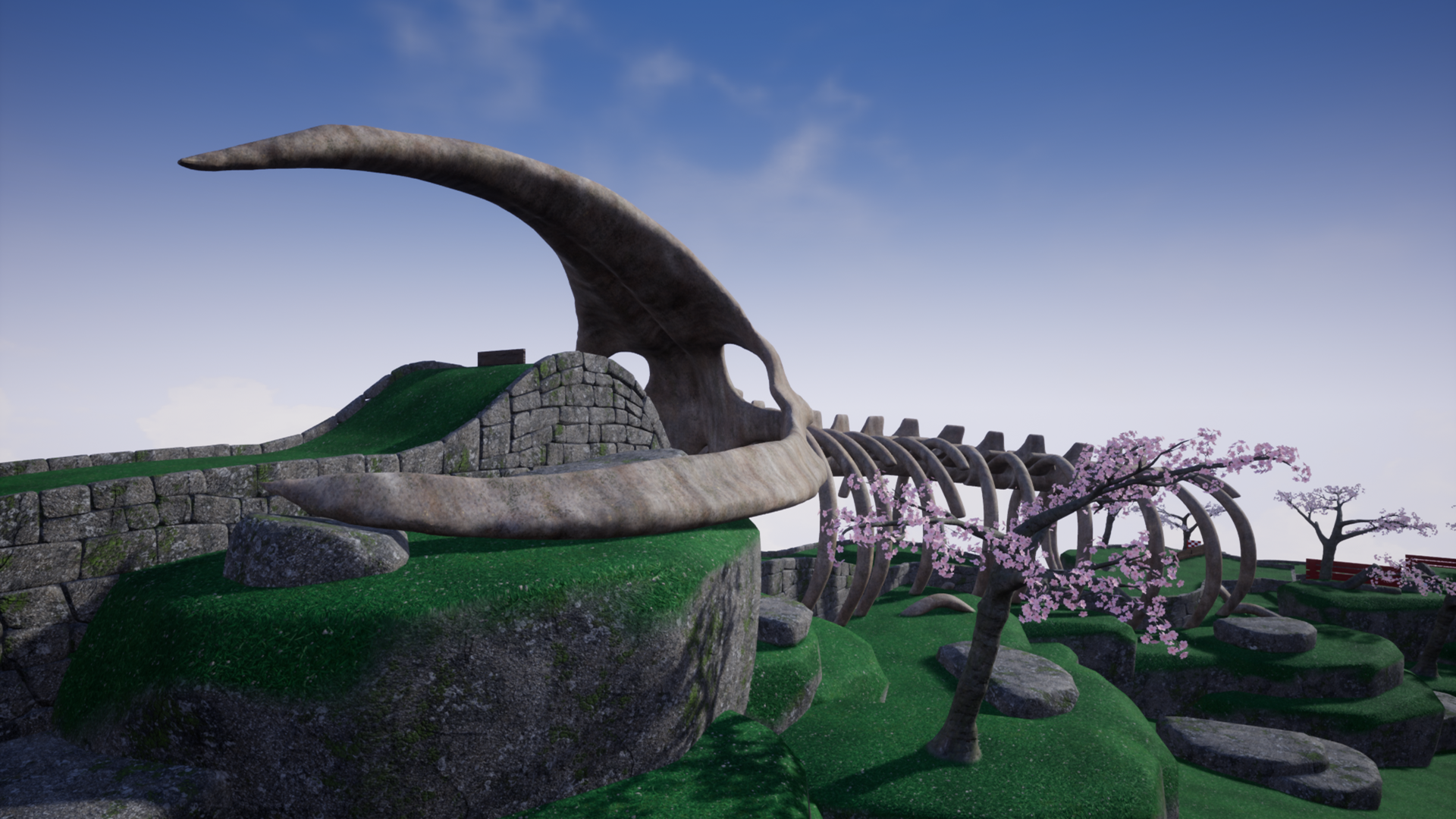
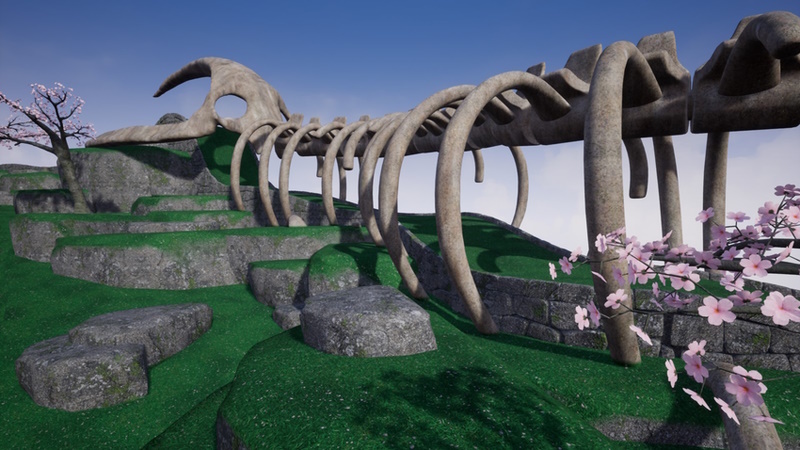
Slightly more levels this time around than previous expansions, as well as distinctive titular level featuring the large leviathan skeleton.
The level breakdown is as follows, one large late game level, four mid-game, and five early. Remember in a previous update there was the added ability to indivudally pick levels you want to feature in a session, as well as preset playlists such as 'early only' or 'mid and late' only depending on how you wish the play the game. This setting can be found in the custom sessions menu.
Improved instancing and LODs
Levels are now constructed internally quite differently through a more efficient instancing (switched from using newer auto instancing with static meshes to instead using traditional hierarchical instant static meshes which does give greater performance) along with a fresh pass at the LODs of nearly all meshes to really push greater performance gains in the specific area of triangle rounds and render primitives. This is something that will effect low end systems more, but will also benefit high end systems when rendering all 9 islands at once, specifically if you’ve manually chosen to play on just large levels for example.
Below is performance numbers from testing on a Ryzen 3200G, no dedicated gpu, 1080p, medium settings. If comparing to a Steamdeck do note that not only is the deck slightly faster but it only has to handle 800p in handheld mode.
Small Levels
Gentle Swing, 94% reduction in prims, fps increased from 84 to 95 fps. 11 fps gained. Around the pond, 96% reduction in prims, fps increased 68 to 81 fps. 13 fps gained. Tee Time 94% reduction in prims, fps increased 69 to 81 fps. 12 fps gained.
Large Levels
Waterhole, 97% reduction in prims, fps increased from 51 to 67 fps. 16 fps gained. Go For it, 92% reduction in prims, fps increased from 75 to 84 fps. 9 fps gained. See you on the other side, 95% reduction in prims, fps increased from 68 to 86 fps. 16 fps gained.
Larger levels will typically see bigger gains as there was more in them to begin with, but most small levels tested still gained at least 10 fps. There is a greater jump playing with ‘other islands’ checked, which means rendering 9 islands at once, and average frame rate jumped from mid 30s to high 50s on average. It will be other factors such as shader cost and or shadows now being the bottleneck for this hardware.
Improved Navigation History
When navigating menus previous navigation states will persist if you return to a previous menu if the current game state allows for it. This really helps for example if in practice menu, you pick a season then press back, the level you had selected will remain. The same will also happen when returning to the practice menu after playing a level.
Various other fixes and improvements
Also included are various bug-fixes to issues found or reported which you can see in the full notes below. This is a very big update so its quite possible some minor issues slipped through testing, so if you encounter any then please let us know so they may be promptly fixed.
Added restructure of backend code to better handle platform specific code i.e. Steam. Platform ids are also handled to make them independent of any specific platform sdk, this will help with error prevention and make it easier to update sdks.
Fixed a potential issue with camera fade behaviour when returning to the main menu from a practice session.
Added improved interfaces to reduce initial main menu memory usage. While the overall memory is low at about 1.5GB this will specifically help very low speed devices by spacing out when assets are loaded into memory.
Added a new customization applying system backend to help target some memory savings. Specifically this will separate out textures used in the front end and in-game, and specifically load in-game textures asynchronous instead. This will make memory savings of around a hundred mb.
Added new backend system to improve how levels are constructed at runtime. This should see big improvements on low end devices.
Fixed an issue where if playing hotseat mode in singleplayer and you launch yourself into some water from the tee, your ball would be hidden.
Added tweak to random level selection by increasing the no repeat pool once you’ve played all levels at least once to be based on number of DLC (the free expansions) you have active. For every expansion enabled (which are enabled by default) the no repeat pool will increase by 9 up to half the total level count. So for example if you have no expansions active this number will be 10, but with all 3 expansions it will be 30. This means no matter how random or not random the level selection is, a level will not be repicked until other levels have been picked for the next 30 levels. Do note that a level is a level is only stored in this system if it has actually been played, so if you quit on e.g. hole 3, levels that would of made up 4-9 are not stored as you didn’t play them. If you deactivate an expansion the no-repeat pool will shrink again accordingly.
Environment
Fixed a rock clipping with a wall near cup on level behind the tee.
Fixed appearance of some island meshes that had excessive amounts of grass covering on their underside. Only a few levels had this issue and as its on the underside it was quite hard to spot, but I’ve done a check of all 50 levels to be sure.
Added Leviathan expansion assets and content.
Added improvement to error prevention for the background construction of island meshes.
Fixed the flag raising detection on Tee Time not fully covering the bamboo path so the flag would raise up and down slightly initially.
Added improved LODs for nearly all wall and décor meshes to bring about performance improvements.
Fixed and improved culling behaviour on leaf particles.
Added distance fade to the snow of fences and tree’s when the camera is close similar to base mesh behavior.
Added tweaks to the collision of the center part of windmills.
Added tweaks to the flag raise position of various levels.
Fixed a waterwheel rotating the incorrect way on take swing.
Interface
Added new navigation history system to remember navigation states as you go back several steps. For instance, if you selected practice, a specific level and then a season, as you press back on each menu the previously selected element will be the default selection when the menu opens. This works with both mouse and gamepad navigation, and you can interact with one menu with mouse, switch to a gamepad and previous navigation will be seamless. Several menus had selective history for the previous step but this unifies the system and expands to all menus with no limit to the steps.
Fixed an issue with the timer display flashing (as if time is running out) during the start of a new level if you were to receive a time out via the six stroke limit while the game has no set time limit in the previous level.
Fixed a potential issue with button click handling in graphics settings menus.
Added memory improvement to all level preview pictures through repackaging with better compression.
Added memory optimization to the intro logos by only referencing specific assets on demand. This is a minor saving but basically means a few MB of textures don’t need to be loaded on first visiting the main menu.
Fixed an issue with saving theme settings from accessibility menu on first start of the game.
Discord Server
Be sure to check out the official discord server with channels for Golfing In Aether and my other various projects.
Golfing In Aether - FREE Leviathan Expansion Coming Soon
Today I want to share some screenshots of the upcoming free expansion coming this March which you can find listed below as coming soon.
There will be several levels as part of this expansion, I can show off three of them today including the titular level which is one of the new late game ones. This features a large leviathan skeleton you have to navigate and offers some distinctive scenery from afar.
The goal of this level is to have your ball directed into the correct part of the lower vertical windmill so it can shoot through for the hole in one.
If you fail to reach the hole in one there is an additional shortcut route you can take to keep your overall stroke count to two. This involves aiming for the specific point on the slope so your ball enters the hole and travels along the shortcut pipe.
Also shown in the above screenshots is that this level works with all existing themes so can be played in Autumn or Winter appearance.
Levels 'Zig Zag' and 'Rebound'
At the other end of the scale is two new small early levels that offer a simple challenge of reflecting your ball for the hole in one. Both of these are designed to be introductory levels you'd have appear at the start of your session but will still offer some challenge as you figure out how to get a hole in one.
'Zig Zag' features cross like sections where if you angle incorrectly over two reflections you'll miss the hole and roll down a ramp the other side of the hole. 'Rebound' is more focused on getting your power dialled in so you hit the a block on the other side of a jump ramp which will as the name suggests, rebound you into the hole.
Coming this March
There will of course be more levels than this in the final expansion release which is still quite a bit away, so I may do further teasers over the coming month. Unlike the previous two expansions this will not introduce a new overall theme/season per se ( autumn/winter etc.) but more about bringing distinctive levels that will continue to bring variety to the overall level pool.
There are also more additions on the way beyond this expansion throughout the year that are pretty significant, but I can’t quite talk about them just yet. I will however say the game will be continuing to receive development with this being the first addition of 'Season 2' so do keep an eye out for future news over the coming year.
Discord Server
Be sure to check out the official discord server with channels for Golfing In Aether and my other various projects.
Golfing In Aether Update Released [1.3.4]
For the first update of 2023 I wanted to target some quality of life additions including both user interface and graphical improvements. The size of the update at nearly 400 MB is due to the significant number of assets that have been tweaked.
ES3.1 Improvements
First up is some improvements to the ES3.1 graphics mode. This is the graphics rendering you get when you pick “ES3.1 (for low end pc’s)” from the launch options, essentially this is the lowest rendering quality and uses mobile level rendering rather than the typical DirectX or Vulkan, so something like you’d find from a game being played on Android for example. The point of this is to make the game playable on really low-end hardware without having to turn regular graphics settings down so low that the game looks terrible.
PLEASE NOTE: The following in-game screenshots are of these lowest quality graphics. You may need to view these in a web-browser at larger size to see specific details.
Material based ambient occlusion
For starters I’ve improved the material based ambient occlusion previously just on some wall pieces as it will really help with wall definition, especially more noticeably when running on a low-quality graphics preset or in ES3.1 mode. Every wall piece has had its mesh piece reworked to support this, with ones that previously had some shading being redone to a higher standard. Various other items such as fences, bamboo, and pipes have all been updated to feature better shading as well.
You will now see some material based ambient occlusion when running regular graphics mode (e.g. DX12/Vulkan) however as the shadows/lighting were already good here you won’t notice as significant of an improvement.
Better LOD island quality
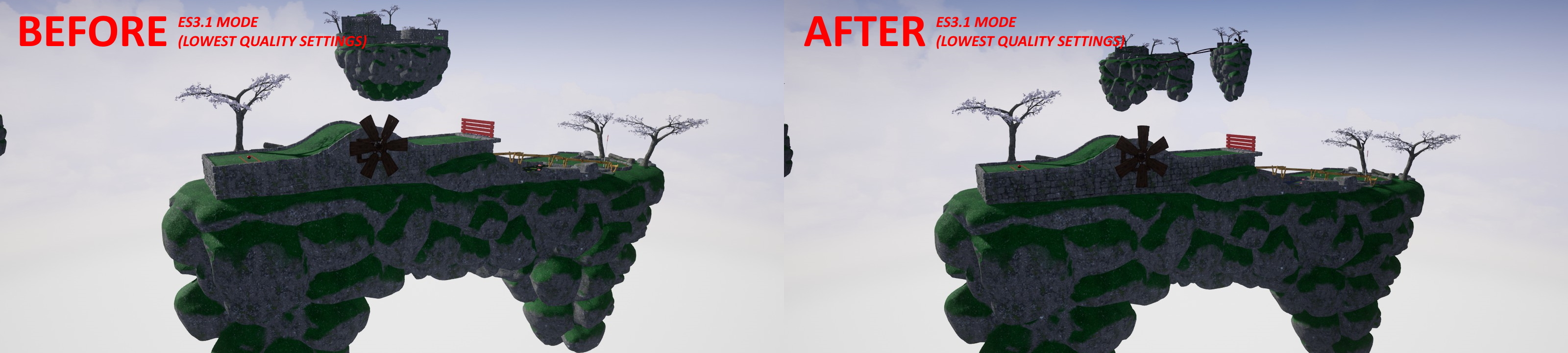
All meshes used for walls and for LOD islands you see in the distance have been reworked to feature a much better quality low LOD level that better holds its form and feature material based ambient occlusion.
I’ve also tweaked the distant islands to get shaded a little darker outside the range of shadows so it appears a little more natural. The reason this occurs at all is because in ES3.1 mode there is essentially no sky lighting and instead the meshes are given emissive values to mimic the effect. When you combine this with shadows only being in the immediate surroundings of the player this would leave the far islands looking a little poor quality.
Water improvements
Because the game uses forward rendering, that means there are no screen space reflections, so water without planar reflections like higher graphics levels feature it would typically have looked underwhelming. ES3.1 came off the worst, but I’ve been able to fake the reflections and give water an overhaul for quality in general. The idea being where certain graphical features are lacking I’ve faked features to at least visually get it close to how the higher end settings would look. It’s a lot better than it was.
Ball shadows
Another improvement is I’ve got shadows for the balls working, this was kind-of a resolution related problem but I’ve been able to shift things around a bit to get these working properly. I’ve also tweaked the shadow bias to make things hold their form as the camera moves further away.
User Interface improvements
I’ve also done some user interface improvements specifically to better handle the switching between mouse/keyboard and gamepad mode. One improvement is that the mouse cursor will disappear when you are using the gamepad and will not cause hover/selections to occur. The other change is that I’ve added a threshold-based movement detection for the mouse to enter keyboard/mouse mode. This means that instead of having to click somewhere, simply moving the mouse beyond a small amount will show the cursor again as well as keyboard glyphs.
Various other fixes and improvements
Also included are various bug-fixes to issues found or reported which you can see in the full notes below. If you encounter any issues then please let us know so they may be promptly fixed.
Added improved material based ambient occlusion for most wall meshes. This will improve the all-graphics quality levels but stand out more at lower settings where weaker simpler is used.
Fixed various small wall gaps.
Fixed some wall alignment on ‘see you on the other side’.
Fixed a ground alignment on ‘center path’.
Added material ambient occlusion to fences.
Added improvements to distant islands in ES3.1 mode so they get better shading.
Added slightly improved water appearance when not using planar reflection.
Fixed ball shadows not rendering in ES3.1 mode.
Fixed Shadow bias causing shadows to sometimes end abruptly in lower end settings.
Fixed some rocks having low LOD levels a little close.
Fixed a small quality issue with one of the pipes on Speed Bump.
Added some ambient occlusion to pipes for ES3.1 mode to help give more depth where these appeared very flat due the limited lighting. This was unneeded for regular graphics mode.
Fixed a slightly overlapping pipe join on Midhole Madness.
Fixed various rocks clipping through walls such as in Turn Ahead and Goofy Golf.
Fixed a tiny track gap on Cliffhanger due to incorrect scaling.
Fixed a poly count inconsistency with a pipe on drop to the left.
Fixed a wall incorrectly assembled on curve it.
Fixed a few unnecessary wall pieces below the terrain on What goes around.
Added a performance optimization to the ramp in ‘go for it’.
Added reworked inside corner wall mesh piece at a higher and consistent quality with other pieces.
Fixed a pipe alignment on Spin City.
Added reworked pipe for one of the pipes used on Rock Bottom. Specifically this was the pipe you go through when heading to the left path at the start, not a hole in one route, so won’t effect leaderboards in any way.
Fixed some wall alignment on go for it.
Added improved lods for all wall meshes.
Added improved meshes for all LOD islands. The tracks better hold their form over distance and support the material based ambient occlusion.
Added material ambient occlusion for the bamboo pieces.
Added memory reductions to all levels by removing excess wall pieces occluded by terrain.
Interface
Added improvements to mouse/gamepad control switching, by mouse cursor being invisible and unable to interact with UI elements while in gamepad mode.
Added improvements to glyph mode switching by having a mouse threshold return to keyboard mode rather than have to click or press a specific button.
Added new thumbnail for level hop and jump.
Discord Server
Be sure to check out the official discord server with channels for Golfing In Aether and my other various projects.
Golfing In Aether Update Released [1.3.3]
This update focuses on some tidy ups and improvements to the ES3.1 low end graphics mode. Notably I’ve fixed some lighting problems with the new Winter expansion and added in support for bloom.
Bloom is now enabled by default, but of course you can disable the feature if you wish by the added graphics setting for it. The performance cost for enabling is minor I found during testing and does help with the visuals a bit.
Other than ES3.1 stuff there are various bug-fixes to issues found or reported which you can see in the full notes below. While I won't be doing any feature updates over the holidays, do please let me know if you encounter any issues at all as these can promptly be fixed :)
Fixed some lighting with the Winter expansion in ES3.1.
Added bloom to ES3.1 mode. It can be disabled in settings if you wish.
Fixed some fences and windmill supports lacking snow in winter theme.
Fixed a rock clipping through a wall on ‘all tee’d up’.
Fixed some windmills not rotating on LOD islands.
Fixed an issue where if in ES3.1 mode you created a winter session, returned to main menu immediately and then begun a practice session set to winter the lighting would appear incorrect.
Fixed some redundant calls to set the lighting, it is now more centralised for error prevention.
Added material based ambient occlusion to walls. This will be most prominent when in ES3.1 mode. It will help a bit with shaded faces by giving more visible depth, normally in ES3.1 these appear a little flat due to the lack of SSAO in forward rendering.
Fixed a flag not correctly aligned with a pole in rail crossing as well as preventing it occurring in other levels.
Interface
Fixed some padding in the graphics settings menu.
Added option to toggle bloom in ES3.1 mode.
Discord Server
Be sure to check out the official discord server with channels for Golfing In Aether and my other various projects.
Golfing In Aether Update Released [1.3.2]
This update comprises primarily of bug-fixes but I've also added the ability to choose what level selection you get to play with during custom sessions.
Session Level Selection
Now that the game through its two free expansion packs has 50 levels there is enough variety where I’m able to add the feature where you can specify which levels to be randomly picked during a custom session.
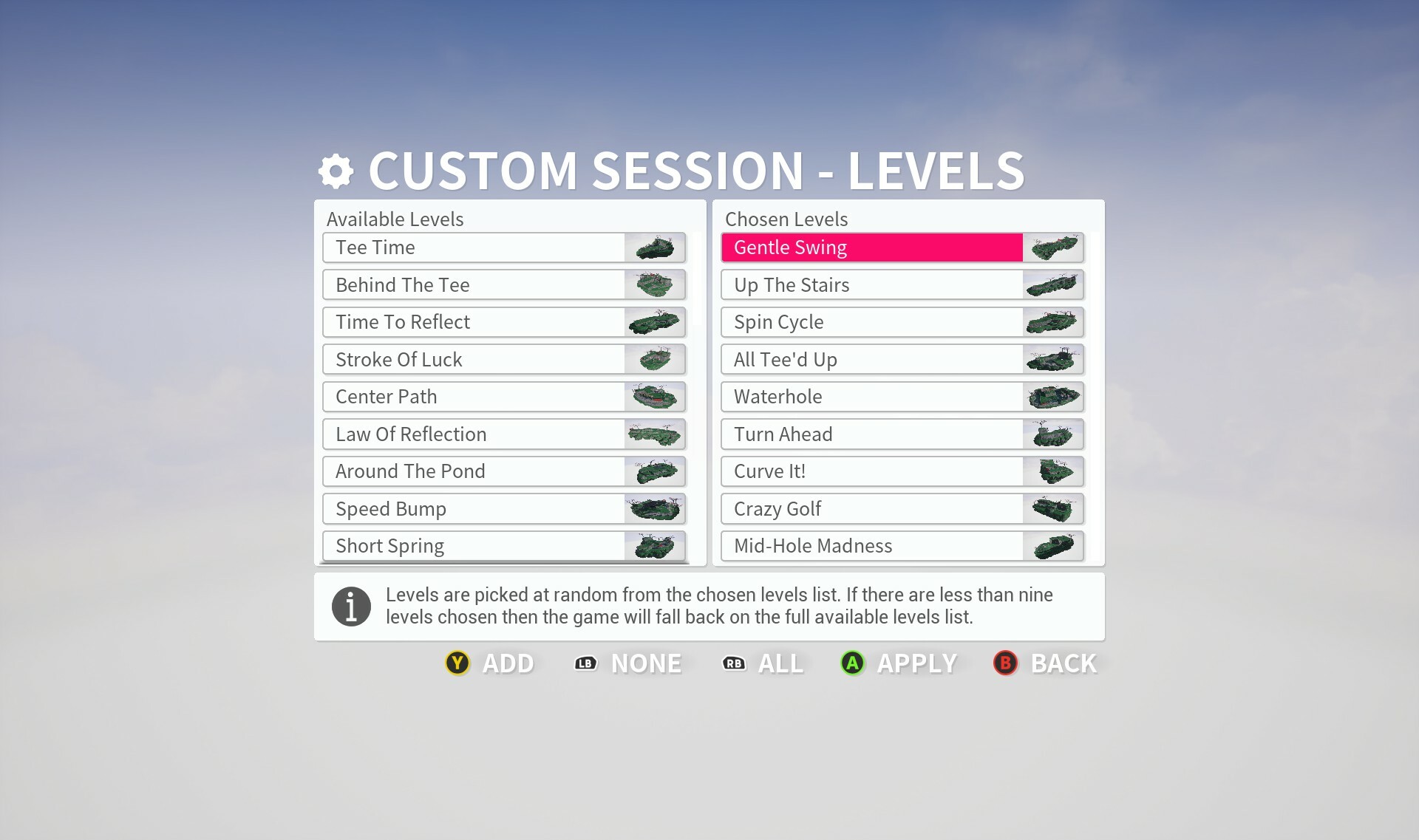
There is preset options for like ‘early levels’ and ‘mid-late levels’, but also the ability to fully pick each level individually by a new menu giving you complete freedom on the session you wish to play.
If your chosen levels number less than 9 then the remaining levels required will be pulled from the full available list. For instance maybe you only pick the first 3 levels to be chosen at random, then remaining six will be made up of any remaining levels you haven’t picked. If you have more than 3 of each early/mid/late stage the stage structure will be the same as the default (3 of each type) otherwise it will be completely random.
The levels you picked will still try to follow the convention of sorting levels early, mid, late, so if you specify lets say the 3 late levels, you’ll see those at the end of the game, not the opening levels. If you pick lets say one early level, it will show up within any of the first bunch of levels, it doesn’t specifically mean it will be the first level as everything is still shuffled around. As the selection is a bit more random here you may not get specific 3,3,3 grouping of levels unless you’ve specifically picked at least 3 for each.
There are buttons to add all or remove all from the list for convenience, so if maybe you just want to remove 1 or 2 levels you don’t like, that’s also a good use of this feature.
Players seeking to unlock the ‘Perfect’ achievement (which less than 0.1% of players have earned) can use this feature to pick levels they are more familiar with or simply find easier. As you have to pick 9 different levels and then hit hole in ones in a row, it’s still a challenging achievement.
Achivements Menu Tidy Up
Another few changes in this update is tidying up the achievements menu a bit as felt this could do with a quality pass. The images are now cached differently so should be more responsive, and I’ve tweaked the formatting of selected items to be easier to see. The button to actually access this menu was overhanging a bit with the back button on stats menu so I’ve fixed that too.
The remaining updates up till Christmas will primarily be bug-fixing now if anything does need fixing, I’ve been doing some extended testing but at the moment there are no outstanding known issues. In the New Year there will be continued development and I'll talk about future stuff then.
Fixed an issue where the release press of the top camera / camera toggle could conflict with pressing B to exit out of the game menu.
Added ability to choose what levels are played during custom sessions. You’ll find ability to change a ‘Levels’ setting in the custom sessions menu, when set to ‘custom’ an additional button prompt will appear at the bottom of the screen to take you to the new menu.
Environment
Fixed some level LODs not loading correctly. I’ve made a workflow adjustment to simplify the process so will help with error prevention in future.
Fixed a island lod for ‘Short Spring’ not being consistently performance optimized.
Fixed the area for the flag raising up on levels ‘Water Hole’, ‘Speed Bump’, and ‘Getting Tee’d Off’.
Fixed ball stopping a little short on midhole madness.
Fixed ball exiting pipe a little too quick on ‘Go for it’.
Interface
Fixed the alignment of lower glyphs on the scoreboard (especially via session replay) overhanging to the right.
Fixed some text getting cropped off on various prompts by widening the size of the prompt slightly.
Fixed achievement icons sometimes not loading in the achievement’s menu. I’ve instead triggered the caching of these icons when opening the stats menu.
Added improvement to achievement menu by having the progress bar selection colors going white when selected and color when unselected.
Fixed text minimum width on achievement menu so progress bars remain consistent length.
Added level selection menu, accessible via pressing Y or the levels button when level setting is set to custom in the custom session menu.
Added remembering last practice menu index when opening the season menu and pressing back. This behaviour previously worked for the leaderboards.
Fixed some gamepad navigation issues on the theme/season select menu.
Fixed some max values on the achievement menu being incorrect.
Discord Server
Be sure to check out the official discord server with channels for Golfing In Aether and my other various projects.
Golfing In Aether Update Released [1.3.1]
Todays update is just a small hotfix following on from yesterdays major update which you can read about in the link below. https://store.steampowered.com/news/app/1914980/view/3613605906276861875 If you encounter any issues then please let me know as I’ll be doing small updates once anything is found or reported that needs fixing.