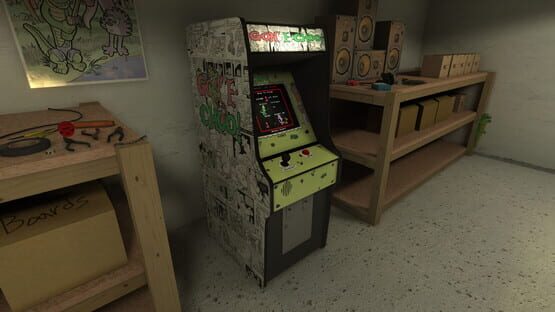
Added a small kitchen area to the back room where employees can take a break, get some coffee and nuke themselves some of last night's casserole.
Added a unisex bathroom (door)
Added an office (door)
Squeaky
Fixes
Fixed the arcade's button pressing when the machine wasn't in use.
Fixed backing away from the machine while paused.
Fixed notepad not initially rendering it's first page when the game is started in game only mode.
Fixed stutter on first pause.
Fixed world geometry visible in game only mode.
Fixed reflection probes not rendering sometimes when changing dynamic light options or going into game only mode.
Known Issues
Unity's OSX support!
rimshot* But no, really, you guys are great, but when I told you to fire your QA team, I thought it was implied that you should hire a new one!
rimshot* But seriously, I'm trying my best to work around it. If your game freezes, it's probably not my fault (you can blame crashes on me). I've found the issue and reported it to Unity, but there are still some places I have to work around it, it seems. Until then, hang in there! OSX was already snubbed by Oculus and Unity doesn't seem to test on OSX at all (considering builds from the last editor wouldn't even run). It's not easy for me, either. In fact, it's incredibly stressful. Please understand that while I'm trying my best to make sure OSX is supported, a lot of these issues are out of my hands.
0.65 Achievements!
I finally decided to add achievements to the game! Check the game's achievements in your library for some helpful hints on how to get them! There aren't many, but you aren't going to get any achievements for simply turning the game on, either. If you want all of these, you're going to have to be pretty dang dedicated.
Changes
Achievements of course!
Known Issues
Unity's OSX support!
rimshot* But no, really, you guys are great, but when I told you to fire your QA team, I thought it was implied that you should hire a new one!
rimshot* But seriously, I'm trying my best to work around it. If your game freezes, it's probably not my fault (you can blame crashes on me). I've found the issue and reported it to Unity, but there are still some places I have to work around it, it seems. Until then, hang in there! OSX was already snubbed by Oculus and Unity doesn't seem to test on OSX at all (considering builds from the last editor wouldn't even run). It's not easy for me, either. In fact, it's incredibly stressful. Please understand that while I'm trying my best to make sure OSX is supported, a lot of these issues are out of my hands.
0.6 I'm alive!
I'm alive and the world shines for me today!
Hey. Been running into a couple of those "hang-ups". I guess that'll happen when you're targeting multiple platforms, VR, and hoping they all work nicely with each other (hint: they don't). So yeah, I've got a couple new features, but I also had to take one away! Why? Well I'm sure the wonderful fellas over at Unity could answer that question. Apparently, changing the resolution during runtime in the latest version of the engine doesn't exactly, you know, work? Unfortunately, the latest version also fixed some major bugs, so I figured removing that option for now was the best way to go about things. It'll be returned when that is fixed (the current patch apparently should have fixed it. Spoiler: it didn't). Let's hope they get it together by the time I'm ready to release the game! Until then, I enabled their wonderful resolution box which many of you have probably seen in other games. You can change the resolution from there, but avoid the input panel. I do not use Unity's input manager because it does not support rebinding of keys, so messing with that could break things. There is no way to disable it, unfortunately, which is why I disabled the box entirely and moved those options to the in-game menu.
Changes
I dunno. It's been a while. I lost my notes...
Some secret stuff for sure..
Oh yeah! Entirely new menus!
Ooh! And options for inverting y-look and changing look sensitivity!
The menu has a nifty non-blippy version of the SPAGG theme, which is actually older then the game itself.
I added a load screen to make launching a bit less jerky.
You know, I'm sure I'm forgetting something.
0.5
I've been working on livening up the cabinet side of the back room this past week with some new interactive arcade parts, some coin boxes and a notepad with notes from the boss.
Changes
Added new interactive arcade parts.
Added interactive notepad.
Added various static props, such as coin boxes and a gator dog toy.
0.4.2
I have a few quick fixes and changes tonight. Thanks for the bug reports. I'm just one guy and I miss a lot of this stuff. More fixes are in the works, as well.
Changes
Added keys.
New gameplay secret.
Fixes
Fixed some jitter issues with the first person controller.
Fixed the cabinet using some wrong textures.
Misc game fixes. Nothing reported/major.
0.4.1
I have a few quick fixes and changes tonight. Thanks for the bug reports. I'm just one guy and I miss a lot of this stuff. More fixes are in the works, as well.
Changes
Added vsync toggle in video options.
Added master volume control
Tip text now floats over interactable objects
Fixes
Fixed floating interactable objects
Fixed tip text in game only mode
The graphics slider no longer locks up your game, which should fix it getting stuck active. This was vsync turning on, and it now has it's own toggle.
Fixed some typos in the flyers.
0.4? More like zero point finally.
Current version 0.4:
Well, Unity's latest version still has issues. Unity's latest patch still has issues. Instead of sitting around waiting for them to be fixed, if they even are fixing them, I'm working around it. The Windows version is built with the latest patch, and seems to work great with or without VR. The OSX version is built with the latest version, which crashes with VR enabled. I disabled VR on OSX for now and may not be able to fully support it in the future, since Oculus doesn't seem to want to support OSX and I'm not sure any other headset manufacturers will either. Of course, most of you aren't VR users, so none of that matters to you.
This is the biggest update yet, and more content is on it's way. For now, keep reporting bugs as you find them and don't be shy when it comes to making suggestions.
Changes
Upgrade to Unity 5 brings more stability and fancier graphics.
You can now freely walk around the back room using wasd to move and the mouse to look around. Interact with objects or the arcade cabinet with E to examine or play them.
Added boards, flyers and posters to the back room.
Dynamic lights now put less strain on the CPU and only update on major changes to the game screen.
New LODs for some models.
Various other performance enhancements.
Lower video settings are now extra low, for those with old or slow hardware.
Secret changes!
Fixes
The game should be more stable and less crashy on most hardware, especially modern hardware.
Known Issues
System cursor is visible in the menu.
Some setting changes will cause dynamic reflection probes to appear black until restarting the game.
If you find any issues, be sure to report them on the community discussion boards. Suggestions are also very welcome.
More hold-ups
Just when I thought I was just about ready to release the new version, some issues showed up. It seems, at least for me, enabling VR in Unity makes the OSX version flat-out crash and the Windows version to lag like crazy. That is, of course, a VR headset is connected. This happens in fresh new projects for me, as well, and whether or not I build on OSX or Windows, so I'm inclined to blame the editor and engine.
Anyway, it seems that unless I decide to snatch VR support from the people who use it, and likely bought this game for it, that I'm unable to release any updates until I fix this issue. It's entirely possible that something I did caused the issue, but I'm not too hopeful considering fresh projects suffer from the same issue. I really do not want to release a new version with features stripped out, especially considering I made this game with VR in mind. On the plus side, the delay has given me some time to make further optimizations and improvements before release, so the upcoming biggest update ever is going to be even bigger.
Anyway, sorry for the wait. This update will surely be a treat for both VR and standard users once everything works!
Edit: It seems this issue is a Unity bug. A recent patch fixed it on Windows, but the OSX build still crashes it seems. The fix for this issue is going to be included in an upcoming patch, which means I can release it when that patch is released. Until then, I'll be adding goodies to make this update even better when it does finally drop.
Explanation for the update lapse.
Hey guys. I just wanted to let you guys know what I've been up to, since it's been a little while since the last update. Since support for Unity 4 is dwindling, especially in the VR department, I've decided to move the project to Unity 5. It's a hard decision, considering I own Unity 4 Pro and I can't afford to upgrade to Unity 5 Pro, but since Unity 5 Personal is feature-complete and it's only downside is a brief splash screen, I decided to update. I've personally seen a boost in performance and stability merely from the update, probably due to Unity 5's much more native approach to VR.
I'm currently in the process of updating to that, including fixing a lot of the issues that popped up during the update. I've also been working on a few other things as a result of the update, which I will list with bullet points below for those of you who are scared of paragraphs.
Upcoming changes
Unity 5 means more stability and performance in most cases.
Graphical improvements, including fancier shadows and reflections.
Roaming of the room has been enabled! Not much to see yet, but there will be plenty, I assure you. Press the interact button while looking at the arcade cabinet screen or controls to play it.
The game will require a video card that supports Shader Model 3. Chances are, yours does. It's not exactly new technology.
Various bug fixes, because of course there are.
I'm currently making sure everything is working smoothly, so expect this new version in the next day or two.
0.3.2 UI fix
Current version 0.3.2:
Fixes
Cursor sits is no longer offset when changing aspect ratios.
Other things to expect next week:
Linux release? I haven't worked with Linux in forever and I don't even have it installed, but let's do this thing.
Possible "upgrade" from Unity 4 pro to Unity 5 personal. Unity 5 personal is feature-complete, and much more Oculus and Steam VR friendly. The game may be stuck with a short Unity Personal Edition logo for a bit as I don't have the funds to afford to pay for the upgrade right now.
Known Issues
Switching to some fullscreen resolutions on some computers minimizes the game. I'd suggest playing at native resolution if you want to play full-screen until I can find a fix for this, but there seems to be no way to know which resolutions will cause this. If this happens to you, wait 10 seconds and click back into the window and the game should revert you to your previous resolution.
If you find any issues, be sure to report them on the community discussion boards. Suggestions are also very welcome.