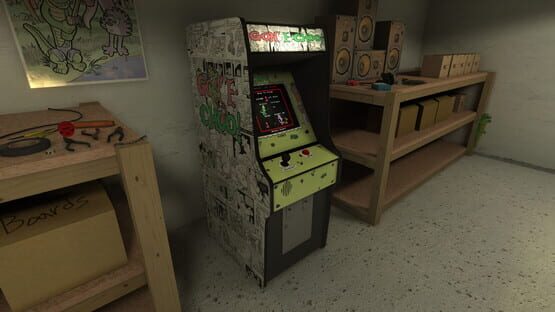
Gator's jump grab now uses the new, framerate-independent method of finding the jump's end point.
Fixes
Windowed mode should work correctly when running in DX11.
Gator can no longer phase through invisible walls while jumping.
Other things to expect this week:
Linux release? I haven't worked with Linux in forever and I don't even have it installed, but let's do this thing.
Known Issues
Switching to some fullscreen resolutions on some computers minimizes the game. I'd suggest playing at native resolution if you want to play full-screen until I can find a fix for this, but there seems to be no way to know which resolutions will cause this. If this happens to you, wait 10 seconds and click back into the window and the game should revert you to your previous resolution.
If you find any issues, be sure to report them on the community discussion boards. Suggestions are also very welcome.
0.3 Oculus Rift DK2 support
Current version 0.2:
Changes
Oculus Rift DK2 Support. The game will automatically enter Oculus Rift mode when an Oculus Rift DK2 is connected and powered on. In my experience, Direct mode works best. You can reset the view from the pause menu. Currently, resolution changing in Oculus Rift mode is not supported.
DirectX 11 support.
Gator and airplane improvements. Both should act fully predictably now.
Changed the pause menu UI to world space for Oculus Rift support.
Fixes
Gator no longer gets stuck on level 2 when you hang out on the first floor all the way to the left. He will now jump down toward you if he can't reach you.
Other things to expect this week:
Linux release? I haven't worked with Linux in forever and I don't even have it installed, but let's do this thing.
Known Issues
Switching to some fullscreen resolutions on some computers minimizes the game. I'd suggest playing at native resolution if you want to play full-screen until I can find a fix for this, but there seems to be no way to know which resolutions will cause this. If this happens to you, wait 10 seconds and click back into the window and the game should revert you to your previous resolution.
If you find any issues, be sure to report them on the community discussion boards. Suggestions are also welcome.
0.2 otter revamp
Good news for those of you who have had their high score runs ruined by unexpected player character behavior: things are much more solid now. I stripped the character script of raycasts wherever I could, and things should always work as expected with the otter now. The gator, not so much. That's coming soon. If the otter behaves strangely at this point, it's probably my fault, so be sure to let me know so I can fix it as soon as possible.
Current version 0.2:
Changes
Minor sprite edits by the artist to fix strangely-sized appendages and missing colors.
Fixes
The player character relies a whole lot less on raycasts now and more on math. Every jump and climb from the same spot should be exactly the same as the last now, so say goodbye to wacky bugs during slowdowns. Similar changes to the gator will be coming next, but for now the player character working as expected is the most important. As always, if you find any bugs, report them in the bug forum, but I tested every jump in the game multiple times with the exact landing point, so things should be good now.
The monitor lights are now forced to immediately update when the arcade game changes screens.
Other things to expect this week:
Linux release?
Oculus Rift DK2 VR support: this was working, but video settings panel broke it. I'm looking into fixing this next week. The final version will use SteamVR and support multiple VR headsets.
Known Issues
Switching to some fullscreen resolutions on some computers minimizes the game. I'd suggest playing at native resolution if you want to play full-screen until I can find a fix for this, but there seems to be no way to know which resolutions will cause this. If this happens to you, wait 10 seconds and click back into the window and the game should revert you to your previous resolution.
The gator can get stuck on stage 2 if you are underneath him on the first floor on the left near the "thru" sign.
If you find any issues, be sure to report them on the community discussion boards. Suggestions are also welcome.
0.13 reverting changes
I've reverted the changes I made to the player character script. This should fix new major bugs, but will bring back some old ones. I'll be working to rewrite a lot of this script to rely less on raycasting and more on pure logic in order to fix these bugs.
Current version 0.13:
Fixes
Reverted changes to the player character script, as the bugs the changes created were worse then the ones that were fixed. Old bugs may still exist, such as unintended jumping, but endless ladders are fixed. I'll be implementing the same changes I made to ladders into the code for running on platforms, since raycasts have proven to be completely unreliable.
Other things to expect next week:
Linux release?
Oculus Rift DK2 VR support: this was working, but video settings panel broke it. I'm looking into fixing this next week. The final version will use SteamVR and support multiple VR headsets.
Known Issues
Sometimes, rather then a jump, you'll gracefully float down to the ground with full control over horizontal movement. This should be fixed with upcoming changes that will remove dependence on raycasts.
Switching to some fullscreen resolutions on some computers minimizes the game. I'd suggest playing at native resolution if you want to play full-screen until I can find a fix for this, but there seems to be no way to know which resolutions will cause this. If this happens to you, wait 10 seconds and click back into the window and the game should revert you to your previous resolution.
The gator can get stuck on stage 2 if you are underneath him on the first floor on the left near the "thru" sign.
I'll be posting more announcements like this with upcoming features and fixes. If you find any issues, be sure to report them on the community discussion boards. Suggestions are also welcome.
version 0.12 (pixels)
Today's update is 100% all about pixels and yet there isn't a single Adam Sandler in sight!
Current version 0.12:
Fixes
Fixed a few issues that caused certain game screen graphics to not display pixel-perfect.
Sharper subpixels
Behind-the-'screens' CRT shader changes.
Changed most of the player character's updates to the main update loop. Please report any unexpected jumping or floating.
Previous version 0.11:
Features
Game-only mode for slower computers and easily-distracted gamers.
Graphic quality slider
Toggle for high-quality monitor light which is currently CPU-intensive. I'll be looking into ways to create the same or a similar effect with more focus on the GPU. Unity doesn't allow color light cookies, so I'm finding a rough estimate of the average screen color in a script every 10 frames, which can still be rough on slower computers. I recommend turning this option off for now on low-end computers and laptops.
Confirm/cancel buttons for the resolution change window. (Currently, yoyo confirms, cancel cancels)
Added a workaround for a unity bug that occurs on OpenGL platforms that renders render textures (such as the one used for the arcade monitor) as completely black in preparation for the OSX and Linux releases.
Added a "view high scores" button to the pause menu. High scores are being posted to the community on the current version, but must be accessed by manually.
Camera lock option.
Somebody forgot to clean the monitor.
Fixes
Otter should no longer get stuck in an animation when winning the level while eating the gator.
Other things to expect next week:
Linux release?
Oculus Rift DK2 VR support: this was working, but video settings panel broke it. I'm looking into fixing this next week. The final version will use SteamVR and support multiple VR headsets.
Known Issues
Switching to some fullscreen resolutions on some computers minimizes the game. I'd suggest playing at native resolution if you want to play full-screen until I can find a fix for this, but there seems to be no way to know which resolutions will cause this. If this happens to you, wait 10 seconds and click back into the window and the game should revert you to your previous resolution.
The gator can get stuck on stage 2 if you are underneath him on the first floor on the left near the "thru" sign.
I'll be posting more announcements like this with upcoming features and fixes. If you find any issues, be sure to report them on the community discussion boards. Suggestions are also welcome.
OSX version released, game-only mode and trading cards!
Good news! 'Gon' E-Choo!' is now out on OSX! Linux and SteamOS are next, but I'll need to actually install them somewhere first. If there are any Linux users out there dying to get their hands on the game, speak up, and I'll hurry it up.
Also, by request, the game now includes a game-only option in the pause menu, which simply plays the game on your monitor with no fancy 3D graphics, simulated CRTs, arcade hardware sounds or room echo. Slower PCs should like this mode a bit better, as well.
The game's Steam trading cards have been approved and are now live, as well. I'll be collecting them myself to see if I can get some of my own profile backgrounds.
Keep those suggestions coming! It's good to know what changes are high-priority so I can work on them first.
0.11 Update patch notes
I pushed out a new version with some new features and fixes.
Current version 0.11:
Features
Game-only mode for slower computers and easily-distracted gamers.
Graphic quality slider
Toggle for high-quality monitor light which is currently CPU-intensive. I'll be looking into ways to create the same or a similar effect with more focus on the GPU. Unity doesn't allow color light cookies, so I'm finding a rough estimate of the average screen color in a script every 10 frames, which can still be rough on slower computers. I recommend turning this option off for now on low-end computers and laptops.
Confirm/cancel buttons for the resolution change window. (Currently, yoyo confirms, cancel cancels)
Added a workaround for a unity bug that occurs on OpenGL platforms that renders render textures (such as the one used for the arcade monitor) as completely black in preparation for the OSX and Linux releases.
Added a "view high scores" button to the pause menu. High scores are being posted to the community on the current version, but must be accessed by manually.
Camera lock option.
Somebody forgot to clean the monitor.
Fixes
Otter should no longer get stuck in an animation when winning the level while eating the gator.
Other things to expect next week:
OSX release, and maybe Linux. I need a Linux or SteamOS installation to test with to be sure it works, first.
Oculus Rift DK2 VR support: this was working, but video settings panel broke it. I'm looking into fixing this next week. The final version will use SteamVR and support multiple VR headsets.
Free look optimizations, including dead zones for super sensitive mice and fixes for the sudden view changes while moving the view during lock-ups and while opening the menu.
EmuL8TR mode, for the modern arcade enthusiast! Play the game in full screen directly on your monitor, no quarters required.
Known Issues
Switching to some fullscreen resolutions on some computers minimizes the game. I'd suggest playing at native resolution if you want to play full-screen until I can find a fix for this, but there seems to be no way to know which resolutions will cause this. If this happens to you, wait 10 seconds and click back into the window and the game should revert you to your previous resolution.
The gator can get stuck on stage 2 if you are underneath him on the first floor on the left near the "thru" sign.
Steam may say you're still playing the game after quitting, which will prevent you from launching the game again after quitting. I'm looking into this, but for now restarting Steam will fix this.
I'll be posting more announcements like this with upcoming features and fixes. If you find any issues, be sure to report them on the community discussion boards. Suggestions are also welcome.
Upcoming changes, fixes, and known issues
Hey guys, just wanted to let everyone know what is being worked on at the moment.
Upcoming changes (next few days):
Graphic quality slider
Toggle for high-quality monitor light which is currently CPU-intensive. I'll be looking into ways to create the same or a similar effect with more focus on the GPU. Unity doesn't allow color light cookies, so I'm finding a rough estimate of the average screen color in a script every 10 frames, which can still be rough on slower computers. I recommend turning this option off for now on low-end computers and laptops.
Confirm/cancel buttons for the resolution change window. (Currently, yoyo confirms, cancel cancels)
Added a workaround for a unity bug that occurs on OpenGL platforms that renders render textures (such as the one used for the arcade monitor) as completely black in preparation for the OSX and Linux releases.
Added a "view high scores" button to the pause menu. High scores are being posted to the community on the current version, but must be accessed by manually.
Other things to expect next week:
OSX release, and maybe Linux. I need a Linux or SteamOS installation to test with to be sure it works, first.
Oculus Rift DK2 VR support: this was working, but video settings panel broke it. I'm looking into fixing this next week. The final version will use SteamVR and support multiple VR headsets.
Free look optimizations, including dead zones for super sensitive mice and fixes for the sudden view changes while moving the view during lock-ups and while opening the menu.
Lockable view
EmuL8TR mode, for the modern arcade enthusiast! Play the game in full screen directly on your monitor, no quarters required.
Known Issues
Switching to some fullscreen resolutions on some computers minimizes the game. I'd suggest playing at native resolution if you want to play full-screen until I can find a fix for this, but there seems to be no way to know which resolutions will cause this. If this happens to you, wait 10 seconds and click back into the window and the game should revert you to your previous resolution.
The gator can get stuck on stage 2 if you are underneath him on the first floor on the left near the "thru" sign.
I'll be posting more announcements like this with upcoming features and fixes. If you find any issues, be sure to report them on the community discussion boards. Suggestions are also welcome.