

Good Company
Good Company - Current State of the Game - v0.7.0 Aftermath
We wanted to share with you some observations which became apparent after the big v0.7.0 update for Good Company. As many of you have reported, there are still several problems with the logistics. But with your help, we have quickly identified many of those issues. Some of the new systems did not work as well as expected, and others might not be adequately communicated enough in the game.
As a first step we'd like to share some more details about that:
1. Reservations in the conveyor system are not passed through reliably, and the automatic storage segments do not recognise them. This can lead to the storage segments congesting the target storage.
The clean-up-behaviour of the logistics employees is intransparent and does a poor job. We have a system that should automatically solve issues with items being stored somewhere they don't belong. In those cases, the clean-up behaviour either transports the items to an existing reservation or an empty slot on the courier pallet.
2. A change will come soon. Logistics employees will only clean up items if the slot is reserved for a different item type. It will also take care of items on the courier pallet if they are placed in a wrong slot. But for now, this means that if a logistics employee fails to solve an issue, they will destroy items as a last resort. This way, we can make sure that your logistics will always work as long as you have enough employees and inventories.
3. Regarding missing information: We will show additional information about current states in the logistics system, like how many slots a courier route has if an item is placed in a slot where it does not belong and other small bits of info that would help to understand what issues pop up in a logistics setup.
4. Regarding communication between work zone logistics and the conveyor system: Currently, the automated logistics won’t know about the conveyor system putting items into storages. Fixing this will require more effort on our part meaning this won't be solved in the upcoming patch. For now, if you want to use logistic connections and conveyor belts in the same work zone, you’ll have to set up logistics connections manually.
We are already working intensely on fixes and solutions for these issues. Unfortunately, we don't have an ETA for a patch yet, but we're confident that you can expect it within a few days. We'd like to take a little more time to thoroughly execute the optimisations so you can enjoy proper changes and improvements. We appreciate your understanding, and we thank you for your patience as well as your fantastic support!
If you'd like to have an early look at the changes, we are aiming to prepare an update on the beta branch today.
All the best,
your Chasing Carrots
Good Company - Update v0.7.0 "Work Smart" is live!
A very rare phenomenon is happening! We've been able to bend space-time and transform Summer into a Christmas-like season for you. Ho-ho-ho, an awesome present awaits... We're stoked to finally treat you with the long-anticipated update "Work Smart" - Good Company v0.7.0!
Actually, many of you already had the chance to experience some of the additional features, polished mechanics, and many bug-fixes during the Beta Test. And with your dedicated feedback, you've helped us shape this exciting update into its final form.
We're super proud and happy to release Good Company's biggest leap so far, which wouldn't be possible without the support of our community! Fetch yourselves a drink, maybe some snacks even - the following patch notes will be quite a long read. We hope you will enjoy the treats we have prepared for you.
All the best,
Your Chasing Carrots
--
Please note: due to the big changes introduced with this update, we strongly recommend players (re)play the first three campaign levels, which tutorializes the new features!
--
[previewyoutube="734T_iQtu-4;full"]
Patch Notes v0.7.0 - “Work Smart”
Work Zones
As an integral part of the updated core system and a foundation for future updates to come, we're introducing Work Zones to Good Company. These are areas players can define in order to better structure and organize their production lines.
- By default, each building starts with a predefined Work Zone
- Player can flexibly create, modify, and delete Work Zones
- There is no minimum or maximum size for the zones
- Player can flexibly create, modify, and delete Work Zones
- Work Zones function independently from each other, and so does their logistic setup
- Basic logistic connections can’t be made across several zones
- Logistic Points have been removed, logistic employees will be directly assigned to zones instead
- A logistic employee assigned to a zone will handle all logistic connections within the zone
- Work Zones have a subtle visual representation in the normal mode
- Zones have a stronger visual representation in the new Work Zone mode
- Work Zones can be named individually, and be marked with one of 36 colors to choose from
- The logistics mode is now part of the Work Zone mode
- Players can choose between automatic and manual logistic connections for Work Zones
- By default the logistics within a zone is set to automatic
- Every Work Zone that uses or provides goods requires a Courier Pallet
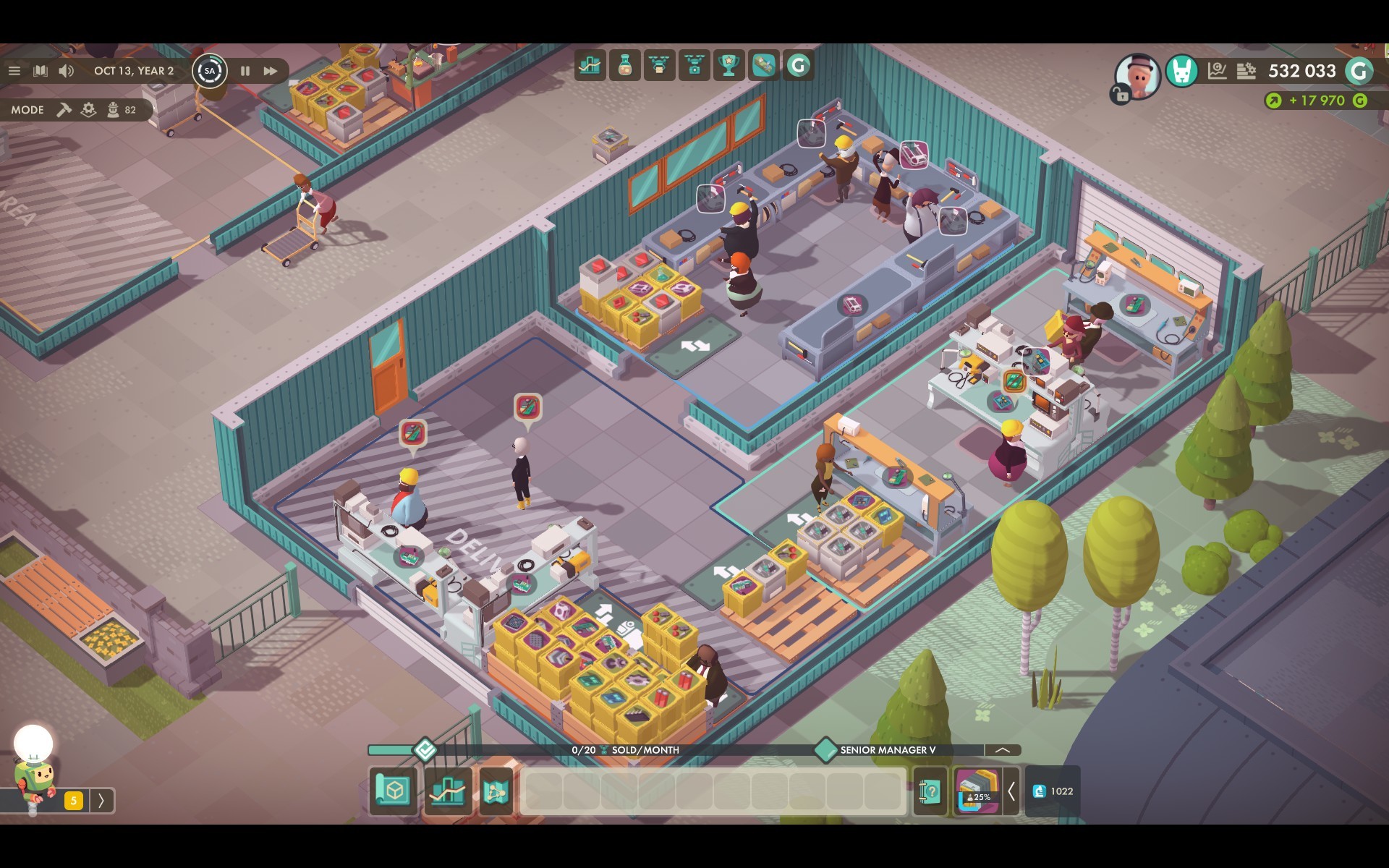
Automatic Logistics
A new feature to ensure an easier approach to setting up a production. By default, the automatic logistic mode is activated. It will try to connect workplaces and inventories within a single Work Zone and set inputs and outputs on Courier Pallets.
- Automatic connections are active by default
- Automatic connections can be deactivated in Work Zone mode -> Logistics
- Whenever players make changes to a workplace, its connections get updated
- The system will always use Courier Pallets as start and end point for a production line
- If additional inventories are placed within a zone, automatic logistics will try to consider those as intermediate storages for the production
- Don’t forget to hire logistic employees on a Work Zone when placing shelves!
- If a Courier Pallet is placed in a Work Zone's Delivery Area, buy and sell orders will set accordingly
- Buy orders for base materials will be made automatically, if possible
- Sell orders for products will be made automatically, if possible
- Buy orders for base materials will be made automatically, if possible
- Logistic employees will now attempt to clean up inventories
- If a shelf contains items which are not required there, employees will try to restock them where needed within the Work Zone
- If there's no need for these items, employees will place them in the Courier Pallet and create an outgoing request for couriers
- If a shelf contains items which are not required there, employees will try to restock them where needed within the Work Zone
Courier Pallets
The Buy- and Sell-Zones have been removed from the game. Instead we're introducing Courier Pallets. They serve as multi-purpose objects to enable transportation between Work Zones, as well as setting buy and sell orders (as long they are placed within a Delivery Area).
- Courier Pallets can be purchased through the construction menu in the Storage category
- Players can place as many pallets as they want
- A Courier Pallet has 18 inventory slots
- Courier Pallet placed in a Delivery Area can be used to buy and sell items
- Delivery Areas are marked by a white striped area on the ground
- They are usually located at garage doors near the public street
- Delivery Areas are marked by a white striped area on the ground
- Courier Pallets can be served by logistics or by the Courier System
- Courier Pallets make use of a threshold system where limits are set for selling or transporting
- 80% threshold on input means the courier will fill up to 80% of the reserved space
- 80% threshold on output means the courier is allowed to take 80% away, but the last 20% are reserved for the Work Zone itself and must not be transferred
- 80% threshold on sell orders means that everything above 80% can be sold
- 80% threshold on input means the courier will fill up to 80% of the reserved space
- Buying works with absolute numbers of stacks up until which the pallet will buy missing materials to restock those stacks
- The company will only pay for the difference of restocked materials
- The pallet will add default settings for the Courier System based on the setup in the Work Zone
- If an item is being consumed in a zone but not produced -> 100% input
- If an item is being produced but not used in a zone -> 100% output
- If an item is being produced and also consumed in a zone -> 50% output
- If an item is set to buy -> it’s considered as if it were produced in the zone
- If an item is set to sell -> it’s considered as if were consumed in the zone
- If an item is being consumed in a zone but not produced -> 100% input
- Players can manually change thresholds by activating an advanced mode. It's even possible to combine input and output settings.

Courier System
Couriers are employees with special equipment to transport large quantities of items between two or more Courier Pallets. This system works mostly automated and independent from what happens within a zone – it will simply focus on the states of Courier Pallets.
- The courier menu button can be found at the bottom bar of the HUD, left of the player inventory
- It can also be accessed via the hotkey N
- It is possible to add, edit or remove courier routes through this system
- After a Courier Route is created, players can add waypoints by selecting the pallets on the map
- A route needs at least 2 waypoints to work
- A pallet can’t be added twice
- The order of pallets can be changed afterwards
- A route needs at least 2 waypoints to work
- Courier Pallets have an input and output. If a route has an input and an output for a specific item, it will be added to the route for transportation
- Players can modify input/output settings for pallets to a certain degree
- Otherwise input and output depends on the internal logistic setting of the Work Zone
- Players can modify input/output settings for pallets to a certain degree
- A courier can transport up to four different items
- If there are more than four items to be transported, additional couriers can be hired
- A route will display a warning in its overview, if necessary
- If there are more than four items to be transported, additional couriers can be hired

Market Updates
We are constantly iterating the market system of Good Company in order to improve it. While major updates related to markets, marketing, etc. will be introduced in the future, we now want to introduce some short term approaches to improve market balancing.
- Market phases now need to be advanced manually (Freeplay only)
- In order to advance a market phase, players need to accumulate a certain amount of sales for a product
- If the required sales amount is reached, players can click a button to advance the market phase
- Through manual market phase progress, the former phase duration got removed
- In order to advance a market phase, players need to accumulate a certain amount of sales for a product
- Market phase changes were rebalanced (Freeplay only)
- A new market phase now is more challenging, expecting more additional features
- Demands will increase with each market phase instead of being stable
- The potential profit margin will increase over phases instead of dropping
- A new market phase now is more challenging, expecting more additional features
- Product prices now depend on the expected feature values
- Each product has a base price for each phase, while in Freeplay the product price modifier will affect only the base price
- The base price will be increased for each feature point (0.1) added during the product design
- This price bonus depends on the added features. Usually, it's 10G per 0.1 feature point
- The price bonus can exceed the limit for the market appeal - the bar will then fill from right to left in a different color.
- Each product has a base price for each phase, while in Freeplay the product price modifier will affect only the base price
- Several products in the campaign have been updated to match the new general balancing
Balancing Update
We're putting a continuous effort into balancing Good Company. With the 0.7.0 update, we decided to implement quite drastic changes, which affect the recipes/crafting of all modules. Instead of listing single changes, we want to share with you a general balancing breakdown.
- The duration of a day was changed from 15s to 20s
- Base crafting time has been increased from 10s to 20s
- On one hand, we want to make crafting times easier to calculate, but this also mitigates the huge effect walking times of crafting employees had on production costs
- Tier 2 crafting times have been increased from 4s to 12s
- Machine-based crafting time is now 40s or 5 batches (8s each)
- On one hand, we want to make crafting times easier to calculate, but this also mitigates the huge effect walking times of crafting employees had on production costs
- Pick-up time got changed from 1s per inventory to 2s per inventory
- Many module recipes have been simplified, especially for the later game
- The amount of consumed and produced components have been reduced
- All modules should now yield a profit, even if the production efficiency is not maxed out
- Several properties of modules are now distributed more evenly throughout the tiers
- Features points per field
- Drawbacks per features
- Production cost per feature
- Sampling time per data point
- Features points per field
- Cases now always have the same amount of slots,no matter what product they are used with
- Small cases can’t be used anymore for the first bots
- Tier and cost for the first small chassis have been reduced
- Stack sizes have been unified
- 20 for all modules
- 50 and 100 for base materials and components
- 20 for all modules
- The amount of items that can be sold per component/module is now set to 2 stacks per week
Levels & Campaigns
Due to the extensive changes introduced for Work Zones, balancing and automatic connections we had to change some levels and challenges. However, most of the content is still the same, with slight balancing adjustments.
- Level 1 - 3 have been completely reworked
- The new logistics and Work Zone mechanics are explained in levels 1 and 2
- We recommend everyone play those two levels, even experienced players
- Level 3 is now an in-depth research and market tutorial
- Level 4 to 8 got minor adjustments to fit the new balancing
- The challenges "Module Mania" and "Chassis Parade" now have completely new ‘modules’ as the old recipes were changed
- All campaign levels got a new ‘season’ for their highscore
- If you switch to game version 0.6, you can still play the old challenges with old highscores

New Conveyor Parts
We are aware that handling conveyor belts is not as optimal as possible yet, and in future updates we want to address several issues related to belts. What we found most important though, was adding new segments to the system which aim to improve the gameplay of conveyors in general.
- Overhead Transporter
- A segment with the fixed length of 3, 4 or 6 tiles, of which 2 (start and end) are on ground level
- Players, other belts and equipment can be placed underneath the overhead part
- This makes it possible for belts to cross
- A segment with the fixed length of 3, 4 or 6 tiles, of which 2 (start and end) are on ground level
- Automatic Storage System
- This element takes items from a belt, machine, etc. and places them in an inventory (shelf)
- No employees are required to operate it
- The setup for this element is pretty much automatic
- This element takes items from a belt, machine, etc. and places them in an inventory (shelf)
- Automatic Retrieval System
- This element takes items from an inventory (shelf)
- Players are able to define ratios to make sure that items arrive in the expected order at the end of a conveyor belt or machine
- The system offers additional configurations to wait for a specific stock amount before starting to work, or the ability to skip items in a specific order sequence
- This element takes items from an inventory (shelf)
- Freeplay maps now include Conveyor Hatches
- Hatches are vents in a building wall
- It is not possible to change position of hatches
- Conveyor belt lines can be built through hatches instead of doors and gates
- Hatches are vents in a building wall
New Map & Products
To enhance Summer feelings, we're happy to extend Good Company with a new Freeplay map set on sandy shores, as well as a new product.
- When starting a new game, players can now select a map to play on
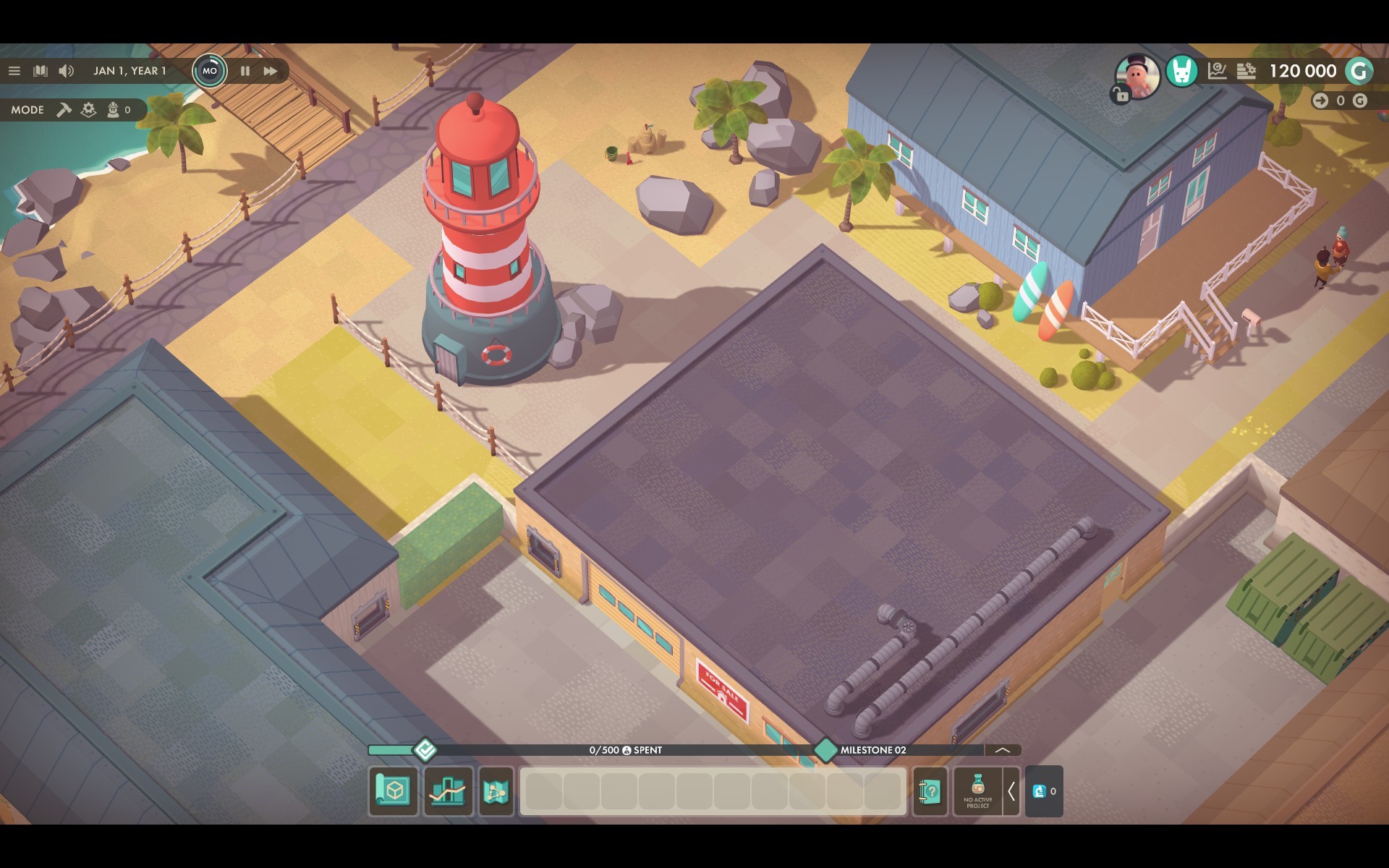
- A second Freeplay map called ‘Silicon Summer’ was added
- This is a bigger map with larger buildings and features a beach theme
- Freeplay now starts with two products instead of one
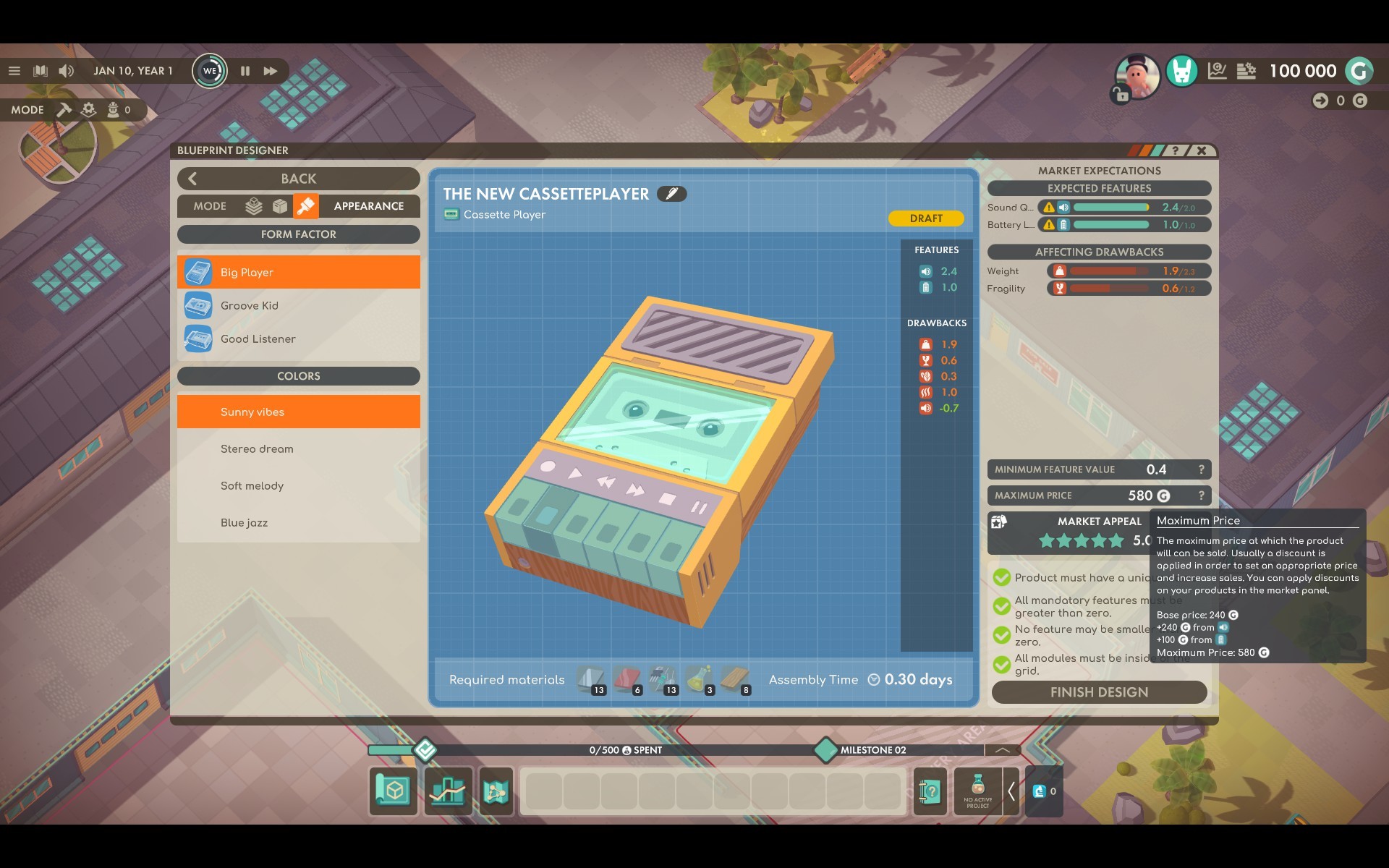
- With the new Cassette Player, we are introducing a new product type which is between the Calculator and the Small Game Devices
- The Cassette Player requires fewer features
- The average expected feature amount for each feature is higher than for other products on a similar level
- The Cassette Player also replaces the Calculator as the product in level 2
- The Cassette Player requires fewer features
New Machines
Also, we are introducing two new machines to Good Company. This addition is another move of shifting production setups towards mechanically automated systems.
- Small Case Machine
- Unlocked through milestone 5 during the Freeplay
- Produces any type of small cases in a batch of 5 within 40 seconds
- Does not require employees to operate
- Can be connected to conveyor belts
- Unlocked through milestone 5 during the Freeplay
- Metal Processing Machine
- Unlocked through milestone 5 during the Freeplay
- Can produce any metal component in a batch of 5 within 40 seconds
- Does not require employees to operate
- Can be connected to conveyor belts
- Unlocked through milestone 5 during the Freeplay

Design Desk removed
For an easier handling of the product design process, we have removed the Design Desk.
- The Blueprint Designer can be accessed at any time using the button at the bottom of the screen, on the left of the player inventory
- Players can also use the hotkey B to open the design view
Good Company - Beta Test for Update v0.7.0
As many of you might already know and anticipate, we have something big coming your way. So big, we are tempted to use a conveyor belt to deliver it! ;) During the coming weeks, we'll be testing the Good Company update v0.7.0, codename "Work Smart", on our public test branch. This update will be our biggest one to date!
Since you, our lovely community, have continuously amazed us with valuable feedback and bug reports, we're happy to give you the opportunity to test new content and improvements ahead of setting it live in the main game.
The public test branch will be set live on Friday, June 12th and everyone who owns Good Company is welcome to join! In order to do so, just switch your game version to "_latest_beta" on Steam/GOG. For details about this and more important things to consider for v0.7.0, as well as for future updates, please check out this link:
https://steamcommunity.com/app/911430/discussions/0/2440335959622074572/
Wait, we see a big question mark hovering over your heads... Riiight! What kind of new features and improvements can you look forward to? Let's give you a brief overview!
In v0.7.0, "Work Smart", the following core game changes will be introduced:
- A Work Zone System to set up and organize workplaces for production.
- Work Zones will set up automatic logistics connections by default.
- A Courier System which handles transportation between Work Zones.
- A new, all-in-one pallet that can be used for buying, selling, as well as a storage or contact point for the Courier System.
- A dedicated delivery area where players can place pallets, instead of the previously used fixed Buy/Sell Zones.
- Updated game balancing – more specifically, recipes will be reworked in order to take the new game flow into account.
- The market will change, phases in Freeplay will be triggered manually.
- Product values will change according to the added features.
Also, we plan to introduce more awesome stuff, like:
- Conveyor improvements, like an overhead segment, shelf connectors, and fixed wall hatches for conveyor belts.
- Two new machines: the Metal Processing Machine and the Case Welding Machine.
- Overhauled tutorial levels starting off the campaign.
- Market improvements, introducing a button to manually advance market phases and the possibility to create premium products for high price ranges.
- An additional Freeplay map set on a sunny beach.
- A new starter product for the Freeplay mode: the Cassette Player.
Your impressions and input after the public test might have an impact on how we are going to implement some of the features listed above in the final update version v0.7.0. We will provide you with a more detailed overview as soon as we have evaluated your feedback.
We hope you’ll have a great time playing Good Company's preview version of v0.7.0, "Work Smart"! As always, please use your preferred channel to share your feedback with us and the community: Discord, Reddit, or the Good Company forums on Steam.
All the best & stay safe!
Your Chasing Carrots
Good Company - Hotfix 0.6.5b
Last week’s update introduced some bugs that blocked certain game functions and challenges.
Those issues will be fixed with this update, 0.6.5b. As a bonus, we’ve also implemented displaying freeplay modifier settings for new save games in the freeplay save game selection menu!
Thank you for your feedback and for bringing these issues to our attention.
If you find any more problems or if you have more feedback, then visit the Steam forums, our official Discord Server, or the official Good Company Reddit!
Your Chasing Carrots
Patch Notes v0.6.5b
- It is now possible to see the modifiers for all Freeplay save games.
- Fixed an issue where it was not possible to load a Freeplay game without returning to the main menu first.
- The interface for loading and saving games should now be more intuitive to use.
- Fixed an issue with the Welfare Survival challenge that generated employees costing 50 000 G or more.
Update v0.6.5
Dear Tinkerers and Tycoons,
Several weeks have passed since Good Company's Early Access launch and we've tried our best to address as much of your feedback as possible by regularly patching the game and releasing updates, which we'll continue to do in the future. But, for now, we are eager to move on with new and exciting features for Good Company! That said, this 0.6.5 update will be the last smaller patch before the release of the upcoming larger 0.7.0 feature update.
We invite you to accompany us on the road to version 0.7.0, which will address a lot of important game design issues in the logistics system, among other things. We're excited to share more details on this bigger update during the coming weeks. Until then, we hope you enjoy the new customization options for the Freeplay mode!
Thank you for your support!
Your Chasing Carrots
Patch Notes v0.6.5
Freeplay Modifier
- When starting a new Freeplay game you are now able to adjust modifiers that change the balancing and the behaviour of the Freeplay Mode.
- There are 5 difficulty presets that will set the modifiers to certain defaults:
- [Sandbox] disables achievements, no game over, all buildings unlocked
- [Easy] default setting, it’s easier than the current Freeplay
- [Medium] slightly more difficult than the current Freeplay
- [Hard] harsher balancing, but still quite doable
- [Challenge] hardest setting we would recommend
- Each option can also be changed manually. The game difficulty preset will then switch to ‘Custom’.
- The available options are:
- Starting Funds (Huge - Low)
- Equipment Costs (x0 - x2)
- Employee Hiring Costs (x0 - x2)
- Employee Wages (x0 - x1.5)
- Unlock All Buildings (yes/no)
- Bankruptcy Delay (disabled bankruptcy, 90 days, 30 days, instant)
- Phase Duration (x2 - x0.25)
- Product Prices (x1.5 - x0.8)
- Product Demand (x10 - x0.4)
- Randomness addition per Phase (1% - Max)
- Maximum Randomness (0% - 80%)
- Unlimited Phases (for Randomness)
[note] Old save games will automatically be considered to be in normal difficulty.
Additional Freeplay settings may be added in future updates.
[known issue] New save games won’t display their modifiers in the loading dialogue
Production Statistic Filters
- The production overview can now be filtered by base material, components, modules and products.
- You can search the statistics by item type name.
- There are filter buttons on production / consumption that will set a filter to the opposite side:
- clicking the filter button on an item on the production side will display only materials directly required for said item on the consumption side.
- clicking the filter button on an item on the consumption side will display only items on the production side that can be produced using said item.
- Produced and consumed numbers won’t exceed the theoretical maximum anymore. This happened due to rounding errors, since the average maxima are not even numbers.
Additional Settings
- Automatic pause when tabbing out of the game window
- Possibility to disable the advisor
- Added a tooltip delay setting
- The default of the camera behaviour can now be set (locked to player vs. free camera)
Bug Fixes
- Analysis desks should not display misleading icons anymore.
Good Company - Update v0.6.4
It's time for yet another shiny update for Good Company! One important request we were receiving from our community: Stats! You want to take a peek under the hood of your mighty production machinery in order to find out how you can tweak things to the max? There you go! With today's update, we bring you our first version of Workplace, as well as Company-wide statistics - amongst the usual mix of balancing improvements and bug fixes. Curious? Please read on...
All the best and be safe!
Your Chasing Carrots.
Community translation in German
v0.6.4
Workplace Statistics
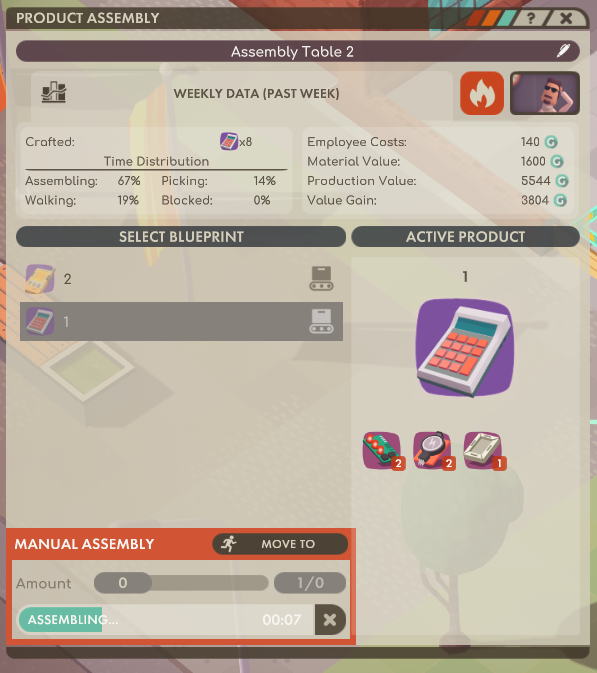
- Crafter and assembly tables now have a button that opens a weekly statistics overview.
- The stats displayed there cover the past week:
- Produced units: displays how many modules/products have been crafted
- Time distribution: shows the relative amount of time spent by the assigned employee
- Values: gives an overview of the money spent and the value gained for that workplace
- Produced units: displays how many modules/products have been crafted
Company-wide Production Statistics
- There is now an overview for all produced and consumed items throughout your company.
- The panel can be opened with [P] or via the production overview button in the top right corner of the screen.
- The left side of the statistics display shows the amount you have produced during the past week.
- This gives you an outlook on how much you could optimize your existing workplaces' output, for instance, by optimizing walk distances.
- The right side displays the amount of consumed materials (excluding sold and analyzed modules).
- The maximum here shows the consumption of materials if every table's production capacity was maxed out.

Balancing
- Data Point yields from analyzed modules have been rebalanced. The average amount of Data Points has been increased. Modules which are more difficult to produce will get a boost on Data Points you can generate from them.
- Analysis times have been rebalanced. You now generate Data Points faster by analyzing higher tier modules. Modules of the same tier that yield more data points may take longer to be analyzed, but the Data Point output per day is the same.
Logistics Bugfixes
- Sometimes logistic employees would get stuck and stop their tasks because they couldn’t find a path. They continued being stuck even if the path to their destination was no longer blocked.
- There was an issue with the way logistics employees handled priorities. This should be fixed now.
- Fixed an issue where the robo advisor would tell the player that an employee has long walking times while the issue was that an inventory was full.
General Bugfixes
- Fixed an issue where decoration rewards for challenges would not get unlocked.
- Completing any challenge will reward all missing decorations.
- The reward list can be found here on our Official Good Company Wiki
- Completing any challenge will reward all missing decorations.
- It is now possible to unlock more products in the Welfare Survival challenge.
- Unlocking happens through earning Discovery Points like in Freeplay mode.
- We've approached fixing an issue where players can't progress in milestones, or markets did not progress. We hope we have this fixed but we can’t tell for sure yet, as the bug is hard to reproduce. Please let us know if this issue persists.
Good Company - Official Wiki
The past few weeks have really shone a light on just how supportive and friendly the Good Company community is. Thank you to everyone for being a part of this, especially those who have been sharing guidance on the game, like redditor x1fr, the creator of GOOD CALCULATOR!
Inspired by these collaborative efforts, we have decided to lay the foundation for an ambitious community-driven project. Today, it's our pleasure to inform you that we have started setting up the Official Good Company Wiki, which you can already access.
We have established a basic structure for information and data about the most central aspects of Good Company, and we are already looking forward to maintaining and expanding the wiki together with you, in the months and years to come.
To make it easier for contributors, we will be providing support for adding, editing, and formatting content, including imported game data and localization options. Also, we aim to add more tools for content management over time.
If you want to volunteer as an editor for the project, please join us on our Discord Server. After that, you can login on the wiki with your Discord account and let us know in our dedicated #📖wiki channel.
Please also inform us about which language(s) you want to be an editor for. The wiki supports the official Good Company languages, but for the time being, it only contains English pages. We hope that, over time, an active international community will make the wiki available in all languages!
We're really excited to take on this endeavor together with you! If you have any questions or feedback about this, or anything else regarding Good Company, be sure to pick your channel on our central hub, or leave a comment here.
All the best & stay safe!
Your Chasing Carrots
Good Company - Update v0.6.3
Our next update is available! As always, we aim to react quickly to community feedback for constant improvement of your favorite Corporate Machinery Simulator. Today, we are happy to introduce a broad mix of improvements, including new features, refined balancing, and many bug fixes. We hope you like these changes and we are looking forward to your feedback.
Enjoy & stay safe,
your Chasing Carrots
v0.6.3
Upgradable Tables
- Players can now upgrade crafting tables directly from the respective table panel.
- To upgrade a table, a module needs to be selected.
- Based on the selected module, the table will be upgraded to the next, faster table.
- The upgrade will cost the difference between the original table and the new one.
- Upgrading a table will cancel the crafter's current progress and restart it.
- Previously set logistics connections will remain active on the upgraded table.
- Upgrading tables will not be possible if the construction menu is not available.
Quick Hire
- All workstations now have a quick hire button.
- A random employee will be hired and assigned to the selected table.
- Every table also has a quick fire button.
- This option will be unlocked once employee hiring is available.
Advisor System
- From time to time the advisor, Lumo, will pop-up on Monday mornings.
- The advisor informs you if there are potential basic problems in your company.
- We will be considering expanding this feature with more tips in the future.
- If possible, the advisor will show you an example of the detected problem.
- There are 6 tips that can currently be triggered:
- Not all Products are getting sold from the Outgoing Zone.
- Production Employees are inefficient and have to walk too much.
- Production Employees are missing Module/Component XYZ.
- Not enough of Base Material XYZ being ordered in Incoming Zone.
- Logistics connection isn’t served, because it is not in range of a Logistics Point.
- Hint: Sell over-produced Modules/Components XYZ.
- Not all Products are getting sold from the Outgoing Zone.
Other
- While placing new equipment, the respective holograms now have an improved preview for where the object can be placed.
- All production and research times are now displayed as in-game days.
- Mouse confinement setting is now ‘off’ by default.
- Info browser now has tooltips for materials & modules.
Balancing
- Inventory transfer times are now 1s (0.066 days), no matter how many materials are being transferred.
- Previously it was 1s per different material/module/product.
- Metal Cases sampling time has been fixed. The base sampling time was too low:
- 0.46s -> 1.46s (9.2s -> 29.2s on the first Analysis Table)
- Level 3 got re-balanced to provide a more steady income:
- Calculator markets provide more income now.
- Market requirements for Calculators and Pocket Computers were reduced.
- Calculator markets provide more income now.
- Markets for the ‘Welfare Survival’ challenge have been updated:
- Removed markets beyond cleaning/transport bots.
- All markets progress slightly slower.
- All market requirements increase less drastically.
- All markets have an increased profit amount.
- Removed markets beyond cleaning/transport bots.
General Fixes
- Calculation of camera bounds has been fixed. Previously, some unintentional camera behaviour could occur at the edges of some maps.
- Sometimes the mouse containment setting used wrong data to apply the containment. Now it should always fit the actual game window.
- Challenge completion achievement did not trigger properly (4/7 challenges done)
- The next challenge you complete should reward all missing achievements.
- Fixed an issue where the game crashed when returning to the main menu.
- When sales for specific products were above 65 535 G the amount looped to 0 G.
- Sales for a single product can now be ~16 000 000 G.
- Fixed an issue where the game would crash when switching modules on a crafting station.
- Fixed a UI-scaling issue with highscore tables making some buttons inaccessible.
- Blueprint Designer button is now gated properly depending on whether the Drafting Table is available.
- Hitbox issues, mainly with the chemistry table, have been fixed. The hitboxes should now behave more consistently
Level & Challenge Fixes
- Level 3, Milestone 8: the Metal Case (Tier 3) was counted as a viable module to complete the current task (reaching a production of 14 Tier 4 modules every week)
- Level 4, Milestone 7: the goal unit [produced/week] was wrong. It has been changed to display the correct unit [produced].
- Level 6, Milestone 1: progress counted 'total production', which was wrong. This has been corrected to 'weekly production'.
- Level 6, Milestone 5: progress counted 'Courier Bots' while it should have been only counting 'Delivery Drones'. This is also fixed now.
Text Fixes
- Welding Table now has a proper description, the localization string was broken.
- [FR] Level 6, Milestone 4 the ‘[goalTarget]’ replacement was broken.
Good Company - Outlook to v0.7.0
About two weeks ago, we launched Good Company into Early Access and, while the game still has a few kinks we need to work out, we're super happy about the positive reception. Thank you so much for supporting us! Today, we would like to give you an outlook about the next steps towards version 0.7.0.
Currently, we are actively addressing the most obvious issues that have been pointed out by our community and we have already picked out a few features that can be improved within the upcoming weeks.
Before v0.7.0
Let's give you more details about the features we're going to implement over the next few updates.
Easy Table Upgrades
Crafter tables, such as the Tinker Table, will have an easy upgrade mechanism if a module has been selected, reducing the amount of connections one needs to make when changing production tables.
Advisor System
A first version of an in-game advising system, which analyzes how you play and informs you if there are obvious weak points in your setup so you can improve your efficiency.
Workplace Statistics
We intend to add an initial basic version of workplace statistics for crafters, assembly tables, and possibly logistic workplaces, which will give you an overview on the performance of a specific workplace during the past seven workdays.
Freeplay Modifiers
Many of you have asked for it! You will be able to customize your freeplay experience depending on your playstyle. We will start out with just a few options in the first version and implement more over time.
Sandbox Light
This mode will be included in the Freeplay Modifiers. To enable sandbox play, there will be at least an option to disable the fail conditions that could lead to a Game Over.
Company-wide Production Statistics
An overview of all the produced goods in the company. The basic version will display the produced items per week. However, we would like to expand upon this and will do so if we make good progress through development.
More Conveyor Belt Options
While we won't be able to completely redesign how conveyor belt building and handling works, we intend to add several new segments for improved usability:
- Overhead Segments: 3-6 tile long segments that transport goods on a higher level, so that the player character and employees can move through below.
- Inventory Sorter: an end piece for a conveyor belt that stores transported items directly in a shelf, without requiring employees to do this.
- Ratio Placer: this segment can be connected to a shelf. It takes items from its inventory and places them directly on a conveyor belt in the required ratio. With this, you can avoid your conveyor belts getting unnecessarily blocked by materials.
Additional Balancing
We are constantly testing and balancing the game, and the community feedback really helps to identify specific issues. The next steps on our re-balancing list are:
- Campaign Level 3
- Challenge: Welfare Survival
- Overall Research & Sampling
Bug Fixes & Crashes
Our new reporting system Bugsplat works very well and helps us identify and fix crash issues. We are also working on regular bug fixes, but this process takes time. We need to organize our capacities so we can keep on fixing problems and adding new features.
With every update you should see bugs being fixed, but please understand that some specific issues may take a while.
And what about v0.7.0?
Our community reflected that the biggest concern about Good Company is the logistics. Already being an important point on our Roadmap, Work Zones will address that by improving a lot of logistic issues that are currently present.
We will update you about the development progress over the coming weeks but, as Work Zones are a bigger change, this feature can't be implemented in the short term. It may take two months, more or less, because the process is very iterative and requires a lot of testing, especially if we want to consider all your feedback.
The core ideas of Work Zones are as following:
- Reduce the need to interact with the logistics, without restricting the current possibilities
- Faster initial setups and changes on products lines
- Better segmenting of production lines into smaller bits
- Improved overview over what actually happens (statistics and such)
- More control over the most important material flows
- Flexibility for future updates and content
So, that's some nice stuff we're aiming for, right? Without you, our community, it would have been a lot harder to properly identify the most pressing issues, so thank you so much for your awesome input throughout all aspects of Good Company! We can't wait to improve and build on the game even further! We have so much more to share and it's awesome that we get to experience this journey with you through conversation and your exciting let's plays. Please keep this up, that's what makes the Good Company community so special!
If you haven't already, come, join the merry band of tinkerers and tycoons on our Discord server, on Reddit, or follow us on Twitter and Facebook.
So, once more, because it can't be stretched enough: You rock! ♥
All the best & stay safe,
Your Chasing Carrots
Good Company - Update v0.6.2
We have great news for our great community!
We're presenting to you the next Good Company update, just in time for an Easter holiday gaming binge! Following your valued feedback, we have introduced a couple of improvements and fixes and hope you like what you see!
Happy Easter,
Your Chasing Carrots
v0.6.2 Changelog:
Camera Controls
- There are now two control modes!
- Character Centric (Locked Camera)
- Will be the default mode.
- You can now move the camera by dragging with the right mouse button or via edge panning.
- The camera will snap back to your character as soon you move.
- Will be the default mode.
- Free Mode
- Can be toggled with [TAB] or by clicking on the lock symbol on the portrait icon.
- You can move the camera with [WASD] or mouse controls as in the Character Centric mode.
- The camera will not snap back to your camera as soon as you move.
- You can click on the player portrait to center the camera on your character, or you can use the [HOME] key for that.
- Can be toggled with [TAB] or by clicking on the lock symbol on the portrait icon.
World Interaction
- Buy orders on the Incoming Zone can be done from any position.
- Blueprint Designer can be used from any position.
- It is now possible to change recipes on tables no matter how far away your character is.
- For manual crafting you still need to move to the designated location.
- This can be done automatically via the crafter panel.
- If you open an equipment panel, it will close any that were already open.
Additional Settings
- Camera Speed can be adjusted in the User Interface section.
- Edge Pan Border can be adjusted in the User Interface section.
- Will determine how many pixels away from the border activated the border panning.
- Confine Mouse to Window.
- If enabled, the mouse will not go over the window edge.
Bug Fixes:
- Freeplay progression through milestones now has an additional check to make sure that progression is properly set. This also applies to older freeplay savegames.
- Campaign levels will now check on load if decoration and trophy rewards are properly set and reward you if there was an issue saving this data on your profile.
- Missing Japanese characters were added to the character set: 々鷹 % = &
- Moving an assembly table no longer removes the worker that was assigned to it
- Fixed a crash caused by attempting to move assembly tables with active workers on them.
- Fixed the net worth calculation of equipment
Patched earlier this week:
Hotkeys:
- Most commonly used functions and interfaces are accessible via hotkeys now:
- Construction: 1 (alphanumerical)
- Logistics Mode: 2 (alphanumerical)
- Employees: 3 (alphanumerical)
- Market Panel: M
- Research Tree: T
- Fast Forward: F
- Blueprint Designer: B
- Pause / Unpause: Space
- Construction: 1 (alphanumerical)