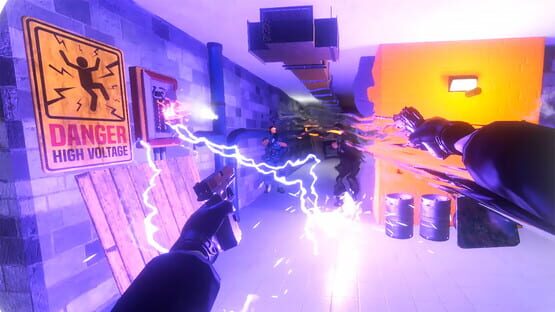
New Year Update, Gun Throwing and Other Improvements
New Year Update!
This year was filled with great Hard Bullet improvements, and our team worked tirelessly to bring them to you. See you next year with lots more to share!
Snowballs
This holiday season, we've scattered snowball piles throughout the Hard Bullet arenas and sandbox levels.
Pick up a snowball and throw it at an enemy for a fun way to knock them off their feet!
Snowball Guns
Sure, you can transform any gun into a Snowball Gun using the Ammo Generator, but we've gone a step further and created two pre-made holiday weapons for you: the Snow Ingram and Snow Sawed-Off.
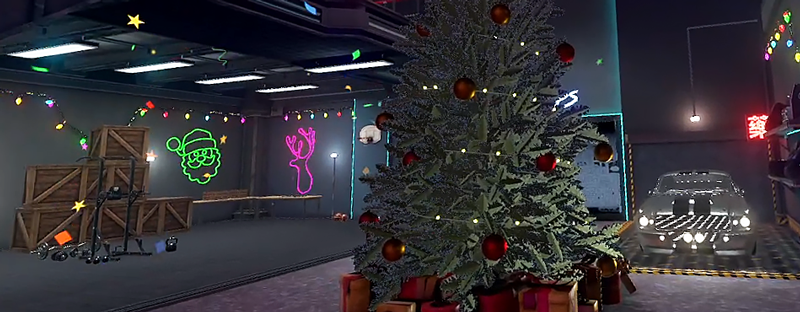
Look for both festive firearms under the spruce tree in any Sandbox level. Have fun!
Gun Throwing
We've enhanced the impact of throwing firearms. Now, you can effectively use your gun to knock enemies off their feet and buy yourself some time — whether it's using the butt of your rifle or simply throwing it at an enemy. Ragdolls will roll!
Spear Throwing Improved
Tweaked the force required for a spear to penetrate a human torso and head, ensuring a truly powerful and satisfying experience.
Bugfixes and Improvements
Physical Objects: Fixed a problem where large objects would bounce while being held.
Ammo Generator: Simplified the process of placing and picking up objects.
Ammo Generator: Corrected the scale units and default values.
Melee Throws, Jump, Sprint, Arena Destructions, Gun Sounds and more!
New Player Controls
We've completed extensive behind-the-scenes work and successfully upgraded to Unity 2022. This upgrade opens up many new possibilities, and we're excited to introduce several of them to you today!
Throwing Redesigned
Because of physics nature of Hard Bullet, throwing things was always a tricky part. Today we present new throwing mechanics with optional auto-aim. Variuos weapons now can be thrown differently.
Knives
Grab the handle for a straight throw, or grab the blade for a spin throw.
Axes and Swords
Thrown axes will spin during their flight towards the target.
Spears and long sticks
Should be thrown over the shoulder, like in real life. The throw's distance depends on how hard you throw.
Firearms and Props
Will try to simulate real world physics.
Jump Updated
We're excited to unveil a new, reimagined jump ability, combining the best features from various versions of Hard Bullet over the years.
Jump on Button Release: This key update changes how jumping works - now, the jump activates only after releasing the Jump button. The duration of the button press determines the jump's height.
Slowmotion Jump: For a more powerful leap, hold the jump button longer. This type of jump deactivates slow motion mid-air, adding a cinematic feel, especially useful in long corridor shootouts. You have the option to disable Slowmotion Jump in the Settings if you prefer.
Control Schemes for Jump Ability: Lastly, we've introduced a choice between two control schemes for the Jump Ability. You can stick with the 'Stick Up' or switch to using the 'A' (or Touchpad) Button, depending on your preference and controller.
New Stick dead zones
Updated stick dead zones so jump and crouch will be much more responsive and there should be less situations when you accidentially turn while jumping.
Sprint Added
You now have the ability to move at varying speeds, allowing you to better adapt to different environments and situations. The stick movement is fully analog, so you can move slowly through challenging areas or sprint towards your goal in open arenas.
By default, clicking the left stick initiates running, but you can customize this in the Sprint Options at any time:
Click Left Stick: Sprint, then return to walking when you stop.
Hold Left Stick: Hold the stick down in one direction to start running. Walking eventually will become sprint.
Always Run: Stay in sprint mode continuously.
Always Walk: Disables the Sprint feature entirely.
New Hand Positions and Better Grab
We've redesigned hand offsets for all controllers to more accurately reflect the grip position of virtual firearms and their real-world counterparts.
These changes will take effect immediately after the update, and will reset any previous offset adjustments. You can readjust the offsets in the Control Settings to better suit your playstyle if the new defaults aren't quite right for you.
Additionally, we've improved the grabbing mechanism for distant objects, making it much easier to reach and grab items that are far away.
Other Controls Improvements:
Improved how your arms interact with thin walls, columns, and other static level elements. This enhancement should significantly reduce glitching and teleport your hand (with weapon) closer to your body when needed.
Empty front holsters will no longer prevent your hands from grabbing distant objects.
An option to completely disable the player's body model. You'll see only small transparent spheres representing your palms.
Index: modified the touchpad functionality — it now activates on click rather than just hover.
Added Options to Turn Off Leg Kicks, Crouching and Strafe movement.
Arena Narratives and Destructions
A key aspect of Hard Bullet has always been not only its intense gore but also the array of deadly mechanical objects in the arenas that can be used against enemies.
This update introduces a subtler, narrative-driven approach to brutality, moving away from the direct style of earlier versions. We're also adding new interactive objects in the arenas, including parts that can be detached with a shot or other types of damage.
We're excited to present two updated locations and are diligently working on enhancing the others!
New Kowloon and Market
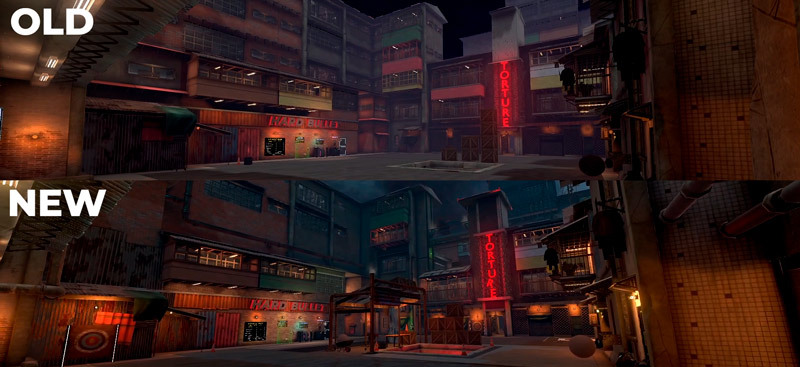
A great example of this approach is the updated Kowloon Arena. It's no longer just a backstreet dotted with brutal machines. Instead, it's transformed into a car repair workshop where features like hanging hooks and working drills are an organic part of the environment.
The Market arena has also been refreshed. It's now a larger space that accommodates the improved game speed and player movements more effectively. We have big plans for this area, so expect to see more updates and iterations in the future.
Animated Skyboxes
We've implemented a new skybox featuring moving clouds in the sky. We plan to continue enhancing our locations to improve game world and athmosphere.
Grab Surfaces everywhere
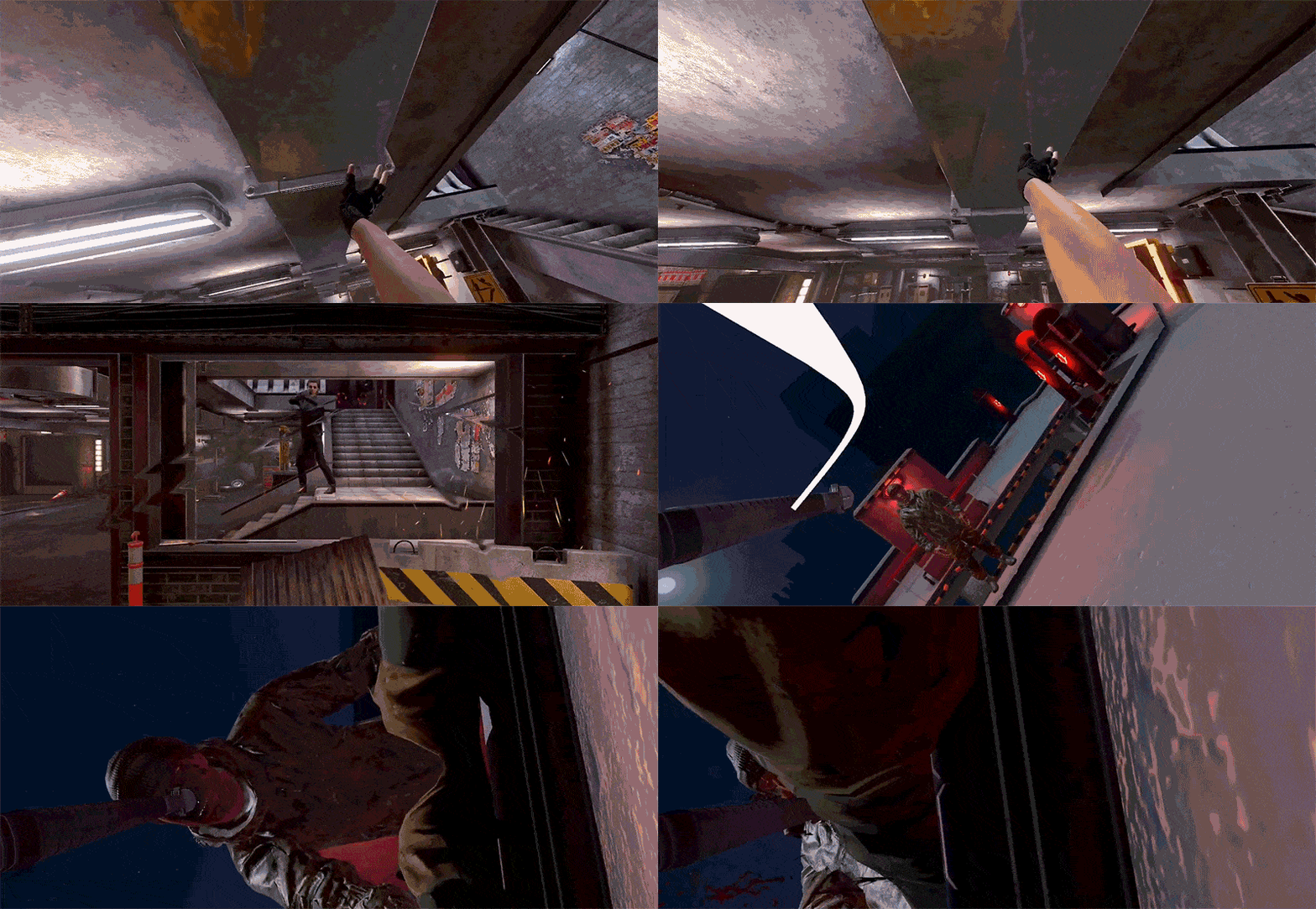
Most small elements within the levels are now climbable, allowing you to access different parts of the arenas without limitation.
Essentially, anything that appears grabbable can be grabbed: this includes pipes, window frames, stair railings, and more.
New Ammo and Enemy Generators
We've introduced new user-friendly models for the ammo workshop and enemy generator. Both are now accessible in the Hand Spawner Menu, allowing you to add extra generators in any arena.
The Ammo Generator is simplified with two key points: one for placing the future bullet and the other for the firearm. Just press the button to "enchant" the gun with your chosen prop.
We've also improved the prop grabbing mechanism. Now, when you pick up an object, it turns into a small miniature and reverts to its normal size once removed from the workbench.
Other Arena Improvements:
Improved sparks from bullets on all metal surfaces to look better.
Fixed roofs colliders on some arenas.
Gun Sound Rebalance
We've updated the reverberation of certain sounds, ensuring you experience the full impact of every gunshot and click from our firearms. Additionally, we've introduced a separate Audio option for Firearms sounds, allowing you to adjust the balance to your preference.
Tweaked the sound volume and range for Drill and Grinder machines.
Enemy Updates:
Enemy Spawn Updated
Finally eliminated annoying performance glitch on enemy spawn when starting waves. No more spikes on wave start for flawless Hard Bullet experience.
Other Enemy Improvements
Smaller bullet calibers like 9mm will create smaller blood splashes on walls than big ones.
Gore: New option — Mid Violence which includes bullet holes and blood splatters but dismemberment and deep wounds are disabled.
UI Changes:
Added one more Intro Screen with most common User Experience options.
Moved all 'Swap Controls' options to Controls Tab.
Updated the Settings layout with colored table rows for a more visually appealing look and easier text readability.
The Tip icons have been moved to the left for a more intuitive design.
To view a Tip, click the (?) icon, which opens a window on the right. You can close the Tip by clicking the icon again or scrolling through the menu.
Added more Tips for your convenience.
The pointer for interacting with UI elements will now always be active when you hover over the Menu field.
Corrected the script display for Arabic and Hebrew languages.
Firearms Updates:
Increased Damage for Calibers:
.32. and .38 to 25 (4 body shots to kill enemy without armor)
9mm and .45acp to 34 (3 body shots to kill enemy without armor)
Other Firearms Improvements:
Lever Action: Resolved a bug where it could be placed in holsters with the lock open.
Pump Shotguns: Addressed issues where the pump could still be moved even with the 'Move When Empty' setting activated.
Moss500: Fixed an issue with a malfunctioning pump.
Grenade Launchers: Reduced the explosion distance for grenades from 5 meters to 2 meters.
Fixed a bug that caused enemies to fall over too easily in the arenas. This small patch should fix most of those awkward situations.
We're also working on new models and other big enemy updates. Stay tuned for our next devlog post on Steam, coming either later this month or early October, for more details.
Improvements
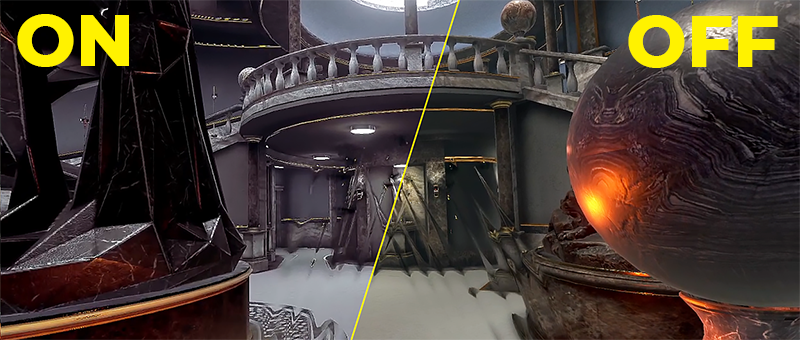
Added a feature to disable color correction during slow motion. You can find this option in the Graphics section of the Pause Menu.
New Controls: Jump, Crouch, Climbing. Leg Kick. Bullet Calibers. New Effects.
Hi! We've always aspired to inject more dynamism into our fast-paced shooter and today's update substantially contributes to this aim.
Player Updates
We've made updates to the Climb and Jump physics, along with the addition of new Leg Kicks and Crouch mechanics. Because of these changes, we've had to adjust the right stick controls. All in-game guidance has been updated accordingly to match your specific VR controllers.
New Controls Scheme
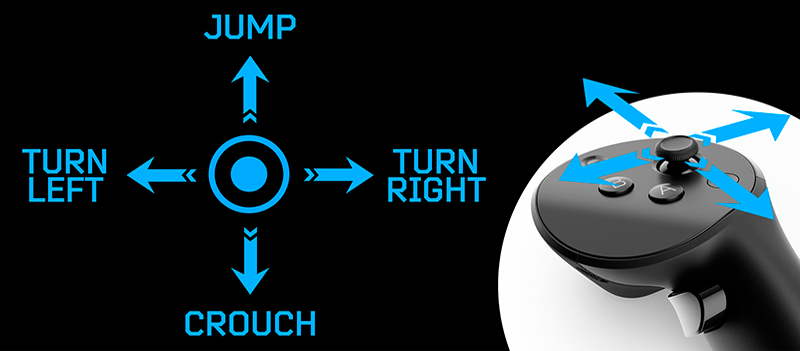
Had to revamp the main hand control scheme to accommodate our new features. This applies to all VR controllers we support.
Jump and Crouch are designated to your right stick, while the 'A' button activates the Ability Slot (Low/High Kick for now). Take a look at this diagram to familiarize yourself with the new layout:
Sure, an updated control scheme for your specific controllers can be found in game.
Jump, Wall Jump and Player Speed
We've overhauled the jumping mechanics to ensure this feature is as smooth and effortless as ever.
Keep holding the stick UP to achieve higher jumps. For a wall jump, simply press it again after hitting a wall, an enemy, or any object in the arena.
To keep things moving, we've also given a slight boost to the player's speed. This is a provisional modification while we work on incorporating adjustable speed controls for the left stick in upcoming updates.
And importantly — we've addressed and resolved all the glitches that could hinder or stop your jumps. Now, every leap is predictable and easy to execute.
Low Kick and High Kick
While there is still a lot to tell what role Abilities will play in future Hard Bullet, we already testing the first active one — Leg Kick.
Press the 'A' button once to perform a Low Kick. This can be used to interact with objects on the ground and quickly damage enemies.
Hold down the 'A' button to execute a High Kick, which is more powerful. It will deal more damage and pull enemies away from you.
Climbing Improvements
We've improved the climbing mechanics, so you can once again climb physical objects like crates and ragdoll giants.
While climbing, Press 'Jump' (Up) to propel yourself upwards, aiding your climb onto the object. This currently only works for physics objects and is not yet possible with level elements.
We're planning to fully implement edge-climbing mechanics for non-physics objects (arena parts) in the next update.
Artifical Crouch
We've introduced a Virtual Crouch feature, allowing you to pick up items from the ground without physically crouching in real life. Press Stick Down to get yourself closer to the floor.
You can customize the way this feature works to best suit your play style or turn it off completely in the Player Settings:
Firearms Updates
Different Bullet Calibers
We finally got our hands on those bullets, and though it was a challenging task, we are proud to present 14 different bullet calibers you can now encounter in Hard Bullet!
Damage Rised and Magazine Capacity
We've worked a lot to enhance visual damage, haptic feedback, enemy knock-back, and damage inflicted, making them more realistic to match the changes brought by the new bullet calibers.
We've also revisited the magazine capacities of all firearms, tweaking them to more closely match their real-life counterparts. This change is particularly noticeable in the case of pistol magazines (whose capacity has increased by roughly 1.5 times) and pump shotguns.
Quick reference guide. Please note that some images may not be entirely accurate and use in-game terminology. They are intended to illustrate the new damage and magazine capacities for the current weapons in the game. Apologies for the pictures quality:
With over a dozen distinct bullet types now distributed among numerous firearms, our arsenal is more varied than ever. However, we're not stopping there — we have exciting updates planned for our weapons in the future.
Stay tuned and don't hesitate to share your feedback. Your input helps us improve the game!
Lever Action Reloading Improved
And yes, we plan to add a rotation reload in the future!
Shots are more physical
To make calibers really shine, we changed how enemies phisically react to different shots, for example, shooting into lower leg parts will result in falling, while shotgun chest shots should pull them back.
Overall, this is just the first bird of new enemy interactions, more complex things like new animations and states are planned for future updates.
Force Feedback for Guns
We've finally introduced haptic feedback for all gun interactions — now, you can truly feel every reload and shot like never before!
Should you find the vibrations too intense, you have the option to reduce their strength in the General Settings.
Gameplay Updates
New Slow Motion Visuals
We've updated the slow-motion effects to create more contrast between slow motion and regular time speed, providing an intense focus as you take aim.
In addition, we've introduced a visual effect for flying bullet itself, which not only looks cool but also may help your aiming too. Note that this is just a visual effect only, and no smashed bullet will be found on the ground.
Arena state after player falls
No more wave resets or lost items when you fall off the arena! Now, you'll simply reappear in the Armory and can jump right back into the action with the same wave and all your things in place.
Just remember, if you're holding a weapon with extra welded parts when you fall, it will lose those parts - that's the one thing we haven't fixed yet. But rest assured, we'll figure something out!
Enemy/Wave Spawn Improvements:
Enemy bodies no longer disappear when a wave finishes.
Resolved the issue of T-Pose enemies appearing with certain wave settings.
We've addressed the issue where enemies could remain alive while lying on the ground, thus preventing the spawn of new ones.
The 'Remove Bodies' button in the Pause Menu is now functioning properly and remove enemies added with Spawn Tool.
Resolved the issue where the limbs of defeated enemies could unnaturally twitch or move when hit or shot.
Other Bugfixes & Improvements:
Added LIV Support🎉
Violence: Added presets for quick switching between violence levels.
Violence: If blood is turned off, decorative blood and blood particles from certain machines will be removed too.
Options: New option to choose whether weapons can be removed.
Options: Added a "Reset Settings" button to General to revert all settings to defaults.
Grenades: Fixed issues with pins visual detach after placing grenade into holster and moving around.
Grenades: Chest holsters now available.
Action Camera: Fixed a bug related to two-handed placement.
Pump Shotguns: Resolved a problem with the second hand rotating or getting stuck inside the pump after trigger pressed. There is a rare situation when it can be done an we work on it.
Katana: Fixed blade grabbing issue.
Sounds: Adjusted distance for some sounds.
Quick preview of some things we are working on
...and there's even more on the way!
Player Physics Improvement: We're continuing to enhance player physics, and improved climbing is just the beginning. Our next goal is to enable edge climbing in different parts of the arena.
New Control System: We're developing a new control system that will allow complex interactions, such as varying walking/running speeds, animations for finger positioning on guns, more intuitive throwing mechanic and a lot of inner improvements.
Raid Visuals Tease: We're getting ready to share the first visuals and reveal more about the new game mechanics we're planning.
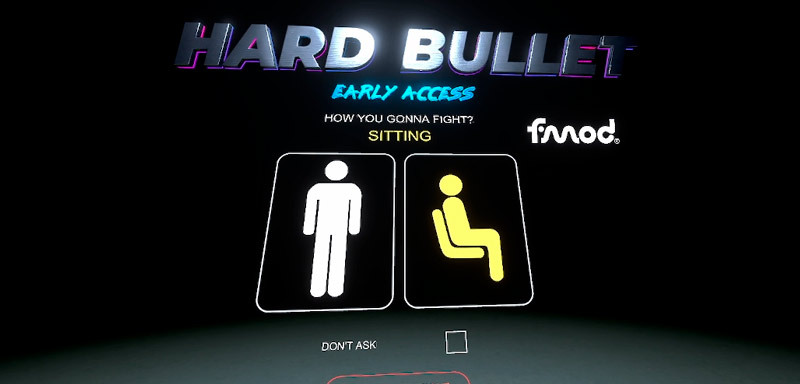
Calibration: We've added a Standing/Sitting mode selector before calibration. If you've previously deactivated this at start-up, you can always switch between modes and recalibrate via the General Settings.
Controller Offsets: The button to open the Offsets Menu has been returned to the Controls screen. Holster Offsets: Fixed an issue where one of the leg holsters would not move.
Lever Action: Now, the lever only moves after you press a button and it won't open itself — only if you set choose option in Interactions Menu.
Revolvers: Resolved an issue with placing the Bodyguard (small black revolver) into holsters.
Tips: Added a Tip for Lever Action reloading. Tips: Increased the font size and provided more space for text.
UI: Made several improvements throughout the user interface.
Lever Action Rifles, Virtual Cameras, New Outfit, UI Updates
Hi all! We wanted to thank everyone who participated in our Open Beta and everyone who sent us bug reports during these weeks. Folks, you are awesome!
Today we close the Preview Beta branch until next time and launching this big update. Let's check it out together!
Lever Action Rifles
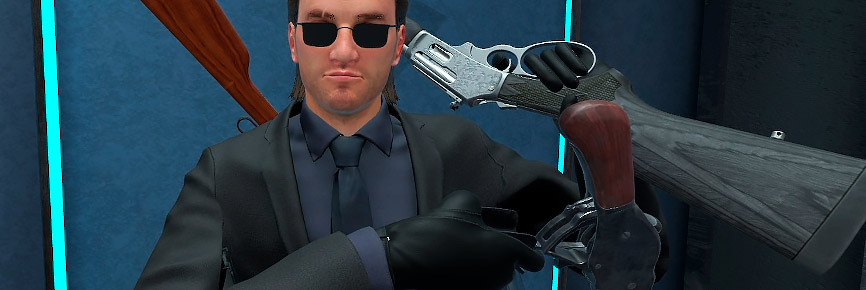
Again we deliver a new weapon type to Hard Bullet — the one that makes you feel so awesome! Prepare to work with your hands a lot while feeding these bad boys with bullets.
We plan to add more lever action rifles during future updates.
Virtual Cameras
We built several Virtual Cameras that will help you show your gameplay from new perspective. You can tune all of them using settings, create your own presets and even switch between them with your keyboard!
Action Camera
Spawnable small camera that you can place in the air or attach to physics objects. All created cameras share one settings preset you can change.
Camera will stay in the air where you place it. You can pull it like a weapon from a distance.
To weld Action Camera to a physics object, bring the camera closer until the welding line appears. Release the camera and it will stay welded to the chosen object.
Each Action Camera appears with a number on it — switch between them in the Camera Settings or your assistant (lucky you!) can switch between them using the same numbers on PC keyboard.
Action Camera has the following settings. Notice, that all Action Cameras share the same one preset, so you cannot modify their settings per camera, only all together:
Switch to player — The broadcast will automatically switch to the nearest action camera to the player.
Return to position — If the camera looses the player, it will rotate back to the original direction the camera was set when it was placed.
Turn after player — camera will turn after player on place until they leave it's view.
Horizontal Auto-Alignment — The camera automatically aligns to the horizon, parallel to the ground. Disabling this feature allows you to set the camera at any angle.
3rd Person Camera
This one shows player from the side. We made several presets for you and you can make up to 5 more.
Probably the most interesting option is Follow Camera — this is an AI controlled camera that follows the player and keeps they on screen. Maybe it's not so complex like in some true 3rd person games and has its flaws, but we are working on them.
Our idea here is to get rid of live preview window, so you can just have your bullet hell fun in Hard Bullet and Follow Camera will do the rest.
Forehead Camera
This one is an updated version of Wide FOV Camera we had before. Now you can change the FOV and camera positions.
Updated UI and Launch
New First Launch
Now on launch you'll be asked to choose a language and make a body calibration.
We reworked the hand length calculation, so now players body should be more ralistic. ALso you can always turn it off in the Settings.
You can choose to skip them and jump right into lobby after you launch HB. You can always change those settings in the Menu.
Changed country flags to country names so it's more convenient to find familiar words and make the right choice. We added all missed translations so now everything including Help/Tips menues can be read on your preferred language.
New UI Elements
Help Tips Hover over a question mark sign near some settings names and you'll get a short description. Please, let us know what options in game settings or mechanics you'd like to see explained.
Units Where needed we show height in metric units and all scale proportions now show percents.
Checkbox and Hidden Options No more Yes/Noes. Some times checkbox may show additional options.
Stick Scroll and AutoScroll Added a scroll for long lists — you can use it with a pointer or just use Stick on your controller. We also added autoscroll for some long Tip texts — it starts to slowly move the list up after a while.
Player Updates
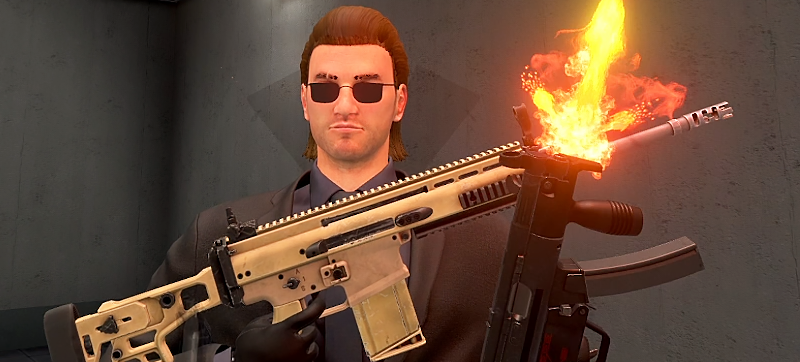
New Hero Outfit
This is the first version of our hero look. We plan to add more outfits as well as facial expressions in the future updates.
We left an option to switch to old jungle outfit, set a paper bag instead of the face and sure you always can turn off the body completely.
Movable Holsters
Now you can detach holsters from physical body and even move them around a little. You can change positions for chest, legs and belt ammo holsters.
Body and Hands Calibration
We added more complex calibration to better align your virtual and real body.
Other Improvements
Lighting: New lighting at all locations, new light effects on metall gun parts. Force Feedback: Added feedback when howering weapons you can grab. Options: Possibility to switch off the artifical turn completely. Options: Added option to keep or remove thrown mags. You can choose to remove all, remove empty or keep them on arenas in any state. Revolvers: Changed fastloader models. Sounds: Added lacation sounds to some arenas and sandboxes. We'll keep adding more sounds to arenas in future updates. New Languages: हिंदी (Hindi), עברית (Hebrew), Norsk (Norwegian), Română (Romanian) and Magyar (Hungarian).
Bugfixes:
Bruises: Returned flesh deformation, so enemy face won't just get colored, but will have visible skin damage. Ragdolls: Removed invisible volume in enemy mouth so gun can be put inside again. Pistols: Magazines can be removed only by pressing DropMag button (B). Now you won't be able to remove it with second hand. Pistols: Bug when grabbing blocked pistol slider could invert its movents. Pistols: Grabbing with second hand did not work if you handed the pistol over your hands before. Revolvers & Break-Action: Excessive "loading" when using fastloaders or putting extra shell blocks. Break-Action: Now thrown shell block divides into separate shells you can use. Break-Action: Thrown shell block ammo won't glitch on the ground. Pump Shotgun: Forend could stuck if moving it without any shells inside. Wave Spawner: Dead body amount minimum now set to 1 to remove an awkward enemy disappearing after death. Wave Spawner: Enemies won't appear in T-poses when sertain Wave settings are set. Violence: Volumetric Blood did not appear from torso wounds.
Public Beta Launch: Virtual Cameras, Lever Action Test, New UI and more!
Hi, today we launch Open Update Preview with lots of new stuff for players and content makers. Some things are so complex that we still have not decided wether they will get into the final version or not.
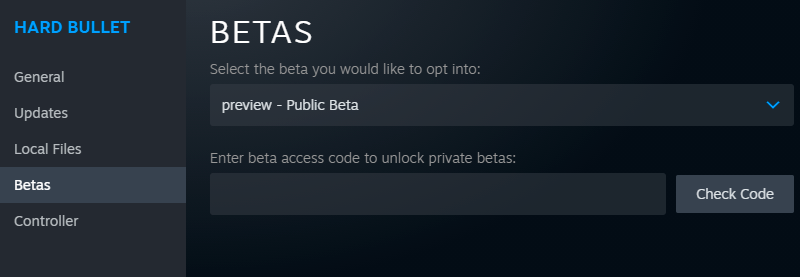
How to switch: in Steam open Hard Bullet Properties, go to Betas tab and select preview - Public Beta.
This is first time we do such public preview of upcoming updates, hope we'll continue this practice in the future.
Soon you'll find what else is in this beta and what's planned for furture May Update (this May, no strict date), but for now let's dive into two most important features!
Virtual Cameras
We built several Virtual Cameras that will help you show your gameplay from new perspective. You can tune all of them using settings, create your own presets and even switch between cameras with your keyboard!
3rd Person Camera
This one shows player from the side. We made several presets for you and you can make up to 5 more.
Probably the most interesting option is Follow Camera — this is an AI controlled camera that follows the player and keeps they on screen. Maybe it's not so complex like in some true 3rd person games and has its flaws, but we are working on them.
Our idea here is to get rid of live preview window, so you can just have your bullet hell fun in Hard Bullet and Follow Camera will do the rest.
Action Camera
This small cute camera will stay in the air where you place it. You can use built-in Spawn Tool or just grab it with your hand. You can't weld it to objects yet.
Action Camera appears with a number on it — switch between them in the Camera Settings or your assistant (lucky you!) can switch between them using the same numbers on PC keyboard.
Forehead Camera
This one is an updated version of Wide FOV Camera we had before. Now you can change the FOV and camera positions.
Still in work
And this is not all! Some cool cameras we are still working on:
AI-controlled Action cameras that will turn on when the player is nearby, letting you move through arena and always stay in focus.
Welding for Action Cameras so you can attach them to guns and enemies.
More keyboard controls for creator's IRL assistant to switch between cameras.
Tracking Camera to keep player in the viewport.
Lever Action Reloading Test
We've been experimenting with lever action weapons to find the better way to reload them in Hard Bullet style.
Please, tell us what do you think — reloading may feel unintuitive at first (especially with two hands), but it becomes easier as you learn. Probably. Or not. That's why we are doing this tests huh.
You'll find a lever action gun in the Dead Box sandbox over a green cube in the center of the arena.
There are some options similar to those we have for pump action shotguns to choose better mechanic for you. Visit Interactions Settings to choose.
Other Changes
A few words about other interesting things you'll notice in this beta:
New UI and Launch
Starting options are still work-in-progress as we plan to add more complex height calibration. You can set checkbox to skip them and jump right into lobby after you launch HB. You can always find those in General the Player settings.
Changed country flags to country names so it's more convenient to find familiar words and make the right choice. Also, let's all welcome new languages: हिंदी (Hindi), עברית (Hebrew), Norsk (Norwegian), Română (Romanian) and Magyar (Hungarian)!
Tips translations are not ready, but all the other UI elemetns are here. Please, contact us if you think you have a better idea for some options on you native language.
New lighting on weapons
Last graphics update cut the guns visuals a little and they started to feel more blank or saturated. Today we adding new awesome visual and lighting reflections to weapons and arenas.
This is the most optimized and good-looking setup we've ever done to Hard Bullet and we are very satisfied with these results.
Hand Poses, Performance Update, QoL Improvements and What's Next
Arena Performance Improvements
Huge rework of lighting on all arenas, improved visuals, added some details and the most important — FPS boost. Here are some noticable examples:
Dead End Sandbox
Stairs
Baths
Hand Poses
Custom poses for all game firearms are here! No more wacky grabs, clipping fingers and other immersion-breaking visual glitches. Hold your guns like you should.
Sound Updates
It took a while but we finally find a new partner to help us with sounds — Volkov Studio! Check out their Youtube or website.
Guys already did a good job with break-actions and are adding brand new sounds for Hard Bullet revolvers today.
This is just the start as sound team is full of great ideas and clever solutions, so prepare to hear some changes in the future updates!
Other Bugfixes & Improvements:
Revolvers: Added Recoil;
Revolvers: Added two new revolvers — Bodyguard and Rhino;
Pistols: Now can be hold for the second hand grab point alone;
Gore: 9mm deal more visible damage to enemy head;
Gore: Shotgun body damage effect depth increased;
Ammo Workshop: Revolvers can be used too;
Armory: Tuned distance to show/hide weapons on stands;
UI: Added a scroll element to some Settings tabs;
Reduced size on drive from 18Gb to 15Gb;
Things we are working on
Here are some cool things we are working on right now, some you'll see quite soon, but some will take months, let's dive into our plans together!
More Virtual Cameras
More tools for content makers to create impressive machinimas and show Hard Bullet from new angles. We plan to add possibility to switch between several cameras that you can place on arena. We also are working on innovative AI camera that should follow player as he goes though levels.
And of course we'll finally be able to see the main character's face reactions!
Lever Action Rifles
After delivering you break action and revolvers, the most tricky type of firearm is left — the lever action rifle. We plan to ship those during March-April period.
Raid* Game Mode
Our try in large arenas like City Rooftops gone quite well so we decided to move further and started working on new game mode with working title Raid. *It does not mean we want you to assult somehting, it just sounds nice.
This also includes long-awaited AI update and some narrative so we'll be a step closer to more complex things like Story mode in the future.
There is no strict date for this new game mode, we'll show some progress in Devlogs when we'll be ready.