I've tackled various bits of the game that were graphically less efficient than they could have been, in order to improve performance. Anyone running Hexahedra with a dedicated graphics card probably won't notice much difference, but anyone using integrated graphics should find that the game runs more smoothly now, especially on larger levels.
Other new features:
All of the video tutorials about controls and game mechanics such as cube merging can now be viewed whenever you like from the Esc menu. Click the new "Help" entry to get a list of the videos, arranged by category.
To help with this, there's a new video tutorial about adding and removing devices.
Hexahedra Demo Update 5
Demo Updates 2-5:
A few small updates have gone out over the last few weeks, and a larger one today. Here's a summary of all the changes between them.
Bugs Squashed: 10 (of which 3 were reported by you - thanks!)
Updates:
When selecting device types (e.g. selecting the colour for a Spray Painter) each option now has a tooltip stating what device it will produce.
Added a video tutorial for the Panel Storer, replacing a couple of text-only popups
The Close button on track windows now has a tooltip explaining that clicking it moves the tracks back to the workstation, and doesn't delete the tracks.
Changed some tutorial wording for clarity.
Bugfixes:
Cube panels in visualizations no longer sometimes end up in the wrong place when switching from 2D to 3D view.
2D cube visualizations no longer jump around constantly when rewinding.
Linux: Fixed the cause of a huge mouse cursor that would overlay tooltips.
Linux: Tutorial videos now play properly.
Switching colourblind mode on or off at a specific point in the tutorial no longer breaks the tutorial flow.
Steam Next Fest: Hexahedra First Look and Dev Chat
Omnituens will be doing a blind playthrough of Hexahedra, giving his impressions of the game as he sees it for the first time. Developer Sidequest Ninja will be on hand in voice chat to answer any questions you might have about the game.
Stop by to see some factory building in action!
Don't forget that Hexahedra is on Kickstarter for the duration of Steam Next Fest.
Kickstarter Live!
The time has come! Now that the demo is live, the next step is to raise the funds for the rest of the game!
Although I'll continue to cover all the code and game design, the Kickstarter campaign will allow me to commission the rest of the assets needed for Hexahedra, including new factory environments, some with high-tech, slick devices, some that have been cobbled together from spare parts.
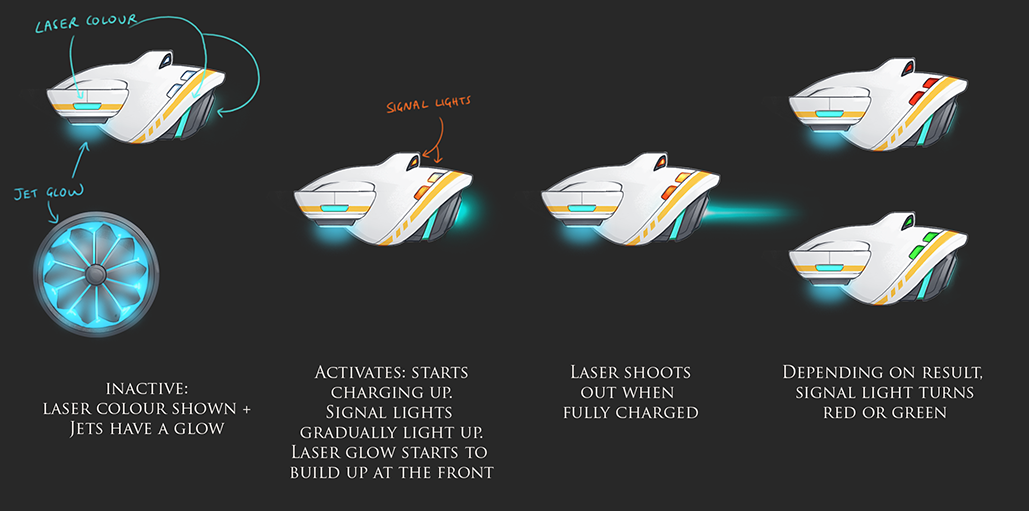
The high-tech, hovering devices of Hexahedra Incorporated:
Backing the project will mean you can get a copy of the game for below the launch price. There will also be higher tiers that start with adding a copy of the soundtrack and, at the top end, will allow you to design a level or name one of the in-game corporations.
A cobbled-together Heater that definitely poses no health and safety hazards whatsoever:
It's taken two and a half years to get here - a huge thank you to everyone who played the beta or the demo and gave feedback and reported bugs. The game wouldn't be in such a solid state without you!
After two and a half years of work, I've released the demo of Hexahedra!
A huge thank you to everyone who tried out the playtest version, gave me feedback, and helped make the demo the best it can be.
If you've got the playtest version installed, you won't be able to launch it any more. However, your save data will transfer over to the demo, so you'll be able to carry on without losing any progress.
Grab the demo from the store page if you haven't already!
Open Beta Update 4
This is a small update with a few tweaks as I head towards the Demo release :) Bugs Squashed: 1 (reported by a user, thanks!)
Changes:
New tutorial videos added (down with walls of text!)
Also tweaked some other bits of the tutorial.
There's now a "News" window on the main menu. For now, it has details of the upcoming Kickstarter campaign.
Bugfixes:
Improvements for ultrawidescreen. If you're playing in as aspect ratio wider than 16:9, you'll now find the interfaces place themselves much better.
The resolution options now don't have anything wider than 16:9. The game isn't well-suited to ultrawidescreen, so the emphasis here is on making sure the available options give a good experience.
Open Beta Update 3
Bugs Squashed: 13
New features:
As well as being able to slide tracks up and down, in larger levels you can now drag the tracks into their own window. Position tracks wherever you want!
Other Changes:
Lasers are now explained with a video tutorial
Some levels now have tutorial help built into the factory, which persists after running through the popups.
Various performance improvements in both models and textures.
Bugfixes:
Right-clicking a device to remove it now adds an entry to the Undo system.
Single-panel cubes no longer "collide" with devices in different workstations.
Tracks now expand properly when undoing a workstation deactivation.
It's no longer possible to box-select commands in hidden tracks.
Fixed devices now always turn red on hover, never blue.
Level 3's fixed commands are now actually fixed in place.
Kickstarter Pre-Launch
Hello Beta Testers!
IT IS (almost) TIME, and I need your help. Later this year I'm going to run a Kickstarter campaign to raise the funds I need to finish Hexahedra (more models, music, audio, etc), and the Kickstarter pre-launch page is now live!
This means you can now sign up to be notified as soon as the KS campaign launches. Backing the project will mean you can get a copy of the game for below the launch price. There will also be higher tiers that start with adding a copy of the soundtrack and, at the top end, will allow you to design a level or name one of the in-game corporations.
Those last two will be limited in number (there's only room for so many levels and corporations!), so if you're interested in those be sure to get in quick once the campaign launches.
Signing up even at this stage will help get the game funded - the more people who register their interest, the higher up the project will go in Kickstarter's algorithm, and the more visibility it'll get.
Bugs Squashed: 27 (of which 2 were reported by beta testers - thank you!)
New features:
It's now possible to swap individual commands when dragging.
You can now see a miniature version of the factory hex visualization next to each factory cube. You can turn them on permanently via the Options menu, and you can toggle them when the factory is running by holding down Shift.
Other Changes:
You can now remove devices with a right click, just like commands. Use middle click if you're in single-click drag mode.
Substantial performance improvements when rewinding the factory.
The factory hex visualizations now place themselves over the cubes, rather than next to them, when zooming out a long way.
The Trigger Rear Device icon now matches the other four.
You can now click anywhere on a device source to bring up the set of options, not just the icon itself.
You can now hide the additional text in the Options menu by clicking the relevant "?" button again.
Bugfixes:
Fixed factory hex visualizations overlapping strangely - where the 2D UI goes behind another one, the cube panels should also be masked out.
The command marker no longer disappears when a workstation pauses just as the marker switches tracks.
Sending a one-panel cube to a different workstation no longer wrongly collides with an activated device in the receiving workstation on the first step of movement if the only panel present is still fully within the sending workstation. e.g. sending a cube with only a left panel over to the right.
Playback no longer stops too early when cubes collide with certain arrangements of panels.
Fixed slot highlighting when redoing movement of commands.
Deleting selected commands (via keypress) while dragging other commands no longer breaks undo history.
Changing the setting for mouse axis inversion for camera leaning now updates the setting properly.
Various fixes to the appearance of factory hex visualizations.
Cube visualizations with their rotations unlocked will no longer jump 90 degrees when rewinding.
Fixed a couple of issues with the failure UI.
Bonus bugfix - the bug reporting Discord bot can now cope with people leaving the server after reporting bugs!