Fixed. After the construction of the module (Academy of Engineers), the number of trained engineers led not to training, but to their reduction.
Fixed. Messages on the quantity of goods being fetched by factories and greenhouses were superimposed on the menu (Research).
Fixed. Building modules could be simultaneously selected, which resulted in the display of multiple interfaces.
Now you can select only one module that is already built.
Changed. The module for the extraction of oxygen, it was necessary to indicate what it should do. Now the oxygen module automatically extracts oxygen every 3 seconds, without assignment, provided that the Modular function (Oxygen) is enabled.
Added. After each save of the game, the Saves folder will additionally create (backup) your saveings.
Message development
At the moment we are working on creating a new game mode, we think the new mode should you like.
Update v1.0.1.3346
Fixed. The numbers in the resource list showed non-integer values.
Fixed. Requirements for processing of titanium and steel ore were too high.
Fixed. The position of the sun on the mini-map was not true located.
Fixed. The animation of the module (Complex) number 9, increased in size, after the animation of destruction was turned on.
Fixed. Human resources such as biologists, engineers and scientists were sometimes not trained.
Changed. Recycling of steel and titanium has become easier! The extraction time is reduced to 3-5 seconds instead of 20 and now no water is required for them.
Added. Now scientists, biologists and engineers will be trained by default every 3-6 seconds after the start of the game.
Removed. Unnecessary resource (carbon dioxide).
Removed. Limiters of resources (earlier it was impossible to extract resources, having reached the determined quantity, now it is possible indefinitely).
Optimization. Reduced the use of RAM by 50 mb after the construction of the module (Complex).
Update v1.0.1.3342 + Tutorial
Fixed. "Wencor" did not collect the fragments of the asteroid, under the mouse control.
Fixed. The sound of the explosion was not reproduced, after the explosion effect creation.
Fixed. While choosing the modules for construction (greenhouses, complex) – the information about the modules was not properly displayed.
Fixed. After building the modules (Long Bridge and Complex), the module positioning point was shifted by 20 pixels.
Fixed. The Asteroids sometimes became transparent.
Fixed. In some places, the junctions of the cosmic background were visible on the map.
Fixed. Music plays from the beginning of the game until you open the sound tab in the settings.
Fixed. The degree angle icon was drawn, now it is a symbol.
Fixed. Between the name of your ship and the word (Cruiser), a gap was omitted.
Fixed. When you opened the selection menu again (modular functions), the modules were not pressed the first time.
Fixed. The mouse cursor did not disappear when one of the building modules was activated, now the cursor disappears and does not interfere with the constructing.
Fixed. The progress of construction Indicator sometimes disappeared.
Fixed. When constructing the Academy, the modular buildings did not move between the floors.
Fixed. After the research window was turned on, it was possible to open different menus even if the buttons were not visible.
Fixed. Some names of buildings displayed the name of other buildings.
Fixed. During the choice of construction, information about the available designs was not accurate.
Fixed. Tooltips (hints) were not always displayed.
Added. In the training menu, you can find the button [Extraction of resources - Mining plant]. Clicking on it you will be taken to the interactive training of this lesson.
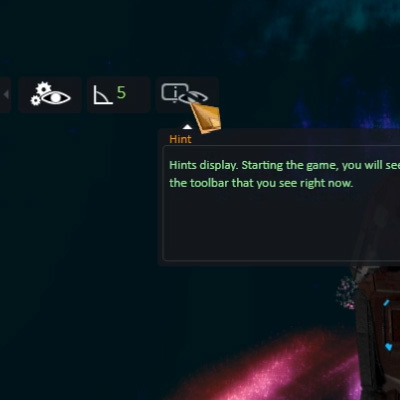
Added. Many clues to different elements of the interface, describing their functions, including the icons of modules and their functions.
On the picture below, you can see the location of the hint button. You need to left-click on it to display the block of hints.
Optimized. Reduced the load on the main memory (now background objects occupy 300 MB less than in previous version).
Optimized. Removed superfluous objects which are not visible and load operative memory at a rate of 20 Mb).
Optimized. Some modules now use less RAM when they are built.
Changed. The design of the building module (Housing) is remodeled.
Localization
Changed. [English, Russian] Some grammatical errors in the sentences and names of the modules have been fixed.
Changed. [English, Russian] Incorrect understanding of the meaning in the localization of the term (Module - the building part of the station) in the game settings it was implied as a set of game functions.
Note. The work of the spaceport may be unstable (we are solving this problem).
Message from the developer:
The main functions of the game work stably. You can start a battle, get resources, build your station from scratch, manage your ships (Venkor and Admiral), buy a turret for the ship (Admiral) and even control the turrets.
Your support is very important to us, please be patient. Soon we are going to add more training lessons.
Update v1.0.1.3303
Fixed. It was impossible to make the dismantling of the building (the spaceport).
Fixed. The building "Spaceport", sometimes did not display the selection circle.
Fixed. Sometimes the interface was not deleted and remained in RAM. Now, the interface is redrawn only when necessary.
Fixed. When controlling the ship "Wenkor" and "Admiral", showed the selection circle "Spaceport".
Fixed. When clicking on work buildings, the health indicators did not display the value.
Fixed. "Wenkor" flew in a random direction, after he was sent to X point by clicking with the mouse.
Fixed. Some parts of the interface overlapped each other.
Fixed. The Grid tool continued its display in the store.
Added. New interface, with minimal system load. A new interface, touched upon (main game interaction panel, spaceport panel, panel when the buildings is switched on).
Added. New tips in the lower construction menu. You can display hints if the hint feature is turned on. The button for turning on the prompts can be found on the left side of the screen by expanding the small tab.
Added. You can move some parts of the interface, where you prefer, while the interface will retain its position until you start a new game.
Added. When you select each building, the properties of this structure are displayed on the screen.
Added. The required cost of resources in the construction of buildings, changes color, if there are enough resources for construction, then in green, if not enough resources, then in red.
Changes. The right mouse button will not close the construction window. To close the construction window, use the orange button with the arrow (back).
Changes. Buildings no longer receive random numbers (health) at startup, now they have a fixed value.
Changes. The brightness of the buttons is increased in the factory menu, after activation.
Changes. The "fast battle" module is temporarily disabled.
* Localization of the game interface in English, will appear in the next update!
Critical change. When you turn on the "enemy attack" mode, enemy ships are now created in small groups with a certain periodicity. However, each time enemies will stay faster, and time will decrease, and their number will grow.
This change will allow to play without heavy load on the processor.
If your computer slows down, when the enemy appears, then try turning off the Mini-map, this will bring about 4% of the performance.
You need to open the console by pressing the [~] key and enter a sentence "map disable" without quotes and to include back "map enable".
We are still working on optimization ...
Message from the developer: We read your feedback and take into account your wishes. We are aware of many mistakes and some flaws in the game.
Please read the "early access" section carefully.
We constantly develop new features and fix bugs in the game.
We will release updates as often as possible. We draw attention to the fact that at this stage of the development of the game, the main task of the game is the construction of a base.
Attention: the game is very demanding on RAM, the higher and higher its frequency the better. For a stable game, we recommend at least 8 GB of memory.
Your feedback is very important to us.
Update 1.0.1.3290
Fixed - When you open the store menu, the ship "Admiral" could be selected.
Fixed - When the "Fast battle" module was turned on, at the beginning of the game the mini map was not correctly displayed and it was possible to allocate buildings.
Localization
Added - partial localization of the text in English (game menu, admiral's interface, store interface).
Update 1.0.1.3285
Fixed - Ships "Admiral" and "Wencor" can now be selected and operated by the mouse.
Fixed - In the main game menu, the "Campaign" button was not darkened (there is no company in the game).
Fixed - When entering the store menu, the "Admiral" and "Wencor" pictogram control buttons continued to be displayed.
Fixed - In the mode of control of the ship "Admiral", when switching the control of the turrets (rotation and fire) - The control mode of the AI did not work.
Added - Interface of life indicators of the Admiral's box, - appears after the "Admiral" control is turned on.
Added - Now the "Admiral" has a cargo hold.
Added - "Wencor" can download resources to the ship "Admiral", if you fly to him on "Wencor" for this you need to click on the ship "Admiral".
Hooray! The game is out in early access!
Dear players, we ask of You to take into account that the game is in early access stage and it may dramatically change in future.
We ask You to report any bugs and suggestion of gameplay improvements in discussion section.
After starting the game You may notice, that user interface might be in different styles and stage of development as well as localization may be absent in some places - this is due to the fact that we’re adding new features and do not have enough time to update the old interface elements and localize new functions.
At this current stage we doesn’t have detailed training in the game, yet.
Please, don’t forget to turn on modules of game - these may drastically change gameplay.
We warn you that the game has problems with saving the game and settings.
If you have a problem, please restart the game from the "Admin Name". We are already working on eliminating this problem.
You may also provide us your help in localizing of the game for different languages. Learn more about this in the discussions section.
Dear users, we apologize for the fact that the game Hope of Humanity is not currently released on the "MacOS" operating system. This is due to the fact that we don't have our own MacBook to conduct thorough testing and debugging of the game without testers. We ask of You to not to be discouraged, as this problem may be solved in the future releases of the game.