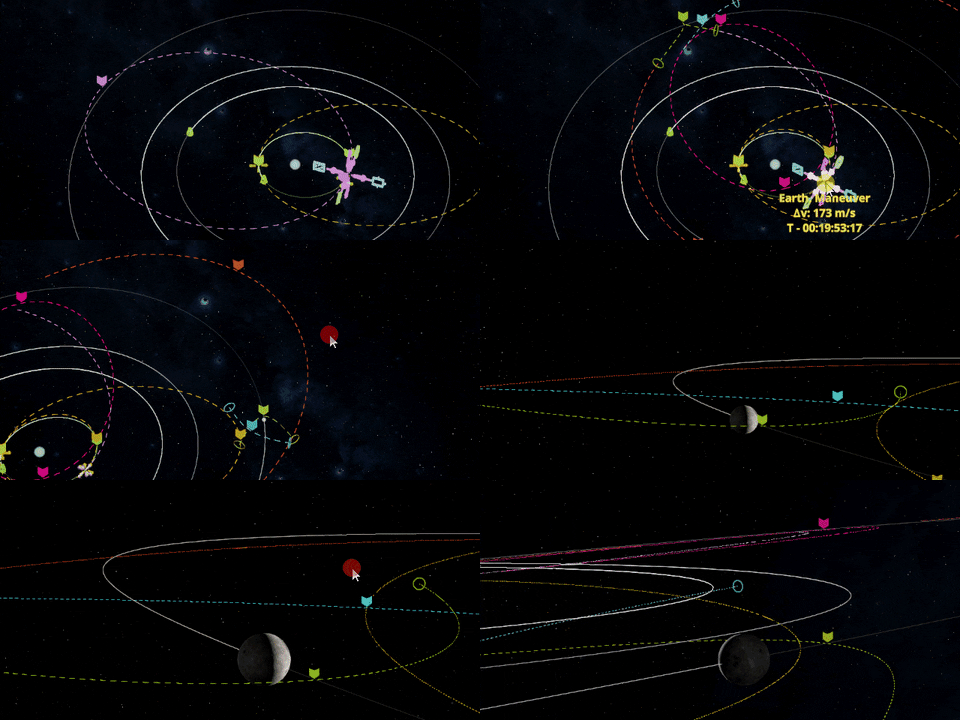
I got a lot of bug reports thanks to our amazing Discord community and some of the videos that were published on youtube last week. I fixed all the critical bugs with reproducible scenarios. And a bunch of less important ones that didn’t require big changes to the game.
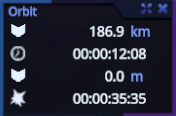
This patch includes some features and a lot of changes too. I’ve added a third rocket assembly tutorial to the game that shows how to use some tools that weren't touched in the previous ones. And I changed the orbit parameters panel. In the collapsed state it shows the most important parameters for any flight: orbit apoapsis and periapsis and time to these nodes. If your spacecraft’s trajectory ends up on the planet’s surface it shows time to impact instead of time to periapsis.
Using this panel you can now put a spacecraft on orbit without opening the map even once
If you click the expand button, then you will get all the other orbit parameters.
This panel is gigantic in the expanded state, but what can you do
There is still one major bug that I am trying to hunt down where the rocket sometimes becomes corrupted during rocket assembly and can’t be loaded. But you still can find the rocket file in the save folders. If it happens to you, please contact me via email or Discord and send me this rocket file with the description of what happened. I will be able to fix your rocket and also it could help find the issue.
This is the last big patch to v0.21 version. I can push some smaller hotfixes here and there but I will mainly focus on the next game update now. All other non-critical bug reports I received will be included in that one.
Stay tuned and have a nice flight!
v0.21.8 release notes
Features:
🔸 added time to apoapsis/periapsis/impact to the orbit stats panel; 🔸 added third rocket assembly tutorial.
Changes:
🔸 added expand/collapse button to orbit panel which will toggle visibility of additional orbit parameters; 🔸 reduced assembly colliders of "Raduga-52" and "Vega-072" engines so they can be attached to big fuel tanks in more different ways; 🔸 engines are now grouped by fuel pair first and then by thrust on the parts panel. 🔸 added fuel name and image to rcs tooltip; 🔸 increased camera exposure compensation range that could be set during the flight and on the map; 🔸 improved memory allocations on assembly shop scene; 🔸 improved "Citrine" external RCS plume effect; 🔸 reduced mass for "Clap" Longitudinal Decoupler; 🔸 added hydrazine fuel variant to "The little one" Fuel Tank FT-0; 🔸 removed fog from assembly blueprint scene; 🔸 automatic time warp is no longer interrupted by physics simulation, it is just capped at 10x speed; 🔸 part name properly updates when changing its config using select tool.
Fixes:
🔸 big memory leak on spacecraft mode scene; 🔸 switching pass resources mode in the attached parts using “Select” tool, doesn’t work (mode switches, but part continue to work in the previous mode); 🔸 not being able to open context menu and raycast highly eccentric orbits; 🔸 equatorial inclination doesn't account for orbit's longitude of ascending node and can produce incorrect results; 🔸 part rotation is lost when detaching part and then using undo; 🔸 sometimes assembly stuck when constantly switching from grab to select mode and back and clicking on different parts; 🔸 1.2m radius parts could not be attached to the bottom of rover_fairing_0; 🔸 command module porthole shows Earth's water through the part; 🔸 some props are missing in the control center; 🔸 engine thrust effects and sounds start playing when turning on engines end time is paused; 🔸 center of lift and center of drag forces overlays are swapped between each other; 🔸 ALT+click on rocket part doesn't focus camera, when "Select" or "Rotate" mode was selected; 🔸 game loads in initial 10x time warp and then switches back to 1x; 🔸 sometimes game stuck when quitting to desktop or main menu; 🔸 sometimes game stuck after using Select tool and selecting one of the parts; 🔸 buttons are vertically stretched on instruments panel on surface and navball mods; 🔸 stages are cut off by the bottom of the screen in the ultra-wide resolution; 🔸 game stuck when several parts was selected using symmetry and then they were removed by pressing undo; 🔸 part params window is clipping through celestial bodies filter when solar system map is open.
Patch v0.21.4
I usually make only fixes and do not add any new features in patches in between updates, however since many new players are joining and trying out the game I decided to process feedback faster and implement features that do not require big changes to the game as soon as possible.
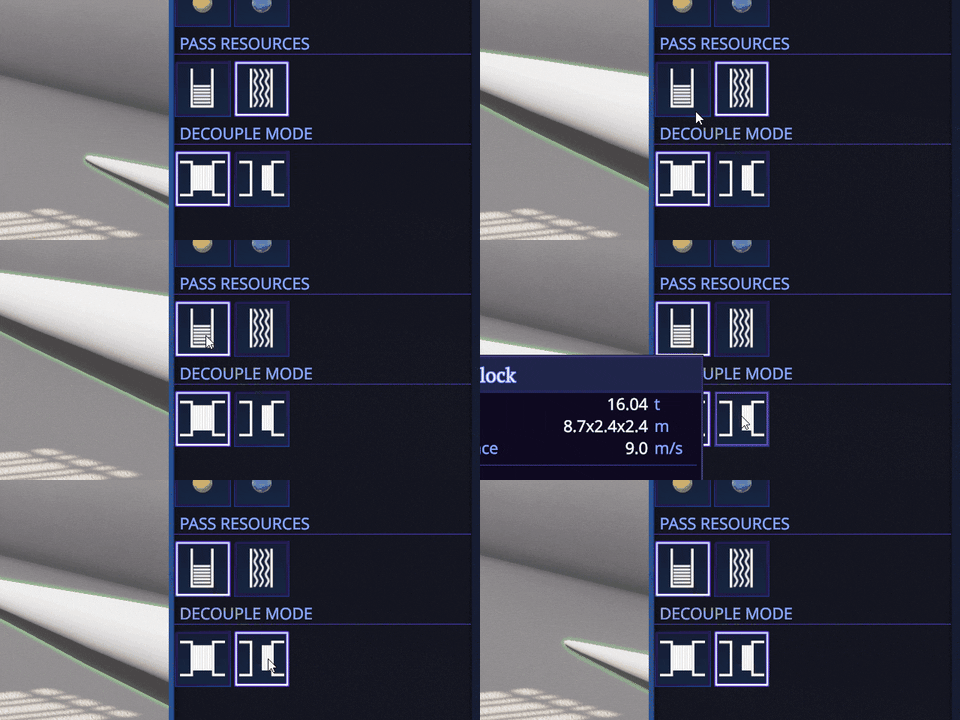
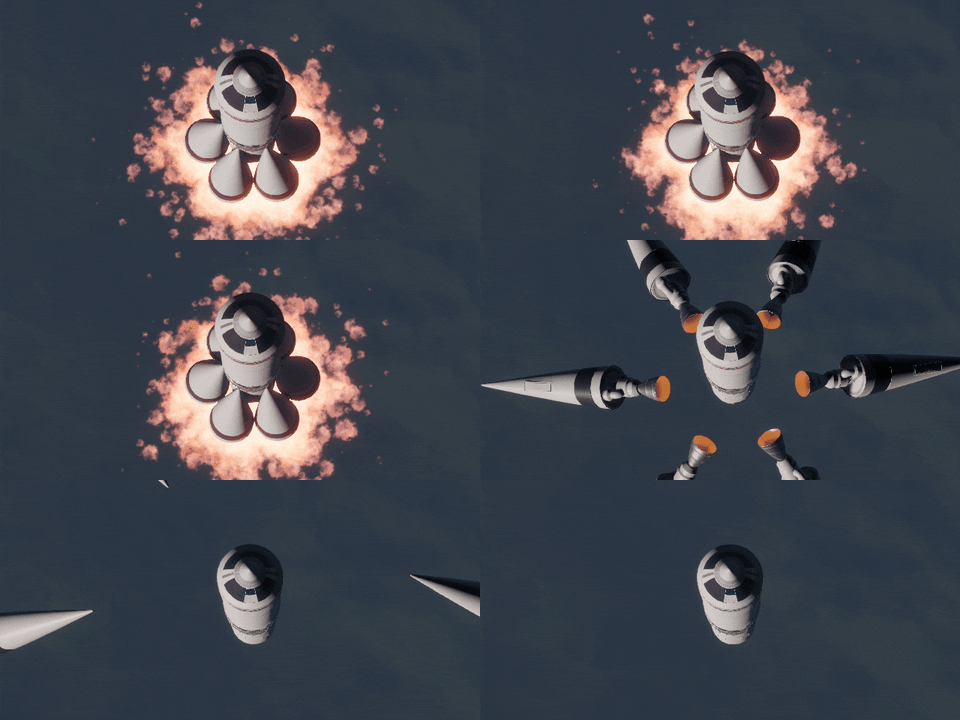
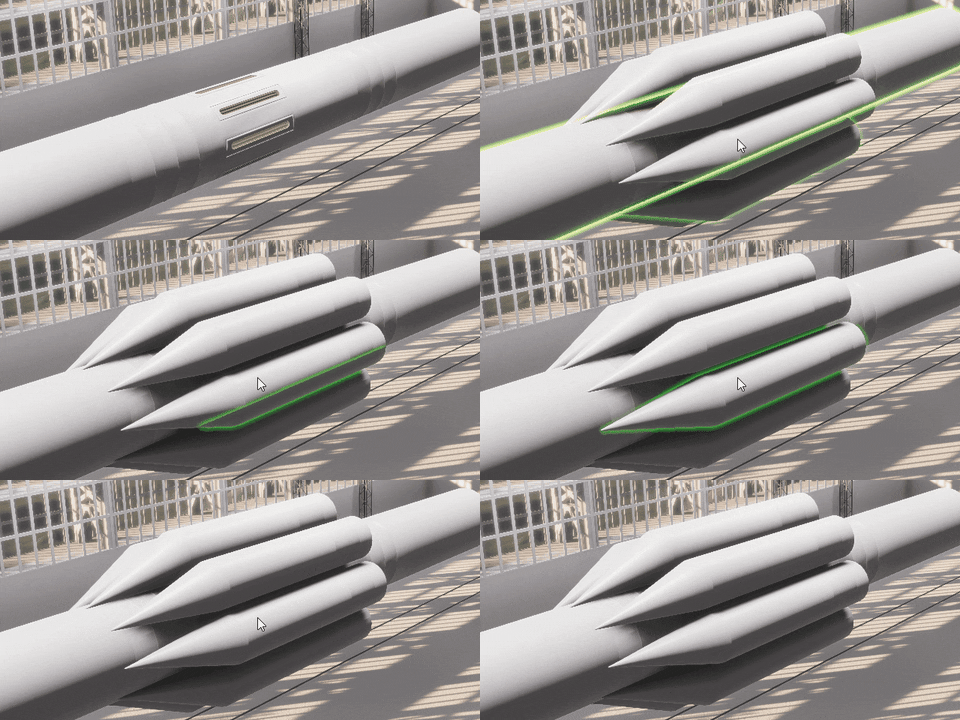
One of those features was the request to decouple some side boosters without needing additional decouplers to match the behavior “Proton” or “Souz” rockets have. And now you can easily do that.
Just select new decouple mode in the part configuration
And enjoy the new behaviour. No additional decouplers required!
Other than that, I updated some outdated information in tutorials. And made several fixes that will make the game more stable.
v0.21.4 release notes
Features:
🔸 added additional configuration to side boosters Side Fuel Block and Conic Fuel Block so they can be decoupled from rocket without using a dedicated decoupler; 🔸 added one more time warp step in between 1 day and 1 month, equal to 1 week; 🔸 added toggle to orbit stats panel that switches orbit inclination display mode from the ecliptic to equatorial plane and vice versa;
Changes:
🔸 re-enable thrust limiter slider for all engines in the engine parameters window during the flight. 🔸 all "Reach orbit" contracts now have correct inclination set relative equatorial plane (previously was incorrectly set to ecliptic plane); 🔸 Molniya and Tundra contracts now have correct periapsis and orbital periods;
Fixes:
🔸 Molniya and Tundra contracts can't be completed; 🔸 game stuck after completing any "Reach orbit" contract and trying to exit to main menu or quit the game; 🔸 crash when changing from select mode to grab mode removing previously selected part and switching back to select mode; 🔸 sometimes there is no missing fuel warning displayed when attaching some engines to the fuel tank that have no required fuel for them; 🔸 mods list window have no background; 🔸 navball is black in the navball mod scene; 🔸 some translation strings are missing; 🔸 some tutorial steps have outdated information; 🔸 fixed missing caption in one of the advanced tutorials
Known issues::
🔸 switching pass resources mode in the attached parts using “Select” tool, doesn’t work (mode switches, but part continue to work in the previous mode); 🔸 geostationary orbit contract references ecliptic plane instead of equatorial one;
Update v0.21.0 "Essentials" is now LIVE!
Hi, there! Three months have passed in a blink of an eye and it is time to publish the next update. This is a medium-sized update but it has a lot of changes under the hood. Because most of the changes were localized and there were no engine version updates, I decided to release this update without the beta cycle. We will see how it goes, but without further ado let’s dive into it.
Support for different fuel types
As I mentioned in the previous update, all the engines in the game are based on real world counterparts. And the last two engines I’ve added have a much higher ISP, but should consume a hydrogen / oxygen fuel pair instead of UDMH / dinitrogen tetroxide all the other engines use. But while the game was designed around different fuel pairs, some game systems were still not fully reworked to support that. For this update I’ve added a hydrogen / oxygen fuel pair and support for every single one of them. For example, stage dV calculation, fuel level indicators, maneuver dV calculations and even fuel transfer in docking ports are working not only for the H2 / O2 pair but for any other one I will add in the future.
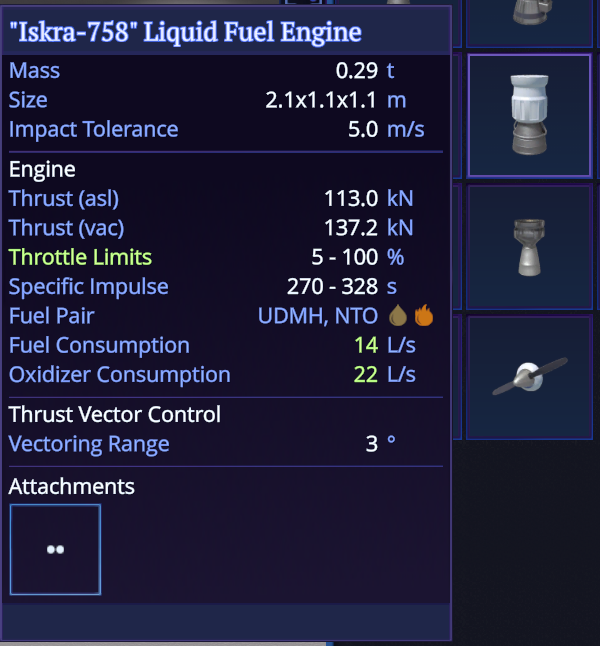
All engines and fuel tanks tooltips have color coded fuel indicators now
This change would greatly affect the rocket design. See, liquid hydrogen has a very small density and mass. At the same time engines that use it have much higher ISP which means they are more efficient. So the upper stages of a typical rocket will be much lighter, but carry less fuel for the same volume. Because of that you will probably build smaller lower stages or could make the upper ones bigger depending on your need. I'm looking forward to seeing screenshots of your new designs.
Stages now grouped by fuel consumption, have fuel indicators too and change color to red, when the stage doesn't have fuel that engine use
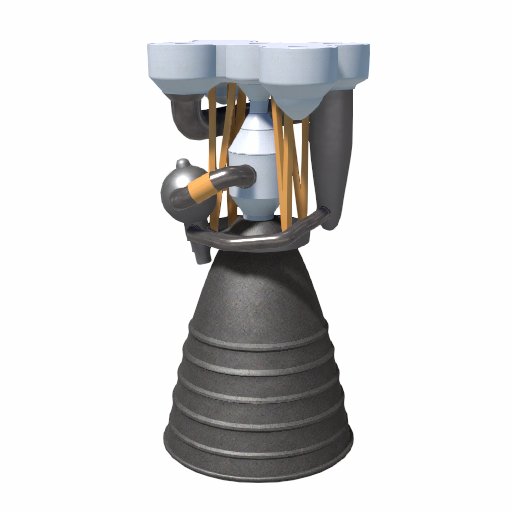
It is also interesting that the USSR designed and built only three different engine models that used hydrogen as a fuel. So I’ve added the missing one. But it looks like another popular fuel pair is just around the corner.
Meet 1-socket "DVK-1" Liquid Fuel Engine
Assembly improvements
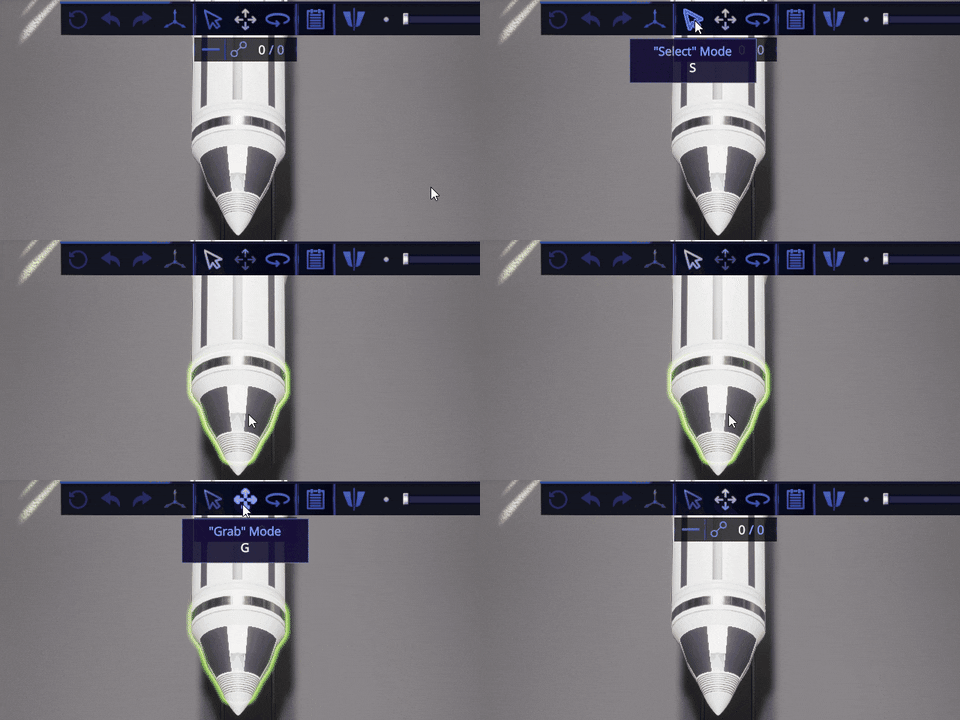
You can finally change configuration for already attached parts. All you need to do is to switch to “Select mode” on the instruments panel and then click on the part you want to change. Symmetry is working too. Note, that at this moment, only existing configurations are supported. For example, you can change fuel type, decoupler resources pass mode or control surface parameters for the attached part. I will add full configuration support for all the parts in the next update, because it will be easier to change by combining it with the redesign of the rocket part flight windows.
Just switch to the Select mode and click on part you want to change
I’ve also added support for 8-way radial symmetry. It is a bit awkward because it can produce buggy looking results when trying to attach 8 fuel tanks that have the same size as a central one. But this is not the only use case for that and it opens more design space, so why not.
Below some new parts structure parts, made with 8-way symmetry in mind.
Octagonal Prism O-100
Octagonal Prism O-200
Structural Adapter Octahedron-Hexagon
I’ve also made a full rebalance pass on all fuel tanks in the game. I have developed several formulas and carefully recalculated all part parameters, including mass, surface area and volume, making it much more consistent. Thanks to this change, most of the tanks, especially medium sized ones, can hold more fuel now. I also found a bug in the calculations that made all cubic-shaped tanks hold two times less fuel than they should do. And now it is fixed too.
Flight changes
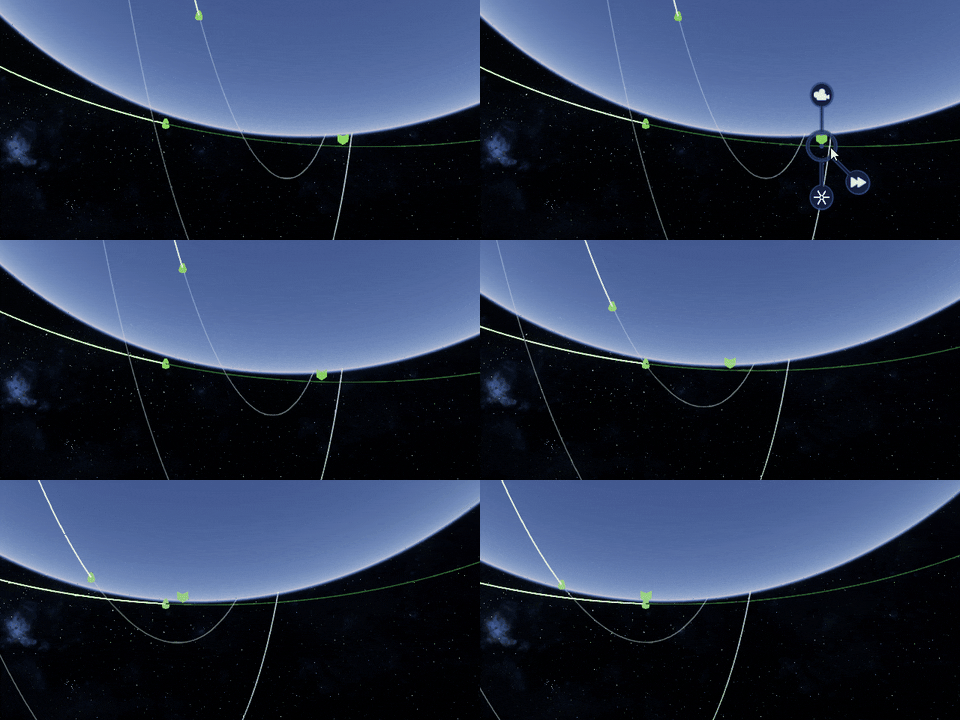
Another one most requested feature is to warp to a point on the orbit. And now you can finally do it!
I can't even imagine how I lived without this feature before
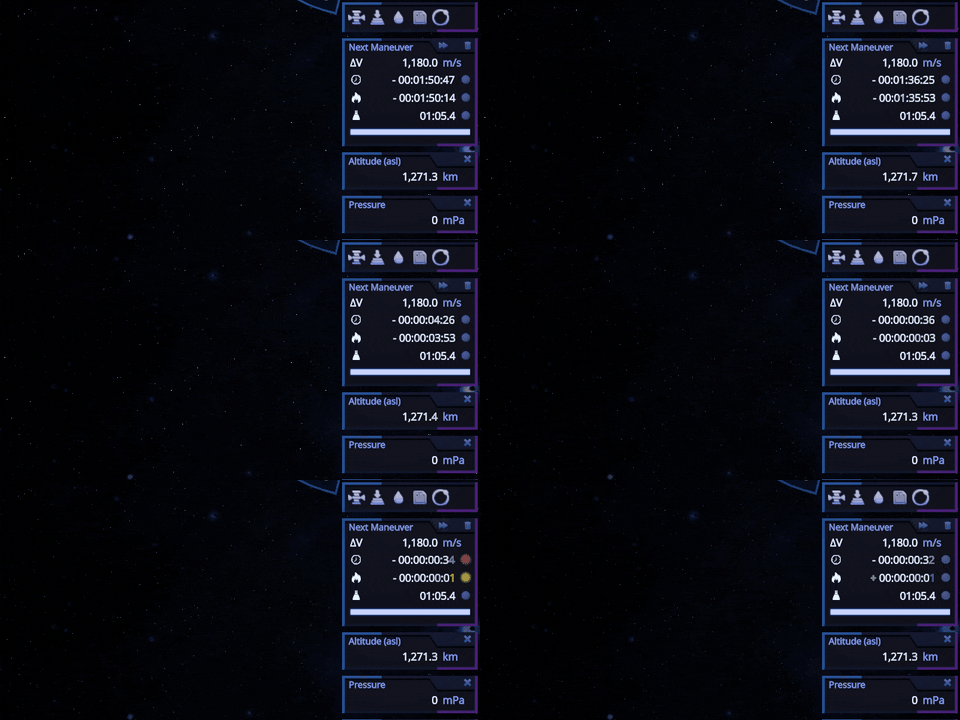
I’ve also added a button to the maneuver panel, so you can warp 10 seconds before the start of engine burn. Not only that, but there are a set of indicators with sounds that will help to make your maneuvers much more precise.
Making maneuvers become very enjoyable process
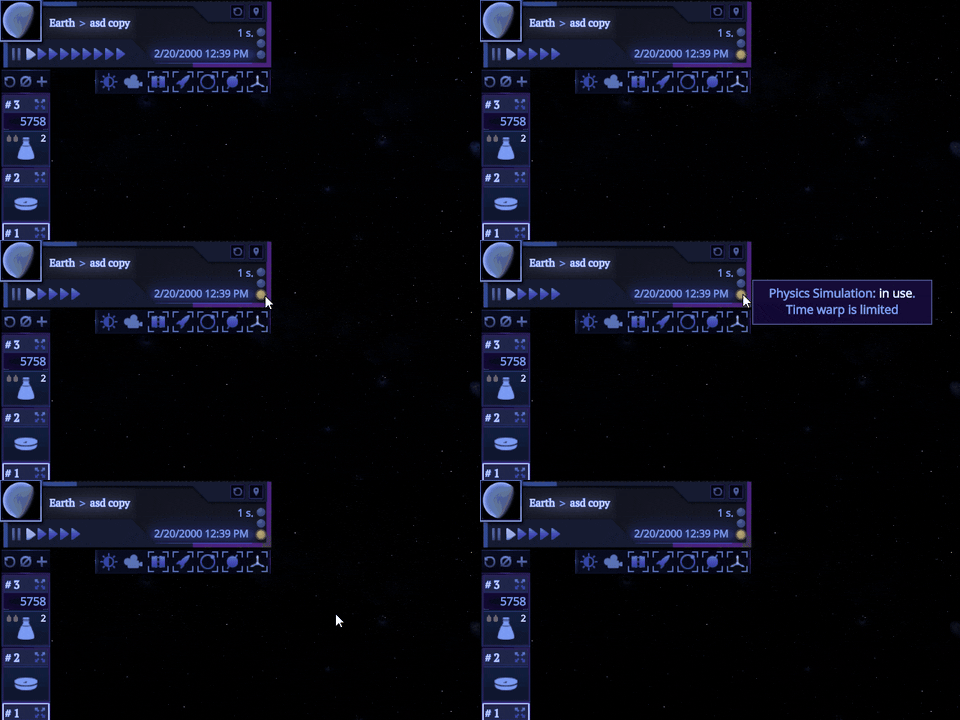
I’ve also added two more indicators to the time panel. One will light up every time the game is in physics simulation. Another one – when automatic time warp was initiated. I hope this will answer a common question, why time warp sometimes is not working as expected.
The third indicator is reserved, I haven't figured out what it can be used for yet
More UI redesign
Assembly shop and main menu UI was visually redesigned to approach the quality standard set by the flight UI. There are plenty of old interfaces left in the game, but I will deal with them sooner or later.
Parts, rockets, spacecrafts and assembly lists were greatly improved
As well as some smaller UI elements
Textures improvement
Solar map textures of all gas giants were improved. I’ve also added solar map materials to 4 biggest Jupiter satellites.
If a planet still has no surface materials, it will load solar map texture now. I think it is better that just a white sphere, despite it has very limited resolution
As always, there is much more that this update brings. You can find full patch notes below. Thanks for playing and stay safe!
⚠️Important! Your old save file is compatible, but it is highly recommended to rebuild all your rockets, because old ones will not recive updated paramters or simply could not work properly.
v0.21.0 release notes
Features:
🔸 added H2 and O2 fuel pair; 🔸 added Select mode for Assembly and ability to change rocket part configigration for already attached parts; 🔸 full rebalance pass on all fuel tanks parameters; 🔸 added 8-way symmetry and part variants, that support it; 🔸 added warp to maneuver button and start burn indicators to maneuver panel; 🔸 all planets, that still have no surface, now use textures from the scaled space model, instead of just a white sphere; 🔸 added Callisto, Ganymede, Io and Europa solar map textures; 🔸 improved all gas giants solar map textures; 🔸 [Space context menu] added warp to point option; 🔸 added two indicators to the time panel, that will show if the game is running physics simulation or if auto time warp is used; 🔸 added more sfx to the game; 🔸 redesign of some old interfaces; 🔸 added irregular moon celestial body type and corresponding map filter;
🔸 engine 6 and engine 7 now uses H2+O2 fuel pair; 🔸 corrected engine_skycrane hydrazine consumption; 🔸 adjusted visuals and slot positions for decoupler_radial_1
Changes:
🔸 significantly improved fuel tanks attachment stability, when trying to connect it to the radial decoupler; 🔸 advanced assembly tutorial received additional tutorial steps, clarifying some assembly mechanics; 🔸 advanced assembly tutorial was split into two parts, to reduce its size; 🔸 stage groups with engines now have fuel type indicators; 🔸 collapsed stage groups are now grouped by fuel type; 🔸 stage fuel navball indicator now works with any fuel that engines consume; 🔸 stage fuel navball indicator now calculate amount and % for entire fuel pair instead of only fuel alone; 🔸 added indication that engines have no required fuel in the stage to stage group; 🔸 base time warp in the spaceport is 1 now (previously was x10); 🔸 time warp acceleration / deceleration is frame rate independent now; 🔸 game will unpause if you click pause button a second time; 🔸 changing time warp using hotkeys will also unpause the game if it was paused; 🔸 orbit raycast no longer processed if orbit point is behind the celestial body; 🔸 small improvements to scaled space atmosphere computation, that will improve its quality; 🔸 added window for parts, that contain kerosene; 🔸 improved UI for widescreen displays;
Fixes:
🔸 symmetry not working when trying to detach / reattach fuel tank from decoupler; 🔸 sometimes you can notice a strait line on a planet surface; 🔸 sometimes there is a wrong ambient light color when flying over the planet; 🔸 dV is not calculated for hydrazine engine on stages; 🔸 dV is incorrectly calculated when stage contains more fuel or oxidizer than required by engine's consumption ratio ; 🔸 sometimes maneuver placed using orbit context menu, appeared in the wrong place or not appear at all; 🔸 orbit raycast distance is resolution-dependent; 🔸 orbit with section sometimes looks broken; 🔸 orbit raycast doesn't work on high eccentric orbits with no sections; 🔸 orbit with encounter doesn’t reset it's shape after switching to spacecraft with this orbit and to another one; 🔸 wrong door connection between coal generator and elevator; 🔸 sun flares are visible through solid geometry, when the sun is near the edge of the screen; 🔸 fuel transfer in docking port window doesn't work; 🔸 placeable actions subpanel remains visible, when exiting to rocket list and assembly was in Select or Rotate mode;
Patch v0.20.7
Here is a small patch with a bunch of fixed bugs that was mostly found by the community. Also this patch brings a pretty big change in rotation steps of big hexagon-like sockets that can be found mostly on fuel tanks. Initially those sockets supported only 60 degrees turns to follow the hexagon sockets restrictions. After receiving some feedback and thinking about it for a while I decided to remove this restriction and allow rotation on those sockets with a 10 degrees step. Despite being not very “socket accurate” It should not break anything and will greatly increase customizability of all rockets. I hope you will enjoy this change.
v0.20.7 release notes
Part changes:
🔸 rotation step for hexagon, heptahedron, star and heptahedron range sockets increased from 6 to 36 steps;
Changes:
🔸 updated to latest Unity patch version, increasing the game stability; 🔸 removed CRC check on asset bundles, that can randomly prevent the game from starting up; 🔸 removed some shader duplication wich should improve performance;
Fixes:
🔸 game crashes on quit from flight or spaceport; 🔸 black squares appears on windows in the assembly shop; 🔸 orbit stats panel breaks when changing SOI from Earth to Moon; 🔸 flipped socket for nano reaction wheel; 🔸 visible tiling on skycrane material; 🔸 crash on skycrane detach when spacecraft is on the ground; 🔸 crash when adjusting manever using mouse wheel, when editing values in input fields at the same time.
Patch v0.20.8
Here is a small patch with a bunch of fixed bugs that was mostly found by the community. Also this patch brings a pretty big change in rotation steps of big hexagon-like sockets that can be found mostly on fuel tanks. Initially those sockets supported only 60 degrees turns to follow the hexagon sockets restrictions. After receiving some feedback and thinking about it for a while I decided to remove this restriction and allow rotation on those sockets with a 10 degrees step. Despite being not very “socket accurate” It should not break anything and will greatly increase customizability of all rockets. I hope you will enjoy this change.
v0.20.8 release notes
Part changes:
🔸 rotation step for hexagon, heptahedron, star and heptahedron range sockets increased from 6 to 36 steps;
Changes:
🔸 updated to latest Unity patch version, increasing the game stability; 🔸 removed CRC check on asset bundles, that can randomly prevent the game from starting up; 🔸 removed some shader duplication wich should improve performance; 🔸 update game input module to a version that fully supports current Unity Engine.
Fixes:
🔸 spacecraft item lose status line when spacecraft name is too long; 🔸 newely created rocket could failed to save, if rocket with the same id did not load properly; 🔸 game crashes on quit from flight or spaceport; 🔸 black squares appears on windows in the assembly shop; 🔸 orbit stats panel breaks when changing SOI from Earth to Moon; 🔸 flipped socket for nano reaction wheel; 🔸 visible tiling on skycrane material; 🔸 crash on skycrane detach when spacecraft is on the ground; 🔸 crash when adjusting manever using mouse wheel, when editing values in input fields at the same time.
Update v0.20.5 "In Between" is out of Beta!
This was a very hard beta cycle. Unity 2022.3 kept raining bugs, different problems and unexpected changes that constantly broke the game in different places. I couldn’t hope that those issues would be solved on the engine side in time, because even getting a reply from Unity staff is almost impossible nowadays, so I needed to find workarounds to them. Should I mention that most of the issues that I reported in August are still not fixed?
Anyway, I think this update is ready to come out. I’ve described most of its features in the previous post, so let’s talk about the new parts that were not part of the beta and will be available in this release.
New engines and fuel tanks
I’ve added two new engines this time. The process of adding them is pretty hard, because every single engine in the game is based on the parameters of the real ones and I spend a lot of the time on research of existing technology. These ones have a much higher ISP and are best suited for second and third stages of rockets. They have their own drawbacks and should not become the only and obvious choice during rocket assembly (at least I hope so).
"Electron-0210" Liquid Fuel Engine
"Aragna-6410" Liquid Fuel Engine
The only catch, that they should use a hydrogen-oxygen fuel pair. While the game was designed around different fuel pairs, some game systems are still not fully reworked to support that. For example, stage dV calculation, fuel level indicators, maneuver dv calculations is expecting a single UDMH/N2O4 pair. Also there are no warnings during rocket construction that will indicate that current engines are missing fuel. So, to simplify things, I decided to not add a new fuel pair for now, but I will definitely do it in the next update with the necessary improvements and reworks.
FT "Piston"
FT "Bublik"
New decoupler, fairings and adapter
5 m diameter is getting more love now. New Apollo-style decoupler for that radius will make your rockets look much cooler and more convenient for use. Note that it actually consists of two separate parts, like payload fairings.
"Rumble" Decoupler Adapter
"Rumble" Decoupler
I’ve also added another 5 m payload fairing set that should be easier to use for placing rovers inside.
Payload Enclosed Base GO-5
Payload Enclosed Section GO-5 1.4m
Payload Enclosed Cap GO-5
And the first 2.4 to 5 m adapter will provide you more choice while designing your rocket of dreams.
Adapter 1.2-5
New solar panels
There are two new solar panels that are not only compatible with each other, but can be perfectly tiled on a hexagonal connection.
"Gektoplast-A" Solar Panel
"Gektoplast-M" Solar Panel
They are also very light and could be used on a spacecraft, where each kilogram counts
Combinatorial examples
Parts for skycrane
I released rovers in the previous update, but the game lacked some important parts to build fully functional skycrane. Using the next two parts combined with the rover payload fairing, you should be able to finally do it now.
V-1 Sky Crane Base
Nano Reaction Wheel
Putting those parts into good use
There are a lot of changes made to the game during this five month cycle, so I expect that not all bugs were hunted down. So if you encounter something strange, please report it to our discord or on the steam forums and I will try to fix it as soon as possible.
You can find full release notes down below. Another year has come to an end and I wish you good fortune in the year to come. Thanks for playing and see you in the next one.
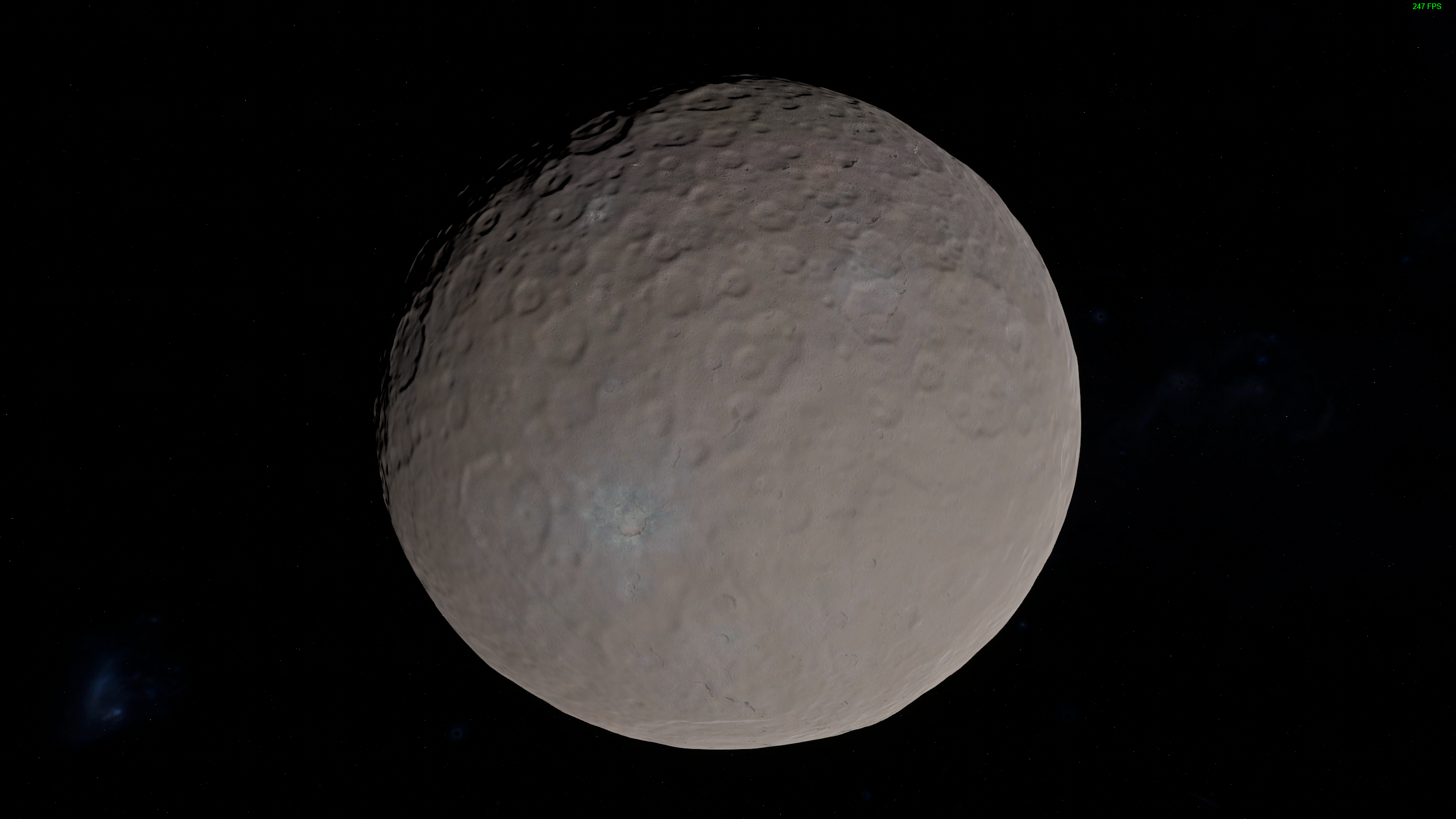
Flying over Ceres
Flying over Vesta
v0.20.5 release notes
Features:
🔸 added Ceres; 🔸 added Vesta; 🔸 Mars textures rework 🔸 added scaled space filters; 🔸 added celestial bodies list into Control center; 🔸 added search functionality to tracked objects list in the Control center; 🔸 added panel for manual adjustments of the selected maneuver dV during the flight; 🔸 resources panel can display all resources, that spacecraft has; 🔸 added orbit info panel during the flight; 🔸 predicted orbits are displayed relative to target frame of reference now, when you focus camera on it; 🔸 added correct ambient light when flying over surface of the planet; 🔸 added manual brakes for wheels and the corresponding indicator to navball (use ALT+B to toggle).
New rocket parts:
🔸 V-1 Sky Crane Base; 🔸 "Rumble" Decoupler and "Rumble" Decoupler Adapter; 🔸 "Aragna-6410" Liquid Fuel Engine; 🔸 "Electron-0210" Liquid Fuel Engine; 🔸 FT "Bublik"; 🔸 FT "Piston"; 🔸 "Gektoplast-A" Solar Panel; 🔸 "Gektoplast-M" Solar Panel; 🔸 Payload Enclosed Base GO-5; 🔸 Payload Enclosed Cap GO-5; 🔸 Payload Enclosed Section GO-5 1.4m; 🔸 Nano Reaction Wheel; 🔸 Adapter 1.2-5.
Part changes:
🔸 Zarya engine geometry rework; 🔸 "Mgnovenie\" Probe Core decreased in size; 🔸 batteries slightly reduced height and mass; 🔸 simplified all engine colliders; 🔸 adjusted size of combustion chamber on some engines.
Changes:
🔸 added safeguard, that should check if any spacecraft received a NaN position during orbit calculations and destroy that; 🔸 parachute auto cut now triggers when spacecraft touches the ground, instead of near zero speed check; 🔸 rocket command module selection will prioritize ordinal command modules if there are cockpit or rover present alongside; 🔸 riteg will calculate decay time from launch not from the time it is created in the assembly shop; 🔸 you can toggle on/off delete hotkey for tracked objects list now; 🔸 improved control center tracked objects list UI; 🔸 improved loading times, when entering spaceport or assembly shop; 🔸 game consumes on average 400 Mb less memory; 🔸 "time" debug command now supports input date in string format; 🔸 added support for DirectX12 and Vulkan API (that can be faster on some PCs), that can be enabled via command line parameters: -force-d3d12 -force-vulkan
Fixes:
🔸 planet surface disappears if you quit to main menu from the assembly shop in blueprint mode; 🔸 exception when trying to attach something on top of engine 4; 🔸 spacecraft with wheels no longer transitions into sleep state when it is no longer moving and after steering was used once; 🔸 rocket can still receive wheel commands even when command module is destroyed; 🔸 maneuver sometimes not placed via context menu; 🔸 orbit planner sometimes predict wrong intersect nodes; 🔸 crash when setting the Sun as a target; 🔸 you can't unset target when surface object was set as a target; 🔸 riteg uses part attachment date as a decay start instead of launch day; 🔸 Circular Extended Unit has wrong orientation for radial dual attachments; 🔸 time warp not working, if spacecraft's lights are on and there is little electricity left 🔸 different typos and missing translations in assembly;
Known issues:
🔸 navball text changes brightness depending on exposure (unity bug); 🔸 SSAO is mostly turned off during the flight because of artifacts (unity bug);
Update v0.20.0 "In Between" Public Beta
Today I am releasing part of the v0.20.0 "In Between" update into the beta branch. This will not include new rocket parts and several smaller features. They need a bit more work, so they will come in two and a half weeks with a full update release. So, let’s talk about what’s new is awaiting you in this update.
Note: this update is in public beta. This means, that you need to swith your game to beta-builds branch, to access it.
Ceres
The first dwarf planet located between the orbits of Mars and Jupiter has arrived to the game! The surface elevation is based on Dawn space probe data and the surface color was built using the newest procedural texturing technology. It is a small body only 946 km in diameter and a mass of 0.0128 of the Moon’s one with a high inclined orbit. It would be almost impossible to reach with the current set of parts, but I will not underestimate players of Rocket Science, who have already arrived on every single present body in the inner planet group with the technology made mostly for lunar flights. So we’ll see how it goes.
Vesta
The first fully made asteroid is now in the game too! It is the second biggest body in the asteroid belt with the mean diameter of 525 km. While it is a pretty big object and its shape is close to a gravitationally relaxed oblate spheroid, the large concavity and protrusion at the southern pole combined with the small mass placed it into the asteroid category instead of dwarf planet one.
Mars textures rework
I’ve mentioned this one in the previous dev update. Not only did it get a new procedural selection of colors, but twice as many materials using some new ones. Here is an orbit view of the planet.
Control center UI changes
I’ve added a new Celestial Bodies list there. It only contains major bodies in the Solar system for now, but I'll add more as time goes on. Spacecrafts list was reworked and can hold more elements and it is harder to accidentally remove your spacecraft now (you should specifically toggle on hotkey removing or use a delete button for that). I’ve also added search functionality to both lists.
Map filters
You can filter your map in the Control Center and during the flight now. You can finally turn off all debris and don’t see it anymore (but the game will still simulate it, there is no way around this).
The filter also applies to the spacecraft and bodies lists in the Control Center
Flight panels improvements
One of the frequent requests was to display rocket orbit data. I’ve added an orbit instrument, where you can see the orbit's periapsis, apoapsis, inclination and eccentricity. Note, that orbit data is available for all spacecrafts, but when the instrument parts system will be implemented, it will be tied to a specific instrument you will need to attach to the rocket.
Please let me know if you need more orbit data and I will add a toggle for that
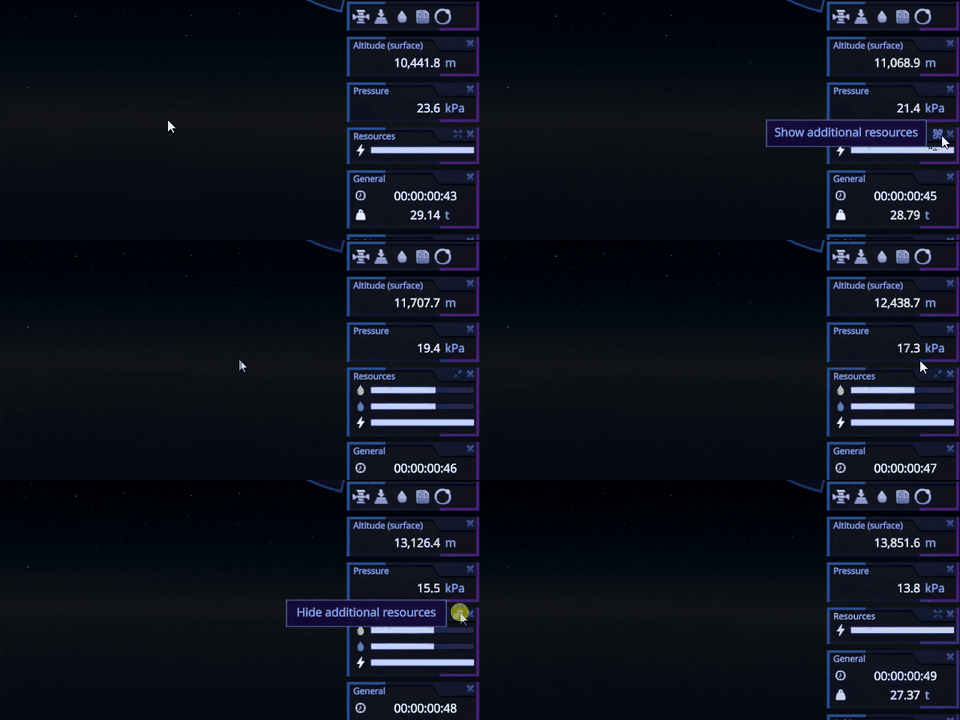
You can also display all the resources that the rocket has by simple toggle now.
Other features
Two most requested features are in the game: Fast Load button and orbit planner improvements. You no longer need to ALT+F4 the game, if you made a mistake. You can load the last game autosave at any moment during the flight or in the space center.
Due to legacy code limitations, the game will load spaceport by default, but I am planning to make it load directly the flight if you pressed the button during the flight
If you will get an encounter and then will switch to a body in which SOI spacecraft will get to, you will be able to see an orbit relative to this body frame of reference
Engine update
I’ve described this in the previous dev update too. It was a very long and painful process and there are so many changes in the code, most of those are invisible. I’m expecting plenty of bugs and crashes in this update. On the other hand, some systems should start working smoother and faster. There are a bunch of bugs fixed as well, and more to come. Anyway, please let me know if you find anything not working as expected and I will be glad to fix it.
That’s all for today and I am waiting for your feedback.
Dev Update: Overcoming Unity
After v0.19.6 release I took two weeks off to prepare for another big task – the transition to the new 2022.3 version of Unity. This particular one has to be one of the most challenging in the entirety of the game's existence. As I mentioned in previous dev updates, I’ve started building Rocket Science using a lot of newest experimental Unity packages such as HDRP, DOTS, Addressables, Burst, etc. They were under active development, which led to constant API and breaking changes, bugs and other early access stuff that you are familiar with. On the other hand they provided a set of tools that basically allowed me to make this game on Unity as performant as it is.
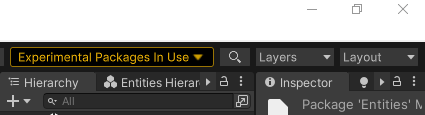
As time went by some of these packages reached version 1.0 and finally became “stable”. But DOTS ones, using which I built planet generation, orbits and maneuver planner, remained “experimental” until Unity 2022.3. So I definitely wanted to transition to that version of editor and finally get rid of this warning panel and start working on fully stable and supported version of the engine:
The only catch was that DOTS API changed a lot between last version and 1.0 so I wasn’t even able to open Unity Editor until I will apply hundreds of changes into the game's code to implement the new API. It took me more than a month to do all this stuff, but at that moment I thought that it was worth it. Because the code became much cleaner, a lot of dirty hacks and workarounds were removed and some functions and structures became unnecessary because they were already implemented in the newest Unity. Moreover I revisited the architecture of planet generation and made it consume almost 400Mb less memory, which will become very useful when I start to add props and details on the planet’s surface. Also thanks to some changes I made, loading times between spaceport or assembly to flight transition reduced a lot.
But when I fixed the last compiler errors and finally launched the game I was shocked by the amount of bugs this version introduced. Here are only some of the most notable ones.
Navball for some reason lost almost all the color
Ambient lightning disappears during transition between scenes, and sometimes completely
All UI icons render with artifacts
All directional light shadows are broken
And the cherry on top: the game build immediately crashed on start.
This was very unexpected. I haven't seen so many bugs since Unity 2019.3 using which Rocket Science was initially released (and because of that I lost almost 20% of sales in refunds). But I simply couldn’t go back, because I’ve spent so much time on this transition already, so I started searching for workarounds and posting all these bugs to Unity at the same time.
I found acceptable solutions to almost all of these bugs except the broken directional light shadows one. And Unity is always very slow on processing posted issues: it can easily take them a half of a year to fix and backport them to the stable version from the current tech stream. So I began a deeper investigation and debugging and found out that shadows break when any object in the scene is located further than 1e8 meters from the origin, even if it is not in a current camera view. For comparison, the Moon is around 3e8 meters away. And the only workaround was to disable any object that exceeds this distance. Which means no distant rendering (or even planet rendering from high altitudes) which was not acceptable for the game at all.
So I started poking Unity Technologies at forums trying to drive their attention to this bug. And the silence was an answer. Two more months have passed and I finally got the response: they just closed this bug with a resolution “By Design”. They said that Unity has never supported far away objects and don’t have any plans to support it in the future. Which was simply not true. How Rocket Science is working then?
I was very demotivated by this and combined with the news about the new engine pricing model (basically 2.5% revenue share from sales in addition to current monthly payments for the editor). So further development on Unity didn't look very attractive. But I pulled myself together and spent the weekend debugging and deconstructing that shadow bug piece by piece. Surprisingly I found a source of this problem in the engine's code and an acceptable solution for it. At the same time this bug was reopened by some responsible employee from UT and then fixed later (but it will still take at least three months to propagate this fix into the current version of Unity).
This is all great, but I lost so much time that I could have used for gameplay development while doing work that Unity Technologies should do. I'm tired of the fact that most new engine’s features don’t support and don’t even consider space simulators as a type of product that could be built with it. For example they released great cloud and ocean systems, but both of them can only be used on a flat surface. It is also very inconvenient to wait a half of a year until some critical bugs will be fixed and get to the users, because your game release could be completely blocked by this. Moreover this sudden change in pricing model undermines the company's credibility.
But migrating Rocket Science to another existing engine is not an option either. For example, Unreal Engine don’t support C#, Godot doesn’t support Data-Oriented design, Unigine is not that popular and it can be hard to find guides, tutorials and answers to questions about it. So I decided to continue development of Rocket Science on Unity for now, but spend some small portion of time making my own game engine specifically for space simulators. Since I know what I need and 80% of existing game code is engine independent already, it will be possible to migrate it when the time comes. But I don't think it's going to happen anytime soon, because it's a huge task, with a lot of unknowns and research I would need to do. But in the long run it will allow me to do a lot of stuff that is not possible on Unity right now.
Back from Unity mess to the game itself. Here is a quick overview of some features that are currently in development for v0.20.0
Martian system materials rework
I wanted to do it, since the new procedural material system was introduced in March 2022 but don’t have time to. This is basically the last celestial bodies that work on the old one.
Old Mars
New Mars. You can see that surface color become much more realistic
Old Mars
New Mars. A lot more surface detail has appeared that is more consistent with the planet’s topography
Orbit planning improvements
If you will get an encounter and then will switch to a body in which SOI spacecraft will get to, you will be able to see an orbit relative to this body frame of reference.
You can even change a maneuver while staying in the target body reference frame and see, how orbit will change
Solar system map filters
Sometimes it can be hard to plan a flight trajectory because a lot of objects could clutter your view. So I am working on a set of filters that would help you to deal with this problem and clean up your map,
Work in progress, could change before the update
Processing feedback
Last three months I received a lot of feedback from the players, who spend around 1000 hours in Rocket Science. There are different requests there: from simple UI improvements to bugs that crash the game when encountered. I need to process most of it before the release of the update.
As always, more stuff is coming including traditional bugfixing, QoL improvements and more rocket parts. But I will cover all of that next time. That’s all for today, thanks for your support and feedback! See you soon.
Patch v0.19.8
A small post launch patch that improves the game stability a bit and brings some QoL features.
v0.19.8 release notes
Features:
🔸 updated Unity to the latest 2021.3 patch version, which will improve stability and performance a bit; 🔸 added separate icons for planes and rovers to the map; 🔸 improved wheels controls and responsiveness; 🔸 added front indicators for "Mgnovenie" Probe Core and "SOHO" Probe Core; 🔸 added a tooltip to the rocket name on time panel telling you how to edit it.
Fixes:
🔸when new rocket was saved and immediately after that was renamed, the name doesn't change in the assembly UI; 🔸 when rocket was renamed and changes were reset right after that, the changed name not reverted back.
Patch v0.19.7
A small post launch patch that improves the game stability a bit and brings some QoL features.
v0.19.7 release notes
Features:
🔸 updated Unity to the latest 2021.2 patch version, which will improve stability and performance a bit; 🔸 added separate icons for planes and rovers to the map; 🔸 improved wheels controls and responsiveness; 🔸 added front indicators for "Mgnovenie" Probe Core and "SOHO" Probe Core.
Fixes:
🔸when new rocket was saved and immediately after that was renamed, the name doesn't change in the assembly UI; 🔸 when rocket was renamed and changes were reset right after that, the changed name not reverted back.