

I Fetch Rocks
Compositions Update
Compositions allow you to save and name your current ship configuration independently from your save games. Compositions can be saved for the whole ship, or on a per room basis. This allows you to do things like experiment with new ship configurations in sandbox mode, save them as a composition and then load these compositions into your Career Mode Save game.
In Career mode, you'll only be able to load the composition if you're in the dock and you have the required components. If you have the funds, you'll also be given an easy option to automatically purchase any components you don't already own when loading a composition.
Rendering performance for rooms with exceptionally complex circuits with many floating objects has also been significantly improved.
Patch notes for 0.4.9.4
Patch notes for 0.4.9.0
- The physical features of the data pad no longer rotate with the screen
- The datapad is now less erratic about when the screen rotates
- Imrpoved the robustness of how the datapad is removed and returned to the holster
Patch notes for 0.4.8.1
- Added Vector Cross arithmetic module
- Added unlimited tethers to the tutorial
- Fixed precision of alignment vector
- Fixed Vector Subtract module sometimes being processed out of order
- Fixed both ends of cable not highlighting
- Fixed bug with Carbon Bond Plate if it was put into inventory while partially inserted
Patch notes for 0.4.7.0
- To assist with cable management, both ends of a cable will now highlight when either end is highlighted.
Change log for 0.4.6.0
Patch notes for 0.4.5.5
Update for Cables and Radiation
Happy New Year Rock Fetchers!
We hope you all had a great holiday season and are ready for a new update. We have made some minor adjustments and are preparing for a major new mode.
Cable Management
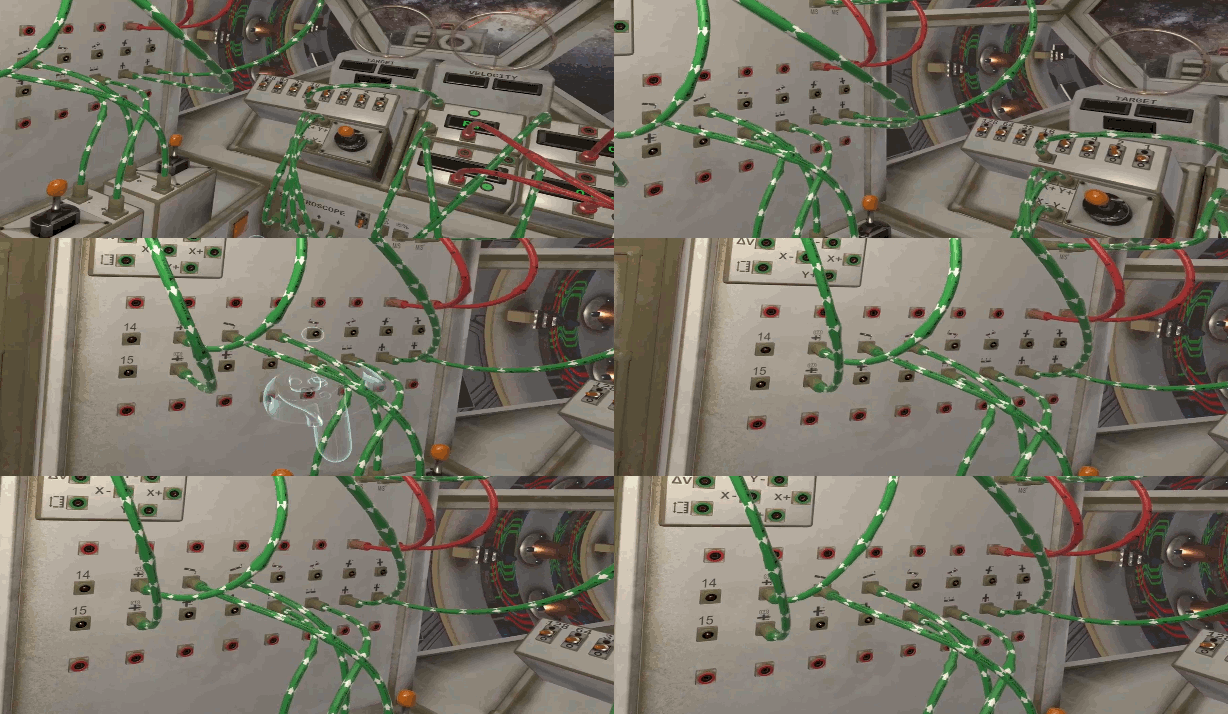
The Community has asked for some time now about cable management and we have listened. You will now be able to grab the midpoint of a cable and move it (within reason) out of your way. Look for the "grab point bulge" on the cables as shown below and just… move them!
Radiation / Cosmic Rays
Radiation is always a burning topic (See what we did?!) and we have made another adjustment to it. You will notice different and more frequent sound effects now associated with the radiation to help you be aware of how much radiation is out there and when your Magnetosphere is failing.
For those of you unsure how the radiation zones and Magnetosphere upgrades work together here is a guide for the first 3 stages:

The processing plant has its own magnetosphere which blocks all radiation within a 500m radius, its ability to block radiation gradually decreases to 0 between 500m and 2500m from the station.
Your ship has an onboard magnetosphere that works in conjunction with the processing plant. This can block all radiation at any distance from the station, however in its default configuration it is highly unstable and will only work when the ship is completely stationary.
Upgrading the magnetosphere can increase its stability in motion and allow your ship to move safely at greater distances away from the processing plant.
Bug Fixes
- Fixed small oxygen leak when connected to dock that prevented the ship's atmosphere from being able to reach 20% oxygen.
- Carbon Bond Plate will no longer be consumed if the laser runs and there's no CO2 left in the atmosphere.
- Fixed an issue with the Cargo Unit Mailing gun if it was switched off before the firing routine had completed.
Sneak Preview - The Academy - Coming Soon
On our roadmap for 2022 we mention a circuit designer. While we worked on delivering this it has slowly morphed into The Academy which is our next big release. In The Academy there will be a series of courses, including a new revamped tutorial, to teach the player about the various module functions, basic logic circuits, binary arithmetic, boolean logic and more….. But that's not all!
There is also the ability for the community to create and share their own circuits which are effectively puzzles for another user to complete.
The Academy’s modes in more detail:
Mode 1
This is where you will complete The Academy courses. These are either pre-created or created by the community and imported to your game folder. The player will be presented with a single wall where they must build a circuit to solve the puzzle detailed on the datapad.

The puzzle is solved when the Data-In port(s) are receiving the correctly configured data.
Mode 2
This is the designer mode that opens up the pre-circuit and post-circuit wall areas:

This gives users the ability to create the evaluators to determine circuit completion out of modules for the main wall and create power / data points for the player to use as a basis for their circuit. You can save your designs, create your own datapad pages (using images and text files) and share them with others.
What next?
We are focusing on getting I Fetch Rocks to 1.0 and this will include The Academy as well as a new, revamped tutorial and then… well.. we have some plans we will share in due course.
Thank you to the community for your support and we hope you are as excited as we are to see 1.0 and where we go next!
Until next time circuit designers.
I Fetch Rocks Team
Patch notes for 0.4.3.0
2 x 2 = 4
To floating point operations between 0 and 1, e.g:
0.2 * 0.5 = 0.1