

I Fetch Rocks
Patch notes for 0.1.7.3
Patch notes for 0.1.7.1
- Replaced white band on data cables with a band of directional arrows to show the direction that data travels
- Significantly increased the presence of cobalt asteroids
- Added labels to Binary Shift in/out ports
Patch notes for 0.1.6.4
- Add Exit Game button to data pad quit menu, so players can choose to exit the game entirely or quit to lobby
Patch notes for 0.1.6.3
- You can now save anywhere in career mode as long as you are not tethered to an asteroid
- You can now use the Processing plant in sandbox mode and all elements are unlocked
Community Feedback Content Update 0.1.6.0
Thanks for all the amazing feedback and support over this last week since our release into Early Access.
It has been a great week with many new ideas and community made designs already being shared on our Discord.
In response to your requests we have some exciting new modules and features in this update.
First up is the Artificial Magnetosphere Generator
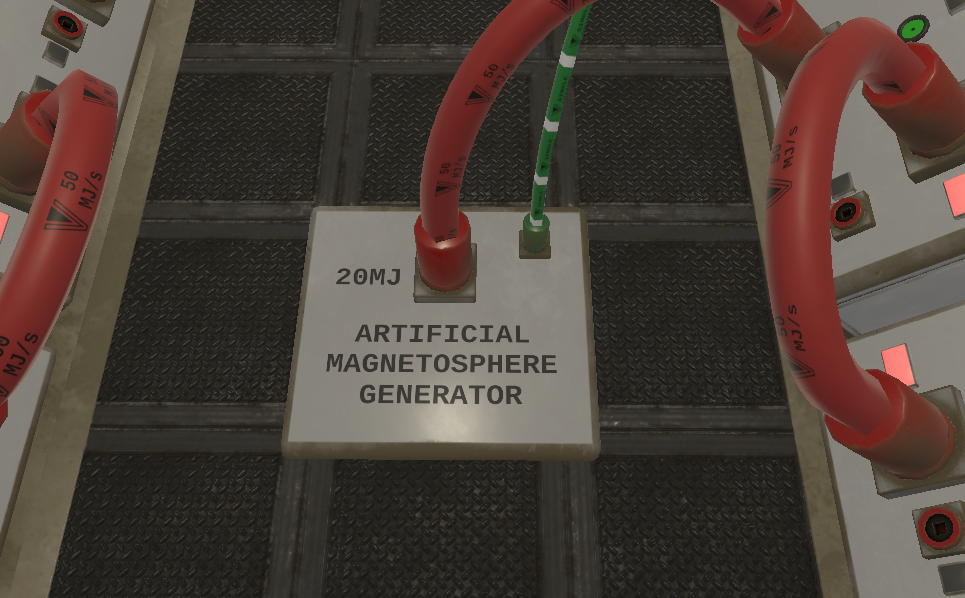
This new power thirsty ship feature generates an artificial magnetosphere that can deflect high energy particles in much the same way as the magnetosphere around Earth. Just like any new technology this one has its minor limitations, it uses a huge amount of energy and it doesn’t seem to work at all when the ship is moving, but Vertiago Fortana’s top researchers are looking into ways of stabilizing the field when in motion and will let you know if any breakthroughs are made… for a price!
Next up is Registers!

A Register module is the first memory module we’re introducing, more advanced modules will be coming in future. When powered and the "write" input is true, a register module will let you store a single 16bit input value to use immediately or keep it for later. The register module will lose its memory after approximately 5 seconds of power loss.
The Cockpit now has a new locked target panel.

The Locked Target panel will output the Range (distance) and angular differential for you to use in your contraptions. You could even use these values to create your own autopilot!(Note: fully automating your ship may lead to the loss of a job with Vertiago Fortana’s)
Improved Auto Value Display

The Auto Value Display module has been improved to let you manually set the format of the data output using the 4 toggles located on the top of the module. The module will still try to auto detect the format when all toggles are set to their off position, but this auto detection will not work if the data has been modified or routed through an intermediary module.
Inventory Menu Pin

For ease of access, once the inventory menu has been pulled out it can be pinned open by clicking on the pin sphere.
We are in the process of writing a full technical manual on the data pad which will allow you to identify items and understand more about their function and configuration.
Below are the full patch notes since the last announcement.
Until Next Time Circuit Designers!!
I Fetch Rocks Team
-PATCH NOTES-
- Added Magnetosphere generator to protect stationary ship from high energy particles
- Added new Register Module
- Added new data ports to cockpit for locked target angles and distance
- Added manual format override to Auto Value Display
- Added inventory menu pin
- Added a new 2 axis joystick module that is restricted to either moving in the X or the Y axis.
- Added Easy, Normal and Hard difficulty modes accessed on the datapad.
- Added labels to multiplex merger and multiplex splitter for easier identification
- Adjusted UI buttons on pad and all computers to have a green border to make it more obvious that they are buttons.
- Adjusted asteroid acceleration inside catchment area
- Adjusted/Replaced some of the sounds such as doors, O2 splitter and high energy particles to be less harsh sounding
- Adjusted high energy particle spawning by reducing their rate to zero within 500 meters of the station.
- Adjusted maximum VR floor height adjustment from +/-0.25 to +/- 0.5M
- Fixed issue that prevented cables from being plugged into newly repaired modules
- Fixed all arithmetic modules lagging behind the rest of the simulation
- Fixed crash when division module was spawned
- Fixed Switched Power supply not switching when input value was 1
- Fixed resupply of lances not working from shop
- Fixed lance count unsigned overflow
- Fixed items you’re holding not following you when you go between rooms
- Fixed missing colliders on CO2 splitter
- Fixed non functional binary merger module
- Fixed Spectroscope/Range laser working when unplugged
- Fixed binary light display working when unplugged
- Fixed grabbing cables connected to floating devices causing them to be pushed by the cabler
- Fixed crossed over power ports on life support/hub room boundary
- Fixed T2 Contract amounts being less than T1 contracts
- Veritago fortana has located and blocked the malicious code that displayed fictional log data from a “previous pilot”. Further attempts to unlock this content will be found and blocked by our company security division. Let the past go!
Minor Update Patch Notes
Thank you to all of those that have been enjoying our game and for providing such amazing feedback already.
Based on your feedback we have a minor update being released that addresses some of the bugs you have experienced and suggestions you have made.
Below are the patch notes and a bonus mini animation for your enjoyment.
Until Next Time Astronauts!!
I Fetch Rocks Team
-PATCH NOTES-
- Fixed 180 degree turn occasionally persisting in locomotion mode
- Fixed spelling errors on tutorial pages
- Fixed tooltip placement
- Fixed buttons not highlighting during tutorial
- Fixed Datapad text alignment
- Fixed some trigger points for tutorial steps
- Fixed Quantum Conduit Stabilizer Rings very slowly drifting out of the ship
- Fixed O2 not being consumed after tutorial is complete
- Fixed streamer cam erroneous space view when player leaves room
- Adjusted all module lights to increase their brightness
- Adjusted shop pricing
- Adjusted ship manual wordings
- Adjusted tooltip wordings during shop section
- Adjusted tooltip wordings during contract section
- Adjusted Vive controller manipulation sphere position
- Adjusted Oculus touch controllers to also grab with grip trigger
- Added tutorial steps for save game and manual
- Added tutorial step to start the engine
- Added manual topics for Power and Data
- Added inventory functionality to show you the module name when storing items
[previewyoutube="8rfx_5HfkMw;full"]
Early Access Release Update
We are finally here! This will be our last update before we launch into Early Access on the 3rd March.
That's right it's only a couple of days to wait until you can start flying, hauling and engineering in our game through the career and sandbox modes included on launch. There are many modules and aspects that we have not shown you yet but here is a teaser for one of our favorites. The label maker:
[previewyoutube="qEQqZmJKoVI;full"]
We have our own plans for the future of this game but community feedback is very important to us as we progress through Early Access. To shape the future of our game with your feedback and suggestions we have created a Discord Channel to bring the community together.
You can join it Here: Official I Fetch Rocks Discord Server
Until next time, future employees of Veritago Fortana!
I Fetch Rocks Team
How does power work?
How does power work?
All power throughout the ship is measured in Mega Joules per Second or MJ/S.
There are two ways to generate power for your ship.
Main Power:
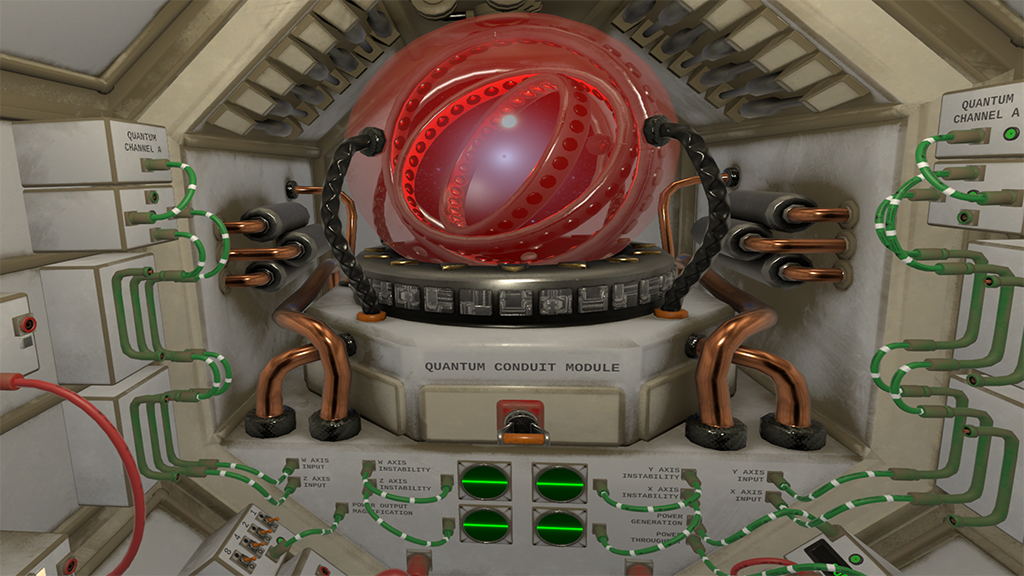
The main power supply for your ship is provided by the Quantum Conduit Module or QCM for short. The module doesn’t generate any power itself, but is able to instantaneously transfer significant amounts of power directly from the fusion drive that is located on the primary mining station.
The amount of power the QCM can transfer depends on the stability of the Quantum Synchronization state or QS state for short, which can be configured using the X,Y,Z and W input axis. To achieve a QS state you must configure each axis to receive a specific signal using Quantum Channel Generators and Mathematics modules. There are multiple QS states theoretically possible ranging from 1% of the fusion drives total output all the way up to 100%.
Once each axis is receiving the correct signal for that QS state then the total power throughput will automatically adjust to the maximum the QS state will allow. Without any signals plugged into any of the axis a trickle of power will go through the QCM to maintain the connection to the main fusion drive on the primary mining station. Circuit diagrams for various QS states are in the game and can be earned as you progress.
If you try to pull more power than is available to the conduit then the link and power throughput becomes highly unstable, if this instability is maintained for too long the link will become desynchronised with the station and a manual restart will be required.
Emergency Power:

There is an emergency Dynamo located within your DataPad to be used if…when…main power fails. You can plug modules directly into the back of your personal data pad and shake the pad to get a small amount of power. There is enough charge to power doors or lights but not much else.
Routing Power:

You can supply power to most modules within a room using the small 1 MJ/S power cables.

Use the large 50 MJ/S power cables to transfer power between rooms and to power hungry modules such as the thrusters, linear/angular dampers and the CO2->O2 production module.

There are also Energy Cells and other Power Distribution modules that can aid in keeping your ship powered and routing power where it is needed, for when it is needed.
We hope that this has… sparked… your interest and will… power… your thoughts on what to do when you get into our game.
Until Next time future haulers!
I Fetch Rocks Team
Career Mode Recruitment Video
We are getting ever closer to March and our release date into Early Access. Our last update was a technical update to showcase the intricacies of the data functionality in our game but today we wanted to showcase the… capitalist aspect.
Below is a recruitment video for the company you will be working for in the I Fetch Rocks Career mode.
[previewyoutube="daQvzB5WpAY;full"]
More updates are incoming and include another technical showcase on power distribution.
Tune in next time for more rock fetching action!
I Fetch Rocks Team
How Data works in I Fetch Rocks
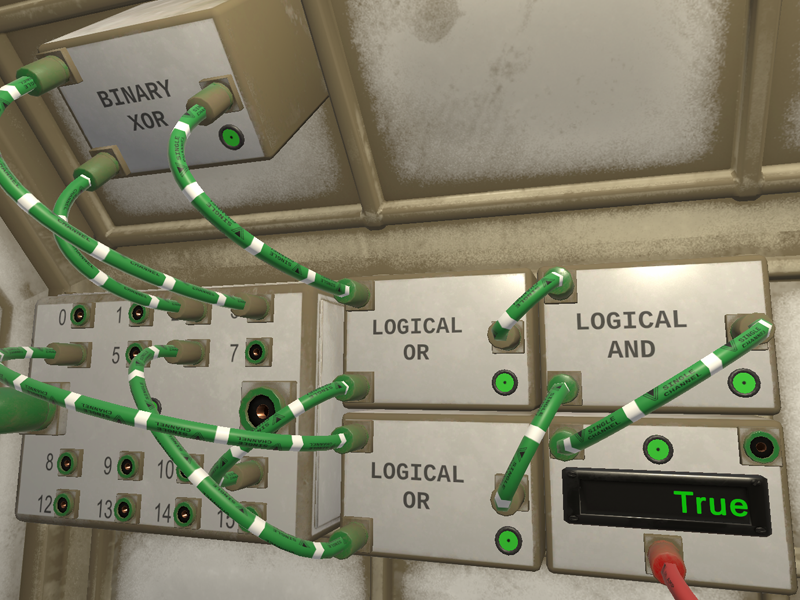
Hi Everyone,
We are back with an informative piece on how data works in our game. Here’s an excerpt from the in-game manual and some screenshots to show how data flows in the game:
Overview
All data values (in and out) use 16 bit values between 0 and 65,535. These 16 bit values are used to control every part and module of your ship.
For example:
When you set a controller such as a slider to its minimum the output will be 0.
When you set a controller to its maximum the output will be 65,535.
When your thruster receives a value of 0, its thrust output will be off.
When your thruster receives a value of 65,535 its thrust output will be maximum.
Cables
All data cables in the game are green and white striped.

A Small Data Cable carries a single 16 bit channel that can be updated up to 50 times per second. These cables are used to pass data between modules within a room.

The Large Data Cables can carry up to the equivalent of 32 small data cables. These are used to transport data between rooms.
Multiplexing

Data Merger modules are used to merge several Small Data Cables into one Large Data Cable.
Data Splitter modules are used to split the data channels from one Large Data Cable back into separate Small Data Cables.
When merging and splitting, the first 14 channels (0-13) are reserved for flight controls from the cockpit, however you can make use of these channels for other purposes if you wish.
Central Hub

When data passes into the Central Hub, the signal from each channel will be combined using a "binary OR" operation.
For example:
If on channel 0 you are sending a binary signal of:
0000000011111111
and from another source on the same channel 0:
1111111100000000
Then the hub will combine them both to:
1111111111111111
The combined signals for each of the 32 channels are then sent back out to all the rooms plugged into the data outputs of the central hub.
Binary Merging
Some modules, such as the Logic modules consider all data input to be either True or False.
The 16bit value of 0 is considered to be False.
Any value greater than 0 is considered to be True.

Binary Splitter modules can split the 16 bit value from 1 Small Data Cable into 16 separate True or False values.
Binary Mergers modules can merge 16 different true or false values into 1 small data cable.
NOTE: Each Binary Merger and Splitter module can only merge 8 bits at a time. There is a shift toggle switch on the module to select the first 8 bits or the last 8 bits of the 16 bit value.
To set all 16 bits on a single channel you can use two Binary Mergers (one shifted and one not shifted) and combine the output of both using a Binary OR module.
Closing Comments
That teaser of text and screenshots shows not only the fine control you can have over your Asteroid Hauler but the intricacy of the simulation we have created.
Don’t fancy configuring everything yourself? Then good news! In Career Mode your hauler will be pre-configured so you can fetch those rocks right out of the gate!
We will be posting further updates shortly so stay tuned.