Mouse Controls! (kinda) and Cloudy Skies (literally)
This is a slightly smaller list of changes, but an important update. No changelist this time, but each change needs a few words, so here we go.
SKY IMPROVEMENTS
I messed with some volumetric clouds, and they looked pretty good, but not worth the performance hit (about 1ms on my PC). Just using nice high-res textures turned out to work the best, with no real performance hit and a nice visual improvement. I tried messing with different visual styles of clouds, but realistic ones seemed to fit the best. The sun/moon is also now visible as a very bright sphere. If you look towards it, the post-processing adjusts appropriately. Overall, this was a nice bang-for-the-buck improvement in making the world feel better (it's also the reason why this update is 100+mb in size). There are a few things left for the UI/etc that need touching up, but this is one of the last in-world tweaks before 1.0.
MOUSE CONTROLS
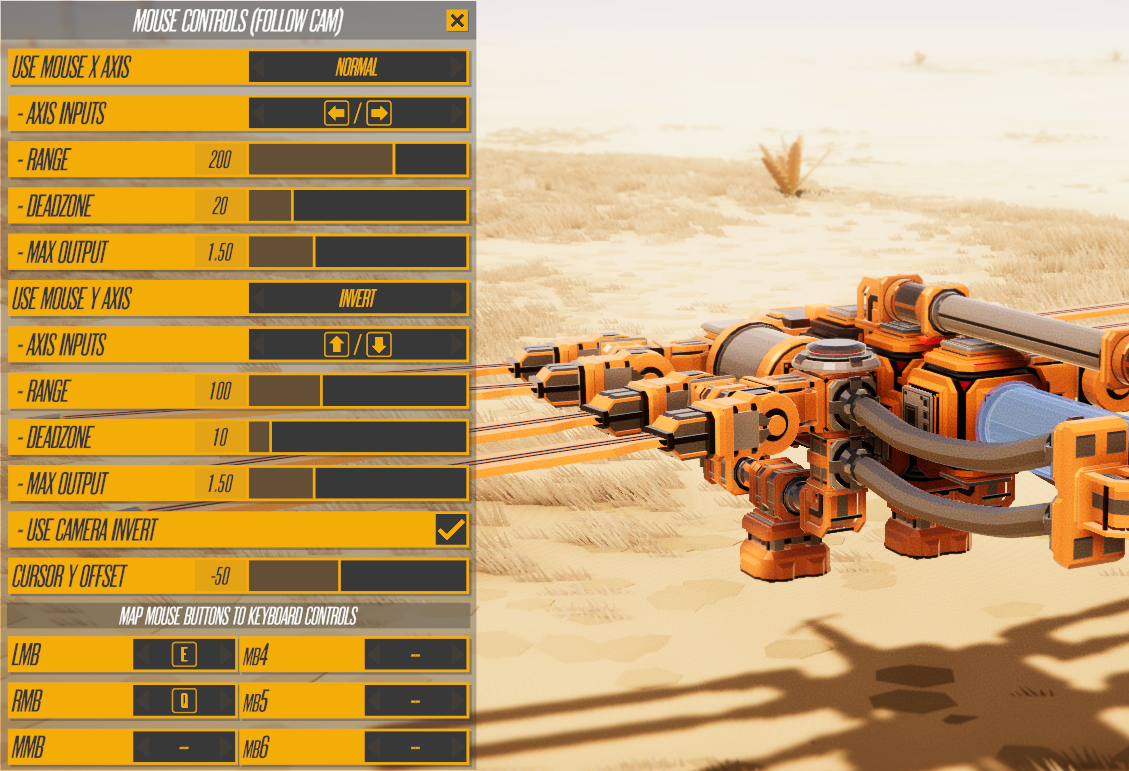
This was a not-too-complex task that required balancing a lot of different issues, so there's a little clunkiness in how you make a vehicle use mouse controls. But I think the result is a good compromise. Basically this dialog handles all the mouse controls.
The majority of that dialog controls how the X/Y axis function and which controls/inputs they override. The bottom part controls which controls/inputs the mouse buttons override. Except they don't override anything, they share/piggyback on existing controls. Originally I had mouse buttons mapping normally, but this made for some awkward issues, especially for those who use Orbit cam instead of Follow cam. Instead everything mouse-related is on this popup, and the mouse controls only function when you 1) use follow cam and 2) are not using a gamepad.
I switched some of the mission vehicles to use mouse controls (the ones that fire something), but aside from Hover Hornet I think using the keyboard remains identical to before. That vehicle I felt ok changing because it never controlled great with keyboard in the first place (it's always been far better with gamepad).
SPACEBAR CHANGE!
This is a side-effect of having mouse support. I decided it was time to switch the main shortcut for starting/ending the game to ENTER instead of SPACE. The mission vehicles will be changing soon to use SPACE as the main fire/action button, and LEFT SHIFT as the main turbo/boost button. This should make the game a bit easier to pick up and play for new players.
LOGIC CODE CHANGE
Some logic stuff, particularly with things that toggle, has always been a bit buggy. I decided it was time to bite the bullet and change anything with part controls/logic that's not visual to use the same code path, and it seems to have worked. I have tested a lot of different vehicles and things seem to be working as expected (aka better than before), but please let me know if you see any logic-related glitches/etc. A link to the Steam Workshop vehicle always helps :)
[Logic also no longer runs in Build Mode. It was still doing so for a few parts.]
STEAM WORKSHOP FIX
I fixed the issue with Workshop Vehicles not having their creator names showing up (and maybe sometimes showing the wrong vehicle name). It was an easier fix than I expected, sorry that took so long.
PART COLORS
New part colors now make a little more sense. If you change the color of a part, that's the color any new part will have. It no longer cares about any parts you may have selected/highlighted, only if you changed colors. I think it also changes the default if you assign new colors in the Edit Palette menu, but that feels ok to leave as is.
NEXT UPDATE PLANS
The next update will be coming...I don't know when, sorry. I'll be working on more turrets/enemies/etc starting tomorrow, and more missions soon. It may be January before the next significant update. I'm looking forward to making lots of fun/varied missions, and development has gone pretty well the last month or so. But estimating/predicting how that will go is difficult to do with any accuracy. A new release date trailer will be coming in January/February when I have a better idea of how long it'll take to finish the game.
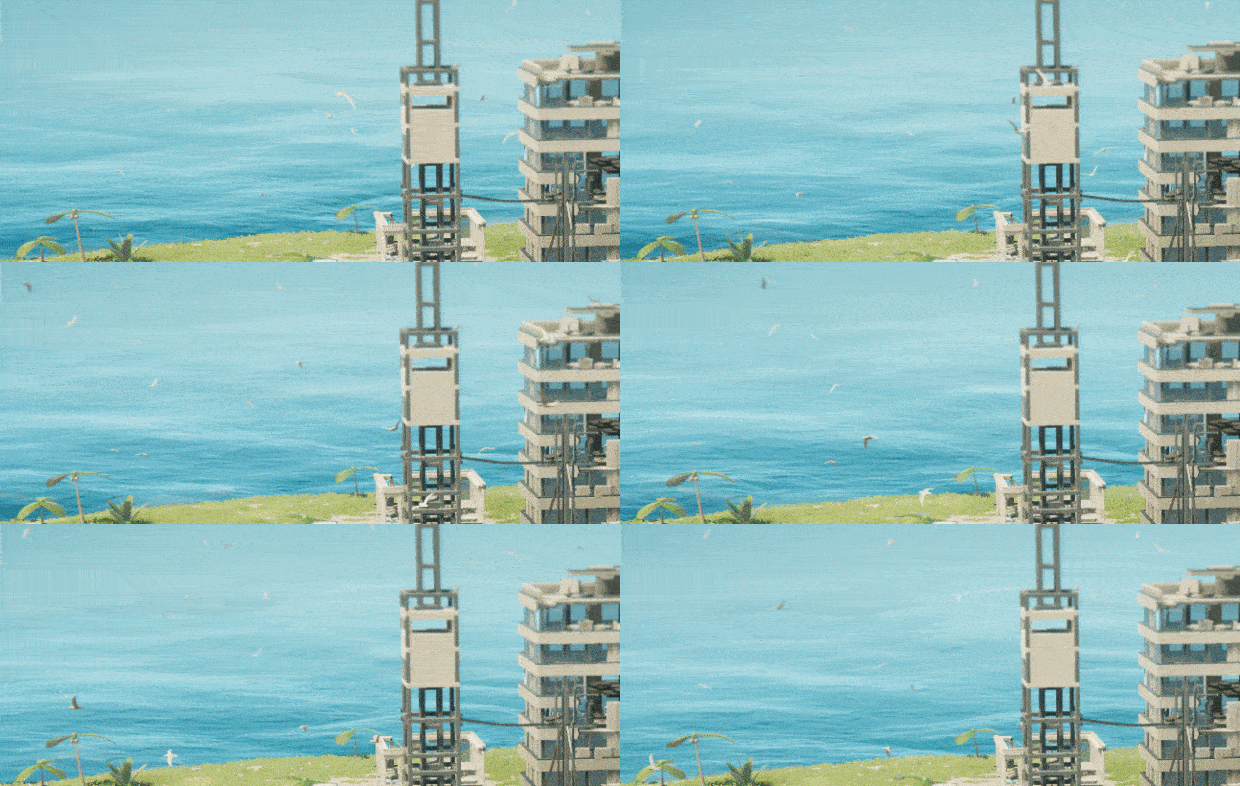
Adding more life to the game (aka seagulls and turtles)
Instruments of Destruction takes place on small islands, mostly for technical reasons. I've been thinking about adding something to the islands since 2020, but didn't find the time to do it until now. That something is the animal you see/hear on basically any island or near most large bodies of water: Seagulls. Islands without birds seem lifeless, which they literally are (sorry plants).
Seagulls aren't the only new lifeform, as sea turtles are also now chilling on beaches. Both new ambient creatures are generated/placed procedurally when you start playing, so you won't see them in build mode. I may still tweak how they behave/react, but they are pretty interactive right now. There's a set number per island, and that can be adjusted in the map editor (along with a couple beach parameters relating to turtle locations). There can be up to 400 total creatures, though nothing comes close to that currently.
[At first the turtles were going to be crabs, and they were kinda working, but they were just too creepy. Turtles seem to fit much better.]
Though these creatures have no real impact on gameplay currently, that may change with some bonus missions in the future. And even without a true gameplay impact, the game/world feels a bit empty when I load up an island that doesn't have any spawning (especially seagulls).
In terms of things that will definitely make a gameplay impact, lets take a quick look at the full changelist:
Changed how the Kraken works in a few ways - Damage to tentacles no longer matters, only hits to head - 1 hit = enraged, 2 hits = game over - Change a bunch of details and UI elements to fit new design Added new turret entity and better support for destroyable objects - Not currently used, but can be placed in Sandbox/Editor Added new ambient animals (seagulls and turtles) with automatic placement - Turtles spawn on the shore in groups - Seagulls spawn on (mostly) edges of structures - Control spawning count and beach limits in editor Added a damage flash to parts and objects Added Bonus Vehicles to the Vehicle select menu (old vehicles from previous missions) Made a potential fix to logic part issues, particularly with toggle parts - Also fixed issues with toggle parts and dropship, as seen in Mission 8 Fixed a few other minor issues
The big things to note:
The Kraken works a bit differently, with it now being a two-hits-to-die system. It moves a bit slower, the tentacles no longer matter for damage, and when it hits a structure with it's head, the structure falls down. The rage meter is replaced with a "danger level" that shows how close the Kraken is to something it can take damage from (either an explosive or large structure).
There's a new enemy turret and improvements to the entity destruction system to support it. This isn't used on any campaign missions yet, but it will be (you can place them in Sandbox mode to try them out). More turrets and other enemies will be coming soon. Now that I've got one working, the rest should be a bit easier/faster.
Bonus Vehicles resurrects a bunch of the older vehicles that were available previously. Note that this list will change in the future, so if you want any of the vehicles in particular, you may want to load-and-save them locally.
I also fixed an issue with Mission 8's vehicle (Dragonfly) that was caused by the helicopter drop. It may have also fixed the issue with toggle logic sometimes breaking, but that's a more difficult one for me to test/confirm.
UPCOMING WORK: ANOTHER SLIGHT DETOUR
Many people have asked for mouse controls over the past 1.5 years, and until recently I didn't see a good enough reason to worry about it. Controlling physics-based vehicles with a mouse is tricky, as vehicles have rotational inertia, and mouse controls are a weird kind of analog control (compared to a joystick/trigger). Plus other vehicle building games (like Besiege) don't have mouse controls.
But with the recent new campaign, the difference in controls between a gamepad and keyboard-only is more noticeable. Quite a few vehicles in the campaign, particularly those where you need to use/aim a weapon, control much better with a gamepad than keyboard. So I need to do something about that. I don't know exactly how things will work, but I'll add some kind of mouse support for controlling parts.
My initial thought is to let you assign the mouse to override four buttons (such as the arrow keys), and use an analog value for each axis that can go well past 1, but also centers itself over time. You'd have control over a couple speed values for each axis, and it'd be easy to invert the axis/speed. These values would be saved with the vehicles, and it'd be easy/quick to change. Perhaps there would be something for marking the Y-axis as auto-invert (so it could be inverted by player's options if desired).
But I'll have to try it out and see. Along with the mouse-control thing, the other major task for the next update is adding more turrets/enemies. I'll probably look more closely at adding more objective types as well. I'm anxious to get back to making/improving a bunch of missions/vehicles. There will likely be one more (significant) update before the end of the year with the enemies/mouse controls, but new missions are unlikely to arrive before early January.
Update 0.415 Drops Today (That's a Pun--Vehicles Get Dropped Off Now)
For the past 6 months or so, I had been planning to redo the camera system entirely. I didn't do that, as I instead found some good ways to work around the systems limitations. The changes went about as well as I could have expected, and I consider the camera system close to final at this point, though if you have any feedback/requests, now is the time to speak up. [NOTE: Free camera will receive some more attention later] I also spent a couple days working on the new Dropship (helicopter) sequencing/etc at the start/end of Story missions in the main campaign. The Kraken got some camera focus as well, so you'll see it more clearly when it arrives, departs, or destroys everything.
Now my focus shifts towards making the game as fun as I can. Part of that is vehicle and mission design, but before I go into extreme-content-production mode, I need to get the remaining objectives and other supporting AI/obstacles working. Need things like turrets, defense drones, and other trap-like things, along with more obstacles that can be used in light puzzle-solving.
KRAKEN TWEAKS COMING?
I'm also not 100% sure about how the Kraken works right now. I'll probably try making the failure state not analog. Basically any damage to the head triggers the end of the mission, but damaging the tentacles won't matter. That will require redoing missions/timing and slowing the Kraken down, but that's not a big deal. I'm also considering having obstacles/etc that the Kraken is drawn to (like a siren), and I'll think about how else you can interact with it aside from preventing damage to it.
About 25 of the final missions will use the Kraken, and I want to be sure they don't feel like glorified escort missions. They're on the edge of that right now, and the uncertainty of the mission fail state doesn't help. With some fine-tuning, better indicators of Kraken-danger, and a dedicated "where's the Kraken?" camera toggle/button, I think the Kraken missions will be as fun as the non-Kraken missions.
0.415 CHANGES
Here's an overview of changes for 0.415, which is not complete, as I didn't write everything down this time (too many camera changes/tweaks to track):
- A helicopter now drops off your vehicle at the start/end of the main campaign Story missions - Some controls for a few vehicles were updated/improved - Mission intro/ending camera now use custom angles/etc (no control) - Camera modes now cache their zoom/rotation/etc so Orbit/Follow no longer depend on each other - Follow and Orbit camera had numerous small improvements - Vehicles with Momentum cam now work better with Follow cam - The Kraken gets camera-focused on at 3 different times (entry, exit, and destroy) - Isometric camera mode was removed (Orbit does the same thing, more or less) - Full-screen blur is used for camera transitions where appropriate - Sped up some sequencing to remove unnecessary frames/pauses - Tracking mode was removed (for now) - New transition from Build mode to playing the game - Added a new Invert Reverse Turning to Power Wheels/Treads (checkbox, enabled by default) - Outputs and signals now use a different highlight color to make it a little more obvious that inputs and outputs are different (and signals/controls are too) - Fixed some bugs (custom missions and a couple others I forgot)
FUTURE UPDATES
As usual, I'm not sure about frequency of future updates. At some point in the next couple months, I'll probably stop updating the game until 1.0. There will be a number of new missions before then, and 1.0 will likely double the number of missions in addition to adding some other polish/finishing features.
The big unknown is really how long it will take to make all the missions/vehicles fun and varied. Not every mission has to be amazing, but having a lot more standouts like Push It Real Good and Initial Revision is the goal.
New Build Tutorial and Challenge Mode in Version 0.410
Let's start with the changelist this time. It's not a massive one, as some of the things listed took a bit longer than you might think at first. Here's what changed in version 0.410:
Added 5 new build tutorial missions + islands
Added new build tutorial system with step by step instructions
Added challenge missions/objectives for first 2 main + 5 build missions
Added new challenge mode logic and objectives
Added new voice lines for new build tutorials + challenge mode
Added new part unlocking system for Build&Destroy campaign
--- Editor lets you edit the part locking per mission
Added a Mission Complete/Challenge Complete popups when you finish
--- 3-stars for normal missions (bonus and main objectives)
--- Moment of completion for Challenges
Added invert output option to direction sensor (Max Limit = 1 instead of 0)
Islands now load their outline meshes from disk instead of generating them
--- Speeds up going into either campaign for the first time after startup
Level Editor: Added new tools to help place more entities faster
Changed reset layout for vehicle controls to use a better default layout (assumes you haven't change mappings)
Crystals are now semi-random on each load (3 chosen from ones placed)
Changed campaign map islands to fade in/out as you get closer (instead of always drawing)
Fixed campaign map scrolling limits to be dynamic based on islands in the campaign
Increased build menu size of parts and part names
Made shift+click work to select the same colored-parts again (on the Colors setting)
Level Editor: Fixed popup for vehicle default selection deselecting
Level Editor: Fixed cutoff sliders for grass/rock (switched to Wave Logic-style)
Fixed not being to remap a gamepad axis (stick/trigger)
Fixed resizing part reseting physics linkage
Fixed CoM debug display (F11) being broken on certain maps
Slightly reduced area damage boost to structures from 0.360 (particularly with lower mass)
Fixed shortcut to hide/toggle handle not working (Ctrl+W)
Disabled outlines on selections/etc during build mode (too slow with tons of parts)
--- May bring it back later if it can be optimized
Added debug function - Shift+F11 in build mode - disable BOTH as a dual input/output option
--- May make this permanent, feedback is appreciated
The biggest things for 0.410 are the new build tutorials and missions in the Build & Destroy campaign, and Challenge mode now being a real thing that's fairly fun (7 challenges currently). There are a lot of smaller changes within those, and a lot of voice lines added as well.
I'm pretty happy with how the initial missions for the Build & Destroy campaign are shaping up, and the Challenge missions are working well. The build tutorial is hopefully good for new players, but really I need to test it a lot more. Feedback on the tutorial is appreciated. It's a different style than other tutorials, and there will be at least 5 more tutorial missions coming in the future. The additional ones will be less step-by-step and more general. The idea is to teach the basics and then slowly let the player take more and more responsibility for the vehicle design. By mission 11 in the BnD campaign, there won't be any instructions, though you'll still be unlocking parts throughout that campaign.
BUILDING NOTE: I'm considering removing the "Both" mapping option for part controls. Parts can have up to 4 inputs and 4 outputs, and you can assign 2 at once (as an "axis"). But I've been finding it more annoying than helpful when working on vehicles, and I added a mode to disable Both as an option. Hit Shift+F11 while in build mode, and you'll no longer have Both as an option. Just something to try out for advanced vehicle builders.
UPCOMING WORK
After a small bug-fix update or two to follow 0.410, my next two priorities for big tasks: 1) Revise camera system. 2) More objectives and things to support additional objectives.
The camera system work I need to look at more closely and figure out if I should rewrite the whole thing or try to wedge in transitions to animated/scripted cameras at the start/end of missions. Both approaches could work, and though I'm tired of messy code throughout the game, rewriting something that mostly works is not always wise. Having some way to override/blend into a different camera might work, and it could mostly reside outside the rest of the camera system.
For the objective stuff, it's time to finally add turrets and drones/orbs that attack the player (and Kraken). I'm not sure if those will be vehicle-based, or custom objects (like the car/truck/SUV). Beyond the enemies, I need to make sure all the other mission types I want to do are possible. The missions are turning out well so far, but I also see how it could become tiresome/repetitive due to too much focus on destroying stuff. Part of that also requires more creative level design and vehicle/physics interaction. Either way, having a variety of missions is needed to keep the game fun for both campaigns.
Beyond those two things, the biggest remaining task is adding all the missions to both campaigns. That's a massive task on its own, but I'll be breaking it into smaller groups along the way, and missions should get easier to work with fewer features being added. Beyond missions, there are quite a few small tasks, and I'm sure I'll find more things to fix/tweak along the way. It finally feels like I will finish the game someday, even if I'm not sure yet when that is.
Changelist for Version 0.402:
Biggest thing is the Advanced Toolbar being added to Build Mode, but lots of other adjustments and fixes. Not expecting to make further changes to the Build Mode UI, aside from adding help text/tutorials. Full changelist:
Added Advanced Toolbar in build mode (need to enable it to see it) Added buttons to select parts with comments, controls, signal inputs, or outputs Added optional comment and control display on selected parts Added input quick-assign on the edit parts popup - click directly on the listed controls on the right Re-enabled multiple vehicle starts and let you pick them on build mode settings and advanced toolbar Added direct-text-entry as position/rotation snap options Aligned two popups for build mode to the left side (Quick Edit and Vehicle Control Layout) Added Left-Alignment IOMapper option Fixed direction sensor speed mode so the output matches the description - Full output when speed is below the required direction/limit, falls off to 0 at max limit Added a better timeout to Steam Workshop uploads (after 3 seconds, hold Escape if no progress) Changed a lot of slider values to take/show decimal values (generally sliders with larger values) Fixed gamepad being able to see Extreme IO version of popup Fixed Shift-clicking on new Physics Linkage property doing nothing (it now selects parts with same linkage) Fixed Gamepad double-clicking on build mode settings page Changed how some values are displayed in build mode (move amount in particular) Clicking outside a text box (build mode) now completes the entry Fixed signal assignment issue with 2nd page and beyond when using extreme/compressed display Fixed quick assign showing/assigning the wrong inputs with single-input assignment Fixed some problems with part IO displays Fixed Pegasus normal mission bonus objective count
Version 0.401a changelist (vehicle naming fixes)
Tweaked layout of part categories when using mouse+KB (gamepad version unchanged)
Fixed text entry for vehicle name trying to edit the wrong string
Fixed text entry for vehicle name/description sometimes entering on the left side of text)
Changed Steam Workshop upload to make it more clear you're not editing the actual vehicle name
Synced name for saved vehicle name and the displayed name (it uses the name if set, or the saved one if not)
Fixed newly-placed flex connection parts drawing lines to unconnected parts
Complete Build Mode UI Makeover - Version 0.400
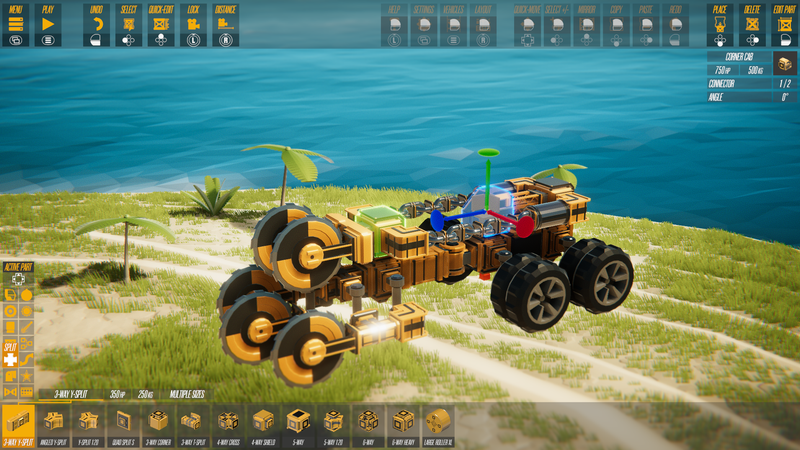
I'll cover future plans and behind-the-scenes stuff below. First we're going to focus on the changes to build mode. Everything with the build mode UI has been revised or altered in some way, so there's a lot to cover. Let's start with one of the big objectives for the redo, which is adding gamepad support to build mode. Here's what build mode looks like while using a gamepad.
There are a few things that change when using a gamepad, and the top bar is the most obvious thing that changes compared to mouse and keyboard. I'm not going to go into too many details of how all the gamepad stuff works because only people on Steamdeck will likely use it for now, but many more people will use it when the game comes to consoles next year. You can't do everything with a gamepad, but that's mostly because I didn't want to deal with creating an in-game keyboard to edit various text fields. There are a few KB/Mouse shortcuts/combos that don't exist on gamepad, but none of those stop you from creating the same vehicle.
Moving on, let's look at the PC version of the layout with the most important popup enabled.
The shortcut for Advanced Mode (A) now brings up the part settings popup (on the right). This is a scrollable list of properties, and nearly every property has a tooltip that explains a bit more of what the setting does. This list scrolls using RMB or MMB Wheel. [I decided to leave the most of the vehicle settings in the cab properties, as I didn't want another pop-up, and there's so many vehicle settings, it needed to scroll anyway.]
The sliders in build mode have a new feature that's been highly requested: You can click on the value and enter a number directly. This also allows you to enter values outside the range of the slider. There are no error checks currently, so this is a good way to crash the game if you're so inclined (that crash won't happen 'til you play, most likely). There's also an optional comment field associated with each part so you can leave notes/comments for yourself or others (top right of the settings, only shows if the comment exists).
If a part has controls, they'll appear at the top of the settings. Click on the inputs/outputs and a secondary popup will appear. There's a new Quick Assign button at the top of that. Press that and this is what you'll see.
Depending on what you press, it'll either assign a new slot, or map to an existing controller slot. The old system of reassigning buttons/etc also exists in a 2x8 list, arranged vertically instead of horizontally now. There are now 32 button slots, up from 24, with the first 16 mapped by default. I decided to rename "Logic" connections to "Signals" to avoid confusion with the Logic parts. There are still 1024 of those available. I changed how signals render on parts a bit, but I might revisit it a bit more later to increase visibility/etc.
So that's the main pop-up and child pop-up you'll probably leave open/use most of the time, but other popups include Build Mode Settings, the Quick Edit popup, and the Layout popup. Build Mode Settings and Quick Edit are mostly a place to throw shortcuts/settings in a way that makes them more accessible to everyone. They all have tooltips and list the relevant shortcuts where needed.
The Layout popup is a bit different though. Here's what that looks like.
You can now edit the vehicle and creator names, along with editing how the control layout is displayed. Every used control will appear here, and you can select and move the controls around as you see fit. This is how they'll be displayed in-game, along with whatever labels you add. For previously created vehicles, the control hint will be converted to a label. You can have up to 8 labels at once. You can also create a gamepad-specific layout. As with most things that you can move, holding shift lets you move the controls/labels in smaller increments.
That covers many of the major changes, but I skipped the new move/rotate handle and many other minor changes and tweaks. There are a couple things that aren't quite finished, particularly the help mode/options, and switching between multiple player starts. I'm also considering redoing how sliders/ammo/overheating displays are handled (they'd be on the control layout, and be customizable), but I'm going to wait a bit.
Here's a quick summary of the build mode improvements (outside of the arrangement of things) if you want to know what to look for:
Sliders now have optional direct text entry with no limits.
New 3d handle for moving/rotating selected parts (resizable).
Gamepad now works with 99% of build mode functionality.
Parts now have optional comments.
Customizable control layouts with up to 8 custom labels, and optional gamepad-specific layouts.
Quick Assign feature to reassign button inputs.
Added descriptions to a lot more parts, and they are always available.
Added tooltips to the majority of part settings
Improved display of shortcuts for buttons/etc.
Many previous shortcut-only options now show as real options that display tooltips+shortcuts.
New option to compress the build mode UI vertically.
New option to display GP+KB shortcuts at same time in the remapper popup.
Added an outline to selected/highlighted parts.
Changed how signal inputs/outputs are displayed on parts.
Added highlighting of parts using the highlighted button/signal (remapper popup).
WHAT'S NEXT? WHAT TOOK SO LONG?
As usual for any big update, I'll be following up with a series of smaller updates over the next day or two. With so many changes, there are bound to be issues that I didn't find. I have a list of smaller changes I might be making, but some of them will depend on feedback/requests/etc. Long-term I have a pretty firm list of what needs to be worked on/added, but at the moment I'm feeling very much burnt out and will work on whatever seems easy/enjoyable to work on. The only thing I'll do for sure in the short-term is update the control layouts of the Main Campaign vehicles.
In terms of why this update took so long, it's because it was a very large amount of work, much of which I was just not able to anticipate. Every time I changed one thing or rebuilt one part of the interface, that would spiral into a web of additional tweaks or fixes or new decisions that was difficult to predict. UI touches nearly every part of the massive codebase for the game, and Build Mode is the most complex system in the game by a significant amount. Every UI element changed in some way while also adding gamepad support, and gamepad support accounted for nearly half of the work because of the added complexity, special cases, etc.
To be completely honest, I've been miserable while working on this update. I only kept going because it needed to be done, and I used my desire to work on anything else as motivation to get this done. I'm glad it's done, and feel some sense of accomplishment, but I'd prefer to never work on a UI this complex again. I didn't enjoy working on the in-game level design tools either, but those don't have to be particularly good or work on console, they just have to work for me. The added pressure and need to keep things as user-friendly (and gamepad-friendly) as possible, along with the sheer number of elements involved, pushed it over the top. I was more productive working on this than the level editor tools, but I was even more unhappy about it.
Part of the problem might be the underlying UI systems I've built just aren't that great, particularly when it comes to creating complex visual elements. But I can't imagine any system that would create the resulting build mode UI/systems without a good amount of messy, difficult code.
Regardless, I'm determined to finish Instruments, and the rest should be relatively easy and enjoyable to work on compared to this.
[Apologies for the excess complaints. And please give feedback about Build Mode even if you don't think I'll like it.]
Driving Towards Release, and A Few Words On Unity
Version 0.360 launches today for Instruments of Destruction. This release signals the beginning of where Instruments of Destruction is heading, with Version 1.0 expected in early 2024. There's a lot of new things in this release, particularly with the New Campaign (from the PAX Demo) now being the primary mode for the game, and the old campaign starting a transition into being the Build & Destroy campaign. The old campaign hasn't changed a lot yet, but it will no longer offer 3 modes, and many of the existing islands will be changing in the future. They'll either be revamped to be included in the Main Campaign, or edited to fit the build mode campaign.
You will also notice the menus and UI have undergone a large transformation. Almost all of the smaller text is now larger, the buttons have changed fonts and got a bit of a stylistic change, and some buttons are now centered instead of being offset to the right. The HUD has been simplified a bit, particularly outside of Sandbox mode, and the 3-star system is much simpler and easy to understand. There are other changes, though I covered a lot of those in the previous news post about the PAX Demo.
The NEXT big update will focus on redoing the interface for Build Mode. I've been playing similar games like Beseige and TrailMakers on console to see how they handle the various issues and streamline things. Besiege is not a bad reference on console (or in general), while TrailMakers' console controls felt very clunky to me. While I will be focusing on making the Build Mode controls usable on a controller while revinsing the UI, I believe doing so will benefit the PC (kb+mouse) experience as well.
I'll try to maintain the various shortcuts and systems that exist currently, but some elements of Build Mode may change in the future. I expect that overall speed and usability for advanced vehicle builders will not be affected in a significant way (either negatively or positively), and there may a slightly re-learning curve. My hope is that the changes will improve build mode for everyone, but the focus is on the initial usability and user experience.
Beyond the build mode UI changes, the old campaign will be morphing into a new sequence of tutorials that unlock more and more functionality and parts over time. Between the new tutorials, improved UI, and better documentation within the UI of the advanced editing capabilities, vehicle building should be a more enjoyable experience for everyone within a couple months.
As mentioned previously, the new campaign will also be expanded significantly. I expect there will be around 50 islands in the Main Campaign by version 1.0, each with its own custom vehicle and bonus mission. The Kraken will be featured in 20 or more missions of the Main Campaign, with additional obstacles, challenges, and objectives providing more variety than what is seen currently.
So those are the two biggest things coming to 1.0, but there will be plenty of other tweaks and improvements. Another significant change coming in the next couple months: the camera system will likely be completely redone. The camera system is just a complete mess at this point, and it's very difficult to do anything with it. The Follow camera will be the primary camera mode because the Main Campaign is built with it in mind, but it will be rebuilt to be much cleaner under the hood while having the flexibility to transition/blend into gameplay-specific cameras as needed (for mission intros/outros/etc). Orbit camera mode will remain as a toggle of some sort, while a new photo mode with other ways to adjust the camera will be added as a separate mode. Some of the exact camera details are still TBD, but that's the general plan.
I'm not going to do a changelist this time because there's just too much to list and I haven't been writing a lot of stuff down. I've tested this build a lot, but I'll still be actively fixing things ASAP if anything snuck through.
ON THE UNITY DEBACLE
I've used Unity as an engine since 2011 for my games. I've used C# as a programming language since 2004. So this has been a really tough week seeing Unity completely destroy their relationship with developers. There are so many ways their proposed Runtime Fee and what they've done is wrong, but I don't feel like going over all of them here.
Up until the past few years, my games barely needed Unity to actually run. They used Unity as a shell for running a ton of C# scripts, playing sounds, drawing things, and processing input. Most of them have just a few game objects in Unity, and I could port one of them to a framework like FNA or MonoGame in a day or two. [Both of those are XNA spin-offs, which was the first C# framework I used to make games back in 2010.]
That easy portability is not true of my latest 3 games: Instruments of Destruction, Rhythm Storm, and Speed Demons. All 3 are more tightly integrated with Unity's systems, especially Instruments and Speed Demons. They would be significantly more work to port to another framework or engine than my previous games.
Let me rewind a couple weeks. At PAX West, over 20 different people asked me what engine I used for Instruments of Destruction, and I gladly told them it was Unity. All but two of them said something like "Oh really?" or "I thought it was Unreal". [For the record, I don't think Instruments looks like an Unreal game.] I even had a guy from Unreal visit the booth 3 times (his son loved the game) and give me his card all 3 times. He wanted me to switch to Unreal for my future games, and I politely told him Unreal looks great but I was happy with Unity.
That feels like a long time ago, even though it's only been 14 days. I've been planning to release PC and console versions of all 3 games (IoD, RS, SD, and maybe one more tiny one) in 2024. That will not change, and I'm excited to finish them all. 2024 will be Radiangames' fond farewell to Unity (and C#), and I'll be going out with the biggest bang I can.
After wrapping those games up, I had been planning to finally switch to Unity's HDRP renderer and upgrade to the latest version of Unity (I still use Unity 2019 and the old Built-In renderer). I was excited learn to use all the latest Unity tech and tools that I've been purposefully avoiding for the last couple years. Those plans have changed a bit. I'll still be learning about some great new tech and tools, but in another engine instead. I'm fortunate that the timing works out in that way.
In the end, the game engine is just a piece of software that game developers use to help bring their games to life. Many types of artists and creators use software. People generally don't care what software was used to make the things they like (music/art/movies/etc), and artists often use software of companies they don't like (hi Adobe!). As much as I now don't like Unity as a company, I still like the software, and I'm not letting my games suffer because the company screwed up.
So yeah, it's been a week. My plans have changed slightly for the future, but 2024 is still going to be a big year for Radiangames titles, and finishing Instruments of Destruction is the first step in making that happen.
The KRAKEN Arrives, a PAX 2023 Report, and Demo Playable
The recent focus for Instruments of Destruction development has been on the new singleplayer campaign and the PAX West demo in particular. When I started to work on the missions for the demo, I started to write voice lines for the intros and endings to each mission, and I was not happy. The writing was fine, but it felt like it wasn't a particularly interesting theme (testing experimental vehicles) nor was there a strong purpose to you destroying everything on these small islands.
I went back to brainstorming ideas for the overall theme/story of the campaign. There were a couple ideas about having the buildings being "infected" with some sort of mutated plants or locust-like pest that you were trying to eradicate, or the buildings being powered by some over-ambitious and out-of-control geothermal technology that would trigger earthquakes/volcanos/etc if the buildings weren't destroyed ASAP. But none of those ideas seemed as simple or visually obvious as the Blast Corps plot: In that game, there's a nuclear weapons disposal truck that's automated, malfunctioning, and heading straight towards its destination, regardless of what's in the way. [Blast Corps is a classic Nintendo 64 game created by Rare in the late 90s.]
That plot is a bit to explain, but once you're in game, it's simple: Don't let the big red truck hit buildings or it all goes boom. Given that Instruments of Destruction takes place on islands, a slow-moving exploding truck wouldn't work, but a giant monster from the sea might work. The problem was I didn't think I could make a Godzilla-like beast that looked good, animated nicely, and could traverse a variety of terrain well. But after I realized a giant octopus might work, I tried prototyping it over the next couple days as a big sphere with lots of ropes attached. Everything went pretty smoothly, and within a week I had the Kraken in the game.
The exact mechanics of how the Kraken might change a little, but it currently works like this: The Kraken wants to destroy all the large structures on the islands. As it does so, it takes damage. That damage makes it Rage meter go up, and if the meter fills to the top, it'll do a big smash attack that destroys everything, and will make the island sink. The islands don't *actually* sink at the moment, but I'll be working on that this afternoon.
So you're basically trying to clear the way for the Kraken so it doesn't take damage. You can't kill the Kraken, you can only make it mad, so attacking it is a good way to end a mission quickly. On the bright side, the blast wave looks really nice. There's a lot of work still to do with the Kraken and the UI/story/etc around it, but it was working well enough for the PAX Demo.
A Report On PAX West 2023
So I got the Kraken working less than a week before PAX, and was furiously putting together some missions and refining stuff as much as possible up until PAX started. PAX runs for 4 days, and I spent a lot of time each night refining the UI/game/missions/etc based on how things went. We had 3 stations playing the game, and there were frequently small crowds of people waiting to play, especially on Saturday and the busier parts of Friday and Sunday.
Not everything went smoothly, and there was a bug with destruction getting harder over time that meant I had to restart the game every 30 minutes or so. I thought fixed the bug Friday evening, but it was actually one of 2 bugs that were having a similar effect. The bigger part I couldn't figure out at PAX, though I fixed it earlier today. I ended up treating PAX as a super-intense playtest, as well as a deadline that I could use for gaining some momentum on the singleplayer campaign. In those regards it was a very successful event.
In terms of value, I'd say spending $5,000+ (got the booth for free, but plane tickets, rooms, equipment, and other stuff add up) is not the most cost-efficient way to get playtesting, but it was quite time-efficient. The game got over 2,000 wishlists from PAX, and sales were also up last week, though that definitely had more to do with the game being on sale than PAX. The wishlists alone mean the cost was probably worth it, and the game is definitely heading in a better direction because of PAX.
PAX Demo Playable Now (in a separate branch)
Since Monday's PAX demo build (0.350e), I fixed the annoying destruction bug (I think), replaced the 3rd missions' vehicle with a more-fun variation, and tweaked various vehicle controls. I also made it play better with keyboard, though it's still a gamepad-focused demo. The build is now available in a separate branch on Steam (the one labeled 'pax demo'). It uses a separate save file.
The PAX Demo build doesn't show everything that will be in the main campaign, but it's an indication of the direction the campaign will take. It's also definitely not final. The closest to "final" you'll see in the demo are the first 2 missions (the first mission is likely to have the island/vehicle refined slightly). Every other mission will be revised and likely changed where it appears in the campaign.
Some stuff NOT in the demo: Each island will have a STORY or TRAINING mission with a 3-STAR scoring system, and a BONUS mission with a score/time/place-based system (no bonus missions in the demo). For all mission types, you are given a pre-built vehicle designed for that mission, and that vehicle is unlocked by beating the mission (every Story/Training mission vehicle is unique, but may also appear in a bonus mission). Getting 3-stars lets you use any vehicle on that mission.
Vehicle building (and Sandbox mode) will always be in the game, but the campaign will not focus on it, and it's not in the demo. There will be *something* that teaches the player how to use the vehicle building system, though I'm not yet sure if that'll be its own smaller campaign or a bunch of optional missions in the main campaign. As mentioned previously the vehicle building UI will be undergoing a complete revision (with gamepad support added). I'll definitely be playtesting the vehicle building system at some point to help refine it, but it'll be a few months at least.
So that's about it for now. The campaign will remain the focus for a while, and after I get the PAX demo integrated in to the main branch (and the camera system redone), the number of missions will be expanded pretty quickly. There will likely be an update to the PAX Demo soon to add the "island sinking" part of the Kraken game over sequence, but beyond that it will probably be a couple weeks 'til the integration update.
Building Collapse Fixed - Version 0.301 Out Now
Just a quicker bit of news this time. Version 0.301 is the final update until after PAX (unless I really broke something). Let's start with the changelist, and I'll review some of them a bit more detail below.
VERSION 0.301 CHANGELIST
Added ammo counts and overheating advanced options to weapons
Added ammo/sec and overheating to laser (+ laser S)
Added structure damage multiplier to individually-placed structures (damage from player)
Added structure damage multiplier to maps (damage from player)
Added player damage multiplier to maps (all damage)
Fixed a big issue with structure collapses, and adjusted collapse settings a bit
Made big player impacts do more damage to structures, apply some extra velocity to them
Changed automobile entities to use white paint instead of yellow
Added more towers and tall buildings
Added some smokestacks and storage silos
Added some more low buildings and warehouses
Added some utility posts and fences
Weapons, including lasers, can now use overheat settings and ammo counts. These are the intended ways to limit weapons, if they need to be limited for missions. You can use both on one weapon, and you'll see little sliders/etc on the HUD. The HUD elements may change later, but they work for now (other feedback elements may be enhanced as well).
Structure damage multipliers can be edited on a per-map basis and on individually-placed structures, and these are specifically designed to modify damage from vehicles. Damage TO player vehicles (from everything) can also be edited on a per-map basis. All these are intended for tuning missions/difficulty/etc for the SP campaign.
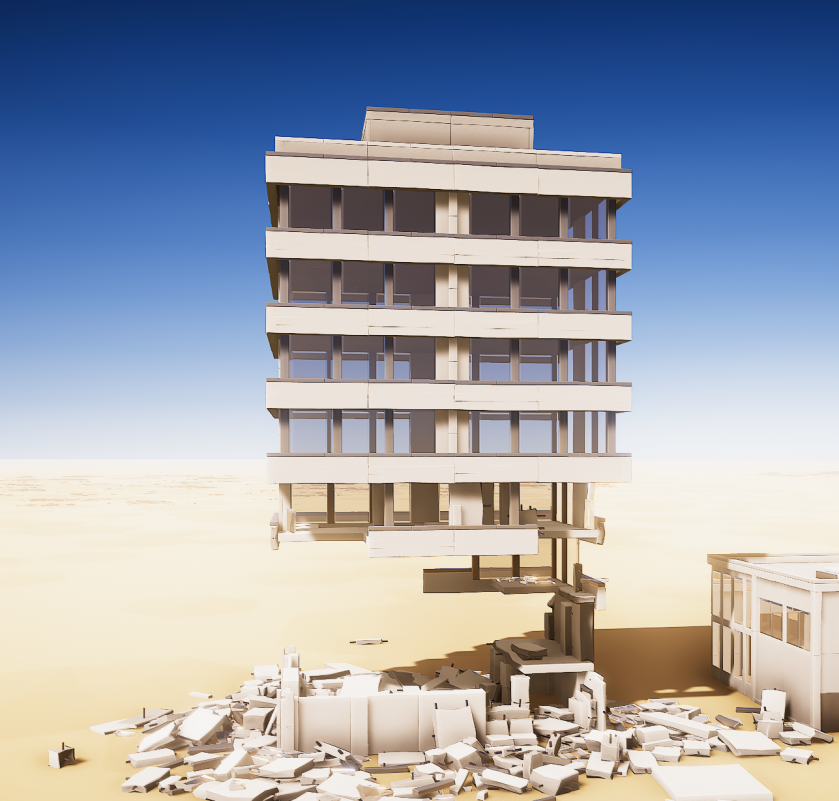
FALLING DOWN One of the bigger bugs that's been present for a while is the following: This didn't happen too often, and I couldn't figure out why it was happening more frequently on certain structures, so I tweaked settings for the past year or so with no success. It seemed kinda better sometimes, but some of the newer structures had the issue more frequently than others.
Mazapine from the discord server targeted this building as a problem in particular, and after a couple hours of debugging, I found the issue: Structures that were highly-interconnected (lots of links between blocks) would sometimes fail to collect the layers of the structure during the collapse algorithm. So instead of this structure showing it had 21 or so layers, it'd stop after 3 because it couldn't find the 4th layer blocks from the 3rd.
I fixed that issue, and found a 2nd issue while testing it. The 2nd issue caused some other random blocks to take damage during the collapse when they were already disconnected. Between those two fixes, and a tweak to damage from big player impacts, the destruction feels better than before.
The final thing from this patch are a bunch of new structures. These will be used in the new missions for PAX/etc.
PAX PRIORITY
Speaking of PAX, I'll be making some big changes to the game for PAX this week, so that means no more patches. The game will be changing quite a bit, and most of the menu will be inaccessible. If you have any changes/fixes that are needed, you'll either need to let me know today (Monday the 21st) or wait a few weeks 'til I'm able to get the PAX changes cleaned up and ready for launch on Steam in September. I've got a lot of things to work on before PAX, so I apologize if I don't get back to you in the next couple weeks.