Version 0.299 is now live on the "debug" branch for Instruments of Destruction. This update brings a large number of changes under the hood, particularly regarding vehicles. After 2-3 days of testing/fixes/etc, I expect to update the main branch with version 0.300.
This latest update took a while for a few reasons, some of which I've discussed before, but the main one in terms of actual work on Instruments: There were more systems that needed to change for multi-vehicle support than I initially realized. Throughout the entire development of Instruments (up until late May), I've always assumed there would be 1 custom-built vehicle at a time. That assumption meant lots of systems could behave globally, which is generally easier to deal with than having multiple copies of something that can start/change/stop/etc.
The code base in Instruments is pretty massive at this point for a solo project, so I have a hard time remembering how everything works, or why I made some specific code/logic choices that I did years ago. I changed lots of code across many files, and it wasn't always clear how to best transition to the new not-global systems. Either way, I think I have all the major problems solved and I've done quite a bit of testing, so hopefully it'll be able to make the leap out of the debug branch before the end of this week.
VERSION 0.299 CHANGELIST
It's not just vehicle-related changes in this update. There are also new structures, a big speed-up for destruction, and the removal of the XP system.
Changed lots of systems to allow multiple vehicles at once
Vehicles: Place start points in map editor to allow more than 1 vehicle
Vehicles: Select from vehicle starts in build mode in top left
Vehicles: Player 1: Always uses keyboard, uses 1st gamepad by default (unless disabled in options)
Vehicles: Player 2: Always controlled by gamepad (1st or 2nd used, depending on options)
Vehicles: NONE: Can be taken over by nearby players by pressing [V] on keyboard or [Y] on gamepad
Sped up large explosions, collapses, deactivating accumulator, etc
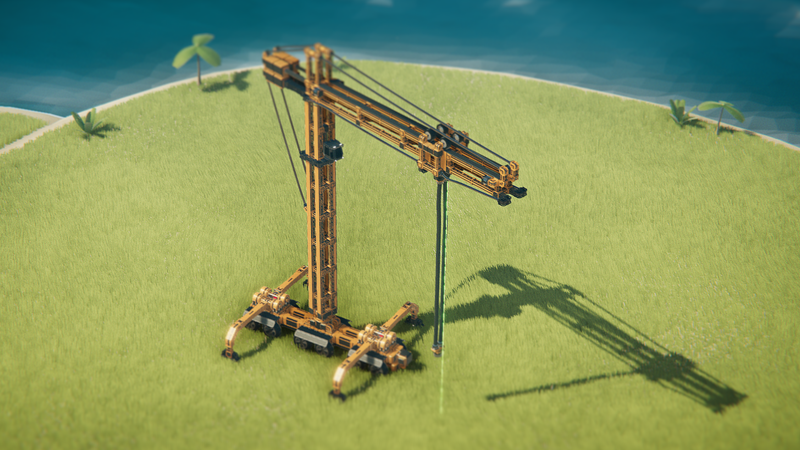
Created a large number of new more-realistic structures to replace previous ones (more to come soon)
Improved explosion damage vs. large blocks
Tweaked some camera controls, particularly when using the gamepad
Removed XP system
Removed build mode requirements/goals (they are deleted from a map if they exist)
Editor: Added some new selection buttons for structures
Editor: Added new vehicle start entity, which replaced the rock entity
Changed grass visuals a bit to have better scale
Fixed most water particles that appeared under the terrain
MULTI-VEHICLE DETAILS
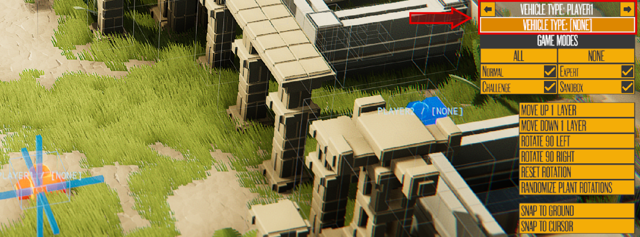
If you want to place/spawn more than 1 vehicle in a map, the MAP has to have more than 1 start point. Only a few built-in maps have more than 1 currently, but I'll add more later. Each start point will spawn a vehicle if one is assigned.
There are 4 Vehicle Control methods: Player 1, Player 2, None, and AI. Player 1 uses the keyboard and/or the 1st used gamepad. If you change the option "PLAYER 1 - USE GAMEPAD" to be disabled, Player 1 will only use the keyboard. In that case, Player 2 will use the 1st gamepad, rather than the 2nd. If you have a 2nd player, the camera controls will not be shown, with the 2nd player controls shown in the upper right instead.
Vehicles with NONE can be taken over by either player. Get close to the vehicle in question and press [V] on the keyboard, or [Y]/[triangle] on the gamepad to swap vehicles. Vehicles marked AI currently do nothing, but will eventually be controlled by AI, and can't be swapped to either way.
While editing in Build Mode, you'll see a list of start points/vehicles in the upper left. The current one (that you can edit) is highlighted, and you can switch between them at any time. If you want to see them in the level without playing, just hit the "Show All Vehicles" checkbox. It shows where they'll all start in the world. Note that vehicles now try to start on the ground, rather than falling from the sky. Or at least they start where the vehicle start points are. You can change the Y/Z start offsets for a vehicle by editing the cab in advanced mode.
If you use the Island/Map Editor to place start points, the relevant things to edit are on the right side. By default, vehicle starts are set to "NONE" for the vehicle to spawn. You can set the Showcase vehicle to spawn instead.
When editing multiple vehicles, the various vehicles you've edited/loaded will be saved until you close the game. Restarting the game will load the *last* vehicle you edited, regardless of the starting vehicle slot it was in. The other vehicles are not saved, so make sure to manually save them if necessary.
OTHER STUFF Build mode requirements and the XP system are both gone from the game, and neither is coming back. In an upcoming update, the Star system will receive some significant revisions. The destruction system got a significant speed up in certain cases (particularly large-scale destruction), and you should see a lot fewer water effects from impacts beneath the ground. There are some new structures that have a more realistic sense of scale, and I'll be creating a lot more new ones to use in the campaign. They generally use fewer blocks than previous structures, relative to their size.
That's all for now. Definitely let me know if you find any issues with the new build (reminder: Debug branch only for now), and I'll try to fix them ASAP.
Instruments of Destruction selected for PAX Rising 2023 Showcase!
I'm excited to announce that Instruments of Destruction will be featured in the PAX Rising Showcase at PAX West! See all the PAX Rising titles here: PAX Rising Showcase.
PAX West is one of the biggest gaming conventions in the US, and it takes place at the beginning of September in Seattle (Labor Day Weekend here in the US). The PAX Rising Showcase chooses a small number of indie games every year. Being selected means you get a small booth in a great location on the show floor. I've been to PAX West a couple times to show Overload with Revival Productions, but this will be my first Radiangames title I've shown. It will also be the first time I've met Auvic (musician for Instruments, Speed Demons, and Rhythm Storm) in person, as he'll be coming as well.
Part of what helped get Instruments selected is this trailer I put together at the end of May. It shows off a number of the vehicles that will be in the new singleplayer campaign. Many of those shown will debut at PAX West along with new maps/structures/missions/etc.
MAKING PROGRESS
That leads me to what I've been working on lately, which is mostly a lot of random stuff. The most exciting (and buggiest) is optimizing the destruction system. It used to take up to 100 milliseconds to un-parent all the blocks from the structures during big explosions. That step is now skipped completely, so destruction is a lot smoother. Parenting (and un-parenting) objects in Unity is *really* slow, and I realized I didn't need to un-parent blocks when they break off a structure because the physics happens independently regardless.
The bugs mostly come about because setting the position/rotation does care about parenting, and that still needs to happen at certain times (such as creating the buildings), and recycled blocks in particular can have issues. I believe I have most of the issues fixed, but it's a difficult problem to solve with certainty. Weird stuff has always happened on occasion in Instruments due to all the physics (and some rare lingering bugs), so it's hard to track down the root cause, especially with thousands of blocks in every scene.
Other recent changes include removing the entire XP system, more work on the multi-vehicle system (still not done), making a bunch of new more-realistic structures, fixing water effects appearing beneath terrain, and improving how structures and large blocks react to explosions.
I'm hoping to reach a good stable point soon where I can update the Steam version to 0.300 (and fix anything that breaks) before really focusing on the PAX West demo. I have a list of 10-12 vehicles that will be featured there, and that includes many of the ones seen in the video above. That build will come to Steam shortly after PAX West.
FEATURED VEHICLES HIATUS
Due to a lack of interest (less than 10 vehicles entered in the Grappling Hook contest) and a desire to focus on PAX West and version 1.0, I'm going to pause the Featured Vehicles contests. I will set 4 of the entries to be featured (and update the featured vehicle text) later today. Thanks to those that entered, and to all the past featured vehicle creators. I'll consider bringing back the Featured Vehicles again in 2024.
Overall interest in the game is low at the moment, and that's partly intentional on my part. I've avoided promoting the game in the first half of 2023, aside from entering it in a few things like PAX Rising/etc. With the new campaign and version 1.0 coming, there will be a lot more stuff happening and the game will receive more promotion as well.
So look for version 0.300 in the next couple weeks, then for the PAX West demo in early September. Beyond that, the full campaign and version 1.0 will be focus. I expect to debut the campaign before 1.0, but I don't have a realistic timetable for either one quite yet. I previously said Late Summer 2023 for campaign, but Fall 2023 is now the current goal and I don't want to promise anything until it's a lot closer to being done.
Early July Development Updates (and I Did a Game Jam)
I started working on Instruments of Destruction in January of 2020, which means it's now been 3.5 years of development time. But not all of that time has been spent on Instruments. Of the 42 months since the game started, I'd estimate I've worked on the game between 30-34 months total. I've also worked on updates for Speed Demons (Apple Arcade-only until 2024), created + finished Devastator for PC/consoles, and created the Rhythm Storm demos.
After version 0.261 of Instruments in early June, I spent a little time taking some elements of Rhythm Storm to create a new "skeleton project". A skeleton project means a mostly empty project with some basic code for drawing stuff to the screen, playing sounds, getting input, etc. That took a bit over a day to trim it all down and clean it up a bit. Its purpose was to both allow me to have a basic project to start with in the 2023 GMTK Game Jam, and to have something to work from for future mini-projects.
"FUTURE PROJECTS"
The future ended up being the next day, and what I planned to be a 2-3 day "arcade" project turned into a 3 week game that I'll reveal in the future (it's done aside from sound effects needing work). In retrospect I should have finished it in 2 weeks, but I spent too much time waffling between various art styles/variations. Between that arcade project and a couple family vacations, I only worked on Instruments for a day or two more in June.
WRECKLESS
This past weekend was the GMTK Game Jam, and I spent about 38 of the 48 hour event working on a prototype. The theme for the jam was "roles reversed", and after coming up with 10 or so possible ideas, I went with one that felt the most obvious based on my experience: Creating a physics-driving game where you direct the traffic, but can't control your own car. You can read more about the game on the itch.io page. Here's a screenshot:
Wreckless is a fun toy/game, and I can check off "Do a Game Jam" from my bucketlist (I don't have one, but it would have been on there if I did). I'm glad it's over though, and I don't have any desire to keep working on Wreckless or do more game jams anytime soon.
A CLEAR PATH AHEAD
One thing I've realized while working on these various projects: I don't mind jumping between smaller projects, but I don't like having large not-quite-finished projects lingering in the background. I knew the GMTK Game Jam would be a turning point in my focus, and I'm glad the desire is there already: I want to finish Instruments of Destruction. I previously planned to have Rhythm Storm in the October Steam Next Fest, but now I'm less sure. If I really need a break from working on Instruments, it might happen, but I'm also fine pushing everything else off until Instruments is done.
Nothing has changed regarding what I'll be working on: A new/larger/improved single player campaign with dozens of pre-built fun vehicles to use, and redoing build-mode's UI. First up on the agenda is finishing up the work to support multiple vehicles at once (for real), and figuring out the best way to use vehicles built in the game for AI purposes (as both enemies and allies). There's a lot of work to do, but those are the two hardest remaining tasks by far, and I want to take them down now while my resolve is high.
I'm not sure how long everything will take or how frequent updates will be from here on out. But rest assured that getting Instruments of Destruction version 1.0 done ASAP (and done well, of course) is my primary objective.
Version 0.261 Changelist
Added new part: Invisible - everything attached to same rigidbody disappears at game start (but still runs logic) - Intended for making it easier to create/edit complex logic (no need to hide most things inside other parts) Added new smaller part: Side Piston S Updated 8 more parameters to persist/copy when expanding/contracting parts Added Spread parameter for Bomb Launcher, Cannon, Gauss, and X8 Rifle Changed default spread for Bomb Launcher, Cannon, and Gauss Fixed a number of slanted loops that got broken (SP islands) Made mirror-rotation syncing more robust (mirror pasting in particular) Fixed copy-paste of ropes being broken Added sound override for lasers Removed limits for flex panel offsets (length + width) Added a selection box to make direction sensor mode more obvious (and allow a speed of 0) Fixed slot 32 on sequencer being unselectable Fixed pushing [ or ] making the hovered button activate Fixed browse workshop pages not working for maps Made mouse snap to center of screen when FPS mode is activated EDITOR: Added support for looping paths - There are now normal (closed/solid) loops, paths, and path-loops
FUN FACTOR Featured Vehicle Winners
In this update we'll take a look at the "Fun Factor" featured vehicles, reveal the next theme, and look at how the campaign progress is going. First, here's the video for the Fun Factor vehicles:
FEATURED VEHICLES
Eldritch Lord - RequinRanger*
Hex-Storm - JacuJ*
Stinger - Stranger
Nothing Overkill Here - Snicker_Nee_Yo
Robot mk2 - Paudl
Laser Spear - DarkySilis
MCCH Ascended Crystal - Arad
Bardl (Object Launcher) - Mazapine
TCCH Great Worm - Arad
Flying Monster - Paudl
Spore V3 - PyroTeknikid
Shock Factor - Mr. Bigglesworth
HONORABLE MENTIONS
ShatterDrone - AjaxGamr
AI Whirligig Saw - Jussi
Dragon - Stranger
Mammoth - Stranger
Junkasaurus - St. Nicolas
Tornado Madness - Costello
Heavy Escavator - DrBean
LCCH Prometheus - Arad
Explosive Barrel Mortar - [Arch]B_Glo
Mole Shockwave Blaster - Kili
HCCH Octopoda mk2 - Arad
Gilded Ornithopod - [Arch]B_Glo
Junk Muncher - St. Nicolas
LCCH Wandering Crystal - Arad
34-Hurricane - Dr.Boom Ultra
Flapjack - Zombie Ninja
MCMW Secutar C-E - Arad
Mosquito - Stranger
Spinning Laser Disc - Richard333
Harvest - ID24601Right
[Apologies if I misspelled anything in the list]
There were a lot of solid entries into this month's contest, and many close calls between the Honorable Mention and Featured Vehicle list. As I've been finding out over the past couple months, creating a vehicle that has a unique purpose/function, fun and easy-to-use controls, and a cool design is a difficult task. There were two vehicles that were especially impressive this time: Eldritch Lord from RequinRanger and Hex-Storm from JacuJ. Hex-Storm is particularly outstanding from a technical and design perspective, while Eldritch Lord is just so creative and mesmerizing to use. Both of them inspired me to create new vehicles for the campaign, and I anticipate creating a few more that are roughly based on other entries. Thanks to everyone who entered the contest, as this was a very enjoyable contest to try all the vehicles!
NEXT THEME: GRAPPLING HOOK NEXT DEADLINE: JULY 19TH, 2023
The next theme will be "Grappling Hook". Use the grappling hook itself, or some other combination of ropes/winches and attachers or similar parts to create a machine that uses a grappling hook in some interesting way. Functionality, ease of use, and overall design will be the priorities. It can be a vehicle that climbs stuff (requiring tough structures is fine), one that tears structures down, or anything else as long as a grappling hook-like device is a key element. The deadline is July 19th.
CAMPAIGN PROGRESS
I've been back working on Instruments recently, with various changes to Rhythm Storm completed (more details and new videos on the RS Steam page on June 6th when the beta demo goes live). Mostly I've been working on additional vehicles, some inspired by the fun factor vehicles, and creating a new video for the game to highlight them. That video I'm not sure will be public, as it's mostly for entering PAX Rising and other online games festivals. Will see how it turns out before making a decision.
After the video is wrapped up, I'll continue working on more features for the campaign (objectives/enemy AI/new objects/etc). I have 44 vehicles that are pretty close to final, with 6 more planned. I hadn't been counting and didn't really expect to reach 50 vehicles, but it seems like I might as well aim for it now. I'm not sure all of them will make it into the campaign with their own missions, and some might just be reward vehicles or alternate vehicles. I expect the vehicle lineup to be one of the key selling points for the game, so I'll be polishing and refining them even after the campaign is initially released.
I'm unsure if the number of maps will be more or less than the number of vehicles. The current plan is for each map to have 2 missions, with the main one having 3 stars to achieve (simpler and different requirements than the current system), and the other being a score-based mission of some kind (time/destruction/enemies destroyed/etc). Some vehicles will definitely show up in multiple maps, and its likely you will be able to switch vehicles in the middle of certain missions.
That's a lot of stuff to work on, and I'll also have some sort of beta-testing before the full launch of the campaign. Before getting too deep into all that, I want to do a pass on bugs and other easy suggestions, so look for a new version in the next week or so.
Version 0.260 brings improved ground/terrain (but there's a catch)
Version 0.260 is heavily focused on new ground/terrain editing tools and improvements. These tools add more complexity/potential to terrain generation, and I know they are not exactly intuitive. I intend to make a video about the terrain stuff, but I just don't have enough time to do it this week (due to important non-work stuff).
Rather than delay the build itself, I decided to release it now, as there are some other gameplay fixes that I want to get out there sooner than later. There's also a new sandbox map, Oasis Test, that replaces Bridge Tester. It's not finished, but it shows some smoother, more "hilly" terrain and has a couple of the new path-style terrain loops. There's still a little refinement to do on the terrain editing, but it's pretty close to final. Next week I'll wrap up the refinements and do the tutorial video for Terrain mode (formerly known as Ground mode). Here's the full changelist:
GAME/BUILD MODE: Fixed the up/down arrow between controls (made it swap instead of selecting both which made no sense) Fixed flex treads not working with auto-braking Fixed direction of changing override sounds in the UI being reversed Fixed flex panel/triangle/etc not going up to 10 in length/width slider UI adjustments Fixed fog still being active even when it shouldn't be Fixed bug with camera mod in FPS mode not working when more than 1 is present
EDITOR: Added new option to use loops as paths instead - Creates a road/path instead of a loop - Path points can be moved vertically (independently), unlike normal loops - Path points have width, y-offset, and slope offset values - Does not use Upper or Structure-based grass/rock generation - Control over side generation is start/end/left/right, not per point Added per-type filters per loop for grass/rock generation Added Negate option (and Negate Offset) to cancel out grass/rock generation Added some wider slope widths for loop generation (5x1, 8x1, and 12x1) Added control over grass/rock tolerance curve slopes (Hold CTRL while editing to see/edit slope with LMB y-motion) Increased maximum amount of grass points to 360k from 230k (rock points unchanged) Changed how grass generates on low-angle slopes/edges/etc for more organic terrain Changed Upper grass/rock generation to only generate within the loop boundaries (instead of everywhere) Added "Noise Affects Top" option for loops Made per-loop noise available for all loops Added backup point highlighting for loops so you're less likely to accidentally select nothing (and deselect the loop) Resvised how ground plane rock generation works to be simpler, faster, and better Added tooltips to all more slider settings and named some a bit better Added SHIFT functionality to editor sliders (slow increments for fine-tuning) Changed loop mesh generation so triangles below a ground plane are now removed Renamed Ground mode to Terrain mode to make it a little less ambiguous Changed Skew settings to affect all loop vertical profile types, not just custom profiles Fixed arrow keys not working to move camera in Normal cam mode in editors (and fixed Control not speeding up arrow keys) Fixed editor camera switching to weird modes when going back and forth to build/play mode - Known issue: orbit cam is still the best for testing, follow/iso change to orbit Fixed issue with using skew and noise on the same loop Fixed grid grass/rock generation to not generate stuff outside the borders of the loop (most obvious in ground-plane maps) Fixed editing some values only changing the current loop instead of all the selected ones
If there are any urgent fixes (hopefully not), I'll be able to get them done for another 16 hours or so. After that, you'll have to wait 'til next Monday.
First Person View and more with the Camera Mod and Sound Mod parts
Version 0.256 brings a number of minor changes and fixes along with two more parts that let you customize vehicles in new ways. I'll focus on the two new parts, with the full changelist below:
CAMERA MOD AND FIRST PERSON
First Person view is finally possible in Instruments of Destruction thanks to the new Camera Mod part. Has it been worth the wait? So far I'm going to say no. The game isn't really designed around FP view, so the effects don't look good from up-close. You can customize a lot about the First Person view, including the FOV, turning limits and speed, and where it appears relative to the part. In general I expect this to only be used for specific weapons/modes of a vehicle, and I don't plan to use it for anything else. Of the existing cabs, only the first 3 have decent interior models, with the Tall Cab and Standard Cab being the best ones. Not sure I'll add interior models to the other cabs. It depends on whether I need them, and when/if I add custom mesh overrides per part/type for vehicles.
Alternatively, you can use the part to offset or override the other camera modes, with different settings for both Follow (the first 5 values) and Iso/Orbit camera modes (the next 5 ISO values) If you set it to Override Cab Pos, it ignores the cab(s) and uses the part position/orientation instead. Otherwise it functions as an offset. If you set it to Always On, it ignores the input. Otherwise the strength value of the input can be used to modify how fast the offsets are applied once activated (this doesn't apply to FP view).
SOUND MOD
The vehicles in Instruments have 10 looping sound slots. Any part with a Sound Override setting (wheels, lasers, pivots, pistons, etc) affects one of those looping sounds, and changing the Sound Override changes which slot is affected by that part. That hasn't changed. But it's important to realize the 10 looping sounds exist, as they are what the Sound Mod part affects. Each Sound Mod can affect 2 looping sounds/slots. Let's break down 1 slot and the various parameters:
Slot 1 (or 2): This is the looping sound SLOT, named for the default sound that is played there and what normally affects that loop. There are always 10 slots, though the sounds are generally silent unless a part causes them to change in volume/pitch. This is the most important parameter because it affects what you are editing/changing. If you have 2+ Sound Mod parts modifying the same slot, only 1 of them will work.
-Sound Effect: This is the audio sample that is used for that slot. When you change the SLOT above, this will change automatically to the DEFAULT sound effect (the default pitch/volume will also be updated). There are 10 default looping sounds (same names as the slots), then 20 more looping sounds to choose from. A lot of them are similar, but I think that's ok because the pitch in particular affects the sound character more strongly than might be obvious at first.
-Pitch: This is the base pitch for the looping sound. 0 means it's played at the default pitch (100% speed) for the sample. At -0.75, it's playing at 25% speed (aka 2 octaves down), while the max pitch is 2.00 (aka 300% speed 2 octaves up).
-Dynamic Pitch: If there's an input set for the [+] value (top left for slot 1, top right for slot 2), that input is multiplied by the dynamic pitch and ADDED to the base pitch value. So how much it affects the pitch depends on the base pitch. If the total pitch value gets to -1 or lower, it essentially stops the sound.
-Volume: This is the base volume for the looping sound. This is straightforward compared to pitch, though volumes above 1 don't do anything by default. 100% is the max volume, but because the loops are affected by other parts or dynamic volume, values above 1.0 are still potentially useful.
-Dynamic Volume: If there's an input set for the [UpArrow] value (bottom left for slot 1, bottom right for slot 2), the dynamic volume is multiplied by the input strength, and then that adds to the part-based volume before multiplying by the base volume to get the final volume. If no part/etc is affecting the volume, then it's a bit simpler: Input Strength x Dynamic Volume x (base) Volume = Output Loop Volume.
There's also a TEST IT button for each slot. That'll play the whole loop once using the base Pitch/Volume settings. Some loops are longer than others, but in-game it's harder to tell that (because they loop).
NOTES: A couple of the slots (Engine1 and Engine2) are affected by the vehicle's speed and cab settings. Some of the slots also have their pitch affected differently based on the dynamic part parameters. There's too many variables to list them all here, but keep that in mind if you just using the Sound Mod to override the base loop sounds and not control them directly. Different slots will sound slightly different (and Engine1/2 are affected by speed and the Cab Engine Volume setting). There is also no default smoothing for the Sound Mod part input stuff, so you'll need Output Modifiers/etc on the inputs if you want to do that kind of thing.
VERSION 0.256 FULL CHANGELIST Added new part: Sound Mod - customize the various sound loops the player vehicle uses (10 loops) Added new part: Camera Mod - enable FP cam or offset/rotate the camera (based on the camera mode) Added optional outputs to most weapons (except lasers) Added F11 third mode for collision rendering (blue = normal, red = no_collide, green = treads, yellow = tread tracks) Added 6 new particle type variations for Particle Effects part Added two new regions for custom islands (and changed Compound + Test Island region) - Also made it possible to affect exposure/saturation/contrast per region Added material override on physics modifier and overlapper Improved how highlighting works in build mode so it's easier to pick between 2 nearby parts (slight distance penalty for current selected one) Allow small thruster and foot/foot xl to rotate Added a function to select duplicate parts in build mode (Shift+Y by default) Fixed low-speed bonus push (and gravity) no longer being used for powered wheels (all sizes) Fixed: PgUp/PgDn not using new rot increments Fixed last 4 colors not loading correctly on restarting in build mode Added another check to remove duplicate selections of a single part in build mode Fixed wave generator with loops disabled still essentially looping Fixed not reselecting the right part when playing and returning to build mode (for close/overlapping parts)
The focus continues to be on building lots of unique vehicles for the upcoming campaign. I'm definitely burnt out to some extent, but feel compelled to keep working on vehicles (have around 50 at various stages). I want to start working on more maps soon, but need to add some new terrain generation tools first (hills/paths in particular are not fun to build currently) and I've been starting to think about how to rearrange build mode's UI more. Still don't have everything worked out in my head in that regard, so it probably won't happen yet.
At some point I'll need some beta testing on the new set of vehicles and maps, but that's still a month or more away. I had been hoping to get the campaign done before the Steam Summer sale, but that's looking less likely because good vehicles just take so long to do well, and I have no reason to believe maps will be much faster. On the plus side, I plan to polish about 10 vehicles to essentially final quality, and if I don't find anything significant to add/improve/change, I'll finally move on to non-vehicle work.
And There was Much Rejoicing (and Particles)!
Version 0.255 features a significant part of a different sort: The Particle Effects part. I'll go over in more detail below, as I'm going to continue doing the expanded changelist-style of updates for these vehicle-focused changes.
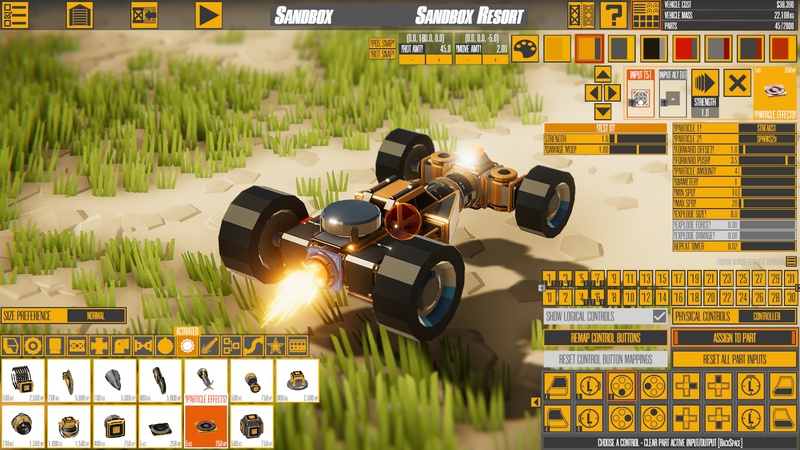
PARTICLE EFFECTS PART Added new part: Particle Effects - Strength affects particle count, push/pull strength, and explosion damage/force - Trails use strength to affect their lifetime, and amount is divided by 5 - Push/Pull are not particles, but a force applied to some particles - Distort particle FX is different: strength affects size (diameter/spd no affect, amount = opacity modifier) - Optional explosions that apply force/damage can also be used (these are always omnidirectional currently) - Repeat timer set to 0 means no repeating, low values (0.01/0.02/etc) should be used with caution Expanded sfx library for speaker to 22 sounds (previously 8) Added camera shake and vibration strength adjustments to speaker Added new part: Overlapper - stack up to 5 parts on a single connection
Each Particle Effects Part (PEP, in the Activated category) can generate two different particle effects at once, though some of the settings between the different particle types overlap in odd ways, so often you'll want more than one PEP.
The actual amount of particles generated depends on the particle type (smaller ones generate up to 8x more actual particles than it says), but in general it's not too hard to figure out and adjust accordingly. There's even a "Test It" button so you can try out the settings in Build Mode (explosions can destroy the buildings before gameplay starts), though it ignores the Repeat Timer in build mode. Here are a couple of the more unique particles that use the parameters in a different way:
Distort1a/1b - The distortion effect is always a single particle, but it uses the Amount value for the opacity. The strength affects the size.
Trails1/2 - These generate particles over multiple frames, and the amount is actually divided by 5 (and rounded up).
Push/Pull - These apply forces to most particle types. NOTE: Applying a force to a particle on the same frame it's generated doesn't always work.
To supplement the particles, I expanded the "Basic" Speaker so it has a lot more cool stuff to play with. In addition to 14 new sounds of various kinds, it can also create a screen shake, and for the first time in Instruments: You can also vibrate the controller. It also gains the Repeat Timer and Test It options [Using Repeat Timer with low values + loud sounds is not recommended.]
Finally, the last supplemental change for the PEP is the new part: Overlapper (Decorative category). It's a stupid part really, but it has 5 connectors overlapping on one side, so you can stack parts more easily without having to copy/paste a bunch of Flex Connectors.
ROUNDED FLEX PARTS Added new parts: Flex Light R and Flex Panel R - Like flex panel/light but with circular shapes and scale setting -- Flex Panel with style of 5-9 uses different scaling (keeps dome shape) Reduced minimum length/width to 0.3 (from 0.5)
These parts are essentially the flex panel/light, but with a new circular base shape and new scaling parameter added. The scaling is applied before the mesh is stretched out. The Flex Panel actually isn't a panel for the last 5 styles. In that case it's a partial dome.
WHEELS AND TREADS IMPROVEMENTS Added reinforce option to all wheel types and treads Added tread/powered wheel paremeter: Auto-Braking - Changes how they behave in turns and when not pressing anything - Also tweaked response when reversing directions - Changed default tread track material to slippery (doesn't really affect handling), and made it actually use the material override Added 4th mesh options for flex treads (A3 is intentionally minimal) Fixed wheel size collision issues (tiny, giant, flex)
All treads and wheels (except the Flex Wheel) now have a Reinforce option, and it helps with joint stability. Even Steering wheels, which already had a Reinforce option, benefit from the new type of reinforcement.
The second significant change is the addition of the Auto-Braking option to Powered Wheels and treads. This lets you change how the wheels behave when turning and when no throttle/reverse is applied. The default is None, but the new options are Partial and Full. I may change the default to new parts to be Partial in the future because it feels like a better balance to me.
Treads also received a 4th mesh option for all slots (A through E). I had a couple requests for the last base mesh (A3) to be essentially empty, so that's pretty much what it is.
OTHER TWEAKS/FIXES Changed how direction sensor limit works to be consistent with other logic parts with ranges - Should hopefully adapt previous settings to new limit style Added proximity sensor-relative motion for Repulsor (Emitter Channel) - If not 0, it finds the first Proximity Sensor with that channel, and applies forces/torque relative to that parts' orientation - Useful for complex builds where you want to move something relative to another Removed No Effects from treads (conflicted with reverse tank steering, not useful enough to keep for now) Fixed an issue with material overrides not being used Tweaked Breakable Connector break point strength downward to more reasonable values
The notable changes here are changing how the Direction sensor displays/uses limits, and the Repulsor Drive getting another mode. If Camera Relative is disabled, and the Emitter Channel is set to a non-zero value, the forces from the Repulsor Drive will now be relative to the first Proximity Sensor with that channel. This will make it a lot easier to move objects relative to each other without excessive amounts of logic and sensors.
That's all for this time. No predictions/etc this time about what will be next.
Version 0.251 Changelist
Added part relative movement option (Shift+W by default), along with a move axis Changed part rotation so it makes more sense, and displays the rotation axis arcs Added rotation increment settings to buildmode (Shift+Brackets to change) Added part rotation/position display Expanded part move increment range down to 0.125 (NOTE: Red = X = Left/Right, Green = Y = Up/Down, Blue = Z = PgUp/PgDn) (When rotating, keys are switched for X/Y because it feels better)
Made a bunch of build mode settings save/load (snap settings, move/rotation mode, and large/small thing) Fixed dual-direction rotation sensor Improved overdrive display in new UI Fixed saw blade not working with logic inputs Tread_collider now defaults everything to Slippery except tires Fixed rotation snap so it actually does something reasonable instead of randomly rotating things
Even More Vehicle/Part Physics + Polish with Version 0.250
Version 0.250 is another update where parts and advanced part options are focused on polishing vehicles even more. We'll break down the full changelist and go over some of the elements/changes in more detail.
PHYSICS TWEAKING AND CONTROL Added new part: Rotation Sensor (logic) - Senses rotation around an axis (or overall speed) Added new part: Physics Modifier (flight) - Adjust some physics properties of the attached rigidbody (velocity damping, gravity, center of mass, inertia tensor)
There are two all-new parts in this update focused on giving more precise control over physics/controls. The Rotation sensor measures the rotation speed (in radians/sec) of the rigidbody it's attached to, and outputs 1 or 2 values based on the rotation. In ANY mode, it measures the total rotation speed regardless of axis/direction. In the other 3 single-axis modes (X/Y/Z), it measures how fast the rigidbody is rotating *relative to the Rotation Sensor's orientation*. In single-axis mode, it can use dual outputs, so rotation in one direction or another can be measured separately.
The second part is the Physics Modifier. This one lets you adjust the physics of the attached rigidbody more directly. The 1st two settings (Move/Spin Dampen) are the same as those in the Gyroscope but with a higher max value. They essentially act as additional drag for rotation/movement. Bonus Solver makes the physics run more sub-steps, and is only recommended for stabilizing joints (reinforcing a joint is recommended before using this, and combining them does result in stiffer/more stable joints). This setting "spreads" to other rigidbodies more than the other settings due to how physics work under the hood.
The next settings are Bonus Gravity and CoM Y-Offset. Bonus Gravity is a bonus multiplier on top of the normal gravity settings (if the Sandbox gravity is 0, this does nothing). CoM means Center of Mass, and it moves the center of mass down, relative to how the rigidbody starts in the world. Both of these values are often used to make cars drive better in games. The final settings are Tensor X/Y/Z. These adjust how much the rigidbody resists rotation in those directions. The higher the values, the more rotational inertia the body will appear to have in those specific axes.
COLOR SLOTS Increased vehicle color slots to 8
Just a quick mention here: If anything is going to have a bad bug in this update, it's probably this. It appears to be fully working though, and combines nicely with other recent updates that added more colors and made it possible to select all parts of the same color (Shift+click on a color). I expect some people will use the additional colors as essentially "selection groups" rather than colors, as you can set all the slots to the same color. This is probably the last significant vehicle color-related update until a custom color editor is added (not sure if that'll be before or after 1.0).
GENERAL/PHYSICS TWEAKING Added damper mod setting to suspension parts Added TREAD COLLIDER as a material override (collides with treads and other tread colliders, but not other player parts) Added advanced option to reduce structure damage from attacher Changed Slippery material override to do significantly reduced damage to structures Changed ropes to do a lot less damage to structures Changed one end of resizing rope to have a better joint anchor position (less awkward skewing) Increased max starting position to 50 (from 12) for Winch
The first two changes were requests that made sense, and let you do more customization with suspensions and treads. The rest are about improving the Winch/Hook Launcher/Attacher, though they also affect ropes. Structures were taking too much damage from ropes of all sorts, and the Attacher damage to structures is now adjustable. So doing structure-climbing vehicles/machines is a lot easier now, and the Hook Launcher fails to stay attached a lot less often.
CAR-FIGHTING VEHICLES Tweaked explosion damage/force vs. entities Tweaked damage/explosions vs. plants Tweaked blaster force to be more upward Increased damage/force to automobiles from collisions at high speeds
These changes make vehicles that battles against the car objects/AI more fun. Also trying to make explosions/etc more consistent.
TWEAKING STUFF Added depth offset to flex panel/triangle/light Added Shift+click (left of slider) - Select all flex connections on current linkage - Also works for Motor Linkage on powered pivots and Channel on Prox Sensor Added an inner glow for thrusters Added some inherited velocity to some particles (blaster, weapon fire, and thrusters)
Flex Panels/Lights/Triangles become a bit easier to use in awkward locations with a depth offset. Flex Connections (and a couple other things) with the same linkage can be selected with Shift+click. The other two are just minor visual tweaks.
OTHER FIXES Fixed reinforced joints getting double (or more) mass on 1st spawn (fixes most 1st-spawn issues I think) Fixed reflection probes going black far too soon (reflection probe bounds 6x bigger, this is the weird graphical issue if you drove far on Desert Test) Fixed flex arc having terrible collision for build mode Fixed copy-paste (and other functions) on combo wheels Made loading a vehicle remove inputs/outputs for parts that shouldn't have them Fixed letting you assign to an invalid input (for 2-input parts) Fixed mirror-duplicate not aligning flex triangles (and connectors not updating immediately) Fixed direction sensor Motion Direction making no sound Fixed Flex connection drawing still linking to deleted parts
Just some more bug fixes, with the more important/critical ones towards the top.
Version 0.250 isn't really anything special, but the amount of polish and control that is now possible with vehicles (and controls) means the quality of the built-in vehicles for the campaign will that much higher. I've been polishing vehicles and figuring out exactly what kinds of missions/maps will work best for the campaign. I'll be starting on some of those soon, though I always seem to find more things to fix/tweak as I'm making the vehicles.
As with 0.245, I don't *expect* to make any further updates for a while, but I've wrong about that so many times that I should stop predicting things like that.