Lots to cover, so let's start with the changelist, then I'll explain how the logic/input/controls work in more detail:
Version 0.170 Changelist:
Added new part: Logic Timer - This is an input delay with 2 modes (see below)
Added new part: Logic Gates - Use up to 4 inputs and 3 gates to do some basic logic
Added new part: Basic Light - Customizable light that can also be used as a toggle for controls that don't have them
Added new part: Distance Sensor - Measures distance from the sensor (proximity) or distance from sea level (altitude)
Added new part: Direction Sensor - Measures your direction (North-East-South-West-Up-Down) or speed in those 6 directions plus 2 more (Sensor facing direction, or Any).
[Just wanted to interrupt and say each of the 5 logic parts serves multiple purposes. There will be more logic parts and things that trigger outputs, but these 5 should handle most of your programming/logic desires. Onward with the changes...]
Added new part: Free Piston - Works like Free Swivel, but in piston form. When not powered in use, it will slide freely. Power is also applied very differently than normal pistons.
Added new part: Quad Split S - Splits 1 connector into 4, intended for use with logic parts if you need to use a large number of them (larger version coming soon)
Changed and sped up connector + overdrive drawing [
} Added 3 new part categories and rearranged some stuff (kind of a lot)
Adjusted min/max rotation to do exactly what you'd expect (relative rotation from your starting angle) on rotating parts
Adjusted min/max rotation angles to snap in better increments
Adjusted pivot direction display so it's more relevant/helpful
Added advanced build option to enable "independent motor" for limited-rotation parts (now the default)
- Independent motor parts will neither be affected by, nor affect, other rotation parts
- Set custom "Motor Linkage" index so you can link motors like you want (this is basically the old behavior, but no longer linked to controls)
Fixed mirror mode sometimes choosing the wrong mirrored part in certain cases (common with mini-wedges)
Fixed some limits/issues with suspension length
Fixed the logic for hiding advanced/help stuff
[There were other changes, but I stopped writing stuff down at some point and I've been too busy to go back and find everything I adjusted/fixed/etc.]
HOW TO USE LOGIC PARTS
NOTE: I was working on a video to explain logic parts, but I realized a little way through that there's something missing: A more interactive display of how the parts are connected (logically). Basically I need to draw the inputs/outputs on the part you have selected, and any parts that are directly connected, so that you can trace the logic more easily. So I stopped the video and released this update a few hours earlier than expected. Look for version 0.171 to add that feature (and maybe more) next week, along with a video to cover all the new logic parts.
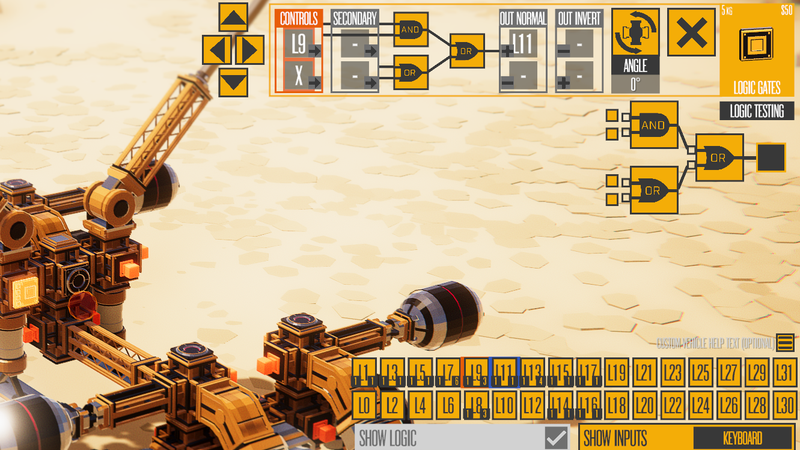
This image contains the majority of what you need to know about logic parts, and I'll break down the various sections below.
In the bottom right, we see 32 "L#" buttons. These are the logic buttons. They act as inputs for any part (just like a keyboard/gamepad button), and also receive outputs from logic parts. Whenever you have a part selected, all the logic/control mappings with a blue highlight are used by the part, and the orange highlighted one(s) are the ones for the controls you're editing.
There are 2 or 4 inputs for parts that receive inputs, and 4 outputs for parts that have outputs (only the 5 new logic parts so far). Note that there's a lot more detail to remapping controls, but the important thing is knowing which control is active/remappable. The active control has an orange outline, and that active control is what will be remapped when you click on an input (logical or physical). It's a bit confusing at first, but here's a quick way to see how it works...
EXAMPLE #1: Create a logic timer that has a 1 second delay and leave the default settings (Y to start the timer, H to cancel it), then click on "Out Normal" in the upper right, then "L1" in the logical inputs. You should see its "+" output mapped to L1. Now create a thruster, then click on L1 again to map its controls to L1 (because it has no outputs, the "Controls" input was auto-selected). Start the game, and when you press Y, the thruster will activate 1 second later. Press Y again, and the thruster will deactivate another second later.
Understanding the connection between logical inputs/outputs is the biggest new concept, so I highly recommend completing the example above. And here's another one that focuses on two other new parts...
EXAMPLE #2: Create a Logic Gate. Set the top gate to AND (click on it once). Click on "Out Normal" and then on "L3" in the logical controls array. Now add a Basic Light. Select "Controls" next (Y+H), but only click on it once (so both Y and H are highlighted in orange). Then click on "L3" below. Start playing and you should have to press both Y and H to turn the light on.
I think that's enough explanation for now. I'll be hovering in the forums to answer questions, and hop on over to the Discord if you want even more interactive Q&A. Aside from the 3D/interactive display of inputs/outputs to make logic better, I'll be trying out some ideas to make the input remapping a little more obvious/intuitive.
There's still at least one more big wave of vehicle building updates still to come beyond the logic tweaks/improvements: Multi-select, Copy-Paste, Rotating, etc. But I may diverge to work on some less-intense things for a little while. Getting this update done was a massive amount of work, and I need to back away a little and make sure logic stuff is solid before tackling another epic update.
FEATURED VEHICLE REMINDER
Just a quick reminder that this month's featured vehicle theme is Balloon Bombers, and I'll be doing the judging/playing on the 26th of this month, so get your entries in by then.
Version 0.161 Changelist
Add new part: Sliding Pipe (strength adjusts sliding friction)
Changed pistons to use Min/Max positions for improved usability
Updated 3 piston models to make them use staggered extensions
Rebalanced huge impacts in a few ways to make it less of a problem for massive vehicles
Added Mega Impacts slider to Sandbox mode so you can still play with extreme impacts if you want
Fixed release connector to apply force based on sub-part positions, not rigidbody
Made it possible to disable particles completely
Version 0.160b changelist
NOTE: Power Pivot S will be out of position if you placed it previously * Fixed Power Pivot S not working correctly. * Fixed Sliding Rail so it functions as it did before. * Fixed expand/contract changing the color slot of the mirrored piece.
20+ New Parts, Improved Pistons/Suspension, Aerial Views + More (Version 0.160)
Version 0.160 has a number of changes that make the game more enjoyable in some form, and the community was the driving factor in nearly all of them. I want to thank everyone who contributed ideas, or gave feedback, or just chimed in on random discussions. You guys are all making easier on me to make the game better!
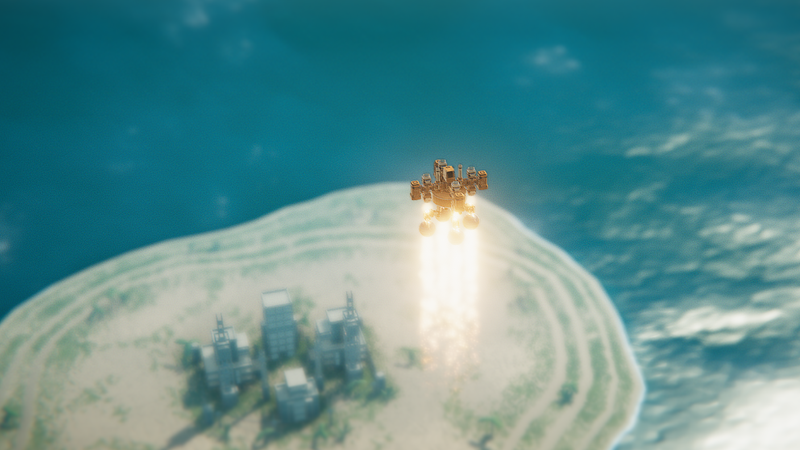
We'll get to the numerous parts, but the Balloon Bomber contest was one of the driving factors for the first big changes I made earlier this week: The camera can now go 10x higher in the sky, and balloons/thrusters are effective up to a much higher altitude. The change was made possible because I finally fixed the shadow draw distance to correctly scale based on the camera's altitude, so the instances of shadows disappearing around your vehicle should be gone.
A much better aerial view of Sandbox Resort, now with actual shadows!
Once I could fly high in the sky, I had to check out the "fly way high, smash down fast" vehicle that I made a little while back. I also lessened the drag from air again (and max angular velocity, see below), and it didn't feel very satisfying to hit into the ground at 500+ km/h and get a relatively minor impact. So I added a new big impact effect that triggers for hitting downward on structures/ground at high velocities with a lot of force. It may need a bit of tuning, but it feels pretty good with the numerous vehicles I tried out.
After those things were in, I tried to focus on expanding the part library to address the various requests for a few larger parts, but the most requests were for smaller parts. People mostly want to build smaller vehicles, so this was my main focus for new parts. A number of commonly-used parts received new "S" versions (S mean small), while I also added Mini variations for things such as beams and wedges. To make it easier to build with small/large parts instead of having to push E constantly, there's a new "Size Preference" option too.
Along the way of adding all the new smaller parts, I tried to improve the range of motion for suspensions and pistons. It ended up working even better than I expected, so I updated most of the existing suspensions/pistons while adding a new one of those as well. The new one (Suspension S) was actually the first one I did, and it felt like the most work because I was creating a new system at the same time. Now it looks like an easy add-on when it definitely didn't start that way.
I was also fortunate that someone pointed out that Fast Swivels weren't working with Overdrives, or at least they weren't glowing. Turned out the glowing wasn't working for a number of different parts, but that was simple to fix. Fast Swivels were actually ignoring overdrives completely, so I fixed that first, then increased the maximum turn rate at higher power, and fixed the max angular velocities being way too low. In all, Fast Swivels are now a LOT more useful/unique, and at max power on an overdrive, they're probably spinning up to 5-10x faster than previously (depending on the amount of mass they have to turn).
There are some other tweaks that will be nice in the long run, such as making it possible to adjust the hitpoints of blocks in structures, including making them invulnerable if needed. This rock-em-sock-em robot from a Discord member, and the ensuing discussion, was one of the driving factors in making the change.
So yeah, lots of cool changes driven by feedback and community in general. This is probably the most productive 4 days of work I've had since before the game launched, and I was only working on Instruments about 2/3rds of the time (rest was on a new project). I don't know if I'll continue this level of productivity/efficiency, but I like this update's scale and pace. I'm not going to worry about it too much, and just try to have fun working on stuff.
Version 0.160 changelist:
Added support for multi-piece parts with super-flexible sizing
Improved piston functionality to allow far more range of motion and customizability
Updated parts: Small Piston, Large Piston, and Side Piston use new systems (revised 3-part models)
Updated parts: Side Suspension and Suspension use new flexible sizing (revised 3-part models)
Added new part: Suspension S (contract from Suspension)
Added new parts: Mini Beam (expandable to Mini Beam XL) and Mini Beam S (contractable to Mini Beam XS)
Added new parts: 4-Way Cross Mini (contract from Cross 4-Way) and Angle 90 Mini (contract from Angle 90)
Added new parts: Y-Split Mini (contract from 3-Way Y-Split) and T-Split Mini (contract from 3-Way T-Split)
Added new parts: Power Pivot S and Swivel 90 S (contract from full-size versions)
Added new parts: Fast Swivel S and Power Swivel S (contract from full-size versions)
Added new parts: Dump Box XL, Hook XL, and Spiky Ball XL (expand from Dump Box, Hook, and Spiky Ball)
Added new parts: Wrecking Ball XL and Wrecking Ball S (expand from Wrecking ball)
Added new parts: Mini Wedge and Mini Wedge XL
Updated parts: Flex Swivel and Flex Pivot models reduced in thickness
Updated parts: Round Cover and Square Cover reduced in thickness (Square Cover renamed Mini Panel)
Added new parts: Round Cover S/XL and Mini Panel XL/XXL (expand from Round Cover and Mini Panel)
Add option to choose which part size you prefer to place (smaller, normal, bigger)
Fixed Fast Swivels not being affected by Overdrive
Increased power to Fast Swivels (particularly high powered ones)
Increased the max angular velocity of vehicle parts (affects fast swivels in particular)
Changed camera to go way higher and fixed shadows when doing so
Increased max altitude parameter so balloons/rockets/etc can go higher
Added new big impact effects for large downward player impacts on ground/structures
Added toughness to blocks in structure editor
- INV makes them indestructible, otherwise is a hitpoint multiplier
Added connection to front of thruster (also fixes issue with them not aligning with mirror mode)
Fixed some cases of undo in ground editor (loops became unselectable, could also stop working completely)
Fixed Drill XL and Skid XL mass being too light
Increased size of water depth texture for island/water depth effects
Removed most particle effects from water under land
Fixed Magnets, Thrusters, and Fast Swivel not activating the overdrive glow
Renamed some parts to have more consistency (still not 100% consistent, but good enough for now)
Prevented both help and advanced mode from being active at the same time (build mode)
Dune Buggy Winners, Version 0.151, Tutorial Videos, and More
It's been a little while and there's a lot to cover, so let's jump right in with the Featured Vehicles for September. This month's theme was Dune Buggy, and there were (again) over 50 entries to look through. I wasn't sure if the theme would get much interest since destruction isn't really part of it, but I was (again) very impressed with all the entries. Here are the winners and honorable mentions:
FEATURED VEHICLES
Chasing Rat Grav Buggy - Kaijp
Halo Warthog (Buggy Vers) - AceOfBlades
Buggy Fun - Looshkin42
Truck-Buggie - DarkySword
Storm Buggy - Yatobi
CliffClimer - PaperMachine
Red Viper Hyper Buggy - Zombie Ninja
Dune Buggy and ATV - Turbo Jack Flash
Sand Blaster - PyroTeknikid
DuneStar - AjaxGamr
Mini-Rally - SmokieTheSalmon
Heavy Duty Buggy - Kozuel
Super-Duper Buggy - MasterSubliminal
Cross Buggy - AlienWang
Interceptor mk 2 - Stranger
Stadium Truck - Stranger
HONORABLE MENTIONS
Bearco. Sand Rail - OscBear
Bare Bones Buggy - Tatsumesan
Buggy2 - Looshkin42
Bend-It-Like-Buggy - IceCreamMan4254
SooFighter Buggy 01 - SooFighter
Dune Buggy - BurntPotato0123
Doom WPV mk3 - Omble09
5x5 Buggy mk1 - IceCreamMan4254
BFF Buggy mk VI - Grim
Leviathan Monster Truck - DangoSpark117
Desert Vulture - Atlantic
Gunner Buggy - Yatobi
Mega Buggy - Dominus Nictus
Mega Buggy - Crow
Dakkar - Stranger
Rude Racer - Stranger
Sand F1 - Stranger
Baja Buggy mk 2 - Stranger
Scarab - Stranger
Stranger had large number of entries this time, and they were all quite good, but Interceptor mk 2 and Stadium Truck stood out to me. Other really impressive standouts included Dune Buggy and ATV, Cliff Climber, Halo Warthog, and Sand Blaster. All the featured vehicles were excellent, and many of the honorable mentions just missed the cut this time. Enough talking, here's a video:
I wish I had a larger island to test these creations with, and that's something I'll remedy in the future. I'll also look a bit more into ways to make vehicles smaller. Smaller parts are one way that's definitely coming, but perhaps some universal scaling option would help. It's a more technical problem than it appears at first, but the scale issue keeps coming up and is unlikely to go away, so I should probably take another look at making it happen.
NEXT FEATURED THEME: BALLOON BOMBER DEADLINE: OCTOBER 26TH
The next theme will be Balloon Bomber, which is pretty much what it sounds like. Use balloons (mostly) to power a flying vehicle, and give it the ability to rain destruction down from above. Whether that's actual bombs or other weapons is entirely up to you.
VERSION 0.151 CHANGELIST
Here are the changes for version 0.151:
Added 4 new gameplay songs and 2 new build songs (plus 2 more bonus tracks)
Added soundtrack customization screen so you can choose which songs play
Added Mass Modifier, which adjusts entire player vehicle while playing (doesn't adjust mass display, select cab in Advanced Mode to edit Mass Modifier)
Doubled the max charge amount for distract mode (and structure testing)
Widened maximum zoom in/out range for most camera modes
Reduced damage to structural blocks (from structure/ground collisions only) when 120hz physics is not enabled
Added "Recommended" label to 120hz physics
Fixed expanding/contracting an object resetting the color slot
Made it more obvious which blocks are decals in the editor
Ignore all block damage for a short while after island loads
The biggest new thing this time is the soundtrack expansion and customization. The soundtrack is mostly complete at this point, but there could be other tweaks/changes in the future. The Mass Modifier for vehicles fits Sandbox Mode perfectly, and it should let you fine-tune the behavior of your vehicle. The new structure tutorial is also linked from the game, or you can just watch it here:
UPDATES AND TUTORIALS, ETC
Updates have been a bit too slow lately, and I hope to improve that over the next few weeks. The structure editor tutorial was one thing that really threw me off track for Instruments, and future tutorials will be different. I'm happy with the tutorial, but creating it made me not want to work on the game for a bit, so I worked on something else. Now that I've cleared my head, I'm not going to worry so much about doing things in an exact order, but instead focus on just getting things done.
I feel like I've only been going half-speed with Instruments updates, and haven't been enjoying the process. Most of the tedious/boring tasks are done with (editors, workshop stuff), so I'm looking forward to just getting stuff done. The vehicle building update is still the next big update, but I'm not going to worry about what order or how many small updates are made along the way.
Version 0.150e changelist
Added updating to structures and islands: 1. Browse to the thing (structure/island) you want to update, push "Set Ready To Update" 2. Load the thing/edit it/etc. 3. Press Workshop Upload... 4. Update Island/Structure is a button, it should be available aka not disabled. [It'll list the item ID, and the original item name. If the description was blank, it'll copy the description from the item you're about to update.]
Fixed not being able to upload islands with workshop structures on them
Version 0.150d changelist
Fixed entity list so markers/boulders load correctly Reduce point particle size a little (they're more opaque than before, not sure why)
Changelist for version 0.150c
STRUCTURE EDITOR FIXES & TWEAKS Fixed Update Footprint not being undoable Fixed maximum joint counter Removed shortcut key for Center All in the structure editor Changed wedge skew toggle to Control+W instead of Control+D Removed Reset Cam from Structure Mode because it was not useful Fixed Orientation checkbox not toggling correctly Added objective outline offset to structure data (custom per structure instead of using BRIDGE flag) Fixed Add At Mouse not hitting the ground in the structure editor Disable Cam button in non-3D views, behaves same as Normal Don't load color palette from editor level Fixed Extrude from wedge was 2x longer than it should have been Fixed Q (Fast Move) not being axis-aligned Fixed Select All not creating the handle Fixed F focusing on old selection instead of everything (with nothing selected) Fixed F not doing anything in FREE mode Added a Snap Size and Snap Position (below Reset Rotation) Added buttons for tutorial videos to the editor hub menu (future ones disabled) Added some confirmation to New Structure? Fixed MirrorX/Y/Z having the wrong orientation for rotated & wedge blocks Fixed "Select Intersecting" so it ignores wedge blocks Fixed Select Non-Standard so it uses the size of the block, not it's axis-aligned bounding box Fixed a few missing localization entries Removed unnecessary warning about ground
Changelist for version 0.150b
Fixed custom mesh bounding box offset on import Fixed some undo problems with meshes Added new entity type: simple signs (arrows and 1, 2, and 3, use custom data to change the variant) Turbine vaccuum applies more force to the player while underwater (3.5x)