Version 0.150, aka the World Building Update, contains some of the most significant new features to the game since launch. I'll go over the biggest changes after this quick video, which covers the basics of the editors and what they do.
I'll be continuing to add more tutorials to this series, with the next 3 videos going in-depth on the structure editor, layout + ropes modes in the island editor, and ground mode in the island editor. A vehicle building tutorial series will be made *after* the next major update (0.200), as enough stuff will change that making a tutorial now would have some things negated within a month or two. Anyway, let's get on with what's new in 0.150:
STRUCTURES: WEDGES AND PAINTING
As mentioned previously, structures are no longer limited to boxes and 90 degree angles. The wedge block is a variation of the decal, and that teams with new rotational controls and extrude shortcuts to allow for way more variation in structure shapes. Block painting also brings more visual variety to structures, with up to 10 different color choices per structure. I'll be building a few new structures soon to show off the new wedges and rotational controls in particular, and will include some new painted blocks as well.
ISLANDS: MORE GROUND AND MODE POSSIBILITIES
Islands have so far all used the custom mesh-building tools to generate their ground meshes. These tools have worked well to create visually interesting but still consistently-styled shapes, but they are limiting in some important ways. Now island builders can use some new built-in meshes, or import completely custom meshes in the FBX format. All meshes need to use one of the four built-in ground materials (for now), but they support rock and grass generation for all the algorithms except "Upper". That basically means custom meshes are easy to make look good and will fit in well with the loop-based meshes that exist already.
In addition, islands now have palettes that are used to paint structures. These are saved per island so it's easier to keep visual consistency and reduce duplicate structures. The other big addition to the island editor is the ability to create islands with objectives. Each mode can be enabled separately, so you only have to create objectives for the modes you want.
STEAM WORKSHOP SUPPORT FOR ISLANDS AND STRUCTURES
Islands and structures now have workshop support! You don't need to use the editors to see the islands, as they are accessible in multiple places throughout the game. It will take a bit longer to see islands popping up in the workshop, but over the long-term we should see a lot more variety in the game content.
MORE STUFF: DOUBLE THE WHEEL STRENGTH!
Maximum part strength has been capped at 3 since the game launched, with Overdrives kinda getting that maximum to 6. Well, now that strength cap is no longer 3, as each part type can set it's own max strength. Most moving parts have seen their cap increased, with many doubled to 6. This means vehicles can travel a lot faster without overdrives, particularly when combined with the just-reduced air friction (which was way too extreme before). There are also some other subtle changes that will make vehicle building better, such as the ability to disable Mini Thruster effects, and holding SHIFT to reverse-cycle strength values with the shortcut key, or holding it to fine-tune slider values in advanced mode.
THE NEXT COUPLE WEEKS
I'll be focused on some more quality of life changes, and fixing anything that comes up, for the next couple weeks of Instruments work. The one feature I'm sure I want to get in (aside from a few new structures) is updating Steam Workshop structures/islands. I think that's the last Steam Workshop task for a while. I'll be recording more tutorial videos for the editors as well. I still need to refine my process, but having a more consistent way to generate voice overs is going to make creating the videos a lot less painful.
Long-term, I'll be continuing to aim for a big vehicle building update within a month or two. Multi-select, copy-paste, and logic parts are the big ticket items, with more mini-parts also coming (so it's easier to build smaller/detailed vehicles). Though the roadmap to 1.0 feels solid now, I'm not sure what comes after that, and won't decide on the 3rd big update until the vehicle building update is complete.
Version 0.150 Changelist
(Full announcement post tomorrow, but here's the changelist) STRUCTURES Added new type of block for structures: Wedge Removed right-angle restrictions to blocks/rotation Improved tools to make structure creation easier/faster Added painted block support to structures Added support for custom structure palettes per island Increased hitpoints for blocks so structures are a little harder to destroy
ISLANDS Added support for custom meshes in Layout: Ground mode Import/move/rotate/scale custom meshes Added support for grass/rocks on custom meshes (all types except Upper) Added palette editing for islands (affects structures) Sped up camera in layout editor (hold CTRL to go faster) Added ability to create Normal/Challenge/Expert objectives for a custom island Added list buttons for selecting an island in Sandbox mode Added ability to turn off water for islands (height ceiling still active, but can go down really far) Added Editor region as an option for islands (mostly for the grid-matching dust effects)
STEAM WORKSHOP Added uploading/downloading structures thru Steam Workshop Added Steam Workshop structure support to Island editor Added uploading/downloading islands thru Steam Workshop Added auto-downloading of Workshop structures on Workshop islands Added support for playing workshop islands from sandbox mode, play mode, and more
VEHICLES/GAMEPLAY Added variable max strength for part types Increased max strength of many part types (things that spin or extend) Made power wheels go faster/apply more force at higher strength values (can make faster vehicles) Added reverse-cycling for strength (Hold SHIFT and press S or the button) Added fine-tuning for advanced mode sliders (Hold SHIFT) Allow disabling of effects for mini-thruster Fixed collision with bullets and triggers, and collision with attachers + triggers Reduced atmosphere falloff to be weaker, made balloon have way more buoyancy underwater Changed map grid/dashed line drawing to speed it up
Wrecking Ball Featured Vehicles and Version 0.150 (Likely) Coming Next Week!
Version 0.150 is approaching release, possibly within a week, but before we get to that, let's take a look back at August's Featured Vehicles.
AUGUST'S THEME: WRECKING BALL
There were a lot of great entries, with some very impressive designs and satisfying destruction. Two builders managed to get two winning vehicles this time, with both of them (Stranger and SmokieTheSalmon) having a couple excellent and unique designs. Here's a video showing the winners and honorable mentions, then a text list below that:
FEATURED VEHICLES
Cerberus Flail - Kaijp
OG Wrecking Ball - SmokieTheSalmon
Wrecker Crane - SmokieTheSalmon
Willy Wrecken Balls - PaperMachine
Urban Wrecker - Stranger
Wrecking Orb Machine - Neo_Runner
Big Swinger - Zombie Ninja
Wrecking Crane MK4 - OscBear
WalkaMass - Stranger
Octo-Gone - Turbo Jack Flash
Steel Cable Striker - DanoSpark117
Omega Wrecker - PyroTeknikid
HONORABLE MENTIONS
Wrecking Ball Ram - IceCreamMan4254
Ball On A String - ESD
Nauseating Idea - Tatsumesan
Accurate Wrecking Crane - GameMachine_Marco
WreckingBall - Looshin42
Wrekkkking Ball - Jonny_Arson
Duel Ball Wrecker - DangoSpark117
Heavy Wrecking Crane - Stranger
Carousel Crahser - Red Cassette
Wrecking Ball - Destiny
Athena - Aaardvark123
DeployableWrecker - DarkySword
Crashing Tide - Parallel
This was a very fun one to judge, and the controls were generally pretty easy to figure out. I still need to figure out a good function to auto-remap QWERTY to AZERTY keyboards and back, as that does affect a few entries, but I'll take a look at it in the post-0.150 support period. Thanks as always to everyone who entered!
SEPTEMBER'S THEME: DUNE BUGGY
One of the less-major changes in version 0.150 is the increased max strength of powered wheels, and the ability for wheels to propel vehicles faster than before. Those changes make the Dune Buggy theme even more exciting than it might appear at first. Along with the new option to disable mini-thruster effects, making fast-moving vehicles is much easier.
But going fast isn't the only thing I'm looking for in next month's vehicles. Handling bumps and uneven terrain is also desirable. I'll be using Aries as the island for trying out the Dune Buggy entries. There's no particular mission I'll be using, and raw speed isn't necessary, but overall driving enjoyment and cool design will be the priority.
Choosing September's theme was a bit difficult. Even though I have over 15 theme ideas written down, many of them will be much better when vehicle parts have more customization and logic. Vehicle part logic will be the one of main focuses of the next big update after 0.150, so it won't be a problem for too much longer.
[UPDATE: Forgot to mention the deadline will be September 21st, so no rush, especially considering you'll want to test with 0.150 before submitting.]
VERSION 0.150 BETA TESTING SOON
Version 0.150 is finally nearing release. Today I'll be working on the last significant feature (importing custom meshes), but that's actually one of the least difficult parts of adding custom ground meshes. Just supporting custom meshes at all, and allowing some editing of their placement/scale/rotation, was completed yesterday, along with letting you place prebuilt meshes like ramps, boxes, and spheres. Workshop support ended up being the biggest task by far this time around, as supporting workshop structures within islands (which can also be on the workshop) was more complex than I first realized.
Anyway, the new version will go into a new Beta branch of the game first. After a couple days of additional testing and likely some fixes, the big 0.150 release is expected late next week. Will do a video highlighting all the new stuff for the launch, and some additional promotional stuff.
After 0.150, I expect to do a week or two of smaller updates based on feedback. I will also be creating some structure and island editing tutorial videos on YouTube that are linked in the game. I'm not super-concerned about making the editors easy to use, but I definitely need to explain them in more detail so it's not as much trail-and-error.
The next big update (0.200 will likely be the version number) will be focused on vehicle building enhancements. That means multi-select, copy and paste, importing multiple vehicles at once, and some level of part logic support. There might be changes that break previous vehicles in some way, and I'd rather get those in sooner than later.
Thanks to the roadmap and some recent brainstorming on where I want to take Play mode, I now have a clearer long-term plan for the game and what version 1.0 will look like. I'm nowhere near the finish line for the game, but it feels good to finally have an idea of what the finish line looks.
Wrecking Ball Reminder and World Building Progress Report
As previously discussed, the pace of game updates is changing. The first large update will be focused on Structures and Island creation, with some significant changes and new features all coming at once.
WEDGES, ROTATIONAL FREEDOM, AND PAINTED BLOCKS
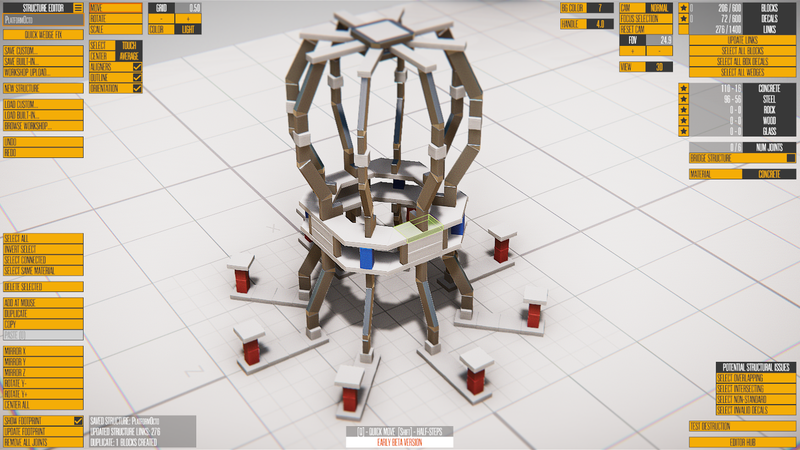
The first wave of changes are all in and working, with just a few bugs left to iron out. Previously a structure like this was impossible to build:
I don't know what that is, but it does demonstrate the new structural features. The first thing to note is the blue and red colored blocks are concrete, with all materials except glass being paintable. There are 10 colors to choose from, and you can set the available paint colors per island. This makes it easier for custom islands to have more cohesive color themes without having to create multiple copies of a structure.
The second major change is the addition of wedge blocks, which are a kind of decal block (smaller building pieces that can't be broken down further). Unlike normal box decals, wedges have collision before they break off the structure they're attached to. Combined with the new full rotation controls (instead of only 90 degree increments), you'll be able to create buildings of nearly any shape. It's unlikely the current structures will change too much, but expect future buildings to be less boxy and more colorful.
STEAM WORKSHOP INTERFACE
With those changes working, I recently moved onto making the Steam Workshop interface for structures and islands. Working on UI for my games can be a bit tedious, partly because there's just so much of it, and Instruments is no exception, so it's been a slog for the past few days.
I tried to revise the UI system early in Instruments development to use more data and less code, but it only partially solved the problems and caused more than it solved, so I scrapped the changes and use basically the same UI system I've been using for the past 10 years--define the look of the UI in one code file, and the behaviors of the buttons in another--with a few minor improvements. I'm hoping by writing about the issues, it'll spark an idea/alternative that works better (as sometimes happens), but so far I don't have any new ideas.
Anyway, I'm approaching the point where I'm just hooking things up to the UI and tweaking the look. After Steam Workshop is mostly functional, the final big feature to go in will be custom meshes for islands. I'm still not sure what will happen with materials (or grass/rocks) on these custom meshes, but those are things I'll need to experiment with either way. Beyond that, there will be a lot of testing and refinement.
I'm hopeful the update will be out in early September, but it's a bit too early to say for sure. I expect to create some tutorial videos for the structure and island editors at that time. Once the update hits, it shouldn't take long before we start seeing tons of new islands and structures to play with and destroy.
WRECKING BALL REMINDER
Just a quick reminder to get your Wrecking Ball entries submitted to the Steam Workshop by this weekend. The official deadline is Saturday, but any submitted by the end of Sunday will likely get played as well. I'm really looking forward to trying out all the entries, and as usual there will be a video to highlight the winners and honorable mentions.
Version 0.127d changelist
One big hack to fix an annoying problem, and a couple other minor fixes: * HACKED the vehicle spawning code to deal with treads/chainsaws being messed up after they are first placed in build mode. * Added strength setting the Suspension Swivel. * Updated part starting positions/angles when copy-settings is used (and fixed cost not updating).
0.127c Changelist
* Added new part: Side Offset (and Side Offset XL) to Frame category * Updated a few showcase vehicles to have better suspension
Version 0.127a/b changes
Version 0.127a: Fixed 3 sandbox islands not loading Version 0.127b: Fixed bug with unlocking in campaign Version 0.127b: Fixed particles being offset on vehicle spawn
Vehicle Building Improvements and a Longer-Term Focus
Two main things to go over today: Version 0.127 has some nice bug fixes and improvements that advanced vehicle builders will appreciate, while the game's future updates will become larger but less frequent (more details below).
VERSION 0.127 IMPROVEMENTS
I had planned to do a few bug fixes after a short trip last week, but the 0.127 update has expanded into more than just that. Let's take a look at the changelist, and then go over details of a few of the changes:
* Added New Part: Angled Y-Split (like a double turn 45 combined into one part) * Added Copy-Paste for part settings (CTRL+C to copy, CTRL+V to paste) [NOTE: Paste is to the HIGHLIGHTED part, not selected part] * Added Copy-settings placement option (hold CTRL while adding a part) * Increased max speed of vehicle spawn/despawn animation * Added triple-speed option for vehicle spawn/despawn (hold SHIFT) * Added warning for workshop vehicles with hacked strength values * Changed lighting settings for Compound * Fixed bullet collision issue that made them collide with water incorrectly (and disappear mid-air) * Fixed custom island loading issue with old islands * Fixed key-holding bug when you started gameplay * Disabled shot cost display in advanced mode
I plan to do a more extensive vehicle building update in the future, but one thing that would really help speed up large vehicle designs is not having to adjust settings for so many parts. There are now two ways to do that, depending on how your prefer to work. The first is using traditional copy-paste, with Control+C making a copy of the selected part's settings, and Control+V pasting those settings to the highlighted part. Note the difference, as this means you can just mouse over a part without having to click on it for the pasting. Also note the game doesn't stop you from pasting settings between different part types, but it does give you a warning each time you do so. The second way is to hold CTRL while adding a part. It'll use whatever the last copied settings are instead of the defaults (it also has no part-type restriction, just a warning).
If you look through a lot of vehicles on the workshop, you'll probably appreciate the animation speed being increased more on large vehicles, and you can now hold SHIFT to triple the speed on top of that. It can cause a little framerate slowdown, but it helps overall. There were also a couple important bug fixes, and the angled Y-split part was an easy addition that'll make it a little easier to create compact angled designs.
LARGER, LESS FREQUENT UPDATES
Version 0.127 marks the 20-something-th update to the game since it was released in March, and there have been 25+ more minor updates for bug fixes/etc. That's a lot of updates in a short amount of time, and I've enjoyed working at this pace. But aside from the occasional YouTube video to highlight the featured vehicles or significant new features, I've completely stopped promoting the game in any way. Coverage of the game is way down as well (aside form Scrapman, no big YouTubers still consistently play the game). I think the constant stream of updates can be a bit overwhelming to keep up with, and only hardcore players are really aware of all the changes going into the game. It's also hard to know whether version 0.123, 0.124, or 0.125 is the one to promote (for instance), as they each added significant things, but if they were all combined, I would have felt more justified in telling more people about the update.
So even though I enjoy creating smaller updates every week or two (or more often sometimes), I'm going to shift to larger, more significant updates, with more of a theme to the updates, and more promotion to go alongside them. There are some definite development advantages to larger updates, aside from the focused attention each release can receive. I can focus on larger issues with the game, and tackle multiple related larger tasks, and it'll help me focus my long-term plans a bit more. Speaking of long-term plans, I'll be writing up a list of bigger updates I plan to do and updating the sticky Roadmap thread later today.
[I may do occasional WIP updates to the debug branch of the game as the bigger updates near release for those who want to see stuff ASAP.]
With all that said, I'm going to get to work on finishing that roadmap and do more a bit more planning, then get to work on whatever the first big update ends up being.
Version 0.126a changelist
Bug fixes for build 0.126: * Fixed Suspension Arm and Pivot Spring not bending correctly in most orientations * Fixed angle limits for Suspension Arm * Removed position for Suspension Socket * Removed blank description for X8 Rifle * Fixed collision for Gauss Gun not working
Trebuchets, Catapults, and Some Powerful New Weapons
It's been less than a week since the last update, but there's a lot to go over today. Let's just jump right in with the Trebuchet and Catapult Featured Vehicle winners, and we'll cover the update below.
Here's the video of the Featured Vehicle winners, with lists below:
https://www.youtube.com/watch?v=55lrUG1aAco
FEATURED WINNERS
Trebupult - Joefulle
One Button Trebuchet - SparkyMcCalci
Trebuchet - JMMAJ2
Plebuchet - OscBear
Run Awaaaaay! Trebuchet - Zombine Ninja
Heavy Catapult mk3 - Tatsmesan
Will It Catapult - Detaal
Floating Arm Trebuchet V3 - Miss Stabby
Steel Catapult - DarkySword
Inertial Catapult - Pyroteknikid
Trebuchet Fortest Island - Rattlesnake82
Sci-fi Trebuchet - Ajaxgamr
HONORABLE MENTIONS
Experimental Void Lobber - Jonny_Arson
Cab Trebuchet - Pyro_Knight
Catapult Tank - Pyro_Knight
Catabuchet - Stranger
Dakkapult - Stranger
Cross-apult (V2) - TurtleBravo85
B29 Enola Gay Trebuchet30 - WC4513
Reloadable Trebuchet - SparkyMcCalci
Tree-Bushey - IceCreamMan4254
Tre-Mrr-Chet - Lady Loranda
Rocket Propelled Catapult - Red Cassette
Simple Trebuchet - SparkyMcCalci
Antimatter Catapult - JS_Coulthard
Cross-apult - TurtleBravo85
ACME(tm) Catapult - IceCreamMan4254
Over 50 entries this time, and many of them were quite impressive. I think this theme would have benefitted pretty significantly from more logic/automation parts, as some of the machines were very cool but also a bit too complex to operate consistently. I spent a lot of time trying to figure out a number of the entries' controls/concepts, and I think I figured them all out, but in the end I favored the simpler/elegant trebuchets and catapults. As usual it was hard to draw the line between winners and honorable mentions, but I prefer two categories rather than trying to rank them. Either way, I appreciate everyone taking the time to enter these contents, and I'm plan to keep doing them until 1.0 at least, possibly beyond that.
AUGUST'S THEME: WRECKING BALL
Next month's theme will be Wrecking Ball. This means building a traditional-ish demolition vehicle whose method of destruction is swinging a ball (or something similar) into a structure. Mechanical devices are preferred, but not required. Satisfaction when used (how fun is it to use to destroy a building), and overall design will be the top priority. As usual, easy-to-use vehicles will likely have an advantage as well. There's no particular island/building this time, and I'll be sure to try each vehicle against multiple structures/targets. Deadline will be August 20th.
0.126 - A BIG WEAPONS UPDATE
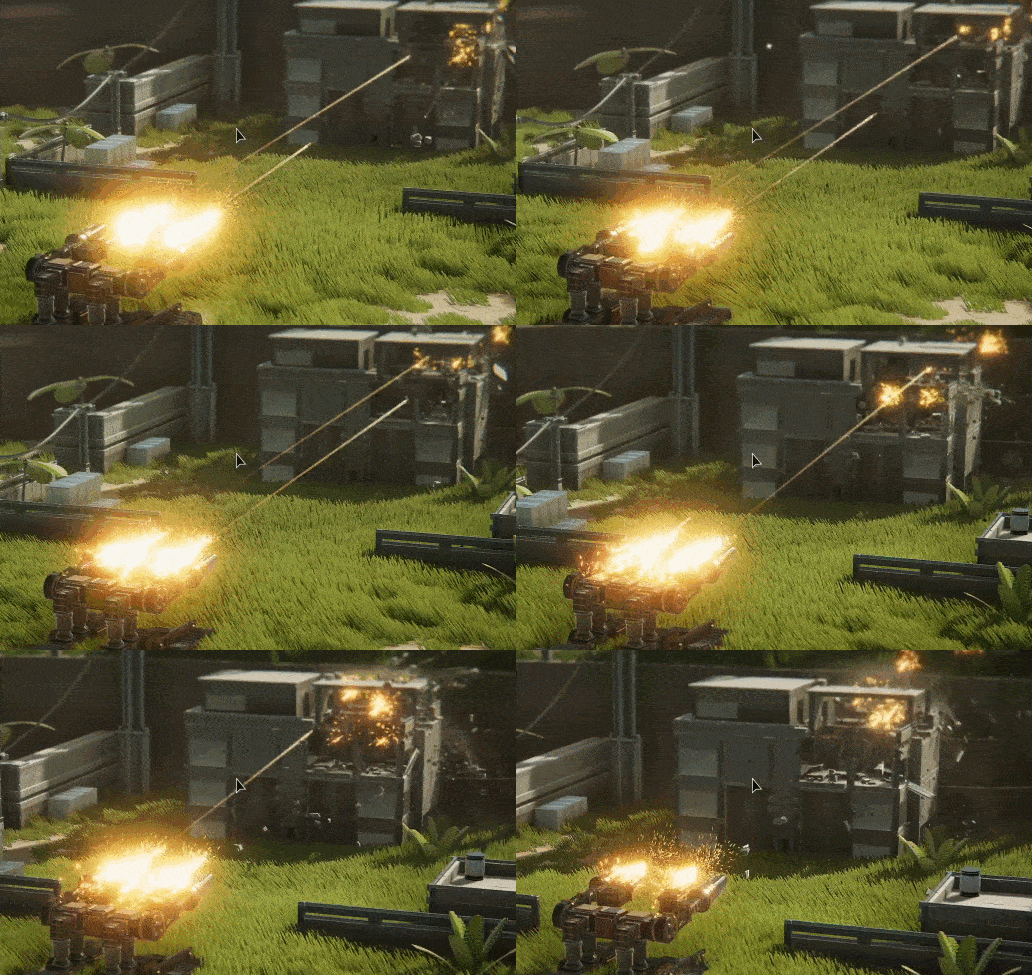
It's been a while since I added some new parts, and though there was a big content addition recently in the form of 7 new islands, I decided it was a good idea to add some new parts before going into gameplay prototype mode for a few weeks. That's a long way of saying 0.126 is here, and it's got some pretty cool stuff in it. Here's a quick preview:
And the changelist for 0.126: * New part: X8 Rifle (fires bullet, with high rate of fire possible) * New part: Gauss Gun (fires explosive bullet, with medium rate of fire possible) * Added weapon firing modes to all 4 projectile weapon parts (Single Shot, Automatic, Burst) * Added refire rate, burst size, and relative delay settings to weapon parts (advanced mode) * New parts: Suspension Swivel, Suspension Socket, and Suspension Arm * Added Strength (mass) setting to Steel Orb and Steel Orb XL * Replaced Structure Zoo 2 with Compound, which is now the default Sandbox island * Fixed weapon trails jumping around sometimes (particles and trails each had a similar to distinct version of this) * Updated cannon part model to fit sizing of projectile a bit better
Lots of fun new things in this update, with the new weapons and weapon firing adjustments being the most significant. It's easy with these new settings to create over-powered vehicles, but there are already so many ways to do that (lasers, vortex, magnets, fixed bombs, etc) that adding more potentially-OP parts doesn't really change the balancing issues. I did have to simplify the weapon counters so there's just one "shot" counter for regular projectiles, and if more energy-based weapons (plasma gun/etc) are added, those will use the power system as lasers.
The new suspension parts are just some things I've wanted to add for variety, though they probably don't change what's possible very much. The mass/strength thing was added to steel orbs, as it was pretty obvious when testing the featured vehicles that they needed the option to be heavier. And there's a new default island for Sandbox mode. That may change/evolve into a campaign island eventually, but for now I just wanted to see something besides Structure Zoo 1.
This will be the last update for a bit, as I'll be going into gameplay prototype mode for 2-3 weeks. Have a long list of things to try out, and the new weapons in particular provide some basis for potential enemies/obstacles. The game will definitely have more combat of some sort in the future, though I may draw a line between the demolition/puzzle style islands and those that focus more on combat. Will have to see how the next few weeks go, and I'll aim for some prototype islands to showcase the new gameplay elements before going too far in a particular direction. Until next time...